
Phezer P15 Handheld Inkjet Printer
4.1Editor score
Standalone touchscreen operation
Adjustable 12.7mm print height
25-language interface
Our handheld inkjet printer guide compares 10 models for print height, ink, battery life, portability, screen controls, coding versatility, and value in 2026.
A handheld inkjet printer brings variable codes, dates, logos, and machine-readable identifiers directly to cartons, packages, metal parts, and other products. The best unit combines consistent output, fast-drying ink, intuitive controls, dependable battery life, and a body that remains comfortable during extended mobile work.
The ten products in this guide were compared using their stated print heights, supported content, ink systems, surface compatibility, battery endurance, displays, file-import options, and physical design. The list highlights models for compact work, high-volume production, broad code selection, and different marking environments.
Each review explains who benefits most from a particular printer, where its specifications stand out, and which compromises may matter. Ratings and product details can change over time, as can availability, so readers should confirm current specifications and seller information before making a purchase.
4.1Editor score

4.7Editor score
4.4Editor score
This side-by-side overview highlights the major differences in print height, controls, ink, battery life, and intended marking applications, helping buyers narrow the field before reviewing each model in detail.


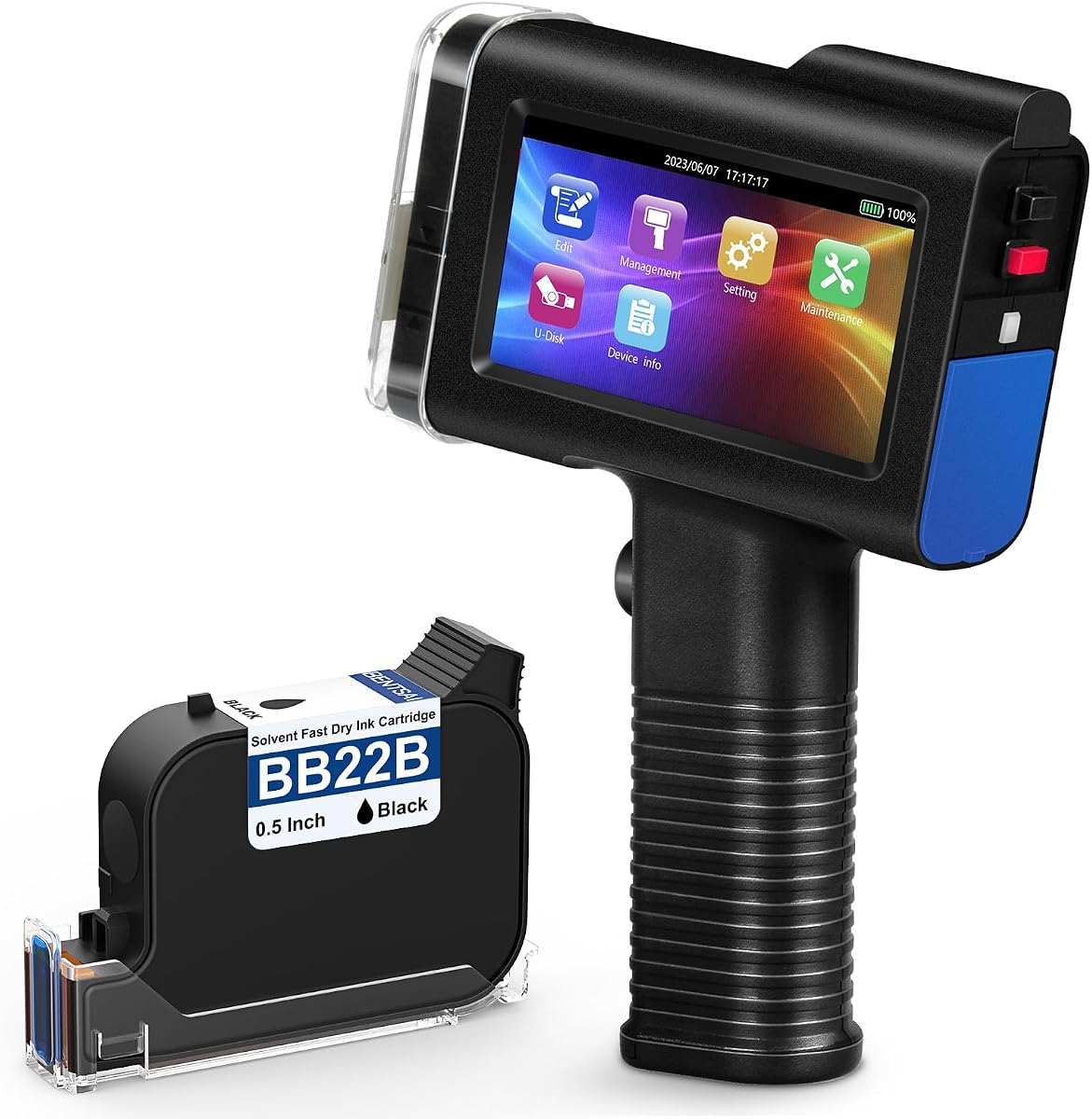
This handheld inkjet printer earns a 4.7 rating and stands out as a balanced general-purpose coding solution. Its 12.7mm print height, 4.3-inch HD capacitive touchscreen, 42ml fast-drying cartridge, and stated 16-hour operating time cover the core needs of mobile packaging, warehouse, and product-marking teams without requiring a large industrial setup.
We may earn a commission when you buy through this link, at no additional cost to you.
The strongest aspects are versatility and convenience. It can produce text, dates, batch numbers, QR codes, barcodes, and graphics across plastic, metal, glass, wood, fabric, and cardboard. Operators can create or edit templates directly on the screen, while the USB port accepts JPG, PNG, and BMP files for importing logos and other graphics. The self-locking cartridge and international language support further simplify mobile deployment.
Its print height is fixed at 0.5 inches, so it is less flexible than models offering one-inch output or fine adjustment down to 0.8mm. The product data also does not mention photoelectric triggering or conveyor-line mounting, making it less specialized for fully automated production environments than some alternatives. These limitations matter when very tall codes or automated synchronization are central requirements.
For warehouses, fulfillment teams, small manufacturers, and mobile labeling operators, this is a compelling all-around recommendation. It combines a capable screen, useful import options, fast-drying ink, broad surface support, and long claimed endurance in a well-rounded format. It is the strongest general choice for buyers who need flexibility without specialized automation features.
The touchscreen lets operators create and edit templates without relying on a connected computer for routine changes. USB file import expands that convenience by supporting common JPG, PNG, and BMP assets, which is useful for recurring logos, packaging artwork, and variable data.
Long stated battery life and a compact handheld format reduce the need to return to a charging point during a shift. The included positioner, cartridge, cable, and storage media make the printer ready for a range of carton, container, and product-marking tasks.
We may earn a commission when you buy through this link, at no additional cost to you.
The JC01 carries a 4.2 rating and emphasizes portability, rapid output, and durable mobile use. At 390g, it is one of the lighter printers in this guide, while the included wrist strap helps guard against accidental drops. Its stated 300-nozzle system, 12.7mm print height, and fast-drying 42ml cartridge target high-paced production environments.
We may earn a commission when you buy through this link, at no additional cost to you.
The printer supports text, barcodes, QR codes, logos, and other graphics on plastic, cartons, metal, wood, glass, aluminum, foam, and curved surfaces. A 4.3-inch touchscreen provides access to 25 language options, and USB import accommodates TTF, PNG, JPG, and BMP files. The stated battery life exceeds 16 hours, which is particularly attractive for operators moving between packing, storage, and production areas.
The principal limitation is its fixed 0.5-inch printing area. Buyers needing a one-inch-tall code or very narrow text height cannot adjust the print area to fit the job. Its 4.2 rating is also lower than several alternatives, although ratings alone do not reveal the reasons for individual customer experiences. The stated multi-material support and drop-conscious design remain meaningful advantages.
This printer makes the most sense for mobile production teams that value a light body, fast-drying output, and long operating duration. It should appeal to users marking packages or components in several locations during a shift, especially when those workers need a touchscreen, file import, and consistent access to common code formats.
A 390g body is well suited to repeated one-handed use, particularly when operators move between packing stations, loading areas, and warehouses. The wrist strap adds a practical safeguard in busy environments where a printer may be carried while both hands are needed for packaging.
The stated compatibility list includes porous and non-porous materials, including foam and curved surfaces. This expands the JC01's usefulness for teams that cannot standardize on one package or component type.
We may earn a commission when you buy through this link, at no additional cost to you.
The BENTSAI BT-HH6105B2 has a 4.4 rating and is a strong choice for detailed production marking. It supports small text, dates, batch numbers, QR codes, Data Matrix codes, logos, and pictures at a stated 600 DPI, all within a 12.7mm print height. Six barcode types add flexibility for businesses that need more than a basic batch code.
We may earn a commission when you buy through this link, at no additional cost to you.
Its material range is one of its defining strengths. The stated compatibility includes cardboard, wood, fabric, cement, plastic, metal, aluminum, glass, leather, ceramic, and other porous, semi-porous, and non-porous surfaces. Flat and curved products are also supported. The 42ml waterproof, quick-drying cartridge dries in two to five seconds, helping production lines maintain a steady pace after each print.
Custom templates can be edited on the 4.3-inch touchscreen or loaded from JPG, PNG, and BMP files. Photoelectric printing and the ability to mount the unit to a conveyor line make it more relevant to semi-automated workflows than a purely manual portable printer. The trade-off is a stated endurance of more than eight hours, which is shorter than the 16-hour figures advertised by several competitors.
This model is best suited to production teams that value resolution, code variety, and conveyor integration over maximum portability or all-day battery duration. It is also a logical option for businesses marking varied materials and needing a stable, repeatable coding process within a packaging or manufacturing environment.
The stated 600 DPI output is valuable when small characters, compact barcodes, or detailed graphics must remain clear. It also gives operators more confidence when the marking content must fit within the available 12.7mm print area.
Photoelectric printing and conveyor-line mounting support a more systematic marking process. These features are especially relevant for repetitive packaging lines where operators need the printer to work in coordination with product movement.
We may earn a commission when you buy through this link, at no additional cost to you.
The BENTSAI BT-HH6205BL earns a 4.3 rating and offers the most flexible print-height range in this guide. It adjusts from 0.8mm to 25.4mm and can print as many as ten lines, making it suitable for both compact serial numbers and large blocks of production information.
We may earn a commission when you buy through this link, at no additional cost to you.
Its 42ml quick-drying cartridge works across wood, cardboard, plastic, polyethylene, metal, glass, ceramic, aluminum foil, and concrete. The five-roller system is designed to produce smoother, more stable placement than a three-roller arrangement, while the 4.3-inch HD touchscreen and ergonomic handle support extended operation. The stated battery life exceeds 16 hours, matching the strongest endurance figures in the category.
This printer is designed for demanding users in food and beverage, manufacturing, packaging, logistics, healthcare, and cosmetics. Its variable data capabilities include batch numbers, dates, text, logos, pictures, QR codes, and other codes. One limitation is that the listing identifies it as a handheld-only unit, and the supplied details do not mention photoelectric triggering or conveyor installation.
Buyers who need precise control over print height should give this model strong consideration. It is especially attractive for industrial teams that occasionally need more than 0.5 inches of vertical space and value a long battery life, stable movement, and broad material support in one portable device.
The adjustable range accommodates substantially more use cases than a fixed 12.7mm or 25.4mm area. Operators can select a compact height for narrow markings or expand the area for dates, logos, QR codes, and up to ten lines of text.
The five-roller system is intended to improve print stability as the unit moves across a surface. Combined with the 410g weight, ergonomic handle, and long stated endurance, it appears designed for repetitive marking during lengthy production sessions.
We may earn a commission when you buy through this link, at no additional cost to you.
The Phezer P15 has a 4.1 rating and is a practical option for small businesses that want a capable handheld coder without depending on an app, phone, or computer for routine operation. Its Cortex-A9 quad-core processor, built-in storage, and 4.3-inch LCD touchscreen support direct editing and standalone workflows.
We may earn a commission when you buy through this link, at no additional cost to you.
The print area adjusts from 2mm to 12.7mm, and print length is unrestricted according to the product information. It supports text, numbers, QR codes, barcodes, dates, times, and logos on paper, boards, cartons, stone, pipes, cables, metal, glass, plastic, and cloth. A positioner and 360-degree printing capability are useful for curved or uneven surfaces.
A black 42ml quick-drying cartridge is included, with other colors listed as available. The cartridge system is designed to reduce leakage and nozzle blockage. The P15's main drawback is its 4.1 rating, the lowest among the ten products, and its listed total weight of 1.54 pounds is less favorable for prolonged handheld use than the lighter models in the guide.
Despite those trade-offs, the P15 is well suited to small manufacturers, repair businesses, warehouse operators, and local packaging teams that value independence from connected devices. It offers a good combination of content types, surface versatility, language support, and adjustable output, making it an accessible entry into handheld coding.
Operators can enter and edit content directly on the built-in display, and the included memory card provides a way to organize files without a constant connection to another device. This makes the printer practical for mobile work and temporary production areas.
The stated 360-degree capability and included positioning plates make the P15 useful for products such as bottles, cables, pipes, and tubes. These positioning aids can also make repeated manual placement more consistent.
We may earn a commission when you buy through this link, at no additional cost to you.
The MS-Z10 carries a 3.9 rating and offers an adjustable print area, multiple resolution settings, and a 4.3-inch touchscreen. Its print height ranges from 0.078 inches to 0.5 inches, and it can produce one to five lines of text for batch numbers, dates, counters, barcodes, QR codes, and logos.
We may earn a commission when you buy through this link, at no additional cost to you.
The included 42ml black cartridge dries rapidly to support clear output on cartons, metal boards, wood, glass, and curved surfaces. Users can select 300, 400, or 600 DPI, import BMP, JPG, or PNG files by USB, and choose among several languages. An auxiliary positioning plate is included to assist with placement, while the package also provides a carrying case.
The key concern is durability of the printed mark. The product information specifically states that the ink is water-resistant but not permanent, so it may be unsuitable for products exposed to harsh moisture, heavy abrasion, or long-term outdoor exposure. Its 3.9 rating is also the lowest in this group, making it prudent to consider user feedback and specific workflow requirements before committing.
The MS-Z10 is most appropriate for warehouses, retail operations, logistics teams, and workshops that need flexible line count and resolution on varied indoor surfaces. Buyers who need long-lasting markings for outdoor products should favor a model explicitly advertising fade resistance or permanent adhesion.
The ability to move among 300, 400, and 600 DPI gives operators a choice between everyday output and finer detail. This is useful when a workflow includes both simple batch codes and denser barcodes, logos, or graphics.
A 0.078-inch minimum makes narrow codes possible, while the 0.5-inch maximum accommodates multiple lines. The range is more versatile than a fixed-height printer, although the supplied information does not indicate a one-inch option.
We may earn a commission when you buy through this link, at no additional cost to you.
This one-inch handheld printer has a 4.0 rating and is built for users who need a larger marking area than most standard models. Its maximum 25.4mm print height accommodates text, expiration dates, batch numbers, QR codes, barcodes, and high-resolution graphics on fabric, wood, glass, plastic, cardboard, and metal.
We may earn a commission when you buy through this link, at no additional cost to you.
The 42ml cartridge is stated to dry in less than two seconds, allowing work to move quickly to the next product. It is also described as waterproof and fade-resistant, with output of up to 1,140,000 characters. A 4.3-inch HD capacitive touchscreen supports template creation, editing, and saving, while the USB port accepts JPG, PNG, and BMP files.
The infrared aiming assist is a notable addition for accurate manual placement, though the product information does not mention photoelectric triggering or automatic conveyor integration. Its fixed 25.4mm maximum provides room for large content but does not offer the fine 0.8mm adjustment available with the BENTSAI BT-HH6205BL. The 4.0 rating suggests a product with clear strengths but less overall customer consensus than the leaders.
This printer is a good fit for packaging and identification tasks that involve tall logos, multiple lines, or prominent expiration information. Buyers should favor it when ink speed and a large print area are more important than ultra-fine height adjustment or integration with automated sensing equipment.
The 25.4mm print area provides room for more substantial graphics and multiple lines of information than 12.7mm models. It is particularly relevant to expiration dates, logo marks, and codes that must remain legible on varied packaging.
The stated sub-two-second drying time helps packaged products move through a workflow without waiting for the mark to set. This makes the printer more relevant to fast-paced packing and handling environments.
We may earn a commission when you buy through this link, at no additional cost to you.
The XMINI combines a 4.5 rating with an exceptionally portable 0.54-pound body. Its small 2.4-inch resistive touchscreen and 2000mAh rechargeable battery make it a natural choice for operators who need to carry a coder between locations rather than work at a fixed station.
We may earn a commission when you buy through this link, at no additional cost to you.
Despite its compact size, the printer supports text, barcodes, batch numbers, production and expiration dates, pictures, logos, and counters. The stated 2-12.7mm print-height range accommodates one to five lines. Operators can enter content directly, import customized material from a computer, and print 360 degrees on uneven or curved surfaces with the supplied positioning board.
The 2.4-inch resistive display is less spacious than the 4.3-inch screens offered by many competitors, and the product information recommends calibrating it after delivery to preserve sensitivity and accuracy. The included touch pen is useful for preventing accidental screen input, but the smaller display may require more navigation when editing complex templates.
Despite those trade-offs, the XMINI is a strong pick for mobile warehouse work, field marking, and light production duties. Its light weight, curved-surface support, 28 language options, and complete accessory set make it especially useful for workers who carry equipment over long distances or work in confined spaces.
At 0.54 pounds, the XMINI places less weight on the operator than most competing handheld printers in the guide. This can be meaningful during repeated trips between receiving, storage, packing, and production areas.
The positioning board and stated 360-degree printing support help make marks on uneven products more manageable. These features are valuable for flexible packaging, cables, containers, and other items that are difficult to mark on a flat table.
We may earn a commission when you buy through this link, at no additional cost to you.
The E12 Mini has a 4.7 rating and stands out for its detachable handle, which converts the device between a full handheld configuration and a compact mini mode. At 1.1 pounds and 4 by 4.7 by 2 inches, it is designed for mobility in areas where a larger printer would be cumbersome.
We may earn a commission when you buy through this link, at no additional cost to you.
The printer supports dates, serial numbers, barcodes, QR codes, and custom logos in BMP or JPG formats below 300kb. It offers adjustable fonts and sizes, a 12.7mm maximum print height, and unlimited print length. Its stated material range includes corrugated cardboard, metal, plastic, wooden pallets, fabric tags, bottles, tubes, and other curved containers.
The included 42ml black cartridge is stated to deliver approximately 80,000 characters at a standard 10mm height, with quick-drying, waterproof adhesion achieved in under three seconds. That character figure is lower than the yield claimed by some 42ml competitors, so high-volume users should consider their expected code size and frequency. The supplied details also do not identify a touchscreen or indicate a language count.
Despite the missing control-screen specifications, the E12 Mini is compelling for field teams, warehouse ladder work, production-line movement, and mobile inventory tasks. Its detachable design provides a practical compromise between handheld control and compact storage, while the 4.7 rating gives it one of the strongest customer-consensus marks in the guide.
The detachable handle allows users to choose between a full grip for active marking and a compact configuration for storage or close-access work. This is a practical distinction in environments where operators move between narrow aisles, ladders, and production areas.
Dynamic dates, serial numbers, QR codes, and barcodes cover common warehouse and logistics needs. Support for corrugated cardboard and fabric tags makes the compact model relevant to both product and inventory identification.
We may earn a commission when you buy through this link, at no additional cost to you.
This 0.5-inch nozzle printer earns a 4.5 rating and combines a light 390g body with long stated battery life. It is designed for mobile coding on cardboard, wood, plastic, metal, glass, and curved surfaces, with a print height that adjusts from 0.8mm to 12.7mm.
We may earn a commission when you buy through this link, at no additional cost to you.
The printer supports one to five lines of text, dates, QR codes, barcodes, serial numbers, logos, and other variable information. Its USB workflow accepts TXT, JPG, JPEG, BMP, and variable database files, allowing batch coding without a separate software setup. A 4.3-inch touchscreen supports direct customization, while 25 language options help standardize use across different teams.
Its maximum print height is smaller than the one-inch alternatives, so it is better suited to compact marks than large logo blocks. The supplied information also does not mention photoelectric sensors, conveyor mounting, or an integrated printhead system beyond the stated nozzle. Those omissions make it more of a flexible manual coding tool than a specialized automated coder.
The model is a good recommendation for warehouses, fulfillment operations, and mobile production teams that want efficient USB batch updates and broad file support. Its light weight, wrist strap, ergonomic grip, and stated endurance of more than 16 hours make it especially suitable for all-day work involving frequent movement.
Direct access to TXT, image, and variable database files makes repeated batch updates more efficient. Operators can prepare content on a drive and print it without installing additional software for each task.
The 390g body, wrist strap, and more than 16 hours of stated operation support mobile use throughout a long shift. This makes the printer attractive for operators who move frequently rather than remaining at a dedicated workstation.
We may earn a commission when you buy through this link, at no additional cost to you.
The right handheld inkjet printer depends on the marks you need, the materials you mark, the length of a shift, and the level of automation in your workflow. Comparing these factors before buying helps avoid a unit that is powerful but inconvenient to operate.
Print height determines the size and amount of information the printer can place in one marking. Most compact models cover up to 12.7mm and suit dates, batch numbers, short text, and standard codes. Models with a 25.4mm maximum can accommodate larger logos, more lines, and denser information blocks. The BENTSAI BT-HH6205BL offers the broadest adjustment, from 0.8mm to 25.4mm, while the MS-Z10 and 0.5-inch nozzle models support a narrower low-end range. Check both the maximum height and minimum adjustment if your workflow includes very small characters.
Choose enough height for the largest expected mark, not merely the most common code. Multi-line product information, expiration dates, and logo placements can require substantially more space than a short serial number.
Fast-drying ink helps products move through packing, handling, and fulfillment without smudging. Many models in this guide advertise drying in two to five seconds, while the 1-inch fast-dry printer claims less than two seconds and the E12 Mini states under three seconds. Ink characteristics also influence compatibility with different surfaces. Some products advertise waterproof, fade-resistant adhesion, while the MS-Z10 explicitly notes that its ink is not permanent. Solvent-based systems may behave differently on plastics, coated packaging, fabrics, metals, and porous materials.
Match the ink claim to the environment. For outdoor products, moisture, abrasion, or long storage, prioritize fade resistance and strong adhesion rather than drying speed alone.
Battery endurance determines whether a printer can support a full mobile shift without an interruption for charging. Several models state more than 16 hours of operation, including the JC01, BENTSAI BT-HH6205BL, and 0.5-inch nozzle printer. The first-ranked 42ml fast-dry model and the one-inch fast-dry printer also claim up to 16 hours. The BT-HH6105B2 states more than eight hours, which may still suit shorter workdays but offers less margin for extended production schedules.
Treat stated battery figures as an important comparison point, not a guarantee in every environment. Screen use, ink density, print size, temperature, and battery condition can affect real-world runtime.
A touchscreen is valuable when operators need to change dates, codes, or graphics directly in the field. Most models use a 4.3-inch display, while the XMINI uses a more compact 2.4-inch resistive panel. Direct editing reduces dependence on computers, phones, or apps, although screen size and responsiveness still matter. For more complex artwork, check the supported formats: JPG, PNG, and BMP are common, while the JC01 also lists TTF and the 0.5-inch nozzle printer supports TXT, JPEG, and variable database files.
Choose a workflow that matches your staff's technical comfort. Standalone editing is valuable in mobile settings, but easy file import is equally important when frequent design changes come from an office computer.
The products range from general-purpose printers to machines with very broad material claims. Cardboard, plastic, metal, wood, and glass are common among all models, but some also specify glass, aluminum, fabric, leather, ceramic, concrete, polyethylene, aluminum foil, and curved containers. Positioning plates or boards are included with several units to improve placement on uneven products. If your business handles only one material, the broad claims may be less important than print quality, cartridge behavior, and workflow speed on that specific surface.
Review the material list for every package type you regularly mark. A printer that handles cartons but not curved bottles may still be unsuitable for a mixed production line.
Weight, grip, and screen design influence fatigue during repetitive marking. The XMINI is the lightest listed model at 0.54 pounds, while the JC01 and 0.5-inch nozzle printer each weigh 390g. The E12 Mini uses a detachable handle to switch between full handheld and compact modes. Larger or heavier designs may feel stable, but they can be less comfortable to carry between locations. Wrist straps on the JC01 and 0.5-inch nozzle printer add protection against drops in busy work areas.
For a mobile team, include the full route between storage and the marking point in your evaluation. A lightweight printer that is easy to carry may be more useful over a long shift than a slightly heavier unit that stays near a workstation.
Manual coding is sufficient for mobile warehouses and one-at-a-time packaging, but production lines may require synchronization with product movement. The BENTSAI BT-HH6105B2 supports photoelectric printing and can be mounted to a conveyor line. That capability can reduce the need for an operator to trigger every mark manually. Other printers in the guide focus on direct touchscreen entry and USB file import, which are convenient but less suited to automatic sensing. Before selecting a model for a fixed line, determine whether automatic triggering, conveyor compatibility, or uninterrupted operator control is the priority.
Do not purchase for automation unless the listed functions explicitly support it. A general-purpose handheld printer may be accurate and fast while still requiring a person to initiate each print.
Text, dates, batch numbers, serial numbers, counters, and logos form the basic content set for most units. QR codes and barcodes are also widely supported, while the BT-HH6105B2 specifies six barcode types and Data Matrix capability. File size limits can matter for imported logos; the E12 Mini lists BMP and JPG files below 300kb. Ensure the printer supports the exact identifiers required by your customers, warehouse system, or regulatory process, and confirm that the imported graphic resolution remains readable at the intended print height.
The widest feature list is not necessarily the most useful. Prioritize the code types, variable fields, and file workflow your team uses every day, then consider less common formats as optional benefits.
Begin by fully charging the printer and installing the supplied ink cartridge according to the manufacturer's instructions. Calibrate the touchscreen if the model calls for it, confirm the language setting, and check that the nozzle protection cap or cartridge lock is secure. Before printing on a product, create a simple test template using the actual font, code type, and surface you intend to use.
Import logos or variable data by USB when required, confirming the file type and any size limits. Hold the printer at a comfortable angle and move it steadily across the product, using the included positioner or alignment plate for curved or uneven surfaces. Maintain the device's stated printing distance and height settings, and avoid stopping mid-mark unless the template is specifically designed for separate segments.
After each session, cap the cartridge as directed to help prevent the ink from drying and blocking the nozzle. Wipe the exterior and print area with a soft, lint-free cloth, keep the touchscreen free of packaging residue, and store the unit in its case with the cartridge properly secured. Recharge before extended storage, periodically verify print clarity, and arrange service or replacement ink when output quality declines.
Handheld inkjet printers commonly apply text, dates, batch numbers, serial numbers, counters, barcodes, QR codes, and logos. Compatible materials can include cardboard, plastic, wood, metal, glass, fabric, aluminum, leather, ceramic, and various curved surfaces. Confirm both the content and material you need are listed for the specific printer before purchasing.
Most of the printers in this guide can enter and edit content directly on their built-in touchscreen. Several also support USB import, allowing users to transfer JPG, PNG, BMP, TXT, or other supported files from a computer. Computer-free operation is especially useful for mobile teams, although offices with frequent design changes may still need a computer-based preparation workflow.
A 0.5-inch printer creates marks in a narrower vertical area, making it suitable for short codes, dates, and compact labels. A 1-inch model can place larger logos, more lines, or a greater amount of information in one area. The BENTSAI BT-HH6205BL is different again because its height is adjustable from 0.8mm to 25.4mm.
Yes, several models specifically support curved or uneven surfaces. The E12 Mini, XMINI, Phezer P15, JC01, and 0.5-inch nozzle printer all include curved-surface support in their product information, and several come with positioning plates or boards. For best consistency, move the printer smoothly and follow the recommended printing distance.
Fast-drying ink is valuable when a marked product must be moved, stacked, packed, or shipped shortly after printing. Several models dry in approximately two to five seconds, while others claim less than two or three seconds. Adhesion, water resistance, and permanence also matter, so buyers should consider the complete ink specification rather than drying time alone.
The XMINI is among the most compact choices at 0.54 pounds, while the E12 Mini offers detachable full-handheld and mini modes. The JC01 and 0.5-inch nozzle printer are also light at 390g and include wrist straps. The right selection depends on screen size, print height, battery requirements, and whether curved products or imported graphics are part of the task.
Some models are designed for semi-automated workflows. The BENTSAI BT-HH6105B2 supports photoelectric printing and can be mounted to a conveyor line, allowing prints to be coordinated with product movement. The other models primarily emphasize manual touchscreen and USB workflows, so buyers with automatic requirements should verify the necessary functions are explicitly supported.
The most important step is to cover or secure the cartridge correctly when the printer is not in use, helping prevent nozzle drying and blockage. Keep the print area and touchscreen clean, use the recommended ink and storage conditions, and run a test print before important work. If characters become faint or irregular, check the cartridge and nozzle condition and follow the manufacturer's cleaning or replacement guidance.
The 42ml fast-dry model is the strongest all-around recommendation because it combines a capable 4.3-inch touchscreen, a 12.7mm print height, fast-drying ink, long stated endurance, and broad file and material support. The Phezer P15 offers an accessible standalone alternative, while the BENTSAI BT-HH6105B2 is the strongest choice for high-resolution production coding and conveyor-related integration.
For a very different set of priorities, the E12 Mini and XMINI lead in compact mobility, while the BENTSAI BT-HH6205BL provides the most adaptable print height. The JC01 and 0.5-inch nozzle printer suit long mobile shifts, the one-inch fast-dry model favors large markings, and the MS-Z10 is worth considering for flexible resolution and line count where permanent ink is not required.
Before buying, verify the current specifications, package contents, compatibility, and seller information on the product page. Ratings, product details, software expectations, accessories, and availability can change, so use this guide as a structured starting point and confirm that the chosen model still matches your materials, code types, and daily workflow.