
Epson EcoTank ET-2803
4.2Editor score
Cartridge-free refillable ink
Up to two years included ink
Wireless print copy scan
Up to 4,500 black pages
Ink tank printers replace small, frequently replaced cartridges with refillable reservoirs that can hold much more ink. That approach lowers day-to-day running costs and reduces interruptions, while refillable models from Epson, Canon, and HP offer a practical choice for households and home offices that print regularly. The right model depends on capacity, convenience, and document-handling needs.
We compared all ten supplied products using their stated page yields, included-ink estimates, connectivity, refill systems, scanning features, display options, and productivity functions. The list covers complete ink tank printers from Canon, Epson, and HP, plus a four-color refill bottle set that can extend the life of compatible HP models. Ratings and availability can change over time.
Each review explains why a product earned its position and who is most likely to benefit from it. Our top three highlight a value-focused Epson, a well-rounded Epson with faster output, and a more premium Canon with automatic duplex printing. Product prices and promotions fluctuate, so readers should verify current pricing, warranty terms, and ink compatibility before purchasing.
4.2Editor score

4.2Editor score

4.2Editor score
As an Amazon Associate we earn from qualifying purchases.
The comparison below places all ten products side by side, with special attention to printer functions, included-ink claims, refill convenience, and output capabilities. Because one listing is an HP-compatible ink set rather than a complete printer, it appears in the table as a maintenance accessory and should not be evaluated as a standalone printing device.






The Canon MegaTank G3270 is a straightforward wireless all-in-one printer aimed at homes and home offices that want to avoid cartridge replacements. Its 4.1 rating places it near the front of this list because it combines useful print, copy, and scan functions with a substantial initial ink supply. Canon states that the included set can produce as many as 6,000 black-and-white pages or 7,700 color pages, depending on the test conditions used in the product claims.
We may earn a commission when you buy through this link, at no additional cost to you.
Its main appeal is the balance between refillable ink capacity and a relatively compact control interface. The 1.35-inch square LCD provides a straightforward way to review settings and navigate basic copying or scanning tasks. Wireless connectivity allows compatible devices to submit jobs without a direct connection, making it easier to place the printer in a shared room or on a desk away from the router. Single-sided printing is the only document workflow, so duplex printing is not included.
The G3270 does not offer the convenience of automatic two-sided printing found in the Canon Megatank G3290. That distinction matters for offices or students who routinely print lengthy reports, manuals, or research papers because every long document must be flipped manually. The smaller display may also feel less intuitive than the G3290's larger color touchscreen, particularly when navigating more complicated copy settings. These are limitations rather than fundamental weaknesses for light-to-moderate printing.
We recommend the G3270 for buyers who want simple wireless printing, scanning, and copying without paying for advanced productivity hardware. It is especially suitable for households that value high included page yields and dependable tank-based operation. People who routinely print multipage documents should consider a model with automatic duplex printing, while those who need a larger interface can look toward the G3290.
Canon advertises up to two years of included ink and page estimates of 6,000 black-and-white pages or 7,700 color pages. These figures are manufacturer claims rather than guarantees for every print job, but they indicate that the G3270 is designed for substantial use before the first refill.
Wireless printing, copying, and scanning cover the essential functions of a modern home office. The square LCD is smaller than many color touchscreens, but it keeps on-device navigation focused without adding unnecessary complexity.
We may earn a commission when you buy through this link, at no additional cost to you.
The Epson EcoTank ET-2803 is our Best Budget pick because it delivers the essential features of a modern refillable printer without adding premium productivity hardware. It carries a 4.2 rating and provides wireless printing, copying, and scanning through a compact all-in-one design. Epson states that the included ink can cover up to 4,500 black pages or 7,500 color pages, with up to two years of ink in the box under its stated conditions.
We may earn a commission when you buy through this link, at no additional cost to you.
The cartridge-free system is central to the ET-2803's value. Refills use Epson's EcoFit bottles, which fit into high-capacity tanks and are designed for straightforward filling. Epson says each replacement bottle set is equivalent to about 80 individual cartridges, illustrating how refillable ink changes the frequency of supply interruptions. The printer also supports AirPrint and the Epson Smart Panel app, allowing supported phones, tablets, and computers to print without navigating a complex wired setup.
Its limitations are important to consider. The ET-2803 does not list automatic two-sided printing, so long documents require manual page turning. It also lacks the 100-sheet paper tray, faster stated print speed, and larger color display associated with the ET-2903. Epson specifically recommends genuine Epson ink because non-genuine ink may cause damage not covered by the limited warranty. That makes the quality and compatibility of future refills part of the ownership decision.
This printer is a strong match for budget-conscious households, students, and casual home offices that print enough for cartridge savings to matter but do not require advanced paper handling. It is also a practical entry point for anyone who wants an Epson EcoTank system and mobile printing. Buyers who regularly produce long reports should step up to a model with automatic duplex printing.
EcoFit bottles feed directly into the high-capacity reservoirs, eliminating the need to replace small cartridges. The keyed design is intended to reduce mix-ups, while the large starting supply makes the printer practical for extended use after setup.
Wi-Fi connectivity, Apple AirPrint, and the Epson Smart Panel app cover common ways to print from a smart device. The integrated flatbed scanner adds useful copying and scanning functions without requiring a separate device.
We may earn a commission when you buy through this link, at no additional cost to you.
The HP Smart Tank 5003 is an Editor's Choice because it brings together a long included-ink allowance, simple refills, wireless operation, and photo-friendly output in one home-oriented package. This particular listing has a 4.1 rating. HP describes the printer as cartridge-free and refillable, with up to three years of ink included and the ability to produce approximately 6,000 black or color pages from the supplied set under the manufacturer's stated testing conditions.
We may earn a commission when you buy through this link, at no additional cost to you.
Its refill system is designed to reduce mess. Rather than squeezing pigment into a narrow opening, users plug compatible ink bottles into the tanks and allow the ink to drain. The design also includes print, copy, and scan functions, borderless printing, and mobile and wireless support. These features make it a natural fit for a family room, shared office, or dorm where different people may print assignments, tickets, recipes, and photographs.
The main drawback is that automatic duplex printing is not included in the supplied specifications. That means lengthy reports and multipage documents cannot be handled entirely through an automatic two-sided workflow. HP's description also promotes sharper text and richer colors specifically with HP Smart Tank ink, so shoppers should think beyond the initial bundled supply when budgeting for long-term ownership. The four-star rating is solid, though not the highest in this comparison.
We recommend the Smart Tank 5003 for buyers who prioritize an easy refill process, broad everyday functions, and a generous starting supply. It is especially suitable for users who want wireless photo printing alongside ordinary documents and who do not need automatic two-sided output. Anyone producing frequent long reports should verify whether a duplex-enabled model better matches their workflow.
HP's refill system is built around inserting bottles into easy-access ink tanks and letting them drain. This approach reduces the need for squeezing and is intended to make routine replenishment more approachable for first-time tank-printer owners.
Print, copy, scan, borderless output, and wireless mobile access form a versatile everyday package. The printer is best suited to users who regularly mix schoolwork, household documents, photographs, and other color projects.
We may earn a commission when you buy through this link, at no additional cost to you.
The Epson EcoTank ET-2903 is a strong all-around home printer for buyers who want more speed and paper capacity than a basic model. It has a 4.2 rating and stands out with stated speeds of 11 black pages per minute and 6 color pages per minute, plus a 100-sheet paper tray. Its tank-based design is supported by an initial supply Epson says can handle up to 3,600 black pages or 6,500 color pages.
We may earn a commission when you buy through this link, at no additional cost to you.
Image quality is another major strength. Epson lists a maximum resolution of 5760 x 1440 dpi and describes the printer as capable of producing detailed photographs and sharp text on a wide range of media. The 1.44-inch color screen improves navigation, while the flatbed scanner supports copying and scanning. For connected workflows, the printer supports Apple AirPrint, Mopria Print Service, Mopria Scan, and the Epson Smart Panel app.
Automatic duplex printing is the main feature buyers miss relative to the ET-2988. The ET-2903 may also take up more desk space than compact models because of its paper tray and control display. Epson's warning about genuine ink is another consideration: third-party supplies may affect performance and may not be covered if they cause damage. Its stated print speeds are ideal for routine documents, but high-volume commercial offices may still need more specialized equipment.
We recommend the ET-2903 for households and home offices that print a mixture of text and photos and want an easy-to-navigate color screen. Its combination of speed, tray capacity, mobile support, and refillable ink makes it a particularly complete general-purpose option. Those who need two-sided automatic printing should examine the ET-2988 instead.
The 5760 x 1440 dpi specification supports the model's suitability for color photographs as well as everyday documents. The result is a more versatile printer than one focused exclusively on office text.
A 100-sheet input tray and stated zero-warmup output make the ET-2903 more practical for frequent print jobs. Its 1.44-inch color display also provides a clearer on-device interface than a simple text display.
We may earn a commission when you buy through this link, at no additional cost to you.
The Canon Megatank G3290 earns the Best Premium designation because it adds automatic duplex printing and a large color touchscreen to an already capable refillable all-in-one design. Its 4.2 rating matches the strongest Epson models in the list, while the G3290's interface and document workflow make it a compelling option for users who print more often than a casual home user.
We may earn a commission when you buy through this link, at no additional cost to you.
Automatic two-sided printing is the clearest distinction between this model and the G3270. It reduces the need to feed paper back manually when producing reports, assignments, brochures, or multi-page records. The 2.7-inch color touchscreen also gives users more room to review settings and navigate copy or scan jobs. Canon states that wireless print, copy, and scan functions are included, so the machine can function as a central home-office device.
Ink capacity remains generous. Canon advertises up to two years of included ink, with up to 6,000 black-and-white pages or 7,700 color pages from a single set under its stated conditions. As with every page-yield estimate, actual results will vary according to documents, coverage, maintenance, and other factors. Buyers should also consider that larger controls and productivity features may make the printer less compact than entry-level tank models.
We recommend the G3290 for people who want the convenience of automatic duplex printing and enjoy a more sophisticated display. It is a particularly good fit for students, remote workers, and home offices that regularly produce long documents. Buyers whose main requirements are wireless printing and basic copying can save by choosing the G3270, while this model makes more sense when reduced page-flipping is a daily priority.
Automatic duplex printing simplifies long-document production and reduces paper handling. This is the G3290's most important advantage over the entry-level G3270 in the Canon range.
The 2.7-inch color display provides a larger and more visual control surface. It is particularly helpful for users who frequently copy, scan, or adjust settings directly on the printer.
We may earn a commission when you buy through this link, at no additional cost to you.
The Epson EcoTank ET-4800 is aimed at users who want a high-capacity Epson with scanning and copying built into one unit. Its 3.8 rating is the lowest among the complete printers in this roundup, so prospective buyers should weigh that customer feedback carefully. Nevertheless, the product data identifies high-capacity ink tanks, EcoFit bottle refills, a built-in flatbed scanner, and a color display as meaningful strengths.
We may earn a commission when you buy through this link, at no additional cost to you.
Epson's refill design is a proven part of the EcoTank range. The tanks are filled with dedicated bottles rather than replaceable cartridges, reducing the frequency of consumable changes. The printer also uses Epson's Micro Piezo Heat Free technology to produce sharp text, color photographs, and graphics. That combination makes it suitable for a home office that produces a steady mixture of administrative pages, lesson plans, web graphics, and family photos.
The ET-4800's 3.8 rating may reflect buyer dissatisfaction, although the supplied information does not identify specific causes. Automatic duplex printing is not stated, which may limit its appeal for users who produce lengthy documents. The integrated scanner and copier make it more versatile than a print-only model, but buyers comparing it with newer EcoTank models should investigate current feature differences and availability before committing.
We recommend the ET-4800 for an existing household that values Epson's cartridge-free ecosystem, generous tank architecture, and a combined printer-scanner-copier design. It may suit users who prioritize recognizable refill technology and solid color output over newer productivity specifications. Because the rating trails the leading Epson options, comparing the current warranty and support terms is especially worthwhile.
The large refillable reservoirs are intended to support longer intervals between ink changes. Epson EcoFit bottles provide a familiar way to replenish each color without replacing compact cartridges.
The built-in high-resolution flatbed scanner and color display expand the printer into a practical copier and scanner. This consolidation is useful in home offices that want fewer separate devices.
We may earn a commission when you buy through this link, at no additional cost to you.
The Epson EcoTank ET-2980 is a high-yield wireless all-in-one with a 4.0 rating. Epson states that its included ink can produce up to 6,600 black pages or 5,500 color pages, making it a compelling option for users who produce substantial black-and-white documents such as school assignments, forms, and lengthy reports. The printer uses a cartridge-free tank system and can print or scan from a smart device through the Epson Smart Panel app.
We may earn a commission when you buy through this link, at no additional cost to you.
Its refill process is one of the model's clearest selling points. Supersized tanks and uniquely keyed EcoFit bottles are designed for simple filling without the risk of selecting the wrong color. Epson says each replacement bottle set is equivalent to about 90 individual cartridges, illustrating the potential reduction in replacement cycles. The emphasis on black yield makes this printer particularly interesting for students and offices that print many text-heavy pages.
Automatic duplex printing is not specified, and the supplied data gives fewer details about paper capacity and display size than the ET-2903. That makes the ET-2980 harder to position for buyers who need high-volume duplex documents. Epson also advises using genuine ink to maintain print quality and performance because non-genuine ink may cause damage excluded from the limited warranty.
We recommend the ET-2980 for buyers who want a large initial black page allowance and simple Epson tank refills. It is a sensible fit for families, students, and home offices with heavy text-printing needs but modest demand for advanced controls. Those who require automatic two-sided output or a larger paper tray should compare the ET-2903 or ET-2988 before making a final decision.
The stated 6,600-page black yield makes the ET-2980 especially attractive for text-heavy users. Actual output varies, but the starting supply is positioned for substantial use before refilling.
Epson's uniquely keyed EcoFit bottles reduce uncertainty when adding color. The larger reservoirs make routine ink maintenance less frequent than with cartridge-based printers.
We may earn a commission when you buy through this link, at no additional cost to you.
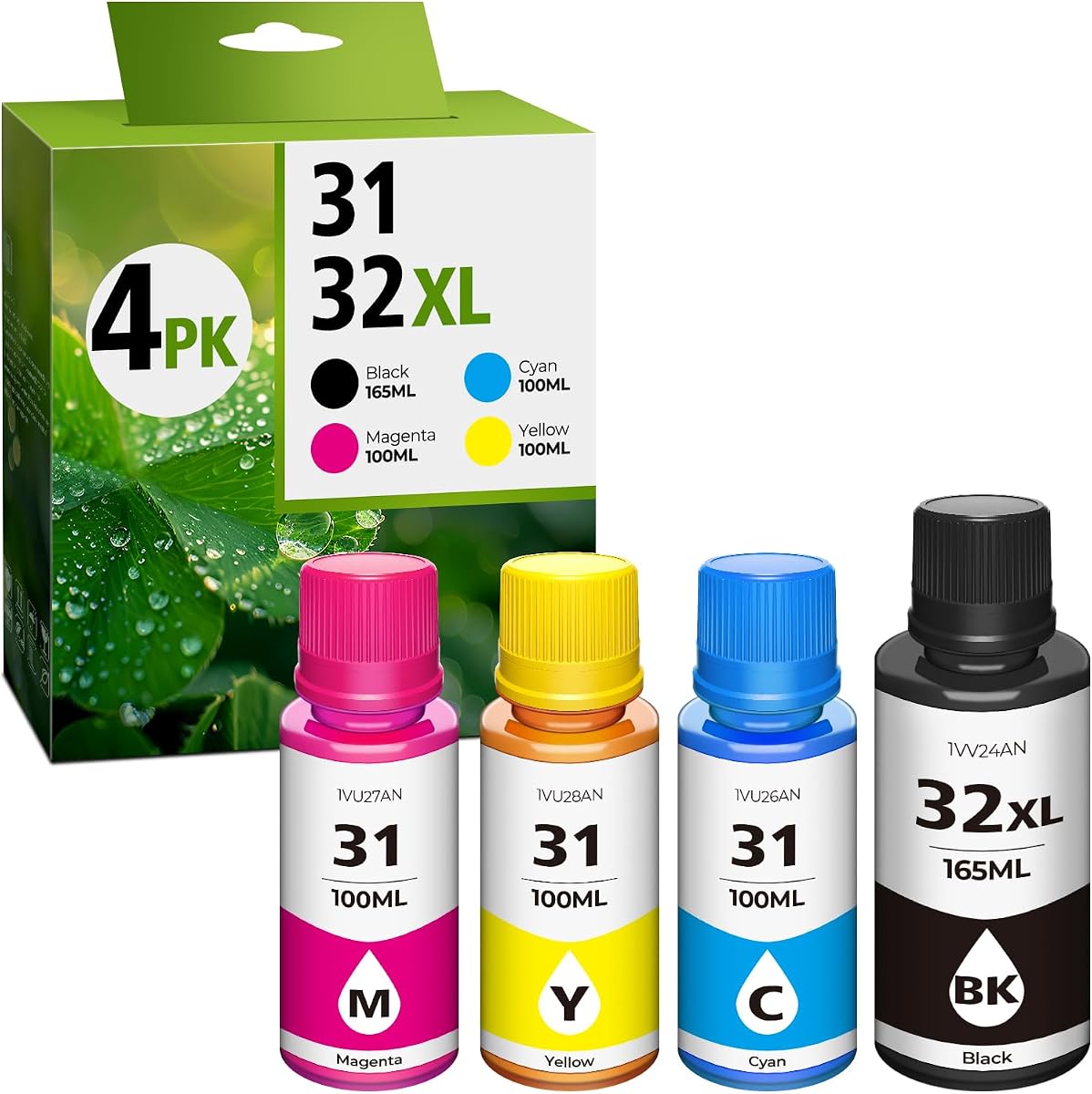
This four-bottle set is not a printer, but it is a useful ink-tank maintenance option for people who already own a compatible HP model. It has a 4.4 rating, the highest customer rating in the supplied comparison, and includes one 165ml 32XL black bottle plus 100ml bottles of cyan, yellow, and magenta 31 ink. Its ASIN listing is included because refill supplies are a major part of the ink-tank ownership experience.
We may earn a commission when you buy through this link, at no additional cost to you.
Compatibility is broad within the specified HP Smart Tank, Smart Tank Plus, earlier Smart Tank, and Ink Tank families. The listing names many supported models, including Smart Tank 5003, 5101, 7602, 6001, 5100, 7001, 7301, and numerous other listed series. Buyers must verify the exact model number because physical similarity does not guarantee compatibility, and using an incorrect bottle can lead to leakage, poor results, or performance issues.
The ink is dye-based, which differs from the OEM black pigment ink identified in the listing. Epson and HP both provide warnings on their products about the importance of compatible ink, and this accessory's own instructions recommend cleaning the printhead and warn against mixing its black with OEM black pigment. Those cautions make this set less convenient for first-time printer owners and more appropriate for an informed user who has confirmed compatibility and ink type.
We recommend this set for existing HP tank-printer owners seeking a four-color refill at a potentially lower ongoing cost. It is not a substitute for buying a printer, and it should be purchased only after checking the supported model list and understanding the dye-versus-pigment distinction. New buyers should choose a complete printer with its manufacturer-supported ink system rather than starting with an aftermarket refill set.
The set includes black, cyan, yellow, and magenta bottles, allowing users to replenish all four colors together. This is more convenient than sourcing individual refill colors separately.
The listing supports numerous HP models, but buyers should match the exact model number and confirm the required ink type. The dye black differs from OEM pigment black and should not be mixed without following the manufacturer's guidance.
We may earn a commission when you buy through this link, at no additional cost to you.
This HP Smart Tank 5003 listing offers the same stated core functions as the other Smart Tank 5003 entry, including print, copy, scan, borderless output, wireless printing, and up to three years of included ink. Its 3.8 rating is lower than that of the other complete printers in the guide, which makes it important for shoppers to read current customer feedback before deciding that its convenience outweighs any recurring concerns.
We may earn a commission when you buy through this link, at no additional cost to you.
The defining benefit is a refill process designed to minimize mess. Users insert ink bottles into the cartridge-free tanks and allow the ink to drain instead of squeezing it into an opening. HP states that the included supply can handle up to 6,000 black or color pages. Combined with wireless and mobile printing, this creates an approachable package for households that want to handle a variety of documents and images without frequent cartridge changes.
The lack of listed automatic duplex printing limits the appeal for long-document workflows. The 3.8 rating also warrants attention, even though the supplied product information does not identify the reasons behind customer feedback. Buyers should consider whether they need duplex output, how much they plan to print, and what support and warranty terms apply to the exact listing. The model's AI-capable designation is present in the product name, but no detailed AI functions are supplied in the factual data.
We recommend this listing for buyers who value easy refilling, mobile access, and a large initial ink allowance over advanced office automation. It may work well for mixed home use, but users with frequent long reports should favor a duplex-capable alternative. Comparing the two available Smart Tank 5003 listings by current rating, availability, warranty, and included accessories is essential because their customer scores differ.
The bottles plug into the tanks and empty by gravity, reducing squeezing and associated spill risk. This approach is intended to make routine refilling feel more approachable.
Borderless output and mobile connectivity expand the printer beyond ordinary text documents. It is a flexible home choice for photographs, web pages, school projects, and routine records.
We may earn a commission when you buy through this link, at no additional cost to you.
The Epson EcoTank ET-2988 is a renewed all-in-one model that combines fast output with automatic duplex printing. Its 3.9 rating is slightly below the 4.0 and 4.2 scores earned by several new competitors, but the supplied specifications reveal a productive package: up to 15 black pages per minute, up to 8 color pages per minute, a 100-sheet tray, automatic two-sided printing, and a 1.44-inch color screen.
We may earn a commission when you buy through this link, at no additional cost to you.
Epson states that the included ink can produce up to 6,600 black pages or 5,500 color pages, providing a substantial starting supply. The printer supports printing and scanning from smart devices through the Epson Smart Panel app and also supports Apple AirPrint, Mopria Print Service, and Mopria Scan. Its 4800 x 1200 dpi resolution is lower than the ET-2903's stated 5760 x 1440 dpi, but the resolution difference will not matter equally to every user.
Because this is a renewed product, condition, warranty coverage, and included accessories deserve careful review. Refurbished or renewed hardware may offer a different risk and reward profile from a completely new unit, and the precise details are not supplied in the product data. The 3.9 rating reinforces the importance of checking recent customer feedback. Automatic duplex printing nevertheless gives the ET-2988 a meaningful advantage over many entry-level EcoTank models.
We recommend the ET-2988 for value-conscious buyers who prioritize fast output and automatic duplex printing and are comfortable with a renewed product. It is a strong fit for students or home offices that regularly print lengthy text documents. Buyers seeking maximum photo resolution may prefer the new ET-2903, while those who prioritize simpler purchasing and warranty certainty should examine new alternatives.
The stated 15-page-per-minute black speed and automatic two-sided output support heavy document workflows. These features are the key attractions for users who want speed without manual page flipping.
A renewed product can provide useful value, but buyers should review its condition, included accessories, warranty, and return terms. The exact configuration should be confirmed before purchase.
We may earn a commission when you buy through this link, at no additional cost to you.
A good ink tank printer should match your print volume, document habits, and tolerance for setup. Start with the functions you genuinely need, then compare ink yields, refill methods, connectivity, paper handling, and long-term ink compatibility rather than focusing only on the initial purchase cost.
Short on text, choose a model with a strong black yield. For photos, prioritize resolution and borderless support. Match the printer to your normal workload rather than the largest stated estimate.
Automatic duplex printing prints both sides of a sheet without requiring the user to turn the paper over manually. It saves time and reduces errors when handling reports, manuals, presentations, and other long documents. Among the featured models, the Canon Megatank G3290 and Epson EcoTank ET-2988 explicitly include automatic two-sided printing, while the G3270 and several other models list single-sided operation.
If you regularly print multipage documents, automatic duplex is worth prioritizing. For short, mostly single-page jobs, the feature may not justify choosing a larger or more expensive model.
All complete printers in the guide use refillable tanks rather than replaceable ink cartridges, but the refill mechanisms differ. Epson uses keyed EcoFit bottles, Canon markets its MegaTank system, and HP describes an easy-access, mess-free process in which bottles are inserted and allowed to drain. Look for a method that you will feel comfortable using and confirm the bottles are available for your specific model.
Simplify the process with keyed containers and clear tank access. Keep manufacturer-supported ink in mind because some brands warn that incompatible ink may affect performance or warranty coverage.
The supplied product descriptions advertise generous starting supplies ranging from up to two years of ink in some Canon and Epson models to up to three years in Epson and HP listings. Included page estimates range from several thousand black or color pages to more than 7,000 color pages in selected Canon claims. These numbers illustrate tank capacity, but they are not guarantees for every document.
Compare both black and color yields instead of focusing on one headline number. Higher yields are most valuable when your workload genuinely requires them, so choose a tank size that fits your usage rather than automatically selecting the largest.
Every complete printer in the comparison supports wireless printing, which allows a laptop, phone, or tablet to send jobs without a USB cable. Epson models specifically mention the Epson Smart Panel app, AirPrint, and Mopria services, while HP highlights mobile and wireless printing. This is essential for shared spaces and convenient for anyone who wants to print from a device other than a desktop.
Check the mobile functions you need rather than assuming every app supports every task. Wireless printing is standard here, but scanning and setup experiences can still differ by platform and model.
An integrated flatbed scanner and copier can eliminate the need for separate devices, making the printer more useful for administrative work, study materials, and household records. Most models include a small display for navigation, while the Canon Megatank G3290 stands out with a 2.7-inch color touchscreen. The Epson ET-2903 and ET-2988 use 1.44-inch color screens.
Choose a larger screen if you adjust copier settings frequently or want a more visual interface. A basic display is sufficient for users who mainly print and initiate scans from a computer or mobile app.
Photo quality depends on maximum resolution, supported media, and the balance between convenience and output speed. The Epson ET-2903 lists 5760 x 1440 dpi, the highest figure in the group, while the ET-2988 lists 4800 x 1200 dpi. The renewed ET-2988 also has the fastest stated black speed at 15 ppm, followed by the ET-2903 at 11 black ppm. Canon's G3270 and G3290 share an included-ink allowance of up to 6,000 black-and-white or 7,700 color pages.
Prioritize photo resolution for image-heavy work and speed for document-heavy work. A high resolution alone does not replace good source images, proper paper, and correct color settings.
Paper capacity is another practical distinction. The Epson ET-2903 and renewed ET-2988 include 100-sheet trays, making them convenient for users who prefer fewer refills during long print runs. Refill costs should also be estimated using realistic page volume and the manufacturer's supported ink. A low initial printer cost does not guarantee lower ownership costs if compatible ink is difficult to find or if the warranty excludes damage caused by unsupported supplies.
Choose a tray size that matches how often you print and budget for genuine or explicitly supported refill ink. Review warranty terms before using any alternative bottle set.
Begin by unpacking the printer, removing all shipping restraints, and installing the supplied ink before configuring Wi-Fi or connecting it by USB. Each brand has its own setup software, but the basic sequence is similar: place the printer near the intended signal location, choose the network, complete the on-screen prompts, and install the corresponding mobile app if you want phone or tablet access. Run the supplied alignment or test pages before beginning important jobs so that colors and text placement are properly calibrated.
Refill only when a color tank is genuinely low, and use ink approved for the exact printer model. Epson's EcoFit bottles, Canon's compatible MegaTank ink, and HP's supported Smart Tank ink each have their own containers and procedures. Before opening a bottle, read the supplied instructions and compare the bottle and tank labels. Do not mix ink types, and do not use the aftermarket dye black refill discussed in the review of the HP bottle set with OEM pigment black without carefully following the manufacturer's guidance.
For routine care, keep the printer on a level surface away from direct sunlight, dust, and temperature extremes. Load paper within the supported range, use the appropriate media setting for photos or heavier stock, and avoid leaving partially used sheets in the input tray where they can curl or gather dust. Run the printer's cleaning or maintenance cycle when nozzle performance declines, and address alignment or cleaning prompts before they become persistent. For recurring clogs or poor prints, consult the model-specific manual rather than repeatedly cycling power or cleaning, as that can interrupt maintenance routines.
Ink tank printers are generally designed to have lower ongoing ink costs because you refill large reservoirs instead of replacing small cartridges. The actual saving depends on print volume, the cost of compatible ink, and how often you use the printer. A cartridge printer can be economical for very occasional printing, while a tank printer usually becomes more practical for regular document, school, or photo output.
Modern ink tank printers can produce sharp text and detailed color images, and several models in this guide specifically target photo use. Results also depend on the printer's stated resolution, paper, ink quality, and print settings. Use manufacturer-supported ink and select the correct media type to achieve the most consistent results.
The supplied listings advertise up to two years or three years of included ink, depending on the model. Page estimates range from several thousand pages to as many as 7,700 color pages in selected Canon claims. These are manufacturer estimates under stated conditions, and actual yield will vary with coverage, color use, settings, and maintenance.
Some third-party ink is available for certain models, but Epson and HP both warn that non-genuine ink may affect performance and may cause damage not covered by the limited warranty. The HP-compatible bottle set reviewed here also uses dye black rather than OEM pigment black and includes specific mixing warnings. Check the printer manual and warranty before using an alternative supply, and never mix ink types without following the manufacturer's instructions.
Single-sided printing handles only one side of each sheet. Automatic duplex printing flips and prints the reverse side without manual intervention, saving time on multipage documents. The Canon Megatank G3290 and renewed Epson EcoTank ET-2988 explicitly offer automatic duplex printing, while several other models in the guide list single-sided operation.
The Epson EcoTank ET-2903 is a strong candidate because it lists 5760 x 1440 dpi resolution, supports borderless-style photo output through its Epson feature set, and includes a color display. The HP Smart Tank 5003 also lists borderless printing. The best choice still depends on source-image quality, paper selection, and whether speed or maximum resolution matters more.
Every complete printer in this guide includes scanning and copying functions. The Canon MegaTank G3270 and G3290, Epson EcoTank ET-2803 and ET-2903, HP Smart Tank 5003 listings, and the Epson models described as all-in-one are designed for these tasks. The HP 31/32XL bottle set is an ink accessory and does not provide scanning or copying.
Use the correct bottle and color, keep the nozzle area clean, and avoid leaving the printer unused for long periods without performing the recommended maintenance cycle. Store bottles upright with their tips sealed and follow the manufacturer's preparation steps before filling. If a leak or persistent blockage occurs, stop adding ink and consult the model-specific manual rather than mixing supplies or attempting an unsupported repair.
The Epson EcoTank ET-2803 is the strongest budget-oriented choice because it combines a 4.2 rating, wireless printing, scanning, copying, and a generous included supply. The Epson ET-2903 is our Editor's Choice for buyers who want faster output, a 100-sheet tray, strong photo resolution, and a convenient color display. For premium convenience, the Canon Megatank G3290 leads with automatic duplex printing and a 2.7-inch color touchscreen.
Prioritize the features that affect daily work rather than simply choosing the model with the largest stated page yield. Heavy text users should consider the ET-2980's high black yield, long-document users should look for automatic duplex, and photo-focused users should examine resolution, borderless output, and supported media. Anyone using refill bottles should verify exact model compatibility, ink chemistry, warranty coverage, and return terms before buying.
Ink tank printers are a sound choice for regular printing because they reduce cartridge replacement and provide substantial onboard ink capacity. Still, current prices, promotions, ratings, included accessories, and warranty conditions can change. Check the live product listing and manufacturer documentation before ordering, and choose supported ink to protect print quality and the long-term reliability of the machine.