
Epson EcoTank ET-2803
4.2Editor score
High-capacity ink tanks
AirPrint and voice controls
Built-in scanner and copier
Printers with AirPrint make it simple to produce documents and photos from an iPhone, iPad, Mac, or compatible device without installing vendor-specific software. The right model should also deliver dependable wireless connectivity, clear output, manageable ink use, and enough document-handling features for your routine.
This guide compares ten all-in-one and multifunction printers using the supplied specifications, emphasizing AirPrint support, wireless setup, print quality, scanning, copying, duplex printing, paper capacity, displays, and mobile-control options. It covers compact home models, tank-based systems, and a higher-capacity business-oriented printer for different needs.
Each review explains the printer's strongest qualities, practical limitations, and ideal user, helping you narrow the field before comparing the full lineup. Product details and ratings reflect the information available for this guide, while retailer offerings and prices can change, so confirm current specifications before purchasing.
4.2Editor score

4.2Editor score

4.0Editor score
As an Amazon Associate we earn from qualifying purchases.
The comparison below highlights each model's AirPrint position, core functions, connectivity, document handling, and best-use profile so you can quickly identify the most suitable option for your devices and workspace.





The Canon PIXMA TS6520 is the most well-rounded choice in this guide for someone who wants AirPrint without giving up useful office features. It carries a 4.2 rating and combines wireless color printing, scanning, copying, automatic duplex printing, and a compact 1.42-inch monochrome OLED display. Its AirPrint and Mopria support makes it particularly convenient for Apple-device users and compatible mobile workflows.
We may earn a commission when you buy through this link, at no additional cost to you.
Its main advantage is the balance it strikes between home convenience and practical productivity. Dual-band Wi-Fi supports connections on both 2.4GHz and 5GHz networks, while the Canon PRINT App and Mopria Print Service provide alternatives when AirPrint is not the preferred route. Automatic two-sided printing can reduce paper consumption and make longer documents easier to manage, and the integrated scanner handles everyday copying and document capture.
The hybrid ink system is intended to deliver sharp text and vivid color for documents and photos. Media support extends to bordered and borderless output on sheets up to 8.5 by 11 inches, giving the printer more flexibility than a basic document-only device. The OLED screen also allows quick monitoring of ink levels and printer status without navigating a complicated physical menu.
The main compromise is the lack of an automatic document feeder. If you routinely process multi-page paper originals, the TR7120 or OfficeJet Pro 8125 may be more convenient. Otherwise, the TS6520 is an excellent recommendation for students, home workers, and families that want AirPrint, polished color output, and duplex printing in a relatively compact footprint.
AirPrint support allows compatible iPhones, iPads, and Macs to recognize the printer without a vendor-specific print workflow. Canon PRINT App and Mopria Print Service add convenient alternatives for setup, status checks, and mobile printing.
The combination of automatic duplex printing, an integrated scanner, copying, and an OLED status display gives the TS6520 more day-to-day flexibility than a basic single-function printer while preserving a compact design.
We may earn a commission when you buy through this link, at no additional cost to you.
The Canon PIXMA TS4320 is a sensible value-focused option for users who prioritize AirPrint, wireless printing, and essential office functions in a compact package. Its 3.9 rating is the second-lowest in the group, but the supplied specifications show a capable feature set: printing, copying, scanning, automatic duplex printing, dual-band Wi-Fi, and broad mobile-service support.
We may earn a commission when you buy through this link, at no additional cost to you.
AirPrint, Canon PRINT App, and Mopria Print Service give users several ways to print from a smartphone or tablet. The printer's hybrid two-cartridge system is designed for sharp text and vivid color, supporting both ordinary documents and photo-oriented projects. Automatic two-sided output also makes it more useful for reports, schoolwork, and other multipage assignments.
The TS4320 does not include an automatic document feeder, so large scanning or copying jobs require placing each sheet on the flatbed. Its EPEAT Silver and ENERGY STAR certifications are a meaningful plus for buyers who value environmental considerations, and the stated compact design suits smaller desks and home offices.
Choose this model when AirPrint compatibility, wireless access, duplex printing, and multifunction capability matter more than the highest listed rating. It is especially appropriate for students, occasional home workers, and families printing a mixture of coursework, household documents, and photos.
Alongside AirPrint, the TS4320 supports the Canon PRINT App and Mopria Print Service, giving users more than one mobile printing path. Its dual-band Wi-Fi can also provide a more flexible home network connection.
Automatic duplex printing saves paper during longer jobs, while scan and copy functions eliminate the need for separate devices. The printer handles documents and photos on common letter-size media, with bordered and borderless options.
We may earn a commission when you buy through this link, at no additional cost to you.
The Canon MegaTank G3270 is built for buyers who print frequently enough to care more about ink capacity than cartridge convenience. It has a 4.1 rating and offers wireless printing, copying, and scanning through a MegaTank system whose stated yields reach up to 6,000 black-and-white pages and 7,700 color pages per set of inks.
We may earn a commission when you buy through this link, at no additional cost to you.
Its biggest advantage is the reduction in routine refilling interruptions. The large reservoir and high stated page output suit a busy home office, classroom, or shared household where documents and projects generate steady print volume. A 1.35-inch square LCD provides basic on-device information, while the integrated all-in-one design consolidates printing, scanning, and copying.
There are important compromises. The supplied information specifies single-sided printing only, so it lacks the automatic duplex convenience found in several higher-ranked models. AirPrint is also not explicitly listed among its features, meaning buyers who require confirmed native AirPrint support should verify compatibility with the current product listing before purchase.
The G3270 is best for high-volume users who can accept manual paper turning and want to reduce the frequency of ink replacement. If you print only a few pages each week, require automatic duplex output, or consider confirmed AirPrint a non-negotiable requirement, a more explicitly connected model may be the better fit.
The MegaTank format is aimed at users who regularly produce reports, lesson materials, and colorful documents. Its stated page yields make it more relevant to high-volume households and offices than to occasional printers.
The square LCD gives users quick access to printer information without requiring a computer or phone. It is a useful middle ground between printers with no display and larger models with a full touchscreen.
We may earn a commission when you buy through this link, at no additional cost to you.
The HP OfficeJet Pro 8125 is the strongest productivity-focused model in this lineup, with an automatic document feeder, automatic duplex printing, a 225-sheet input tray, and a 2.7-inch color touchscreen. Its 3.9 rating reflects a capable printer designed for home offices, reports, presentations, flyers, and other professional-looking color documents.
We may earn a commission when you buy through this link, at no additional cost to you.
The automatic document feeder is especially valuable when copying or scanning multipage paper originals. Stated print speeds reach up to 20 pages per minute in black and 10 pages per minute in color, while dual-band Wi-Fi and HP Wolf Essential Security support a managed home-office setup. HP AI is included to improve the formatting of web pages and emails by reducing unwanted content and awkward layouts.
Its color touchscreen is larger and more interactive than the compact displays on several Canon models. However, the printer is designed to work only with cartridges containing original HP chips or circuitry, which may matter to buyers who prefer certain third-party consumables. The included Instant Ink trial also requires attention to subscription terms after the trial period unless canceled.
This printer is ideal for a home office that values workflow efficiency over a minimal footprint. It should be particularly attractive to users who regularly scan multi-page documents, want touch-based controls, and appreciate automatic two-sided output. Confirm cartridge and service preferences before finalizing the purchase.
The automatic document feeder handles multipage originals more efficiently than a flatbed-only design, while automatic duplex printing simplifies two-sided reports and presentations. These features reduce repeated manual intervention.
HP AI is designed to clean up the formatting of online content before printing. For users who regularly print recipes, articles, email threads, and web pages, this can produce more coherent pages with fewer unwanted elements.
We may earn a commission when you buy through this link, at no additional cost to you.
The Canon PIXMA TR7120 brings together nearly every capability sought in a home-office AirPrint printer. It has a 4.2 rating, native mobile-service support including AirPrint, automatic duplex printing, a copier and scanner, and an automatic document feeder for handling multipage originals. A 1.42-inch monochrome OLED display provides convenient access to ink and printer status.
We may earn a commission when you buy through this link, at no additional cost to you.
It is especially attractive to hybrid workers who print from a Mac, iPhone, or iPad but still need paper-document tools. The ADF makes routine copying and scanning more efficient, while the duplex system reduces paper use and manual flipping. Dual-band Wi-Fi, Canon PRINT App, and Mopria Print Service provide flexible connection and printing options.
Color and document quality are supported by a hybrid ink system intended for sharp text and vivid photographs. Common letter-size documents and photos can be produced with or without borders, broadening the device's usefulness beyond office paperwork. The scanner and copier round out an all-in-one feature set that can reduce the need for separate peripherals.
Compared with the TS6520, the TR7120 adds an ADF but occupies a somewhat larger workspace. That trade-off makes it ideal for users who value streamlined multipage handling more than minimum footprint. It is a strong recommendation for families, students, and home workers who want AirPrint alongside genuine office productivity features.
An automatic document feeder is the key distinction between the TR7120 and many compact all-in-ones. It is well suited to multipage copying, scanning, and routine paperwork, while duplex printing keeps output concise.
AirPrint support provides a direct route from compatible Apple devices, while Canon PRINT App and Mopria Print Service extend mobile access. The included 1.42-inch OLED display makes ink and status monitoring straightforward.
We may earn a commission when you buy through this link, at no additional cost to you.
The Epson EcoTank ET-2803 is the premium recommendation for users who want AirPrint alongside a high-capacity tank system. It earns a 4.2 rating and includes wireless printing, a high-resolution flatbed scanner, a color display for copying and navigation, AirPrint support, the Epson Smart Panel app, and hands-free voice-activated printing.
We may earn a commission when you buy through this link, at no additional cost to you.
Its primary advantage is ink capacity. The refillable EcoTank design is stated to provide enough ink for up to 4,500 black pages or 7,500 color pages per replacement bottle set, with up to two years of ink in the box under the stated terms. Epson's Micro Piezo Heat Free technology is designed to produce sharp text and strong color photographs on virtually any paper type.
The scanner and copier make it a complete desk companion, while AirPrint and the Epson Smart Panel provide two convenient mobile printing paths. The refillable design can also reduce cartridge waste compared with a conventional cartridge-based model, though users should follow the correct genuine-ink guidance to maintain print quality and protect warranty coverage.
Automatic duplex printing is not identified in the supplied feature list, so buyers who require it should verify the current configuration. Even so, the ET-2803 is an excellent fit for high-volume households and home offices that prioritize AirPrint, tank-based ink capacity, sharp output, and integrated scanning over a larger touchscreen or advanced document feeder.
High-capacity tanks reduce the frequency of ink replacement and make the ET-2803 well suited to regular document and photo workloads. Epson's stated bottle yields of 4,500 black pages and 7,500 color pages illustrate the intended scale of use.
AirPrint covers compatible Apple devices, Epson Smart Panel adds device management, and hands-free voice-activated printing provides another option for supported setups. This variety makes the printer approachable in a shared modern household.
We may earn a commission when you buy through this link, at no additional cost to you.
The Brother Work Smart 1360 is a compact all-in-one aimed at home and home-office users who want cloud connectivity and thoughtful document handling. Its 3.8 rating is the lowest listed, but the specifications describe a capable set of features: automatic duplex printing, a 20-sheet automatic document feeder, a 150-sheet paper tray, and a 1.8-inch color display.
We may earn a commission when you buy through this link, at no additional cost to you.
Cloud app connections are its defining feature. The printer can print from and scan to popular services including Google Drive, Dropbox, Box, OneDrive, and others through an approachable on-device interface. Brother Mobile Connect adds mobile menu navigation, device management, and Page Gauge ink monitoring, while wireless and USB connections cover local and network use.
The stated print speeds reach up to 16 pages per minute in black and 9 pages per minute in color. Automatic duplex printing makes it more useful for multi-page documents than a basic printer, and the ADF supports lightweight multipage scanning or copying without taking up excessive desk space.
AirPrint is not explicitly listed in the supplied specifications, so a buyer who depends on native Apple printing should confirm support before buying. Subject to that verification, the Work Smart 1360 is a strong match for students and home workers who want cloud workflows, duplex output, and compact productivity features.
Direct connections to widely used cloud storage services make it easier to retrieve online documents for printing and send scanned material back to a cloud workspace. The color display provides a clear way to navigate those services.
Despite its compact design, the printer includes duplex output, a small ADF, and a 150-sheet tray. It is a more complete option for users who want full-size document features without moving to a large office model.
We may earn a commission when you buy through this link, at no additional cost to you.
The HP DeskJet 2923 is a straightforward wireless all-in-one for occasional color printing, copying, and scanning. Its 3.7 rating is the lowest in the group, so it is best viewed as a simple household option rather than a productivity-focused machine. The feature set covers the essentials without a large display, advanced feeder, or automatic duplex printing.
We may earn a commission when you buy through this link, at no additional cost to you.
Dual-band Wi-Fi is a notable strength because it can connect over either 2.4GHz or 5GHz networks. The HP App supports printing, scanning, copying, and faxing from a smartphone, while HP AI is designed to improve the formatting of web pages and emails by reducing unwanted content. A simple icon LCD provides basic on-device controls.
Its 60-sheet input tray suits homes that print recipes, letters, to-do lists, financial documents, and similar short jobs. Stated speeds of up to 7.5 pages per minute in black and 5.5 pages per minute in color are modest, matching its basic positioning. The enclosure uses at least 70% recycled plastics and carries ENERGY STAR and EPEAT certifications.
The printer is intended for basic needs and does not list automatic duplex printing or an automatic document feeder. Its Instant Ink enrollment also includes a trial period followed by subscription terms unless canceled. It suits users with light printing demands, while heavier workflows are better served by the TR7120, OfficeJet Pro 8125, or EcoTank ET-2803.
Dual-band wireless connectivity and the HP App make everyday mobile printing straightforward. The interface remains intentionally minimal, which suits users who want a printer that does not demand constant attention.
The 60-sheet tray and modest stated speeds align with recipes, letters, reports, and occasional color jobs. For frequent multipage printing, a model with automatic duplex output and a larger feeder would offer a better workflow.
We may earn a commission when you buy through this link, at no additional cost to you.
The Canon PIXMA TS3720 is a compact and approachable AirPrint printer for basic home use. It has a 4.0 rating and supports AirPrint, Mopria Print Service, and the Canon PRINT App. Setup is designed to be completed without a computer, while dual-band Wi-Fi provides compatibility with both 2.4GHz and 5GHz networks.
We may earn a commission when you buy through this link, at no additional cost to you.
The printer's versatility is more noticeable than its feature count suggests. It can handle envelopes, photos, high-resolution paper, banners, square photo sizes, and borderless photos up to 5 by 7 inches. Canon also provides access to POSTARTIST Online for creating banners and signage. Chromebook compatibility adds value for students printing assignments and school materials.
A 1.5-inch segment LCD gives basic status and setting access without making the device overly complex. Its two-cartridge ink configuration is designed for straightforward full-color printing, and the all-in-one format includes scanning and copying for occasional document tasks.
The key limitation is single-sided printing. There is no automatic duplex system or automatic document feeder, so multipage jobs require more manual handling. Nevertheless, the TS3720 is an excellent match for a small home, student, or Chromebook user who wants confirmed AirPrint support and creative media options in a simple device.
The printer can join a compatible Wi-Fi network without requiring a computer, making initial setup more approachable. Dual-band support gives users options across modern home networks.
Support for envelopes, banners, high-resolution paper, square photos, and borderless output expands the TS3720's creative potential. It is a useful companion for craft projects, school displays, and mixed-media printing.
We may earn a commission when you buy through this link, at no additional cost to you.
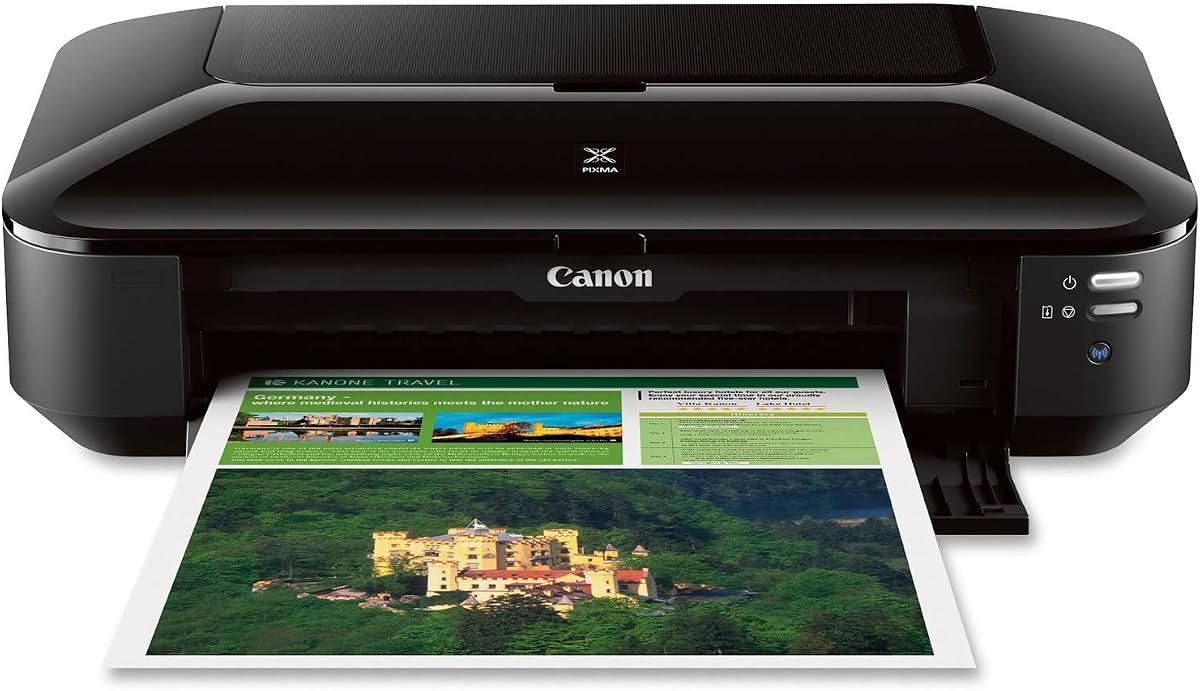
The Canon PIXMA iX6820 is the dedicated business-oriented choice and the most explicitly AirPrint-focused premium model in the guide. It carries a 4.1 rating and supports AirPrint, Google Cloud Print, and Pixma Printing Solutions. Its five individual ink tanks and maximum resolution of 9600 by 2400 dots per inch indicate a system intended for more demanding color and photo output.
We may earn a commission when you buy through this link, at no additional cost to you.
The automatic sheet feeder holds 150 sheets, providing useful capacity for longer workflows. Fine print-head technology is engineered for detailed inkjet output, and the large ink-tank configuration gives users separate reservoirs for different colors. Wireless operation and cloud compatibility expand access beyond a direct USB connection.
The supplied compatibility information is dated, listing Windows XP through Windows 8.1 and specific Mac OS X versions. Buyers should verify current operating-system support with the manufacturer or retailer. Its stated dimensions are also larger than those of the compact home printers in this list, making desk space and placement important considerations.
This printer is recommended for a home business or creative professional who specifically wants a business-class AirPrint workflow, higher maximum resolution, and substantial feeder capacity. For occasional home use, it is more equipment than necessary, but for higher-volume color documents and photographs, its specification set is more purposeful.
A maximum resolution of 9600 by 2400 dots per inch and five individual ink tanks support detailed color work. The configuration is relevant to users who regularly produce presentations, graphics, photographs, or polished mixed-color documents.
Native AirPrint, Google Cloud Print, and Pixma Printing Solutions provide several routes for remote printing. The 150-sheet automatic feeder supports larger batches than many compact models in the comparison.
We may earn a commission when you buy through this link, at no additional cost to you.
The most important AirPrint printer is not necessarily the one with the longest feature list. Your device mix, print volume, document workflow, preferred ink system, and available space should guide the decision before you compare smaller details.
AirPrint compatibility should be treated as a baseline requirement, not an assumed feature. Canon models in this guide that explicitly list AirPrint include the PIXMA TS6520, TS4320, TR7120, TS3720, and PIXMA iX6820, while the Epson EcoTank ET-2803 also states AirPrint support. The MegaTank G3270, HP OfficeJet Pro 8125, Brother Work Smart 1360, and HP DeskJet 2923 do not explicitly mention AirPrint in the supplied data, so buyers should verify the current specification or product package before purchasing.
Confirm AirPrint support for your specific device and operating system. Look for an AirPrint logo or a clear compatibility statement, and make sure your Wi-Fi network is operating normally. If AirPrint is not listed, do not assume that mobile printing, an app, or Mopria support is equivalent.
Most buyers should decide whether they need a printer only for output or a true all-in-one. Every product here includes some combination of printing, scanning, and copying. The Canon PIXMA iX6820, for example, is described as a wireless business printer with AirPrint and cloud compatibility, while the Epson EcoTank ET-2803 includes a high-resolution flatbed scanner and copier. An all-in-one is more useful when you regularly need to digitize paper, make copies, or preserve physical records.
Choose a multifunction device if scanning and copying are recurring tasks. If printing is virtually the only requirement, a simpler model may reduce unnecessary desk space and complexity. Check the supplied functions carefully because the products differ in displays, feeders, and duplex capabilities.
Automatic duplex printing can substantially reduce paper use and manual effort when documents run to multiple pages. The Canon PIXMA TS6520, TS4320, and TR7120 list automatic two-sided printing. The HP OfficeJet Pro 8125 and Brother Work Smart 1360 also include automatic duplex output. By contrast, the Canon PIXMA TS3720 explicitly supports single-sided printing only, and the Canon MegaTank G3270 lists single-sided printing.
Automatic duplex is especially useful for reports, lesson plans, invoices, and packet handouts. If you regularly print short, one-page items, the benefit may be less noticeable. Verify duplex support before buying, especially with smaller all-in-ones marketed primarily for basic home use.
An automatic document feeder makes a substantial difference when scanning or copying several pages at once. The Canon PIXMA TR7120 includes an ADF, the HP OfficeJet Pro 8125 includes an ADF, and the Brother Work Smart 1360 provides a 20-sheet single-sided feeder. Flatbed-only models remain suitable for occasional single sheets, receipts, and creative material, but they require more page-by-page handling.
For a hybrid office, check both the presence of a feeder and its capacity. A 20-sheet ADF is useful for modest batches, while a larger office model may suit continuous processing. Make sure you are comfortable with the feeder's sidedness if your originals are double-sided.
Cartridge-based and tank-based printers offer different operating rhythms. The Canon PIXMA TS6520, TS4320, and TR7120 use a hybrid two-cartridge system designed for sharp text and vivid color. The Canon MegaTank G3270 and Epson EcoTank ET-2803 use refillable tanks with much higher stated page capacities. HP models use ink cartridges, and the OfficeJet Pro 8125 and DeskJet 2923 include Instant Ink enrollment options.
Choose cartridges when simplicity and compact size are your priority. Choose a tank system when you print frequently and want to refill less often. For HP Instant Ink, read the trial and subscription terms before enrolling, and consider the OfficeJet Pro 8125's restriction to cartridges with original HP chips or circuitry.
Wireless convenience depends on more than the presence of a wireless label. Dual-band connectivity appears on the Canon PIXMA TS6520, TS4320, and TS3720, as well as the HP OfficeJet Pro 8125 and DeskJet 2923. The Brother Work Smart 1360 supports wireless and USB connections, while the other models also advertise wireless operation. For a crowded home network, dual-band support can offer more placement flexibility.
Place the printer where it receives a stable signal without being tucked behind furniture or far from your devices. Confirm that your computer or mobile device uses the same network and that the printer's firmware is current. Updating the printer software can also improve wireless setup and compatibility.
The displays range from basic icon or segment screens to a larger color touchscreen. The Canon PIXMA TS6520 and TR7120 use a 1.42-inch monochrome OLED display, the TS3720 uses a 1.5-inch segment LCD, and the MegaTank G3270 has a 1.35-inch square LCD. The Brother Work Smart 1360 has a 1.8-inch color display, while the HP OfficeJet Pro 8125 provides a 2.7-inch color touchscreen.
A larger touchscreen is useful for managing cloud services, navigation, and status checks, but it is not essential for straightforward printing. The Epson EcoTank ET-2803 uses a color display for copying and navigation without providing the same large touch interface. Choose the controls that match your comfort with technology and the complexity of your jobs.
Compact printers such as the Canon PIXMA TS6520, TS4320, and TS3720 fit more easily into home workspaces. The TR7120 adds an ADF and therefore occupies more room. The PIXMA iX6820 is explicitly described as a business printer with substantial dimensions, while the HP OfficeJet Pro 8125 includes a 225-sheet input tray that supports higher-volume work.
Consider not only the printer itself but also the space required to open the output tray, handle an ADF, and reach the controls. Choose a smaller model for a tight desk or an office with frequent traffic. Choose a larger one when paper capacity and batch processing matter more than minimal footprint.
Begin by placing the printer on a stable, level surface with enough clearance for its output area. Join the printer to your Wi-Fi network using the supplied setup process, or connect it by USB if your model supports that option. On compatible Apple devices, open the sharing or printing menu, select the printer, choose paper and quality settings, and use AirPrint. For other devices, use the manufacturer's app or another confirmed mobile-printing service.
Load paper squarely into the tray and select the correct media type and size in the printing dialog. When scanning, clean the flatbed glass and use the ADF only if its page capacity and sidedness fit your documents. For automatic duplex printing, confirm that the application selects two-sided output and that the paper tray contains enough sheets for the complete job.
Maintain the printer by following the ink guidance for its cartridge or tank system, using the specified genuine ink where applicable. Keep the scanner lid and feed mechanism clean, remove stray paper before it causes jams, and update the printer software when prompted. For tank-based models, store and handle refill bottles as directed, and avoid allowing ink to dry inside the reservoir. Periodically run the built-in cleaning or alignment cycle if the manufacturer recommends it.
AirPrint is a built-in wireless printing system used by compatible Apple devices and some other supported products. Once the printer is connected to the same network, you can select it from a document's sharing or print menu without installing a special driver. The printer must explicitly support AirPrint, and both the device and printer need a working network connection.
The Canon PIXMA TS6520, TS4320, TR7120, TS3720, and PIXMA iX6820 explicitly mention AirPrint in the supplied information. The Epson EcoTank ET-2803 also lists AirPrint as a mobile-printing option. For the other models, mobile printing or app support is described, but AirPrint is not explicitly confirmed, so current compatibility should be verified before buying.
No. Wireless printing broadly describes a printer that can receive jobs over a network connection, while AirPrint is a specific mobile-printing method built into compatible Apple ecosystems. A printer can support wireless printing through an app or Mopria without explicitly supporting AirPrint. That distinction matters if your preferred workflow depends on the standard Apple print menu.
Many models in this guide support photo-oriented media and color output. The Canon PIXMA TS3720 supports square photos and borderless photos up to 5 by 7 inches, while the TS6520 and TR7120 support bordered and borderless output on common letter-size media. The Epson EcoTank ET-2803 and PIXMA iX6820 emphasize stronger color detail. Photo quality can also depend on the ink, paper, and print settings selected.
The Canon PIXMA TR7120 is a balanced choice because it combines confirmed AirPrint with automatic duplex printing, an automatic document feeder, and an OLED display. The HP OfficeJet Pro 8125 also stands out for a larger touchscreen, 225-sheet tray, duplex output, and an ADF. The Epson EcoTank ET-2803 is preferable when high-volume ink capacity is the priority.
An ADF is worthwhile if you routinely scan or copy multi-page paper originals because it reduces manual page handling. The TR7120, OfficeJet Pro 8125, and Brother Work Smart 1360 include one. Flatbed-only models remain useful for occasional single-page documents and photos, but they are less convenient for large scanning or copying sessions.
Cartridge models are convenient for light printing and compact spaces. Tank-based models are usually more relevant to frequent users because their reservoirs offer substantially higher stated page capacities and require less frequent refilling. The Canon MegaTank G3270 and Epson EcoTank ET-2803 fall into this high-capacity category, while the Canon PIXMA models use a hybrid cartridge system.
First, confirm that the printer explicitly supports AirPrint and that your Apple device is on the same Wi-Fi network. Restart the printer and device, remove and re-add the printer if necessary, and update the printer's software and firmware. If the issue continues, check for network restrictions, re-run the wireless setup, and verify that the selected paper and print settings are supported.
The Canon PIXMA TS6520 stands out as the most balanced overall option, combining confirmed AirPrint, automatic duplex printing, useful mobile services, and a compact OLED display. The Epson EcoTank ET-2803 is the premium pick for high-volume printing, while the Canon PIXMA TS3720 offers a straightforward, compact route into AirPrint for basic home and student needs.
Your decision should start with the functions you will actually use. Prioritize confirmed AirPrint support, then consider duplex output, an ADF, ink capacity, and display size. A tank system is attractive for frequent printers, cartridge models fit lighter use, and a document feeder becomes valuable as soon as multi-page scanning becomes routine.
Before ordering, verify the current specification listing, operating-system compatibility, included accessories, and service terms. Retailer listings and prices can change, and manufacturer details may evolve, so checking the latest product information helps ensure that the printer you select fits your devices, space, and expected workload.