
NOYAFA NF-488
4.5Editor score
PoE identification and polarity
RJ45 continuity fault detection
Backlit display for dark workspaces
Explore the 10 best inline POE testers for 2026, comparing PoE standards, electrical measurements, cable checks, displays, portability, and field use.
An inline POE tester places diagnostic equipment directly between a power sourcing device and a powered device, allowing technicians to identify PoE standards, measure power delivery, and isolate network faults. A capable unit should make unusual readings easier to understand, support the standards used in your environment, and remain practical for repeated field troubleshooting.
This guide compares ten inline POE testers and broader PoE cable testers based on supported standards, voltage and current measurements, cable diagnostics, display design, power sourcing, compatibility, and field-focused features. It also distinguishes between testers that measure a live connection, identify passive or standard PoE, verify wiring, or combine several of these functions in one enclosure.
Each pick below highlights the measurements and workflows that set it apart, along with important limitations. Ratings reflect the supplied customer feedback, while products without a numerical rating are presented without a score. Availability, features, and prices can change, so readers should confirm current product details before purchasing.
4.5Editor score

4.6Editor score

The comparison below covers PoE standard support, electrical measurements, cable diagnostics, and practical field features. The list includes dedicated inline instruments, multifunction cable testers, and compact diagnostic tools, making it easier to match the tester to the specific troubleshooting job.




The TRENDnet TC-NTP1 is a dedicated inline PoE tester with a 4.1 customer rating. Its defining feature is a clear separation between T-mode, N-mode, and I-mode, allowing a technician to examine a power sourcing device, handle non-standard passive equipment, or monitor a live powered-device connection without changing tools.
We may earn a commission when you buy through this link, at no additional cost to you.
The T-mode can reveal which supported PoE standard a switch or injector uses and report its voltage output. I-mode displays voltage, amperage, and wattage at the connected device, while the step button cycles through those values or locks a chosen reading for real-time monitoring. Compatibility with IEEE 802.3af, 802.3at, and 802.3bt devices up to 100W broadens its relevance to current installations.
Its limitations come from its focused design. It is a PoE diagnostic instrument rather than a comprehensive cable analyzer, and the display relies on indicators rather than a large graphical screen. The lack of a customer rating above 4.1 may also suggest that some buyers found the learning curve or limited display less satisfying, even though the listed functions are substantial.
The TC-NTP1 is a strong choice for network installers who regularly need to identify PoE type, verify output, and monitor actual consumption inline. It is especially suitable for technicians working with cameras, access points, and other modern PoE devices. The three-mode design and 100W ceiling make it a balanced choice for everyday professional troubleshooting.
Separating source testing, passive testing, and inline monitoring reduces ambiguity. A technician can first identify the supply, then examine the powered device without relying on assumptions about nominal PoE voltage.
Locking the display to voltage, amperage, or wattage makes the tester useful during extended troubleshooting. This helps reveal unstable power even when basic PoE detection appears normal.
We may earn a commission when you buy through this link, at no additional cost to you.
The PoE-T100 combines inline PoE diagnostics with broader DC power testing, and it carries a 4.1 customer rating. Its bright OLED display presents voltage, current, power, and polarity together, giving users more diagnostic context than a simple indicator-light tester can provide.
We may earn a commission when you buy through this link, at no additional cost to you.
Three operating modes shape its main use. PD Mode can simulate a powered device up to 802.3bt, Inline Mode measures power between a PSE and PD, and DC Mode evaluates a non-PoE source. It supports standard 802.3af, 802.3at, and 802.3bt technologies alongside passive PoE and 12–57V DC supplies.
The device draws power from the PoE or DC source, avoiding routine battery management. That makes it convenient for bench work and field inspection, although operators must have a compatible energized source available before the display can operate. Its numerical rating and relatively recent listing also mean there is less accumulated user feedback than with established models.
The PoE-T100 is a persuasive option for installers and IT professionals who want a readable, information-dense diagnostic screen. It can help distinguish standard 36–57V behavior from non-standard 12–57V passive systems, making it useful in mixed environments. Choose it when a full measurement view and flexible operating modes outweigh the benefits of a simpler tester.
The OLED consolidates electrical readings into one page instead of cycling through several screens. This improves diagnosis because voltage, current, power, and polarity can be evaluated together instead of in isolation.
Support for passive PoE and general DC sources extends the tool beyond conventional 802.3af and 802.3at installations. It is particularly relevant to technicians servicing legacy equipment or non-network DC systems.
We may earn a commission when you buy through this link, at no additional cost to you.
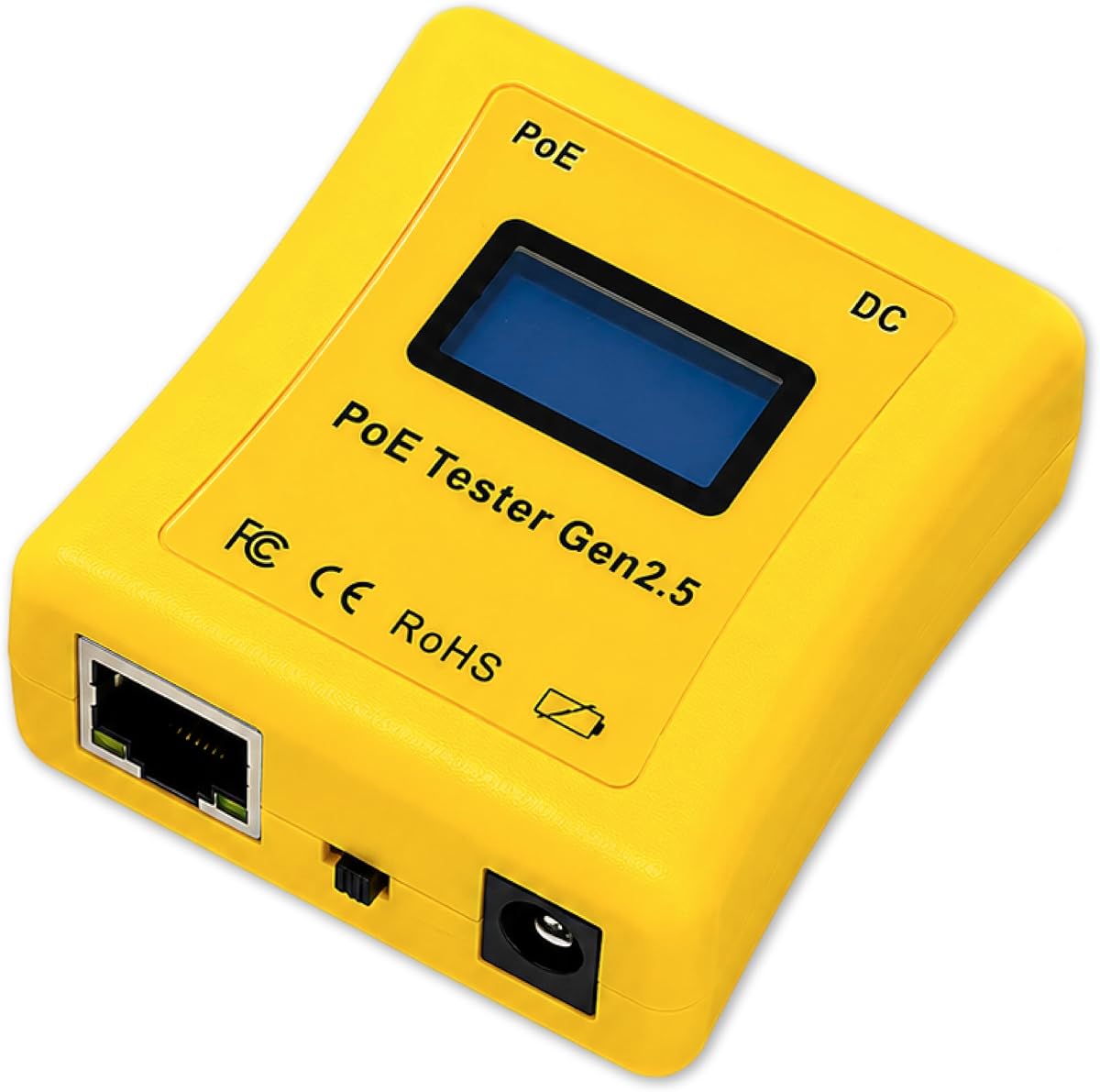
The PoE Texas Voltage & Current Tester has a 4.3 rating and emphasizes a simple, professional diagnostic workflow. It can check PoE type, measure the power consumed by a connected device, evaluate DC supplies, and activate a port on an AF, AT, or BT PoE switch when a powered device is not attached.
We may earn a commission when you buy through this link, at no additional cost to you.
Its Simulate PoE Device mode is particularly useful with managed or auto-negotiating switches. Instead of requiring a full endpoint, the tester can request power and reveal whether the port is operational. As an inline tool, it also reports voltage, current, and power, while its LCD automatically cycles among the principal readings.
The listed measurement capability extends to 280 watts at 56 volts and a DC range of 3.5 to 56 volts, making it capable of handling current high-power devices. The ergonomic body is described as 25 percent smaller than the earlier generation, which improves portability, although automatic cycling can be less convenient than a user-locked display.
This tester is well suited to field technicians who need to activate switch ports, diagnose a powered endpoint, and inspect consumption without batteries. It is less suitable for users who need comprehensive wire-map testing or a large color display. Its emphasis on direct power measurements makes it a dependable companion for installation and maintenance work.
Simulated-device mode allows a technician to confirm that a switch port can negotiate and deliver power. That is useful when commissioning infrastructure before cameras, phones, or access points arrive.
The stated capacity reaches 280 watts at 56 volts, giving the tester relevance for modern 802.3bt deployments. It can help evaluate whether a high-demand device is drawing power within the expected range.
We may earn a commission when you buy through this link, at no additional cost to you.
The NOYAFA NF-488 is a multifunction cable tester with a 4.5 rating. It is especially useful for technicians who need to determine whether a problem lies in Ethernet wiring, PoE configuration, or the power supplied to a device rather than focusing on one narrow measurement category.
We may earn a commission when you buy through this link, at no additional cost to you.
The PoE function automatically identifies standard and non-standard information, including AF or AT voltage standards, power polarity, and jumper methods across a 0–60V range. Its remote wiring system checks for open circuits, short circuits, and crossovers, supports shielded-wire testing, and pairs the remote with a backlit LCD for clear results.
The NF-488 also measures DC current and reports voltage, current, and power between a supply and attached equipment. This versatility comes with some limitations. It is less explicitly oriented toward the newest 802.3bt high-power environment than several dedicated inline models, and its more general design may not offer the same focused live-monitoring experience.
The NF-488 is a compelling choice for low-voltage installers, security technicians, and general IT repair work where both cable integrity and PoE identification matter. Its rating, broad voltage range, remote testing capability, and readable display make it a practical multifunction option, especially when carrying two separate diagnostic tools would be inconvenient.
Remote wire-map testing can locate opens, shorts, and crossovers before a technician assumes a PoE switch or endpoint is faulty. Combining that check with power measurements shortens the diagnostic sequence.
The backlit display and anti-slip casing support field use in equipment rooms and installation spaces. Independent backlighting and shutdown timing add control over visibility and battery usage.
We may earn a commission when you buy through this link, at no additional cost to you.
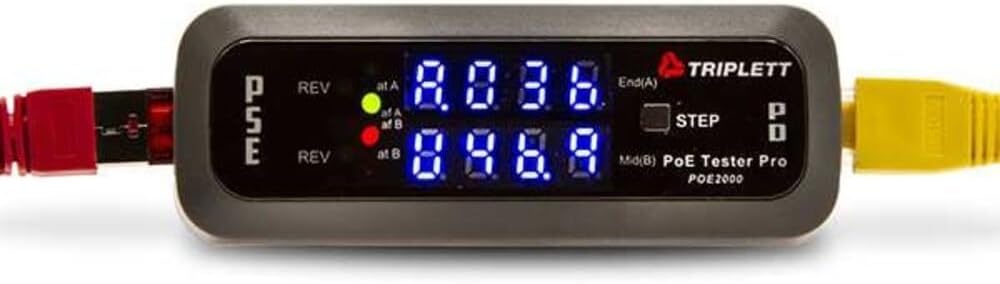
The Triplett POE2000 is an LED-based inline detector designed to identify the structure and behavior of a PoE connection. Its 3.5 rating is the lowest numerical score among the rated products, but its listed features provide useful detail for technicians who work directly with power sourcing equipment.
We may earn a commission when you buy through this link, at no additional cost to you.
Dual seven-digit LED arrays indicate whether power is supplied by End Span on pairs 1/2 and 3/6, Mid Span on 4/5 and 7/8, or across all four pairs. The device also determines whether the connection uses standard or non-standard passive PoE, while two yellow LEDs warn of reversed polarity for the power type.
In inline use, the display alternates among voltage, current, and power. A step button lets the user select a specific value rather than relying only on the automatic sequence. The trade-off is an interface built around indicators rather than a detailed screen, which may be less informative for advanced analysis or documentation.
The POE2000 is a solid option for quick identification of PoE source type, pair allocation, and polarity. Its compact indicator-led approach can be faster than navigating menu-driven displays for routine checks. Buyers seeking live numerical values, comprehensive cable testing, or a broader diagnostic feature set should examine one of the more display-oriented models instead.
The separate LED groups make it possible to determine how power is distributed across the cable pairs. That information helps distinguish common End Span, Mid Span, and four-pair arrangements.
Dedicated reversed-polarity indicators provide immediate feedback on an incorrectly wired power source. This supports fast screening before committing to a more involved installation or repair.
We may earn a commission when you buy through this link, at no additional cost to you.
The Triplett POE3000 is a dedicated inline PoE tester built for detailed identification of power sourcing equipment, and it receives the Best Premium badge for its broad diagnostic specification. It detects PSE type and class, identifies the power source, measures polarity, voltage, current, and power, and determines whether an End Span, Midspan, or four-pair arrangement is present.
We may earn a commission when you buy through this link, at no additional cost to you.
Four LEDs communicate whether the source follows IEEE 802.3af or 802.3at/bt, while two yellow LEDs flag reversed polarity. The tester also determines whether the connection is standard PoE or non-standard passive PoE, which makes it useful in networks that mix vendor-specific or legacy power systems.
Its inline monitoring display alternates among voltage, current, and power, and the step button allows a user to select a specific reading. That gives it some of the practical benefits of a numeric inline analyzer while retaining a relatively direct indicator-led design. The product listing does not provide a numerical customer rating, so its reputation cannot be judged by that measure in this comparison.
The POE3000 is best suited to professional installation and troubleshooting teams that need to know more than whether PoE is present. Its source, class, pair, polarity, and power information can help explain why a device fails to power correctly. Choose it when comprehensive PoE classification matters more than general Ethernet cable continuity testing.
Combining PSE type, class, source, and pair information provides a more complete picture of the power arrangement. That level of detail can shorten diagnosis when several PSE types coexist in the same installation.
A step button gives the operator control over whether voltage, current, or power is shown. The tester therefore supports both rapid source identification and continuous observation of a connected device.
We may earn a commission when you buy through this link, at no additional cost to you.
The Jonard Tools POE-1 combines PoE detection with basic Ethernet cable verification. It supports passive PoE as well as 802.3af, 802.3at, and 802.3bt, and it can report voltage, amperage, and resistance to help determine whether a cable or power delivery path is behaving correctly.
We may earn a commission when you buy through this link, at no additional cost to you.
Cable continuity verification covers Cat5, Cat5e, Cat6, and Cat6a runs. Resistance and continuity information provides a practical way to identify wiring defects that might otherwise be mistaken for a failed powered device. The tool can operate directly from PoE power, while the included AA batteries allow testing of cables that are not energized.
Its package includes a cable remote, female-to-female RJ45 adapter, instruction manual, and two AA batteries. A belt clip and compact enclosure support field portability. However, the product data does not include a numerical customer rating, and the measurement set is less detailed than dedicated units offering explicit power and pair-level classifications.
The POE-1 is a well-rounded choice for technicians who need both cable and power checks in one package. It is particularly useful during installation when a technician must verify continuity before a PoE endpoint is connected. Its broad supported-cable list and included remote make it practical for general network service work.
A single tool can check whether power is present and whether the cable itself has continuity. This reduces the need to make a preliminary wire-map test with a separate device before investigating PoE.
Drawing power from an active PoE line is convenient, but the included batteries cover unpowered cable checks. The tool can therefore be used both before and after infrastructure is energized.
We may earn a commission when you buy through this link, at no additional cost to you.
The PoE Cable Tester has a 4.6 rating, the highest numerical score in this list, and earns the Editor's Choice badge for its unusually broad combination of functions. It verifies standard IEEE 802.3af, 802.3at, and 802.3bt systems, as well as non-standard PoE from 5–60V DC.
We may earn a commission when you buy through this link, at no additional cost to you.
Its 2–80W load detection helps confirm that a switch or injector is supplying adequate power to a connected device. Port flash detection can identify active network ports, making it easier to trace where a cable terminates before conducting deeper power tests.
Cable diagnostics are another major strength. The tester measures CAT5 and CAT6 lengths from 5 to 300 meters, checks continuity up to 600 meters, and identifies shorts, opens, and miswires in both STP and UTP cables. A 1500mAh rechargeable battery, selectable auto-shutoff periods, and a low-battery indicator support extended field sessions.
This is the most complete option in the group for users who need both installation verification and PoE troubleshooting. It is particularly well suited to network contractors, security installers, and facilities teams responsible for cable runs and powered endpoints. The main limitation is that its cable-length range does not cover every possible run, while inactive testing requires attention to the rechargeable battery.
The combination of load detection, port flash, length measurement, and fault identification makes this tool useful at multiple stages of a job. A technician can verify the installation before commissioning and troubleshoot power delivery afterward.
Support extends from common IEEE standards to passive systems operating from 5–60V DC. This broad range is valuable in environments where endpoint vendors use proprietary or legacy power arrangements.
We may earn a commission when you buy through this link, at no additional cost to you.
The Inline Cat5/6 Dvm and Network PoE Tester is designed to combine Ethernet cable diagnostics with digital voltmeter and PoE functions. Its title and supplied description indicate a broad instrument for technicians who want electrical and network checks in one inline format, although the available product information is exceptionally limited.
We may earn a commission when you buy through this link, at no additional cost to you.
Because the product data does not enumerate supported PoE standards, measurement ranges, cable lengths, display details, or included accessories, buyers must verify those specifications before relying on it for a specific workflow. The Cat5 and Cat6 designation is the clearest indication of the intended network-cable application.
The DVM component may make the device useful beyond basic PoE detection, potentially appealing to installers who regularly measure low-voltage DC systems. Still, the supplied information does not confirm exact electrical ranges or accuracy, so those possibilities should be treated as general category characteristics rather than verified specifications.
There is also no published numerical rating for this model, making it difficult to compare customer satisfaction with the better-documented choices in the list. It may suit a technician who values an all-in-one inline instrument, but careful comparison of the current product page is essential. The limited information makes it a less certain recommendation than the well-specified alternatives.
A combined DVM and PoE format can reduce tool switching when a cable problem involves both wiring and power. The exact supported measurements should still be confirmed before field use.
The sparse listing details make current manufacturer or seller documentation especially important. Confirm PoE standards, voltage range, current capability, and cable-test functions against the intended installation.
We may earn a commission when you buy through this link, at no additional cost to you.
The NF-488 Cat5e/6 model has a 4.4 customer rating and combines Ethernet continuity checks with PoE identification and DC power measurements. It supports CAT5 and CAT6 wiring, detecting shorts, crossovers, and open circuits to help locate the root of a poor network connection.
We may earn a commission when you buy through this link, at no additional cost to you.
Its PoE function identifies AF and AT standards, power voltage, polarity, and operating mode. It also recognizes non-standard PoE information. A loop-back test helps determine whether the loop itself is functioning correctly, while the electrical measurement section reports the current, voltage, and power consumed by DC devices.
The stated measurement ranges are 0–60V for voltage, up to 3A for current, and up to 180W for power. Those limits cover many conventional deployments, although they are less expansive than the high-power capabilities described for some dedicated inline tools. The product also includes an LED lamp for illuminating dark equipment spaces.
This NF-488 is a good general-purpose choice for installers and repair technicians who need cable continuity, loop-back, PoE identification, and basic electrical measurements. It is especially useful in confined areas where the built-in work light adds convenience. For newer 802.3bt systems with exceptionally high power demand, verify the limits or consider a tester explicitly designed for that range.
Short, open, crossover, and loop-back checks help separate physical cable problems from power or configuration issues. This makes the tester useful as an early diagnostic step.
Voltage, current, and power measurements provide more context than a binary PoE-present indicator. The 180W power ceiling covers many common devices, though demanding endpoints may require a higher-range instrument.
We may earn a commission when you buy through this link, at no additional cost to you.
The right inline POE tester depends on the standards, cable types, power levels, and faults you need to diagnose. A useful purchase should provide clear readings, support the equipment in your network, and remain convenient to operate at a rack, access point, or remote installation site.
Begin by identifying the PoE types encountered in your work. IEEE 802.3af is the baseline standard, while 802.3at supports higher power and 802.3bt extends capability further into high-power applications. A tester limited to older standards may identify that power is present but fail to communicate the full operating class or expected delivery range. Passive PoE support is also important in environments that include legacy or vendor-specific equipment.
A useful diagnostic instrument should do more than illuminate a PoE-present indicator. Look for voltage, current, and wattage readings, particularly if you need to determine whether a powered device is receiving the amount of power it requires. Measurement ceilings matter for modern access points, cameras, and other demanding endpoints, while broad voltage ranges help identify non-standard passive systems.
Inline tools sit between the PSE and PD so the tester can observe power as it travels through the installation. This is more informative than a simple port checker because it can expose unstable or insufficient delivery under real conditions. A step button or selectable display is helpful when you want to watch one measurement continuously rather than wait for readings to rotate automatically.
PoE problems frequently originate in damaged or incorrectly terminated Ethernet cables. Continuity testing, remote wire-map verification, short and open detection, and loop-back functions help separate installation faults from equipment faults. Check whether the tester covers the cable categories in your facility, such as Cat5e, Cat6, or Cat6a, and whether it can test shielded as well as unshielded wiring.
LED indicators work well for quick identification, but a numeric display provides more detail and reduces interpretation. An OLED or backlit LCD can be especially valuable in dim server rooms and installation cabinets. Consider whether measurements appear together or whether the user must cycle through pages, and whether the screen can lock a selected value for prolonged monitoring.
Many inline PoE testers draw power from the line under test, allowing battery-free use. That is efficient during active troubleshooting, but it can limit testing of an unpowered cable. Some models include batteries for offline wire checks, while others use a rechargeable cell with an automatic shutdown timer. Evaluate which arrangement best fits the stages of your typical workflow.
Advanced models can identify Endspan, Midspan, four-pair delivery, PSE type, class, polarity, and the specific pairs carrying power. This information is valuable in networks with managed switches, injectors, and unusual power arrangements. It also helps identify reversed polarity, a condition that may prevent a device from powering even when the switch reports that PoE is available.
Field technicians often carry testers between customer locations, so size, weight, screen visibility, and storage matter. A belt clip, pocket-sized enclosure, backlight, or work lamp can make a noticeable difference during repeated installations. Cable remotes and RJ45 adapters should also be included when needed for remote or nonstandard connections, and the full accessory package should be checked before ordering.
Start by identifying whether the connection is standard IEEE PoE, passive PoE, or a conventional DC source. Connect the tester in the manner appropriate to its mode, then select the matching operating option. For inline testing, place the instrument between the PSE and PD without leaving an unconnected or incorrectly wired cable in the path. Before handling exposed connectors or energizing unfamiliar equipment, check that the installation is safe and in the expected state.
Read the displayed or indicated information systematically rather than focusing on a single value. Confirm PoE standard or source type first, then examine voltage, current, power, and polarity as relevant. If a result is unexpected, repeat the test with a known-good cable or endpoint and use continuity, wire-map, or loop-back functions to rule out a physical cable fault. Record the values when an intermittent problem may need further investigation.
Care for the tester by keeping connectors clean, protecting the enclosure from impact, and following the battery guidance supplied with the model. Remove batteries during long periods of storage if the manufacturer recommends it, recharge rechargeable units as directed, and avoid exposing the instrument to moisture, excessive heat, or solvents. Periodic checks against a known PoE source can reveal a depleted battery, a damaged remote, or an unreliable connection before a field job depends on it.
An inline PoE tester is placed between a power sourcing device, such as a PoE switch or injector, and a powered device. It can identify the applicable PoE type, show voltage, current, and power, and reveal issues such as insufficient delivery, reversed polarity, or an unstable connection. It is particularly useful when a port appears active but the connected endpoint does not function normally.
A compatible inline tester should be safe when connected and operated according to its instructions. The important precaution is to confirm that the tester supports the source voltage, PoE standard, and connection arrangement being examined. Using a device on an unfamiliar high-voltage or proprietary system without confirming compatibility can lead to unreliable readings and potential equipment damage.
That depends on the model. Dedicated inline testers primarily focus on PoE detection and electrical measurements, while multifunction tools may also provide continuity, open, short, crossover, wire-map, or loop-back checks. The NOYAFA and Jonard options in this list include cable-testing functions, while several dedicated inline instruments concentrate on source, polarity, class, and power measurements.
Standard PoE follows recognized IEEE 802.3af, 802.3at, or 802.3bt specifications, including defined negotiation and power-class behavior. Passive PoE generally supplies power without the same standardized negotiation process and may use a non-standard voltage or polarity. A tester that supports both can identify more systems, but care is still needed to verify that the electrical arrangement is safe for the attached device.
The switch may be delivering power on a pair arrangement, polarity, voltage, or class that the endpoint does not accept. A damaged cable, poor termination, overloaded port, incompatible passive injector, or faulty adapter can also interrupt the path. Measuring voltage, current, and power and then testing cable continuity can help separate these possibilities.
Many self-powered models draw energy directly from the PoE or DC source they are testing. That is convenient for diagnosing an energized installation, but it may prevent measurements on an unpowered cable. Products with removable or rechargeable batteries can support offline testing, so check the power requirements before choosing a model for pre-installation work.
Look for a display that clearly identifies voltage, current, power, polarity, PoE type, or source classification relevant to your work. A step button or selectable readout is useful when you want to monitor one value continuously. LED-only testers are efficient for quick checks, while OLED and backlit LCD models generally provide more detail for complicated diagnoses.
It can if it supports the relevant standards, passive power arrangements, voltage range, and power class. Older 802.3af devices may work with a modern tester that also supports 802.3at and 802.3bt, while passive systems require explicit passive-PoE detection. Also verify that the tester's current and power limits exceed the requirements of high-demand endpoints.
The best-supported all-around option in this guide is the PoE Cable Tester with a 4.6 rating because it combines standard and passive PoE checks with load detection, port flash, cable length measurement, and fault identification. The NOYAFA NF-488 stands out as a budget-oriented multifunction choice, while the Triplett POE3000 provides an advanced indicator-based approach to PSE source, class, polarity, and inline power classification.
Prioritize the capabilities your work demands. A technician focused on live power delivery should seek accurate voltage, current, and wattage readings, high-power compatibility, and selectable displays. Someone responsible for cable installation should also consider continuity, wire-map, length, short and open detection, and loop-back functions. Mixed-service professionals will benefit most from a unit that handles standard, passive, and DC sources without switching tools.
Before making a final selection, verify the current specifications, included accessories, and compatibility with your cabling and endpoint standards. Ratings and product configurations can change, and the best choice for an active installation may differ from the best choice for a pre-commissioning cable check. As with any purchase, compare current availability and prices before ordering.