
Playnex Two-Controller Pack
4.3Editor score
Two controllers included
Hall Effect joystick sensing
Programmable rear buttons
USB-C rechargeable battery
RGB lighting and motion control
Compare 10 Hall Effect Nintendo Switch 2 controllers across joystick performance, drift resistance, battery life, features, compatibility, comfort, and overall
A Hall Effect Nintendo Switch 2 controller uses magnetic sensing to detect joystick movement without relying on the physical contact used by traditional potentiometer sticks. That design can reduce wear and drift, making it appealing for platformers, fighting games, shooters, and any player who values consistent directional input across a long gaming session.
The controllers in this guide were compared using the supplied specifications, compatibility claims, ratings, battery information, control features, and included accessories. We considered Hall Effect sensing, supported devices, wake-up behavior, motion controls, vibration, programmability, trigger options, charging arrangements, and comfort-related design details rather than claiming hands-on testing.
Each review explains where a controller stands out, where buyers may need to compromise, and which kinds of players may prefer it. Rankings reflect the information supplied for these products. Prices, firmware behavior, software availability, and promotional offers can change, so confirm the current listing and requirements before purchasing.
4.3Editor score

4.6Editor score

4.3Editor score
This side-by-side comparison highlights the major differences among all ten controllers, including Hall Effect joystick technology, device support, control customization, battery capacity, lighting, motion features, and charging accessories.




The AceGamer two-controller pack combines Hall Effect joysticks with a generous feature set and a 4.4 rating. It supports Nintendo Switch, Switch Lite, Switch OLED, and Switch 2, making it a practical choice for players who want one controller for multiple Nintendo systems. The red-and-blue pairing is particularly useful for couch gaming, local multiplayer, or keeping separate controllers for different users.
We may earn a commission when you buy through this link, at no additional cost to you.
Its Hall Effect sticks are described as resistant to the wear, insensitivity, and drift associated with conventional joystick modules. The claimed lifespan of up to five million rotations makes the technology particularly relevant to players who put heavy demands on platforming, fighting, or competitive action games. A six-axis gyro supports motion-controlled play, while dual motors provide four selectable vibration levels for different feedback preferences.
Programmability is a major strength. The rear M1 and M2 buttons can perform single or multiple assignments across a broad selection of face, shoulder, trigger, stick, and directional inputs. Three turbo rates—five, 12, and 20 shots per second—add another layer of customization. These capabilities are useful for repeatable actions, although players should verify that their preferred assignments work as intended in each game.
The main tradeoff is that the package does not include a charging dock. The listed 800 mAh battery is described as providing approximately 12 hours of continuous play and recharging in three to four hours, which is generous, but a USB-C charging cable and suitable charging setup are needed. This controller is a strong recommendation for households wanting two well-equipped controllers rather than a single premium dock-based model.
Receiving two distinct controllers removes the usual need to purchase a second compatible unit separately. That makes the pack especially useful for local multiplayer, shared family sessions, and players who keep one controller connected to the television and another available for handheld or alternate system use.
Single and multiple rear-button assignments give players more room than a standard controller layout. Combined with three turbo speeds and four vibration levels, the programming options let users adapt the controller to shooters, action games, and games with less conventional control schemes.
We may earn a commission when you buy through this link, at no additional cost to you.
The 8Bitdo Ultimate 2 is the premium-oriented selection in this guide, combining a 4.3 rating with one of the most distinctive accessory packages. Its integrated charging dock keeps the controller ready for use and automatically reconnects it when removed. The dock also adds a display-oriented charging routine that is more convenient than placing the controller on a cable and searching for it later.
We may earn a commission when you buy through this link, at no additional cost to you.
Unlike the other models here that primarily advertise Hall Effect sticks, the Ultimate 2 uses TMR joystick technology and describes its advantages as greater sensitivity, precision, durability, and wear resistance. Its trigger mode switch offers a particularly notable choice between linear Hall Effect triggers and non-linear tactile triggers. That flexibility can appeal to players who want analog trigger travel in one game and a more conventional physical response in another.
The controller also supports Switch 2, original Switch, and Windows, with vibration and motion control provided for Switch. A firmware update is required for Switch 2 compatibility, and both the controller and adapter must be brought up to date. Turbo, wake-on-shake, RGB fire rings, and 8Bitdo Ultimate Software V2 round out the feature set, though those features may not apply identically on every supported platform.
Its premium case rests on the charging dock, trigger flexibility, and polished multi-device positioning rather than simply having the largest battery specification. Motion support is not listed for Windows, and software configuration may require an extra step. Still, for someone who wants a controller to live on a dock and move easily between Nintendo and PC gaming, the Ultimate 2 is one of the most complete options in the list.
The switch between linear Hall Effect and tactile triggers is unusually useful because trigger feel varies considerably between shooters, racing games, action titles, and ordinary platformers. Players can match the response to the game rather than accepting one permanent compromise.
The integrated charging dock provides a clear home for the controller and restores the wireless connection when it is removed. Automatic reconnection can make sessions smoother, particularly for players who alternate regularly between docked television play and nearby handheld use.
We may earn a commission when you buy through this link, at no additional cost to you.
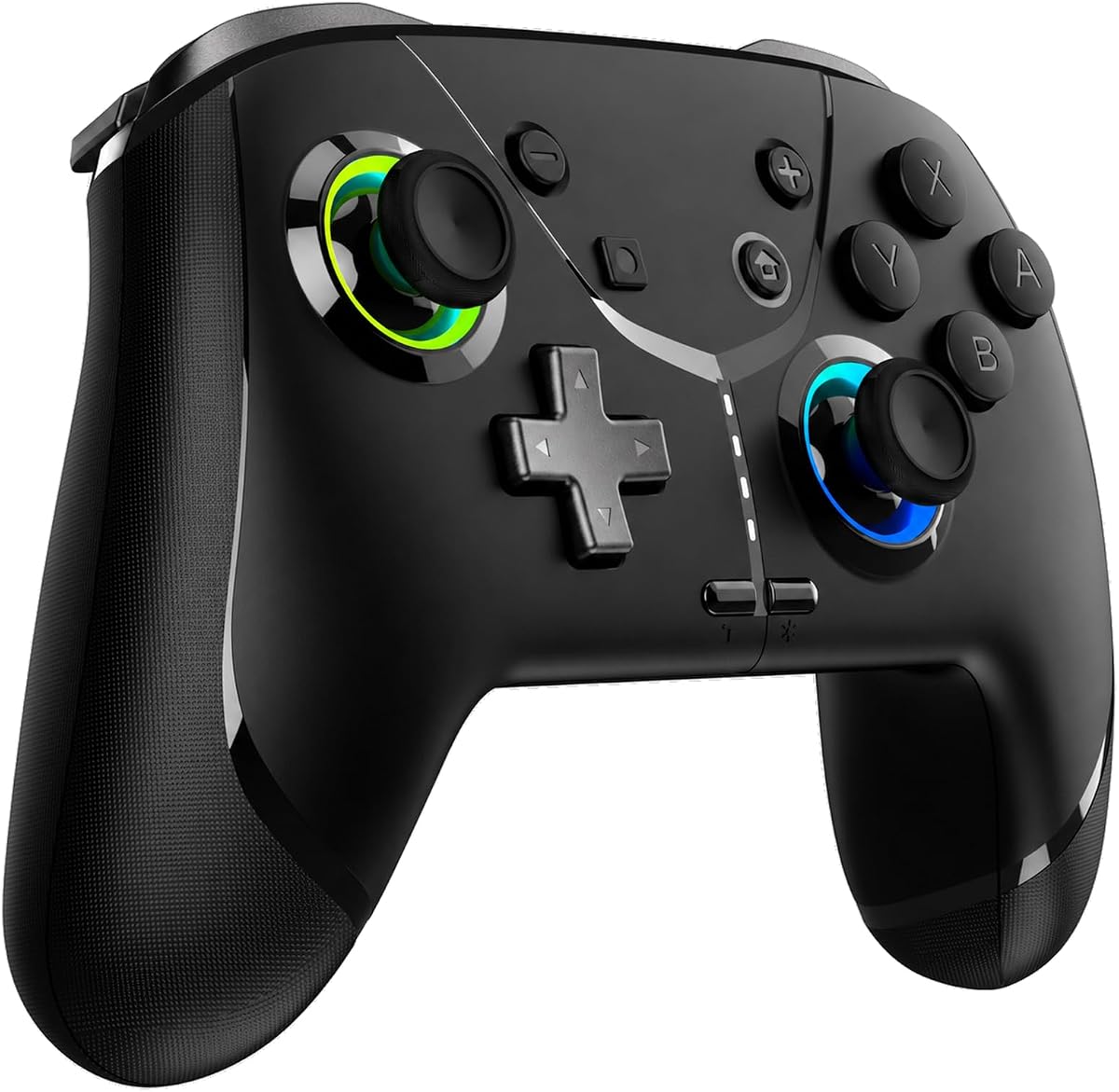
The Playnex two-controller pack delivers Hall Effect sticks, local multiplayer hardware, and cross-platform support with a 4.3 rating. Both controllers work with Nintendo Switch 2, Switch, OLED, and Lite systems, while Windows PC support broadens their utility. The package is particularly appealing when the first priority is equipping a multiplayer gathering with two complete wireless controllers.
We may earn a commission when you buy through this link, at no additional cost to you.
Hall Effect sensing is designed to reduce mechanical wear and deliver smooth, precise movement across action, racing, fighting, and sports games. The controllers include rear M1 and M2 macro buttons, three turbo speeds, and four vibration levels. A 600 mAh rechargeable battery, USB-C charging, RGB lighting, and six-axis motion control create a feature set that goes beyond basic replacement-gamepad functionality.
The wireless connection is listed as stable across up to 10 meters, and Home-button wake-up is available on supported Switch consoles. That last qualification matters because functionality can vary by system and setup. The absence of a dock also means the controllers must be charged separately, although USB-C charging keeps the process straightforward for most modern setups.
This is a strong recommendation for buyers who want two controllers, broad device support, and useful customization without prioritizing a charging dock. It is less compelling for someone who values a premium trigger system or extensive battery capacity, but for a complete multiplayer package, the Playnex approach is clear and efficient.
A two-pack is often more useful than a single controller with a premium accessory, especially for local multiplayer. The included units support Nintendo systems and Windows, so the same pair can cover handheld, television, and PC gaming sessions.
Rear macros, adjustable vibration, and three turbo speeds provide meaningful customization while remaining easy to understand. The controls can be adjusted for different action, racing, and fighting preferences without requiring a more complex accessory package.
We may earn a commission when you buy through this link, at no additional cost to you.
The AceGamer Wireless Pro Controller earns a 4.5 rating and stands out for its compatibility range and extensive feature set. It supports Nintendo Switch 2, Switch, Windows PC, Steam Deck, iOS, and Android. That cross-platform positioning makes it one of the more versatile options for buyers who move between console, handheld PC, and mobile devices.
We may earn a commission when you buy through this link, at no additional cost to you.
Hall Effect joysticks are promoted as a solution to drift, wear, and reduced sensitivity, with a stated lifespan of up to five million rotations. The controller combines those sticks with a six-axis gyro, dual vibration motors, and four feedback levels. Its wake-up function allows supported Nintendo systems to resume directly from sleep, closely matching the convenience players expect from first-party hardware.
The programmable M1 and M2 buttons support single and multiple assignments across common game controls. Three-speed turbo adds rapid-fire options, while the 800 mAh battery is listed for roughly 12 hours of continuous play after a three-to-four-hour charge. Automatic shutdown helps reduce accidental battery drain during longer periods away from the console.
The main limitation is the lack of an integrated charging dock, and the screenshot function may not be equally available across every compatible platform. A wired connection method is not clearly emphasized in the supplied information. Despite that, the 4.5 rating, extensive compatibility, and macro flexibility make this an attractive general-purpose choice for multi-device gamers.
Support for Nintendo consoles, PC, Steam Deck, iOS, and Android gives this model unusual range for a Switch-focused controller. It is particularly relevant to buyers who want one peripheral for more than one gaming ecosystem rather than a separate gamepad for each device.
The listed 800 mAh capacity and approximately 12-hour continuous-play claim give the controller a useful endurance advantage. A full charge reportedly takes three to four hours, while automatic shutdown after inactivity helps preserve remaining power between shorter sessions.
We may earn a commission when you buy through this link, at no additional cost to you.
The Diswoe Wireless Pro Controller is a feature-rich option rated at 4.3. It supports Nintendo Switch, Switch OLED, Switch Lite, Switch 2, and PC, giving it broad relevance for mixed-console households. Its asymmetrical shape and non-slip grips are designed to keep the controller stable and reduce hand fatigue during extended play.
We may earn a commission when you buy through this link, at no additional cost to you.
The Hall Effect joystick system uses magnetic sensing to avoid the direct mechanical contact associated with conventional analog sticks. That approach is presented as a way to improve accuracy and longevity while reducing the chance of drift. Four selectable vibration levels allow players to choose between stronger feedback and quieter operation, which is useful at night or in shared spaces.
Programmable controls are limited to the face and shoulder buttons specified for the turbo function, with three rates of five, 12, and 20 shots per second. A dedicated screenshot button adds a convenient shortcut for capturing moments. The Home button can wake the console after a one-second press, while the 600 mAh battery is listed for approximately eight to 12 hours of play following a two-to-three-hour charge.
The principal caveat is that PC use is described through a wired connection rather than broad wireless multi-platform support. Some supplied wording presents magnetic sensing as eliminating wear indefinitely, which should be read as the intended mechanical advantage rather than a literal guarantee. Even with those qualifications, the controller offers a generous feature set and strong platform coverage.
The asymmetrical ergonomic layout and skin-friendly non-slip grips are designed to distribute the controller naturally across the palms. These details can matter as much as raw stick technology during marathon play, particularly in games that demand constant directional corrections.
Four vibration settings cover full intensity, reduced levels, and an off position. That range lets players preserve impact feedback when wanted while reducing console noise or disturbance when playing more quietly.
We may earn a commission when you buy through this link, at no additional cost to you.
The Luminex Bluetooth Controller is defined as much by its charging dock and concealed lighting as by its Hall Effect sticks. The controller and dock contain hidden LED arrangements with 60 lights, seven color choices, and three lighting modes. When illuminated, the design emphasizes a personalized gaming setup; when off, the concealed pattern remains visually restrained.
We may earn a commission when you buy through this link, at no additional cost to you.
The dock does more than recharge the controller. It synchronizes with the controller lighting and provides a convenient place to store the gamepad between sessions. The controller itself uses Hall Effect sensors for precise movement, while programmable back buttons, turbo functions, vibration adjustment, and macro settings cover the expected customization features for a modern Switch-oriented pad.
An app link expands the configuration options. Players can use the connected app for remapping, joystick adjustment, motor control, lighting effects, and auto-shutdown timing. That flexibility is substantial, although it also makes the controller more dependent on software setup. One-click wake-up is supported for Nintendo Switch 2 and OLED systems according to the supplied information.
The supplied product data does not state a battery capacity, so battery endurance is more difficult to evaluate than on models with explicit 600, 800, or 1000 mAh figures. This is a compelling option for players who prioritize a coordinated dock, concealed lighting, and app-level tuning, but less ideal for someone who wants battery specifications visible before making a decision.
The concealed design keeps the LEDs from looking constantly active when the system is off. Once illuminated, the honeycomb-like presentation and multiple modes create a more deliberate visual identity than a permanently exposed strip of conventional lighting.
The companion app can handle remapping, motor behavior, lighting patterns, joystick adjustment, and shutdown timing. This creates room for personalized profiles, though buyers who prefer a simple plug-and-play controller may find the setup process more involved than necessary.
We may earn a commission when you buy through this link, at no additional cost to you.
The NBCP Wireless Controller has the highest customer rating in this selection at 4.6, making it the leading general-purpose recommendation. It combines Hall Effect joysticks with support for Switch, Switch OLED, Switch Lite, Switch 2, PC, PlayStation 3, Android, and iOS. Wired and 2.4G wireless operation provide additional flexibility beyond a basic Bluetooth gamepad.
We may earn a commission when you buy through this link, at no additional cost to you.
Its response figures are a major point of distinction. The supplied data lists up to 1000Hz response in wired mode and 650Hz over 2.4G wireless. For fast action, competitive fighting, and shooter play, lower input lag and frequent signal updates are meaningful considerations. The sticks use Hall Effect sensing to reduce mechanical wear and support steadier directional accuracy over time.
Programmable patterned RGB lighting gives the controller a distinctive appearance, while the skin-soft, non-slip surface is intended to improve comfort during long sessions. Dual vibration motors provide feedback, and automatic or semi-automatic turbo modes can simplify continuous firing. Programmable rear buttons add another layer of control for titles that benefit from remapped actions.
The package includes one controller, a charging cable, and a manual, but no dock or stated battery capacity. That means the strongest documented reasons to choose it are stick technology, platform breadth, connection modes, and response claims rather than bundled charging convenience. For a buyer who wants one flexible controller across console and PC use, it remains the strongest overall balance in this group.
The listed 1000Hz wired and 650Hz 2.4G wireless response rates give competitive players a reason to consider both connection methods. Wired mode can serve a stationary setup, while 2.4G provides cable-free freedom without asking buyers to rely solely on Bluetooth.
A skin-soft, non-slip texture is designed to remain comfortable through marathon sessions. Patterned programmable RGB adds visual distinction without changing the underlying control layout, making the controller appealing to buyers who want performance features and a more distinctive appearance.
We may earn a commission when you buy through this link, at no additional cost to you.
The aghi Switch 2 Pro Controller combines a 4.4 rating with one of the more capable macro systems in the guide. Its rear AL and AR buttons can be assigned to A, B, X, Y, joystick, trigger, D-pad, and plus or minus inputs. A macro recorder can capture sequences up to 30 seconds long and can be configured to loop for repeated actions.
We may earn a commission when you buy through this link, at no additional cost to you.
Hall Effect joysticks provide contact-free magnetic sensing intended to reduce common drift and preserve precise input over extended use. A six-axis gyro supports motion control, while dual vibration motors offer four listed levels: off, 50%, 70%, and 100%. Turbo functionality provides automatic firing at 5, 10, or 15 shots per second, giving users a different rate range from the 5, 12, and 20 options found on several AceGamer models.
One-key wake-up works across Switch 2, Switch, Switch Lite, and Switch OLED according to the supplied information. The initial Switch 2 pairing process is more involved: the Joy-Cons must be removed, pairing must be initiated through Change Grip/Order, and the Joy-Cons must be reattached within 20 seconds. Later wake-up and automatic reconnection are simpler.
The 800 mAh battery is listed for 15 to 20 hours of play and a two-to-three-hour charge, exceeding the stated duration of several rivals. Seven RGB effects add customization. The special pairing procedure and nonstandard turbo rates require a little learning, but the macro depth and battery specification make this a compelling choice for players who automate repetitive actions.
The ability to record and loop sequences expands the rear buttons from simple shortcuts into fuller automation tools. This can reduce repetitive input in supported games, particularly for repeated attacks or resource actions, provided players configure and verify each sequence responsibly.
A listed 15 to 20 hours of play is among the stronger battery claims in the guide. The two-to-three-hour recharge time remains practical for regular use and gives the controller a practical edge for travel, events, and longer sessions away from a dock.
We may earn a commission when you buy through this link, at no additional cost to you.
The EasySMX S10C combines a 4.3 rating with the largest stated battery capacity in the guide. Its 1000 mAh rechargeable battery is advertised for up to 22 hours of play, making it a notable option for players who travel frequently or want fewer charging interruptions. Hall Effect joysticks help reduce drift, while silicone glide rings are intended to support smooth movement.
We may earn a commission when you buy through this link, at no additional cost to you.
Motion input is handled by a nine-axis system, one of the more extensive specifications listed among these controllers. It supports aiming, steering, and swinging actions across compatible games. A dedicated C button enables voice chat, and the controller also provides two programmable back buttons, adjustable vibration, mechanical ABXY buttons, responsive triggers, and turbo functionality.
One-button wake-up is designed for Switch 2, while the broader compatibility list includes Switch, PC, Android, and iOS. That makes it suitable for console, desktop, and mobile gaming. The two back buttons are less extensive than the four-button configurations offered by some rivals, but they still provide useful room for remapping without making the controller bulky.
Swappable faceplates add a visual and tactile element that most competitors in the list do not emphasize. The controller uses anti-slip ergonomic grips and is not supplied with a charging dock. It is a good fit for buyers who prioritize battery endurance, motion control, voice chat, and appearance over maximum back-button count.
The 1000 mAh battery and stated 22-hour maximum playtime give the S10C the strongest endurance claim here. It is particularly relevant for travelers and players who use the controller away from a reliable charging dock, although real-world use will depend on connection type and settings.
Swappable faceplates let owners alter the controller's appearance without replacing the entire gamepad. This is a simple visual customization option that can help distinguish a shared controller, reflect a preferred theme, or simply freshen the look of a familiar device.
We may earn a commission when you buy through this link, at no additional cost to you.
The FUNLAB Firefly Z is rated at 4.4 and uses a distinctive hidden-glow design to stand apart from brightly illuminated competitors. The controller appears plain black when the lighting is off, while a concealed honeycomb pattern becomes visible when powered in seven RGB colors. Breathing, flash, motion, and always-on modes provide several presentation options.
We may earn a commission when you buy through this link, at no additional cost to you.
Hall Effect sensors are used for the joysticks and are promoted as providing accurate, smooth control with less mechanical wear. Programmable back paddles support remapping, while turbo provides continuous-fire functionality for compatible shooting and fighting games. One-button wake-up is available for Switch 2 systems, and the supplied information points users to a tutorial for the setup procedure.
The KeyLinker app adds deeper control by supporting button remapping, complex turbo and macro commands, motor vibration adjustment, and RGB pattern changes. This is a strong software ecosystem for players who enjoy tuning their equipment. Low-latency wireless Bluetooth and wired modes are also offered, giving users a choice based on their setup or the demands of a particular game.
Compatibility spans Switch 2, Switch 1, OLED, Lite, Windows PC, Android, and Steam Deck. No charging dock or battery capacity is stated in the supplied data, which makes endurance harder to compare. For buyers who prioritize a polished visual design and deep app-based customization, the Firefly Z is an attractive final recommendation.
The concealed honeycomb pattern creates a different visual effect from a permanently exposed RGB strip. Seven colors and several animation modes let the controller shift from understated to expressive depending on the player's setup and mood.
The companion app supports remapping, macro creation, turbo configuration, vibration changes, and lighting patterns. It offers more control than a basic onboard button, making the Firefly Z especially suitable for players who want to adapt one controller across different games and platforms.
We may earn a commission when you buy through this link, at no additional cost to you.
The right controller depends on how you play, which systems you own, and how much customization you want. Compare stick technology, platform support, battery life, triggers, connectivity, charging needs, motion controls, and programmable features before making a choice.
Hall Effect joysticks detect movement through magnetic sensing rather than the sliding contact used by conventional potentiometer modules. The mechanical separation can reduce the wear associated with repeated directional input and is intended to limit common drift problems. This makes the technology especially attractive for platformers, fighting games, shooters, and emulated retro titles where small directional errors can affect the experience.
Choose a controller with Hall Effect sensing for both sticks whenever possible, rather than assuming the label applies to every analog input. Pay attention to the specific wording of each listing. The 8Bitdo Ultimate 2 uses TMR joysticks while offering Hall Effect triggers, whereas the other models primarily emphasize Hall Effect sticks.
Every controller in this guide lists Nintendo Switch 2 support, but platform claims differ elsewhere. Some also cover the original Switch, Switch Lite, Switch OLED, Windows PC, Steam Deck, Android, iOS, or even PlayStation 3. Check both the console and the required connection method, because PC compatibility may depend on wired, 2.4G wireless, or Bluetooth operation.
Firmware can also matter. The 8Bitdo Ultimate 2 specifically requires both the controller and adapter to be updated to the latest firmware for Switch 2 compatibility. Review current system requirements before ordering, particularly if you plan to use a new console, a less common operating system, or a platform with limited third-party controller support.
Battery endurance varies substantially among these controllers. Published figures range from a 600 mAh capacity on the Playnex, Diswoe, and related models to an 800 mAh capacity on several AceGamer and aghi controllers, while the EasySMX S10C lists 1000 mAh. Stated playtime ranges from about eight hours to as much as 22 hours, depending on the model and usage conditions.
Also consider charging convenience. The 8Bitdo Ultimate 2 and Luminex controller include docks, while most others rely on cable charging. A dock is convenient if the controller has a fixed place in your room, but it is not automatically essential for a player who already has a good USB-C charging routine.
Input feel depends on more than the sticks. The 8Bitdo Ultimate 2 offers a trigger mode switch between linear Hall Effect and non-linear tactile response, giving it unusual flexibility. The EasySMX emphasizes mechanical ABXY buttons and responsive triggers. Other controllers focus on dual vibration motors, pressure-sensitive feedback, programmable rear buttons, or automatic turbo functions.
Think about the games you actually play. Fighting and shooting players may prioritize trigger response, stick precision, and remappable rear controls. Platform and action players may care more about reliable directional input, macros, and motion support. A feature is only valuable if the software or genre gives you a reason to use it.
Programmable controls range from simple rear-button assignments to full macro recording and looping. The aghi controller can record sequences up to 30 seconds, while AceGamer models support single and multiple assignments across a broad selection of inputs. The FUNLAB Firefly Z and Luminex controller add macro configuration through companion apps.
Check whether the controller supports the specific buttons and modes you need. More buttons do not guarantee better control; the clarity of the programming interface and the ability to save or disable assignments matter. Users should also verify whether remapping is available for their chosen platform, because app-based features can behave differently across systems.
Motion support can make aiming, steering, and swinging games feel more immersive. Most controllers in the list include a six-axis gyro, while the EasySMX S10C lists a nine-axis motion system. Vibration levels are widely adjustable, with common options including off, 30%, 70%, and full strength, although exact ranges differ by model.
Strong feedback is not automatically desirable for every player. Quiet modes help during late-night play or when family members are nearby. Motion control is useful only if your console and games support it, and the 8Bitdo listing limits its motion feature to Switch. Consider whether these functions are part of your regular routine before assigning them significant value.
Controllers in this guide support Bluetooth, and several also offer 2.4G wireless or wired modes. NBCP lists response rates of up to 1000Hz wired and 650Hz over 2.4G, while the FUNLAB Firefly Z provides low-latency Bluetooth and wired operation. For a stationary gaming setup, a wired mode can simplify connection and avoid wireless interference.
One-button console wake-up is a useful quality-of-life feature, but its setup process varies. The aghi model requires a specific Joy-Con removal and reattachment procedure for initial Switch 2 pairing. Some products point buyers to a tutorial, so review the listing before purchase and avoid touching the sticks during initial connection if the manufacturer warns against it.
Lighting and ergonomics are personal preferences, yet they affect daily use. The Luminex controller and FUNLAB Firefly Z use concealed lighting, NBCP offers patterned RGB, and several other models include simpler RGB effects. For comfort, look for non-slip surfaces, shaped grips, and the weight distribution that feels natural to your hands.
Accessories can materially improve convenience. The Playnex and AceGamer packs include two controllers, while the 8Bitdo Ultimate 2 and Luminex include docks. The NBCP package includes a charging cable and manual but no dock. Compare the complete package rather than focusing only on the controller itself, especially when buying for more than one player.
Begin by fully charging the controller before its first major session using the supplied cable or the manufacturer's recommended method. Read the pairing instructions for your exact model because initial Switch 2 setup can differ from later reconnection behavior. If the product includes a dock, seat the controller correctly and confirm that charging and wireless reconnection are working before organizing the buttons and lighting.
Calibrate or test the joysticks when the system or app provides that option, and keep the sticks unobstructed while pairing. Open the companion app for remapping, vibration, lighting, macros, and trigger settings rather than assigning every function through quick button combinations. Test each new profile in a familiar game, then reduce motion, vibration, turbo, and macro intensity where appropriate.
For care, keep the controller away from moisture, excessive heat, dust, and impacts. Do not push the sticks sideways or rest heavy objects on them. Clean the shell and grips with a lightly damp soft cloth, avoid spraying liquid directly onto the controller, and periodically check the charging port, battery behavior, stick response, and firmware status. Magnetic Hall Effect parts do not eliminate the need for sensible storage and handling.
Hall Effect joysticks detect input magnetically without the direct physical contact used by many conventional analog sticks. That separation is designed to reduce mechanical wear and common drift while maintaining precise directional control. The actual experience still depends on stick calibration, firmware, build quality, and how the controller is used.
No controller should be treated as literally incapable of developing an input problem. Hall Effect sensing reduces one common source of wear because the stick mechanism does not need to maintain continuous contact with a potentiometer, but calibration, electronics, damage, contamination, and other factors can still affect performance. A persistent movement that the character does not command should be addressed promptly.
Yes, every controller listed here states compatibility with the original Nintendo Switch or Switch 1. Some also support Switch Lite and Switch OLED, while all include Nintendo Switch 2 in their stated supported systems. Verify the particular model's connection requirements and any firmware instructions before first use.
The 8Bitdo Ultimate 2 specifically states that both the controller and adapter require the latest firmware for Switch 2 compatibility. Other controllers may also benefit from firmware updates or app updates, although the supplied information does not make that a universal requirement. Updating software can improve compatibility and expand available customization options.
The Playnex and AceGamer packs are the most convenient choices because each includes two controllers. The Playnex package supports Switch 2, Switch, OLED, Lite, and Windows PC, while the AceGamer pair emphasizes Switch compatibility, programmable controls, gyro support, and a larger stated battery. Buyers should compare device needs, button programming, and charging arrangements rather than package size alone.
No, although a dock provides a convenient storage and charging location. The 8Bitdo Ultimate 2 includes an integrated dock with automatic reconnection, and the Luminex model combines its dock with concealed lighting. Other controllers use USB-C charging and may offer stronger battery specifications or a lower-tier feature set, so the dock is only one part of the comparison.
Rules vary by game, tournament, and platform. Turbo and macros can be restricted in competitive settings even when a controller supports them functionally. Players should check current event rules and avoid relying on automated inputs where they are prohibited, especially in ranked or sanctioned competition.
First recalibrate the controller if the system or companion app provides a calibration tool, and reconnect it as directed by the manufacturer. Check that the stick is not obstructed and that no physical damage or unusual resistance is present. If the input continues to drift after troubleshooting, avoid forcing the stick and contact the seller or manufacturer for warranty support.
The NBCP Wireless Controller is the strongest overall choice for its 4.6 rating, dual Hall Effect sticks, wired and 2.4G options, detailed response-rate claims, and broad platform support. The Playnex pack is the better value-oriented recommendation for local multiplayer, while the 8Bitdo Ultimate 2 stands out as the premium model with an integrated dock and switchable linear Hall Effect or tactile triggers.
Prioritize the features you will actually use. Players focused on long sessions should examine battery capacity, trigger response, stick precision, and charging convenience. Competitive and action-game players should pay close attention to latency, remappable controls, motion support, and stick construction. Households should confirm the number of controllers needed, device compatibility, and whether a dock or second gamepad will serve better.
Before purchasing, confirm the current listing details, platform requirements, firmware instructions, and warranty information. Prices and promotional terms can change, and software updates may alter available features. The most valuable choice is the controller whose stick system, battery life, controls, and compatibility align with the games and devices you use most often.
