
AIMZENIX BLADER Adapter
4.0Editor score
Broad console compatibility
Custom shortcut mapping
Adjustable mouse sensitivity
Mouse Grip Adapter for Switch 2 guide compares grips, controller cases, thumb grips, and keyboard-mouse converters for comfort, control, and compatibility.
A mouse grip adapter for Switch 2 is most useful when you want more comfort, steadier control, or a different control style than the standard Joy-Con shape provides. The right accessory should fit securely, preserve access to buttons and sticks, match your preferred games, and remain comfortable during extended play.
We compared the listed products by examining their stated Switch 2 compatibility, ergonomics, attachment method, control features, supported devices, and practical limitations. The list includes purpose-built grips, controller cases, thumb grips, wrist straps, and keyboard-and-mouse converters because each offers a distinct way to improve handling.
The selections show which options prioritize a traditional grip, better portability, flexible input conversion, accessory protection, or more precise aiming. Ratings and product details reflect the supplied listings, while prices and availability can change, so readers should confirm current information before purchasing.
4.0Editor score


4.2Editor score
This side-by-side comparison separates direct mouse-style grips from ergonomic cases, thumb grips, wrist straps, and input converters, making it easier to identify the accessory that best matches your comfort, portability, and control requirements.



This is the most directly aligned product in the list for anyone searching specifically for a mouse grip adapter for Switch 2. Its listing identifies it as a new game-controller grip accessory designed for the Nintendo Switch 2 and includes support for both the left and right sides. No customer rating is supplied, so the strongest evidence in its favor comes from the focused product positioning rather than a numerical score.
We may earn a commission when you buy through this link, at no additional cost to you.
The primary benefit is the change in hand geometry. Rather than asking the player to adapt entirely to a conventional Joy-Con shape, the accessory is intended to make each controller feel more like a mouse. That can appeal to players who spend long periods in shooters, strategy games, role-playing games, or other titles where consistent hand placement matters. Including both sides also creates a more consistent setup than a single-sided grip.
The principal limitation is the lack of additional documentation. The supplied listing does not describe the attachment mechanism, material, exact dimensions, dock compatibility, or how closely the shape follows a traditional mouse. It also provides no customer rating, leaving fewer visible signals about long-term fit or durability. Buyers should examine the product images and current listing details before ordering, especially if precise dimensions are important.
This is a compelling choice for Switch 2 owners who specifically want a mouse-style controller grip rather than a general ergonomic case. It is also a practical first choice because the product is expressly designed around the console rather than offering general compatibility as a secondary feature. For buyers who need published sensitivity controls, remapping, or cross-platform use, one of the converter options will be more informative and versatile.
The adapter's mouse-like positioning gives the hand a more familiar resting point than a standard controller shell. That can reduce the need to constantly reposition fingers during long sessions, although the exact comfort benefit will depend on the final shape and individual hand size.
Because the product is dedicated to Nintendo Switch 2 and includes both sides, it avoids the ambiguity that comes with generic controller accessories. Buyers should still verify physical fit against the current console and controller design before use.
We may earn a commission when you buy through this link, at no additional cost to you.
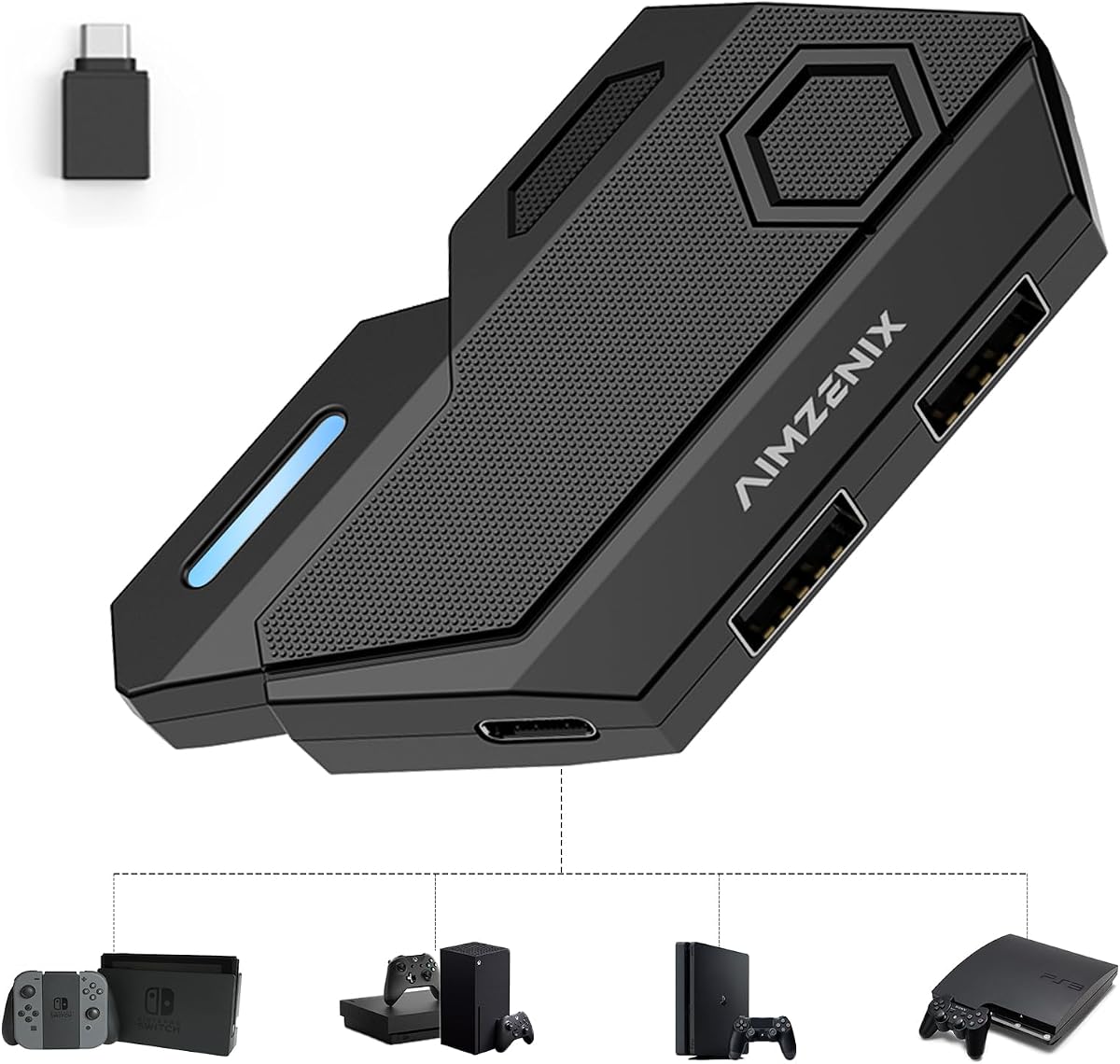
The AIMZENIX BLADER is a keyboard-and-mouse adapter with a 4.0 rating and explicit support for Switch 2, Nintendo Switch, Xbox One, Xbox Series X/S, and PS4. Instead of physically reshaping the Joy-Con, it converts keyboard and mouse activity into controller signals. That makes it a different but potentially more powerful answer for players who want conventional PC-style aiming on a console.
We may earn a commission when you buy through this link, at no additional cost to you.
Custom shortcut mapping and sensitivity adjustment are its standout features. These controls can help players adapt movement, actions, and mouse behavior to different games rather than accepting one fixed configuration. The plug-and-play approach also reduces setup friction because no additional software or driver installation is required. The package includes the converter, a Type-C data cable, an OTG adapter, and an instruction manual.
Several requirements deserve attention. The original corresponding controller must be used, while authorized third-party controllers are not supported. Mice that need drivers are excluded, and the controller's 3.5mm headphone jack becomes invalid once the adapter is connected. The manufacturer also notes that mouse switching assumes view and related sensitivity settings are maximized, which may require adjustment in each game.
This adapter is best for a player who wants precise mouse aiming, keyboard shortcuts, and one accessory that can work across several supported console generations. It is less appropriate for someone who wants a simple physical grip improvement or needs to keep using a third-party controller. Review the manual before setup, plan how audio will be handled, and test the mapping in a less demanding game before an important session.
The adapter translates keyboard and mouse inputs into controller signals, giving supported games access to familiar PC control patterns. Its mapping tools allow players to adjust shortcuts rather than relying entirely on a default layout.
Drivers are unnecessary for the adapter itself, but the connected mouse must not require driver installation. Using the converter also disables the controller headphone jack, so players who rely on wired headset audio need an alternative connection.
We may earn a commission when you buy through this link, at no additional cost to you.
The arVin Multi-Platform Adapter carries a 4.0 rating and is built for Nintendo Switch, Switch OLED, PS4, PS3, Xbox 360, and Xbox One families. It supports wired and 2.4G wireless keyboards and mice, translating their inputs into controller commands. It is an excellent choice for console owners with an established mouse-and-keyboard setup, but it does not list Nintendo Switch 2 compatibility.
We may earn a commission when you buy through this link, at no additional cost to you.
Its most useful feature is the ability to store up to eight separate keyboard and mouse mapping sets. Players can switch configurations with the specified F12 and F1 through F8 combination, which is helpful when moving between games with different control layouts. Sensitivity adjustment is also available for supported Xbox One and Xbox 360 configurations, allowing players to tune the response to their own habits.
The compatibility list contains notable exclusions. Bluetooth keyboards and mice are not supported, Switch Lite and PS5 are excluded, and third-party controllers cannot be used for the guided setup. The product uses hard PVC material and a compact form factor, while a stable cable connection is intended to support responsive input. Because mappings differ by platform, users must follow the manual or tutorial carefully.
This adapter is a strong fit for older supported consoles and players who value many stored profiles. It should not be selected for a Switch 2 setup unless the seller confirms compatibility beyond the supplied description. For multi-console use across current and older systems, choose only after checking both the console and peripheral connection requirements.
Stored profiles reduce the need to rebuild controls whenever a game uses a different scheme. The ability to recall eight distinct configurations is especially useful for shooters, tactical games, and RPGs with varied command layouts.
Wired and 2.4G wireless peripherals are supported, but Bluetooth devices are not. A 2.4G receiver also needs a free USB port, which is worth considering when the converter and controller already occupy several connections.
We may earn a commission when you buy through this link, at no additional cost to you.
The DSSWEN is a single-pack ergonomic adapter designed to turn a Switch 2 controller into a more vertical, mouse-like shape. Its 1.9 rating is the lowest among the rated products in this list, so the listing's comfort claims should be treated cautiously. Nevertheless, its design addresses a specific need: reducing the cramped feeling associated with holding small rectangular controllers for long periods.
We may earn a commission when you buy through this link, at no additional cost to you.
The contoured shell is intended to follow the natural curve of the hand and shift the controller into a mouse-like angle. A guide-rail mechanism allows the controller to slide into the adapter and is intended to minimize wobble. Precision openings are designed to preserve access to triggers, bumpers, face buttons, and analog sticks, while the impact-resistant polymer construction is kept lightweight for travel.
The low rating is the clearest caution. Without details about the reasons behind individual customer feedback, it is impossible to determine whether complaints relate to fit, comfort, durability, or another issue. The single-pack format may also leave buyers needing a separate adapter for the other side. Dock use is mentioned, but the supplied description does not explain whether the product remains attached during docking or whether clearance could be an issue.
This product is worth considering for players who specifically prefer a vertical mouse posture and can tolerate experimenting with an unfamiliar controller shape. It is less suitable as a general recommendation for those prioritizing a strong customer-rating history. Check recent reviews, compare dimensions with the controller, and test the attachment carefully before committing to long sessions.
The main appeal is the change from a conventional horizontal controller posture to a vertical, mouse-inspired position. This may reduce finger crowding for some players, though comfort varies with hand size and gaming habits.
The slide-in guide rail is intended to create a snug connection with minimal wobble. Since the product has a low rating, buyers should examine recent customer feedback about fit and attachment strength before relying on it for vigorous play.
We may earn a commission when you buy through this link, at no additional cost to you.
This multi-platform keyboard-and-mouse converter is compatible with Nintendo Switch, Switch OLED, Switch 2, several PS4 and PS3 models, Xbox One systems, and Xbox Series X/S. It supports wired and 2.4G wireless peripherals and provides custom key mapping alongside mouse sensitivity, scope sensitivity, and deadzone adjustment. Its 2.7 rating reflects a mixed reception that makes feature verification especially important.
We may earn a commission when you buy through this link, at no additional cost to you.
The converter stands out visually through an alien-inspired enclosure, three stabilizing feet, and adjustable RGB lighting. Standard and sound-activated modes shift the lights with game audio, adding atmosphere without altering the input method itself. Functionally, the range of remapping and sensitivity controls is broad for a plug-and-play converter, and the enclosure includes three USB ports and one Type-C port.
The Switch 2 notes are particularly important. Connection must use the console's Type-C interface rather than the converter's USB port. The product does not support the Switch 2 C key or wake-up function, which may affect convenience or specific controls. Mapping also requires an original controller. If setup does not work immediately, the manufacturer recommends unplugging all connected devices and reconnecting them.
This is a practical choice for players who want mouse aiming, keyboard shortcuts, visual customization, and broad console coverage. It is less suitable for those who need every Switch 2 function or prefer a pure physical grip accessory. Review the compatibility notes, update the console and relevant game settings as instructed, and confirm that a game actually supports mouse input before purchasing.
Mouse sensitivity, scope sensitivity, and deadzone controls give players more ways to tune aim than a basic converter. Each setting should be adjusted gradually while using the maximum game sensitivity recommended by the converter's operating method.
The enclosure's sound-responsive lighting can make gaming sessions more visually engaging while clearly distinguishing the converter on a desk. The three support feet also help it remain stable, which is useful when several USB peripherals are connected.
We may earn a commission when you buy through this link, at no additional cost to you.
The Universal Keyboard Mouse Converter supports Nintendo Switch, PS4, PS3, Xbox 360, and Xbox One systems. Its 3.7 rating places it in the middle of the field, reflecting a generally useful product with some details that buyers need to confirm. It uses the original gamepad as a guide and allows keyboard and mouse buttons to be assigned controller functions.
We may earn a commission when you buy through this link, at no additional cost to you.
The selling point is an uncomplicated plug-and-play process without driver installation. The converter is described as supporting most keyboards, mice, and third-party wired games, with no lag, blocking, or recognition problems claimed for supported equipment. Its small enclosure is easy to place near a television or monitor, and the product is positioned as a practical way to play supported FPS games with USB input devices.
The most significant limitation is that the listing does not explicitly identify Nintendo Switch 2 as compatible. This matters because a generic Switch reference does not guarantee support for the newer console. It also does not support a keyboard connected through a USB hub, and no mouse sensitivity adjustment is specified. Some future firmware updates are mentioned, but buyers should not assume every planned function is already available.
This converter is a sensible option for owners of the clearly listed console generations who want customizable keyboard and mouse input without installing software. It is less appropriate for a new Switch 2 setup unless the seller confirms compatibility and explains the required connection route. Check the manual, use supported wired devices, and confirm game-level mouse support before a major play session.
The console's original controller provides the control reference during configuration. This approach lets the converter translate keyboard and mouse activity into recognized controller inputs without a separate application.
Most standard wired keyboards and mice are supported, but keyboards attached through a USB hub are excluded. This limitation can affect larger desktop keyboard setups that rely on an external hub for additional ports.
We may earn a commission when you buy through this link, at no additional cost to you.
The Arvytosty Magnetic Wrist Straps are a four-pack of replacement-style attachments intended for Switch 2 Joy-Con use, including mouse mode. Their 3.0 rating suggests mixed experiences, although the product addresses a clear accessory need: keeping a controller connected to the player's hand during vigorous motion. The adjustable lanyard is designed to reduce the risk of accidental drops.
We may earn a commission when you buy through this link, at no additional cost to you.
A magnetic snap-on mechanism allows the straps to attach and detach without tools. The frame includes upgraded SL and SR buttons that are described as larger and easier to press, while a high-transmittance light guide plate helps display controller connection status. The blue and light-red pieces use a one-piece construction with an electroplated base intended to resemble a mousepad texture and reduce wear on the magnetic contact during mouse-mode use.
This is not a complete replacement for a mouse-shaped grip. It focuses on retention, replacement buttons, and controlled movement rather than reshaping the entire controller. Players who perform large swings, such as in tennis or badminton games, may find the tether useful, but others could view it as unnecessary restraint. The added frame and strap may also change the original feel of the controller.
These straps are best for players who regularly use mouse mode, have experienced worn wrist-strap components, or want a more visible and substantial attachment. They can also serve as a quick-release solution for motion-oriented games. Confirm that the button arrangement matches your preferred control scheme and test the magnetic connection before relying on it during active play.
A secure lanyard helps prevent a controller from leaving the player's hand during large swings or sudden movements. This is particularly relevant for sports, rhythm, and other active games where the controller may be moved rapidly.
The enlarged SL and SR buttons make those controls easier to locate and press than a minimal strap. They are still physical controls on the attached frame, so players should confirm that the added structure does not interfere with their preferred grip.
We may earn a commission when you buy through this link, at no additional cost to you.
The Belkin Nintendo Switch 2 Grip Case is a 4.2-rated ergonomic case built specifically for the newer console. It focuses on comfort, grip security, and everyday versatility rather than mouse-style input conversion. The textured non-slip surface is intended to support stable handling during long sessions, whether the console is used in handheld or docked configurations.
We may earn a commission when you buy through this link, at no additional cost to you.
Its standout feature is the quick-release Joy-Con design. Players can detach the controllers without removing the grip and then use the console's kickstand for tabletop play. The case remains dock compatible, so users do not need to strip it off before connecting the system to a television. It is also marketed alongside Belkin's travel bag, making it relevant to players who regularly move between locations.
The construction uses a minimum of 75% recycled plastic and comes with two-year coverage. This adds a more considered ownership proposition than a basic add-on, particularly for buyers who care about fit, materials, and ongoing support. The tradeoff is that the grip case does not translate mouse movements, remap keyboard commands, or add sensitivity controls. It may also make the controllers slightly bulkier than the original bare design.
This is the strongest premium choice for Switch 2 owners who want comfortable, secure handling without changing how games interpret their inputs. It is especially well suited to players who alternate between handheld, tabletop, and docked play. Choose a converter instead if precise mouse aiming or remapped shortcuts are the main objective, and verify the docking clearance on the current setup before regular use.
The ability to remove the Joy-Cons while retaining the grip makes it easy to move between handheld and kickstand configurations. Dock compatibility adds another layer of versatility without requiring a separate case for each position.
The textured shell improves physical handling but leaves control behavior unchanged. Players seeking a mouse-shaped feel or mouse aiming should look to a dedicated grip adapter or keyboard-and-mouse converter instead.
We may earn a commission when you buy through this link, at no additional cost to you.
The Arvin Keyboard and Mouse Adapter is a 3.8-rated converter for Nintendo Switch, Switch OLED, Switch Lite, Xbox 360, Xbox One, Xbox Series S/X, and PlayStation 3 and 4 systems. It accepts wired and 2.4G wireless keyboards and mice, translating their inputs through controller signals. Its strongest differentiator is a compact enclosure that includes three USB ports and one Type-C port.
We may earn a commission when you buy through this link, at no additional cost to you.
Four distinct keyboard and mouse mapping sets can be stored, making it easier to maintain configurations for different games. Mouse sensitivity is adjustable with Ctrl plus the mouse wheel, a simple shortcut that does not require opening an application. The plug-and-play design is guided by the original controller, allowing keyboard and mouse buttons to be assigned controller functions without separate software.
There are important platform caveats. Nintendo Switch 2 is not explicitly included in the compatibility list, while PS5 hardware is only described as working through a PS4 controller for PS4 games. Bluetooth keyboards and mice are unsupported, and third-party controllers cannot be used for the guided setup. As a result, the adapter's broad console label should not be interpreted as universal support for every current controller generation.
This adapter is a good match for players with supported older consoles or newer Xbox systems who want mouse aiming and multiple stored layouts. Its compact size and four-profile system make it easier to manage than a converter with a larger storage count. Confirm the exact target console before buying, especially for Switch 2, and use wired or 2.4G peripherals only.
The Ctrl and mouse-wheel shortcut allows sensitivity to be adjusted during setup without navigating through a larger configuration menu. It is a convenient feature for balancing aim between different games.
Three USB ports and one Type-C port allow a keyboard, mouse, and 2.4G receiver to be connected with room to spare. The compact ABS housing is easier to transport than a full-size keyboard.
We may earn a commission when you buy through this link, at no additional cost to you.
The COOWPS Switch 2 Thumb Grips are dedicated to the Nintendo Switch 2 Joy-Con and Switch 2 Pro Controller. They do not fit the original Nintendo Switch or OLED models, making model verification essential. With a 4.4 rating, they have the strongest customer-rating figure among the products in this guide, though ratings alone do not establish compatibility or comfort for every player.
We may earn a commission when you buy through this link, at no additional cost to you.
The grips use a high-friction textured material intended to reduce slippage and improve thumb control, including when hands become sweaty. Their added height and broader operating area can also reduce finger fatigue during longer sessions. Two designs are included: a bottle cap profile intended for everyday casual gaming and a taller straw hat profile aimed at shooting games that call for more deliberate stick input.
Their secondary benefit is modest protection. The soft silicone covers can shield the joystick's upper surface from scratches and dirt, although they do not change the underlying controller. The taller cap may alter the control feel compared with a bare stick, so players who value a very low, direct profile may prefer the bottle cap option or another accessory altogether.
These thumb grips are best for Switch 2 owners who have noticed their thumbs slipping or who want a slightly more pronounced stick position. The two heights allow a useful choice between everyday comfort and focused aiming. They are not a substitute for a full mouse-style controller grip, so buyers searching for a radically different shape should choose a dedicated adapter instead.
The textured surface increases friction between the thumb and analog stick. This can make quick corrections and sustained aiming feel more controlled, particularly during active sessions.
The lower bottle cap profile is intended for casual use, while the taller straw hat profile provides more pronounced contact for shooting games. Trying both configurations is the best way to determine which feels natural.
We may earn a commission when you buy through this link, at no additional cost to you.
The best mouse grip adapter for Switch 2 depends on whether you want a physical change in hand position, mouse-style aiming, improved retention, or simply a more secure and comfortable controller. Compatibility, input requirements, and long-session comfort should take priority over decorative features.
A product described as compatible with the Nintendo Switch is not automatically confirmed as compatible with Nintendo Switch 2. The two controllers and their connection methods differ, and some older converters omit Switch 2 entirely. The DSSWEN, COOWPS, Belkin, and purpose-built grip are explicitly listed for Switch 2, while converter descriptions must be checked line by line. The RGB converter, for example, expressly supports Switch 2 through the console's Type-C interface but excludes its C key and wake-up function.
A physical grip adapter changes how the controller feels in your hands but does not translate mouse movements into console inputs. A keyboard-and-mouse converter does the opposite: it enables PC-style aiming and shortcuts while leaving the controller shape largely unchanged. Players wanting a more vertical, mouse-like silhouette should focus on grips such as the NEW Game Controller Grip Mouse Accessory Adapter or DSSWEN. Players wanting precise mouse aiming should consider the AIMZENIX, arVin, or RGB conversion products.
A useful grip should hold the controller securely without blocking the sticks, triggers, bumpers, face buttons, or magnetic rails. The DSSWEN product uses a guide-rail slide mechanism and precision openings, while the Belkin case emphasizes a snug fit, textured handling, and quick-release Joy-Cons. Look at photographs for edge clearance and check whether any accessory changes the feel of buttons or interferes with a case. A connection that is easy to install but shifts during play is less valuable than one that feels dependable.
Mouse input often feels wrong until sensitivity, deadzone, and scope behavior are properly tuned. The AIMZENIX offers shortcut mapping and sensitivity adjustment, the RGB converter adds scope and deadzone controls, and the arVin products store multiple game profiles. Mapping requirements also differ by platform. Some converters can assign keyboard and mouse buttons to controller functions under the guidance of an original controller, while others use specific keyboard shortcuts to switch profiles or alter sensitivity.
Converter compatibility involves more than the console itself. The AIMZENIX requires a corresponding original controller and does not support authorized third-party controllers. Its connected mouse must not require driver installation, and the controller's 3.5mm headphone jack becomes invalid while connected. Other products support wired and 2.4G wireless peripherals but exclude Bluetooth devices, while the Universal Converter does not support keyboards connected through a USB hub. These restrictions can be more important than headline platform claims.
Mouse-style products are most relevant to players who regularly aim with a mouse, use tactical commands, or want customizable shortcuts. Converters are marketed for FPS, TPS, RPG, and RTS experiences, but a game must itself permit mouse input for the approach to work as intended. For sports, motion, or party games, a secure wrist strap may be more useful than an input converter. For everyday portable play, a dock-compatible grip case can offer comfortable handling across handheld, tabletop, and television modes.
The best grip reduces cramping without introducing a new source of pressure. Mouse-shaped designs can create a more relaxed palm position, while textured cases improve friction and stop hands from sliding. Thumb grips raise the contact area around the stick, which may aid control but also changes the original feel. Longer sessions are a good time to assess whether the adapter causes wrist strain, blocks a button, or interferes with the user's grip. A product that feels secure and natural is generally more useful than one with elaborate features.
Ratings can provide a useful signal, but they should be interpreted alongside the product description and limitations. The COOWPS thumb grips have a 4.4 rating, Belkin's grip case has a 4.2, and several converters sit between 3.7 and 4.0. The DSSWEN mouse grip carries a 1.9 rating, which deserves more caution. The purpose-built NEW Game Controller Grip has no supplied rating, so its focused Switch 2 design is the primary evidence. Review recent feedback where possible and prioritize products that clearly disclose what they do and do not support.
Begin by confirming that the accessory is designed for the specific controller model you own. For a physical grip, inspect the rails, openings, and connection points before sliding the controller into place. For a keyboard-and-mouse converter, connect the converter using the method stated in its manual, attach the required original controller, and connect only supported wired or 2.4G peripherals. Do not force a connection or assume that a similarly named console is included in the compatibility list.
For converters, use the original controller to establish the mapping, then assign movement, firing, aiming, and keyboard shortcuts. Adjust mouse sensitivity, scope sensitivity, or deadzone gradually rather than making several large changes at once. Some converters expect the game's view sensitivity to be at its maximum, so follow the product-specific instructions before judging aim. If a command does not respond, disconnect every peripheral and reconnect the devices in the recommended order.
For grips, cases, thumb caps, and wrist straps, check that nothing obstructs the sticks, rails, buttons, charging contacts, kickstand, or dock alignment. Remove the accessory before placing the console in a dock unless the manufacturer explicitly permits use while docked. Clean removable pieces with a soft, dry or lightly dampened cloth, avoid abrasive cleaners and strong solvents, and let every part dry fully before reconnecting it. Replace a grip if it becomes loose, cracked, excessively slippery, or difficult to seat.
Not necessarily. A physical mouse grip changes the shape and feel of the controller but does not automatically translate mouse movement into game input. To use true mouse aiming and keyboard shortcuts, you need a keyboard-and-mouse converter that supports the Switch 2 and the game. Check both forms of compatibility before buying.
Only if the manufacturer explicitly states Switch 2 compatibility. Accessories made for the original Switch or Switch OLED may have different dimensions and connection mechanisms. The Belkin case, COOWPS thumb grips, DSSWEN mouse grip, and dedicated NEW Game Controller Grip are listed for Switch 2, while several converters support only older Switch generations.
It depends on the converter. The arVin products support wired and 2.4G wireless keyboards and mice but explicitly exclude Bluetooth devices. The AIMZENIX also states that mice requiring driver installation are unsupported. Check both the connection type and driver requirements, and use a 2.4G receiver or wired mouse when Bluetooth is excluded.
Most of the listed converters require the corresponding original controller to connect to the console and guide the mapping process. Authorized third-party controllers are not supported by the AIMZENIX, and the arVin products likewise specify original controller requirements. This also affects which controller ports remain available for accessories.
It depends on the grip's design. The Belkin case is explicitly dock-compatible and allows Joy-Con removal for kickstand use. The DSSWEN description mentions dock attachment, but the supplied details do not fully explain clearance or whether it should remain attached while docked. Always follow the manufacturer's docking instructions to avoid pressure on buttons, rails, or ports.
The Belkin grip case is a versatile choice for handheld, tabletop, and docked play because it combines a textured grip with quick-release Joy-Cons and kickstand compatibility. The purpose-built mouse grip may appeal more to players who prefer a fundamentally different hand shape, while thumb grips are useful when analog-stick traction is the main concern.
Console and mouse sensitivity systems operate differently, and converters translate one input style into another. Several products state that in-game view sensitivity should be maximized, while others provide separate mouse, scope, or deadzone controls. Adjust one variable at a time and consult the converter's manual for its recommended setup.
A correct installation should feel snug, align the controller naturally, and leave every stick, trigger, bumper, and face button accessible. For rail-based designs, use the intended guide or slide mechanism rather than forcing the shell. If the grip rocks, catches on an edge, or presses a button, remove it and check the orientation and connection points.
The purpose-built NEW Game Controller Grip Mouse Accessory Adapter is the most direct choice for Switch 2 players who want a mouse-style controller shape. The AIMZENIX BLADER stands out for cross-platform mouse and keyboard conversion, customizable shortcuts, and sensitivity adjustment, while the Belkin grip case is the most polished option for comfortable everyday handling across handheld, tabletop, and docked modes.
Prioritize explicit Switch 2 compatibility, a secure fit, and the type of control change you actually want. A physical grip improves hand position, a converter enables PC-style input, thumb caps improve analog-stick traction, and wrist straps protect against drops. For converters, also verify peripheral type, original-controller requirements, available ports, mapping features, and audio limitations.
Ratings can help narrow the field, but the supplied product information shows why specifications must remain central. Some highly rated products solve only a narrow accessory problem, while others include stronger controls but important exclusions. Confirm current price, availability, dimensions, and compatibility on the listing before making a final purchase.