
Apevia ITX-AP300W 300W
3.9Editor score
Compact Mini-ITX dimensions
300W targeted output
Separable motherboard connectors
Thermal fan speed control
Compare the 10 best low power PSU options for compact PCs, evaluating efficiency, capacity, connectors, cooling, protections, and form factor.
A low power PSU can be the ideal foundation for a compact desktop, Mini-ITX build, HTPC, point-of-sale system, network appliance, or other space-conscious computer. The right unit should provide adequate headroom, clean regulated power, useful protections, compatible cables, and enough cooling without adding unnecessary bulk or noise.
We compared all ten products by examining their stated wattage, efficiency certification, physical dimensions, connector coverage, voltage support, fan design, and safety protections. The list includes Mini-ITX, Flex ATX, TFX, and standard ATX options, with enough detail to distinguish a basic compact supply from a modern high-performance model.
Each review shows which use case the product best serves and where its specifications may require a closer case-fit check. Ratings reflect the supplied customer feedback, while technical details come from the manufacturer information. Prices and availability change frequently, so confirm the current listing before buying.
3.9Editor score

4.6Editor score

5.0Editor score
This side-by-side comparison highlights each model's capacity, form factor, efficiency claims, connector layout, cooling approach, and protection features so buyers can match a power supply to a specific compact system.




The Thermaltake Smart 500W combines a conventional ATX footprint with 500 watts of continuous output, making it a strong general option for compact and midrange computers. It carries a 4.6 customer rating and stands out for its 80 Plus certification, 120mm ultra-quiet cooling fan, active power factor correction, and five-year warranty.
We may earn a commission when you buy through this link, at no additional cost to you.
Its stated compliance with ATX 12V 2.31 and EPS 12V 2.92 standards makes it appropriate for systems that need dependable 12V delivery without requiring the newest ATX 3.x platform. Two PCI Express 6+2-pin connectors provide useful graphics-card support, while OPP, OVP, and SCP help protect the system from common electrical faults.
The main limitation is its older platform designation. While ATX 12V V2.3 remains practical for many builds, systems built around newer ATX 3.1 expectations may benefit from a model that explicitly addresses current connector and transient requirements. The 80 Plus wording also does not identify a more specific certification tier in the supplied information.
This is a compelling choice for a Mini-ITX or compact ATX system that needs 500 watts, quiet cooling, and a long warranty without moving to a premium high-performance design. It is especially appropriate when the case accepts standard ATX dimensions and the installed hardware does not require native 12VHPWR or ATX 3.1 support.
A 500W continuous rating provides useful headroom for a low-power workstation, gaming system, or HTPC while avoiding the bulk of a much larger unit. The dedicated 12V rail and 6+2-pin graphics connectors make the configuration more versatile than a barebones ITX supply.
The 120mm fan is larger than many fans found in compact power supplies and is described as ultra quiet. A five-year warranty also adds meaningful reassurance for buyers who intend to keep the unit installed across several computer upgrades.
We may earn a commission when you buy through this link, at no additional cost to you.
The Apevia ITX-AP300W is built for small systems that need less than 300 watts and very little physical space. Its stated compatibility with Mini-ITX, Flex-ATX, and 1U cases makes it a natural fit for HTPCs, point-of-sale terminals, compact servers, and other systems where enclosure volume is limited.
We may earn a commission when you buy through this link, at no additional cost to you.
The separable 20+4-pin motherboard and 4+4-pin CPU connectors support both modern and legacy motherboard layouts. Two SATA and two Molex connectors are enough for basic storage and accessory needs, while a 40mm double ball-bearing fan uses thermal speed control to balance cooling and noise.
Buyers outside North America must pay particular attention to the manual voltage selector. The unit is factory-preset to 115V and must be changed to 230V when used in a higher-voltage region. The lower 3.9 rating and modest capacity also suggest that buyers should carefully match it to actual component draw rather than use it as a general-purpose upgrade.
The ITX-AP300W is best for a deliberately small, low-power build with modest graphics and storage requirements. It is a sensible option for office systems, media computers, embedded installations, or retro-style platforms where a full-size 500W supply would be excessive.
The 5.9 by 3.21 by 1.59-inch dimensions and stated support for Mini-ITX, Flex-ATX, and 1U chassis focus its value on compact installations. It avoids the physical bulk of a standard ATX unit when every millimeter inside the enclosure matters.
OVP, OCP, and SCP cover three important electrical safety categories, while the 40mm bearing fan has thermal speed control. The connector set is modest but covers the motherboard, CPU, SATA drives, and Molex accessories common in basic compact builds.
We may earn a commission when you buy through this link, at no additional cost to you.
The Apevia ITX-PFC500W provides 500 watts in a 160mm-long enclosure designed for Mini-ITX and Flex-ATX systems. Its fully modular construction reduces cable clutter, while a 4.1 customer rating reflects a generally practical package for builders seeking more capacity than the 300W ITX model offers.
We may earn a commission when you buy through this link, at no additional cost to you.
Connectivity includes one 20+4-pin motherboard connector, one split 4+4 CPU connector, two 6+2-pin PCI Express connectors, two SATA connectors, and two Molex connectors. Full-range active PFC from 90 to 264V removes the need for a manual input-voltage switch, which reduces setup errors in mixed environments.
The 40mm double ball-bearing fan is relatively small, and the storage-connector count is modest for a system with several hard drives or optional devices. The stated output includes a dedicated +12V rail rated at 33 amps, and protections cover overvoltage, overload, overcurrent, heating, and short-circuit faults.
This model is a good fit for a compact gaming or productivity PC that needs 500 watts and modular cables but does not require native 12VHPWR. Before ordering, confirm that the enclosure supports the stated dimensions and that the two SATA connectors satisfy the planned storage configuration.
Because unused cables can remain disconnected, the fully modular layout improves airflow and reduces visual clutter in a cramped enclosure. The split motherboard and CPU connectors also broaden compatibility with different motherboard socket requirements.
The 90-264V full-range input is convenient in regions using different mains voltage, and active PFC is intended to support stable output. Overvoltage, overload, overcurrent, thermal, and short-circuit protection provide a broad electrical safety layer.
We may earn a commission when you buy through this link, at no additional cost to you.
The MSI MAG A650BE combines 650 watts of capacity with a 4.7 customer rating, making it one of the strongest-rated options in this group. Its standard ATX format, 80 Plus Bronze efficiency, and compact semi-modular design suit builders who want reliable power without an oversized premium unit.
We may earn a commission when you buy through this link, at no additional cost to you.
A 120mm low-noise fan handles cooling, while active PFC and a DC-DC circuit design support stable modern operation. The protection package is unusually comprehensive for the category, covering overvoltage, overcurrent, over-power, over-temperature, and short-circuit conditions, and the five-year warranty adds useful longevity.
Its principal trade-off is the semi-modular cable arrangement. Permanently attached cables may be less tidy in a very small enclosure, although the semi-modular approach can reduce the amount of excess cable that must be hidden. The supplied information does not enumerate the exact motherboard, CPU, graphics, or storage connectors, so compatibility should be verified on the listing.
The A650BE is a strong choice for a compact desktop with a moderately powerful graphics card or other hardware that benefits from extra capacity. It may not be the absolute smallest option, but its efficiency, low-noise cooling, protective features, and strong customer feedback make it a well-rounded standard-ATX purchase.
The 650W rating gives builders more headroom than a typical 300W or 500W compact supply. That makes the model useful for compact builds that still use a dedicated graphics card, although case dimensions should be checked before purchase.
80 Plus Bronze certification, active PFC, and DC-DC circuitry make this a refined alternative to simpler compact units. Its five industrial protection categories offer a reassuring combination for daily-use desktop and workstation installations.
We may earn a commission when you buy through this link, at no additional cost to you.
The NovaMist Misting Fan listing has a 4.7 customer rating, but its supplied product title identifies a fan rather than a power supply. The description contains 80 Plus Bronze certification, a five-year limited warranty, and a low-noise fan, suggesting a PSU, yet no wattage, dimensions, or connector information is provided.
We may earn a commission when you buy through this link, at no additional cost to you.
That ambiguity makes a conventional recommendation inappropriate. A buyer cannot reliably determine whether the product will fit a Mini-ITX case, whether it has the correct CPU and graphics connectors, or whether its capacity will support the planned hardware. The image and listing may clarify the actual package, but the available text does not.
The strongest stated attributes are efficiency certification, low-noise cooling, and warranty coverage. Even so, those points do not overcome the missing fundamentals of capacity and physical compatibility. The product title could also indicate a misting fan accessory with a related or mismatched description.
This entry demonstrates why careful listing verification matters. Before purchasing, confirm that the page is actually for a low power PSU, identify its exact model and wattage, review the connector diagram, and measure the intended enclosure. Do not rely on the rating or efficiency statement alone when essential specifications are absent.
The title-description mismatch is the central issue. A responsible buyer should check the product images, package contents, manufacturer, and model number to establish whether the listing represents a power supply or an unrelated cooling product.
Even a genuine PSU needs a stated wattage, dimensions, input range, and connector inventory. Without those details, fit, load capacity, and component compatibility cannot be compared responsibly with the other entries in the guide.
We may earn a commission when you buy through this link, at no additional cost to you.
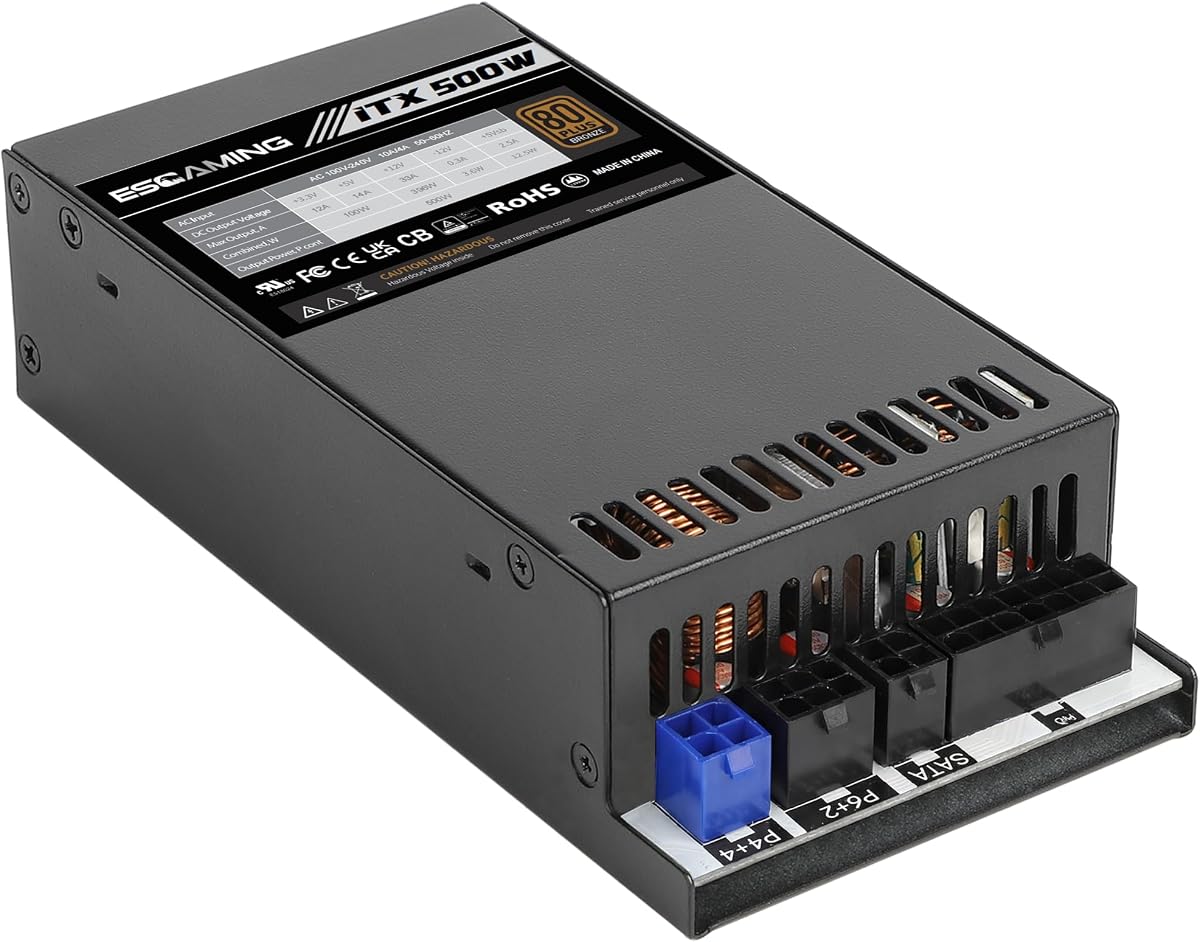
The ESGAMING Fully Modular 500W is positioned for compact 1U-style chassis, with a modular cable system designed to reduce clutter and preserve airflow. Its 4.0 customer rating places it behind several higher-rated alternatives, but the stated capacity and connector selection may still appeal to system integrators.
We may earn a commission when you buy through this link, at no additional cost to you.
The connector list covers one 20+4-pin motherboard plug, one 4+4 CPU plug, two 6+2 graphics connectors, two SATA connectors, and two PATA connectors. Full-range active PFC from 90 to 264V eliminates manual voltage selection, and the seller highlights support for 24/7 server operation.
There is an important inconsistency in the supplied information. The title says 80 Plus Gold, while the feature text identifies 80 Plus Bronze and states up to 85% efficiency at typical loads. The product also uses the phrase 500W in a way that appears to indicate output, but the wording is not as precise as a clear continuous-output specification.
This supply is most appropriate for a compact or 1U installation where modular cabling matters and the builder can verify the certification, exact model, and output details on the current page. It should not be selected over a clearly documented 500W model without confirming that it meets the planned load and case requirements.
Fully modular cabling allows builders to connect only the leads required by the installed hardware. That can improve airflow and make service work easier in compact 1U systems, NAS enclosures, and tightly routed Mini-ITX cases.
Gold and Bronze labels appear in different parts of the supplied listing information. Buyers should rely on the current product documentation and certification mark rather than assume the higher efficiency tier, especially when selecting a unit for a continuously operating appliance.
We may earn a commission when you buy through this link, at no additional cost to you.
The Apevia TFX-PFC500W delivers 500 watts in the TFX form factor used by many small-form-factor cases. Its dimensions are listed as 175 by 84 by 64 millimeters, and the 4.2 customer rating reflects a generally capable compact option with a broad set of features.
We may earn a commission when you buy through this link, at no additional cost to you.
The 80mm fan uses Silent-Start technology, remaining stationary during low-load conditions and engaging as temperature rises. A heavy-duty 33A 12V rail, 0.99 power factor circuitry, and full-range 90-264V input make the unit well suited to compact gaming and workstation builds where stable power is more important than an ATX-sized enclosure.
Connectivity is generous for a TFX unit, including a 20+4-pin motherboard connector, 4+4 CPU connector, two 6+2 graphics connectors, three SATA connectors, and three Molex connectors. It does not support proprietary six-pin or ten-pin Dell, HP, or Lenovo motherboard connections without an adapter, and the case must provide the stated 6.9-inch clearance.
This is an attractive choice for a TFX case that needs more capacity and connectors than a basic Mini-ITX supply. It balances automatic voltage selection, quiet low-load operation, and a comprehensive protection suite, making it particularly practical for SFF gaming and productivity systems.
The TFX enclosure is noticeably smaller than a standard ATX power supply while remaining larger than many dedicated Mini-ITX modules. It offers a middle ground for compact cases that need multiple storage connectors, graphics support, and a higher-capacity 12V rail.
Silent-Start allows the fan to remain stationary until the unit is connected, powered, and operating under applicable load conditions. This can be useful in offices or living spaces where constant fan movement would be distracting.
We may earn a commission when you buy through this link, at no additional cost to you.
The Apevia Venus 500W is a standard ATX supply with a broad connector inventory and a 3.9 customer rating. It is a more conventional choice than the dedicated ITX, TFX, and Flex products, making it relevant for compact cases that still accept standard ATX power supplies.
We may earn a commission when you buy through this link, at no additional cost to you.
The connector set includes one 20/24-pin main power plug, one 4+4 CPU connector, one 6+2 PCI Express connector, three SATA connectors, three peripheral connectors, and one floppy connector. That legacy breadth can be useful when building around older storage devices or upgrading an established system.
A thermally controlled 120mm fan provides a relatively large cooling component, and the listed 5% tolerance for 5V, 3.3V, and 12V outputs shows attention to voltage regulation. Protection covers short circuit, overcurrent, overvoltage, over-power, undervoltage, and over-temperature conditions. The manual input switch requires the correct 115V or 230V setting.
The Venus is best for a basic or legacy-oriented system whose expansion card does not require multiple graphics connectors. For newer high-end graphics, the single 6+2-pin connector may be limiting, and an 80 Plus certification level is not stated in the supplied specifications.
The inclusion of Molex and floppy connectors gives the model relevance for older desktops and systems with specialized accessories. Modern SATA and PCI Express coverage remains available for typical compact builds.
The stated 5% tolerance across the principal positive voltage rails indicates an effort to maintain stable output. The 120mm fan and automatic thermal control are useful characteristics, though users must set the input-voltage switch correctly.
We may earn a commission when you buy through this link, at no additional cost to you.
The 600W Flex ATX PSU is the most technically advanced compact unit in the group, combining 600 watts, fully modular wiring, more than 92% stated efficiency, and a native 12VHPWR connection. Its perfect 5.0 customer rating also makes it one of the most positively reviewed options listed here.
We may earn a commission when you buy through this link, at no additional cost to you.
Its exceptionally small 16.5 by 8.15 by 4.05-centimeter dimensions suit Mini-ITX, NAS, POS, AIO, networking, surveillance, and compact server applications. The 40mm ball-bearing fan is described as silent and temperature controlled, while Japanese capacitors are specified for output stability and long-term reliability.
The package supports modern high-end graphics through a 16-pin 12VHPWR, PCIe 5.0, or 12V-2×6 connection and also includes adapters for 4+4 CPU and 6+2 graphics power. The motherboard cable has a three-pin sense wire that must be connected to the PSU, making careful installation essential. The stated protection suite includes overload, overvoltage, and short-circuit protection.
This is the premium choice for builders who need modern graphics support, minimal wasted cable space, and high efficiency in the smallest chassis. It is less convenient for simple builds because of its specialized cable system and sense-wire requirement, but it offers the strongest combination of capacity, compactness, and contemporary connectivity.
The supplied 12VHPWR cable is intended to handle the peak power demands of current high-end GPUs while reducing abrupt voltage-drop concerns. Adapter leads are also supplied for compatible 4+4 CPU and 6+2 graphics connectors.
The compact Flex format leaves substantial room for storage and airflow inside small cases. Fully modular leads eliminate unused cable bundles, while the stated efficiency above 92% reduces heat generation and the cooling demand created by the power supply itself.
We may earn a commission when you buy through this link, at no additional cost to you.
The Smart W3 Series 600W combines a modern ATX v3.1 platform with 600 watts of capacity, making it well suited to compact but capable systems. Its 4.6 rating reflects favorable customer feedback, and the five-year warranty provides solid ownership coverage.
We may earn a commission when you buy through this link, at no additional cost to you.
ATX v3.1 compatibility is the defining feature, bringing the unit into line with current expectations for power delivery and modern high-end graphics. A DC-to-DC design provides high-amperage 12V output, while the 120mm fluid dynamic bearing fan should support effective cooling with a larger fan than the smallest SFX-oriented units commonly use.
The supplied information does not name a specific 80 Plus tier beyond stating 80 Plus certification and up to 80% efficiency. It also omits the exact cable and connector inventory, so buyers should confirm that the motherboard, CPU, and graphics connections required by the build are included. The flat black cable design may simplify routing in a compact chassis.
This model is a strong option for a modern desktop that wants ATX 3.1 capability without moving to a large premium power supply. It is particularly attractive for builders using recent graphics hardware, provided the case accepts standard ATX dimensions and the required cables are confirmed.
ATX v3.1 compliance makes the Smart W3 Series a logical fit for systems built around recent power-delivery expectations. It offers a modern foundation without the larger physical footprint associated with many high-capacity ATX 3.x units.
The high-amperage DC-to-DC 12V design is well suited to modern processors and graphics cards. A 120mm FDB cooling fan and five-year warranty complement the electrical design with quieter cooling intent and extended coverage.
We may earn a commission when you buy through this link, at no additional cost to you.
Choosing a low power PSU means balancing real hardware requirements against enclosure space, electrical efficiency, connector needs, cooling behavior, and safety features. The smallest possible supply is not automatically the best choice if it lacks enough capacity, suitable cables, or headroom for planned upgrades.
Begin with the combined power requirements of the processor, graphics card, motherboard, memory, storage devices, fans, and USB peripherals. Include an appropriate allowance for startup loads, power transients, conversion losses, and components that may be added later. A compact office PC may operate comfortably within a 300W unit, while a small system with a dedicated gaming graphics card is more likely to benefit from 500W or 600W. The listed wattage is only meaningful when it represents a sustained rating for the intended hardware rather than a marketing figure.
Measure the available power-supply bay and compare it with the product dimensions. Mini-ITX and Flex ATX units suit the smallest enclosures, TFX provides an intermediate option, and standard ATX units require a larger mounting area. Cable bend clearance can add to the effective length required, particularly behind a tray or beneath a fan. A nominally compact unit may still be difficult to install if its cables cannot turn sharply.
List every power connection required by the motherboard, processor, graphics card, drives, fans, and accessories. Modern and older boards may use separable 20+4-pin motherboard and 4+4 CPU plugs, while current graphics cards may need 12VHPWR or equivalent connections. Check whether adapters are included, whether the necessary PCIe cables are present, and how many SATA or Molex connectors the system needs. The supplied 14-pin-to-24-pin cable on the Flex model also requires its sense wire to be attached correctly.
Efficiency matters most when a computer runs for long periods, operates in a warm space, or sits close to sensitive equipment. An 80 Plus certified unit converts a larger percentage of AC input into usable DC output, reducing waste heat and the load placed on the cooling fan. Certification tier and measured efficiency at typical loads are useful indicators, but listings can contain conflicting wording. Buyers should confirm the current certification mark and technical documentation, especially when descriptions alternate between Bronze, Gold, or a general efficiency percentage.
A quality power supply should include protection against overvoltage, overcurrent, overload or overpower, short circuits, and excessive temperature. The number of labeled protections varies across this list, with several models also mentioning undervoltage protection. A meaningful warranty adds confidence, particularly for a continuously operating server, POS terminal, or surveillance system. Protection features do not excuse improper installation, so correct input voltage, fully seated connectors, and compatible loads remain essential.
Compact supplies need enough airflow to remove heat without creating excessive noise. Larger fans generally move more air quietly, while smaller thermal-controlled or silent-start fans can be useful in constrained cases. The fan design should be considered together with efficiency because a more efficient unit generates less internal heat. A 40mm fan may be appropriate for a small 300W unit, while a 120mm fan often fits a standard ATX enclosure more comfortably and moves air with less noise.
Full-range 90-264V or 100-240V models detect mains voltage automatically and reduce the chance of an incorrect setting. Products with a manual 115V or 230V switch require extra care during installation, particularly in internationally distributed systems. Make the selection only after confirming the local electrical supply. Automatic voltage support is convenient, but the underlying wattage, connectors, and case fit still need to match the build.
Fully modular power supplies let builders connect only the cables they need, improving airflow and reducing clutter. Semi-modular designs balance this with permanently attached essential leads, while fixed-cable units are simpler but may leave unused wiring in the case. Modularity is especially valuable in compact systems where every cable has a meaningful effect on airflow. Check that the modular connectors are branded or keyed correctly, route cables without stressing their ends, and avoid combining modular cables from different power supplies.
Before installation, disconnect the wall power and compare the unit's form factor, input rating, and connectors with the case and components. Read the instructions, identify the input-voltage switch if one is present, and confirm that every modular cable belongs to that specific supply. Mount the unit in the intended orientation with the airflow path unobstructed.
Connect the motherboard and CPU power first, followed by the graphics, storage, and accessory cables. On the 600W Flex model, attach the three-pin sense wire to the corresponding PSU connection before using the 14-pin-to-24-pin motherboard lead. Ensure every plug is fully seated, route wires without crushing them, and keep liquid and objects away from the intake and exhaust openings.
After the cables are connected, restore mains power and test the system from a safe operating state. Listen for expected fan behavior, monitor temperatures, and investigate unusual noise, voltage warnings, or shutdowns. Periodically unplug the system, inspect connectors for dust or looseness, and gently clean the fan opening with compressed air. Do not open the enclosure, alter internal wiring, or use the PSU outside its specified environmental and electrical limits.
A 300W supply can be sufficient for a Mini-ITX system using a low-power processor and integrated graphics. It becomes risky with a dedicated gaming graphics card, high-end processor, multiple hard drives, or several expansion devices. Calculate the estimated system draw and choose a unit with comfortable headroom for transients and future upgrades.
Low power PSU is a broad description centered on lower wattage and potentially smaller dimensions. SFX refers to a specific standardized form factor designed for compact cases. A product can be low wattage without being SFX, while some SFX units provide 500 watts or more and sit in the middle between Mini-ITX and standard ATX sizes.
No. Efficiency certification primarily indicates how effectively a power supply converts AC power into DC power. Noise also depends on the fan size, bearing type, thermal control, load level, chassis airflow, and the operating environment. A highly efficient unit can run a smaller fan more slowly, but silence is not guaranteed by the certification itself.
Modularity is helpful but not mandatory. It can reduce unused cables, improve airflow, and make a cramped installation easier to service. A fixed-cable supply may still work in a small case if the excess wiring can be neatly tucked away, but fully modular designs usually offer more flexibility.
Only if the product explicitly supports automatic input ranging across the relevant voltages. A unit with a manual 115V or 230V selector must be set correctly before operation. Using the wrong setting can cause serious damage, so consult the label and instructions rather than assuming the connector will fit.
Most builds require a 20+4-pin motherboard connector and a 4+4-pin CPU connector, while systems with discrete graphics normally need one or more PCIe power plugs. SATA drives use SATA power, and older drives or accessories may use Molex. Newer high-power graphics cards may require 12VHPWR, so the exact graphics connector should be checked before ordering.
Aim for a capacity comfortably above the estimated sustained draw rather than matching it precisely. Additional headroom can accommodate efficiency behavior, startup events, power transients, minor component variations, and future upgrades. The best compact supply is not merely the smallest rated model but the smallest one that reliably supports the intended hardware and its connectors.
Several models in this list require a signal from the motherboard before the fan operates. Connecting only the wall cord and power switch may not provide the standby or control signal the unit expects. Connect the motherboard and CPU power correctly, and consult the manual if the fan remains stationary after startup.
The Thermaltake Smart 500W stands out as the most balanced overall choice, combining a 4.6 rating, 500 watts of continuous output, 80 Plus certification, quiet 120mm cooling, and a five-year warranty. The Apevia ITX-AP300W is the practical budget option for genuinely small systems, while the 600W Flex ATX PSU represents the premium choice for modern graphics, exceptional compactness, and advanced efficiency.
Prioritize case fit, usable capacity, and the exact connectors your hardware requires before considering smaller size or a particular fan design. Full-range input, active PFC, DC-to-DC conversion, and comprehensive protections add value, but they cannot compensate for a unit that is too small, lacks the right plug, or has unclear specifications. Verify ambiguous listings before ordering.
Prices and product details can change over time, so check the current listing, certification information, warranty terms, and included cables at the time of purchase. Comparing the actual hardware requirements with the manufacturer's published specifications will produce a more reliable low power PSU choice than selecting on rating or wattage alone.