
CHGRNLF Mac mini M4 SSD 1TB
4.2Editor score
Dedicated Mac mini M4 fit
Up to 3300 MB/s speed
One-month stability testing
Our expert SSD for Mac Mini M4 guide compares 10 internal upgrades by capacity, speed, compatibility, stability, installation, and buyer value for every user.
An internal SSD upgrade can give a Mac mini M4 more room for applications, creative projects, and media while improving everyday responsiveness. The right drive must match the computer’s proprietary storage design, offer credible performance, and provide enough capacity for your workload without creating unnecessary installation complications.
We compared 10 internal SSD options using the information supplied by their manufacturers and sellers. The comparison covers capacity, read and write performance, Mac mini M4 or M4 Pro compatibility, stability testing, installation provisions, warranty coverage, and the information needed to identify the most practical upgrade for different users.
The guide includes a 512GB replacement, several 1TB and 2TB drives, and a high-capacity 4TB option for Mac mini M4 Pro. Each review explains the product’s strongest benefits and practical limitations, while availability, seller details, and commercial terms can change over time.
4.2Editor score

4.4Editor score

4.2Editor score
The table below compares all 10 drives by model, capacity, stated speed, compatibility, and testing or installation details, making it easier to identify the appropriate Mac mini M4 storage upgrade.
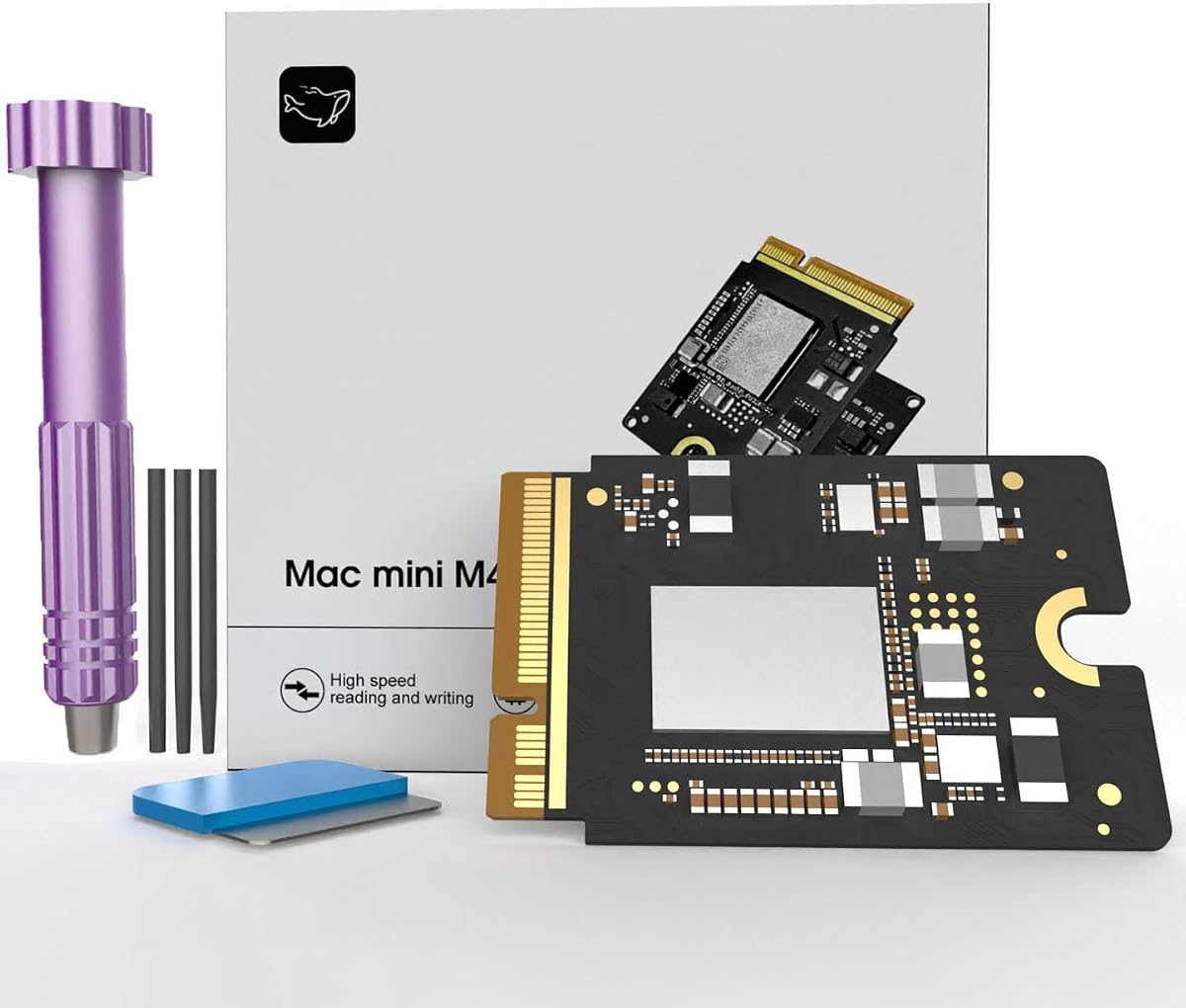


The CHGRNLF Mac mini M4 SSD 1TB Hard Disk for Mac mini M4 is a purpose-built 1TB internal upgrade with a 4.2 rating. Its most appealing combination is straightforward compatibility, a stated speed of up to 3300 MB/s, and enough capacity for a substantial applications library, personal media collection, and active project files without moving to the largest options in the guide.
We may earn a commission when you buy through this link, at no additional cost to you.
The seller describes a drive designed specifically for the Mac mini M4 and intended to integrate with Mac systems during installation. Its claimed read and write performance is presented as useful for app launches, large transfers, and high-definition media editing. More importantly for buyers, the 1TB capacity offers a meaningful increase for users who regularly encounter storage warnings or struggle to keep large working sets on the internal drive.
Stability is another useful selling point. The manufacturer reports that the drive maintained stable performance over a one-month test period without speed degradation, with the same testing period used to examine its components and functions. That is not the same as independent long-term laboratory validation, so careful installation and a current system backup remain sensible precautions. The product listing also does not provide specific warranty information.
This is a strong choice for a Mac mini M4 owner who wants a balanced capacity increase without moving to 2TB or 4TB. It is especially relevant to students, home-office users, developers, and creative professionals handling a mixture of applications and media. Verify the exact computer model before ordering, keep a recoverable backup of important data, and follow the seller’s installation instructions closely.
A 1TB internal drive creates room for applications, documents, photo libraries, and video projects in one location. It can also reduce the need to keep large working files on slower external media, although the actual improvement depends on workload and macOS configuration.
The dedicated fit is the central reason to choose this drive over a generic internal module. Buyers should still confirm their Mac mini M4 configuration and follow the included installation guidance because each replacement can involve transferring or restoring the operating system.
We may earn a commission when you buy through this link, at no additional cost to you.
The Mac mini M4 SSD 2TB, Hard Disk Storage Upgrade for Mac mini M4 combines a 4.4 rating with one of the most practical capacities in this roundup. Two terabytes is large enough for extensive application sets, high-resolution media, project libraries, and local backups, making the drive a strong general-purpose choice for a Mac mini M4 used as a primary workstation.
We may earn a commission when you buy through this link, at no additional cost to you.
Its advertised performance reaches up to 3300 MB/s for reading and writing. The seller connects this figure to shorter application startup delays, reduced system startup time, and faster large-file transfers, all of which are meaningful benefits for multitasking, video editing, and file-heavy office work. The 2TB capacity also reduces the likelihood that users will need to choose which applications and media to keep or remove as storage fills up.
The manufacturer says every solid-state drive undergoes 30 days of continuous high-load testing, with an emphasis on maintaining full-speed performance during sustained use. That is a more demanding stated test protocol than a brief functional check, although the result remains manufacturer-reported rather than independent evidence. Buyers should also plan for the normal process of installing a replacement internal drive and restoring their applications and files.
This is our overall recommendation because it balances capacity, speed, model-specific design, and a relatively strong customer rating. It is a particularly good fit for creative professionals, developers working with local repositories, and power users who want considerable freedom from storage management. Confirm the exact machine model, back up data before opening the chassis, and follow the supplied installation procedure.
The extra room makes this drive useful for keeping project assets, applications, and frequently used files together. It is especially attractive for video editors, photographers, and software developers who regularly move between large files rather than working from a small boot drive.
Thirty-day high-load testing supports the seller’s claim that the drive can preserve performance over extended periods. Buyers can still reduce risk by maintaining backups, monitoring system health after installation, and allowing adequate airflow around the Mac mini.
We may earn a commission when you buy through this link, at no additional cost to you.
The Mac mini M4 SSD 1TB, Hard Disk Storage Upgrade for Mac mini M4 has a 4.4 rating, tying for the highest customer rating among the standard M4 options in the guide. It combines that favorable reception with a 1TB capacity and a stated performance of up to 3300 MB/s, making it a credible all-around choice for a broad range of users.
We may earn a commission when you buy through this link, at no additional cost to you.
The listing says the drive was precisely adapted for the Mac mini M4 and can be installed by the user. Its stated read and write speeds are intended to improve overall response, application startup, and large-file transfer times. The storage capacity is sufficient for a large working set of applications and media, while the dedicated design reduces uncertainty compared with a drive that merely uses a standard M.2 form factor.
Manufacturer-reported 30-day continuous load testing is another point in favor. The drive is said to maintain full-speed performance under long-term, high-intensity use, supported by the use of quality core chips and defined manufacturing standards. These claims offer reassurance, though they should be considered alongside the limited warranty information in the supplied listing and the normal risks of any internal storage installation.
Choose this model if you want the 1TB format, the highest stated customer rating, and a strong claimed transfer rate without moving to the largest standard M4 capacity. It suits students, home offices, and creative users whose libraries fit comfortably within 1TB. It is less suitable if you routinely accumulate multi-terabyte media or need a single drive for several years of large projects.
The capacity-to-speed balance suits users who spend most of their time switching among office applications, messaging tools, web services, and lighter creative software. It also provides a useful local home for downloaded media and active project files.
Model-specific construction is valuable in a compact system where generic storage modules may not fit. Before installation, confirm that the product corresponds to the precise Mac mini M4 configuration and plan to restore the system after replacing the original drive.
We may earn a commission when you buy through this link, at no additional cost to you.
The CHGRNLF Mac mini M4 SSD 2TB Hard Disk for Mac mini M4 offers the same broad 2TB capacity as our leading standard-M4 choice, with a 4.2 rating and a stated speed of up to 3300 MB/s. It is aimed at users who want to keep extensive files and applications on the internal drive while avoiding the much greater capacity and complexity of the M4 Pro model.
We may earn a commission when you buy through this link, at no additional cost to you.
Its selling points are direct. The seller identifies perfect compatibility with the Mac mini M4, easy installation, and integration with Mac systems. The advertised speed is intended to improve transfers, application operation, and high-definition media work. Two terabytes also gives users room for photos, videos, documents, and applications without requiring frequent cleanup of the internal storage.
The manufacturer reports that this drive retained stable performance over a one-month test period with no speed degradation, and that each component and function was examined during that testing. That supports its use in professional and personal environments, though the listing gives no specific warranty term. A careful installation and current backup are still important because no storage upgrade can eliminate the consequences of a failed drive or incorrect procedure.
This 2TB CHGRNLF model makes sense for editors, photographers, and developers who want a model-specific drive with substantial room. It is especially compelling when its overall listing value is more attractive than competing 2TB options. Buyers should compare its seller support, warranty, and documented compatibility against those alternatives before ordering, then follow the prescribed installation process carefully.
A 2TB capacity is a practical middle ground between a conventional internal configuration and an enthusiast-level library. It can hold large media sets and many applications while preserving enough room for operating-system data and temporary project files.
The stated one-month test period is reassuring, but buyers should treat it as one part of a broader reliability assessment. Maintaining recoverable backups, monitoring drive health, and keeping the system updated can help protect the investment after installation.
We may earn a commission when you buy through this link, at no additional cost to you.
The CHGRNLF Mac mini M4 Pro SSD 4TB Hard Disk for Mac mini M4 Pro is the premium choice in this guide, combining a 4.2 rating with 4TB of capacity and a much higher stated sequential read speed than the standard M4 options. It is intended specifically for the Mac mini M4 Pro rather than the base model.
We may earn a commission when you buy through this link, at no additional cost to you.
Its headline performance comes from PCIe 4.0 NVMe technology, with sequential reads stated at up to 7000 MB/s and writes at up to 5000 MB/s. Those figures position the drive for fast boot times, responsive multitasking, and efficient work with large applications and creative projects. The 4TB capacity is the more important benefit for many users because it can accommodate extensive media, project archives, and application libraries.
Compatibility is addressed through a one-to-one original-equivalent ten-layer PCB design intended to match factory specifications and support reliable recognition. The seller says every SSD receives functional and stability testing to reduce risks involving freezes, unexpected restarts, sleep-wake problems, or data loss. Detailed installation instructions and a free disassembly tool are included to make the physical replacement more accessible.
This premium drive is best for M4 Pro owners who handle very large libraries, sustained creative workloads, or multiple demanding applications. It is not appropriate for a base Mac mini M4 because its form factor and target system are different. Users should verify their exact model, preserve a complete backup, and follow the included instructions rather than assuming a standard M.2 replacement procedure applies.
Four terabytes changes how users think about local storage. Large video projects, high-resolution photo collections, virtual machines, development repositories, and finished archives can coexist without constant selection or deletion.
The original-equivalent PCB layout is designed to address recognition and fit within the M4 Pro system. Its inclusion of instructions and a disassembly tool improves convenience, although buyers comfortable with delicate electronics and data migration procedures will still get the best results.
We may earn a commission when you buy through this link, at no additional cost to you.
The Mac mini M4 1TB SSD Hard Disk Upgrade DIY carries a 5.0 rating, the highest numerical rating in the guide, and offers 1TB of dedicated storage for the Mac mini M4. Its stated read and write speed of up to 3300 MB/s makes it appealing for users seeking a responsive, model-specific internal upgrade.
We may earn a commission when you buy through this link, at no additional cost to you.
The listing emphasizes a proprietary M4 NVMe form factor, describing it as engineered exclusively for the computer and as straightforward to install. That specificity is valuable because the Mac mini’s internal storage design is not interchangeable with every conventional notebook SSD. The drive is positioned for plug-and-play use after installation, with capacity intended for media libraries and professional applications.
Reliability is supported by the manufacturer’s claim that the drive was tested for 30 days to maintain performance and durability under professional and personal workloads. As with the other third-party options, this is seller-reported testing rather than independent laboratory certification. The supplied information also does not specify a warranty period, and a perfect rating may reflect a smaller number of customer reviews than lower-rated listings.
This is an attractive pick for a base M4 owner who wants 1TB, strong stated performance, and a straightforward installation proposition. It is a sensible choice for general productivity and creative work, although a 2TB model may be better if the media library is growing quickly. Confirm compatibility, use a complete backup, and review the seller’s installation documentation before beginning.
The 1TB configuration is a practical first upgrade for many base Mac mini M4 systems. It provides visible breathing room without requiring the footprint of a 4TB professional drive or the complexities of working with a different model.
A perfect rating is encouraging, but rating count matters when evaluating customer feedback. Prospective buyers should review the current listing for recent customer comments, warranty terms, and detailed fit information in addition to the numerical score.
We may earn a commission when you buy through this link, at no additional cost to you.
The SlimQ 1TB SSD Compatible for Mac mini M4 – Internal M.2 SSD Upgrade Kit offers 1TB of storage, an M.2-oriented design, and a clearly stated one-year warranty. Its 3.8 rating is the lowest among the rated products here, so buyers should examine the current customer feedback and fit details particularly carefully.
We may earn a commission when you buy through this link, at no additional cost to you.
Performance is listed at up to 3000 MB/s write speed and 2950 MB/s read speed. Although these are slightly below the 3300 MB/s headline used by several other options, they remain high stated transfer rates for reducing application launch delays, boot delays, and file-transfer waits. The exact real-world result can vary with file size, system configuration, workload, and sustained thermal conditions.
The main distinction from many competing entries is the warranty coverage. A one-year term provides a more visible support commitment than the unspecified terms in several other listings. The drive is described as an M.2 internal SSD compatible with the Mac mini M4, and the listing presents installation as a simple internal replacement. Buyers must nevertheless confirm the physical layout and the precise system variant before purchasing.
SlimQ is worth considering for a buyer who values defined warranty support and a recognizable upgrade-kit presentation over having the highest customer rating. It may suit general office work, study, and manageable creative collections. Before ordering, verify the exact compatibility language, installation requirements, and current customer comments so the lower rating does not reflect an avoidable fit or support issue.
A stated one-year warranty gives buyers a clearer point of contact if a covered issue arises. It is a meaningful differentiator, although buyers should still read the warranty terms and keep purchase documentation available.
The stated transfer rates are suited to faster boot and application workflows. Sustained heavy workloads may benefit from comparing thermal behavior and real-world results, but the advertised performance remains more than adequate for a broad range of mainstream tasks.
We may earn a commission when you buy through this link, at no additional cost to you.
The Mac mini M4 SSD 1TB Hard Disk for Mac mini M4 stands out for its complete installation kit, including the M.2 SSD, a thermal pad, a screwdriver, and other stated tools. It provides 1TB of storage and is described as a compact internal upgrade designed for the Mac mini M4.
We may earn a commission when you buy through this link, at no additional cost to you.
Its stated read and write performance of more than 3000 MB/s is positioned as a substantial improvement for data transfers and system responsiveness. The included thermal pad is particularly relevant because it can help transfer heat away from the storage device and assist with steady performance. The listing also describes adaptive compatibility, though users should confirm whether that wording matches the exact physical model and software expectations they need.
The manufacturer reports one-month testing with no observed speed degradation, and the listing says components and functions were examined during that period. This supports a basic stability claim, but there is no numerical customer rating in the supplied data, making independent buyer feedback unavailable for this entry. Specific warranty terms are also absent, so both points deserve attention before purchasing.
The kit format makes this an appealing option for first-time upgraders who do not already own a precision screwdriver or thermal interface. It is also a practical 1TB choice for everyday Mac mini M4 users. Because the listing lacks a rating, buyers should compare its current customer feedback, detailed compatibility information, and seller support with the more highly rated 1TB alternatives.
Including the drive, thermal pad, screwdriver, and stated tools reduces the chance that a buyer must stop midway to find a suitable instrument. It makes the package particularly convenient for first-time installers.
Fast internal storage generates heat during sustained transfers. The included thermal pad is designed to support heat transfer within the compact enclosure, though users should still leave adequate clearance around the Mac mini and avoid placing it in a confined space.
We may earn a commission when you buy through this link, at no additional cost to you.
The Mac mini M4 2TB SSD Hard Disk Upgrade DIY provides 2TB of storage and a stated speed of up to 3300 MB/s. Its 4.1 rating is solid, and the drive is positioned for users who need more room than a 1TB upgrade but do not require a Mac mini M4 Pro-specific module.
We may earn a commission when you buy through this link, at no additional cost to you.
The listing describes a proprietary M4 NVMe form factor intended to provide compatibility similar to original equipment. It presents the drive as an easy expansion for a Mac mini M4, with enough space for large media libraries and professional applications. The 2TB capacity gives creators more freedom to organize video, photography, software, and documents locally while maintaining adequate space for system needs.
Manufacturer-reported testing covers a 30-day period to verify sustained performance and durability under professional and personal workloads. This is reassuring for buyers who expect sustained transfers rather than occasional use. However, the 4.1 customer rating is lower than several other 2TB options, and no specific warranty period is provided in the supplied information, so the current customer feedback deserves close review.
This drive is best for Mac mini M4 owners building a sizable media or development library and who prioritize capacity over reaching for a more highly rated listing. Buyers should check recent reviews for installation or stability concerns, verify the exact compatibility details, and follow a methodical migration and backup process.
Two terabytes is a useful target for editors who regularly work with high-resolution footage, photographers building large libraries, or developers storing repositories and build artifacts. The extra capacity also reduces the pressure to archive or delete files constantly.
The rating remains positive, but no option should be chosen solely from a capacity number. Reading recent comments about recognition, stability, and installation can reveal whether the seller’s instructions are clear and whether the product performs as expected in the buyer’s intended system.
We may earn a commission when you buy through this link, at no additional cost to you.
The CHGRNLF Mac mini M4 512GB Internal SSD Replacement is a smaller-capacity alternative for owners who need a straightforward replacement drive rather than a major storage expansion. It has a 4.2 rating and a stated read and write speed of up to 3300 MB/s.
We may earn a commission when you buy through this link, at no additional cost to you.
Designed specifically for the Mac mini M4, the drive is described as easy to install and fully integrated with Mac systems. Its stated performance is intended to speed up transfers, application work, and high-definition media tasks. While 512TB offers less room than the 1TB, 2TB, and 4TB choices, it can still provide a clean internal drive for a modest collection of applications, documents, and media.
The longest stated validation period among the standard M4 options supports its stability positioning. The manufacturer says the drive maintained stable performance without speed degradation over three months and that each component and function was examined during that period. The listing also describes storage options ranging from 256GB to 2TB in its broader upgrade range, with 512GB serving as the selected configuration here.
This product is best for a user replacing a failed or undersized drive, restoring a Mac mini M4, or choosing a straightforward first internal upgrade. It is less suitable for creators who immediately need a large media library, as one terabyte or more would offer more room to grow. Confirm the exact model, preserve a backup, and review the installation instructions before proceeding.
A 512GB drive can provide a clean, fast foundation for a system used mainly for communication, browsing, productivity software, and moderate file storage. It also serves as a practical restoration option when the original internal drive needs replacement.
The stated three-month test period exceeds the one-month and 30-day periods described for several other options. Although it remains manufacturer-reported, it offers a stronger documented validation claim within the context of this guide.
We may earn a commission when you buy through this link, at no additional cost to you.
The right internal drive depends on exact system compatibility, required capacity, sustained performance, installation confidence, and support terms. Use the following factors to narrow the field before choosing a replacement for a Mac mini M4 or M4 Pro.
Choose only a listing that names your exact Mac mini model, then compare its dimensions, connector arrangement, and installation instructions with the product imagery. Compatibility is the factor to verify first because speed and capacity cannot compensate for a drive that the system cannot safely mount.
Choose the smallest capacity that comfortably supports your current and foreseeable workload. Choosing well above current needs can be sensible for long-term ownership, but choosing well below it often creates recurring storage management and backup work.
Prioritize credible high-speed performance, but do not select a drive solely on a maximum figure. For everyday productivity, the standard options’ claimed rates are more than sufficient, while very large sequential transfers may benefit from the M4 Pro model’s higher stated bandwidth.
Look for a drive with a clearly stated validation period, a responsive seller, and understandable support terms. Back up important information after installation and do not treat a test claim as a substitute for recoverable backups.
Choose a complete kit if convenience and access to proper tools matter. Experienced users can still benefit from detailed instructions, but every installer needs to follow the product-specific procedure because the Mac mini’s compact enclosure and proprietary connector can make a generic SSD guide unsuitable.
Treat warranty coverage as part of the product decision. If two drives appear otherwise similar, prefer the option with clearer support terms and verify the current listing before purchase.
Treat migration as an essential step rather than an optional convenience. A verified backup, a tested transfer process, and a final check of critical files reduce the risk of data loss during an internal upgrade.
Choose the drive that solves your actual storage bottleneck. Capacity is a lasting benefit, while maximum speed matters most when your applications and files regularly exercise the limits of the storage subsystem.
Before beginning the installation, identify the precise Mac mini model, read the seller’s full instructions, and save a current backup of everything you cannot afford to lose. Work on a clean, stable surface, unplug the power and accessories, and allow the computer to cool. Use the recommended tools and avoid forcing connectors or removing parts that are not addressed in the guide.
After installing the drive, connect the Mac mini to a display and follow the required system setup or migration process. Confirm that macOS recognizes the full advertised capacity, install essential applications, and restore important files. Verify that the system boots, sleeps, wakes, and operates normally before treating the upgrade as complete. Keep the enclosure clear of dust and provide ventilation around the unit.
For long-term care, maintain at least one additional recoverable copy of important data. Keep macOS current, avoid abruptly powering down the computer during active writes, monitor the drive for reported problems, and give the Mac mini enough airflow during large transfers. If a drive begins producing unusual errors, disappearing from the system, or behaving inconsistently, stop relying on it as the only copy and investigate the installation or seek qualified support.
No assumption should be made simply because a product is labeled M.2. The Mac mini M4 and M4 Pro use specialized internal storage arrangements, and the physical connector and PCB layout must match the system. Choose a drive explicitly designed for the exact Mac mini model and verify the fit before installation. The 4TB option in this guide is intended for the M4 Pro, while the other products are described for the base M4.
A 1TB drive is usually the more balanced choice for general use, office applications, development, and a moderate media library. A 2TB drive offers more breathing room for photographers, video editors, and users accumulating large files. Choose based on your current library and likely growth, while leaving sufficient space for system data, updates, and temporary project files.
It can improve responsiveness when the original drive is nearly full, when applications and files need to be accessed frequently, or when large transfers are limited by storage throughput. However, processor performance, memory, thermals, and the workload also influence the results. A fast drive cannot make every task faster, but it can make storage-bound operations feel more responsive and help avoid the penalties of a crowded drive.
Back up the macOS installation, applications, documents, photos, videos, project files, browser data if needed, and anything not synchronized to a cloud or external service. A Time Machine backup or another verified backup method can help. Keep the original drive intact until the replacement has been successfully configured, and confirm that critical files open correctly before deleting anything.
The 3300 MB/s figure is a manufacturer-stated maximum for several products, not a guarantee for every file or task. Actual performance depends on sequential or random access, file size, system state, sustained workload, and thermal conditions. Buyers should use the stated speed as a comparison point and look for detailed benchmark methods if precise performance expectations matter.
The 4TB CHGRNLF option in this guide is specifically designed for the Mac mini M4 Pro and uses a purpose-built layout for that system. It should not be assumed to fit or be recognized in the base Mac mini M4. Select one of the products explicitly labeled for the base model unless the seller’s documentation clearly states otherwise.
The physical replacement may be straightforward for an experienced user, but the complete process also includes system preparation, macOS setup, application restoration, and file migration. Download and install software can take much longer than the hardware swap itself. Allow uninterrupted time, follow the exact guide for the selected drive, and avoid interrupting the migration once it begins.
Check that macOS reports the expected capacity, then verify that essential applications open, large files transfer successfully, and the computer can sleep and wake. Review the system’s storage and drive-health information for signs of trouble. A short diagnostic is not a substitute for backups, so retain a recoverable copy of important data even when the new drive appears to function normally.
The CHGRNLF 1TB model is the best budget-oriented starting point, the 2TB Mac mini M4 SSD is the strongest overall choice for most base-model users, and the CHGRNLF 4TB drive stands out as the premium option for the Mac mini M4 Pro. The remaining 1TB and 2TB products provide credible alternatives based on installation accessories, warranty visibility, customer feedback, and model-specific design.
Prioritize exact compatibility first, then select the capacity that comfortably supports your applications, media, and future projects. Performance claims, testing periods, included tools, and warranty terms should shape the final decision, but none is more important than a secure backup and careful installation. For a standard M4, the 2TB options provide the best balance for demanding users, while 1TB remains the practical middle ground for most people.
Before completing your purchase, revisit the current listing to confirm compatibility, included components, warranty coverage, seller information, and any changes in availability. Product details and commercial terms can change, so the listing should be treated as the final source for current product information and the official installation instructions.