
Creality Laser Engraver Enclosure 2.0
4.4Editor score
Dual-window blue-light filtering
Four-thousand-RPM ventilation fan
Foldable steel-frame construction
A laser engraver enclosure creates a more controlled workspace by containing smoke, dust, odors, sparks, and noise while giving you a safer way to observe the engraving process. The best models combine effective ventilation with filtered viewing panels, a rigid frame, adequate clearance, and enough room to operate your machine comfortably.
We compared ten laser engraver enclosures across ten important considerations: internal dimensions, smoke extraction, noise reduction, viewing visibility, material construction, compatibility, storage convenience, access points, included components, and ease of assembly. The list includes fabric tents, acrylic cabinets, and a larger cabinet-style enclosure for users with different workshop needs.
Each pick highlights a distinct balance of features, from compact folding covers to spacious units with integrated storage and power controls. Ratings and specifications reflect the available product information, while prices and availability can change, so compare the current listing details and your engraver dimensions before making a final purchase.
4.4Editor score
4.2Editor score

4.1Editor score
As an Amazon Associate we earn from qualifying purchases.
The following comparison highlights each enclosure's dimensions, ventilation, viewing design, construction, and best use case so you can find the right fit for your laser engraver and workspace.


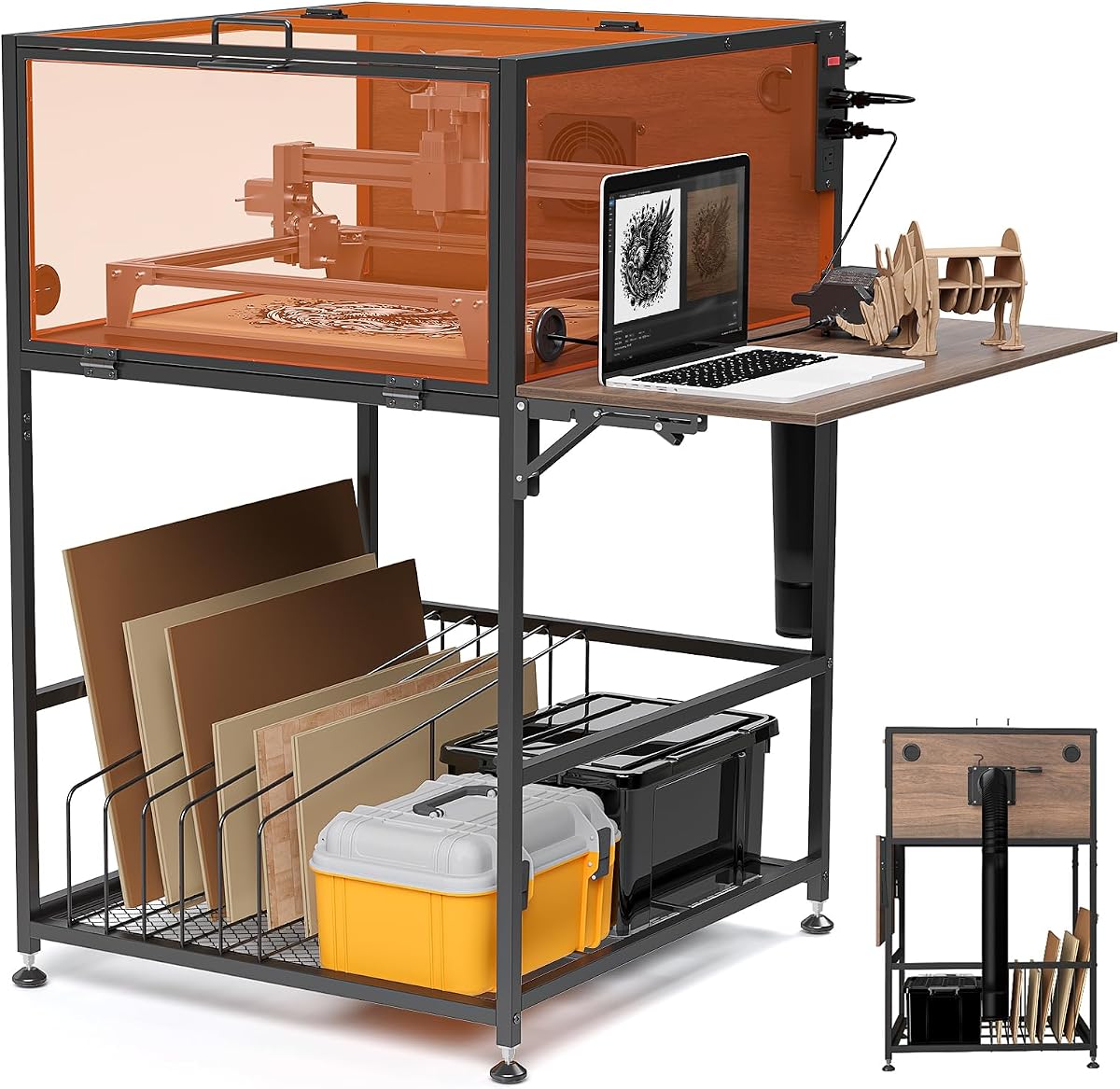
The Crafit Laser Engraver Enclosure Cabinet with Exhaust & Light Filtering is the most complete workspace-style option in this guide. It carries a 4.2 rating and distinguishes itself with a rigid metal frame, thick heat-resistant wood panels, semi-transparent viewing surfaces, integrated ventilation, cable management, storage, and a switch-controlled power strip. Rather than functioning as only a cover, it turns the engraver area into a compact cabinet workstation.
We may earn a commission when you buy through this link, at no additional cost to you.
Its interior measures 24.8 inches wide by 27.1 inches deep and 12.6 inches high. That size can fit many popular desktop engravers, but it is less accommodating than the largest folding tents or the taller acrylic cabinet. The 20-watt fan and two-meter flexible exhaust pipe are designed to improve circulation and draw smoke, particles, and odors away from the work area. Semi-transparent panels offer useful visibility from multiple sides while filtering part of the blue light produced during operation.
The cabinet is strongest as an all-in-one station. A foldable side panel supports a laptop or air-assist kit, while a divided lower rack stores wood sheets, blanks, and other engraving materials. Three AC outlets and one-button power control simplify the connection of the engraver, fan, laptop, and air assist. Magnetic doors, easy-grip handles, cable holes, adjustable feet, and included hardware make routine use and maintenance more convenient.
This is a strong choice for a home craft room or compact workshop where you want more than smoke containment. It may not fit larger machines or low-profile rotary attachments, and the manufacturer explicitly states that it is not professional laser safety equipment. Even so, for a compatible desktop engraver, it offers the best blend of organization, access, visibility, and built-in utility.
A useful distinction is that the Crafit unit is designed as a practical enclosure and work cabinet rather than certified protective equipment. It can reduce smoke spread, noise, dust, splashes, and glare, but users should still follow the safety guidance supplied with their laser engraver, provide appropriate ventilation, and never treat the cabinet as a substitute for professional safeguards.
The divided bottom rack and foldable laptop shelf make this enclosure more useful than a basic tent. Materials remain accessible, while the switch-controlled outlet strip reduces the need to reach behind the machine for individual power controls.
The semi-transparent, thickened panels provide broad visibility while reducing glare and filtering part of the blue light. Magnetic doors and wide openings make it easier to check work and reach the engraving bed without dismantling the enclosure.
We may earn a commission when you buy through this link, at no additional cost to you.
The Creality Laser Engraver Enclosure 2.0 is a well-rated, approachable enclosure for compatible desktop engravers. Its 4.4 rating reflects a product that balances construction, ventilation, visibility, and convenience without adding the bulk of a full cabinet. The 28.3-inch square footprint and 15.7-inch height provide enough room for many machines while keeping the enclosure relatively easy to store.
We may earn a commission when you buy through this link, at no additional cost to you.
A dual-window design gives you two areas from which to observe progress. The blue-light-blocking PVC material is intended to protect eyes while still allowing the engraver to remain visible. A high-efficiency 4,000-RPM fan works with the closed tent design to extract smoke, particles, and odors and to help isolate the sound of the engraver and its cooling fan.
The enclosure uses high-strength steel pipe and flame-retardant fabric, which the listing describes as waterproof and fireproof. Its foldable assembly is a significant advantage for users with limited storage space. Compared with a rigid acrylic cabinet, however, the tent-style structure can be less stable against accidental contact and may offer less shelf-like utility.
This model is a sensible choice for users who want effective enclosure features without a cabinet-style footprint. Check the 28.3 by 28.3 by 15.7-inch dimensions against your engraver and any rotary attachment. It is particularly suitable for Creality Falcon machines and many other common laser engravers, but it is not a substitute for professional laser safety gear.
Its main value is the combination of a high customer rating, useful dual windows, effective extraction, and foldable convenience. If your priority is smoke and odor control in a compact footprint, this cover answers those needs without requiring the more permanent installation of a rigid cabinet.
At 28.3 by 28.3 by 15.7 inches, the enclosure provides useful room for popular desktop models while remaining easier to fold and carry than a rigid workstation. Its stated compatibility extends to Creality Falcon systems and a broad range of other engravers.
The 4,000-RPM fan and closed structure help move smoke, particles, and odors outdoors through the exhaust arrangement. Dual PVC windows let you monitor the job without repeatedly opening the tent.
We may earn a commission when you buy through this link, at no additional cost to you.
The Integrated LED Enclosure is among the most functionally focused fabric enclosures in the guide. It has a 4.4 rating and distinguishes itself through an integrated LED light strip, a fully closed bottom, upgraded aluminum-mold Oxford cloth, iron supports, a 4,000-RPM exhaust fan, and a three-layer composite smoke pipe. These details target visibility, containment, and stable assembly.
We may earn a commission when you buy through this link, at no additional cost to you.
The bottom is designed to seal completely, helping prevent smoke from escaping downward and keeping collected dust and debris inside the enclosure. Its 28.3 by 28.3 by 15.7-inch interior can accommodate common xTool, Ortur, Sculpfun, Atomstack, and other desktop engravers. The integrated LED provides a clear view of the work area, while the thickened PVC window filters blue light.
The three-layer composite exhaust pipe is intended to make it more difficult for smoke and dust to adhere to the inner wall, which may help reduce lingering residue and odor. Upgraded metal support rods improve rigidity, and the entire unit folds for storage. These are meaningful improvements for buyers who expect to move or put the enclosure away between sessions.
Choose this model if poor visibility during a job is your primary frustration, or if you want a more sealed bottom than a basic open-bottom tent. Check clearance carefully because the integrated lighting and pipe placement are part of the fixed structure. Like the other fabric units, it offers less rigid storage and access than a cabinet with hinged doors and shelves.
It remains a strong all-around choice for a compatible desktop engraver. The lighting, sealed base, and upgraded pipe form a particularly coherent feature set for users who want clear monitoring and directed smoke extraction without committing to a bulky rigid cabinet.
The integrated LED strip illuminates the engraving area, reducing dependence on room lighting. The thickened PVC window filters blue light while retaining a useful view of the engraving bed.
The integrated bottom is designed to contain smoke and debris that could otherwise escape beneath a conventional cover. Combined with the exhaust fan and composite pipe, it supports cleaner indoor operation.
We may earn a commission when you buy through this link, at no additional cost to you.
The Green Acrylic Enclosure provides a rigid, cabinet-style structure for compatible desktop laser engravers. Although no customer rating is supplied, its physical design is distinctive: it measures 29.9 by 16.9 by 26.7 inches and uses a black aluminum alloy frame with thickened green acrylic panels. The tall profile offers significantly more vertical clearance than most of the folding fabric covers.
We may earn a commission when you buy through this link, at no additional cost to you.
Green acrylic helps limit smoke diffusion while allowing you to see the engraving process. The rigid frame, bracket connectors, and thicker panels should resist deformation better than fabric-sided tents. A front hinged door, handle, magnetic door stop, and cable threading holes improve everyday operation, particularly when loading material or connecting a rotary attachment.
The package includes acrylic panels, aluminum brackets, connectors, hinges, the handle, magnetic door stop, cable hole covers, screws, nuts, tools, and an instruction manual. That level of included hardware makes the enclosure more appealing for a permanent workshop setup. It also avoids requiring the user to source separate shelving or door components.
The principal trade-off is that this model is intended for specific desktop laser engraver dimensions. You should verify the footprint and height of your machine before ordering. It also does not list an integrated fan or exhaust pipe, so it should not be confused with a fully ventilated cabinet. External ventilation may be needed depending on the engraving materials and local setup.
This enclosure is best for someone who prioritizes rigid construction, tall clearance, and a neat cabinet appearance over a foldable format. It is particularly suitable for a dedicated craft room where the unit can remain assembled and where the enclosure’s physical protection and visibility are more important than portability.
The aluminum alloy frame and thick acrylic panels create a sturdier enclosure than fabric tents. This makes the unit feel more appropriate for an assembled workstation, provided your engraver fits the specified dimensions.
The green acrylic panels allow the operator to observe work while helping limit smoke diffusion and direct glare. A front door, handle, magnetic stop, and cable openings support practical access.
We may earn a commission when you buy through this link, at no additional cost to you.
The Creality Laser Engraver Enclosure 2.0 with Vent is a straightforward enclosure for users who prioritize quick setup and portability. It holds a 4.2 rating and offers a 28.3-inch square interior with a 15.7-inch height. The design supports Creality Falcon machines and is stated to fit 95% of laser engraving machines on the market, though exact machine dimensions should still be checked.
We may earn a commission when you buy through this link, at no additional cost to you.
Its large transparent viewing window filters blue light and gives the operator a clear view of engraving progress. The built-in smoke ventilation system helps expel smoke and dust during cutting or engraving, improving conditions inside the enclosure. The surrounding structure also works to isolate noise, odors, and material residue from the rest of the room.
Assembly requires only a few steps, and the enclosure folds down when it is not needed. Its lightweight construction also makes it easier to carry between a workbench and storage area. That makes the unit a practical fit for users who do not want a permanent cabinet or complicated workstation installation.
Compared with more elaborate covers, it does not offer an integrated LED strip, divided storage rack, power strip, or rigid hinged door. The absence of those features keeps the design simple, but it also means less support for organizing materials and accessories. It is a better fit for straightforward enclosure duties than a full workspace.
For a compatible desktop engraver, this model provides a sensible balance of visibility, ventilation, portability, and setup simplicity. It is a practical option for beginners and experienced users alike, particularly if the enclosure needs to be moved or stored away after a session.
The foldable frame can be assembled in a small number of steps and collapsed when work is complete. Its light weight makes it easier to relocate without a rigid cabinet or permanent mounting process.
A large transparent window provides a broad view of the work area while filtering blue light. The built-in ventilation system helps move smoke and dust away from the interior as the job progresses.
We may earn a commission when you buy through this link, at no additional cost to you.
The LONGER Laser Engraver Large Size Enclosure is built for users who need more vertical and horizontal clearance than a standard 400-millimeter-tall cover. It has a 4.4 rating, and its 31 by 28.7 by 20.8-inch dimensions are explicitly intended to fit the LONGER B1 series and many other desktop laser engraving machines. The extra height can also be useful for rotary attachments or taller accessories.
We may earn a commission when you buy through this link, at no additional cost to you.
A large transparent panel provides a clear view of the engraver while it operates. The enclosure uses fire-retardant materials and is described as easy to clean, durable, and capable of separating dust, debris, fumes, burning odors, and machine noise from the surrounding room. That combination makes it useful for indoor projects where keeping the broader workspace comfortable matters.
The built-in smoking fan supports air circulation inside the enclosure. A connected exhaust arrangement can direct smoke and particulates away from the operator. While the result should not be presented as professional safety equipment, it provides a more controlled setup than leaving a laser engraver uncovered in a small room.
The main compromise is size. At 31 by 28.7 inches with a 20.8-inch height, it requires more bench or floor area than the common 28.3-inch-square covers. It also lacks the cabinet-style shelving and power management of the Crafit model. Those omissions are reasonable if your priority is accommodating a larger machine rather than organizing every accessory.
This is a strong choice for LONGER B1 owners, larger desktop engravers, and users who want generous clearance without moving to a full acrylic cabinet. Confirm the full dimensions, including any attachment, before ordering, and make sure your exhaust route reaches a suitable outdoor or filtered destination.
The 20.8-inch height offers meaningful clearance beyond many standard covers. That additional space can make it easier to accommodate a compatible rotary attachment or other accessories while maintaining enclosure coverage.
Fire-retardant, easy-clean materials work with the built-in fan and transparent viewing panel to help manage smoke, odor, dust, and noise. The enclosure remains most practical when its exhaust is directed outside or into an appropriate filtration system.
We may earn a commission when you buy through this link, at no additional cost to you.
The Creality Laser Engraver Cover V2.0 has the highest listed customer rating in this roundup at 4.5. It uses a 28.3 by 28.3 by 15.7-inch space and is compatible with common xTool, Creality Falcon, Ortur, Sculpfun, Atomstack, and other laser engravers. The listing also notes that its height can accommodate a rotary roller, expanding its usefulness beyond flat-bed projects.
We may earn a commission when you buy through this link, at no additional cost to you.
Its second-generation design upgrades the metal support rods to improve rigidity and reliability. A 4,000-RPM high-efficiency fan moves smoke, particles, and odors through the exhaust system, while the closed structure helps limit their spread into the room. Dual-view windows use blue-light-filtering PVC, allowing the operator to monitor engraving progress from more than one direction.
The foldable construction is one of its most useful qualities. It can be assembled for a session and collapsed to free workbench or storage space. This makes the cover practical for users whose laser engraver is not a permanent fixture, while the upgraded rods help preserve a stable shape during use.
The tradeoff is that the enclosure remains a fabric-and-frame tent rather than a rigid cabinet. It offers little built-in storage, no power strip, and no task lighting. It is also limited to the stated 15.7-inch height, which could matter for accessories taller than those accommodated by larger enclosures.
For a common desktop engraver, this cover offers an attractive balance of customer satisfaction, ventilation, viewing access, and compact storage. It is especially appealing when you want a straightforward two-window design without taking on the permanence of an acrylic cabinet.
Upgraded metal support rods help the square frame remain stable while the enclosure is in use. The square shape also improves window placement and makes the tent easier to observe and carry.
The stated 15.7-inch interior height allows installation of a compatible rotary roller. That flexibility makes the cover useful for cylindrical engraving jobs, provided the complete rotary attachment fits within the enclosure.
We may earn a commission when you buy through this link, at no additional cost to you.
The Creality Laser Engraver Enclosure with Exhaust Fan and Pipe is a compact, highly rated enclosure with a broad range of compatible machines. It carries a 4.5 rating and measures 27.5 by 28.3 by 15.7 inches. The listing identifies common xTool, Creality Falcon, Ortur, Sculpfun, and Atomstack engravers as compatible examples.
We may earn a commission when you buy through this link, at no additional cost to you.
Its enclosed structure helps isolate noise, smoke, odors, fire effects, dust, and water from the wider room. The built-in ventilation system expels smoke and dust during engraving, while the large transparent window filters blue light and allows real-time observation. The slightly rectangular footprint offers useful flexibility for machine orientation and rotary attachment clearance.
Installation is straightforward in principle, but the manufacturer emphasizes pressing the two-way and three-way pipes securely against the connecting rods. This prevents excessive pressure on the cover body and helps maintain a stable setup. Paying attention to those details during assembly is worthwhile because a loosely fitted exhaust connection can undermine containment.
Like the other 400-millimeter-tall Creality-style tents, it provides less vertical clearance than the LONGER and VEVOR options. It also lacks shelves, power controls, and integrated lighting. The reward is a simpler product that focuses on the essential enclosure functions: viewing, extraction, containment, and folding storage.
This model is a strong recommendation for users with a common desktop engraver who wants a compact cover with a strong customer rating. It is especially appropriate if the enclosure will be stored away between uses and the main goal is reducing smoke, odor, dust, and noise during engraving.
The large transparent panel gives the operator a direct view of the engraving bed while filtering blue light. It reduces the need to open the cover merely to check progress.
Securely pressing the exhaust pipes against the support rods helps prevent pressure on the cover body. Taking care during setup supports a more stable enclosure and a consistent connection to the extraction system.
We may earn a commission when you buy through this link, at no additional cost to you.
The Creality Laser Engraver Enclosure is a 4.5-rated option designed for broad compatibility with Creality, xTool, and other desktop engravers. Its 27.5 by 28.3 by 15.7-inch interior gives enough height to accommodate a rotary roller, which broadens the range of possible projects beyond standard flat engraving.
We may earn a commission when you buy through this link, at no additional cost to you.
The enclosure uses flame-retardant material described as capable of withstanding temperatures up to 1,000 degrees Celsius. As always with heat-related claims, actual performance depends on the material, the job, the duration of operation, and whether the enclosure is used as intended. Its practical roles are to contain smoke, odor, noise, dust, and water while improving comfort around the work area.
A large viewing window uses filtered material to help protect the observer's eyes and provide a clear view of the job. The included fan and pipe create a dedicated extraction path for smoke and dust. Together, these features make the enclosure more useful in an indoor room than leaving the machine open, particularly when the exhaust is directed outside.
Installation requires no additional tools and takes a few steps. The structure is lightweight, durable, and foldable, allowing it to be carried or stored when not needed. That flexibility is one of the clearest advantages over rigid cabinets, even though it comes with fewer storage and workstation features.
This enclosure is best for users who want a straightforward, highly rated, broadly compatible cover with ventilation and filtered visibility. Verify your engraver dimensions and any rotary equipment before buying, and always use the exhaust system in accordance with the laser machine's instructions and local safety guidance.
The rectangular interior accommodates many popular Creality and xTool systems, along with other desktop engravers. The extra height can also support a compatible rotary roller for expanded project options.
The tool-free, foldable design allows quick setup and compact storage. Users who occasionally engrave or share a workspace can remove the enclosure when it is no longer needed instead of dedicating permanent bench volume.
We may earn a commission when you buy through this link, at no additional cost to you.
The VEVOR Laser Engraver Enclosure is the premium large-format pick in this guide. It has a 4.1 rating and provides a substantial 31.5 by 31.5 by 19.6-inch interior, or 800 by 800 by 500 millimeters. That makes it one of the roomiest folding covers listed and gives compatible engravers and accessories greater clearance than standard 400-millimeter-tall tents.
We may earn a commission when you buy through this link, at no additional cost to you.
A high-speed 4,000-RPM fan is paired with a fully enclosed structure to help extract smoke, dust, noise, and odor. Exhaust ports on both sides allow some flexibility in where the unit is placed relative to an outdoor exhaust route. The design is aimed at hobbyists and professionals who need a controlled indoor environment for a broad range of engraving tasks.
Storage is a notable advantage. Each side includes a 19.69-inch or 500-millimeter fastener strip, and the adjustable design can accommodate tools of different shapes. Hanging frequently used items keeps them accessible while reducing clutter on the work surface. The enclosure also folds up without requiring reinstallation and is described as lightweight and easy to carry.
The main tradeoff is its footprint. At 31.5 inches square and nearly 20 inches tall, it needs more room than the smaller Creality covers. It remains a fabric enclosure rather than a rigid cabinet, so it offers less resistance to accidental bumps. The stated flame-retardant and fireproof characteristics should be understood in the context of proper use and the materials being engraved.
Despite those limitations, the VEVOR is the most spacious flexible option here. Choose it when clearance, side exhaust routing, and organized hanging storage matter more than compact folding or a rigid workstation. Confirm that the entire machine and any rotary setup fit comfortably inside the stated dimensions.
The 800 by 800 by 500-millimeter interior gives compatible engravers and accessories more room than standard desktop covers. That space is useful for larger workpieces and rotary arrangements that need additional height.
Adjustable fastener strips on both sides provide hanging storage for tools of different shapes. This keeps frequently used implements visible and available without requiring shelves or additional workbench organizers.
We may earn a commission when you buy through this link, at no additional cost to you.
The right laser engraver enclosure should fit your machine, contain the material-specific byproducts of engraving, and remain convenient to operate. Compare dimensions, extraction, viewing access, construction, and storage before choosing.
In short, measure first and buy only after confirming a comfortable fit.
Choose a matched fan-and-pipe system that can be directed toward appropriate ventilation.
Prioritize a filtered panel and viewing angles that match the way you monitor work.
Choose a rigid cabinet for permanence or a reinforced tent for portability and flexibility.
Plan the complete exhaust path before assembly and avoid improvised sealed connections.
Favor wide access, protected cable routes, and openings that suit your workflow.
Match permanence to your engraving frequency and the space available for the enclosure.
Verify every included part and accessory requirement against your own engraving setup.
Before assembly, place the enclosure in its intended location and confirm that your engraver, material supply, and exhaust route will all fit. Install the frame, secure the viewing panels, connect the fan and pipe, and check that every connection is firm without forcing the enclosure into an unnatural shape. Position the machine before adding the final panels or covers so that cables, feet, and accessories are not trapped underneath.
During use, keep the enclosure closed while the laser is operating and direct the exhaust toward suitable ventilation. Do not block the fan, obscure the viewing panels with flammable items, or place combustible materials against hot surfaces. Stay attentive to the machine through the filtered window, and open the enclosure only after the laser has stopped. If the exhaust hose develops a sharp bend or the fan sounds obstructed, pause the job and correct the airflow before continuing.
For maintenance, let the machine and enclosure cool before cleaning. Wipe the panels and accessible surfaces with a soft, lightly damp cloth, and remove accumulated dust or residue according to the enclosure manufacturer's instructions. Clean or replace the exhaust filter if one is present, and check that the pipe, frame joints, hinges, and cable openings remain secure. Fold or cover the enclosure for storage, and inspect fabric or acrylic panels periodically for damage.
Choose an enclosure that is slightly larger than the complete laser engraver, including its frame, feet, cable connections, and any rotary attachment. Most standard covers in this guide measure about 28.3 inches square and 15.7 inches high, while larger options provide up to 19.6 inches of height. Measure your machine and compare every relevant dimension before ordering rather than relying only on a brand name or broad compatibility claim.
No. An enclosure improves containment and airflow, but it does not guarantee that every particle or odor will be removed. Performance depends on the fan, exhaust connection, material being engraved, duration of the job, and where the extracted air is sent. Connect the enclosure to appropriate outdoor ventilation or a suitable filtration system, and always follow the safety guidance supplied with your laser engraver.
Many covers are designed around a common desktop footprint and can accommodate several brands, including models from Creality, xTool, Ortur, Sculpfun, and Atomstack. However, universal-fit claims still require a physical dimension check. Pay particular attention to interior height, bed clearance, cable locations, exhaust exit, and any rotary accessory that will be installed.
Neither style should be treated as professional laser safety equipment without appropriate testing and certification. Flame-retardant fabric can be lightweight, foldable, and effective at containing ordinary smoke and dust, while a rigid acrylic cabinet can offer better physical separation and organized access. Compare the construction, ventilation, and intended use of each model, and prioritize the safeguards specified by your laser engraver's manufacturer.
It depends on your available ventilation route, the materials you engrave, and how often you use the machine. An outdoor exhaust path is generally preferable to recirculating smoke into the room. If outdoor venting is not practical, a dedicated filtration system may be appropriate, but its filter must be suitable for the particular smoke and particles produced by your materials. Follow the guidance for your specific laser and enclosure.
Most fabric-style enclosures in this guide use a foldable design specifically to reduce storage space. Remove or disconnect the exhaust pipe and fan as directed, allow hot components to cool, and make sure no cable is trapped in a hinge or support rod. Fold the frame only after checking the manufacturer’s storage instructions, since sharply bending certain panels or rods could cause damage.
An enclosure is a controlled workspace intended to contain smoke, dust, odor, noise, and some material effects. A laser safety shield is designed around a specific optical protection rating and application. One of the Crafit listings explicitly states that its product is not professional laser safety equipment or a substitute for professional gear, and that distinction applies to the category as a whole.
Allow the laser and enclosure to cool, then use a soft, lightly damp cloth to clean accessible panels and surfaces. Follow the listing instructions for the specific PVC, fabric, acrylic, or metal components. Check the fan, pipe joints, frame connections, and cable openings for blockage or looseness, and clean any filter according to its manufacturer. Replace damaged supports or panels instead of using a compromised enclosure.
The Crafit Enclosure Cabinet is the strongest all-around workspace for a compatible desktop machine, combining light-filtered visibility, integrated ventilation, power controls, cable management, and useful storage. The Creality Enclosure 2.0 stands out as a budget-friendly, highly rated folding option, while the roomy VEVOR provides premium capacity, flexible exhaust placement, and organized tool storage. Each serves a different priority, from compactness to permanent organization.
Before buying, measure the complete engraver and any rotary attachment, then verify where the extracted air will go. Match the enclosure's height and footprint to your machine, consider how often you will use it, and decide whether a rigid cabinet or foldable tent better suits your room. Effective ventilation, clear viewing access, secure assembly, and a proper exhaust route are more important than cosmetic extras.
Finally, check the current product listing, included accessories, compatibility notes, and customer feedback before ordering, since specifications and availability can change. Prices and promotions also fluctuate, so compare the current details rather than relying on an old article or saved listing. Use the enclosure as a supplemental workspace control and always maintain the safety practices required by your laser engraver.