
Coral M.2 Accelerator B+M Key
5.0Editor score
4 TOPS Edge TPU performance
2 TOPS per watt efficiency
TensorFlow Lite model support
Debian Linux compatibility
M2 Accelerator Cards guide comparing AI inference modules, Edge TPUs, adapters, storage cards, and key compatibility for modern systems.
M2 Accelerator Cards add dedicated machine-learning and AI inference capabilities to compatible computers, edge devices, and embedded systems. The best choice depends on processor performance, software support, interface layout, power limits, deployment environment, and whether the application needs computer vision, TensorFlow Lite, or a broader AI framework.
This guide compares ten supplied M2-form-factor products, including dedicated AI modules, dual-TPU boards, PCIe adapters, and M.2 expansion cards. Each selection is evaluated using its documented performance, operating-system support, key format, framework compatibility, power characteristics, and usefulness for specific edge-computing projects.
The recommendations show why the Coral modules remain approachable for TensorFlow Lite workloads, why the Hailo-8 offers substantial multi-stream performance, and where adapters can simplify expansion. Product availability and prices can change, so confirm the current listing, system requirements, and software compatibility before ordering.
5.0Editor score

4.6Editor score

4.3Editor score
This side-by-side comparison distinguishes true AI inference modules from PCIe adapters, storage expansion cards, and other M.2 products included in the supplied list. It highlights the accelerator type, interface, computing performance, framework support, and operating-system considerations that matter most to edge-computing buyers.


The MX3 M.2 AI Accelerator is a dedicated inference module designed for demanding AI computer vision workloads. With a 4.3 rating, it stands out for combining focused AI processing, a standard M.2 M-key 2280 form factor, Linux support, and a comprehensive SDK intended to simplify development and deployment.
We may earn a commission when you buy through this link, at no additional cost to you.
Its strongest feature is the balance between purpose-built performance and integration flexibility. The module can fit into systems with compatible M-key 2280 slots and can be used with a Raspberry Pi 5 when paired with an M-key 2280 HAT. The SDK is particularly important because accelerator hardware is only useful when developers can compile, optimize, and deploy supported models efficiently.
Energy efficiency is another meaningful advantage for deployments that cannot rely on a large desktop power budget. The MX3 is designed to provide strong performance while minimizing power consumption, making it relevant to embedded installations, compact industrial systems, and edge devices that perform inference close to the data source.
The main limitation is platform specificity. Linux is explicitly supported, while no comparable Windows claim appears in the supplied specifications. Buyers should also verify that their system exposes a compatible PCI-SIG M.2 M-key 2280 slot and can provide the necessary software environment. For developers building serious computer-vision pipelines who want dedicated hardware and a complete development path, the MX3 is the strongest all-around recommendation.
Overall, the MX3 earns the Editor's Choice designation because it is explicitly engineered for AI workloads rather than merely offering M.2 expansion. It is a compelling choice when performance, developer tooling, physical integration, and deployment efficiency all matter.
The MX3 is designed around demanding computer-vision inference rather than general storage expansion. That focus makes it more relevant to developers who want predictable acceleration for vision-based applications and a documented SDK for development and deployment.
Its PCI-SIG-compatible M.2 M-key 2280 design creates opportunities beyond conventional desktop PCs. With the appropriate M-key 2280 HAT, the accelerator can also be incorporated into a Raspberry Pi 5-based system.
We may earn a commission when you buy through this link, at no additional cost to you.
The M.2 Accelerator with Dual Edge TPU M.2-2230 combines two Google Edge TPU ML accelerators on one compact E-key module. Its 4.1 rating reflects a specialized product that delivers 8 TOPS of peak int8 performance while maintaining an efficiency figure of 2 TOPS per watt.
We may earn a commission when you buy through this link, at no additional cost to you.
The dual-processor arrangement is the defining advantage. Instead of relying on a single accelerator, this module offers two independent Edge TPU resources connected through two PCIe Gen2 x1 interfaces. That can be valuable for developers who want to spread inference tasks across two accelerators or need more throughput from a limited physical footprint.
Its M.2 2230 E-key format is compact and may suit embedded boards that expose the correct E-key interface. However, it is not as universally interchangeable as a B+M or M-key module. Buyers must check the physical key layout, available lane configuration, host software, and thermal conditions before assuming installation is possible.
The product is most appropriate for compact edge systems already designed around Google Edge TPU software and dual-accelerator deployment. It is less attractive to a beginner who wants a broadly compatible plug-in module or a developer whose models cannot be compiled for Edge TPU execution. For the right platform, though, combining two TPUs in one module is an efficient approach to increasing inference capacity.
This is a strong option when two accelerators can be integrated without occupying two separate expansion slots. Its value comes from the combination of compactness, total throughput, and power efficiency rather than from general-purpose flexibility.
Each Edge TPU has its own PCIe Gen2 x1 interface, allowing the module to present two accelerator resources to a compatible host. This can improve workload parallelism compared with a single-TPU design in systems prepared for it.
The 2230 E-key format keeps the board small, while the stated 8 TOPS int8 peak makes it relevant to embedded inference. The tradeoff is narrower host compatibility than standard B+M or M-key modules.
We may earn a commission when you buy through this link, at no additional cost to you.
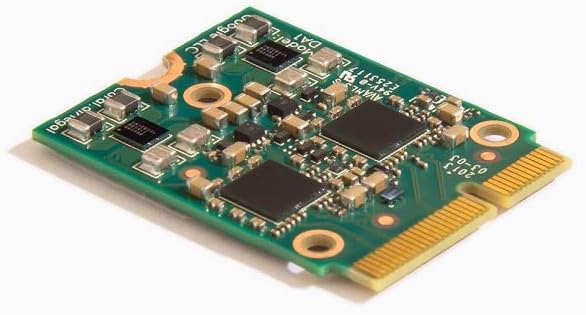
The G650-04686-01 Coral M.2 Accelerator B+M Key is an efficient Edge TPU coprocessor rated at 5.0 in the supplied data. It provides 4 TOPS of inferencing performance at 2 TOPS per watt and is designed for Debian-based Linux systems with a compatible card-module slot.
We may earn a commission when you buy through this link, at no additional cost to you.
The product is particularly well suited to computer-vision projects using TensorFlow Lite. The supplied specification notes that TensorFlow Lite models can be compiled to run on the Edge TPU, while AutoML Vision Edge support helps users build and deploy custom image-classification models. This simplifies the path between an existing compatible model and dedicated edge hardware.
Performance provides a compelling example of the module's capability, with the ability to execute a MobileNet v2 mobile vision model at 400 FPS according to the supplied description. That figure is workload-specific rather than a universal application result, but it illustrates why Edge TPU modules remain useful for high-throughput, power-conscious inference.
The key restriction is the software ecosystem. The module is listed as working with Debian Linux, and TensorFlow Lite compatibility does not mean that every framework or model can run unchanged. Developers should verify model conversion, compiler support, host drivers, and power delivery before committing to a fleet deployment.
For an individual developer, startup, or established edge team seeking a straightforward path to TensorFlow Lite inference, this Coral module is the best-value choice in the group. Its high rating, low power draw, and dedicated vision tooling make it especially approachable for projects that can use the Edge TPU workflow.
The accelerator combines 4 TOPS with a 2 TOPS-per-watt figure, which is useful for deployments where throughput and heat generation both matter. The stated 400 FPS MobileNet v2 example shows the value of a workload-specific accelerator.
TensorFlow Lite compilation support and AutoML Vision Edge capabilities reduce the work required to prepare compatible image-classification models. The module is still specialized, but its intended workflow is clearly documented.
We may earn a commission when you buy through this link, at no additional cost to you.
The QNAP QM2-2P10G1TB is a PCIe expansion card for adding two M.2 2280 NVMe SSDs and a 10GbE network port to compatible QNAP systems. Despite appearing in an M.2-focused list, it accelerates storage and networking rather than machine-learning inference, making it an important distinction for careful buyers.
We may earn a commission when you buy through this link, at no additional cost to you.
Its storage side provides two PCIe Gen3 x4 NVMe slots that can be used for caching or storage expansion. The network side uses Marvell's AQtion AQC113C Ethernet Controller and offers 10GbE with backward-compatible 5G, 2.5G, 1G, and 100M options. Together, these features can improve a NAS workflow that is constrained by storage throughput or network bandwidth.
The card uses a PCIe Gen3 x8 bus interface and supports QNAP QTS, QuTS hero, Windows, and Linux operating systems. A low-profile bracket is preinstalled, while a full-height bracket and a specialized bracket for selected QNAP NAS models are included. This attention to chassis fit is useful in compact enclosures.
It is not a suitable choice for a developer expecting TensorFlow, computer-vision, or other AI inference acceleration. The M.2 slots accept NVMe SSDs, not Edge TPU modules. Its relevance to this guide is as an example of an M.2 expansion product that should not be selected merely because its name or physical form resembles an accelerator card.
For a QNAP owner seeking faster storage and network connectivity, it is an effective purpose-built upgrade. For an AI developer, it should be passed over in favor of a module with an actual inference processor.
Two Gen3 x4 NVMe positions and a 10GbE port address different bottlenecks in a NAS. The card can combine fast SSD storage or caching with higher-bandwidth network transfers when the host and connected equipment support them.
Support for QTS, QuTS hero, Windows, and Linux adds flexibility, although the included specialized bracket indicates a QNAP-focused design. Buyers should verify chassis model, slot availability, and bracket requirements.
We may earn a commission when you buy through this link, at no additional cost to you.
The Rocket 1604L is a PCIe Gen5 x16 adapter card for connecting up to four M.2 NVMe devices. It provides dedicated x4 lanes for each port, accepts 2242, 2260, and 2280 drive sizes, and supports mainstream operating systems on x86 Intel, x86 AMD, and ARM platforms.
We may earn a commission when you buy through this link, at no additional cost to you.
The architecture focuses on storage throughput. A full x16 host interface and four dedicated drive lanes can make the card useful for storage-dense workstations or servers, provided the motherboard and processor platform can supply the necessary PCIe bandwidth. It is not intended to host AI inference processors.
The absence of a supplied rating means there is no numerical customer-rating value to present as an established consensus. The supplied facts nevertheless make the hardware's role clear: it is an add-in card for NVMe storage expansion, and it supports more processor architectures than many enthusiast-oriented alternatives.
The card can also be misunderstood because it uses the same M.2 physical format found in accelerator products. Physical similarity does not make the products interchangeable. An NVMe AIC requires drives, storage drivers, and a compatible PCIe slot; an AI accelerator requires a supported inference runtime and model compiler.
Buyers seeking local high-speed storage may find the 1604L well suited to their task, but it does not advance an AI inference project. It should be considered a complementary M.2 expansion card, not one of the dedicated accelerators in this guide.
Giving each M.2 port a dedicated x4 lane avoids sharing a smaller allocation among multiple drives. The card is therefore designed around high-throughput storage rather than general peripheral expansion.
Support for Intel, AMD, and ARM platforms broadens the potential audience. Exact operating-system support, thermal management, and device compatibility should still be confirmed for the intended host.
We may earn a commission when you buy through this link, at no additional cost to you.
The Dual Edge TPU PCIe Adapter accepts two Coral M.2 accelerator cards and connects them through a PCIe Gen3 x4 host interface split into four Gen2 x1 lanes. It is designed to turn a compatible system into a dual-TPU machine-learning workstation without requiring each accelerator to occupy a separate PCIe slot.
We may earn a commission when you buy through this link, at no additional cost to you.
Its primary benefit is physical efficiency. Systems with limited expansion space can consolidate two accelerator modules on one adapter, while the included heatsink helps manage the heat generated by sustained edge inference. The design is aimed at object detection, image classification, and real-time video analytics.
The adapter targets TensorFlow Lite models, computer-vision applications, and edge AI deployments, which places it in a more clearly defined AI context than the NVMe expansion cards. It is not itself an inference processor, however. Its performance depends on the two Coral modules installed, their model compatibility, host software, and PCIe lane availability.
Because it splits a Gen3 x4 connection into multiple Gen2 x1 lanes, buyers should treat the adapter as a specialized integration solution rather than a transparent high-bandwidth upgrade. Confirmation of operating-system drivers and Coral software support is important before deployment.
For an edge-AI workstation builder with two appropriate Coral modules and a constrained number of free slots, this adapter is highly practical. It is less suitable for someone seeking a single, immediately deployable accelerator because the necessary cards and setup are separate.
The adapter's lane splitter consolidates two accelerator modules into one host expansion card. That makes it useful in compact workstations where a second physical PCIe slot is unavailable.
Mentioned support for TensorFlow Lite, computer vision, and edge AI clarifies its intended role. It is a bridge between suitable modules and the host system, not a substitute for an AI processor.
We may earn a commission when you buy through this link, at no additional cost to you.
The ASUS Hyper M.2 x16 Gen5 Card supports up to four PCIe 5.0 or 4.0 M.2 drives and provides a stated bandwidth of up to 512 Gbps. Its 4.2 rating and extensive storage features make it a strong PCIe expansion option, but it should not be confused with an M.2 AI accelerator.
We may earn a commission when you buy through this link, at no additional cost to you.
The card uses an adapted server-grade PCB, a six-pin PCIe power connector, and a two-phase power solution rated for up to 14 watts of output. A large heatsink, top and bottom thermal pads, and an active fan are designed to reduce drive temperatures and help maintain transfer performance. It also supports a fan cable for chassis-header control.
RAID functionality across supported platforms is a notable feature. Buyers can create a bootable RAID array with up to four M.2 SSDs, depending on the exact platform, software, and drive configuration. Support for 2242, 2260, 2280, and 22110 form factors increases flexibility when choosing storage.
This product does not accelerate TensorFlow, computer vision, or other AI inference workloads. Its M.2 connectors accept NVMe storage devices, not Edge TPU modules. It entered the comparison because both AI accelerators and storage cards use the M.2 form factor, but the practical use cases are entirely different.
For a workstation or compatible server that needs multiple fast SSDs, the ASUS card is a capable expansion solution. For an AI project, its cooling, RAID, and storage bandwidth do not replace a dedicated inference processor, so buyers should choose a true accelerator instead.
The adapted PCB, four supported NVMe devices, and RAID capabilities make the card appropriate for storage-dense builds. It is designed to increase usable PCIe storage capacity rather than compute throughput.
A large heatsink, thermal pads, and a fan help control the heat generated by high-speed drives. Fan-cable support adds another layer of integration with compatible chassis headers.
We may earn a commission when you buy through this link, at no additional cost to you.
The waveshare Hailo-8 M.2 AI Accelerator Module is built around the 26 TOPS Hailo-8 processor and has a 4.6 rating. It delivers substantial edge-inference capability at 2.5 watts of typical power consumption, making it one of the most performance-focused dedicated AI modules in the comparison.
We may earn a commission when you buy through this link, at no additional cost to you.
The Hailo-8's ability to process multiple streams and models simultaneously is especially valuable for camera-based and multi-input deployments. That capability is backed by support for TensorFlow, TensorFlow Lite, ONNX, Keras, and PyTorch, which gives developers a broader set of options than products limited to a single model-compilation ecosystem.
Operating-system flexibility is another strength. The module supports Linux and Windows, works within a temperature range of -40°C to 85°C, and is compatible with Raspberry Pi 5 systems. The listed compatibility across operating systems and frameworks makes it easier to move from a desktop prototype to an embedded deployment, subject to host interface and driver requirements.
The product is a module only, so it does not arrive as a complete standalone computer. A buyer still needs a compatible host, cooling, power delivery, software setup, and the appropriate Hailo development or runtime environment. The listed broad framework support also does not guarantee that every model can be used without modification.
For developers who need high inference throughput, simultaneous workloads, and low power draw, the Hailo-8 is the best premium option. It is particularly suitable for sophisticated edge vision systems, multi-camera analytics, and compact deployments based on Raspberry Pi 5 or a compatible computer.
A stated 26 TOPS gives the module considerable headroom for demanding edge inference. The ability to scale across multiple streams and models makes it especially relevant to multi-camera or multi-stage AI pipelines.
Support for TensorFlow, TensorFlow Lite, ONNX, Keras, and PyTorch broadens model-development options. Linux and Windows support, along with Raspberry Pi 5 compatibility, also allows the same module concept to fit multiple project stages.
We may earn a commission when you buy through this link, at no additional cost to you.
The Coral M.2 Accelerator A+E Key, identified as G650-04527-01, integrates an Edge TPU capable of 4 TOPS of int8 peak inference. Its 4.2 rating, low-power design, and broad operating-system and temperature support make it especially relevant to embedded and industrial applications.
We may earn a commission when you buy through this link, at no additional cost to you.
The A+E interface offers an alternative physical configuration for compatible systems, which can be valuable in compact embedded designs. It delivers 2 TOPS per watt, matching the efficient profile of other Coral hardware while providing enough performance for supported inference tasks.
Operating-system support is broader than the description of some competing Coral modules. Linux support covers Debian 10 and Ubuntu 16.04 or later, while Windows 10 64-bit is also listed. The operating range of -20°C to +85°C further distinguishes it as a module suited to environments beyond controlled desktops.
As with all Edge TPU products, compatibility is centered on software that can compile models for the accelerator. The physical A+E key and M.2 2230 format also demand a carefully matched host. Buyers should not assume it will fit a standard B+M or M-key slot without an appropriate carrier or adapter.
For an industrial designer or embedded developer who needs a compact, power-efficient TPU with a wide temperature range, this module is a strong option. It is less convenient for general experimentation than a universally compatible PCIe card, but that specialization is precisely what makes it suitable for embedded projects.
The -20°C to +85°C operating range supports use in environments where standard consumer modules may be unsuitable. Industrial integration still requires proper enclosure design, airflow, and power validation.
The M.2 2230 A+E layout can fit tight embedded platforms designed around the correct interface. Host-board support and any required carrier must be identified before purchase.
We may earn a commission when you buy through this link, at no additional cost to you.
The Coral Dual Edge TPU Adapter is a compact M.2 2280 B+M carrier designed exclusively for Coral M.2 accelerator modules with dual Edge TPUs. Its 5.0 rating reflects a purpose-built solution for users who want to integrate supported accelerator hardware without relying on a general-purpose PCIe riser.
We may earn a commission when you buy through this link, at no additional cost to you.
The adapter fits standard M.2 2280 B-key or M-key slots, but only when the host uses the PCIe protocol. It provides a bidirectional Gen2 connection with one x1 upstream lane and dual x1 downstream lanes. This is enough to expose the supported accelerator arrangement while retaining a standard host-card footprint.
A stainless-steel mounting screw is included for vibration-resistant PCB fixation, which makes the design relevant to embedded and mobile installations where a loose card would be unsuitable. The explicit warning that it does not support Raspberry Pi CM4 or USB enclosures prevents a common compatibility mistake.
It is an adapter rather than an accelerator, so buyers need the appropriate Coral modules, software, and host support. The listed 5.0 rating should not be interpreted as a measure of inference performance; the actual throughput comes from the installed Edge TPU modules.
For a project that specifically uses dual-module Coral hardware, this carrier is a clean and compact solution. It is less appealing to buyers seeking a ready-to-use AI module because it neither includes the accelerators nor provides a conventional full-size PCIe x4 adapter.
Because the carrier is designed around the dual-module Coral arrangement, it avoids the uncertainty of adapting accelerator hardware to an unrelated interface. Matching the correct modules and host software remains essential.
The 2280 B+M footprint fits common M.2 positions, while the included stainless-steel screw helps resist vibration. Its explicit PCIe-only limitation makes host-interface verification especially important.
We may earn a commission when you buy through this link, at no additional cost to you.
Choosing an M.2 accelerator requires separating true AI compute modules from storage cards and interface adapters, then matching the remaining hardware and software to the intended deployment. The most important factors are workload support, physical interface, host compatibility, power requirements, cooling, and model software.
An M.2 accelerator should contain a processor designed to execute AI inference workloads, not merely provide a connector for NVMe storage. Products such as the Coral Edge TPU modules, MX3, and Hailo-8 perform dedicated machine-learning acceleration. By contrast, the QNAP QM2, Rocket 1604L, and ASUS Hyper M.2 cards expand SSD storage or network connectivity. The physical M.2 designation describes form factor, not workload capability, so confirm that the included processor, runtime, and model toolchain match the intended application.
M.2 modules are not physically interchangeable. The list includes 2230 E-key, 2230 A+E, and 2280 B+M configurations, plus a 2280 M-key accelerator. Compare the module's key layout, length, connector type, and mounting pattern with the host specification. Some systems expose PCIe M.2 slots while others support SATA, and a physical fit does not guarantee usable lanes. A PCIe-only slot is required for the Coral dual adapter, while the MX3 requires a compatible M-key 2280 environment.
TOPS is useful for comparing broad int8 throughput, but it does not tell the entire performance story. Consider the processor architecture, supported precision, model format, data movement, software overhead, and whether the workload can be compiled for the accelerator. The Coral modules offer 4 TOPS per device, the dual Edge TPU module offers 8 TOPS, the MX3 targets demanding computer vision, and the Hailo-8 provides 26 TOPS. A larger figure is useful only when the application and compiler can use it efficiently.
The accelerator's value depends on the ability to prepare and run a model. The Coral B+M module supports TensorFlow Lite and AutoML Vision Edge, while the Hailo-8 supports TensorFlow, TensorFlow Lite, ONNX, Keras, and PyTorch. The MX3 includes a comprehensive SDK intended to simplify development and deployment. Review existing model code, supported operators, conversion tools, runtime versions, and the availability of community resources before making a selection.
Edge inference often favors efficient, compact accelerators over power-hungry desktop GPUs. The Coral modules are described at 2 TOPS per watt, the Hailo-8 has a typical consumption of 2.5 watts, and the dual Edge TPU module maintains the same efficiency figure. Lower consumption can simplify enclosures and reduce cooling demands, but the host, storage, networking, and peripherals also consume power. Ensure that the chosen card has adequate airflow, and use active cooling or a suitable adapter heatsink for sustained workloads.
Some projects need more throughput than a single module can provide. The dual Edge TPU M.2-2230 combines two TPUs in one module, while the Dual Edge TPU PCIe Adapter and Coral Dual Edge TPU Adapter are designed to carry two Coral modules. Check how the host splits PCIe lanes, how software assigns workloads, and whether the enclosure has enough physical clearance. Multi-accelerator designs can improve parallelism, but they also add power, heat, driver, and model-partitioning complexity.
The supported operating systems can determine whether a module is viable. The MX3 is specified for Linux, the Coral B+M module works with Debian Linux, and the Coral A+E module supports Debian 10, Ubuntu 16.04 or later, and 64-bit Windows 10. The Hailo-8 supports both Linux and Windows. Match the accelerator to the operating system already used by the project and confirm the availability of the required drivers, compilers, and runtime components.
Some products in this category are complete compute modules, while others merely connect modules to a host. The Coral Dual Edge TPU Adapter and the larger PCIe adapter need compatible accelerator cards and do not provide inference performance by themselves. This distinction affects the total bill of materials and the amount of setup required. A ready-to-use module is usually more convenient for a new project, while a specialized adapter can be valuable when reusing existing Coral hardware or consolidating expansion.
Begin by identifying the host's exact M.2 interface, supported operating system, available PCIe lanes, and power capabilities. Install the correct operating-system image or platform image, update the system, and install the accelerator manufacturer's drivers, compiler, runtime, and model-development tools. If using an adapter, connect the intended Coral modules according to the adapter instructions and confirm that the host recognizes each accelerator before deploying a model.
Prepare a model that the selected software explicitly supports. Compile or convert it using the documented toolchain, then test with a representative dataset and verify the output against a trusted reference. Start with a modest workload while checking accelerator utilization, system memory, temperatures, power consumption, and latency. Increase streams or model complexity only after confirming that the system remains stable and thermally comfortable.
For maintenance, keep the card and adapter seated firmly, retain any required mounting screw, and avoid blocking the heatsink, fan, or ventilation openings. Monitor temperatures during sustained inference, especially in enclosed systems. Update software and firmware according to the provider's release guidance, keep model and runtime versions aligned, and periodically retest performance after operating-system or framework changes.
An M.2 AI accelerator card is a compact add-in module containing a processor optimized for machine-learning inference. Unlike an NVMe expansion card, it accelerates supported AI models rather than providing storage capacity. These modules are commonly used in embedded systems, edge computers, industrial equipment, and development workstations.
No. Compatibility depends on the module's physical key, length, connector, PCIe lane configuration, power delivery, and host software. For example, the Coral Dual Edge TPU Adapter fits B-key or M-key M.2 2280 positions but works only with the PCIe protocol and is not compatible with SATA M.2 slots or Raspberry Pi CM4 USB enclosures.
The Coral modules use Google Edge TPU processors and are especially well suited to compatible TensorFlow Lite workflows. The MX3 targets demanding computer-vision workloads and includes a comprehensive SDK. The Hailo-8 offers 26 TOPS, a typical 2.5-watt power draw, and support for TensorFlow, TensorFlow Lite, ONNX, Keras, and PyTorch.
Yes, if the goal is AI inference with a Coral-based adapter. The Dual Edge TPU PCIe Adapter and Coral Dual Edge TPU Adapter are carriers for compatible accelerator modules rather than standalone AI processors. The host must also have compatible drivers, runtime software, power, cooling, and an available PCIe connection.
Generally, no. NVMe M.2 cards are designed for high-speed storage and do not include a neural-network inference processor. They may help an AI system load models and data more quickly, but dedicated accelerator hardware is needed to execute supported inference workloads efficiently.
Power requirements vary considerably by model. The Coral products are described at 2 TOPS per watt, while the Hailo-8 has a typical power consumption of 2.5 watts. The dual Edge TPU module also lists 2 TOPS per watt, although total system consumption will include the host, storage, networking, and cooling equipment.
The supplied product information identifies the waveshare Hailo-8 M.2 module as compatible with Raspberry Pi 5. You still need the correct host connection, power, cooling, operating-system support, and Hailo software. Verify the complete setup with the module documentation before beginning a production deployment.
Use a representative model and dataset, then measure end-to-end latency, throughput, accuracy, power use, and temperature. A vendor TOPS figure describes peak capability rather than guaranteed application performance. Testing under sustained load is especially important in compact enclosures where heat and memory bandwidth can limit results.
The MX3 M.2 AI Accelerator is the strongest overall choice for developers targeting demanding computer-vision workloads with Linux and a compatible M-key environment. The Coral M.2 Accelerator B+M Key is the best-value route into dedicated Edge TPU inference, while the waveshare Hailo-8 M.2 Module is the premium pick for high throughput, multi-stream workloads, broad framework support, and low typical power draw.
Prioritize the model toolchain, physical interface, and host operating system before considering headline TOPS figures. Developers already committed to TensorFlow Lite may find the Coral modules particularly direct, while projects needing ONNX, PyTorch, or more simultaneous inference may benefit from the Hailo-8. Adapters are valuable only when the host layout and existing accelerator modules justify their specialized design.
Finally, remember that this list includes storage and interface products that illustrate the breadth of the M.2 ecosystem, not just AI compute modules. Verify the current product listing, included components, dimensions, system requirements, and compatibility details before ordering. Prices and availability can change, so compare the present offering rather than relying on an old listing or outdated compatibility assumption.