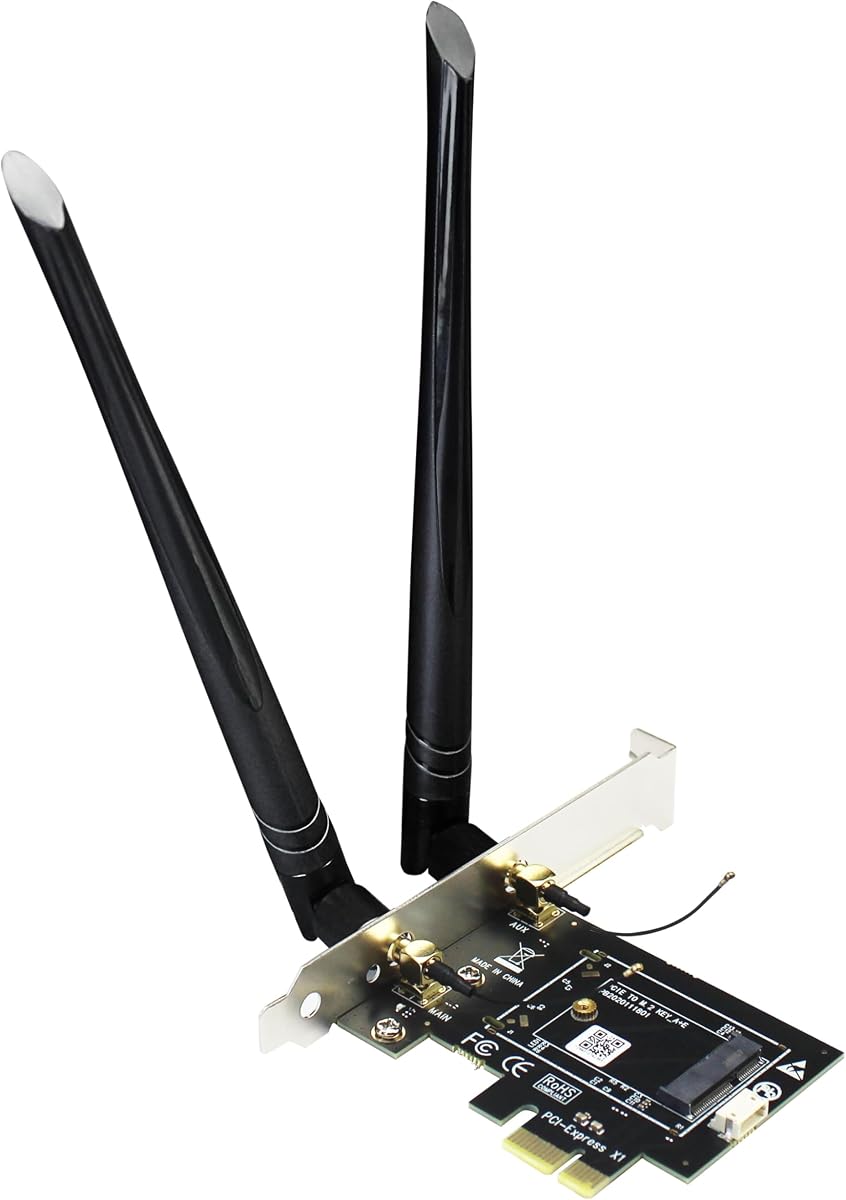
GLOTRENDS WA01 M.2 E Key Adapter
4.1Editor score
M.2 E to PCIe adapter
6 dBi tri-band antennas
Broad module compatibility
Separate USB Bluetooth connection
This guide compares the best M2 Key E WiFi Cards for speed, bands, compatibility, Bluetooth, antenna needs, and system support.
M2 Key E WiFi cards can restore wireless connectivity, add newer Wi-Fi standards, or bring Wi-Fi 6E and Wi-Fi 7 support to compatible laptops and desktops. The right card depends on your slot layout, operating system, antenna arrangement, router, and whether you need Bluetooth alongside Wi-Fi.
We compared the ten listed products by examining their wireless generations, supported frequency bands, maximum stated throughput, Bluetooth versions, physical format, compatibility limitations, and included accessories. The list covers complete M.2 modules, desktop adapter cards, and one antenna-equipped kit rather than treating every product as the same type.
Our recommendations show which card suits each use case, from a budget desktop conversion to a complete Wi-Fi 6E laptop upgrade. Specifications and availability can change, so verify your motherboard slot, antenna connectors, drivers, and router before ordering.
4.1Editor score
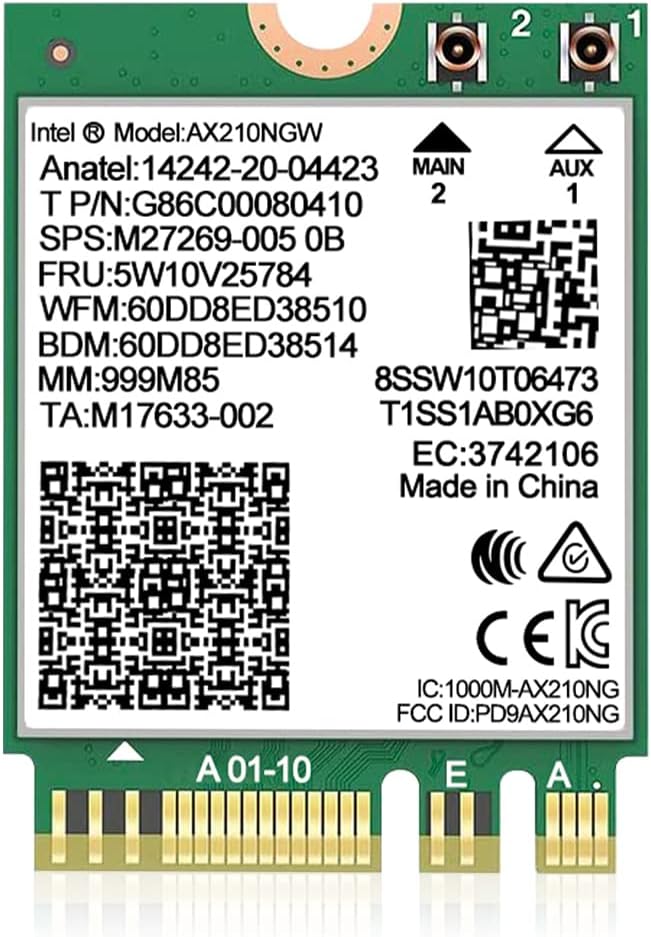
4.6Editor score

4.1Editor score
The comparison includes complete wireless modules, antenna-equipped upgrades, desktop adapters, and Wi-Fi 7 options. Important differences include supported bands, Bluetooth routing, operating-system requirements, physical form factors, and whether the package contains the actual radio module or only an adapter.







The AX210NGW DTK WiFi Card combines an Intel AX210-based M.2 2230 module with antennas, an 11-inch RF cable, and low-profile mounting brackets. Its 4.5 rating reflects a strong overall package for users who need tri-band Wi-Fi 6E and Bluetooth 5.3 without sourcing every component separately.
We may earn a commission when you buy through this link, at no additional cost to you.
The module operates across 2.4GHz, 5GHz, and 6GHz, with stated maximum speeds of 574 Mbps, 2,400 Mbps, and 2,400 Mbps respectively. OFDMA, MU-MIMO, Target Wake Time, and Bluetooth 5.3 make it particularly relevant to modern laptops and compact systems that need efficient wireless connectivity.
The main trade-off is that this is a complete installation kit rather than a bare module, so buyers who already have suitable antennas may have more hardware than necessary. The product information also requires an Intel AX210 driver, and its M.2 2230 E-key format must be physically supported by the host system.
This is our Editor's Choice because it balances capable Wi-Fi 6E hardware, Bluetooth, and included installation accessories in one understandable package. Choose it when you want a desktop or laptop upgrade and do not already have reliable external antennas.
The included 5 dBi antennas, RF lead, and brackets reduce the need to hunt for matching components. This makes the kit more approachable for a desktop build or a laptop that accepts screw-on antenna hardware.
Access to 2.4GHz, 5GHz, and 6GHz gives the card flexibility across different networks. OFDMA, MU-MIMO, and Target Wake Time are useful additions for busy wireless environments and portable systems.
We may earn a commission when you buy through this link, at no additional cost to you.
The GLOTRENDS WA01 is an M.2 E Key to PCIe x1 adapter rather than a wireless card, a distinction that matters when comparing this product with complete modules. It offers a 4.1 rating and a practical way to use a compatible M.2 radio inside a desktop that lacks a convenient wireless slot.
We may earn a commission when you buy through this link, at no additional cost to you.
The package includes two 6 dBi RP-SMA antennas and U.FL-to-RP-SMA pigtail cables. It supports listed NGFF modules including BE200NGW, AX210NGW, AX200NGW, 9260NGW, 8265NGW, 8260NGW, 7265NGW, and 7260NGW, as well as Broadcom, Realtek, and Atheros Key E or A+E modules.
Wi-Fi data travels through the PCIe x1 interface, while Bluetooth requires the included USB connection to a motherboard USB port. CNVio2 and CNVio modules such as AX211NGW, AX201NGW, AC 9560NGW, AC 9462NGW, and AC 9461NGW are expressly unsupported, as are Mini PCIe modules.
This is the Best Budget pick for a desktop conversion because it provides the necessary bridge and antennas while allowing you to choose a separate compatible radio. It is not a ready-to-install wireless solution by itself, so make sure you also purchase an eligible M.2 module.
The adapter moves an M.2 E Key module into a desktop PCIe x1 slot. That makes it useful for builders who want a modular wireless upgrade without replacing an entire motherboard.
Support across several Intel, Broadcom, Realtek, and Atheros modules gives buyers room to select a radio that matches their system. The key restriction is the need to avoid CNVio2, CNVio, and Mini PCIe formats.
We may earn a commission when you buy through this link, at no additional cost to you.
The 10Gtek PCIe x1 adapter is another desktop conversion solution, but its full-height baffle design and broad set of listed module numbers make it a different proposition from the WA01. It carries a 4.4 rating while serving as the carrier for a separate A+E Key radio.
We may earn a commission when you buy through this link, at no additional cost to you.
The adapter can be placed in x1, x4, x8, or x16 PCI Express slots, although its primary data connection is PCIe x1. It supports 3160, 3165, 7260, 7265, 8260, 8265, 9260, AX200, and AX210 modules and can carry both PCIe Wi-Fi and USB Bluetooth.
Its two supplied 5 dBi antennas support only 2.4GHz and 5GHz, not 6GHz. Bluetooth depends on the included small 4-pin to USB 9-pin motherboard header cable, and hot swapping is not supported, so installation planning is important.
This is a good choice for a desktop owner who already owns an eligible M.2 wireless card or plans to buy one separately. It is less suitable for someone seeking tri-band performance out of the box because the Wi-Fi module is absent and the included antennas are dual-band.
Owners of a compatible 2230 A+E Key card can use this adapter to add wireless capability to a desktop. It offers a practical route to reuse hardware instead of replacing it.
Bluetooth is carried through the motherboard's USB 9-pin header rather than the PCIe connection. Make sure the case is open, the header is accessible, and the supplied cable can reach safely.
We may earn a commission when you buy through this link, at no additional cost to you.
The QCNCM865 is a M.2 2230 Key E Wi-Fi 7 card aimed at systems that can take advantage of modern 6GHz networking. Its 4.1 rating reflects a cutting-edge platform, but the practical benefits depend heavily on compatible hardware, a Wi-Fi 7 router, and a recent Windows release.
We may earn a commission when you buy through this link, at no additional cost to you.
It supports tri-band operation on 2.4GHz, 5GHz, and 6GHz, with stated theoretical throughput up to 5.8 Gbps using 320MHz channels and 4K-QAM. Multi-Link Operation can use multiple bands and channels simultaneously, while Bluetooth 5.3 supports accessories such as headsets, keyboards, mice, and controllers.
Full Wi-Fi 7 performance requires a suitable Wi-Fi 7 router, WPA3, and Windows 11 24H2 or newer according to the product details. It is backward compatible with Wi-Fi 6 and 6E routers at up to 2.4 Gbps, but users without a current router will not see the headline capability.
We selected it as Best Premium for buyers who already run compatible modern hardware. Its M.2 Key E format, broad Intel and AMD platform support, and stated compatibility with several desktop families make it a forward-looking choice when the surrounding system can support it.
The 6GHz band and 320MHz channel support create a meaningful upgrade path for compatible systems. A recent Wi-Fi 7 router is necessary to approach the card's stated theoretical maximum.
Multi-Link Operation can combine multiple wireless links, improving responsiveness and reliability when the router and network configuration support it. This is especially relevant to gaming and demanding large-file transfers.
We may earn a commission when you buy through this link, at no additional cost to you.
The Intel AX210 NGW Wireless Card is a straightforward M.2 2230 A/E Key module for compatible laptops and desktops. It has a 4.6 rating and combines Wi-Fi 6E, Bluetooth 5.3, and a widely recognized chipset platform without requiring a separate desktop adapter.
We may earn a commission when you buy through this link, at no additional cost to you.
The card provides tri-band access with stated maximum speeds of 2,400 Mbps on 6GHz, 2,400 Mbps on 5GHz, and 574 Mbps on 2.4GHz. The product information also notes lower power use, improved service life, and Bluetooth features intended to reduce latency and resist interference.
Installation is not entirely plug-and-play. The computer must have an NGFF M.2 2230 A/E slot, and both Wi-Fi and Bluetooth drivers must be installed. The listing specifically says CNVio2 protocol slots and Mini PCIe laptop slots are not supported, so physical fit alone is not enough.
This is our top general-purpose recommendation because the AX210 balances a strong rating, mature Wi-Fi 6E support, and broad operating-system relevance. It is especially attractive for a compatible laptop whose original wireless module has failed and for desktops that already have suitable antenna connections.
The AX210 NGW format is a common choice for adding tri-band Wi-Fi to compatible computers. Its established driver path makes it easier to justify than a less familiar module for general-purpose upgrades.
Combining tri-band Wi-Fi with Bluetooth 5.3 consolidates two wireless functions in a compact module. The card can restore both network and accessory connectivity after an onboard radio failure.
We may earn a commission when you buy through this link, at no additional cost to you.
The OKN AX210NGW Wireless Card is a bare M.2 2230 module that shares the AX210's 4.6 rating with another top-ranked option. It presents a strong mix of Wi-Fi 6E, Bluetooth 5.3, and advanced wireless features for systems with a suitable M.2 socket.
We may earn a commission when you buy through this link, at no additional cost to you.
Its stated maximum speed combines 574 Mbps at 2.4GHz with 2,400 Mbps at both 5GHz and 6GHz. The product description highlights MU-MIMO, 1024-QAM, OFDMA, 160MHz support, ultra-low latency, and WPA3 security in addition to backward-compatible WPA and WPA2.
The card is described as supporting Windows 10 and 11 64-bit systems, including systems with Intel processors and newer AMD processors. It does not include antennas or brackets, so laptop owners must have the correct preinstalled connectors or a suitable antenna arrangement, and drivers must be obtained from Intel.
This module is an excellent alternative to the fifth-ranked card for buyers who prioritize the fuller explanation of MU-MIMO, OFDMA, 1024-QAM, and 160MHz capabilities. Choose whichever AX210 listing has the clearest fit for your connector layout and operating-system support.
MU-MIMO and OFDMA improve how a wireless access point manages simultaneous clients and traffic. These features are particularly useful in crowded homes and offices with several active devices.
WPA3 support offers the newest listed security protocol while retaining WPA2 compatibility. Bluetooth 5.3 adds an efficient option for pairing peripherals such as headsets, keyboards, and mice.
We may earn a commission when you buy through this link, at no additional cost to you.
The AX210NGW Antenna Kit pairs a Wi-Fi 6E M.2 2230 card with external antenna hardware. Its 4.4 rating makes it a practical complete kit for desktops or laptops where the radio can be mounted away from a metal enclosure or positioned near a window.
We may earn a commission when you buy through this link, at no additional cost to you.
The listing specifies 2.4GHz, 5GHz, and 6GHz support, Bluetooth 5.3, and WPA3 support with WPA2 backward compatibility. The package includes Ipex cable, 8 dBi antennas, and brackets, giving users the parts needed for a more deliberate antenna installation.
Compatibility is limited to systems with an appropriate M.2 network slot and Windows 10 or 11 64-bit. An Intel driver is still required, and high-gain antennas do not guarantee a better result in every location; placement, interference, router capability, and regulatory limits all influence real-world performance.
This kit is best for a builder who knows where to position external antennas or needs the radio separated from a crowded metal case. It offers more installation flexibility than a bare module while avoiding the need to source matching cables separately.
External antennas can be moved away from obstructions and placed in a clearer location. This flexibility is useful in metal desktop cases and compact laptops where the original radio position is constrained.
The Ipex lead, antennas, and brackets create a more self-contained installation than purchasing a bare module. Check that the host uses the expected Ipex or antenna connector arrangement before installation.
We may earn a commission when you buy through this link, at no additional cost to you.
The second QCNCM865 listing is a compact Wi-Fi 7 M.2 Key E card with a 4.4 rating. It focuses on high theoretical throughput, tri-band operation, Bluetooth 5.3, and Multi-Link Operation for Windows 11 systems with compatible wireless hardware.
We may earn a commission when you buy through this link, at no additional cost to you.
The card can use 2.4GHz plus 5GHz or 2.4GHz plus 6GHz simultaneously, and its 4K-QAM and 320MHz bandwidth support a stated maximum data rate of 5.8 Gbps. MLO allows a compatible router to use multiple bands and channels, supporting lower-latency and more reliable communication.
Windows 11 is the only listed operating system. The product information recommends downloading the Wi-Fi and Bluetooth driver from the Fenvi website and disabling old wireless drivers in Device Manager to avoid conflicts. As with any high-end radio, the connected router and network configuration determine the experience.
This option is well suited to a compact Windows 11 build that has an M.2 Key E slot and a modern Wi-Fi 7 network. It is less appropriate for an older system or a buyer who needs broad operating-system support without extra driver configuration.
MLO allows a Wi-Fi 7 router to use more than one band and channel at once. That can improve latency, data rates, and reliability when the router and client are properly configured.
The module's compact format and support for Intel and AMD motherboards are attractive, but its Windows-only requirement narrows the audience. Confirm the current driver situation before beginning the installation.
We may earn a commission when you buy through this link, at no additional cost to you.
The BrosTrend WiFi 6 M.2 Wireless Card provides a simpler dual-band alternative to the tri-band and Wi-Fi 7 options in this guide. It has a 4.4 rating and uses the compact M.2 2230 form factor with both Key A and Key E slot compatibility.
We may earn a commission when you buy through this link, at no additional cost to you.
Its stated maximum throughput is 1,801 Mbps, divided between 1,201 Mbps on 5GHz and 574 Mbps on 2.4GHz. UL/DL MU-MIMO, OFDMA, and 1024-QAM support smooth everyday networking, while Bluetooth 5.2 provides faster transmission and broader range than Bluetooth 4.2 according to the listing.
The card supports Windows 10 and 11 and is also described as compatible with Linux systems using kernel 6.5 or higher, although Linux expertise support is not provided. A current Wi-Fi driver should be downloaded from the BrosTrend website for optimal operation.
This is a sensible pick for a compatible laptop or desktop that needs solid Wi-Fi 6 but does not require 6GHz or Wi-Fi 7. Its simpler dual-band approach can also reduce the need to upgrade a router, making it relevant to owners of mainstream Wi-Fi 6 networks.
AX1800 dual-band operation is well suited to streaming, browsing, gaming, and work-from-home use. The split between 5GHz speed and 2.4GHz range provides a useful balance for many networks.
The 2230 card and support for Key A and Key E slots simplify compatibility checks. The host still needs the correct antenna connectors and suitable Bluetooth routing, depending on the computer's design.
We may earn a commission when you buy through this link, at no additional cost to you.
The Intel Killer BE200 is a tri-band Wi-Fi 7 module tailored to compatible Intel systems. Its 4.6 rating makes it one of the strongest-rated products in the guide, while its gaming focus and Bluetooth 5.4 support distinguish it from the QCNCM865 alternatives.
We may earn a commission when you buy through this link, at no additional cost to you.
The card supports up to 5.8 Gbps across 2.4GHz, 5GHz, and 6GHz with 802.11be routers. The listing emphasizes ultra-low latency for gaming, though it correctly notes that maximum performance also depends on distance, equipment, and configuration rather than coming from the client card alone.
Requirements are narrower than for many AX210 options: Windows 11 64-bit is required, an available M.2 PCIe Key E slot is needed, and AMD-based systems are not supported. A Wi-Fi 7 router is also necessary to realize the headline benefits of the standard.
This is a compelling choice for an Intel gaming desktop or compatible laptop already paired with a Wi-Fi 7 router. It is less suitable for an AMD PC, an older Windows installation, or a builder whose network currently tops out at Wi-Fi 6 or 6E.
The card's tri-band Wi-Fi 7 platform and low-latency emphasis suit a modern gaming setup. Real-world responsiveness still depends on the access point, network congestion, distance, and other connected devices.
Bluetooth 5.4 supports common wireless accessories without requiring a separate internal Bluetooth adapter. It is useful for gaming headsets, controllers, keyboards, mice, and other compatible devices.
We may earn a commission when you buy through this link, at no additional cost to you.
A suitable M.2 Key E WiFi card must match the computer's physical slot, radio protocol, antenna connections, operating system, and available network. Reviewing those constraints first prevents an otherwise capable module from becoming an expensive installation mistake.
M.2 Key E wireless modules commonly use the 2230 form factor, meaning a 22mm width and 30mm length, but length alone does not guarantee compatibility. Some systems use other M.2 lengths or proprietary mounting arrangements, so inspect the board and its official hardware documentation before buying. A desktop may also have a general-purpose M.2 slot rather than a dedicated wireless connector.
Choose a card whose dimensions, key, and mounting hole position match the host. If the desktop lacks a usable slot, a PCIe M.2 adapter can provide another route.
Some Intel laptops use CNVio2 or CNVio architecture for integrated wireless modules. These slots are electrically and physically different from a standard M.2 Key E socket, and many generic AX210 or BE200 cards will not work in them. The GLOTRENDS listing specifically identifies AX211NGW, AX201NGW, AC 9560NGW, AC 9462NGW, and AC 9461NGW as incompatible examples.
Always verify the protocol rather than relying only on the M.2 label. If the manufacturer lists a CNVio2-only slot, choose a module explicitly approved for that computer.
A Wi-Fi 7 card cannot create Wi-Fi 7 service on a router that only supports Wi-Fi 6 or earlier. It remains usable with older standards, but the greatest benefit appears with a matching Wi-Fi 7 access point, appropriate security settings, and suitable channel bandwidth. Wi-Fi 6E cards similarly need a 6GHz-capable router to use the third band.
Prioritize the standard supported by your current and likely future router. A lower-generation dual-band card may be more balanced than a premium card that cannot use its headline features.
Laptop cards normally connect to tiny antenna cables routed through the display or case, while desktop modules require external antennas. A complete kit with matched Ipex or U.FL leads, RP-SMA connectors, and brackets can simplify assembly, but connectors must match the radio and host exactly.
Consider antenna placement as well as gain. High-gain antennas do not automatically improve every environment, and metal cases can block signals. External antennas are most useful when they can be positioned in an open area away from obstructions.
A combined Wi-Fi and Bluetooth card may route Bluetooth through internal USB headers, a separate cable, or the platform's internal wireless interface. Desktop adapter cards often require the included cable to connect from the module to a motherboard USB 9-pin header. Without that connection, Wi-Fi may work while Bluetooth does not.
Check whether the desktop exposes a free USB header and whether the adapter's Bluetooth lead reaches it. Laptop builders should verify that the replacement card includes the correct internal cable and connector for their specific model.
Windows 10 and 11 coverage is common among the AX210-based products, while both QCNCM865 listings are specified for Windows 11 and the BE200 requires Windows 11 64-bit. Linux support is mentioned for the BrosTrend card with kernel 6.5 or higher, but the manufacturer does not provide Linux expertise support.
Choose a card whose driver path fits your operating system. Confirm the available driver source and consider removing an older wireless driver before installing a substantially different module, as recommended for QCNCM865.
The GLOTRENDS WA01 and 10Gtek adapter are carriers for separate M.2 modules, not complete wireless cards. They can be excellent desktop upgrade solutions, but a compatible radio must be purchased separately. The AX210 and QCNCM865 listings, by contrast, include the actual wireless module.
Read the package contents carefully before comparing products. An adapter with antennas may appear more complete in an image than a bare card, yet it cannot create a wireless connection until a supported module is installed.
Maximum transfer rates are theoretical and apply under ideal conditions with compatible hardware. Features such as OFDMA, MU-MIMO, 160MHz channels, 320MHz channels, 1024-QAM, 4K-QAM, Multi-Link Operation, and Target Wake Time can influence efficiency and responsiveness, but the router and network determine which are available.
For an ordinary Wi-Fi 6E network, an AX210 is a practical balance of maturity and capability. For a current Wi-Fi 7 network and compatible Windows 11 hardware, BE200 or QCNCM865 products offer the more advanced path.
Before opening the computer, identify the existing M.2 E Key slot and confirm the module's dimensions, mounting position, antenna connectors, and operating-system requirements. For a desktop, power down, disconnect the power cable, and note the available PCIe and USB headers. For a laptop, consult its service guide because antenna routing and Bluetooth cables vary by model.
Install the radio or adapter in the M.2 slot at the appropriate angle, secure it with the retention screw, and attach the correct antenna leads. Connect the Bluetooth USB header cable when using a desktop adapter. Replace the access panel, power the system on, and install the current Wi-Fi and Bluetooth drivers from the manufacturer's or chipset provider's official site.
After installation, use the operating system's network and Bluetooth settings to connect to permitted networks and pair accessories. Keep the antennas accessible, avoid sharply bent Ipex or U.FL cables, and do not operate the card without appropriate antennas when the manufacturer requires them. Update drivers when needed, maintain router firmware and security settings, and remove the module safely before cleaning or servicing the system.
An M.2 Key E WiFi card is the complete radio module that communicates through Wi-Fi and Bluetooth. A PCIe adapter is a carrier card that lets a desktop use a separate M.2 wireless module. Adapter-only products therefore need a compatible radio purchased separately, and their Bluetooth connection may also require a motherboard USB header.
No. The system needs a compatible M.2 2230 A/E Key wireless slot, appropriate antenna connections, and suitable internal USB routing for Bluetooth. CNVio2 and CNVio slots use different architecture and are not compatible with many standard AX210 modules, so check the computer's service documentation before ordering.
The cards can generally connect to older compatible routers, but they will only use the capabilities the router and network provide. A 6GHz band requires a Wi-Fi 6E or newer router, while the advertised Wi-Fi 7 benefits require Wi-Fi 7 hardware, WPA3, and an appropriate client configuration.
Most M.2 Key E wireless modules combine Wi-Fi and Bluetooth, but the antenna and internal USB connections still need to be handled correctly. On a desktop adapter, Bluetooth commonly requires the supplied cable to connect to a motherboard USB 9-pin header, and it may not work until that cable is installed.
Only if the laptop has a compatible, user-replaceable M.2 2230 E Key wireless slot. Many gaming laptops use CNVio2, proprietary card designs, soldered modules, or model-specific antenna connectors. Verify the hardware manual and service guide rather than assuming that a standard module will fit.
No. The stated figures are theoretical maximums under favorable conditions. Actual performance depends on router capability, channel width, distance, interference, antenna placement, bandwidth allocation, operating-system drivers, and the number of active clients.
AX210 is the broadly practical Wi-Fi 6E option for compatible systems. QCNCM865 and BE200 make more sense when the computer and router support Wi-Fi 7, with BE200 limited to Intel systems and the QCNCM865 listings focused on Windows 11.
Desktop M.2 WiFi modules normally need external antennas because the radio is installed inside a metal or otherwise obstructive case. Complete kits include antennas and cables, while bare modules require compatible antennas. Antenna placement can influence signal quality, so install them in an open location when possible.
The AX210NGW DTK WiFi Card stands out as the most complete Wi-Fi 6E package, while the Intel AX210 NGW Wireless Card is a strong all-around module for compatible laptops and desktops. The QCNCM865 WiFi 7 Card leads the premium group for owners with a modern router and a suitable Windows 11 platform.
Compatibility should determine the final decision more than headline speed. Confirm the M.2 form factor, reject CNVio2-only slots, check antenna connectors, route Bluetooth correctly, and make sure your operating system has suitable drivers. A compatible Wi-Fi 6E setup is often more valuable than an advanced card whose extra bands cannot be used.
Finally, verify current product details, included components, and availability before purchasing. Router generations, driver revisions, and bundle contents can change, and those details directly affect whether a card will deliver the capabilities described in its listing.