Lenovo Idea Tab Pro
4.6Editor score
Sharp 12.7-inch 3K display
MediaTek Dimensity 8300 processor
Included Tab Pen Plus
Wi-Fi 6E connectivity
Tablet for Accountants buyer’s guide comparing ten Android tablets for note-taking, multitasking, spreadsheet work, portability, displays, storage, and
A tablet for accountants needs to balance focused document work, portable spreadsheet review, dependable note-taking, and enough power to keep several business applications open. The best model also needs a comfortable screen, practical storage, and accessories that make it useful away from a desk.
We compared all ten tablets using the supplied specifications, including processor, memory, storage, display, operating system, input options, connectivity, battery claims, and productivity features. The comparison covers premium Samsung and Lenovo models as well as more affordable Android tablets designed to work like laptops.
Each review explains who the tablet suits, what stands out, and where compromises appear. Ratings and specifications can change with software updates, configuration differences, and marketplace revisions, so shoppers should confirm the current listing and price before purchasing.
Top 3 Picks for Best Tablet for Accountants
Top 10 Best Tablet for Accountants in 2026 Compared
4.6Editor score

4.7Editor score

4.1Editor score
The table below compares the ten tablets by display, performance, memory, storage, and the accessories or productivity features most relevant to accounting workflows.


The Lenovo Idea Tab Plus combines a sharp 12.1-inch 2.5K IPS panel, a 90Hz refresh rate, and a MediaTek Dimensity 6400 processor in a body described as weighing just over a pound. Its 4.6 rating reflects a well-rounded device that sits between a basic family tablet and a premium workstation. For accountants, the high-resolution display is especially valuable when reviewing dense spreadsheets, reconciling long ledgers, or reading fine-print reports on the move.
We may earn a commission when you buy through this link, at no additional cost to you.
Productivity benefits come from several parts of the package. The included Tab Pen supports Circle to Search, while Lenovo Notepad, Squid, Nebo, and MyScript Calculator cover handwriting, organization, annotation, and calculation needs. Seamless drag-and-drop file sharing between devices is valuable for moving reports, receipts, and spreadsheets without email attachments. The Dimensity 6400 also provides a more capable platform than many entry-level Android tablets, while 8GB of memory supports routine multitasking.
The main compromise is the 128GB storage configuration. Accountants who retain years of working files, scanned receipts, client records, or local accounting databases may want to rely on cloud storage or an external drive. The IPS display is not an AMOLED panel, and the included folio is not the same as a full productivity keyboard. Nevertheless, the 2.5K resolution, 800-nit brightness, quad Dolby Atmos speakers, and stated all-day battery make the tablet pleasant to carry through a full workday.
This is a strong recommendation for independent accountants, auditors, and consultants who want a light secondary display for document review, annotation, and client presentations. It is less ideal for users who require a laptop-style desktop or a large local file library. For most accounting workflows, though, it provides an excellent balance of display quality, portability, stylus support, and everyday performance.
The 2.5K IPS panel provides more usable detail than a standard HD screen, reducing the need to zoom in while checking account codes, formulas, and transaction lines. Its low blue light certification and brightness up to 800 nits also make it suitable for office lighting and travel.
The included Tab Pen and Circle to Search streamline the process of isolating figures, dates, or unfamiliar terms directly from a document. The included note and calculator apps reduce the need to move between separate tools for routine review work.
We may earn a commission when you buy through this link, at no additional cost to you.
The Samsung Galaxy Tab S10+ Plus 12.4-inch 256GB configuration combines a Dynamic AMOLED 2X display, Galaxy AI tools, and a powerful tablet processor. Its 4.7 rating is among the strongest in this group, reflecting a device designed to handle demanding work and high-quality media. For accounting leaders and consultants, the extra display polish and sophisticated note handling can make client reviews and internal planning sessions more productive.
We may earn a commission when you buy through this link, at no additional cost to you.
Note Assist stands out as the most relevant premium feature. It can organize and summarize captured meetings, lectures, and daily notes, while recorded material can receive transcripts and summaries. Circle to Search lets users identify unfamiliar items on screen without switching applications. The included S Pen supports writing, calculation, sketches, and the Sketch to Image feature, creating a flexible tool for financial annotations and client presentations.
The 12.4-inch screen offers reduced glare and excellent visual depth, making it well suited to prolonged document review. Its hardware should accommodate productivity multitasking, although the supplied information does not specify a RAM figure. Durability is another advantage: the tablet is described as protected against bumps, dust, and splashes. The trade-off is the highest purchase cost in this roundup, plus the absence of a listed keyboard.
Choose this Galaxy Tab S10+ when AI-assisted notes, premium visuals, stylus input, and a large internal storage capacity justify the additional expense. It is well suited to senior accountants, controllers, and business owners who regularly annotate documents or record discussions. Buyers focused strictly on value should move to the Lenovo Idea Tab Pro or the keyboard-equipped budget model.
Note Assist can turn lengthy meeting recordings and handwritten material into organized summaries and transcripts. For accountants, that means less time transcribing questions, assumptions, and action items after a client or internal review.
The Dynamic AMOLED 2X display gives financial tables, charts, and reports deeper contrast and vivid color. The included S Pen adds precision for annotations without requiring a separate stylus purchase.
We may earn a commission when you buy through this link, at no additional cost to you.
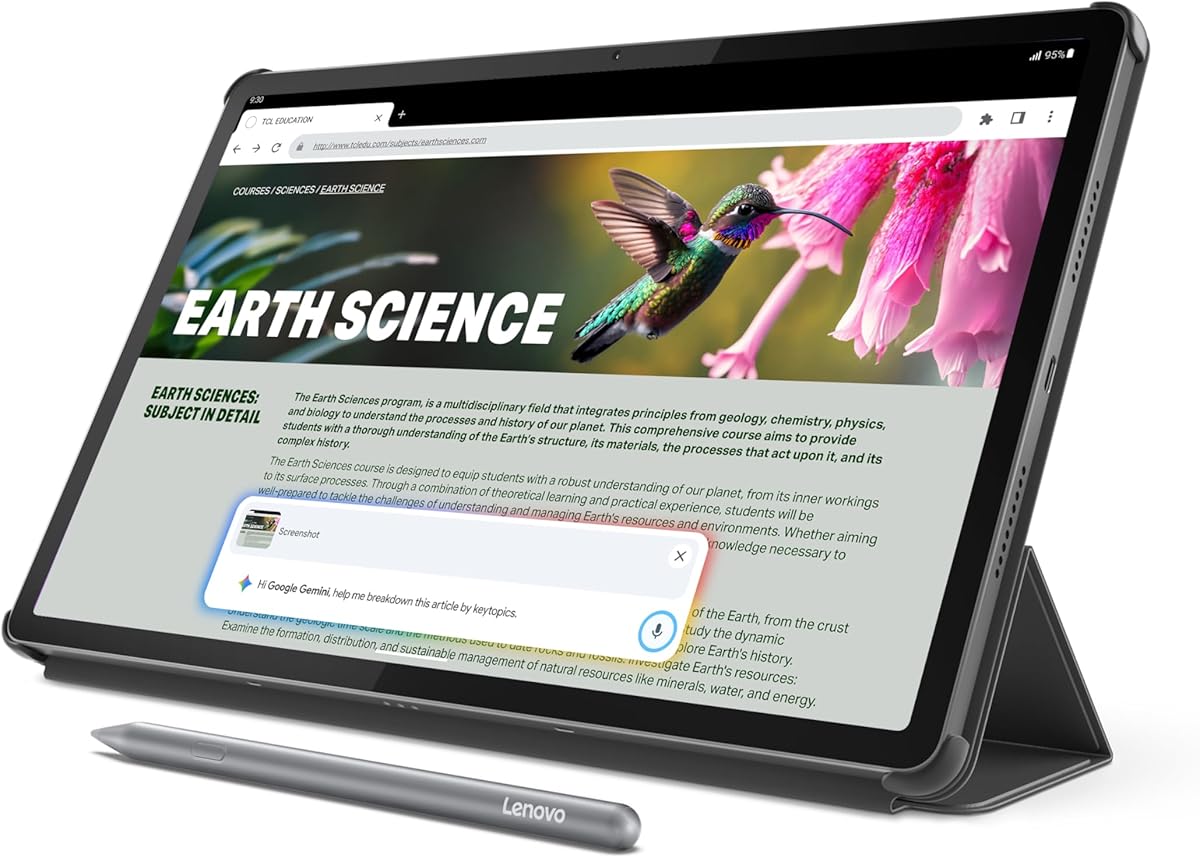
The Lenovo Idea Tab Pro combines a 12.7-inch 3K LCD, a MediaTek Dimensity 8300 processor, 8GB of memory, and 128GB of storage. It earns a 4.6 rating and stands out as a performance-focused option without entering the most premium price tier. The large, sharp display is particularly appropriate for accountants who spend much of the day examining multi-column reports, charts, and transaction records.
We may earn a commission when you buy through this link, at no additional cost to you.
Performance should feel responsive for spreadsheet review, web-based accounting applications, note capture, and normal multitasking. Wi-Fi 6E supports fast downloads and dependable network access, while the 45W quick charging system is useful when moving between offices or client sites. Google Gemini adds contextual assistance, and Circle to Search provides a quick way to investigate terms encountered in reports. The included Tab Pen Plus and folio case improve the out-of-box experience.
The display also supports mono and chromatic reading modes, offers Low Blue Light certification, and works well for long reading sessions. Quad JBL Dolby Atmos speakers are more relevant to presentations or educational media than traditional accounting work, but they are a welcome addition for webinars and training. The compromises are familiar: 128GB of internal storage and no bundled keyboard. Buyers planning extensive offline archives may need cloud storage or expansion accessories.
The Idea Tab Pro is a compelling recommendation for working accountants who want a high-resolution screen, strong processor, modern connectivity, and useful stylus tools at a midrange level. It is also well suited to students progressing toward accounting or finance careers. For someone who mostly needs a portable document viewer and calculator, the Idea Tab Plus may be sufficient; for heavier workflows, this model offers more headroom.
A 3K panel gives dense financial statements noticeably more definition. Accountants can inspect fine print, compare narrow table columns, and read multi-page reports with fewer distracting scaling adjustments.
The 45W quick charging support is practical for consultants and field auditors who move frequently between locations. An 11-hour stated video-streaming figure also suggests the tablet can cover a typical workday when used as a secondary device.
We may earn a commission when you buy through this link, at no additional cost to you.
The JJGJ 13-inch Android 16 tablet offers a large 13.4-inch 2K display, a keyboard, mouse, stylus, case, screen protector, charger, and cable. Its 4.1 rating reflects a functional package that prioritizes included accessories and screen area. For accountants replacing a secondary laptop, the supplied keyboard and mouse make this one of the most immediately practical options in the roundup.
We may earn a commission when you buy through this link, at no additional cost to you.
Its memory is described as 32GB, consisting of 8GB physical memory and 24GB virtual memory, with 256GB of internal storage. A microSD card can add up to 2TB, although the card is not included. The 1920-by-1200 panel is suitable for side-by-side document viewing, while Widevine L1 support allows HD and Ultra HD streaming from compatible services. Android 16 adds refined gestures, adaptive layouts, and integrated Gemini assistance.
A Unisoc T615 octa-core processor and 10000mAh battery form the core performance platform. The product description claims up to 12 or more hours of continuous video playback, though real accounting use will vary with brightness, applications, and connectivity. The 16MP rear camera and 8MP front camera are useful for scanning documents and calls. The main reservation is that the rating trails the leading models, making long-term software support and sustained performance less certain.
This tablet is best for budget-conscious accountants who want a large display, conventional keyboard, mouse, and stylus without assembling a separate accessory list. It is less suitable for demanding data analysis, intensive video editing, or users who prioritize a premium ecosystem. If a complete portable workstation matters more than top-tier processing, the bundle has considerable practical value.
The included keyboard, mouse, stylus, and folding case allow immediate use in tablet or computer mode. That completeness is valuable for an accountant setting up a temporary workspace in a hotel, airport, or client office.
The 256GB internal configuration is more practical than many similarly positioned tablets, and microSD expansion provides additional room for archived reports. Users should verify application compatibility before storing active accounting databases on removable media.
We may earn a commission when you buy through this link, at no additional cost to you.
This 10.1-inch Android 16 tablet combines 20GB of combined memory, 128GB of internal storage, and 2TB expansion support with a broad collection of accessories. Its 4.2 rating positions it as a capable entry-level device rather than a high-end business tablet. The included keyboard, mouse, stylus, case, charger, and cable make it appealing to accountants who want a basic portable work setup at a modest cost.
We may earn a commission when you buy through this link, at no additional cost to you.
The operating system is the full Android 16 version, and Google Mobile Services certification provides direct access to the Play Store. That matters for accounting because users need dependable access to spreadsheets, webmail, cloud storage, video meetings, and finance apps. The 10.1-inch 1280-by-800 HD IPS display is less sharp than the larger 2K and 3K alternatives, but it remains adequate for routine review and communication.
Connectivity includes dual-band 5GHz Wi-Fi 6 and Bluetooth 5.0, while a 6000mAh battery is claimed to support all-day use. The 2.0GHz octa-core processor should cover standard office tasks, although it is not intended to compete with the Dimensity 8300 or Samsung’s premium processor. The listed 20GB memory includes 16GB of virtual memory, a distinction worth understanding because virtual memory cannot fully replace physical RAM.
Choose this model for interns, students, and budget-conscious bookkeepers who need a lightweight web, email, and document device with a keyboard. It is less suitable for accountants who spend hours viewing complex dashboards or need high-end pen features. It also lacks the premium display and software ecosystem of the Samsung and Lenovo flagships, but its accessory-rich package makes it a functional secondary computer.
Google Play certification and official Android 16 support make it easier to install current spreadsheet, banking, accounting, and collaboration applications. The result is more practical for daily work than a restricted tablet operating environment.
The keyboard, mouse, and stylus turn the tablet into a flexible workstation, while the 10.1-inch format remains easy to carry. It is a sensible option for short work sessions away from a primary office computer.
We may earn a commission when you buy through this link, at no additional cost to you.
The Samsung Galaxy Tab S10 FE+ 13.1-inch 256GB version offers one of the largest displays in this comparison, paired with a 4.7 rating and a durable design. It is well suited to accountants who review financial reports, charts, and client documents on a broad canvas. The blue US Wi-Fi configuration provides 256GB of internal storage, reducing pressure to keep every working file in cloud space.
We may earn a commission when you buy through this link, at no additional cost to you.
The productivity tools are tailored to handwritten and mathematical work. Handwriting Assist straightens, aligns, and spaces handwritten notes, making hurried meeting annotations easier to read later. Math Solver can convert handwritten equations into text and solve them through the S Pen. Circle to Search provides a quick way to investigate terms without leaving the current document, while dual speakers support online meetings and training sessions.
Durability is a meaningful advantage for field auditors, inventory specialists, and consultants who regularly travel. The Galaxy Tab S10 FE Series is described as resistant to droplets, splashes, and immersion, offering more reassurance than a basic tablet. The 13.1-inch screen also makes split-view work more comfortable, allowing a spreadsheet and supporting document to remain visible together.
The main drawback is size: a 13.1-inch display is excellent for analysis but less convenient in a compact bag. No keyboard is listed as included, and it remains more expensive than the entry-level alternatives. This is a strong recommendation for accountants who prioritize a large screen, refined note tools, Samsung features, and durability, especially those willing to carry the device regularly.
The 13.1-inch display offers room for large spreadsheets, dashboards, and document panes. It is particularly useful for consultants who want to show a client several related figures without repeatedly switching applications.
Water resistance adds useful protection against splashes and accidental immersion. It does not eliminate the need for careful handling, but it makes the tablet better suited to unpredictable office and travel environments.
We may earn a commission when you buy through this link, at no additional cost to you.
The Jeazans Android 16 tablet is differentiated by its included AI smart speaker dock, which handles charging, sound, ambient lighting, and several smart-display functions. Its 3.6 rating is the lowest among the listed tablets, so it requires more careful consideration. The device may suit accountants who want a stationary office hub as much as a conventional portable tablet, especially those who use it for calls, schedules, and document viewing.
We may earn a commission when you buy through this link, at no additional cost to you.
Its 10-inch HD IPS screen provides standard viewing quality for spreadsheets, web applications, and presentations. Storage begins at 64GB but can expand by up to 1TB with a TF card, which is not included. The stated 36GB memory consists of 6GB physical and 30GB virtual memory. Android 16, Google Play, Wi-Fi 6, Bluetooth 5.4, and an eight-core processor cover the fundamentals of modern tablet use.
The dock is the strongest differentiator. It keeps the tablet charged, turns it into a room-filling stereo speaker, synchronizes ambient lights with music, provides eight white-noise environments, and can display a digital clock or photo frame. Magnetic wireless charging makes dock-based use convenient. The 6000mAh battery and claimed five hours of 1080p dock playback are useful for a fixed workspace, though the 15-day standby figure is not a substitute for a full workday battery estimate.
For an accountant, the dock could make the device useful as a charging hub and second display during office hours. It is less compelling as a primary mobile computing device because of the modest screen, limited internal storage, and lower rating. Consider it if the dock functions matter more than processing power or premium styling, and verify application performance before choosing it for demanding spreadsheets.
The included dock transforms a portable tablet into a charging station and connected desktop hub. Its clock, photo frame, stereo speaker, and ambient lighting functions can make waiting time or a shared office more useful.
The headline 36GB memory combines 6GB physical RAM with 30GB of virtual memory. Virtual memory helps when several lightweight applications are open, but demanding accounting software is better suited to a model with more physical memory.
We may earn a commission when you buy through this link, at no additional cost to you.
This 128GB gray version of the Galaxy Tab S10 FE+ delivers the same large 13.1-inch form factor and 4.7 rating as the higher-capacity model. It is a sensible choice for users who want Samsung’s productivity and note features without paying for more internal storage than they need. The device is particularly attractive for accountants who work primarily with cloud-based applications and focused mobile tasks.
We may earn a commission when you buy through this link, at no additional cost to you.
Handwriting Assist keeps handwritten notes aligned, while Math Solver turns pen-written equations into editable text and solutions. Circle to Search makes it easy to identify unknown items on screen, and the responsive S Pen supports to-do lists, calculations, and drawing. A dedicated keyboard hot key can provide quick access to AI features when an optional keyboard is used. These tools suit brainstorm sessions, review annotations, and fast capture of action items.
The large screen supports entertainment, casual multitasking, and document-heavy work, while a powerful processor is specified for fast-paced use. Super Fast Charging is useful between appointments, and the 128GB configuration can be supplemented with a microSD card. Although the listing mentions up to 256GB across the family and up to 1TB of additional expansion, buyers should check the exact card support and availability for the purchased configuration.
This model is best for accountants who value a large screen, an included S Pen, and Samsung’s polished productivity tools but have moderate local storage needs. It is less suitable for users with extensive offline archives or those who need a bundled physical keyboard. As a general-purpose tablet for travel and presentations, it balances size, features, and storage more evenly than many alternatives.
The S Pen and Handwriting Assist reduce the friction of taking notes during financial reviews. Tidy, searchable documentation can be created without waiting until a desk is available.
The 128GB model works best for accountants who keep current working files in cloud services and use the tablet as a secondary device. Expansion support provides a backup for selected documents, while core records should remain in managed storage.
We may earn a commission when you buy through this link, at no additional cost to you.
The 512GB Galaxy Tab S10+ is the high-storage version of Samsung’s premium 12.4-inch tablet, offering twice the internal capacity of the 256GB model. Its 4.7 rating and AMOLED 2X display preserve the same polished character, while the larger storage target appeals to accountants who retain substantial local work. It is the most expensive choice in the roundup, so its value depends on how much offline capacity is genuinely needed.
We may earn a commission when you buy through this link, at no additional cost to you.
The core performance platform includes a powerful tablet processor and a 12.4-inch Dynamic AMOLED 2X screen with reduced glare. Galaxy AI features support sketches, visual searches, meeting-note organization, summaries, and lecture or meeting transcripts. These tools are particularly relevant to consultants who record discussions, document assumptions, and then turn raw notes into concise action items before a financial model is finalized.
The 512GB capacity is the defining difference. It can accommodate multi-year document sets, exported reports, scanned receipts, client materials, media, and locally installed applications with less pressure to delete or upload files. That convenience must be weighed against the device’s premium purchase cost and the continuing need for backups, synchronization, and responsible handling of sensitive financial information.
This is the strongest option in the guide for an accountant who wants premium Samsung hardware without being limited to cloud-dependent storage. It is suitable for senior finance staff, business owners, and consultants who travel and need a capable standalone document repository. Those maintaining smaller working sets should compare the 256GB Galaxy Tab S10+ instead, since it delivers the same major productivity features at a lower tier.
With 512GB of internal storage, the tablet can hold extensive working files without frequent cleanup. It is useful for consultants who need immediate access to prior models, client records, and supporting schedules while traveling.
Recording features can generate transcripts and summaries, reducing manual note processing. Accountants can focus on assumptions and decisions while the tablet organizes the supporting material for later reference.
We may earn a commission when you buy through this link, at no additional cost to you.
The Relndoo 10-inch Android 16 tablet combines a 256GB storage configuration with a keyboard, mouse, stylus, folding case, screen protector, charger, and cable. Its 4.0 rating reflects a budget-oriented package with broad functionality. For accountants who need a portable secondary machine for email, documents, web applications, and handwritten notes, the extensive bundle can be more valuable than a premium processor or display.
We may earn a commission when you buy through this link, at no additional cost to you.
The 26GB memory figure consists of 4GB physical memory and 22GB virtual memory, which should be considered carefully for heavy multitasking. A Unisoc T606 octa-core processor operating up to 1.6GHz handles ordinary tasks, and Android 16 adds Gemini AI, privacy and security features, face unlock, and split-screen multitasking. Google Mobile Services certification provides Play Store access, an important requirement for standard accounting and collaboration apps.
The 10.1-inch HD IPS display is modest next to the 2K, 3K, and AMOLED options, so dense spreadsheets will require more zooming. On the positive side, the 8000mAh battery, USB-C connection, 3.5mm headphone jack, dual-band Wi-Fi, Bluetooth 5.0, and wireless projection create a flexible accessory setup. Text recognition, translation, and object recognition are also included in the described lens features.
This tablet is best for students, junior staff, and budget-conscious accountants who value a complete portable setup over premium specifications. It is less appropriate for intensive spreadsheet modeling, large local databases, or users who need enterprise-grade device management. Because the tablet does not support SIM cards, it depends on Wi-Fi for online service. For a simple, accessory-rich mobile companion, it is a functional choice.
Split-screen mode can place email beside a document, or a video conference beside meeting notes. That makes the tablet useful for reviewing a client question while consulting a reference file without moving between separate devices.
Dual-band Wi-Fi, Bluetooth 5.0, a headphone jack, and wireless projection provide several ways to connect at temporary offices. The included keyboard and mouse make the tablet usable for longer typed entries despite its modest display resolution.
We may earn a commission when you buy through this link, at no additional cost to you.
The right accounting tablet balances screen quality, performance, software access, input methods, and secure document handling. These factors matter more than raw specifications alone because daily workflows often mix spreadsheets, web applications, email, video calls, signatures, and handwritten review notes.
Screen size determines how many rows, columns, and document sections can remain visible without constant zooming. A 10-inch screen is easier to carry and works well for email, checklists, and short reviews, while a 12.4-inch or 13.1-inch display is preferable for comparative statements, dashboards, and side-by-side research. Resolution also matters: the 2K and 3K models in this guide present finer text than 1280-by-800 HD screens, reducing strain when small account codes, footnotes, or spreadsheet headings must be read accurately.
Choose a large, high-resolution screen for sustained analysis and a smaller HD panel for a lightweight secondary role. Consider glare, brightness, color quality, and low blue light features as well, especially during long review sessions or travel.
A capable processor helps with multi-window accounting applications, large spreadsheets, browser tabs, PDF work, and virtual meetings. The Dimensity 8300 and 8300-class hardware in the premium Lenovo tablet and Samsung’s powerful tablet processor are better suited to demanding multitasking than the Unisoc chips in the entry-level choices. Physical memory matters because virtual memory can supplement RAM but does not provide the same performance. A model with 8GB physical memory is a sensible starting point for document-heavy work, while 4GB physical memory is better limited to light tasks.
Match processing power to your actual workload rather than to a benchmark headline. Reviewers should also consider how many apps, tabs, and cloud sessions they expect to keep open at once.
Accountants should distinguish internal storage from expandable storage. Internal memory is generally faster and more convenient for active applications, while microSD or TF expansion can help with archived reports, receipts, and media. The choices here range from 64GB to 512GB, with several models supporting 1TB or 2TB expansion. A larger internal capacity is advantageous when records must remain available offline, but expanded storage should not be treated as a substitute for backups, especially when sensitive information is involved.
Prioritize at least 128GB for a general-purpose business tablet and more if you retain local archives. Use approved cloud synchronization, encrypted backups, and secure document-management systems regardless of capacity.
A keyboard materially improves spreadsheet entry, long email composition, and formula work, while a stylus supports signatures, markup, calculations, and visual explanations. Some affordable models include a keyboard, mouse, and stylus as a complete bundle, whereas premium tablets often include an S Pen but no keyboard. Samsung’s Handwriting Assist and Math Solver can improve handwritten workflow, while Circle to Search on several models helps users identify terms directly from the current screen. The right combination depends on whether the tablet is a primary mobile workstation or a document-review companion.
Check what is actually in the box before budgeting for accessories. Confirm keyboard compatibility, case fit, pen responsiveness, and whether your accounting application supports handwriting or split-screen modes.
Wi-Fi 6 or Wi-Fi 6E can improve performance in busy offices where many devices share network capacity, although actual speed depends on the router and internet service. Bluetooth 5.0 or newer supports accessories such as keyboards, mice, headsets, and external storage. Front cameras matter for client calls and internal video meetings, while wireless projection can turn the tablet into a presentation screen. One option also includes a 3.5mm headphone jack, which is useful for private calls in busy environments.
Consider how and where you work. Travelers need dependable dual-band Wi-Fi, office-based users may prioritize wired or dock options, and meeting-heavy accountants should evaluate camera quality, microphone behavior, and speaker clarity.
Tablet battery claims are commonly based on video playback, which may not reflect heavier spreadsheet, Wi-Fi, display, or video-call use. The listed capacities range from 6000mAh to 10000mAh, while stated video runtimes extend from around 11 to 13 hours. Fast charging, including Lenovo’s 45W system and Samsung’s Super Fast Charging, can be more useful during a packed schedule than a modest improvement in standby efficiency. Dock-based models add another layer of convenience by keeping the tablet charged at a fixed desk.
Treat quoted runtimes as guidance rather than a guarantee. For a full day of accounting work, carry a compatible charger or power bank and adjust screen brightness, background apps, and connectivity settings when necessary.
Google Play and Google Mobile Services certification make it easier to install current accounting, spreadsheet, banking, and collaboration applications. Android 16 appears across many choices, while Gemini and on-device AI features can assist with research, note organization, translation, and summaries. Galaxy AI adds more focused meeting-note and handwriting tools in Samsung models. AI output should be reviewed before it enters a financial record, and sensitive data should only be processed under an organization’s approved security and privacy policies.
Verify the latest operating-system support, security-update policy, application compatibility, and device-management requirements before adoption. A familiar, well-supported software ecosystem can matter more than a small difference in processor performance.
An accountant may carry a tablet between offices, client sites, courtrooms, banks, and project rooms. Weight, thickness, display size, and water resistance all affect daily usability. The Lenovo Idea Tab Plus emphasizes a light, slim design, while the large Samsung FE+ screen provides more working space but is less compact. Water resistance adds confidence for travel, though it does not make a device immune to drops or extreme conditions. Protective cases, screen covers, and secure carrying solutions remain sensible additions.
Choose the lightest tablet that still provides a comfortable screen, or the smallest tablet that can handle your spreadsheets. Durability features are most valuable when the device will regularly operate away from a controlled office desk.
Start by installing only the accounting, spreadsheet, cloud-storage, communication, and security applications required for your role. Sign in to the organization’s managed account, enable multifactor authentication, and configure screen locking before entering client or financial information. If a physical keyboard is included, test the layout, shortcut keys, charging path, and case stability before beginning a long document session. Separate work files from personal downloads so that archived records remain easy to locate and secure.
Organize files into clear folders for current engagements, recurring reports, tax documents, receipts, and completed work. Use approved cloud synchronization for frequently accessed documents and maintain a second backup for irreplaceable records. When reviewing a spreadsheet, freeze headings, use landscape orientation for wide tables, and employ the pen for assumptions or exceptions rather than overcrowding cells with annotations. Split-screen mode can keep a reference document visible beside email or a meeting note, provided both applications support simultaneous operation.
Charge with the supplied or manufacturer-approved power supply, keep the charging port free of dust, and avoid leaving the tablet in extreme heat or prolonged direct sunlight. Clean the screen with a soft, lint-free cloth and avoid harsh liquids near the display. Use a protective case during travel, remove the keyboard when the tablet is not in computer mode, and back up data before software updates. If the device handles sensitive records, follow your organization’s policies for remote wiping, encryption, app permissions, and secure disposal.
A tablet can be better for reviewing reports, annotating documents, attending meetings, and working away from a desk. A laptop remains preferable for sustained data entry, complex Excel work, specialized desktop accounting software, and extensive file management. Many accountants use a tablet as a secondary device rather than replacing their primary computer.
The right amount depends on whether files remain in cloud storage or are kept offline. At least 128GB is practical for general use, while 256GB or more suits frequent travelers and local archives. Expansion support is useful, but sensitive records still need encrypted storage, backups, and an organization-approved synchronization policy.
Many accounting and spreadsheet applications are available through the Google Play Store, provided the tablet has Google Play and Google Mobile Services access. Exact feature parity varies by application and input method, so accountants should test functions they use, including formulas, printing, exports, add-ins, and external connections, before committing.
A stylus is not essential for standard data entry, but it is useful for signing documents, marking exceptions, adding notes to reports, and solving handwritten calculations. Models with reliable pen support, handwriting cleanup, and a bundled stylus can provide a more natural hybrid-paper workflow.
A 10-inch model is easier to carry and better for email, short reviews, and travel. A 12.4-inch or 13.1-inch model provides more room for wide spreadsheets, dashboards, and side-by-side documents. Resolution and text clarity should be considered alongside raw size because not every large display is high resolution.
A keyboard is highly useful when entering data, revising long emails, or working in spreadsheet applications. Several lower-cost models include one, while some premium tablets do not. If the tablet is mainly a portable second display, a stylus and good screen may be sufficient, but a keyboard becomes increasingly valuable as work becomes more intensive.
Enable multifactor authentication, screen locking, device encryption where available, and approved remote-management tools. Use organization-approved cloud storage, avoid untrusted networks, update applications promptly, and separate work data from personal services. Before disposing of or returning a device, remove accounts, clear local storage, and confirm that synchronized files remain accessible through managed systems.
No. Virtual memory can help a tablet maintain several lightweight applications by using storage as overflow, but it does not perform like additional physical RAM. Expandable storage is useful for archived files, although active applications and frequently used records perform best in faster internal storage. Both distinctions matter for heavy spreadsheet work.
The Samsung Galaxy Tab S10+ Plus offers the strongest all-around mix of premium display quality, Galaxy AI note assistance, S Pen capability, and internal storage, making it the leading choice for professionals who want a capable secondary computer. The Lenovo Idea Tab Pro stands out for its 3K display, Dimensity 8300 performance, rapid charging, and included pen, while the 13-inch Android 16 model gives budget-conscious users a keyboard, mouse, and large screen in one package.
When choosing, prioritize the work you actually perform. Select a high-resolution 12-inch-class tablet for long spreadsheet and document sessions, a 10-inch model for portability, and sufficient physical memory for serious multitasking. Ensure your required accounting applications, security controls, cloud services, and accessories are compatible, and consider how records are stored before deciding how much internal capacity is necessary.
Marketplace prices, configurations, ratings, and availability can change, and the same model may appear in multiple storage or color variants. Before purchasing, confirm the current listing details, included keyboard or pen, expansion support, operating-system version, and warranty. Use the linked listings to compare the final options, but evaluate each tablet against your own workflows rather than specifications alone.