
Creality Space Pi X4
4.6Editor score
Four-spool drying capacity
Dual 200-watt chambers
Maximum 85-degree heating
Illuminated monitoring window
Our 3D Printer Filament Dryer Box guide compares ten options for capacity, temperature control, humidity monitoring, sealing, filament compatibility, and ease
A 3D printer filament dryer box protects moisture-sensitive material from the humidity that can cause stringing, bubbles, clogs, poor layer adhesion, and inconsistent surfaces. The most useful models combine controlled heat, effective airflow, dependable sealing, readable displays, and enough room for the spools you regularly use.
The ten products in this guide were compared using the information supplied by their manufacturers and customer listings. The review considers capacity, drying temperature, heating method, timer range, humidity monitoring, filament-port design, supported materials, safety features, and whether the enclosure can remain useful as storage between prints.
Each pick highlights the product that best fits a particular need, whether that means handling several spools, drying demanding engineering materials, monitoring humidity automatically, or maintaining a compact one-spool setup. Ratings reflect the supplied customer feedback, while product availability and manufacturer configurations can change over time.
4.6Editor score

4.7Editor score

4.7Editor score
The comparison below places all ten dryers by capacity, heating capability, control features, and filament support, making it easier to identify the right model for a home printer, a multi-material workspace, or higher-performance materials.
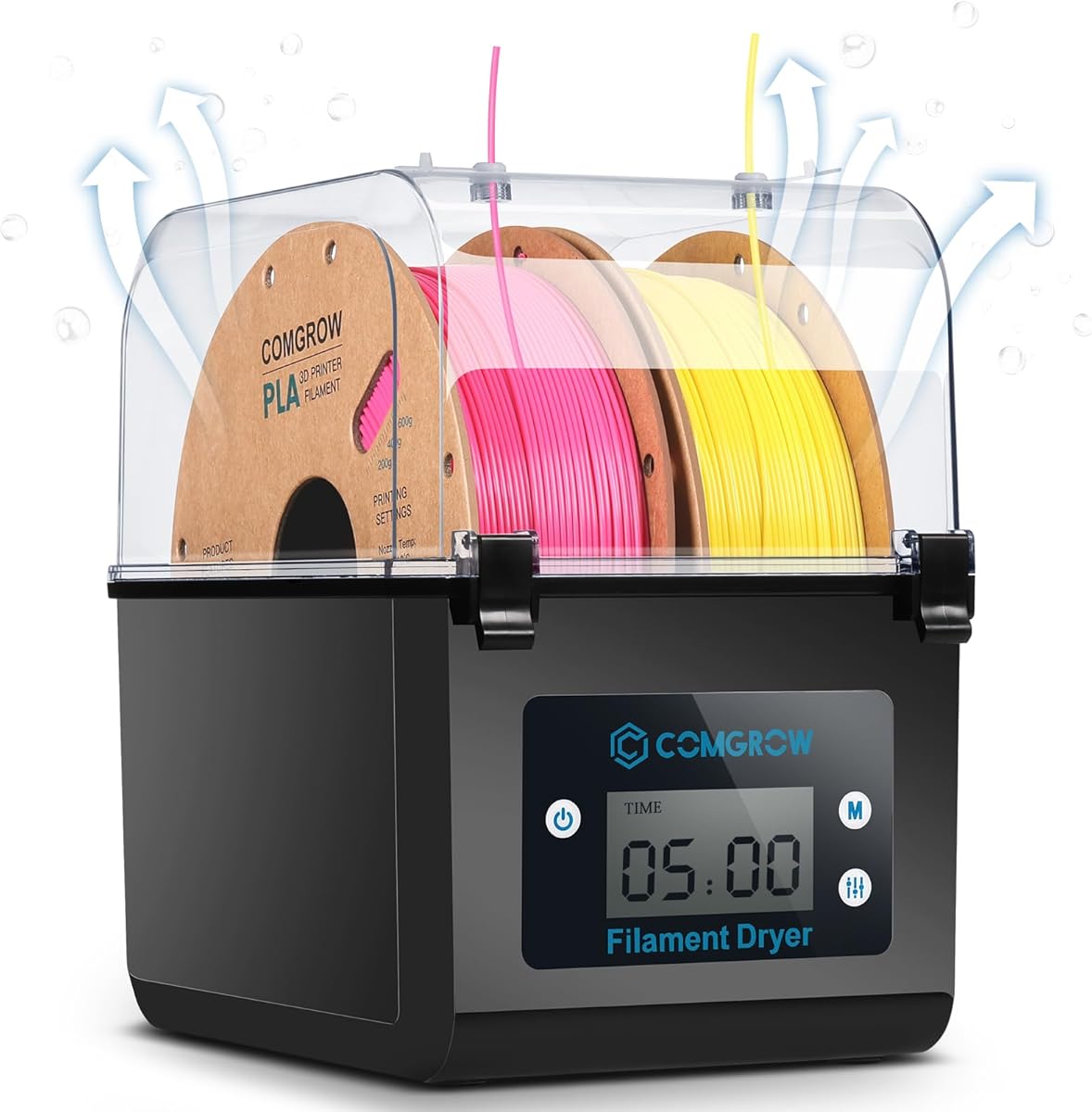



The Comgrow Dryer Box is a compact enclosed dryer designed to preserve and condition up to two one-kilogram filament spools. Its supplied customer rating is 4.4, and its strongest qualities are straightforward controls, real-time temperature and humidity information, and a sealed outlet designed to protect material while still permitting filament feeding. It is aimed at common FDM materials rather than high-temperature industrial processing.
We may earn a commission when you buy through this link, at no additional cost to you.
The enclosure measures 9.29 by 6.49 by 9.13 inches internally, allowing it to accommodate two rolls while supporting both 1.75mm and 2.85mm filament diameters. The stated material compatibility includes PLA, ABS, and SILK. Heating is adjustable from 40°C to 50°C, while operating time can be configured from six to twelve hours. A two-inch LCD and touch buttons make the operating state and chosen settings visible without navigating a complicated interface.
The sealing design deserves particular attention. A silicone cable sheath and Teflon tube form the filament outlet, and the opening can be plugged when it is not being used. During active drying, the supplied instructions say the outlet should remain open so moisture can drain. When the unit is idle, closing that opening helps preserve the drier internal environment. This is a sensible arrangement for a box intended to be both a working dryer and a protected storage space.
The main limitation is its deliberately narrow thermal range. Forty to fifty degrees is suitable for many everyday filaments, but it offers less flexibility with temperature-intensive engineering polymers than several other models in this guide. The timer range is also more limited. Despite those constraints, the Comgrow is a well-balanced choice for a home user who wants to dry two common spools, see environmental readings, and feed filament directly without sacrificing enclosure protection.
The display reports temperature, humidity, and the current operating state rather than leaving the user to estimate whether the chamber has reached the chosen condition. That visibility is especially helpful during longer drying sessions or in humid environments.
Two spool positions provide more flexibility than a single-spool enclosure without expanding into a full multi-chamber system. The unit is therefore a practical middle ground for printers that regularly use more than one color or material.
We may earn a commission when you buy through this link, at no additional cost to you.
The Creality Space Pi X4 is the most advanced premium dryer in this group, with a supplied rating of 4.6 and a focus on capacity, independent heating, and support for demanding filament types. It can hold four standard one-kilogram spools or two two-kilogram spools, making it suited to high-volume users, multiple printers, and workspaces that keep several colors open at once.
We may earn a commission when you buy through this link, at no additional cost to you.
Its two independent 200-watt heating chambers reach as high as 85°C. The listing states that the dual-chamber arrangement removes moisture faster than single-chamber dryers, while a touch interface lets users customize drying scenes and temperatures. The suggested range covers 50–60°C for common materials such as PLA, PETG, and TPU, with an 80–85°C capability intended for ABS, PET, PC, ASA, PA, and PAHT. The enclosure is also described as silicone-sealed to limit moisture reabsorption.
Unlike a basic passive storage box, this model actively maintains conditions during printing pauses. That makes it useful for long jobs where a spool may remain connected for hours and the surrounding air is humid. An illuminated window allows the user to inspect the spools without opening the enclosure and disrupting the controlled environment, which is a thoughtful feature for multi-spool workflows.
Its main trade-offs are physical size and complexity. A four-spool, dual-chamber enclosure occupies more counter space than compact one-spool models, and independent controls may be more than a beginner needs. For users who regularly print with several materials, need higher drying temperatures, or want active storage during extended pauses, however, the additional capacity and chamber flexibility justify selecting the X4 as a premium option.
Independent heating chambers can be especially useful when different materials need different temperatures. The model can serve varied filament inventories without treating every spool as though it requires an identical drying cycle.
An 85°C maximum is the highest listed figure in this comparison. That range creates more options for engineering-grade polymers that need more aggressive moisture removal than common PLA or PETG.
We may earn a commission when you buy through this link, at no additional cost to you.
The Creality Space Pi SE combines a straightforward one-spool format with features usually associated with larger dryers. It carries a 4.4 rating and includes a built-in fan, PTC heating, adjustable temperature and time, a display with a countdown, and compatibility with many widely used filament types. It is a practical choice for a printer owner who regularly works with one spool at a time.
We may earn a commission when you buy through this link, at no additional cost to you.
The heating system can reach 65°C within 15 minutes according to the supplied information. A fan circulates hot air through the chamber, while insulation on the inner wall helps retain warmth. Temperature settings span 45–65°C, and the drying timer can be programmed from zero to 24 hours. This gives users more scheduling flexibility than a fixed six- or twelve-hour cycle.
The SE is designed to be used without assembly and to make monitoring straightforward. Its screen and knob provide access to real-time humidity readings and a drying-hours countdown. The manufacturer also recommends storing dried filament in a vacuum bag after conditioning, making it clear that the active dryer and passive long-term storage are complementary rather than interchangeable.
The principal compromise is capacity. It is built around a one-kilogram spool, so users with multiple frequently used materials must rotate spools or maintain separate storage. Its maximum 24-hour timer is also shorter than the 48-hour range offered by the larger Space Pi. Even so, the quick heat-up, useful temperature ceiling, and broad material support make this a balanced and approachable dryer for everyday use.
Reaching the stated temperature in 15 minutes makes the SE practical for users who want to condition filament shortly before a print rather than start a long drying routine well in advance.
The display, knob, countdown, and humidity readout reduce the amount of guesswork involved. A new user can select a temperature and duration and track progress from one interface.
We may earn a commission when you buy through this link, at no additional cost to you.
The Creality Space Pi emphasizes convenient material selection and an unusually large control screen for a compact dryer. Its supplied rating is 4.4, and the model supports a 45–70°C adjustment range, a timer that extends to 48 hours, and one-key presets for up to 12 filament types. It is well suited to users who switch between standard and composite materials and want quick access to appropriate settings.
We may earn a commission when you buy through this link, at no additional cost to you.
A 3.7-inch touchscreen provides the primary control method and supports switching between Celsius and Fahrenheit. The preset list includes familiar materials such as PLA, PETG, TPU, and ABS as well as composite types like PLA-CF, PA-CF, and ASA. Users can still choose custom temperatures and times, which makes the presets a starting point rather than a rigid restriction.
The 110-watt PTC heater works with a built-in fan to circulate hot air through the enclosure. The supplied information emphasizes more even heating than designs relying only on a flat heating pad. A power-off memory function restores the previously selected material and temperature after an interruption, reducing the inconvenience of resetting a long cycle following a power outage.
Unlike the SUNLU S4, this dryer does not offer an automatic humidity-based drying mode, so the user controls when heating starts and stops. It also centers on a single working spool rather than a multi-spool or dual-chamber arrangement. Its screen, preset breadth, long timer, and flexible settings nevertheless make it an attractive choice for a user who values direct control and clear material guidance.
One-key profiles reduce the effort required to select suitable drying conditions. This is particularly useful for composite filaments that are less forgiving of an arbitrary temperature and duration.
Retaining the last material and temperature settings can save time after an outage. The feature is especially relevant during extended drying sessions or in workspaces where power interruptions are not uncommon.
We may earn a commission when you buy through this link, at no additional cost to you.
The SUNLU S1 Plus is a compact dryer centered on straightforward environmental monitoring. It has a supplied rating of 4.3 and accommodates one standard spool, making it most appropriate for home printers and users who dry material on a one-at-a-time basis. Its two-inch LCD reports temperature, drying time, and humidity, giving the user a clear view of the chamber conditions.
We may earn a commission when you buy through this link, at no additional cost to you.
A fan assists with the movement of moisture-laden air out of the enclosure, while adjustable temperature and timer controls allow the drying cycle to be matched to the filament and ambient environment. The available temperature range is 35–55°C, which covers many common FDM materials but remains below the ranges offered by the Creality X4, Creality Space Pi, SUNLU SP2, Sovol SH02, and SUNLU S4.
Its maximum internal spool size is listed as 210 by 89 millimeters in height. The manufacturer states compatibility with 1.75mm, 2.85mm, and 3.00mm filament in PLA, PETG, ABS, TPU, Nylon, and PA. That range includes three common diameters, making the box less dependent on a single spool format.
The compact format and clear controls are strong points, but the single-spool limit requires rotation when several materials need conditioning. Users working with high-temperature or composite filaments may also benefit from a dryer with a wider range or automatic moisture sensing. For ordinary filament storage and periodic drying, though, the SUNLU S1 Plus offers an easy-to-understand solution with useful environmental data.
The display puts temperature, time, and humidity together in one location. This gives the user a more complete picture of drying progress and the internal storage environment.
The integrated fan helps move excess moisture toward the enclosure outlet. That circulation can make a modest heating system more effective during routine drying.
We may earn a commission when you buy through this link, at no additional cost to you.
The Polymaker PolyDryer is different from most heated models in this comparison because it is a passive storage enclosure. Its supplied rating is 4.4, and its core purpose is to reduce exposure to humid air between prints rather than perform a timed heating cycle. A sealed design, desiccant support, and a visible hygrometer work together to maintain a cleaner and drier spool environment.
We may earn a commission when you buy through this link, at no additional cost to you.
The box supports a one-kilogram spool and is compatible with PLA, PETG, ABS, ASA, TPU, PVB, and PA/Nylon in 1.75mm, 2.85mm, and 3.00mm diameters. That broad material list does not imply that every filament requires aggressive heating; instead, it reflects the storage box's ability to create a protected environment for different materials between uses.
A particularly useful feature is the ability to feed filament while the spool remains inside. Users do not need to open the sealed enclosure for every print or move the spool to a separate holder during a long job. The built-in hygrometer makes it possible to check the internal condition rather than relying entirely on assumptions about the room's humidity.
This is a storage box only, as the supplied listing explicitly notes. It cannot heat filament, select a drying temperature, or run a timed dehumidifying cycle, so it will not replace an active dryer for severely wet or high-temperature materials. It is best suited to users whose main concern is maintaining a dry, sealed reserve and who occasionally print directly from the box.
A sealed container with desiccant is particularly useful for filament that is not consumed every day. It creates a controlled storage environment without occupying a powered heating cycle continuously.
Keeping the spool inside during printing means users need not open the enclosure each time they begin a job. That helps preserve the protected environment and simplifies a regular desktop workflow.
We may earn a commission when you buy through this link, at no additional cost to you.
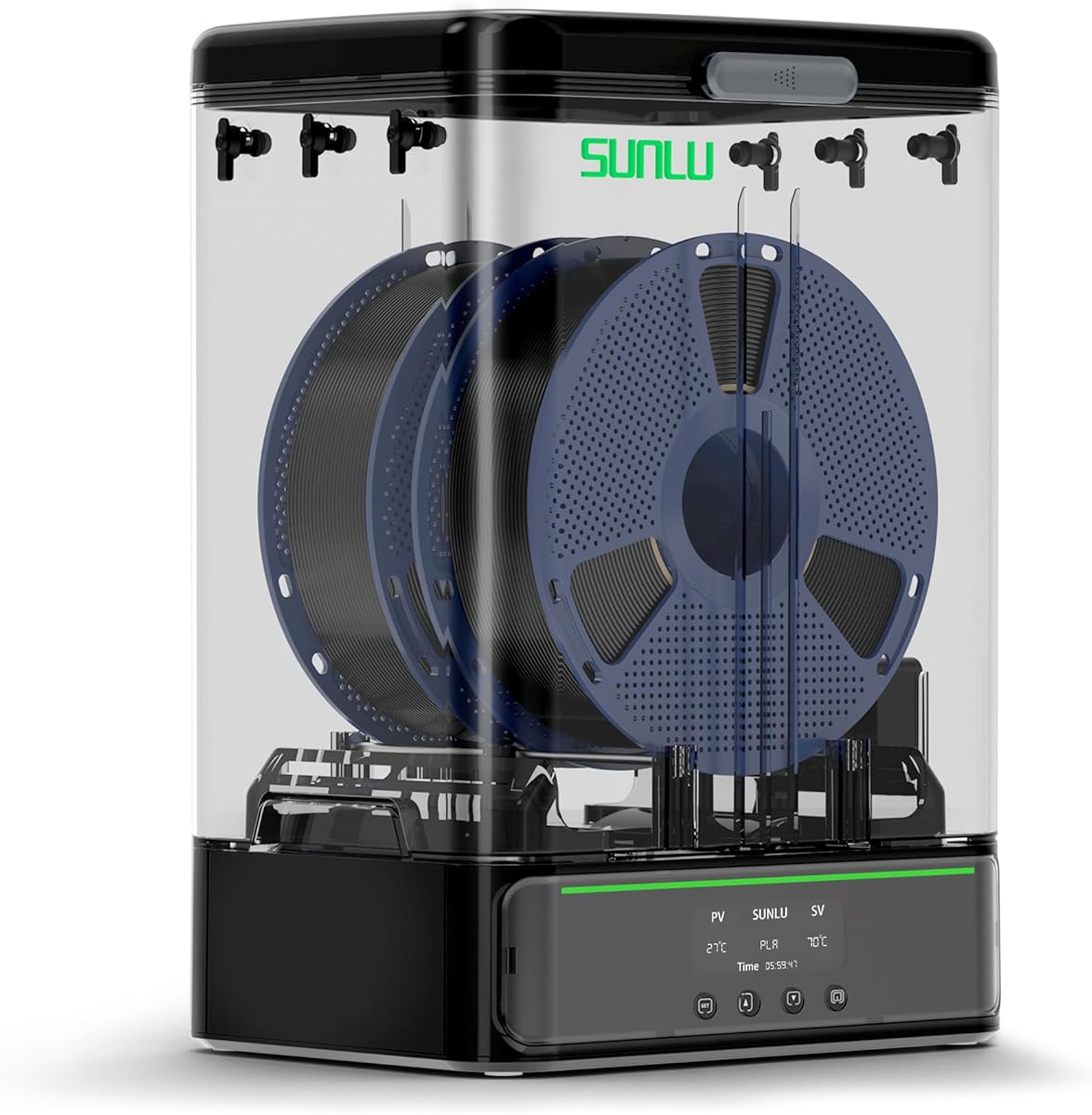
The SUNLU FilaDryer SP2 is built around a detachable dryer and storage base, allowing the same system to serve active conditioning and protected storage. It has a supplied rating of 4.4, holds two one-kilogram spools, and includes six silicone filament holes plus two PTFE tubes. The two-part construction gives it flexibility that a basic single-chamber dryer cannot offer.
We may earn a commission when you buy through this link, at no additional cost to you.
A 250-watt PTC heating element can bring the chamber to 70°C in 15 minutes according to the supplied information. Air circulates around the spools to promote even heating. After drying, the upper dryer section can be lifted from the base by its strap handle, leaving the filament in a sealed storage container with sliding latches and gaskets. This design is useful when a user wants to dry one batch and then protect a broader inventory.
The rollers accommodate different spool sizes, including larger three-kilogram spools, while the bar holder supports 250g, 500g, and paper spools. The system works with common filament types including PLA, PETG, TPU, ABS, PA, and PC in standard 1.75mm and 2.85mm diameters. An HD touch display presents temperature, time, and humidity, while a dryable hygrometer and desiccant containers support the storage function.
The main drawback is physical size. A detachable two-part arrangement, multiple ports, and support for larger spools require more workspace than compact single-spool units. It is nevertheless one of the more versatile systems here, particularly for users who alternate between drying, direct feeding, and long-term storage while working with several spool formats.
Separating the heated upper section from the base allows the same spools to move from active drying into protected storage. That versatility reduces the need for separate containers in some workspaces.
Six silicone holes and two PTFE tubes provide options for routing more than one material. The arrangement is useful for dual-material printers, color changes, and users maintaining several feed lines.
We may earn a commission when you buy through this link, at no additional cost to you.
The Sovol SH02 is a two-spool dryer built around quick heating, strong sealing, and simple material selection. Its supplied customer rating is 4.3. The enclosure can dry two one-kilogram spools simultaneously, and its relocated filament holes are designed to accommodate printers with different extruder positions while helping keep the workspace organized.
We may earn a commission when you buy through this link, at no additional cost to you.
A 150-watt PTC heater reaches 50°C in seven minutes and 70°C in 25 minutes. The temperature can be set from 40–70°C, and a built-in fan circulates hot air through the chamber. One-key profiles cover nine filament types: PLA, TPU, PETG, ABS, ASA, PVA, PC, PA, and PP. This gives users a convenient starting point while retaining the option to select conditions for a particular material.
The SH02 uses thicker sealing material than the earlier SH01, and the listing emphasizes moisture and dust protection even when the dryer is not powered. Users can also add up to four bags of desiccant, although those bags are not included. During operation, a safety system cuts heating if the PTC temperature exceeds 130°C and resumes below 90°C. An alarm sounds if the fan stops, helping alert the user before continued heating could damage the PTC module.
The absence of a stated built-in humidity display means users have fewer visible environmental readings than with several competing models. The included accessories also do not extend to desiccant bags. Even so, the fast warm-up, generous temperature range, two-spool capacity, and nine presets make the SH02 a capable option for users who want efficient active drying without automatic humidity control.
Reaching 50°C in seven minutes is useful when a spool needs quick conditioning. The faster warm-up can make active drying feel more practical in a frequently used workspace.
A stronger gasket helps maintain a protected environment when the unit is off. The possibility of adding desiccants gives users another passive safeguard for longer storage periods.
We may earn a commission when you buy through this link, at no additional cost to you.
The SUNLU S4 stands out for combining four-spool capacity with automatic humidity management. Its supplied rating of 4.7 is the highest among the listed products. The box is designed for FDM workflows involving multiple machines, colors, or materials, and it can accommodate four one-kilogram spools while supporting connections to four printers at the same time.
We may earn a commission when you buy through this link, at no additional cost to you.
Its 350-watt PTC heater is listed as reaching 50°C from 25°C in 30 minutes. Three built-in fans, including two side fans and one bottom fan, maintain a temperature balance within plus or minus 3°C. This circulation is intended to prevent sections of the chamber from drying unevenly and is especially relevant when several spools occupy the enclosure.
The standout feature is automatic humidity control. In the described mode, the user selects a target range between 30% and 50%. The dryer begins heating when humidity reaches the selected range and stops when readings fall below 25%, which helps avoid excessive drying. This is a more adaptive approach than selecting a fixed timer and hoping the result is sufficient.
Safety features include PTC protection, a temperature switch, and software protection with real-time alerts for unexpected temperature changes. The result is a feature-rich enclosure that is well suited to dedicated print farms, educational spaces, and serious hobbyists. The tradeoff is footprint and a control system that offers more than a new user may need, but for busy multi-printer setups, its capacity and automatic behavior make it an especially compelling choice.
Automatic humidity control adjusts the process as readings change. This is particularly useful in rooms where seasonal weather alters the amount of moisture in the surrounding air.
Three fans move air around the enclosure from the sides and bottom. The stated temperature balance of plus or minus 3°C supports more even treatment across a chamber holding four spools.
We may earn a commission when you buy through this link, at no additional cost to you.
The white SUNLU S1 Plus offers a simple way to dry one spool while it remains connected to a printer. It carries a supplied rating of 4.7 and includes two internal rollers, a two-inch LCD, adjustable heat, and a generous timer range. Its appeal lies in a clean, compact workflow rather than high capacity or automatic material management.
We may earn a commission when you buy through this link, at no additional cost to you.
The temperature can be adjusted from 35–55°C, and the drying time can be set from one to 99 hours. The default continuous drying period is six hours, while the supplied guidance notes that many commonly used filaments under normal conditions need roughly three to six hours. The broad timer makes the unit suitable for both a short preparation session and an extended drying routine.
Two rollers inside the chamber allow a spool to feed directly to a printer during drying. The enclosure is also designed to operate quietly, with the listing stating sound levels below 10db. That can make it useful in an office, bedroom, or shared workspace where a louder fan and heating system would be distracting. The large LCD displays temperature and time clearly.
The unit supports spool diameters of 1.75mm, 2.85mm, and 3mm, with maximum spool dimensions of 210 by 85 millimeters in height. It accommodates more than 20 commonly available filament types according to the listing. Its limitation is that only one spool fits, and it offers a lower ceiling than high-temperature dryers. For a single-printer setup seeking quiet operation and direct feeding, it remains an especially approachable choice.
A stated operating sound level below 10db makes the dryer practical near people who are working or resting. The enclosure can maintain a drying environment without the noise associated with louder active systems.
The large two-inch screen and straightforward temperature and time controls keep the process understandable. Users can begin a session without navigating extensive menus or making complex chamber arrangements.
We may earn a commission when you buy through this link, at no additional cost to you.
The right filament dryer depends on how many spools you use, which materials you print, how humid your workspace is, and whether you need active heating, automatic humidity control, or protected storage. These factors help separate a convenient one-spool enclosure from a capable multi-material system.
Capacity determines how many materials can be dried or stored at once. Single-spool boxes are compact and often less expensive to operate, but users who alternate frequently between colors will need to rotate spools manually. Two-spool systems offer a more useful middle ground for most dedicated printers, while four-spool or dual-chamber models are better for multi-machine studios, color workflows, or inventories containing several material types. Check the stated spool dimensions as well as the number of positions, since a nominal capacity may not accommodate oversized spools.
A wider temperature range provides more options for different polymers, but it should be considered alongside heating method and timer control. Common PLA, PETG, ABS, and TPU may be handled by models in the middle of the range, while nylon, polycarbonate, ASA, and some composite filaments can benefit from access to higher settings. The Creality Space Pi X4 reaches 85°C, whereas compact units such as the SUNLU S1 Plus top out at 55°C. Always compare the available range with the requirements of your filament manufacturer rather than assuming a higher maximum automatically means better results.
PTC heating is used across much of this category, but the circulation system matters just as much. Models with a built-in fan can move warm air around the chamber, reducing hot and cool areas that may leave different portions of a spool unevenly dried. The SUNLU S4 uses three fans, while the Creality X4 relies on dual heating chambers and the Creality models use circulating fans. Consider both heating wattage and airflow, especially when drying multiple spools or thick spools that need heat to reach the filament itself.
A humidity display gives useful confirmation that the enclosure is maintaining a suitable environment, while automatic humidity control goes further by starting and stopping heating based on a target range. The SUNLU S4 is the clearest example in this list, offering a selectable 30–50% range and automatic shutdown below 25%. Other models generally rely on the user to choose a temperature and time. Automatic control is convenient in changing weather, while manual settings can be valuable when the user understands a particular filament and wants a repeatable drying recipe.
A dryer must balance two competing needs: releasing moisture while active and preventing humid air from returning while inactive. Many products use gaskets, silicone cable sleeves, Teflon tubes, and closable filament ports to achieve this. Some models also include desiccant containers for passive protection. The Comgrow requires its outlet to remain open during drying and closed when not in use, illustrating why the port design matters. Before buying, understand how the unit is intended to vent and how you will store the filament after conditioning.
Most listed dryers support the standard 1.75mm and 2.85mm diameters, while several also accept 3.00mm material. Material support ranges from common PLA and PETG to ABS, ASA, TPU, nylon, PC, and carbon-fiber composites. Compatibility should include both the filament diameter and its required drying temperature. A box that physically fits a spool but cannot reach the recommended temperature may be better suited to storage than active conditioning for that particular material.
A clear display reduces the chance of overlooking an unfinished cycle or selecting the wrong temperature. Most models use a small LCD and simple buttons, while the Creality Space Pi adds a 3.7-inch touchscreen and the X4 uses a drying-scene touch interface. Timer ranges vary from fixed preset periods to as much as 24, 48, or 99 hours. Longer maximum timers do not guarantee superior results, but they provide flexibility for materials that need extended conditioning or for a user who wants to adjust a recipe gradually.
Active heat and fans require sensible protective systems. The Sovol SH02 includes automatic heating cutoff, fan-stop alarms, and temperature-based resumption, while the SUNLU S4 combines PTC, temperature-switch, and software protection. Also consider practical features such as print-while-drying rollers, detachable storage sections, multiple feed ports, and power-off memory. These details determine how naturally the dryer fits your existing printer, storage, and workflow.
Begin by identifying the filament type, checking the spool for damaged or loose outer layers, and cleaning the inside of the enclosure. Confirm that the spool sits correctly on its rollers or holder and that the filament can travel toward the feed port without crossing itself. Install the correct spool adapter if needed, and make sure any silicone guides, PTFE tubes, or cable sleeves are seated properly before closing the lid.
Select the temperature and duration using the filament manufacturer's recommendations as the starting point. A preset can be convenient, but custom settings may be necessary when room humidity, spool size, or filament age affects the required drying time. During the first cycle, observe the display and humidity reading if available. Do not cut the filament or open the chamber repeatedly during heating, since repeated interruptions can slow moisture removal and disturb the controlled environment.
After drying, let the unit cool briefly if necessary and move the filament into a sealed storage container or an approved vacuum bag when the product instructions call for it. Clean the interior with a dry, lint-free cloth, remove loose filament fragments, and inspect the gaskets, rollers, fan openings, and feed tubes. Keep the unit away from water and combustible materials, use the prescribed electrical supply, and leave adequate space around vents and fans.
PLA is not usually as aggressively moisture-sensitive as nylon or some other polymers, but it can still absorb enough moisture to affect appearance or performance in humid conditions. A dryer is most useful when you notice bubbling, excessive stringing, rough surfaces, or inconsistent feeding. It can also be worthwhile as a preventive measure for filament that will sit unused in a humid room.
The correct setting depends on the filament type and the manufacturer’s guidance. Common materials may need lower temperatures than engineering polymers, and using an overly aggressive setting can deform a spool or damage filament. Start with the recommended range for your exact material, then adjust within the dryer’s limits based on its condition and the displayed humidity.
Several models are designed specifically for print-while-drying use. Their internal rollers or holders keep the spool in position while a PTFE tube guides the filament to the printer. The enclosure must be configured according to its instructions, and the filament path should be checked for bends, friction, and alignment before starting a long print.
No. If filament has just been dried, stored in a sealed container with desiccant, or used regularly in a controlled environment, it may not need another full cycle. Drying is most useful after a spool has been open for a long period, stored in humid conditions, or shows symptoms associated with moisture. Repeated unnecessary heating may be counterproductive.
No. Higher temperatures can remove moisture more quickly, but only when the material is designed for that temperature. Excessive heat can soften filament, damage the spool, or affect the polymer. Air circulation, humidity, exposure time, and correct temperature all contribute, so a moderate cycle with good airflow may work better than an unnecessarily hot setting.
A passive storage box uses sealing and desiccant to reduce moisture exposure but does not heat the filament. An active dryer uses controlled heat, airflow, and often a timer to remove moisture from the material. Passive storage is useful for dry reserves, while active drying is more appropriate for filament that has already absorbed moisture or requires a specific conditioning cycle.
Only when the manufacturer permits it. Some units include dedicated desiccant containers, while others leave room for bags without supplying them. Desiccant should not obstruct airflow, touch the heating element, or prevent proper sealing. Following the product instructions is especially important because passive moisture control and active heating may require different ventilation arrangements.
A humidity reading and stable temperature are useful indicators, but the best test is a successful test print. Look for clear extrusion, consistent diameter, minimal popping or bubbling, good layer adhesion, and clean surfaces. If those symptoms improve after one cycle, allow another cycle only if the manufacturer recommends it, since excess drying can sometimes create brittleness or feeding difficulty.
The SUNLU S4 is the leading choice for busy users who want four-spool capacity, automatic humidity control, and even multi-fan circulation. The Creality Space Pi X4 is the premium option for users who need independent chambers and the highest listed temperature ceiling, while the SUNLU S1 Plus offers a simple, quiet, one-spool way to dry material and print at the same time.
For most home users, capacity should follow the number of spools used in a normal week rather than the size of a future collection. Temperature range, airflow, sealing, and readable controls matter more than extra modes. Materials such as nylon, PC, and high-performance composites justify a wider range, while a single PLA or PETG user may be well served by a smaller single-spool model.
Before purchasing, verify the current manufacturer specifications, included accessories, electrical requirements, and filament compatibility for the exact model. Product designs and configurations can change, so confirm that the capacity, timer, temperature range, and port arrangement still meet your needs. Also check current availability before making a final choice.