
SCRIB3D P1
4.4Editor score
Adjustable temperature controls
Stepless speed adjustment
Ceramic nozzle construction
Our expert guide compares 3D Printing Pens for Kids, covering safety, filament options, controls, included accessories, creative versatility, and ease of use.
A 3D printing pen can turn simple lines and shapes into tangible creations, giving children a screen-free outlet for art, building, and early STEM exploration. The most useful models balance approachable controls with dependable plastic output, while age-appropriate safety features remain essential for younger makers.
We compared all ten products using their stated specifications, included accessories, age guidance, filament compatibility, temperature controls, safety features, and customer ratings. The guide covers child-focused sets, capable creator tools, and bundle options that add mats, stencils, guides, or a wider range of filament colors.
Each review highlights the product's strongest qualities, practical limitations, and ideal user so you can judge it against your child's experience and interests. Ratings and availability can change, and product prices vary, so confirm the current listing and included accessories before purchasing.
4.4Editor score
4.4Editor score
4.5Editor score
This side-by-side comparison shows the key differences in child safety, controls, filament support, construction, and bundled creative accessories across all ten 3D printing pens.


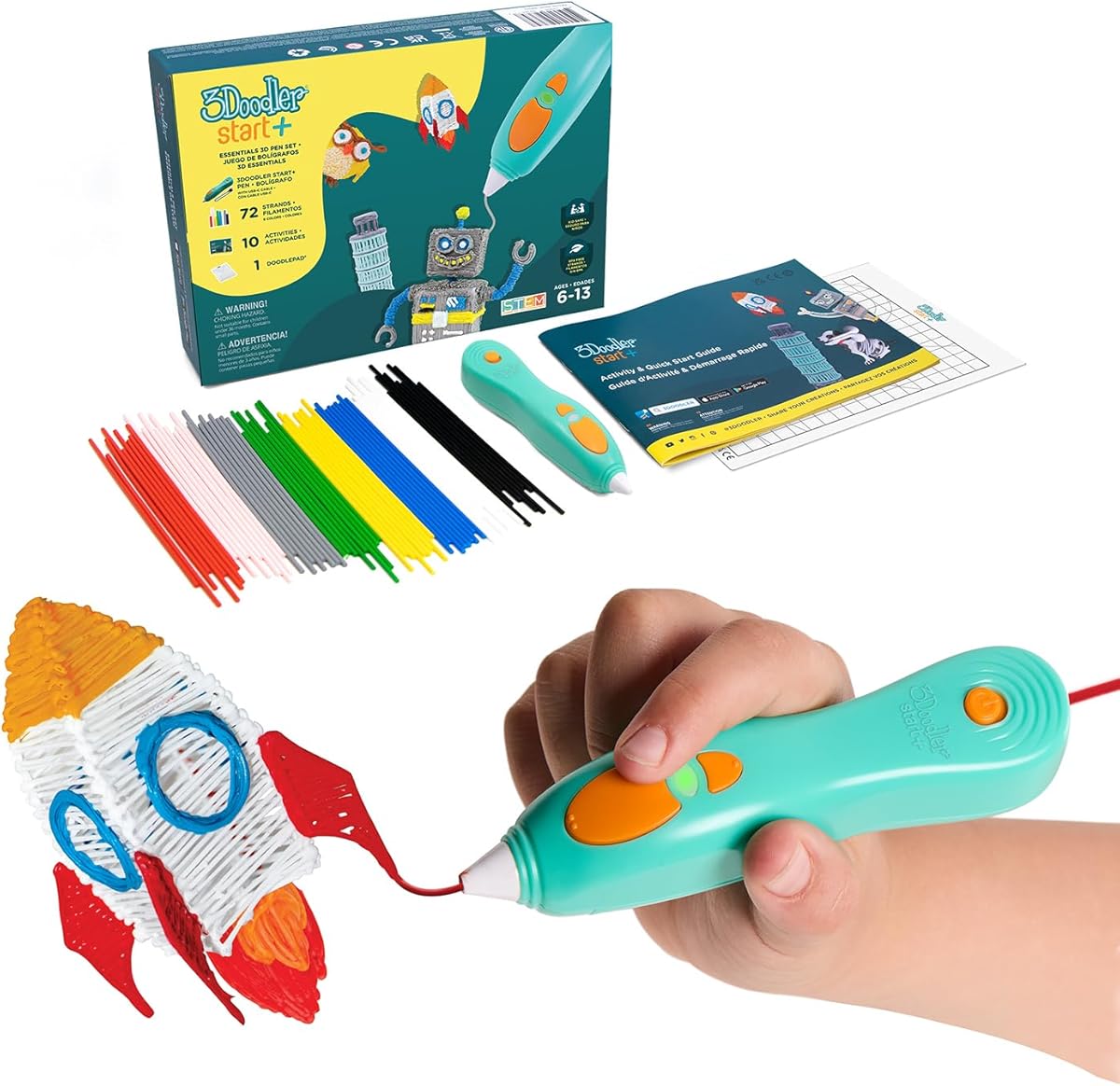
The 3Doodler Start+ Essentials is purpose-built for children aged six and older, combining a 4.4 rating with a reassuring approach to heat and handling. Its most distinctive feature is the absence of externally hot parts: the product information states that the nozzle and plastic can be touched without burn risk. That design makes it easier for adults to supervise creative sessions without treating the pen like a conventional heated crafting tool.
We may earn a commission when you buy through this link, at no additional cost to you.
The set includes a slimmer pen, DoodlePad and Doodlemat, 72 strands of mixed-color Start+ plastic, a USB-C cable, an activity guide, and 10 new stencils. These accessories create a ready-to-use experience for children who want to draw or build immediately. The upgraded slimmer body is easier for small hands to hold, while the larger filament selection supports varied colors without requiring a separate order right away.
The trade-off is that this model is deliberately specialized. It uses 3Doodler Start plastic filaments rather than the broader 1.75mm material range supported by many conventional 3D pens. It also offers less direct control over temperature and speed than the MYNT3D and SCRIB3D models. For a child focused on safe, guided drawing rather than technical experimentation, those limitations are reasonable.
This is the strongest overall choice for younger children because it prioritizes safety, accessibility, and a complete starter experience. It is particularly well suited to home art, beginner projects, and supervised STEM play. Choose the 3Doodler Start+ when the child's age and comfort level make a cool-touch design more valuable than access to advanced filament settings.
The child-safe construction removes a major barrier to independent creative play. Its stand-by mode also provides a clear way to pause between activities, while the USB-C cable eliminates the need for a model-specific power brick.
Ten stencils, a drawing surface, and an activity guide make the set easier for children to use independently. The mixed-color strands also make it simple to begin experimenting with color combinations.
We may earn a commission when you buy through this link, at no additional cost to you.
The SCRIB3D P1 combines approachable operation with controls that give children room to improve. Its 4.4 rating reflects a generally well-received balance of features, including a stepless speed slider, adjustable temperature, and a ceramic nozzle. Unlike entry-level toys that offer only basic on-and-off operation, this model lets young makers gradually learn how changing speed and material affects the deposited plastic.
We may earn a commission when you buy through this link, at no additional cost to you.
The kit includes three colors of PLA filament, a power adapter, a step-by-step manual, and a stencil guide. Its controls are easy to summarize: plug in the adapter, wait for the red warm-up light, feed the filament, and use the forward and reverse buttons for flow and retraction. The P1 supports PLA from 160 to 210 degrees Celsius and ABS from 210 to 235 degrees Celsius.
Although the ceramic nozzle improves durability and helps resist clogging, the pen still heats plastic during use. The product information does not describe it as child-safe in the same manner as the 3Doodler Start+, so adult supervision and careful handling remain important. Its two-minute auto sleep is helpful for avoiding unnecessary heating when the pen is temporarily idle.
The SCRIB3D P1 is a strong value-oriented choice for older children, tweens, and families seeking more capability than a basic drawing toy. It is especially useful when a child wants to try different filament types or gradually master speed control. It may be less suitable than the Start+ for a very young child who needs a cool-touch design.
Stepless speed adjustment is more continuous than a simple multi-position dial, helping children practice controlling line thickness and fill. Temperature adjustment broadens the range of materials available as their projects become more ambitious.
The included manual, stencil guide, adapter, and three filament colors cover the essentials for a first session. Retraction and auto-sleep features make the tool more convenient for regular use.
We may earn a commission when you buy through this link, at no additional cost to you.
The MYNT3D Professional is aimed at children old enough to understand more technical controls and ready to explore material behavior. Its 4.4 rating and large OLED display distinguish it from simpler pens. The screen shows the material temperature, while settings can be adjusted in one-degree increments across a broad 140-to-230-degree Celsius range.
We may earn a commission when you buy through this link, at no additional cost to you.
An adjustable feed system regulates the speed and flow of deposited material, giving the user finer control than a basic fixed-speed model. This is valuable for intricate drawings, structural pieces, and experimental projects. The kit includes three colors of PLA filament, an AC adapter, and a slim ergonomic pen, along with a one-year limited warranty.
The dense set of settings is the main consideration for families. A younger child may benefit more from the guided simplicity of the 3Doodler Start+ than from learning precise temperature increments. The Professional also does not claim the same child-safe, no-hot-parts design, and it includes fewer colors than many bundled alternatives.
Choose the MYNT3D Professional for a child who is already enthusiastic about 3D art and wants technical control. It is particularly suitable for detailed freehand work and experimenting with PLA under different heat and flow conditions. For most early use, an adult should explain the controls and supervise operation.
One-degree temperature increments make it possible to refine how PLA flows and adheres. Combined with adjustable feed, this provides a high level of control for users who have already mastered basic 3D pen technique.
The OLED display gives immediate information about material temperature. That visibility helps young makers understand cause and effect while reducing unnecessary trial and error.
We may earn a commission when you buy through this link, at no additional cost to you.
The MYNT3D Super offers a durable middle ground between a simple kids' pen and a highly technical creator model. Its 4.3 rating reflects solid overall performance, while the ultrasonically sealed nozzle is designed to be nearly clog-proof and withstand repeated use. That construction should appeal to families expecting regular drawing sessions.
We may earn a commission when you buy through this link, at no additional cost to you.
A stepless speed slider gives the user continuous control over plastic flow, making it possible to move between detailed lines and faster filling. The pen accepts 1.75mm ABS and PLA filament and includes three colors of PLA, an AC adapter, and a slim ergonomic touch body. A one-year limited warranty adds some reassurance for longer-term use.
Compared with the MYNT3D Professional, this model offers less visible temperature information and fewer explicit settings. That makes it more streamlined, but it also removes a useful teaching aid for children who are learning how heat affects different plastics. It also lacks a dedicated child-safe claim, so adult supervision remains appropriate.
The MYNT3D Super works well for children who have outgrown a basic toy-style pen and want smoother, dependable extrusion. Its simple speed control and durable nozzle reduce friction without overwhelming them with menus. It is a good choice for making models, decorations, and everyday household fixes under adult supervision.
The ultrasonically sealed nozzle is the defining feature, reducing the likelihood that residue will interfere with later sessions. It is a practical advantage for a child who enjoys frequent creative work.
Compatibility with both PLA and PLA's alternative, ABS, lets users progress beyond the starter filament. The stepless slider helps balance extrusion speed against the detail required by a project.
We may earn a commission when you buy through this link, at no additional cost to you.
The SCRIB3D Advanced focuses on a comfortable, controlled drawing experience for older children and creative users. Its 4.3 rating reflects a well-rounded tool with a large LCD screen, eight speed options, and buttons for loading, unloading, adjusting temperature, and changing speed. The curved soft-touch surface is designed to reduce fatigue during longer sessions.
We may earn a commission when you buy through this link, at no additional cost to you.
Five colors of PLA filament provide more variety than the three-color entry kits, while the included manual and stencil guide help new users get started. The pen's interface communicates heat and speed information clearly, which can be useful for children learning how those variables influence a model. Its one-year guarantee and responsive customer support provide additional buyer reassurance.
The eight discrete speed settings are less fluid than a stepless slider, but they may be easier for younger users to understand. The included filament quantity is also lower than the length supplied by some large bundles, meaning additional colors may eventually be needed. As with other heated pens, it should not be treated as a child-safe touchable tool.
This is a good selection for a child who wants a dedicated 3D pen for frequent drawing and prefers clear settings over minimalist operation. Comfortable handling and visible controls make it approachable without eliminating creative range. It works well for models, freehand art, and stencil-based projects when supervised.
The curved soft-touch body supports a natural grip, which can make detailed work feel more comfortable. An ergonomic shape is especially useful for children creating multiple pieces during one creative session.
The LCD screen keeps temperature and speed in view while drawing. Eight selectable speeds offer enough variation for both fine details and broader builds without overwhelming the interface.
We may earn a commission when you buy through this link, at no additional cost to you.
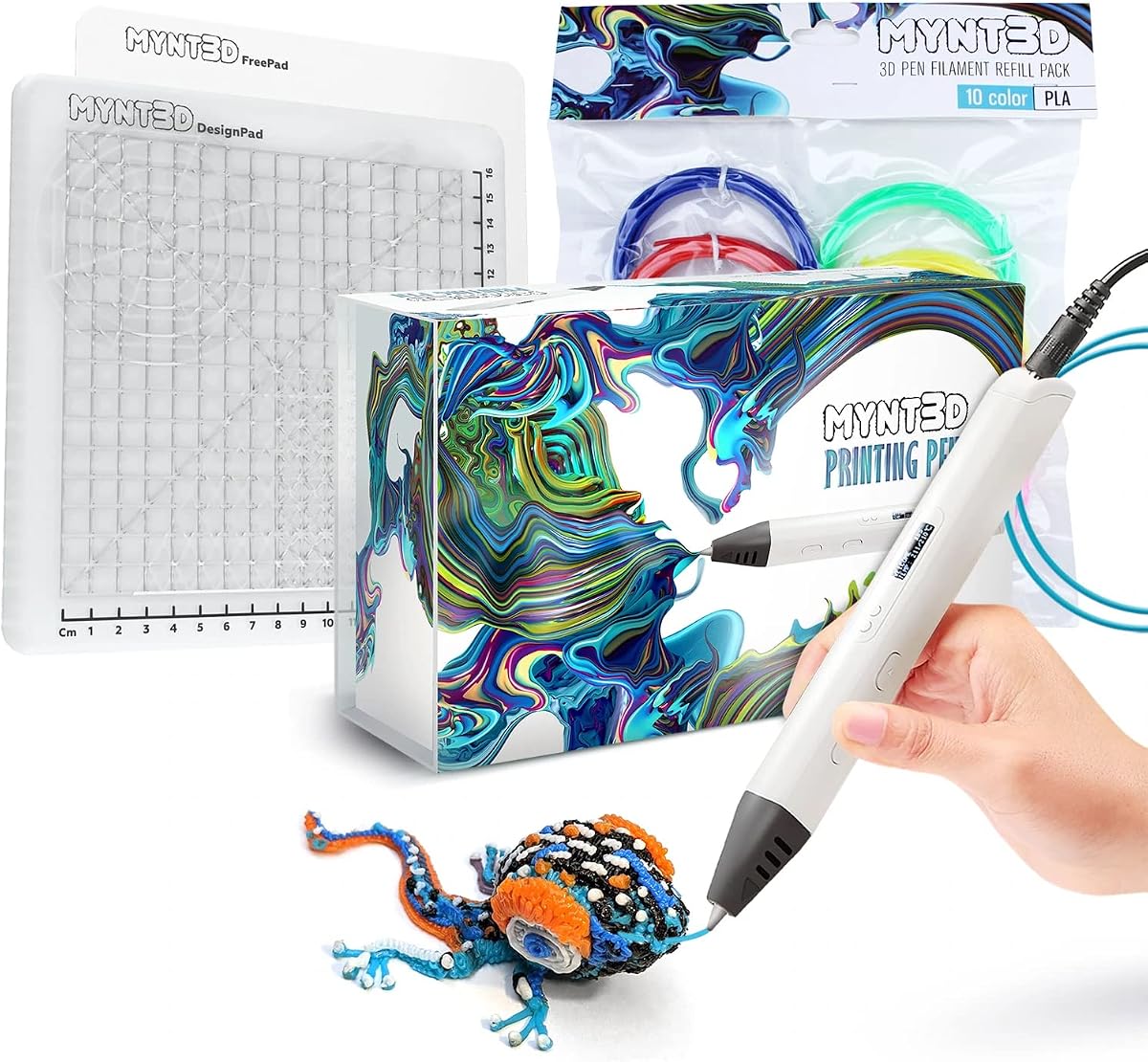
The MYNT3D Pro Bundle is the most complete package in this guide and carries the highest listed rating at 4.5. It pairs the Pro pen with ten colors of vacuum-sealed PLA, a double-sided silicone DesignPad, and a transparent FreePad tracing surface. That combination supports both freehand creativity and more structured design practice.
We may earn a commission when you buy through this link, at no additional cost to you.
The pen itself uses stepless speed control, discrete temperature adjustment, and a replaceable sealed nozzle intended to resist clogging and extend operating life. Those features make it well suited to children who are serious about 3D art or ready to explore different material settings. The channeled DesignPad helps form geometric shapes, while the FreePad's adhesion supports tracing familiar patterns.
The premium feature set also brings complexity. Younger children may find multiple temperature settings and extensive accessories more than they need, and the heated nozzle requires supervision. A family seeking a simple first pen may find the 3Doodler Start+ easier to introduce, while those wanting abundant colors and dedicated mats get substantially more here.
Choose the MYNT3D Pro Bundle when you want a ready-to-use creative station rather than only a pen. It is the strongest fit for a child who draws frequently, enjoys color variety, or wants to improve technical 3D drawing skills. The one-year limited warranty and customer support round out the package.
Ten filament colors reduce the need for immediate refills and make it easy to separate objects by color. The dual-mat setup also supports different workflows without constantly improvising a drawing surface.
The replaceable sealed nozzle is a notable upgrade for regular users. Temperature and flow controls provide the precision needed to move from basic shapes toward more elaborate models.
We may earn a commission when you buy through this link, at no additional cost to you.
The MYNT3D Super Bundle combines a capable daily-use pen with ten colors of PLA and two drawing surfaces. Its 4.4 rating reflects the appeal of a complete setup: users receive the Super pen, blue, green, red, yellow, orange, pink, black, tan, brown, and gold filament, along with the DesignPad and FreePad.
We may earn a commission when you buy through this link, at no additional cost to you.
Stepless speed control and adjustable temperature allow the pen to handle ABS or PLA. A replaceable sealed nozzle supports longer-lasting operation and simplifies upkeep when the original component eventually needs attention. The silicone DesignPad includes channels for geometric shapes, while the transparent FreePad is intended for tracing patterns and practicing consistent outlines.
As with the Pro bundle, the comprehensive package may be more than a first-time user needs. The heated component requires responsible adult oversight, and the number of available materials and accessories can make the learning curve feel substantial. A family only interested in occasional doodling may prefer a simpler three-color set.
This bundle is best for an older child or dedicated beginner who wants lots of colors and professional-style mats from the outset. It supports both structured projects and free creation while remaining less expensive in concept than a specialized technical printer. It is a strong middle ground between a basic kids' set and the full MYNT3D Pro package.
Ten filament colors support colorful models, layered decorations, and distinct project components. Vacuum-sealed packaging helps keep each refill protected until it is needed.
The DesignPad's channels help guide straight lines and geometric forms. The FreePad adds a tracing surface, giving children two different ways to plan and refine their work.
We may earn a commission when you buy through this link, at no additional cost to you.
The 3Doodler Flow is explicitly positioned for teens, adults, and creators, making it better suited to older children who want a more capable tool than a starter model. Its 4.1 rating is the lowest among the rated products in the guide, but the pen offers meaningful advantages, including 1.75mm compatibility with PLA, ABS, and wood-style plastic filament.
We may earn a commission when you buy through this link, at no additional cost to you.
An integrated LCD provides real-time temperature monitoring, helping users select settings and maintain consistent extrusion. The package includes eight filament colors totaling 80 feet and a comprehensive activity guide that teaches the basics. Its compact, lightweight construction also makes it easier to carry between a desk, classroom, or shared creative space.
The lower rating and more advanced target audience are important distinctions. It does not offer the specialized child-safe claims associated with the 3Doodler Start+, so younger users need close supervision. Some children may also find the wider material compatibility and creator positioning less approachable than the guided simplicity of dedicated kids' kits.
Choose the Flow for an older child, teen, or family member interested in varied filament types and portable creation. It works well for freehand structures, stencil designs, handmade gifts, decorations, and household fixes. Within a child-focused roundup, it is best viewed as a step up for experienced users rather than a first choice for a six-year-old.
PLA, ABS, and wood-style filament compatibility opens the door to different finishes and project types. Real-time temperature information helps users adapt settings as the material changes.
The compact body is designed to be lightweight and portable. That makes the Flow convenient for moving between projects or sharing a creative session in a classroom or common area.
We may earn a commission when you buy through this link, at no additional cost to you.
The SCRIB3D P1 Bundle expands the approachable P1 with a silicone drawing mat designed for tracing, practice, and cleaner projects. It includes the pen with display, starter PLA filament, a stencil book, a project guide, and a power adapter. The two-sided mat includes built-in shapes and patterns that can help children develop steadier lines and more consistent forms.
We may earn a commission when you buy through this link, at no additional cost to you.
The smooth silicone surface is described as durable, reusable, heat-resistant, and easy to wipe clean. That makes it more than a simple piece of paper: it provides a dedicated place for the heated pen and a repeatable method for practicing designs. The P1 itself retains its stepless speed control, adjustable temperature, ceramic nozzle, and anti-clogging features.
The product does not have a listed customer rating, so there is less visible customer feedback to evaluate than for the other picks. As the pen heats plastic, it should not be treated as a cool-touch toy. The bundle also appears more focused than the larger MYNT3D collections, with less filament and fewer dedicated drawing surfaces.
This set is a strong match for a child who benefits from tracing and guided practice. The stencil book, project guide, and patterned mat can make the learning process less intimidating than drawing entirely from memory. Choose it when a structured setup matters more than a broad color range, and supervise heating and nozzle contact.
Built-in shapes and patterns give children a clear path to follow while they become familiar with extrusion speed. The silicone surface can help reduce the visual clutter of loose plastic during repeated practice.
The mat is designed to be wiped clean and reused across drawing, tracing, and everyday sessions. Its heat-resistant construction supports its role as a dedicated work surface.
We may earn a commission when you buy through this link, at no additional cost to you.
The 3Doodler Start+ Refill Bundle is designed for children who may use their 3D pen frequently and want a large supply of material on hand. It includes the child-safe Start 3D pen, DoodlePad, 72 strands of mixed-color filament, a USB-C cable, an activity guide, 10 stencils, and more than 1,250 additional feet of plastic filament.
We may earn a commission when you buy through this link, at no additional cost to you.
The defining benefit is endurance. Instead of running out of filament after a few projects, the child can continue building, coloring, and experimenting without an immediate refill order. The included stencils and activity guide support structured projects, while compatibility with the free iOS and Android app adds templates, instructions, and step-by-step ideas when a compatible device is available.
Its lack of a listed customer rating means buyers must rely on the established Start+ feature set rather than visible feedback for this particular bundle. It also remains tied to 3Doodler Start plastic, and the app is optional rather than required. The cool-touch, no-hot-parts design is the major advantage over conventional heated pens for young children.
This bundle is ideal for families confident that their child will make regular use of a 3D pen and values having plenty of material immediately available. It combines a child-focused safety approach with a generous accessory package. Choose it over the standard Start+ set when minimizing refill interruptions and keeping a child engaged for longer periods is the priority.
The large additional filament supply is especially useful for ambitious models or frequent creative routines. Children can experiment with color and scale without repeatedly stopping because a strand has run out.
The app can provide templates and instructions while the physical activity remains hands-on. The no-hot-parts design preserves the pen's child-oriented safety positioning while extending project options.
We may earn a commission when you buy through this link, at no additional cost to you.
The right 3D printing pen depends on age, safety preferences, creative interests, and how much control the child is ready to manage. Compare these factors carefully because they determine whether the tool feels inspiring or frustrating.
Age is the first consideration because 3D pens heat and soften plastic before depositing it. The 3Doodler Start+ models specifically use a child-safe, no-hot-parts design and are intended for ages six and older. Other pens offer ceramic nozzles, auto sleep, anti-clogging features, and clear controls, but those features should not be confused with a completely cool-touch design. A parent buying for a younger child should prioritize the stated safety design and establish a firm rule against touching the nozzle.
In short, choose a child-safe model for younger makers and supervise any heated 3D pen carefully.
Beginners benefit from a small number of understandable controls, while more experienced children may enjoy adjusting speed and temperature. The SCRIB3D P1 uses a stepless slider and straightforward forward and reverse buttons, while the Advanced adds a display and eight speed options. The MYNT3D Professional permits one-degree temperature changes, and the Pro Bundle adds discrete temperature adjustment. More control expands project possibilities but also requires more explanation.
In short, match the interface to the child's attention level and willingness to learn, rather than simply selecting the largest feature set.
PLA is mentioned in every kit and is described as versatile and easy to use, making it the most accessible starting material. ABS support appears in the SCRIB3D P1, MYNT3D Super, MYNT3D Super Bundle, and 3Doodler Flow, giving those users broader material choices. The 3Doodler Flow also supports wood-style plastic filament. Dedicated Start+ products use their own Start plastic system, which should be considered before planning to buy compatible refills separately.
In short, begin with PLA and choose broader compatibility only when the child is ready to experiment with different materials.
Stencils and activity guides can make the early learning curve much easier by showing children what to make and how lines behave. A DoodlePad or Doodlemat provides a stable drawing surface, while the MYNT3D bundles add a channeled DesignPad and a transparent FreePad for tracing. The SCRIB3D P1 Bundle also includes a two-sided silicone mat with built-in patterns. These accessories often provide more educational value than simply adding another plastic color.
In short, prioritize guides, stencils, and a reliable drawing surface when the child is new to 3D printing.
Starter kits commonly include three colors, while the Advanced supplies five and the larger MYNT3D bundles include ten. The 3Doodler Flow includes eight colors totaling 80 feet, and the Start+ Refill Bundle provides more than 1,250 additional feet. More material supports longer projects and color experimentation, but young children may not use every color immediately. Consider whether the child prefers freeform drawing, multicolored models, or structured crafts before choosing the largest bundle.
In short, choose the amount of filament by project length and likely color variety, not by bundle size alone.
A reliable nozzle helps prevent frustrating interruptions when plastic does not feed smoothly. The MYNT3D Professional and Super use an ultrasonically sealed nozzle described as nearly clog-proof. The MYNT3D Pro and Super bundles use replaceable sealed nozzles, while the SCRIB3D P1 and Advanced include anti-clogging features and a ceramic nozzle on the P1. Flow adjustment is also important because steady extrusion produces cleaner lines and more consistent structures.
In short, prioritize sealed or replaceable nozzle construction and adjustable flow for frequent, low-frustration use.
A 3D pen can support freehand art, geometric construction, model making, seasonal decorations, handmade gifts, and practical household fixes. Product guides can provide structured project ideas, while stencils and tracing surfaces help children translate two-dimensional ideas into three-dimensional forms. Some models also support a free app containing templates and instructions, which adds variety without making the physical tool dependent on a screen.
In short, select accessories and instructions that match the kinds of projects your child will actually want to make.
Power arrangements affect how easily a pen can move between rooms or shared workspaces. The 3Doodler Start+ uses USB-C, the 3Doodler Flow is described as compact and lightweight, and most other models use an included AC adapter. Auto-sleep functions can reduce unnecessary heating after a project pauses. A protective stand or properly cleared workspace also helps keep the heated nozzle from contacting surfaces while the pen is in use.
In short, match power and portability needs to where the child will create, and always allow the nozzle to cool before storing.
Begin on a clean, heat-resistant surface and read the specific model's instructions before heating the pen. Install the filament in the direction indicated by the manufacturer, secure it at the rear of the tool, and allow the pen to reach the recommended temperature. For the SCRIB3D P1, this warm-up generally takes two to three minutes and is signaled by the red light. Never pull filament forcefully if resistance appears.
Once heated, feed the filament until it reaches the nozzle, then stop extrusion while you position your first line. Start slowly to establish a steady path, adjust speed or temperature only as the manual permits, and use stencils or traced patterns when learning line control. Pause the pen between shapes and never touch the nozzle while it is hot. An adult should supervise children using models without the Start+ no-hot-parts design.
After finishing, use the unload or reverse function where available to remove the filament while the pen is still in its appropriate operating state. Allow the nozzle and plastic to cool, then wipe excess plastic from the nozzle only as directed by the manufacturer. Store the pen with filament removed if the instructions recommend it, keep spare strands away from heat, and use the supplied mat or stencils to keep future sessions organized.
It depends on the model. The 3Doodler Start+ is specifically described as child-safe for ages six and older because it has no externally hot parts and uses Start plastic that can be touched without a burn risk. Other 3D pens heat plastic and should be operated with adult supervision and careful attention around the nozzle.
The 3Doodler Start+ is intended for children aged six and older, making it a clear fit for younger makers who need a designed safety approach. Older children can choose a more technically advanced pen when they can understand speed, temperature, loading, and unloading controls.
PLA is the most straightforward starting material because it is described as versatile and easy to use, and every kit includes PLA in some form. Start with the filament supplied with the pen, use the stated temperature range, and consider ABS or wood-style material only after the child is comfortable with the basic process.
That depends on the pen and the child's maturity. A child-safe Start+ design may support independent creative play more comfortably, though general supervision is still wise. Conventional heated models should always be used with an adult present because the nozzle and extruded plastic become hot during operation.
A pause in flow can result from incorrect temperature, a feed issue, or residue near the nozzle. Refer to the model's anti-clogging guidance, confirm that the correct filament and compatible settings are being used, and avoid forcing the filament backward. If the problem continues, follow the manufacturer's troubleshooting or warranty process.
They are not required to create a 3D model, but they can make early projects more approachable. Stencils guide the first line, while mats provide a stable, clean work area and can help children trace shapes or practice consistent forms.
PLA is the easier starting option and appears throughout the supplied kits. ABS requires a higher operating range in the models that support it, while the 3Doodler Flow also accepts wood-style plastic filament. Always follow the temperature and nozzle guidance for the exact pen and material combination.
Turn off the pen and allow the nozzle and deposited plastic to cool completely before cleaning or storage. Follow the manual's unloading instructions, remove loose plastic from the work surface, and store filament in a dry place away from heat. A protective mat or stand can also reduce nozzle contact during storage.
The 3Doodler Start+ Essentials is the leading choice for younger children because its no-hot-parts construction, slimmer body, stencils, and mixed-color filaments combine safety with a complete beginner experience. The SCRIB3D P1 offers the strongest value-oriented alternative, while the MYNT3D Pro Bundle stands out as the most complete premium kit with ten colors and two drawing surfaces.
For a child making their first 3D creations, prioritize age-appropriate safety, simple instructions, and a reliable drawing surface. For an older or committed young maker, look for stepless speed control, precise temperature settings, a sealed nozzle, broad filament compatibility, and enough material to complete larger projects. The correct choice should feel engaging rather than overly technical.
Before buying, confirm the current product listing, rating, included accessories, and filament compatibility. Product prices and availability can change, so compare the current bundle with your child's age, interests, and the amount of supervised creative time you can provide.