
Zalman GigaMax 700W
4.4Editor score
80 Plus Bronze certification
Comprehensive safety protections
Sleeved 120mm cooling fan
Compare 10 leading 700W ATX power supply options by efficiency, modular cabling, modern GPU support, cooling, protection features, noise, and fit.
A 700W ATX power supply sits in a useful middle ground for many gaming and productivity PCs, but wattage alone does not guarantee a good fit. Efficiency, rail design, connector availability, transient-load handling, fan behavior, protections, and physical clearance all influence whether a unit suits a particular build.
This guide compares ten power supplies associated with the 700W category, including several 750W models that offer useful headroom for demanding components. We examined published specifications for efficiency certification, ATX and PCIe standards, modular cabling, cooling, protection circuits, connector layouts, and warranty coverage rather than claiming hands-on testing.
The selections include true 700W units and closely related 750W options, with each review clarifying the actual rated capacity. Our top three represent a practical budget ATX 3.1 choice, a feature-rich 700W alternative, and a premium-focused build. Prices and availability can change, so verify current listings and case dimensions before purchasing.
4.4Editor score

4.3Editor score

4.6Editor score
The comparison below places each unit's actual capacity, efficiency, modularity, modern power standards, cooling approach, and protection features side by side, making it easier to identify the right option for a specific PC build.


The Smart W3 Series is a 700W ATX power supply built around Intel's ATX v3.1 platform, making it one of the most relevant models for a current midrange or high-end gaming build. Its 4.3 rating reflects a generally favorable customer response, while its published specifications emphasize modern power delivery rather than legacy compatibility. It is a particularly interesting choice when a builder wants current platform support at a true 700W capacity.
We may earn a commission when you buy through this link, at no additional cost to you.
Its DC-to-DC high-amperage 12V rail design is a key strength for modern graphics cards and CPUs. Rather than dividing the principal 12V output across several smaller rails, the design concentrates power where demanding components need it most. Compatibility with ATX v3.1 is especially valuable for systems built around current-generation hardware. The included low-profile flat black cables also support a cleaner case interior and can improve airflow compared with bulky, loose cable bundles.
The main limitation is its 80% certified efficiency, which is lower than the Gold efficiency achieved by many premium alternatives in this roundup. The supplied information also does not identify the cable arrangement as fully modular, so buyers should not assume that unused connectors can be removed. A 120mm FDB fan provides cooling, but there is no published semi-passive mode or detailed acoustic profile in the supplied specifications.
This is a strong recommendation for a builder who wants a genuine 700W unit, current ATX guidance, and a capable 12V supply without stepping into a larger premium design. Check the case clearance, inspect the connector list, and confirm that the included cables meet the requirements of the planned graphics card. For those priorities, the Smart W3 offers a modern and appropriately focused feature set.
The high-amperage 12V rail and ATX v3.1 compatibility make this unit relevant to builds using contemporary processors and graphics cards. Confirm that the graphics card's power requirements and supplied cable configuration align before installation.
A 120mm fluid-bearing fan handles routine cooling, while the low-profile black cables help reduce visual clutter. Their flat form can also preserve airflow inside a tightly packed case.
We may earn a commission when you buy through this link, at no additional cost to you.
The Zalman GigaMax 700W offers a straightforward combination of capacity, efficiency, and protection features for cost-conscious builders. Its 4.4 rating is the highest among the three true 700W entries in the supplied group, giving it a favorable customer-history signal. It is well suited to mainstream gaming systems that need more than a basic unit but do not require the newest connector standard.
We may earn a commission when you buy through this link, at no additional cost to you.
Efficiency is certified to 80 Plus Bronze, with the listed specification indicating efficiency up to 87% at a 100% load under 115-240V operation. Active PFC supports a maximum power factor of 99%, while a 105°C capacitor is included for high-voltage stability. Protection covers over-current, over-voltage, over-power, over-temperature, under-voltage, and short-circuit conditions, and the unit carries multiple safety and EMC certifications.
Its all-black sleeved cables help maintain a consistent appearance, and the sleeved 24-pin motherboard connector supports tidier routing. A silent 120mm fan with a sleeved bearing provides the stated cooling solution. The drawback is that this design does not emphasize ATX 3.x or PCIe 5.x readiness, so it is less compelling for builders who want a native 12V-2×6 connection or the latest transient-load guidance.
The Zalman is a practical pick for a 700W gaming PC on a controlled budget, particularly when the graphics card uses conventional PCIe power connectors. Buyers should still verify the exact power connectors and physical clearance for their components. The five-year warranty and extensive protection suite make it a more reassuring budget option than a bare-bones unit.
Bronze certification and active PFC reduce wasted energy and heat while supporting stable power delivery. Although it does not match Gold models, the stated efficiency makes it a practical choice for systems under sustained moderate load.
The broad protection suite covers six common electrical fault conditions. This focus on safety makes the GigaMax appealing for a dependable everyday gaming or productivity system.
We may earn a commission when you buy through this link, at no additional cost to you.
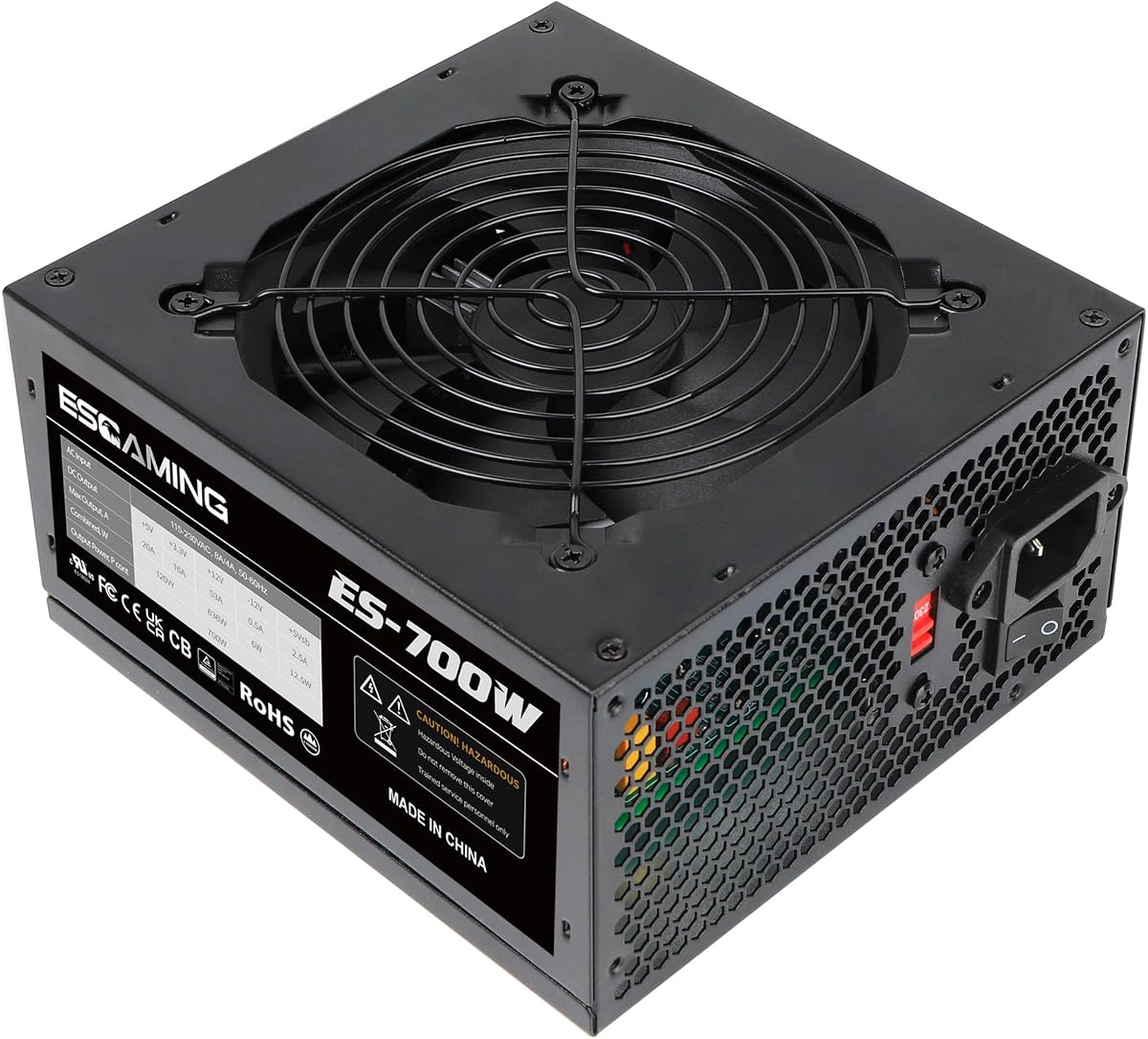
The ESGAMING 700W PSU distinguishes itself with a generous set of connectors and a straightforward nonmodular design. Its 4.2 rating is respectable within the group, and the published specification suggests that it targets builders who value broad peripheral support over a premium enclosure or advanced modular cabling. The auto-thermally controlled 120mm fan is also a useful feature for variable-load systems.
We may earn a commission when you buy through this link, at no additional cost to you.
The cable inventory includes a 24-pin motherboard connector, one 4+4-pin CPU connector, two PCI 6+2-pin connectors, four SATA connectors, four PATA connectors, and one floppy-drive connector. The 8-pin PCIe connector can separate into a 6+2-pin configuration, while the CPU connector splits into 4+4. That versatility can be useful when assembling or upgrading a system with storage drives and older accessories.
The nonmodular layout is the main compromise. Every supplied cable remains in the system even if it is not connected, which can make airflow and cable management more difficult than with a fully modular unit. Efficiency certification is not stated in the supplied information, and there is no indication of ATX 3.x support, a native 12V-2×6 cable, or a semi-passive cooling mode. These limitations matter most for high-end graphics hardware.
This PSU is best for a 700W build using standard PCIe connectors and several SATA or legacy devices. Its global 115-220V input switch adds flexibility, while protection against short circuits, over-current, over-voltage, over-power, under-voltage, and over-temperature provides basic safeguards. Buyers needing a modern GPU cable or cleaner cable routing should choose a newer modular alternative.
Two PCIe 6+2-pin connectors and generous SATA and PATA coverage make the unit practical for traditional builds. The 4+4 CPU connector also offers broad motherboard compatibility.
Automatic thermal control lets the 120mm fan respond to operating conditions. The 115-220V switch broadens compatibility with different household and regional input arrangements.
We may earn a commission when you buy through this link, at no additional cost to you.
The MSI MAG A750GL is a 750W gaming power supply that provides useful headroom for builds often associated with the 700W class. Its 4.6 rating is among the strongest in the group. The combination of Gold efficiency, full modularity, modern ATX 3.1 and PCIe 5.1 readiness, and a ten-year warranty makes it especially appealing for a new high-performance system designed to remain relevant for years.
We may earn a commission when you buy through this link, at no additional cost to you.
The native dual-color 12V-2×6 cable is a major feature for current graphics cards. It removes the need to rely on multiple traditional PCIe connectors for high-power delivery while supporting the newest platform requirements. Full modular construction allows builders to route only the cables they need, improving case airflow and making installation more orderly. Gold certification further reduces conversion losses and heat relative to less efficient Bronze units.
The 750W rating means this is not a literal 700W model, although that capacity is generally useful rather than restrictive for a suitably configured system. As with any native high-power cable, builders must check that the socket on the graphics card has enough clearance for the connector and that the PSU's modular cable design is compatible with the card. The supplied information does not detail the complete cable inventory or cooling behavior, so those points should be verified.
The A750GL is an excellent choice for a gaming build with a modern graphics card, especially when long-term warranty coverage matters. Its native connector, modular layout, and efficiency certification offer a balanced package. For users who want the strongest combination of platform longevity and gaming-oriented features, this is a particularly compelling recommendation.
The native 12V-2×6 cable is designed for contemporary high-power graphics hardware. It reduces cable complexity and aligns with PCIe 5.1 platform expectations.
A ten-year warranty provides a substantial ownership advantage over models with shorter coverage. Combined with Gold efficiency and modular construction, it suits a build intended for extended use.
We may earn a commission when you buy through this link, at no additional cost to you.
The CORSAIR RM750e is a modern 750W ATX 3.1 power supply aimed at builders who value clean installation, low-noise operation, and dependable platform support. Its 4.6 rating places it among the most well-regarded options here. Although the capacity is greater than a literal 700W requirement, that headroom makes it a sensible option for a powerful gaming PC with a current graphics card.
We may earn a commission when you buy through this link, at no additional cost to you.
ATX 3.1 certification is the central feature, including support for platforms that must withstand two transient power excursions from the GPU. That matters because modern graphics cards can briefly demand more power than their sustained rating under certain conditions. Fully modular cabling reduces unnecessary cable clutter, while the 120mm rifle-bearing fan uses a calculated fan curve to limit noise even at full load.
The 105°C-rated capacitors are intended to support stable electrical performance and reliability over time. Modern standby compatibility is another useful quality, providing fast wake-from-sleep behavior and improved low-load efficiency. The supplied information does not specifically confirm whether a native 12V-2×6 cable is included, although PCIe 5.1 readiness indicates platform awareness. Buyers should check the full connector and cable list to ensure the graphics card's preferred connection method is available.
The RM750e is recommended for a high-performance system where quiet operation, modular cabling, and modern transient-load handling matter. Its rated capacity gives more flexibility than a 700W unit, while its efficiency and reliability-oriented component choices support long-term ownership. Verify the physical fit and exact cable bundle before ordering, but the published feature set is well suited to modern gaming builds.
ATX 3.1 certification and support for two GPU transient excursions align the unit with modern power-delivery behavior. This is especially relevant to recent high-performance graphics cards.
A calculated fan curve helps manage acoustic output at full load, while full modularity keeps unused cables out of the chassis. The result is a cleaner and potentially better-cooled system.
We may earn a commission when you buy through this link, at no additional cost to you.
The ASRock PRO 750G combines Gold efficiency with current ATX and PCIe platform support at a 750W capacity. Its 4.6 rating indicates strong customer reception, and the native 12V-2×6 connection makes it relevant for recent high-end graphics cards. The unit appears focused on delivering modern compatibility without introducing a more elaborate premium feature list.
We may earn a commission when you buy through this link, at no additional cost to you.
Gold certification is stated at up to 90% efficiency, which can reduce power waste and heat compared with Bronze alternatives. The native dual-color 12V-2×6 cable supports up to 450W of power delivery to compatible graphics cards, making it a clean choice for a system with a modern high-power GPU. A 120mm low-noise fan provides cooling, and the standard ATX format should fit most compatible cases.
The three-year warranty is shorter than the ten years offered by the MSI MAG A750GL and the five years offered by several other choices. The supplied information also does not state whether the cables are modular, so buyers should not assume unused connectors can be removed. As with any native 12V-2×6 connection, installers should check socket clearance and ensure the graphics card supports the appropriate cable arrangement.
The PRO 750G is a strong fit for a modern 750W build that prioritizes efficiency and native GPU connectivity over an unusually long warranty. It is particularly attractive for builders who want a straightforward standard ATX unit with current platform standards. Confirm modularity, connector inventory, and case clearance before making a final choice.
The native dual-color 12V-2×6 connector is rated in the product information for up to 450W delivery. It offers a straightforward connection for compatible modern graphics hardware.
Up to 90% Gold-certified efficiency can lower heat and energy waste. A low-noise 120mm fan balances the need for cooling with quieter operation during typical use.
We may earn a commission when you buy through this link, at no additional cost to you.
The Thermaltake Toughpower GX1 is the premium-oriented true 700W choice in this guide. Its 4.6 rating is the strongest among the actual 700W models, while Gold efficiency, continuous power, and a single high-amperage 12V rail distinguish it from budget units. It is particularly appropriate for builders who want a capable 700W platform without moving to a 750W model.
We may earn a commission when you buy through this link, at no additional cost to you.
The design supports 80 Plus Gold efficiency up to 90% and is ready for C6 and C7 low-power states, helping reduce energy use during lighter workloads. Its single 12V rail uses DC-to-DC conversion to deliver stable power to modern GPUs. The connector inventory includes one 24-pin connector, one 4+4-pin CPU connector, eight SATA connectors, four PCI-E connectors, four peripheral connectors, and one floppy connector.
SLI and CrossFire readiness reflect the unit's support for multiple graphics-card configurations, although a single high-power GPU remains more typical of current builds. The nonmodular arrangement is the main practical compromise, because all cables must remain inside the case even when unused. It also follows ATX 12V v2.4 rather than the newer ATX 3.x platform, so buyers prioritizing native 12V-2×6 connectivity should choose a more recent alternative.
The GX1 is a strong recommendation for an established gaming or workstation build that needs exactly 700W, efficient operation, abundant storage connectors, and a long single 12V rail. Its five-year warranty adds confidence. Check the GPU connector arrangement carefully and allow enough room for unmanaged cables, but the published specifications make it a confident choice within its category.
Gold certification up to 90% makes this model more efficient than Bronze alternatives while preserving a true 700W rating. C6 and C7 state readiness further supports low-load operation.
A single 12V rail with DC-to-DC conversion provides a strong dedicated output for demanding graphics hardware. This arrangement is well suited to modern multi-GPU platforms.
We may earn a commission when you buy through this link, at no additional cost to you.
The be quiet! Pure Power 13 M is built for systems where acoustic quality is a priority. Its 4.6 rating reflects strong customer approval, and the 750W capacity offers comfortable headroom for a powerful gaming or media-creation PC. The distinguishing feature is semi-passive cooling: during low load, the fan stops completely until cooling is required.
We may earn a commission when you buy through this link, at no additional cost to you.
Efficiency is certified at up to 94.3%, the highest stated figure among these selections. That can contribute to lower heat and reduced fan activity, complementing the zero-RPM behavior. LLC topology supports precise voltage regulation, while the airflow-optimized fan is designed to remain quiet across operating scenarios. The result is a package specifically oriented toward quiet computing rather than merely adding a fan-speed claim.
The ATX 3.1 design includes a native 12V-2×6 connection for next-generation graphics cards and four PCIe 6+2-pin connectors for current-generation GPUs. It also handles power excursions up to twice the unit's rated power, as stated in the product information. Full modularity simplifies cable routing, and the single massive 12V rail simplifies power distribution. The tradeoff is a 750W rather than literal 700W rating, making it most appropriate when the extra capacity has a clear purpose.
This is the top choice for a near-silent workstation or gaming build where a zero-RPM idle state and high efficiency are priorities. It also suits users who want a native modern GPU cable and full modularity. Buyers should still verify the physical connector arrangement, case clearance, and the graphics card's power requirements before installation.
The semi-passive mode stops the fan entirely at low load and reactivates it as demand rises. This can make a noticeable difference in a quiet office, media center, or desk-based system.
Gold certification at up to 94.3% reduces conversion waste, while LLC topology supports stable voltage regulation. These traits complement the unit's focus on low heat and low noise.
We may earn a commission when you buy through this link, at no additional cost to you.
The Rosewill VMG 750W stands out through its compact 140 by 150 by 86mm chassis, making it a relevant option for smaller cases and space-conscious builders. Its 4.3 rating indicates solid customer reception. Although it is a 750W unit, the modern platform support, full modularity, and broad connector strategy make it a useful companion to more conventional 700W choices.
We may earn a commission when you buy through this link, at no additional cost to you.
Compatibility with both ATX 3.0 and ATX 3.1 provides broad support for current and transitional hardware. The native PCIe 5.1 12+4-pin 12V-2×6 cable supplies direct power to compatible new graphics cards. The product information states support for up to 235% power excursion and 300% GPU power excursion, indicating emphasis on transient-load behavior, although buyers should consult the detailed documentation for exact test conditions.
Full modular construction reduces cable clutter, and the listed 120mm FDB fan supports low-noise cooling. A steel shell with large vents promotes airflow, while 100% Japanese electrolytic capacitors form part of the internal component strategy. The six-protection suite covers over-current, over-power, over-temperature, over-voltage, short-circuit, and under-current conditions. The compact dimensions are especially useful for small-form-factor and compact ATX enclosures.
The VMG is recommended for a builder who wants modern GPU support and modular cables in a smaller power-supply footprint. Its five-year warranty adds useful coverage. Confirm that the case accommodates a 140mm-deep unit and that the graphics card supports the native connector arrangement. With those checks completed, it is a flexible option for compact high-performance systems.
The 140mm chassis depth can create room for longer graphics cards, additional drives, or better airflow in compact cases. It is particularly relevant to small-form-factor builders.
ATX 3.0 and 3.1 compatibility plus the native 12V-2×6 connection prepare the unit for current graphics hardware. Its stated excursion handling adds further support for transient-heavy platforms.
We may earn a commission when you buy through this link, at no additional cost to you.
The Thermaltake Toughpower GT 750W offers a balanced combination of modern standards, efficiency, modular cabling, and quiet-load behavior. Its 4.6 rating is among the strongest in the group. While it is rated at 750W rather than exactly 700W, that additional headroom can be useful for a system with a current graphics card, especially when additional power transients must be accommodated.
We may earn a commission when you buy through this link, at no additional cost to you.
Full compatibility with Intel ATX 3.1 specifications and a native PCIe 12V-2×6 connection position the unit for modern GPUs. The listed 300W rating for the native connector gives buyers a clear reference for the type of hardware it is intended to serve. Gold efficiency reaches up to 90% according to the supplied information, helping reduce waste and heat during operation.
Smart Zero Fan technology adjusts fan speed according to load and minimizes noise during low-load periods. Fully modular low-profile black cables improve routing and airflow. The single high-amperage 12V rail is optimized for high-end gaming and workstation use, while the five-year warranty provides solid coverage. The main trade-off is that 750W may be more than a modest 700W system actually needs.
The Toughpower GT is a versatile recommendation for a modern 700W-class or 750W build that wants native GPU connectivity without giving up modularity. It balances efficiency, quiet behavior, and current platform support effectively. Confirm the graphics card connector requirements, socket clearance, and case dimensions before installation.
ATX 3.1 compliance and the native 12V-2×6 connection align the PSU with contemporary platform requirements. The connector is suitable for compatible graphics cards that fall within its stated delivery range.
Smart Zero Fan behavior reduces low-load noise, while full modularity and flat black cables keep the chassis tidy. This makes the unit well suited to a clean gaming or workstation build.
We may earn a commission when you buy through this link, at no additional cost to you.
Choosing a 700W-class power supply requires matching electrical capacity, connector standards, efficiency, cooling behavior, and physical dimensions to the rest of the PC. The most important step is to estimate the build's demand and then leave sensible headroom without paying for capacity that the system cannot use.
A 700W power supply is appropriate for many mainstream gaming configurations, but the correct choice depends on the CPU, graphics card, number of drives, expansion cards, and expected upgrade path. High-end processors and GPUs can make 700W less comfortable, while a 750W option provides modest additional headroom. Do not determine capacity from the graphics card's advertised wattage alone; consider the recommended PSU figure published by the GPU and CPU makers. A unit operating persistently near its limit may also run hotter and produce more fan noise. The right approach is to estimate sustained component demand, add a reasonable reserve, and select a standard ATX unit whose output and connectors match that calculation.
ATX 3.0 and ATX 3.1 are especially relevant when using recent graphics cards that can produce short-duration power excursions. A native 12V-2×6 or 12+4-pin connector provides a direct connection to a compatible GPU, while ATX 3.1 compliance indicates that the unit was designed with the latest transient-load behavior in mind. Older ATX 12V v2.x units can still work with many systems, but they may not offer the same platform guidance or native high-power connection. Matching the PSU to the motherboard and GPU is more important than selecting a superficially newer model that lacks the required cable. Always check connector shape, pin layout, and physical clearance before installation.
Efficiency determines how effectively a PSU converts AC power into usable DC power. Higher efficiency generally means less energy waste, less internal heat, and a smaller chance that the fan needs to spin aggressively. Bronze units are the budget-oriented tier in this group, while Gold models are better suited to efficient, quieter builds. The be quiet! Pure Power 13 M claims the highest stated efficiency here at up to 94.3%, while most Gold alternatives reach up to 90%. Efficiency does not change the total power available to components, but it affects operating heat, wall-draw behavior, and cooling demands. A more efficient unit can be worthwhile when it remains within the capacity required by the system.
A nonmodular PSU supplies a fixed set of cables, including any that the build does not need. Fully modular units let the builder install only required cables, improving airflow and reducing clutter. Hybrid designs fall between those approaches, although none of the supplied descriptions clearly identifies such an arrangement. Cable management is especially important in compact cases with multiple SATA devices or a long graphics card. When comparing nonmodular options, leave enough space for the unused cable bundle. When comparing modular models, verify that every cable needed by the motherboard, CPU, GPU, drives, and accessories is included.
A 120mm fan is standard across this group, but the control strategy matters more than fan size alone. The be quiet! Pure Power 13 M and Thermaltake Toughpower GT use semi-passive or Smart Zero behavior, allowing the fan to stop or run at reduced speed under light load. Thermally controlled fans adjust as operating temperature changes, which is useful for systems that alternate between light and heavy workloads. Noise specifications are not supplied for most products, so buyers should consider the design intent and published features rather than assume identical acoustic performance. For a quiet workstation, prioritize semi-passive behavior and efficiency. For a gaming system that remains heavily loaded, a well-controlled fan and strong efficiency remain important.
Modern graphics cards draw power from the 12V rail, and a dedicated high-amperage 12V output simplifies power delivery. Several choices use DC-to-DC conversion, which is especially relevant for modern CPUs and GPUs. ATX 3.x platforms also address transient loads, or brief spikes above sustained component demand. These characteristics are important because a PSU can have sufficient nominal wattage yet behave poorly with hardware that produces sudden current excursions. Builders should pair a modern power standard with a compatible GPU, using its native cable when available. For older graphics cards, multiple conventional PCIe 6+2-pin connectors may remain appropriate. The number of connectors alone does not establish safe compatibility; their rating and arrangement must also match.
Electrical protection helps guard components if the PSU encounters abnormal conditions. Common safeguards include over-current, over-voltage, under-voltage, over-power, over-temperature, and short-circuit protection. A broad protection suite is preferable because different faults require different responses. Warranty length provides a separate indicator of manufacturer confidence and can reduce risk over a long ownership period, although it should not replace compatibility checks. The MSI MAG A750GL leads this group with a ten-year warranty, while several alternatives provide five years. Consider warranty terms alongside the unit's certification, component quality, and protections rather than treating length as the only measure of reliability.
Standard ATX describes the general form factor, but power-supply depth can still determine whether a unit fits a particular case. The Rosewill VMG 750W is especially compact at 140mm deep, while the supplied data does not list dimensions for every competitor. Check the chassis specifications, including the space reserved for cables and modular connectors. Native 12V-2×6 cables also need room at the graphics-card socket; a rigid connector may not clear a thick side panel or adjacent card. Measure both the PSU bay and the GPU connection area rather than assuming every ATX-compatible unit and cable will fit.
Before installation, disconnect the PC from mains power and allow the system to cool completely. Record the existing cable routes if the computer is already assembled, and compare the new unit's connector inventory with the motherboard, CPU, graphics card, drives, fans, and accessories that need power. Check case clearance and the graphics card's socket space before fastening the PSU into place.
Connect the 24-pin motherboard connector and the appropriate 4+4-pin CPU connector, then use the manufacturer's recommended graphics-card connection. For a native 12V-2×6 cable, align it fully and verify that the socket has adequate clearance without forcing it. Install SATA and peripheral power cables with care around fans and sharp case edges, and use modular sockets only where each cable is fully seated. A modular PSU should be switched off and disconnected before any cable is removed or added.
After wiring the system, inspect the installation for loose connectors and ensure that no cable is pinched. Connect the AC power cord before turning on the computer, then listen and watch for unusual fan behavior while the system begins its startup sequence. Keep the intake and exhaust paths clear, avoid operating the PSU in an enclosed or excessively warm space, and clean exterior dust periodically. Do not open the power supply, and consult its documentation before changing cables or configurations.
It can be enough for a well-matched system, but the CPU and graphics card determine the real requirement. Check the graphics-card maker's recommended PSU guidance and compare it with the estimated draw from all other components. A 750W model can offer extra headroom for power-hungry parts or future upgrades.
Choose 700W when it meets the calculated demand with sufficient margin and fits the case. Consider 750W if the build uses a high-end processor and graphics card, expects an upgrade path, or wants additional transient-load headroom. Extra capacity does not improve performance by itself, so avoid paying for wattage the system will never use.
ATX 3.1 is a current power-supply standard designed around newer platform requirements and transient-load behavior. It is particularly relevant for recent graphics cards that may briefly demand more current than their sustained rating. Compatibility still requires matching connectors, so check the GPU and PSU instructions before installation.
A native cable is useful for a compatible modern graphics card because it provides direct high-power delivery and can simplify cable routing. It does not automatically make one PSU better than another. Confirm that the graphics card supports the connector and that there is enough physical clearance around the socket.
It usually helps because unused cables can remain inside the PSU rather than blocking the case interior. The improvement is most noticeable in compact cases with long graphics cards or several drives. Nonmodular units can still work well, but builders must route and secure the excess cable bundle carefully.
No. Efficiency certification reduces conversion losses and heat, which can make a fan easier to cool quietly, but it does not control fan speed by itself. Semi-passive or smart-zero modes, fan curves, component quality, and operating load also influence noise. A semi-passive model is generally preferable for a very quiet system.
A reasonable amount of headroom prevents the unit from operating near its maximum capacity during normal load. The appropriate margin depends on the CPU, GPU, transient behavior, and planned upgrades. Use component recommendations rather than relying on a single wattage estimate, and include power for drives, fans, and expansion cards.
Only if the replacement cable set is compatible with the PSU's exact connectors, pinouts, and electrical rating. Visually similar modular sockets are not automatically interchangeable, and connector shapes can fit while the internal wiring differs. Follow the manufacturer's instructions or obtain a correctly rated replacement cable rather than adapting an unknown cable.
The Smart W3 Series 700W is the strongest modern choice for a builder who wants a true 700W unit with ATX v3.1 compatibility and a focused feature set. The Zalman GigaMax 700W is the budget pick, offering Bronze efficiency, extensive protection, and a five-year warranty, while the Thermaltake Toughpower GX1 provides a premium true-700W option with Gold efficiency and a single high-amperage 12V rail.
For builds that benefit from extra capacity, the MSI MAG A750GL stands out with its long warranty and native modern GPU connector. The be quiet! Pure Power 13 M is ideal when silence is the leading priority, the CORSAIR RM750e emphasizes modular construction and modern transient handling, and the Rosewill VMG 750W offers a compact chassis for smaller cases. Match the final choice to the graphics card, CPU, connector requirements, case dimensions, and desired cable-management style.
Current prices, discounts, and product availability may change, so review the live listing before buying. Confirm the actual rated wattage, included cables, ATX generation, native GPU connection, protection features, warranty, and physical fit. Those compatibility checks are more important than wattage alone and will lead to the most suitable 700W-class ATX power supply for the build.