
ESD Safe Anti Static Cleaning Brush Set for Electronics
5.0Editor score
Compact heads for narrow gaps
Designed for dry dust removal
Useful across PC components
Safe for regular maintenance
Our Anti Static ESD Cleaning Brush Kit guide compares 10 options for safe, precise electronics cleaning, bristle design, storage, portability, and versatility
Anti static ESD cleaning brush kits help remove dust, crumbs, and trapped debris from keyboards, circuit boards, fans, cameras, and other sensitive electronics without introducing static charge. The right kit balances gentle bristles, useful brush shapes, comfortable handles, and convenient storage, making routine device care safer and more effective.
We compared the supplied ten products by considering ESD-safe materials, brush size and stiffness, reach into narrow spaces, grip design, kit contents, portability, and suitability for electronics maintenance. The list includes dedicated brush sets as well as broader cleaning kits with tweezers, cloths, scrapers, or an air blower, covering needs from home use to professional workbenches.
Each pick reveals a different balance of capability, from compact five-piece kits to larger professional collections and a travel-ready set with a zippered pouch. Ratings and availability can change over time, and current prices fluctuate, so compare the features that matter most to your devices rather than relying on price alone.
5.0Editor score

4.8Editor score

4.5Editor score
This side-by-side comparison highlights each kit's piece count, brush designs, storage options, and intended cleaning environments. The differences help distinguish compact precision tools from larger professional sets and multi-purpose electronics cleaning collections.
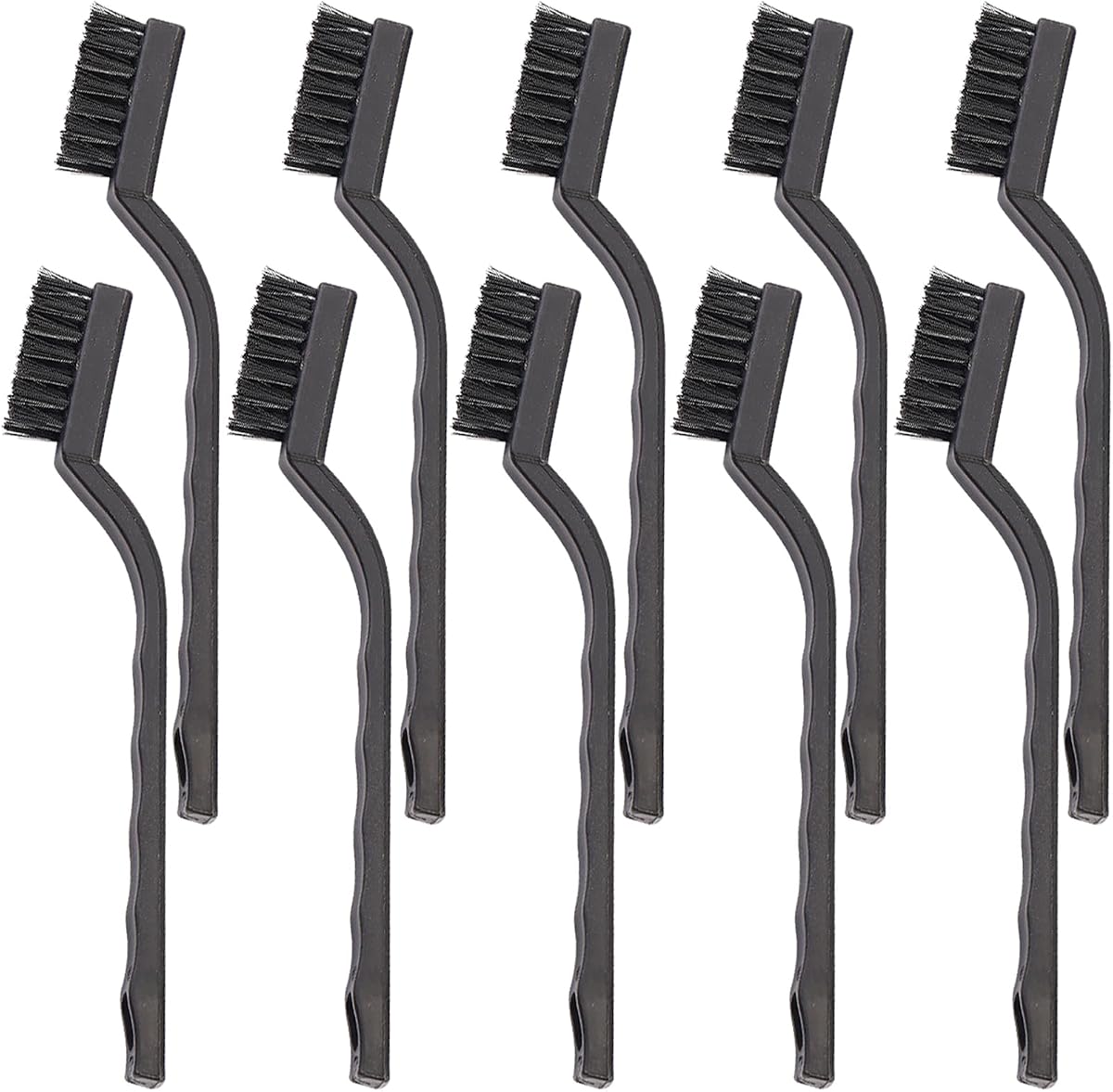



The 10PCS Anti Static ESD Cleaning Brush Kit earns a 4.7 rating and stands out as a flexible general-purpose option for routine electronics cleaning. Its ten brushes can address keyboards, mobile phones, computers, motherboards, sensitive components, machines, razors, and even fish tanks, giving the set broader reach than a keyboard-only kit.
We may earn a commission when you buy through this link, at no additional cost to you.
The central benefit is the combination of anti-static nylon bristles and comfortable plastic handles. The bristles are designed to lift debris without scratching valuable devices, while the nonslip handle supports steady control. A built-in hanging hole also makes it easy to separate the brushes, dry them after use, and keep them accessible on a pegboard or near a workbench.
Its main limitation is that it does not include a dedicated carrying pouch. The supplied information also positions the bristles as gentle, which is reassuring for delicate surfaces but may make the set less aggressive against stubborn residue than the hard-bristle option in this list. Buyers who frequently move between locations may prefer the second-ranked kit with a zipper pouch.
This is a strong recommendation for computer owners, electronics hobbyists, and anyone who wants several brushes without carrying an oversized toolkit. It covers common tasks around keyboards, circuit boards, and sensitive components while remaining simple to store. For broad household utility and a generous ten-piece format, it is one of the most balanced choices.
The anti-static nylon bristles are intended to remove dust without generating harmful static charges or scratching surfaces. That makes the set useful around motherboards, mobile phones, and other components where residue removal must be handled carefully.
A ten-piece collection reduces the need to keep separate tools for broad areas and confined spaces. The included hanging holes also encourage organization, which is especially helpful when the brushes are used in an office, workshop, or multiple-home maintenance routine.
We may earn a commission when you buy through this link, at no additional cost to you.
The Electronics Anti Static Brush Tool Cleaning Kit has a 4.8 rating and is the most polished all-brush set in this roundup. It combines ten brushes in different sizes and stiffness levels with a zippered mesh pouch, allowing users to match the tool to a tight port, a keyboard, a fan, a motherboard, or a delicate lens.
We may earn a commission when you buy through this link, at no additional cost to you.
Its most distinguishing feature is the deliberate range of bristle stiffness. Softer options can support detailed work, while firmer brushes can tackle more stubborn dust in suitable spaces. The set is positioned for keyboards, computer fans, motherboards, cameras, and other sensitive electronics, while anti-static bristles help reduce static buildup during maintenance.
The storage pouch is a meaningful upgrade over loose brushes. It keeps the collection organized, protects the heads from being bent or lost, and makes the kit more suitable for a mobile repair kit or shared workbench. The trade-off is that the pouch itself takes up more room than several loose tools, and the package does not include tweezers, cloths, or an air blower.
This set is an excellent choice for tech professionals, serious hobbyists, and anyone cleaning a varied collection of devices. It gives more flexibility than a kit of identical brushes and better organization than simple hanging-hole storage. For an all-purpose, travel-ready electronics toolkit, the added pouch and varied brush profiles are particularly persuasive.
A range of bristle stiffness levels lets users move between delicate detail cleaning and areas that need more agitation. This reduces the need to guess which brush can safely handle a keyboard, cooling fan, camera, or circuit board.
The zippered mesh pouch keeps ten differently sized brushes together and ready for travel. It is particularly convenient for repair technicians or hobbyists who need to maintain several computers and electronic devices across different locations.
We may earn a commission when you buy through this link, at no additional cost to you.
The ESD Safe Anti Static Cleaning Brush Set carries a perfect 5.0 rating and focuses on a clear task: removing dry dust from compact electronic areas. Its small crevice-style heads are built for narrow gaps, corners, slots, and internal component surfaces where a full-size household brush would struggle.
We may earn a commission when you buy through this link, at no additional cost to you.
The product is especially relevant to laptop and desktop maintenance. The supplied information identifies GPUs, motherboards, keyboards, cameras, and other electronics as suitable targets. Compactness allows the brushes to enter spaces around keys and components, while the ESD-safe design keeps static discharge as a central consideration rather than an incidental feature.
This is fundamentally a dry-dust maintenance set, not a complete detailing system. Users should not expect it to remove sticky residue or perform the broader jobs associated with cloths, scrapers, and an air blower. The supplied data also repeats the compact-crevice description but does not clearly identify multiple bristle stiffness levels, so buyers seeking more varied tools may prefer a kit with explicit size and stiffness ranges.
The set is a compelling option for PC owners and electronics hobbyists who want a focused, low-clutter solution for regular dust removal. Its compact heads suit small openings and sensitive surfaces, making it especially useful during routine cleaning of keyboards, boards, and computer internals. Shut down and unplug equipment before using it.
Compact brush heads can enter corners, slots, keyboard gaps, and other areas that larger brushes may miss. This makes the set useful for routine cleaning where debris is light but access is difficult.
The set is specifically positioned for dry dust removal and ESD-sensitive components. Powering down and unplugging electronics before cleaning adds a basic layer of safety to routine device maintenance.
We may earn a commission when you buy through this link, at no additional cost to you.
The WAFJAMF Anti Static ESD Brush Kit has a 4.5 rating and emphasizes practicality. It includes five black, static-dissipative nylon brushes, each with a compact 3-by-0.5-centimeter head and a total length of 17 centimeters, making it easy to hold several spares around a workbench, office, or toolbox.
We may earn a commission when you buy through this link, at no additional cost to you.
The narrow head is designed to reach tight spaces such as keyboard gaps, PCIe slots, fan blades, and circuit boards. Its long profile offers useful reach without a bulky handle, while the textured nonslip grip helps maintain control. At 71 grams for the set, it remains light enough for comfortable extended cleaning tasks.
Because the five brushes appear to share the same general design, this package offers convenience and redundancy more than task-specific versatility. Users who require a mixture of soft and firm bristles may find the ten-piece mixed-stiffness kit more accommodating. On the other hand, having identical spares makes it simple to divide them among several work areas.
This kit suits IT technicians, desktop builders, and dedicated hobbyists who want dependable brushes readily available in multiple locations. It also fits users cleaning laptops, 3D printers, cameras, electric razors, and circuit boards. For a straightforward five-brush package with reach, grip, and storage considered, it is a practical recommendation.
The 17-centimeter length and narrow 3-by-0.5-centimeter head work together to reach confined areas around keys, slots, fans, and boards. This profile favors access over broad surface sweeping.
Five matching brushes can be distributed across an office, workshop, home, and travel kit. The built-in hanging hole supports quick storage and helps each brush dry after use.
We may earn a commission when you buy through this link, at no additional cost to you.
The 5 PCS Mini Keyboard Brushes have a 4.6 rating and distinguish themselves with five different shapes and sizes. Rather than providing five identical tools, the set is designed to handle both deep gaps and areas that are difficult to clean with a conventional brush.
We may earn a commission when you buy through this link, at no additional cost to you.
The brushes use PP handles and nylon bristles. According to the supplied information, the bristles are durable, resist breaking or falling out, and will not generate static electricity during use. Their small size and light weight also make them convenient to carry between home and work or to keep in a desk drawer.
Potential applications extend beyond keyboards to appliances, car interiors, vents, circuit boards, mobile phones, cameras, and other electronic devices. The trade-off is that brushes alone may not be the right tool for greasy or stubborn deposits, and the package does not include a storage pouch or complementary cleaning cloth.
This set is ideal for users who want several brush geometries without carrying a large kit. The variety makes it useful for both everyday debris and narrow electronic spaces, while the five-piece count provides enough tools for separate devices. For portable, shape-specific cleaning at home or at work, it offers a particularly adaptable setup.
Five brush shapes make it easier to match narrow, angled, or confined areas to a suitable profile. This variety is more useful than buying several copies of the same small brush.
The lightweight brushes are easy to carry and deploy around computers, phones, cameras, vents, and household devices. A desk drawer or small toolkit is sufficient for storage.
We may earn a commission when you buy through this link, at no additional cost to you.
The 20 Pcs Anti-Static ESD Cleaning Brush Kit has a 5.0 rating and is built for sustained electronics maintenance. Its 20-piece quantity is the largest in the roundup, making it attractive to repair workers, workshops, and anyone who wants multiple brushes positioned around several workstations.
We may earn a commission when you buy through this link, at no additional cost to you.
Conductive nylon bristles are paired with high-strength PP handles to dissipate static during cleaning of PCBs, motherboards, and other components. The supplied information describes a fine 0.35-millimeter single bristle and a 20-tuft layout, while the 170-millimeter overall length supports controlled access to narrow areas.
These are hard nylon brushes, so the main trade-off is selectivity. They should be used on suitable surfaces and in confined spaces, but a user who needs a softer tool for delicate finishes may prefer a kit with explicit stiffness levels. Twenty brushes can also create more clutter than a compact five- or eight-piece set unless they are distributed or stored methodically.
The kit targets circuit boards, motherboards, keyboards, game consoles, 3D printers, and desktop components. Its textured nonslip handles, curved design, and hanging holes support steady work. For high-volume cleaning and multi-station operation, this is a thorough professional-style collection, though hobbyists may find a smaller mixed set easier to manage.
Twenty brushes provide enough inventory for shared benches, specialist departments, or separate cleaning stations. The quantity reduces the need to move a single brush between tasks while electronics are being serviced.
The fine bristle layout and long curved handle are designed to reach keyboard switches, fan blades, and component gaps. These details support precise removal of fine dust without the bulk of a large household brush.
We may earn a commission when you buy through this link, at no additional cost to you.
The Anti Static Brush Kit has a 4.5 rating and offers five identical, purpose-built ESD brushes. Its 15-by-30-millimeter head is compact enough for keyboard keys, PCIe slots, fan blades, and soldering joints, while its 170-millimeter length provides useful leverage and reach.
We may earn a commission when you buy through this link, at no additional cost to you.
The bristles are described as static dissipative and intended to remove dust and flux residue from dry, sensitive components. A soft-touch plastic handle with a textured grip supports accurate control during longer repair sessions, and the hanging hole makes the five brushes easy to organize on hooks or pegboards.
Its identical profiles are both a strength and a limitation. Buyers receive reliable spares and can place one in several workspaces, but they do not get a range of stiffnesses or shapes. The relatively stiff bristle description also means extra care is appropriate around particularly delicate surfaces, even though the product is presented as safe for circuit boards.
The set fits computers, laptops, 3D printers, drones, cameras, fish tank pipes, TVs, routers, gaming consoles, and other electronics. It is especially practical for PC enthusiasts, IT students, and hobbyists who want a ready supply of identical brushes. The combination of reach, grip, and simple storage makes it a dependable five-piece choice.
Static-dissipative nylon bristles make the set suitable for routine dust and flux-residue work on dry PCBs, motherboards, graphics cards, and other sensitive components when used carefully.
The 170-millimeter soft-touch handle balances access with control, while the integrated hanging hole helps each brush remain visible and dry. Five matching units also make it easy to keep spares in several locations.
We may earn a commission when you buy through this link, at no additional cost to you.
The Portable Nylon Anti Static Brushes Kit has a 4.7 rating and is the broadest traditional cleaning set in the list. Its eight brushes include different sizes and bristle hardness levels, with round-handle tools for fine detail and a flat-handle brush intended for PCBs and circuit boards.
We may earn a commission when you buy through this link, at no additional cost to you.
The mixed profiles make it useful beyond a single electronics format. Round brushes can reach CPU fans, controllers, cameras, and sewing-machine areas, while a crank brush is positioned for heavier-duty scrubbing such as grout. A scraper brush can address stubborn stains, shaver heads, and car air vents, making this kit useful for mixed household or detailing work.
An important caveat is that the yellow-bristle brush and scraper brush are explicitly not anti-static. Buyers using the set around sensitive components should choose the suitable anti-static tools rather than assuming every included accessory is safe around a PCB. The kit also focuses on brushes, so it does not supply the broader tweezers, microfiber cloths, or blower found in another option.
This set is best for users who want a portable, varied cleaning kit and can identify which tools are appropriate for each task. It works well for keyboard crumbs, general electronics dust, and occasional non-electronics scrubbing. The mixed tool selection is valuable, but electronics-focused buyers who require every accessory to be ESD-safe should choose a more uniform kit.
Multiple bristle hardness levels and handle shapes support fine detail as well as more demanding scrubbing. This makes the set useful for electronic precision work and broader household cleaning when the correct tool is selected.
The yellow-bristle brush and scraper are not anti-static. They may be helpful for difficult non-sensitive stains, but users should not treat those accessories as ESD-safe tools for live or exposed circuit boards.
We may earn a commission when you buy through this link, at no additional cost to you.
The Small Anti Static ESD Safe Dust Brush Kit has a 4.5 rating and goes beyond a brush-only package. It includes eight ESD-safe dust brushes, six precision tweezers, four microfiber cleaning cloths, and an air blow cleaner, creating a more complete electronics and optics maintenance collection.
We may earn a commission when you buy through this link, at no additional cost to you.
The brushes can be used on computers, gaming keyboards, phones, watches, Xbox systems, car interiors, vents, circuit boards, desk fans, and other hard-to-reach spaces. The microfiber cloths handle dust, oil, smudges, fingerprints, and dirt on lenses, screens, and glasses, while the soft air blower helps dislodge debris from delicate surfaces.
The tweezers require careful interpretation. The supplied information states that they are not heat-resistant and notes that metal tweezers can acquire a static magnetic charge when handling metal objects. It also mentions carbon fiber tweezers as preferable when static attraction could be a problem. Users should therefore identify the material and intended use of each tweezer before placing it near sensitive parts.
This collection is ideal for a broad electronics-care drawer, especially when the goal includes not only brushing but also lifting small debris, wiping surfaces, and blowing dust free. It is more comprehensive than any brush-only set here, although the range of accessories and material caveats make it less streamlined for someone who only wants several ESD brushes.
Tweezers, microfiber cloths, and an air blower complement the eight brushes with distinct ways to remove or control debris. The collection is better suited to a full detailing routine than a simple brush-only purchase.
The cloths are positioned for screens, glasses, and camera lenses, while the soft blower can clear dust from electronics. The metal tweezers are not heat-resistant and may attract a static magnetic charge, so material awareness remains important.
We may earn a commission when you buy through this link, at no additional cost to you.
The WAFJAMF 5 Pcs Black Anti Static Brushes have a 4.6 rating and focus on compact, detailed cleaning. The set includes five round-handle brushes with high-grade conductive fibers and an ESD-safe handle designed to dissipate static around PCBs, integrated circuits, motherboards, and BGAs.
We may earn a commission when you buy through this link, at no additional cost to you.
Each brush measures 14.5 centimeters overall and has a high-density head measuring 1.5 by 0.5 centimeters. That small profile is well suited to tight crevices, keyboard gaps, laptop fans, phone circuit boards, and laboratory devices. The bristle construction is also described as heat resistant, which adds useful resilience around warm internal areas when the brush is used appropriately.
The five brushes are identical, so this package is less flexible than a mixed-shape set. Its shorter overall length can also require a little more repositioning than a 17-centimeter brush. Nevertheless, the compact round handle is comfortable, slip resistant, and easy to control during soldering or electronics repair.
This set is a good fit for IT technicians, DIY electronics enthusiasts, repair shops, and laboratory applications that require several small ESD brushes. It also suits general keyboard and laptop-fan maintenance. For users who value compactness, conductive construction, and a straightforward five-piece format, it remains a capable option.
Conductive fibers and an ESD-safe handle help dissipate static while cleaning sensitive boards and devices. The small head can reach confined areas where a full-size brush would be difficult to control.
The rounded, slip-resistant handle supports precise work during soldering and component cleaning. A 14.5-centimeter body is easy to maneuver in a crowded workbench, although users may value more reach in some spaces.
We may earn a commission when you buy through this link, at no additional cost to you.
The most useful kit is the one that combines static-controlled materials with the right brush geometry, reach, and storage for your work. Consider the devices you maintain, the kinds of debris you encounter, and whether you need a focused electronics tool or a broader cleaning system.
An anti static ESD cleaning brush kit should use conductive or static-dissipative bristles and, ideally, a handle that supports controlled static dissipation. This matters most around exposed circuit boards, memory modules, graphics cards, integrated circuits, motherboards, and other components that can be sensitive to electrostatic discharge. The label alone is not enough for mixed kits; inspect whether every included accessory is actually ESD-safe.
Some larger sets include a scraper or a yellow-bristle brush that is expressly not anti-static. Those tools may be useful for household stains, but they should not be treated as suitable for exposed sensitive electronics. Look for clear information about conductive nylon, static-dissipative fibers, and ESD-safe handles.
Round, pointed, angled, flat, and narrow crevice brushes serve different areas. Round profiles are comfortable for fans, cameras, controllers, and general detail work, while flat or slender heads can reach between keyboard keys, along slots, and around solder joints. A kit containing several geometries can be more adaptable than a group of identical brushes.
Think about the spaces you actually need to clean. A large household brush may handle a keyboard surface but leave dust trapped around switches and narrow component gaps. Conversely, a collection of tiny brushes may be less efficient for broad surfaces. The best selection balances precision tools with at least one practical general-purpose profile.
Softer bristles are preferable for delicate finishes, screens, camera lenses, and easily scratched components. Firmer nylon bristles can dislodge stubborn dust from keyboards, cooling fans, and circuit boards, but they require more care around delicate surfaces. A mixed-stiffness collection gives you the flexibility to change tools as the task changes.
Do not assume that harder is always better. Fine dust usually responds well to controlled sweeping, while residue and sticky debris may need a different cleaning method altogether. If your work is mostly dry dust and routine maintenance, a medium or compact bristle is usually sufficient. For heavy buildup, choose a set that explicitly identifies stronger cleaning options.
Reach determines how easily a brush enters a laptop fan, keyboard switch, PCIe slot, connector, or narrow internal corner. A long handle and small head create a useful balance: the handle provides leverage while the compact head delivers precision. Products in this roundup range from approximately 14.5 to 17 centimeters, with brush heads from very slim profiles to wider rectangular designs.
The head must also be small enough for the target area. Wider heads cover surfaces faster but may be unsuitable for tight electronics. Narrow heads are more precise but take more passes. For mixed use, select at least one narrow crevice brush and one slightly broader brush for dust on exposed sections and larger component areas.
A comfortable handle makes detailed work more consistent. Textured, nonslip, or soft-touch surfaces can help prevent accidental movement, especially when the brush is used over a motherboard or inside a fan housing. Rounded profiles are easy to rotate, while longer handles can reduce the need to reposition the brush in deep areas.
Weight also matters during longer sessions. Lightweight plastic handles are easy to carry and generally less tiring, while curved shapes can support a relaxed grip. Avoid choosing based on appearance alone; a handle that feels secure in your hand and allows controlled, light-pressure strokes is usually the most valuable.
Storage affects whether brushes remain clean, undamaged, and easy to find. The simplest options are built-in hanging holes, which encourage air drying and work well on pegboards. A zippered mesh pouch provides stronger organization and makes a set easier to carry between locations. Larger quantities can be divided among workbenches, while small kits fit neatly in a desk drawer.
If you travel to clients or work on equipment away from a bench, portability may justify a pouch-based set. If you maintain electronics at a fixed workstation, hanging holes may be more convenient. A carrying case is helpful, but it should not be the only reason to choose a kit; bristle quality, shape, and ESD construction remain more important.
A brush-only set is useful for dry dust, crumbs, and routine electronics maintenance. A full care kit can add tweezers for small debris, microfiber cloths for smudges and fingerprints, and an air blower for loosening dust. These extras make a package more versatile, but they also introduce material considerations and may make the collection less streamlined.
Choose a full kit when you clean cameras, screens, glasses, watches, and several device types. Choose a focused brush set when your work centers on keyboards, boards, fans, and internal components. For a complete package, note that the included metal tweezers are not heat-resistant and may hold a static magnetic charge, so they should be used with that limitation in mind.
Home users and casual hobbyists generally need a few compact brushes with comfortable handles and a hanging hole. Repair technicians or workshop operators may benefit from a larger collection of ten or twenty tools, allowing brushes to remain at separate stations. Mobile technicians should prioritize a zippered pouch, while users maintaining cameras and optics may need a broader kit with cloths and an air blower.
The stated applications matter more than the number printed on the package. A twenty-piece set does not guarantee twenty different functions, and a five-piece set can still be highly effective if every brush matches the user's usual cleaning areas. Check dimensions, bristle characteristics, handle design, and included accessories before deciding.
Begin by powering down, unplugging, and allowing hot electronics to cool. Work in a clean, well-lit area, and avoid opening a device or exposing sensitive boards unless you are comfortable with the required procedure. Use the brush dry for ordinary dust, moving gently from ports, slots, connectors, fan blades, and around key mechanisms with light repeated strokes.
Choose the brush according to the surface. Use a narrow, softer head for delicate areas, a more suitable firm brush for stubborn dust in robust gaps, and the scraper only for compatible non-electronic surfaces because it is not anti-static. A microfiber cloth can remove remaining smudges, while an air blower can lift loose particles. Avoid pushing debris deeper by using short, controlled movements rather than forcing the brush into a port.
After use, remove loose dust from the bristles, keep brushes away from moisture and heat, and store them through their hanging holes or in the supplied pouch so the heads do not bend. Keep ESD brushes separate from dirty or oily tools, and never use them while equipment is powered. Periodically inspect the bristles for fraying or shedding, and replace the set if the tips no longer clean effectively.
An anti static ESD cleaning brush removes dust, crumbs, and debris from electronics while using conductive or static-dissipative materials intended to limit electrostatic discharge. It is commonly used on keyboards, motherboards, GPUs, cooling fans, cameras, phones, ports, and other sensitive components. It is particularly useful for dry dust that can be brushed away without liquid.
No. Some mixed kits include ordinary yellow-bristle brushes, scrapers, metal tweezers, or other accessories that are not ESD-safe. The eight-piece mixed set in this guide explicitly states that its yellow-bristle brush and scraper are not anti-static. Check each tool's material and intended application before using it around exposed circuit boards.
Yes, electronics should be turned off and unplugged before brushing. This prevents accidental activation, reduces the chance of moving debris into a live circuit, and makes it safer to work near power connections and exposed components. Allow warm equipment such as computer fans and power supplies to cool before cleaning.
Avoid spraying liquid directly onto electronics or soaking the brush unless the manufacturer specifically approves it. Liquid can cause short circuits, corrosion, residue, or damage to optical and display surfaces. A dry-brush approach is suitable for ordinary dust, while a damp microfiber cloth may be appropriate for a compatible screen or exterior surface if the device instructions permit it.
Hard bristles can be effective for stubborn dust in durable, confined areas such as cooling fans or keyboard mechanisms, but they require more care. Delicate screens, camera lenses, coatings, and exposed precision components are better treated with a softer brush or an approved cleaning method. Choose based on both the debris and the surface.
The ideal interval depends on the environment, but routine inspection every few months is reasonable for typical use. Workstations near dust, pets, food, or heavy activity may need attention sooner. Disconnect the device, remove loose debris carefully, and avoid turning a simple maintenance session into an unnecessary deep repair.
Different sizes and shapes let you match each cleaning task to an appropriate tool. Narrow heads reach keyboard switches, slots, and component gaps, while broader heads cover exposed surfaces more quickly. A varied set also reduces the temptation to force one brush into an unsuitable space, which can damage delicate parts or spread dust deeper.
They should be used cautiously. The tweezers in the multi-tool kit featured here are not heat-resistant, and the supplied information notes that metal tools can acquire a static magnetic charge when handling metal objects. Carbon fiber tweezers are presented as an alternative when static attraction is a concern. Material and task compatibility should always be checked.
The Electronics Anti Static Brush Tool Cleaning Kit is the strongest all-around choice because ten varied brushes, multiple stiffness levels, and a zippered mesh pouch cover a wide range of electronics tasks. The ESD Safe Anti Static Cleaning Brush Set is ideal for focused dry-dust work in confined spaces, while the WAFJAMF Anti Static ESD Brush Kit provides a practical five-brush setup with reach and spare availability.
Prioritize static-controlled construction first, then choose brush shapes, stiffness, head size, and handle design according to the devices you actually maintain. A larger kit is not automatically better: a mixed pouch-based set is useful for mobility, a workshop set helps multiple stations, and a compact five-piece collection can be sufficient for a single home bench.
Ratings, included accessories, and current prices can change, so check the latest listing details before purchasing. Use the guides above to confirm whether every tool is ESD-safe, compare reach and bristle behavior, and select the kit that best matches your devices, maintenance habits, and storage needs.