
Lamicall Watch Stand for Apple Watch Magnetic Fast Charger
4.7Editor score
Wide Apple Watch compatibility
Secure silicone support
Clean 45-degree profile
Our Apple Watch Dock guide compares compatibility, charging design, portability, cable management, materials, and standout features across 10 options.
An Apple Watch Dock can make charging feel tidier, keep your watch visible, and give your bedside or desk a more organized appearance. The right model depends on whether you want a simple holder, a portable charging station, or a multi-device setup with broad compatibility.
We compared these docks using the supplied product details, focusing on charger compatibility, supported Apple Watch models, viewing angle, portability, cable handling, safety features, included accessories, and practical design. The list covers passive stands, integrated magnetic chargers, travel docks, and three-in-one charging stations.
Each review highlights the product's strongest benefit alongside its limitations and ideal use case, helping you narrow the field before buying. Product ratings and availability can change over time, and current prices should always be checked on the linked listing before making a purchase.
4.7Editor score

4.6Editor score

4.6Editor score
The comparison below makes it easier to distinguish simple watch stands from integrated chargers and multi-device stations, with particular attention to compatibility, power requirements, viewing features, and portability.



The Lamicall Watch Stand is an aluminum-alloy holder that combines a clean appearance with practical support for the official magnetic Apple Watch charger. Its 4.7 rating reflects a strong balance of useful features, and the supplied information emphasizes stable placement, broad compatibility, and a polished design suitable for a desk or nightstand.
We may earn a commission when you buy through this link, at no additional cost to you.
A silicone section around the charger opening helps keep the watch from shaking or slipping, while the cushioning is intended to protect the watch from scratches. The stand holds the charger at a standard 45-degree angle, making the display easy to inspect and supporting Nightstand Mode when that feature is enabled on the watch.
The main limitation is that the Apple Watch magnetic fast charger is not included, so existing owners can use the dock immediately, while new owners need to supply compatible charging hardware separately. The fixed angle offers no adjustment for different users or viewing positions, but it remains a sensible tradeoff for a compact holder designed to stay on a desk or bedside table.
This is a strong general recommendation for someone who already owns an official magnetic charger and wants an inexpensive, attractive place to keep it. Its broad case-size list and secure silicone contact make it especially useful for households that use more than one Apple Watch or regularly switch between case sizes.
The opening is sized to hold the magnetic fast charger while the surrounding structure keeps the charging cable gathered rather than spread across the surface. That makes the stand as useful for organizing a charging area as it is for displaying the watch.
The 45-degree position presents notifications, the time, and Nightstand Mode information at an approachable angle. It works well beside a bed or on an office desk where the watch is checked frequently but should not be handled constantly.
We may earn a commission when you buy through this link, at no additional cost to you.
The Spigen Watch Charger Stand is a flexible TPU holder designed around the official Apple Watch charger. Its 4.5 rating and straightforward construction make it a practical option for users who already own compatible charging equipment and want a stable, understated place to store the watch.
We may earn a commission when you buy through this link, at no additional cost to you.
The Nanotac foundation is intended to resist slipping, which is particularly useful on a smooth desk or bedside surface. The stand accommodates the watch with its strap open or closed and supports Nightstand Mode, giving it more flexibility than a holder that only works with one strap position.
As with several passive stands in this roundup, the Apple Watch charger and charging cable are not included. That makes the product most economical for current Apple Watch owners, but buyers starting from scratch need to account for the separate cost of the official magnetic charging setup.
The Spigen stand is best for anyone who prioritizes a stable, protective desktop dock over decorative metal construction. Its soft material also reduces the chance of scratching the watch or charger and makes it straightforward to reposition as needed.
Allowing the strap to remain open or closed makes this holder convenient for people who wear looped bands, keep watches fastened overnight, or alternate between several bands. The watch can still be placed on its charger without forcing an unnatural strap position.
The non-slip foundation helps prevent the dock from wandering when the watch is placed or removed. That stability is especially valuable for nightstand charging, where bumps and repeated contact could otherwise leave the charger sitting at an awkward angle.
We may earn a commission when you buy through this link, at no additional cost to you.
The elago W2 Charger Stand is a silicone dock built around precise cutouts that secure the Apple Watch charger and route its cable through the structure. Its 4.6 rating and attention to fit make it a strong choice for buyers who want a compact holder that stays visually and physically organized.
We may earn a commission when you buy through this link, at no additional cost to you.
The product's compatibility list covers current and older Apple Watch families, including Ultra, SE, and numbered Series models across numerous case sizes. Nightstand Mode is supported, so the same dock can serve as a charging point, display stand, and bedside time or alarm surface.
Premium silicone helps keep the watch scratch-free while also preventing the stand from moving across a surface. The soft appearance is less formal than the Lamicall aluminum option, and the Apple Watch and its charger remain separate purchases, but those considerations are outweighed by the thoughtful charger fit and cable-management design.
The elago W2 is a strong recommendation for users who dislike loose charging cables and want one dock that can accommodate many Apple Watch generations. It is especially suitable for a desk, nightstand, or shared charging area where organization and reliable positioning matter most.
The precisely designed opening helps the magnetic charging puck remain seated instead of shifting around. A stable charger creates a more consistent connection and keeps the watch positioned as intended.
A dedicated cable-management opening reduces the loose-cable effect around the charger. The result is a compact charging area that looks more deliberate and leaves more usable space on a crowded desk or bedside table.
We may earn a commission when you buy through this link, at no additional cost to you.
The Upgraded Foldable Travel Dock is an integrated magnetic charging stand designed for easy transport. Its 4.4 rating reflects a useful combination of one-step charging, a folding body, included USB-C cable, and automatic cutoff, though the product does not support Series 1.
We may earn a commission when you buy through this link, at no additional cost to you.
Placing the watch upright begins charging without installation, and the built-in magnetic connection is designed to hold it firmly in place. Nightstand Mode is supported after enabling the relevant setting on the watch, allowing the dock to display time and alarm information while charging.
Its foldable, lightweight form distinguishes it from desktop-only stands and makes it suitable for business trips, holidays, camping, and other travel situations. The chief drawback is that a power adapter is not included; you may need a compatible USB-A adapter depending on your existing equipment and setup.
This dock is a practical recommendation for travelers who want to bring their own Apple Watch charging solution rather than depend on a destination cable. It is also useful at home as a compact station for newer Apple Watch models when a permanent desk dock is unnecessary.
The folding structure reduces the footprint when the dock is not in use, making it easier to place in luggage or a carry-on. It also protects the charging surface slightly by allowing the user to fold the stand around it.
The integrated magnetic charger starts with a simple placement and cuts off when charging is complete. Overheating protection adds another layer of reassurance, though a stable suitable power source remains important for reliable operation.
We may earn a commission when you buy through this link, at no additional cost to you.
The Macally Apple Watch Charger Stand is a weighted-metal dock with a 45-degree viewing angle, anti-slip grips, and a design intended to complement Apple accessories. Its 4.7 rating makes it one of the strongest all-purpose desktop options in the list.
We may earn a commission when you buy through this link, at no additional cost to you.
The weighted base and grip system help keep the stand secure, reducing the chance that it will move or tip. A circular cutout and cable slot conceal the charging lead, improving the appearance of a desk or counter while also making the charging setup easier to manage.
Compatibility covers Apple Watch Ultra, numbered Series, SE, and multiple band or case sizes. The product does not include the actual charger, so it is primarily aimed at existing owners with the official magnetic charging hardware. Its fixed angle is a minor restriction for users who alternate between standing and flat viewing positions.
Macally is best for anyone who wants a dock that feels more substantial than a lightweight silicone holder. The weighted base, restrained appearance, and effective cable concealment make it a good fit for an office, kitchen counter, or bedside charging zone.
The weighted base resists movement when the watch is placed or removed. This gives the dock a reassuringly solid feel and reduces visual and physical instability around the charger.
Anti-slip grips help protect the watch from scratches and help keep it secured. The combination is particularly useful on smooth surfaces where a lighter stand might slide during routine use.
We may earn a commission when you buy through this link, at no additional cost to you.
The AhaStyle Silicone Charging Dock is a soft, stable holder that keeps an Apple Watch charger in position and organizes the surrounding cable. Its 4.6 rating and premium silicone construction make it a comfortable option for protecting watches and supporting everyday charging.
We may earn a commission when you buy through this link, at no additional cost to you.
The dock is designed to work with original Apple Watch adapters, providing a straightforward way to display and charge the watch. It supports Nightstand Mode and covers numerous Series, SE, and Ultra configurations, giving it useful flexibility for current Apple Watch owners.
The restriction to original adapters is important: buyers using an unofficial or differently shaped charger should confirm compatibility before ordering. The watch and charger are not included, and the silicone construction may show wear sooner than a rigid metal stand, although it helps guard against scratches.
AhaStyle is a good recommendation for people who prefer a soft dock that reduces contact wear and keeps a charging cable visually contained. Its combination of wide model support and nightstand functionality makes it particularly appropriate for a bedside table.
The silicone surface offers softer contact than a hard metal edge, helping protect the watch from scratches. It also creates enough friction to help the dock and watch remain settled during ordinary use.
Nightstand Mode lets the watch display the time and alarms while it charges. Positioned near a bed, the dock becomes a dedicated charging station rather than simply a place to leave a loose cable and watch.
We may earn a commission when you buy through this link, at no additional cost to you.
The Lamicall Magnetic Fast Charging Dock is a compact, integrated charger with an adjustable hinge, N52 magnets, and a USB-C cable. Its 4.7 rating reflects a feature-rich design that suits both bedside charging and travel while supporting every listed Apple Watch model and case size.
We may earn a commission when you buy through this link, at no additional cost to you.
The viewing angle adjusts from 0 to 90 degrees, offering more flexibility than fixed stands. A blue LED indicates active charging and yellow indicates standby or a completed charge, giving useful visual feedback without requiring a separate display.
Temperature control, over-current protection, over-voltage protection, and short-circuit protection are included. The product recommends removing the watch case for optimal charging and using a steady 5V/1A source. Its power adapter is not included, but the supplied USB-C cable means many users can connect it to an existing adapter.
This dock is an excellent recommendation for someone who wants a portable charger with precise magnetic placement and adjustable viewing. The included cable and broad compatibility improve convenience, while the case-removal recommendation and missing adapter are the main details to consider.
The hinge can move from flat to upright and anywhere between, making the dock useful on a bedside table, work desk, or during travel. It is easier to find a comfortable viewing angle than with a permanently fixed holder.
N52 magnets pull the watch into the intended charging position and help resist minor movement. The LED then communicates charging or standby status at a glance, which is useful in a bedroom or across a desk.
We may earn a commission when you buy through this link, at no additional cost to you.
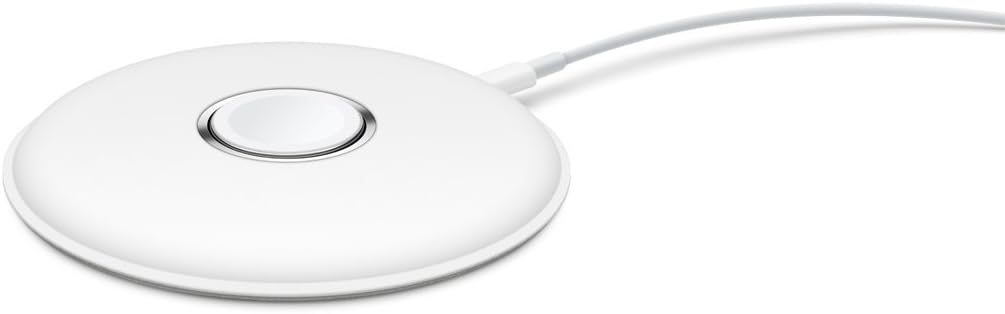
The Apple Watch Magnetic Charging Dock uses the same inductive charging connector supplied with Apple Watch and supports every model and size. Its 4.7 rating reflects a straightforward, dependable design that closely follows Apple's established charging format.
We may earn a commission when you buy through this link, at no additional cost to you.
The watch can charge flat with its band open or rest on its side. In the side position, it automatically enters Nightstand Mode, allowing the charging dock to display the time and function as an alarm clock. That versatility makes it particularly useful near a bed.
It connects through a Lightning-to-USB cable and an included Apple 5W USB power adapter, providing a more complete package than docks that omit wall power. Its design has fewer portability-oriented details than newer folding or multi-device models, and the older cable interface may be less convenient for users centered entirely on USB-C.
This is a strong recommendation for buyers who value a simple, recognizable Apple-style charging experience and want the required power adapter included. It is less compelling for someone seeking a compact travel accessory or a combined phone-and-watch charging station.
Flat placement supports overnight charging with the band open, while side placement creates an upright display. This flexibility makes the dock useful for different routines with the same charging hardware.
The included Apple power adapter and cable provide the necessary charging path. That makes the dock particularly convenient for people who do not already have an appropriate wall adapter or who prefer a complete setup.
We may earn a commission when you buy through this link, at no additional cost to you.
The Belkin Apple Watch Charger is a compact magnetic charging pad designed for travel and all Apple Watch models. Its 4.5 rating and included USB-C cable make it a streamlined option for people who want an official charging experience in a smaller travel-oriented form.
We may earn a commission when you buy through this link, at no additional cost to you.
MagSafe technology helps align the watch with the charging surface, while the product is stated to charge Series 7 and Series 8 models from 0% to 80% in about 45 minutes. Automatic charging cutoff helps prevent continued charging after the watch reaches a full state.
The 1.2-meter USB-C cable includes convenient cable management, but a power adapter is not included. Unlike stands that hold the watch upright, this dock primarily provides a flat charging surface, so it is less useful for viewing notifications or operating Nightstand Mode as a bedside clock.
Belkin is a strong recommendation for travelers or desk users who value magnetic alignment, broad model support, and a compact format. Buy it if a flat charging pad fits your routine better than an upright display stand.
The low-profile pad can fit into limited spaces in a carry-on, overnight bag, or desk drawer. It offers a dedicated charging surface without the bulk of a multi-device station.
The magnetic connection helps the watch settle accurately on the charging area. Automatic cutoff provides clear charging control, although users still need to supply an appropriate wall adapter for everyday use.
We may earn a commission when you buy through this link, at no additional cost to you.
The Anker MagGo 3-in-1 Qi2 15W Charging Station is the most comprehensive dock in the roundup, combining a phone charging area, Apple Watch charging, and a third wireless charging position in one compact desktop design. Its 4.6 rating reflects a strong feature set and certified fast charging for supported Apple Watches.
We may earn a commission when you buy through this link, at no additional cost to you.
The station provides up to 15W wireless charging for a compatible phone and can charge an Apple Watch Series 10 from 0% to 100% in 1 hour and 13 minutes according to internal lab testing, with actual results subject to variation. The watch platform adjusts vertically up to 45 degrees and supports StandBy mode in landscape orientation.
The package is unusually complete, including a 40W USB-C adapter, a five-foot USB-C cable, a welcome guide, and a 24-month warranty. Its multi-device format demands more desk space than a watch-only dock, and it is excessive for anyone who charges only an Apple Watch.
This premium station is ideal for users who want one organized charging destination for an iPhone, Apple Watch, and another Qi2-compatible device. For a watch-only setup, one of the simpler stands or compact magnetic chargers will usually provide a more focused and less space-intensive solution.
The three-in-one layout reduces the number of separate charging accessories on a desk. Placing a phone and watch on the same platform can also make notifications and watch faces easier to view throughout the day.
The watch section can move vertically up to 45 degrees and supports a landscape StandBy presentation. This gives the station useful flexibility for desk viewing, notifications, and active charging.
A 40W adapter and USB-C cable are included, reducing the need to purchase extra power accessories. The warranty and included guide also make this a more self-contained option than many travel-oriented charging pads.
We may earn a commission when you buy through this link, at no additional cost to you.
The most useful dock is the one that matches your charging hardware, available space, and routine. Compatibility, viewing position, included accessories, and portability should be considered together rather than treating any one specification as decisive.
Apple Watch charging docks fall into two broad categories: passive holders that support the official magnetic fast charger and integrated products that contain their own charging hardware. A passive stand may look simple, but it requires you to own the correct charger and cable, while an integrated dock generally needs only a suitable power source. Products that explicitly support only the official Apple Watch adapter should be checked carefully if you rely on a third-party charger.
Choose a passive holder if you already own an official magnetic charger. Choose an integrated dock if you want a ready-to-use travel system or need a charging connection built into the stand.
Compatibility claims can vary significantly between stands. A dependable dock should accommodate the case size and family you own, including older numbered Series models, SE versions, or Ultra models where relevant. Bands can also affect fit, especially when the charger or watch must sit at a particular angle. Review the complete compatibility list rather than assuming that a general Apple Watch label guarantees every size.
Match the listed model, case dimensions, and charging connector to your own watch. If you plan to replace your device later, a dock with the broadest current support is the safer long-term choice.
An upright dock makes the watch easier to read, while a fixed 45-degree position is often convenient on a desk or bedside table. Adjustable-angle models offer more flexibility but usually cost more or add mechanical parts. Nightstand Mode is another useful consideration because it displays the time and alarms, but the watch setting must be enabled and the dock must hold the watch in the required orientation.
Prioritize a stable upright view if you check the watch frequently. Choose a flat or adjustable dock if your usage changes or if portability matters more than a permanent display position.
Charging performance depends on the dock's charging design, the power adapter, and the watch model. Integrated magnetic docks may support fast charging, while passive stands inherit the performance of the charger placed inside them. Look for a suitable output, automatic cutoff, temperature management, and over-current or over-voltage protection when the product provides an integrated charger.
For predictable performance, use a stable power source that meets the manufacturer's recommendations. A higher-capacity dock is not automatically better if your actual goal is a simple watch holder.
A charging dock should reduce visual clutter rather than merely provide another surface for the cable. Cutouts, routing holes, concealed channels, and included management features can keep the lead gathered and make the charging area easier to clean. This matters especially on a bedside table where several cables compete for limited room.
Look for a dock with a dedicated cable route or opening. If you care most about appearance, a built-in management feature is more useful than adding separate clips after installation.
Desk-only docks can use a weighted base and occupy a fixed place, while travel products emphasize folding bodies, compact dimensions, and low weight. A multi-device station takes more room but can replace several chargers. Consider where the dock will live and whether you need to pack it into a bag, move it between rooms, or charge several devices at once.
Choose a folding or compact model for travel and a stable weighted model for a permanent desk. Choose a multi-device station only when consolidating several chargers is a stated priority.
Aluminum and weighted metal provide a refined appearance and a firm base, while silicone and TPU offer softer contact and help protect the watch from scratches. Anti-slip feet, grips, and a non-slip base are useful on smooth surfaces. Material alone does not determine quality, but it influences how the dock feels, moves, and interacts with the watch.
Choose silicone for soft contact or metal for a substantial desk accessory. Make sure the base has grip features if the dock will sit on a smooth or frequently disturbed surface.
Some docks include the charger, cable, and wall adapter, while others require you to supply all charging components. An integrated product may still need a suitable adapter even when a cable is included. Warranty coverage and clear compatibility instructions are also useful signals, especially for a product expected to remain on a desk or travel regularly.
List what you already own before ordering. A complete package may be more convenient, while a passive stand can be the most economical choice when you already have the official charger.
Begin by confirming that the dock supports your Apple Watch model, case size, and charger. For a passive holder, seat the official magnetic charger securely in the opening and route its cable through the intended channel. For an integrated dock, connect the supplied or specified cable to a suitable power source before placing the watch on the charging surface.
Place the watch onto the dock gently and confirm that the charging symbol appears. If the dock supports Nightstand Mode, enable that setting on the watch in advance and position the watch in the required orientation. Let the charger and dock sit on a level, dry surface away from direct heat, and avoid moving the watch while it is establishing its magnetic connection.
To clean the dock, disconnect the power and remove the watch first. Wipe the contact area and silicone surfaces with a soft, dry or lightly damp cloth, avoiding abrasive materials and excessive moisture. Check periodically that the charger remains seated, the cable is not sharply bent, and the base is still stable. A good dock should make charging quieter, tidier, and more consistent without requiring complicated maintenance.
It depends on the product. Passive stands such as the Lamicall Watch Stand, Spigen stand, elago W2, Macally stand, and AhaStyle dock generally require an official magnetic Apple Watch charger. Integrated products such as the Belkin pad, Anker station, and portable magnetic docks contain charging hardware themselves, although some still require a wall adapter. Always read the package contents before buying.
Most of the stands in this guide support Nightstand Mode, provided the watch has the setting enabled and is placed in a compatible position. An upright dock is usually easier for viewing time and alarms than a flat charging pad. Side-positioned charging may also trigger Nightstand Mode, depending on the dock's design.
A properly designed dock should not damage the watch, and silicone surfaces can reduce scratch risk. Fit matters, so the charger should sit securely without forcing the watch into an unnatural position. Clean both the charging contacts and dock regularly, and avoid placing the watch face-down against a surface that may collect grit.
A stand is primarily a holder that supports a charger you already own. A charging dock includes an integrated charger and usually needs only a cable and suitable power source. Stands can be simpler and more flexible across Apple Watch models, while integrated docks are often more convenient for travel or consolidated charging.
Yes, but portability depends on the model. The foldable travel dock and compact Belkin pad are designed with travel in mind, while the Lamicall magnetic dock also has a slim portable profile. You should carry a suitable power adapter, protect the charging surface from damage, and avoid leaving the dock in extreme heat inside a closed bag.
They are worth considering if you regularly charge a phone, Apple Watch, and another wireless-compatible device and want one organized station. They consume more desk space and offer less value for watch-only charging. A dedicated stand is usually more focused, compact, and straightforward for a single-device setup.
The requirement varies by product. Docks with an included wall adapter can usually be connected as directed, while those that omit an adapter may require a compatible USB power source. Follow the stated voltage and current guidance, particularly for docks with fast charging, and use a stable adapter rather than a questionable low-output connection.
Choose a model with a non-slip base, silicone contact, anti-slip grips, or a weighted metal body. Place it on a level surface and avoid frequently pushing the watch sideways while it is charging. If the base feels loose, clean any dust or residue from underneath before assuming the dock itself is defective.
The Lamicall Watch Stand is the strongest general choice for its polished aluminum design, secure support, wide compatibility, and effective cable organization. The elago W2 stands out for precise charger fit and integrated cable management, while the Anker MagGo 3-in-1 station is the premium option for consolidating a phone, Apple Watch, and another wireless device in one charging area.
For the simplest setup, choose a passive dock only after confirming you own the correct official charger. For travel, prioritize a compact integrated model with a suitable cable and power arrangement. For a permanent desk, consider stability, viewing angle, Nightstand Mode, and how much cable clutter you want to remove.
Ratings, included accessories, compatibility details, and prices can change, so review the current listing before ordering. The linked product pages are the best source for up-to-date information, package contents, availability, and current pricing for each Apple Watch Dock considered in this guide.
