
ASUS ROG Raikiri II Pro
4.0Editor score
8K sampling rate
Hot-swappable TMR sticks
Full-color control display
This ASUS ROG Ally Controller guide compares ten options across connectivity, controls, displays, battery life, portability, and platform compatibility.
The ASUS ROG Ally Controller category includes wired and wireless gamepads designed for handheld gaming, PCs, and compatible mobile devices. The most useful choice depends on control precision, connection stability, display integration, battery life, and whether you prioritize a full-sized console layout or a compact travel design.
This guide compares ten ROG and ROG-compatible controllers using the supplied product details. It covers Xbox-ready wireless models, premium options with OLED screens, Android-focused mobile controllers, renewed listings, and the handheld itself so readers can understand how each accessory fits into a broader gaming setup.
The top selections highlight the strongest combinations of features, while every ranked review explains practical advantages and trade-offs. Ratings, configurations, and availability can change over time, so shoppers should confirm the current product details and live listing before purchasing.
4.0Editor score

3.9Editor score

4.1Editor score
This side-by-side comparison covers the ten supplied products, emphasizing the platform each controller targets, its connection options, major control features, portability, and customization potential.


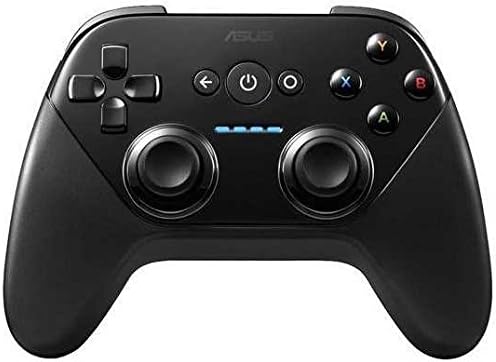
The ASUS ROG Raikiri II combines a conventional full-sized gamepad layout with strong low-latency features, making it a strong general recommendation for PC and ROG Xbox Ally gaming. Its supplied rating is 3.9, and the most notable qualities are the 1000Hz polling rate, TMR joysticks, four programmable rear buttons, and flexible connection options.
We may earn a commission when you buy through this link, at no additional cost to you.
Connectivity is a major strength. The controller supports low-latency 2.4GHz RF, Bluetooth, and wired USB-C, while also carrying certification for Xbox use through USB-C and 2.4GHz. The 1000Hz polling rate applies in PC wired and 2.4GHz wireless modes, and ROG SpeedNova Wireless technology is included for the wireless experience. Dual-mode triggers let players move between short-travel micro-switch behavior and full-travel TMR sensing.
The grip, controls, and accessory bundle also make it practical for long sessions. Micro-switch face buttons, rear buttons, bumpers, and the D-pad provide tactile feedback, while the skin-friendly anti-slip surface supports stability. The supplied bundle includes a protective case that supports charging while enclosed, a charging stand, and two detachable joystick caps. Its stated battery life is at least 30 hours over 2.4GHz when RGB lighting, audio, and vibration are off.
The trade-offs are modest. It lacks the OLED or full-color display found on higher-end Raikiri models, and its most impressive battery figure assumes several features are disabled. It is still a well-rounded choice for players who value stable wireless polling, flexible trigger modes, useful rear controls, and accessories more than an integrated screen.
The 1000Hz polling rate and ROG SpeedNova Wireless technology target a low-latency experience, especially in the controller's 2.4GHz and wired PC modes. This makes the Raikiri II appealing for action games in which immediate analog and digital input matters.
TMR anti-drift joysticks help maintain steadiness while consuming less power than Hall Effect modules. Four rear buttons and dual-mode triggers expand the available input set, allowing players to assign extra commands or select between trigger travel styles.
We may earn a commission when you buy through this link, at no additional cost to you.
The ASUS ROG Raikiri II Pro is the most feature-dense controller in this roundup, with an 8K sampling rate, a full-color display, hot-swappable TMR joysticks, and an extensive set of reassignable controls. Its supplied rating is 4.0, making it a fitting premium recommendation for dedicated PC and handheld gamers.
We may earn a commission when you buy through this link, at no additional cost to you.
Its headline advantage is the competition-level 8K sampling rate through ROG SpeedNova technology in wired and 2.4GHz modes. The hot-swappable TMR joystick modules offer anti-drift performance and lower power use, while the color display can present profile changes, joystick calibration, and button reassignment information. Control customization goes beyond the four rear buttons with two additional bumpers and four front buttons that can be reassigned.
The controller also retains familiar Raikiri strengths. Players can switch seamlessly between short-path micro-switch triggers and full-travel TMR sensor triggers. The D-pad, ABXY buttons, rear buttons, and bumpers use micro-switch mechanisms for immediate actuation and tactile feedback. The supplied battery claim reaches up to 79 hours of 2.4GHz gaming on one charge.
Its disadvantages reflect its ambitious feature set: it is a premium, full-sized design, and some buyers may find the display, swappable sticks, and extensive remapping options more elaborate than necessary. Even so, it is a compelling choice when maximum sampling, customization, and battery endurance are the priorities.
The 8K sampling rate and full-color display distinguish this model from conventional gamepads. The screen can provide practical shortcut information, while the high sampling rate targets rapid input recognition in supported wired and 2.4GHz configurations.
Hot-swappable TMR modules, removable rear controls, extra bumpers, and reassignable front buttons create a highly adaptable layout. These features are particularly useful for players who want to preserve specific bindings across different games or revise them without replacing the entire controller.
We may earn a commission when you buy through this link, at no additional cost to you.
The ASUS ROG Raikiri Pro is a well-equipped full-size controller whose built-in OLED display, three-mode connectivity, and remappable controls make it a natural fit for PC and Xbox-style gaming. The supplied rating is 3.9, and the product balances useful customization with familiar Raikiri ergonomics.
We may earn a commission when you buy through this link, at no additional cost to you.
The OLED panel supports customizable animations, status indicators, and on-the-fly profile switching. Connectivity includes wired USB-C, low-latency 2.4GHz RF, and Bluetooth, providing flexible options for different gaming setups. Four rear buttons can be programmed for game commands or temporary joystick sensitivity changes, while the face controls, triggers, and D-pad support broader remapping through Armoury Crate.
Trigger customization is another strength. Each side can use a short or full-range step-trigger mode, and dead zones are adjustable in Armoury Crate. For sound, the controller includes an ESS DAC, a 3.5mm headphone jack, and a mute button. These details are useful for players who want clearer headset output and direct control over headset functions.
The OLED is a visual centerpiece, but it also means buyers who never use profiles or status information may be paying attention for a feature they will ignore. Armoury Crate configuration is another part of the experience, and some users may prefer a simpler controller with fewer setup options. Overall, it remains a flexible choice for display-focused customization.
The built-in display can show personalized animations, status indicators, and active profiles without leaving the game. It turns the controller into a more informative interface rather than simply an input device.
Selectable trigger travel and adjustable dead zones make it possible to tune the controller for different play styles. The ESS DAC, 3.5mm headphone connection, and mute control add a practical layer of headset management.
We may earn a commission when you buy through this link, at no additional cost to you.
The ASUS ROG Tessen is a compact controller built specifically for Android phones rather than the ROG Xbox Ally or a conventional PC setup. Its supplied rating is 4.1, and its strongest case rests on portability, a 500Hz wired polling rate, programmable rear paddles, and 18W pass-through charging.
We may earn a commission when you buy through this link, at no additional cost to you.
The folding design secures a phone in landscape orientation while protecting the USB-C connector. Compatibility extends to phones between 7 and 14.5mm thick, and rubber support pads plus an extended USB-C connector help accommodate many protective cases. The package also converts into a controller stand, adding usefulness beyond gaming.
Controls are designed to feel more substantial than those on a typical mobile gamepad. The sticks have a stated 22-degree movement range, analog triggers provide variable input, and outward-extended handles improve comfort. Programmable aluminum rear paddles handle more complex commands, while the ROG Button and Armoury Crate app support customization. Mechanical switches in the face buttons and D-pad add tactile feedback, and Aura RGB lighting provides visual personalization.
Its key limitation is explicit platform support: the Tessen is for Android phones only. It should not be chosen as a controller for the ROG Xbox Ally, PC, Nintendo Switch, or other consoles. For mobile players who want a dedicated controller without managing a separate battery, however, it is a compelling and distinctive option.
The Tessen folds to a pocket-friendly form and holds the phone securely in landscape orientation. Its adjustable support and extended USB-C connector are designed to accommodate a wide range of phone sizes and many protective cases.
The 500Hz polling rate keeps input responsive through the wired USB-C connection, while 18W pass-through charging lets the phone receive power during play. This removes the battery-management concern found in many wireless mobile controllers.
We may earn a commission when you buy through this link, at no additional cost to you.
This ASUS ROG Raikiri Pro combines a built-in OLED display with three-mode connectivity and extensive button customization. It carries a supplied rating of 3.4, lower than the other new Raikiri listings in the roundup, so buyers should weigh its attractive feature set against the available customer feedback.
We may earn a commission when you buy through this link, at no additional cost to you.
The OLED display supports personalized animations, status indicators, and profile changes while a game is running. Wired USB-C, low-latency 2.4GHz RF, and Bluetooth allow flexible use on PC, and the product is also certified for Xbox through USB-C. Four rear buttons can be assigned to commands or joystick sensitivity shifts, while Armoury Crate supports remapping and other adjustments.
The trigger system offers selectable short and full-range modes along with adjustable dead zones. A 3.5mm headphone jack, ESS DAC, and mute button handle headset-related needs. The supplied specification lists up to 48 hours of battery life, making the controller suitable for extended wireless sessions when the battery estimate applies under the stated conditions.
The lower rating does not remove any of the listed functions, but it is a legitimate reason to examine current owner comments and the exact configuration carefully. The product is best for someone who prioritizes an OLED display, remappable controls, and flexible connectivity in a conventional full-size gamepad.
Wired, 2.4GHz, and Bluetooth modes let the controller adapt to different PCs and gaming sessions. The OLED adds profile and status information without requiring a separate application to remain open on another screen.
Four rear buttons, selectable trigger travel, and configurable dead zones provide multiple ways to tailor the controller. Armoury Crate serves as the central customization software for button assignments and joystick settings.
We may earn a commission when you buy through this link, at no additional cost to you.
The renewed ASUS ROG Raikiri Pro offers the familiar OLED-equipped Raikiri design through a refurbished listing. It is tested and certified to look and work like new with limited to no signs of wear, and the process includes functionality testing, inspection, and repackaging.
We may earn a commission when you buy through this link, at no additional cost to you.
Its 1.3-inch OLED display has a stated 128×40 resolution and supports customizable animations, status indicators, and profile switching. Connectivity spans low-latency 2.4GHz RF, Bluetooth, and wired USB-C, with Xbox certification through the USB-C connection. Four rear buttons, adjustable trigger dead zones, and Armoury Crate remapping preserve the core customization experience.
Headset features include an ESS DAC, 3.5mm headphone jack, and mute button. The stated battery life reaches up to 48 hours, and the renewed listing includes a 90-day warranty. These specifications make the product functionally similar to the new Raikiri Pro listing, with refurbishment being the main distinction.
No current customer rating is supplied, so this entry cannot be compared numerically with the rated models. The correct choice depends on whether the buyer values the savings associated with a renewed unit more than the reassurance of a new product. The included testing and warranty are useful, but checking the listing's condition details remains important.
The renewed process includes functionality testing, visual inspection, and repackaging. A 90-day warranty adds a defined period of protection, although refurbished status still calls for closer attention to cosmetic and packaging details.
The listing retains the OLED display, three-mode connectivity, remappable rear controls, selectable trigger modes, ESS DAC, and 3.5mm headphone jack. It therefore serves players who want the core feature set at a different purchasing tier.
We may earn a commission when you buy through this link, at no additional cost to you.
The ASUS ROG Xbox Ally is the handheld gaming platform rather than a separate gamepad, but it is essential to this guide because it defines the ecosystem in which external ASUS ROG controllers are used. Its supplied rating is 4.3, and the specification combines a 7-inch 1080p touchscreen with a 120Hz display, Windows 11, and Xbox-oriented software integration.
We may earn a commission when you buy through this link, at no additional cost to you.
Game Bar can be opened through the Xbox button, and the handheld supports games from Xbox Game Pass, Steam, Epic Games, and Windows. Windows 11 provides access to PC libraries, while Xbox Play Anywhere allows progress to continue across supported PC and Xbox environments. The included 3-month Xbox Game Pass Premium subscription gives access to a broad catalog, subject to the listed terms.
Hardware includes an AMD Ryzen Z2 A processor, 16GB of LPDDR5 6400MHz memory, and a 512GB SSD. The 120Hz display supports FreeSync Premium variable refresh, reaches 500 nits of brightness, and uses Gorilla Glass. A 60Whr battery and fast charging that reaches 50 percent in 30 minutes support portable use, while dual USB-C ports allow TV connection and multiplayer controller setups.
This is not a controller that can be evaluated in the same way as the Raikiri products. Its weight, portability, and all-in-one design may meet different needs than a dedicated external gamepad. For players considering the broader ASUS ROG Xbox Ally setup, it offers the hardware and software foundation that the external controllers in this roundup are designed to complement.
The Xbox Game Bar integration and dedicated Xbox button provide a console-like route into supported games. Windows access keeps the device useful beyond Xbox libraries by supporting PC storefronts and Windows applications.
Dual USB-C ports allow the handheld to connect to a television and support multiple controllers for playing with friends. This makes an external ASUS ROG gamepad a natural option for players who want more conventional controls.
We may earn a commission when you buy through this link, at no additional cost to you.
The renewed ASUS ROG Raikiri II listing targets Xbox X|S, the ROG Ally, and PC users who want a wireless full-size controller with a travel case. No current rating is supplied, and the abbreviated product data provides less detail than the other renewed Raikiri listing, so prospective buyers should review the live listing carefully.
We may earn a commission when you buy through this link, at no additional cost to you.
The title identifies 2.4GHz and Bluetooth connectivity, TMR joysticks, an anti-slip grip, a travel case, and up to 50 hours of battery life. Web-based configuration is also highlighted, providing a browser-based route for adjusting the controller without necessarily requiring the same desktop software approach used by other models.
The renewed status can make this option appealing to buyers who want the Raikiri II design at a different purchasing tier. The included case is especially relevant for ROG Ally owners because it offers a way to protect and carry a full-size controller alongside a portable gaming setup.
Because the supplied data is limited and no customer rating is available, there is less basis for judging long-term consistency or exact package contents. Shoppers should verify the controller's condition, included accessories, battery health, platform functions, and warranty terms before treating this listing as equivalent to a new one.
The stated 2.4GHz and Bluetooth support allows the controller to serve PC, Xbox, and ROG Ally use. This makes it a flexible option for travelers who move between docked and portable gaming arrangements.
A bundled travel case helps protect a full-size controller during transport. That practical inclusion is particularly relevant when the controller is used alongside a handheld rather than remaining beside a home gaming setup.
We may earn a commission when you buy through this link, at no additional cost to you.
The CRKD NEO S is not an official ASUS product, but it is a relevant alternative for ROG Ally players because its title explicitly lists Rog Ally compatibility. Its supplied rating is 4.3, and the appeal comes from broad device support, Hall Effect controls, collectible styling, and a mix of functional and visual customization.
We may earn a commission when you buy through this link, at no additional cost to you.
Bluetooth allows wireless pairing with Nintendo Switch OLED, PC, mobile devices, smart TVs, Steam Deck OLED, Legion Go, and ROG Ally devices. The manufacturer states that users can switch between connected devices, which makes the controller a convenient cross-platform option for a mixed hardware collection.
Hall Effect thumbsticks are designed to resist drift while maintaining precise and responsive control. The back buttons can be remapped to single inputs or sequences of actions, and Hall Effect triggers allow the actuation point to be adjusted. Swappable stick tops add visual and tactile customization, while the mobile companion app can reveal the controller's unique product number and rarity rank.
The principal trade-off is brand alignment: the CRKD NEO S is not a dedicated ROG-branded controller, and buyers may prioritize the official ecosystem and PC-oriented Armoury Crate features offered by ASUS products. Nevertheless, its stated compatibility, 4.3 rating, collectible Retro Gold design, and wide device support make it a compelling alternative.
The extensive platform list gives the NEO S unusual flexibility for a compact gamepad. Bluetooth switching can reduce the need to keep several device-specific controllers in the same travel kit.
Limited collectible designs, app-based rarity information, and swappable stick tops extend beyond conventional input customization. The design appeals to buyers who want their controller to look distinctive as well as perform its basic control functions.
We may earn a commission when you buy through this link, at no additional cost to you.
The ASUS TV500BG Gamepad is a straightforward wireless controller for Android and Windows, with a supplied rating of 4.2. Although it lacks the specialized features of modern Raikiri products, it targets a different use case: casual and compatible Android TV gaming in a living-room environment.
We may earn a commission when you buy through this link, at no additional cost to you.
The controller is engineered for accurate input in Android TV and PC games. It supports Android Lollipop and Windows, making it useful for phones, tablets, televisions, and compatible computer games that follow the relevant control conventions. Its wireless format avoids a cable running toward the television or entertainment center.
The product description also highlights the wider Android TV ecosystem, including the ability to play with friends through Google Play Games. Tracking progress and earning achievements across Android phones, tablets, and TVs are part of the broader platform experience, rather than additional controller hardware functions.
Modern enthusiasts will find fewer advanced features than on the Raikiri range: there is no supplied indication of TMR sticks, Hall Effect triggers, rear paddles, an OLED display, or extensive remapping. Its strength is simplicity. It is most appropriate as an easy-to-understand Android TV or basic Windows gamepad, not as a feature-packed companion for the ROG Xbox Ally.
Wireless operation and Android TV support keep the TV500BG focused on uncomplicated couch gaming. It avoids the learning curve and software dependence associated with more advanced ROG gamepads.
Compatibility with Android Lollipop and Windows extends the controller beyond a single TV model. That makes it useful for users who move between television-based Android gaming and compatible PC applications.
We may earn a commission when you buy through this link, at no additional cost to you.
Choosing an ASUS ROG Ally controller means balancing device support, control precision, connectivity, comfort, and the amount of customization you actually need. A feature-rich model is not automatically the right choice for every player, so the most important step is identifying how and where you game.
Start with the devices the controller must support. The Raikiri II, Raikiri II Pro, and Raikiri Pro are positioned for PC and Xbox-compatible use, while the ROG Tessen is explicitly limited to Android phones. The CRKD NEO S supports a broad collection of handhelds, computers, mobile devices, and smart TVs, but it is not an official ASUS product. The ROG Xbox Ally is a complete handheld computer rather than an external gamepad.
Compatibility should be checked beyond the platform name. Consider wired versus wireless support, Xbox certification where stated, the required USB-C connection, and whether your preferred games accept external controllers. Avoid assuming that every Android or Windows game supports every gamepad layout.
Higher polling or sampling figures indicate how frequently a connected controller reports input, but the implementation and connection mode still matter. The Raikiri II lists 1000Hz polling in PC wired and 2.4GHz wireless modes, the Raikiri II Pro reaches an 8K sampling rate in wired and 2.4GHz modes, and the Tessen provides 500Hz polling over wired USB-C. These figures indicate strong response priorities, though they do not guarantee identical performance across every title or connection type.
Choose a rate that matches your play style and supported hardware. Competitive players may prioritize the lowest available latency, while casual users should focus more on stability, button quality, and comfort. Always verify whether the quoted rate applies to the connection mode and platform you intend to use.
TMR and Hall Effect are the two main joystick technologies represented here. The Raikiri II and Raikiri II Pro use TMR modules that are described as anti-drift and lower in power use, while the CRKD NEO S uses Hall Effect thumbsticks. The Raikiri II Pro goes further with hot-swappable TMR modules, allowing the stick assemblies to be exchanged rather than replacing the entire controller.
For drift resistance and serviceability, the TMR-equipped ASUS models are compelling. Hall Effect remains a credible choice in the NEO S, especially for buyers who value its cross-platform design. Choose based on the stated sensor system, the availability of replaceable parts, and the controls your games actually require.
A useful controller should provide controls that improve access without making the layout unnecessarily complicated. The Raikiri models offer four programmable rear buttons, while the Raikiri II Pro adds removable rear buttons, two extra bumpers, and four reassignable front buttons. The Tessen uses programmable aluminum rear paddles for mobile games, and the CRKD NEO S supports remappable back buttons.
Trigger design is another differentiator. Dual-mode triggers on the Raikiri II and Raikiri II Pro allow short-travel micro-switch behavior or full-travel TMR sensing, while the Raikiri Pro products use selectable step-trigger modes with adjustable dead zones. Prefer extra controls when you play titles with many bindings; prioritize a simple layout when portability and ease of use matter more.
A built-in screen can provide useful information without requiring a separate monitor or overlay. The Raikiri Pro has a built-in OLED display for customizable animations, status indicators, and profile changes, while the Raikiri II Pro adds a full-color display for profile changes, joystick calibration, and button reassignment. The OLED in the renewed listing has a stated 1.3-inch size and 128×40 resolution.
Screens are most valuable for players who use multiple profiles or frequently change settings. If that does not describe your habits, a screen may add complexity without improving the core experience. A display does not replace accurate sticks, responsive triggers, stable connectivity, or good ergonomics.
Wired connections offer a straightforward path with no separate wireless battery to manage, which is why the Tessen uses USB-C and supports pass-through phone charging. The Raikiri range offers combinations of 2.4GHz RF, Bluetooth, and wired USB-C, giving players more flexibility across PC, Xbox, and mobile use. The CRKD NEO S uses Bluetooth across its broad device list.
Decide whether low-latency wireless, universal wireless pairing, or dependable wired operation matters most. Check whether a connection mode supports the platform and features you need, and note the supplied battery figures often assume particular lighting, audio, or vibration settings. A controller with several modes is versatile, but the best mode is still the one that matches your usual setup.
The stated battery figures vary considerably: at least 30 hours for the Raikiri II under specified conditions, up to 79 hours for the Raikiri II Pro over 2.4GHz, and up to 48 hours for the Raikiri Pro listings. The Tessen avoids the issue entirely by drawing power from the phone while providing 18W pass-through charging. Battery endurance matters for travel, but the accessory bundle, lighting, and vibration settings can influence actual results.
Treat the published figures as comparative guidance rather than a promise for every configuration. If you use RGB lighting, audio, vibration, or a display frequently, leave a margin for recharging. If uninterrupted phone power is the priority, a wired mobile controller may be more convenient than a wireless model.
A full-size Raikiri controller offers conventional grips, rear controls, and broad platform support, but it takes more space than a folding phone controller. The Tessen collapses for pocket-sized transport and includes packaging that converts into a stand. The renewed ROG Raikiri II listing includes a travel case, while the Raikiri II's supplied accessories include a protective case and charging stand.
Think about where you play and how you travel. A conventional controller may feel better for long desktop or living-room sessions, while a folding design is easier to carry with a phone. Weight, grip texture, handle shape, and the need to keep charging equipment should be considered alongside portability.
Begin by charging the controller fully, reading the included quick-start guidance, and pairing it through the connection mode you intend to use. Wireless models may use 2.4GHz or Bluetooth, while the Tessen connects through a phone's USB-C port. Confirm that the game supports the selected platform and that any required firmware or control software is installed before beginning a longer session.
For software-based customization, open Armoury Crate or the applicable web-based configuration utility and set the buttons, triggers, joystick behavior, lighting, and profile before launching a game. TMR joystick modules are designed with anti-drift behavior, but players should still avoid placing food or drinks nearby and should clean the control surface gently with a dry or lightly dampened cloth.
Store wireless controllers in their case when not in use, and avoid leaving them in extreme heat or a hot vehicle. For the Tessen, let the phone cool before folding the controller, keep the USB-C connector clear of debris, and check that the case does not prevent proper phone support. Periodically inspect joystick motion, rear buttons, triggers, charging contacts, and cable connections, particularly on renewed units.
Yes. The supplied Raikiri II details explicitly list the ROG Xbox Ally among supported devices. It offers 2.4GHz RF, Bluetooth, and wired USB-C connectivity, so the correct mode will depend on how the handheld is being used. Check the current product listing and game requirements for the most up-to-date compatibility information.
No. The ROG Xbox Ally is a Windows-based handheld, but compatibility still depends on the controller and its connection method. The Raikiri models in this guide are positioned for PC and Xbox use, while the ROG Tessen is explicitly for Android phones only. Always confirm platform support before purchasing a mobile-focused controller.
TMR and Hall Effect both use electromagnetic sensing rather than a simple potentiometer contact. The products in this guide describe their TMR joysticks as anti-drift and lower in power consumption, while the CRKD NEO S uses Hall Effect thumbsticks. The best choice also depends on repairability, responsiveness preferences, and the other features you need.
No. An OLED display can be useful for profile changes, status indicators, calibration information, and customization, but it does not replace reliable sticks, responsive triggers, or stable connectivity. Players who never change profiles may receive more value from a simpler controller with stronger polling performance or added physical controls.
Polling rate is especially relevant in fast competitive games because it describes how frequently the controller reports input. The list includes 1000Hz on the Raikiri II, 8K sampling on the Raikiri II Pro, and 500Hz on the wired Tessen. Higher numbers should be considered alongside supported connection modes, stability, and the rest of the control system.
The supplied Tessen description identifies it as an Android-phones-only product designed around a phone held in landscape orientation. It should not be treated as a standard PC controller despite sharing a wired USB-C connection. Choose a full-size Raikiri model or another product explicitly listed for PC use.
A renewed controller can be reasonable for buyers who want established features at a different purchasing tier. The renewed Raikiri Pro includes functionality testing, inspection, repackaging, and a 90-day warranty, while the renewed Raikiri II has less detail in the supplied information. Check the condition report, warranty, accessories, battery health, and return terms before buying.
Basic play may not require extensive configuration, but Armoury Crate is the central software for many remapping, trigger, joystick, lighting, and profile options on the ROG models listed. Install it before relying on advanced settings, and check its current system requirements. The renewed Raikiri II listing instead highlights web-based configuration.
The ASUS ROG Raikiri II is the strongest all-around recommendation for players seeking a responsive 1000Hz wireless controller, TMR joysticks, versatile trigger modes, and useful accessories. The Raikiri II Pro is the premium choice for advanced sampling, a full-color display, hot-swappable sticks, extensive remapping, and exceptional stated battery life, while the Tessen serves mobile Android players who prioritize portability and continuous charging.
Before buying, prioritize the features that change your daily experience. Check platform support first, then consider joystick technology, polling or sampling in the connection mode you will use, trigger customization, battery needs, and physical comfort. An OLED screen, premium materials, and extra paddles are valuable only when they support the games and playing habits you actually have.
Ratings, configurations, warranty terms, and live availability can change, so compare the current listing before checkout. In particular, verify the exact controller for the renewed Raikiri II and renewed Raikiri Pro listings, confirm current platform certification, and review the included accessories rather than relying on a category headline alone.