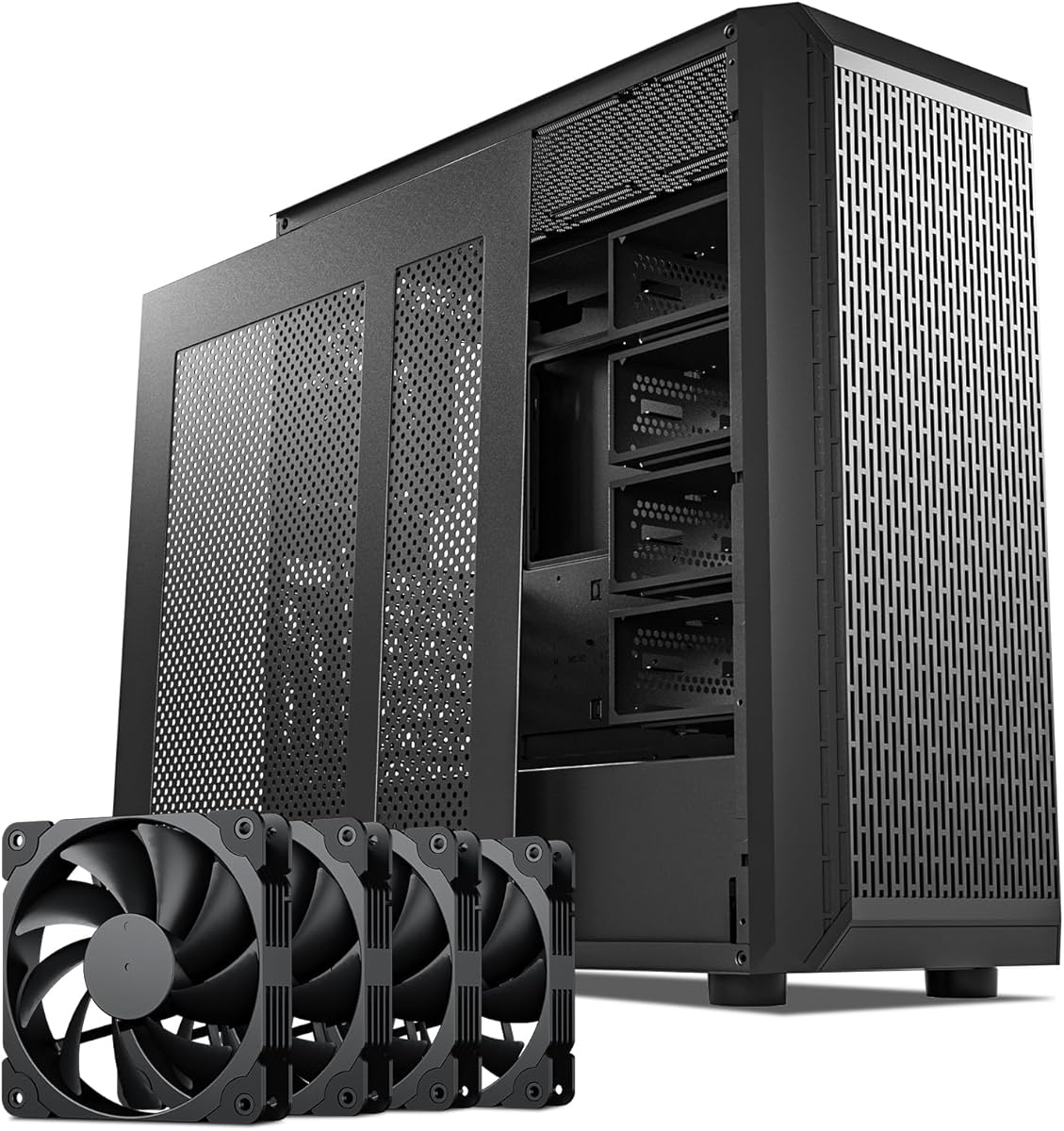
DARKROCK Classico Storage Master
4.4Editor score
Thirteen hard drive support
Four 120 mm fans
Vertical GPU mounting
An ATX NAS computer case must balance dense storage, dependable cooling, serviceable drive bays, and compatibility with the components inside a network-attached storage system. The best enclosure simplifies maintenance while protecting performance, making careful comparison of capacity and expansion options essential.
We compared all ten cases using the supplied specifications, focusing on supported motherboards, drive-bay layouts, cooling options, power-supply clearance, front connectivity, and physical dimensions. The guide covers everything from compact Micro-ATX models to expansive E-ATX and SSI-CEB storage enclosures.
Each review explains the strongest use case, important limitations, and the build considerations that may affect your decision. Product configurations and listing details can change, so confirm current specifications, included accessories, and your planned hardware before purchasing a case.
4.4Editor score

4.7Editor score

4.2Editor score
As an Amazon Associate we earn from qualifying purchases.
This side-by-side comparison highlights motherboard support, storage capacity, cooling provisions, and expansion features so buyers can quickly identify the enclosure that best matches their NAS architecture.




The DARKROCK Classico Storage Master is an ATX-oriented NAS enclosure that combines generous stated storage support with a cooling package designed for powerful home-server components. Its 4.4 rating reflects a broadly favorable buyer response, while the supplied feature list emphasizes thirteen hard drives, four 120 mm fans, and flexible cooling options.
We may earn a commission when you buy through this link, at no additional cost to you.
Storage is the central attraction. Supporting thirteen hard drives gives a builder room to divide data among multiple users, create separate storage pools, or retain spare capacity for future expansion. The vertical graphics-card mount is less common in storage-focused cases and may appeal to builders who want the card displayed prominently, although the listed information does not describe the exact mounting arrangement in detail.
Airflow is supported through mesh front and side panels, four included 120 mm fans, and compatibility with a 360 mm radiator. These provisions make the enclosure more versatile than a basic steel storage box. A large radiator or a complete air-cooled configuration can be considered depending on CPU output, drive temperatures, and the level of background noise acceptable in the installation location.
This is the most approachable recommendation for builders who want substantial storage and modern cooling without moving to a specialist enterprise chassis. It is particularly suitable for a home NAS that also handles transcoding, backups, or other moderately compute-intensive services. Before buying, verify the exact drive-bay arrangement, connector type, and backplane configuration against the hardware you already own, because the listing summary confirms capacity but not every connection detail.
Thirteen-drive support creates room for a large personal archive, a multi-user file server, or a NAS that will expand after installation. Because the precise mounting system is not described in the supplied information, treat the capacity figure as a starting point and confirm whether every position uses standard SATA data and power connections.
Four 120 mm fans and support for a 360 mm radiator give the system meaningful cooling flexibility. This is useful when a NAS also performs media transcoding, container services, virtual machines, or other CPU-intensive tasks that can produce sustained heat.
We may earn a commission when you buy through this link, at no additional cost to you.
The Rosewill Helium NAS Duo is a conventional ATX mid-tower designed for DIY NAS and media-server builds. Its specification sheet is appealing, including eight 3.5-inch drive positions, four 140 mm PWM fans, broad motherboard support, and a 360 mm AIO option. However, its 2.6 rating is the lowest among the listed products and warrants a more cautious recommendation.
We may earn a commission when you buy through this link, at no additional cost to you.
The four 140 mm fans stand out because they can move substantial air with fewer rotations than smaller alternatives. Mesh panels reinforce that airflow-oriented approach, making the case suitable for a home server that will operate continuously near a desk or media center. The listed maximum CPU-cooler height of 180 mm and maximum graphics-card length of 390 mm also provide useful clearance for mainstream ATX components.
Its main uncertainty is the lack of supplied information about the backplane and exact drive connection method. The case supports ATX, Micro-ATX, and Mini-ITX motherboards and includes a USB 3.2 Type-C front port, but buyers still need to verify whether drives use individual cabling, a backplane, or another arrangement. Its low user rating may also reflect the assembled experience, component fit, or missing details that cannot be evaluated from the available data.
Choose the Helium NAS Duo if strong airflow, familiar ATX compatibility, and a straightforward media-server layout matter more than the highest listed rating. It is less compelling for a critical enterprise deployment where a documented backplane, long-term support record, or unambiguous service procedure is essential. Checking recent buyer feedback and confirming all bay connectors before committing is advisable.
Four 140 mm PWM fans create a strong baseline airflow for a storage system that runs continuously. Larger fans can also move useful air at comparatively low rotational speeds, making this layout attractive for owners who want responsive cooling without relying entirely on a large radiator.
ATX, Micro-ATX, and Mini-ITX support makes the enclosure useful across standard server boards and compact alternatives. The stated 390 mm graphics-card clearance is generous for most mainstream cards, while the 180 mm CPU-cooler allowance supports a broad selection of air coolers.
We may earn a commission when you buy through this link, at no additional cost to you.
The JONSBO N5 is one of the most capable enthusiast NAS enclosures in this guide, combining twelve hot-swappable 3.5-inch drive positions, four side-mounted 2.5-inch SSD positions, and room for up to four graphics cards. Its 4.7 rating is the second-highest listed score, reflecting an especially strong balance of storage, expansion, and design.
We may earn a commission when you buy through this link, at no additional cost to you.
Its physical dimensions of 355 by 403 by 350 millimeters make it a substantial enclosure, but that scale supports a genuinely flexible platform. Motherboard compatibility extends from Mini-ITX and Micro-ATX through ATX to E-ATX. Eight PCI expansion slots and support for as many as four GPUs make the N5 relevant to virtualization, GPU transcoding, multi-GPU compute, or storage systems that need dedicated acceleration.
The removable four-bay SSD cage and one-piece top cover simplify installation, while twelve front HDD bays can be installed as hot-swappable drives. Power-supply selection requires care: a 170 mm ATX unit allows all twelve front bays, while a unit at least 170 mm long reduces that front capacity to eight. The enclosure also has notable CPU-cooler, graphics-card, and AIO limitations that must be reconciled with a multi-GPU configuration.
The N5 is the strongest all-around recommendation for a powerful home or workgroup server that blends mass storage with optional compute acceleration. It is less appropriate for a quiet, compact NAS or a simple file server with one basic graphics card. Plan the power supply, riser cables, cooling, and card dimensions before ordering, and use the manufacturer compatibility notes as the final authority.
Support for up to four graphics cards distinguishes the N5 from most desktop-style NAS cases. The eight expansion slots create room for a multi-card compute layout, but GPU length varies by arrangement, so a multi-GPU design should be measured against the stated 325 to 350 mm allowance.
Twelve front drive positions and a removable four-bay cage let owners perform storage maintenance with less disruption. The side SSD positions add fast scratch or cache storage options without consuming any of the twelve front HDD bays.
We may earn a commission when you buy through this link, at no additional cost to you.
The 8 Bay NAS Case is a compact dual-chamber enclosure designed around eight hot-swappable 3.5-inch HDD positions and two dedicated 2.5-inch SSD slots. It carries a 5.0 rating, the highest numerical score in the supplied group, and the package is listed as including drive handles, screws, and cable ties for DIY assembly.
We may earn a commission when you buy through this link, at no additional cost to you.
Storage is the defining strength. Dual SATA backplanes give the eight main drive positions a service-oriented design, while separate SSD slots support faster system, cache, or application storage. The steel construction includes a 0.8 mm galvanized inner frame and cold-rolled outer frame, which is appropriate for a case expected to sit on a desk or shelf while containing multiple spinning drives.
Its compact dimensions of 300 by 270 by 270 millimeters come with clear hardware limits. Motherboard support covers Micro-ATX and Mini-ITX rather than full ATX, CPU coolers must be no taller than 55 mm, and graphics cards are limited to 240 mm. A standard ATX power supply must also measure no more than 170 mm in length, although smaller SFX and SFX-L units can be used with an adapter.
This enclosure is a compelling choice for a compact eight-bay NAS using a low-profile or downdraft CPU cooler and a small motherboard. It is less suitable for long graphics cards, tower coolers, or full-size ATX boards. The high rating is encouraging, but the unusually tight component limits mean the case should be selected by checking the planned system dimensions first.
Eight hot-swappable bays provide useful capacity in a mini-tower footprint. The split chamber concept separates storage from the electronics area, helping builders route cables and fit a compact power supply without sacrificing the principal drive positions.
The listed inclusion of handles, screws, and cable ties reduces the need to source basic installation hardware separately. This makes the package particularly practical for first-time NAS builders, although system components still need to satisfy the compact clearance limits.
We may earn a commission when you buy through this link, at no additional cost to you.
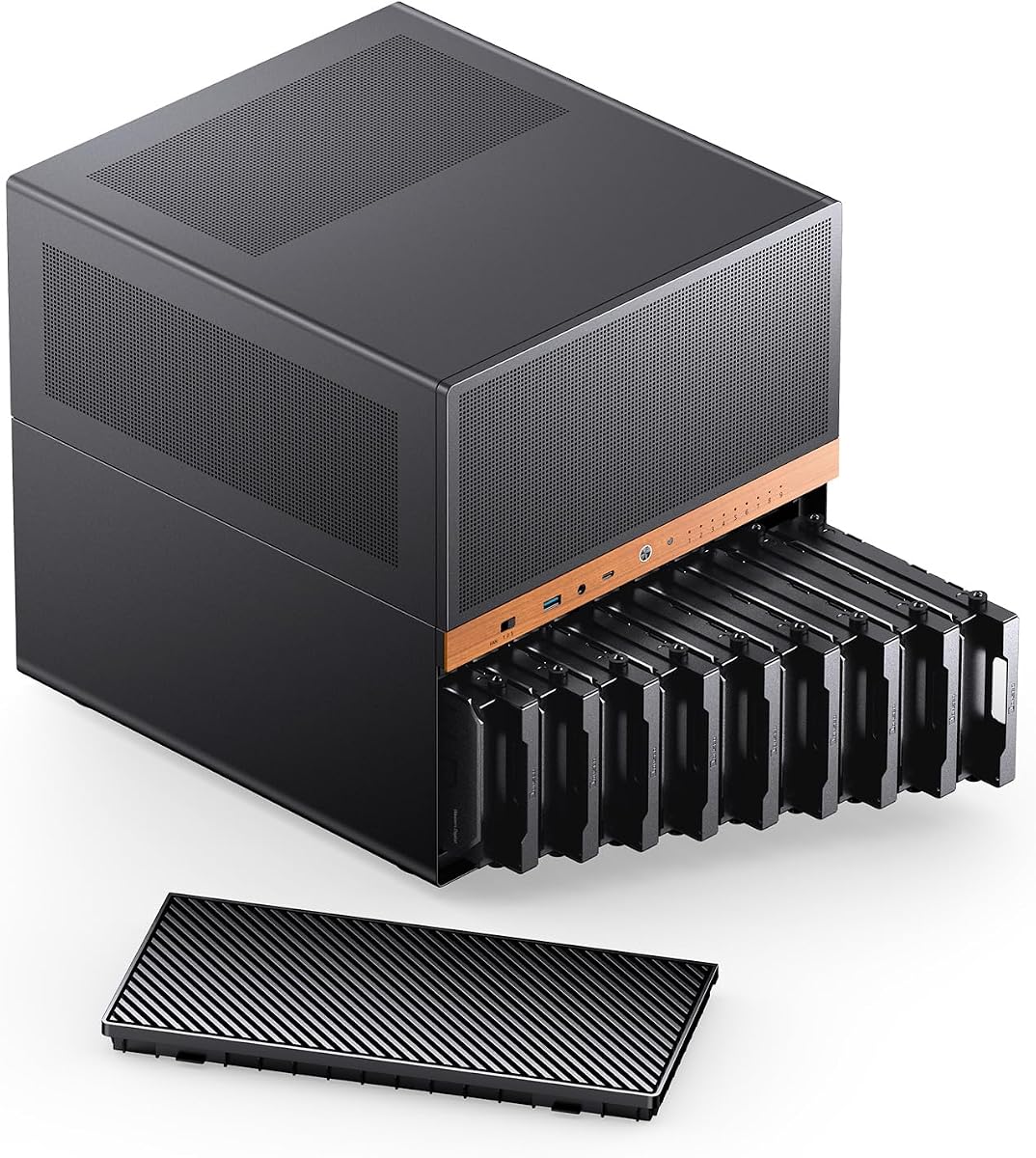
The JONSBO N6 combines nine hot-swappable drive positions with unusually flexible power-supply placement. Its 4.6 rating places it among the strongest products here, while the enclosure's support for ATX and SFX power supplies makes it adaptable to different builds and upgrade paths.
We may earn a commission when you buy through this link, at no additional cost to you.
Storage users receive a removable HDD cage and nine drive positions. The system supports Mini-ITX and Micro-ATX motherboards, up to four expansion slots, and graphics cards within a stated 275 to 320 mm range. Two fans are preinstalled, while additional positions are distributed across the front, rear, left, right, and drive-bay areas. A 240 mm AIO can also be accommodated.
Power configuration is the N6's most distinctive feature. Multiple PSU installation positions offer room to arrange startup current across the backplane, which can be important when several mechanical drives spin up together. The supplied instructions explain that ordinary SATA or SAS drives typically have lower startup demand, while enterprise drives may benefit from all four listed power interfaces being connected. Following those instructions is essential.
The N6 is a strong recommendation for a nine-bay home server that needs hot-swap serviceability, flexible fan placement, and freedom between ATX and SFX power supplies. It may be too large for a small office nook, and its motherboard support does not extend to full ATX. The removable cage and wood accents also make it more attractive as a visible living-room or office server than an anonymous steel box.
Support for multiple installation positions and both ATX and SFX units gives builders useful options when balancing drive startup demands, physical space, and future upgrades. The backplane connections should be planned according to the drive type and the manufacturer's power guidance.
Nine hot-swappable bays provide substantial storage in a moderately sized chassis. The removable HDD cage improves initial assembly and later access, while separate side and rear fan positions provide opportunities to improve the airflow path around drives and hot components.
We may earn a commission when you buy through this link, at no additional cost to you.
The KM7B Full Tower is a high-capacity NAS server chassis offering thirteen HDD bays, two SSD bays, and support for motherboards from Micro-ATX to E-ATX. It has no supplied numerical customer rating, so this recommendation places greater emphasis on the documented specifications than on user sentiment.
We may earn a commission when you buy through this link, at no additional cost to you.
Its expansion layout is unusually generous. Seven plus three PCI positions allow multiple network cards, storage controllers, or other full-height add-in cards. Maximum graphics-card length is 417 mm when the drive bays are not occupied, falling to 280 mm when they are used. That distinction is crucial because a full NAS configuration is likely to retain the storage array rather than sacrifice most bays for one very long card.
Cooling options include three front positions, one rear position, and up to three top positions. The enclosure supports 360 mm and 280 mm liquid-cooling radiators, and its 180 mm CPU-cooler allowance is sufficient for many tower coolers. A magnetic front panel helps with routine access, while standard front USB and audio connectors cover common peripheral needs.
The KM7B is best suited to users who prioritize drive density, motherboard choice, and expansion over a compact footprint. Its listed dimensions of 475 by 230 by 503 millimeters require careful placement on a desk, shelf, or rack. Confirm the exact impact of populated drive cages on card clearance, cooling paths, and cable routing before finalizing a component list.
Micro-ATX, ATX, and E-ATX support gives builders access to a wider range of server motherboards than compact NAS cases. This is valuable for boards featuring multiple networking options, SATA headers, or dedicated management features.
Thirteen HDD positions and ten PCI slots can support a large storage pool alongside network or acceleration hardware. Because graphics-card clearance falls when drive bays are populated, multi-GPU or long-card plans should be reconciled with the storage layout.
We may earn a commission when you buy through this link, at no additional cost to you.
The ZhenLoong Full Tower is the largest storage-focused option in the guide, supporting up to fifteen hot-swappable 3.5-inch or 2.5-inch drives. Its 4.6 rating is strong, and the chassis provides a 15-port SATA backplane, eight full-height expansion slots, and support for motherboards ranging from EEB and E-ATX down to Mini-ITX.
We may earn a commission when you buy through this link, at no additional cost to you.
The 1.0 mm SGCC construction and listed net weight of 16 kilograms indicate that this is a substantial equipment chassis rather than a lightweight desktop enclosure. It supports conventional ATX power supplies and redundant 1+1 CRPS units, giving administrators another way to consider power continuity for an always-on storage system.
The front panel is simpler than those found on many modern cases, with power and reset buttons, one USB 2.0 port, one USB 3.0 port, and status indicators for power, hard-drive activity, and four WAN positions. Four WAN LEDs may suggest a chassis designed for multi-network or multi-controller use, although the supplied information does not explicitly describe how those indicators are assigned.
This is the right enclosure for a high-capacity home lab, archive, or small infrastructure server where drive count matters more than compactness. Its dimensions of 585 millimeters deep, 448 millimeters high, and 198 millimeters wide and its weight require careful planning. The stated transportation cycle of approximately 30 to 40 days is also important for projects with a fixed delivery schedule.
Fifteen hot-swappable drive bays provide the largest stated capacity in this comparison. The dedicated backplane simplifies the connection plan for a full installation and supports both 2.5-inch and 3.5-inch form factors according to the supplied information.
The chassis accommodates standard and redundant power supplies while supporting a broad range of server motherboards. Its size and weight make it more appropriate for a dedicated shelf, rack, or equipment area than an ordinary office desk.
We may earn a commission when you buy through this link, at no additional cost to you.
The Silverstone SST-TJ04B-E, also known as the Temjin, is a distinctive SSI-CEB ATX storage case for builders who value physical design, long graphics-card support, and a purpose-built cooling feature. Its 4.2 rating is solid, although the enclosure belongs to a more specialized platform than the mainstream Micro-ATX models in this guide.
We may earn a commission when you buy through this link, at no additional cost to you.
A seven-millimeter aluminum front panel gives the case a polished appearance, while the positive-pressure design is intended to reduce dust entering through the enclosure. Smart cable routing behind the motherboard tray helps produce a cleaner interior and may improve airflow around the storage system. Eight expansion slots provide room for multiple controllers, network interfaces, and legacy expansion hardware.
Graphics cards up to 17 inches can be installed, offering far more clearance than most modern NAS cases. The integrated innovative hard-drive cooler is another unusual inclusion intended to help manage heat around storage hardware. At the same time, the supplied information does not detail the current drive-bay count, connector layout, or compatibility with contemporary front-panel standards, so buyers should not assume modern features that are not documented.
The Temjin is most compelling as a showpiece or specialized workstation housing an SSI-CEB motherboard and long accelerator card. It is a less straightforward recommendation for a current home NAS because the platform may require older or specialized components. Confirm socket, motherboard, storage-controller, and operating-system support before making this enclosure the foundation of a new build.
The integrated hard-drive cooler is a notable feature in a storage-focused enclosure. It can improve the thermal environment around supported drives, though the supplied information does not specify fan size, control method, or exact drive placement.
The aluminum face and positive-pressure architecture make the case more visually distinctive than a basic steel server box. Support for a 17-inch graphics card also opens the door to substantial compute accelerators that would not fit in many compact NAS cases.
We may earn a commission when you buy through this link, at no additional cost to you.
The JONSBO N4 is a compact Mini-ITX and Micro-ATX NAS enclosure designed for home office, network storage, and smaller enterprise-storage applications. Its 4.1 rating is credible, and the mix of four hot-swappable 3.5-inch bays, two fixed 3.5-inch positions, and two 2.5-inch SSD slots gives it useful flexibility without the footprint of a full tower.
We may earn a commission when you buy through this link, at no additional cost to you.
The case measures 286 by 300 by 228 millimeters and uses a steel frame with North American black walnut solid wood. That exterior treatment makes it more appropriate for a visible home-office or living-room location than a purely industrial server box. The top and bottom compartments separate the main system area from the optical-bay region, and the front panel includes vents.
Compactness creates strict limits. CPU coolers must be no more than 70 millimeters tall, graphics cards no more than 230 millimeters long, and the power supply an SFX unit measuring 125 millimeters. Only one 120 mm fan is built in, so additional airflow may be necessary when several hard drives operate continuously. Four full-height expansion slots remain useful for network cards and storage controllers.
The N4 is a sensible choice for a compact NAS used by one household or a small office, particularly when appearance matters. It is less appropriate for large storage arrays, full ATX boards, tower coolers, or long graphics cards. Confirm whether the fixed and hot-swappable drives share the same backplane, and plan additional cooling and cable management before installing a dense drive set.
The solid walnut exterior softens the appearance of a storage appliance and lets the NAS function as a visible piece of office or home equipment. Steel construction retains the structural foundation needed for multiple rotating drives.
Six HDD positions and two SSD slots provide a useful mixed-storage configuration within a compact 286 millimeter width. The four hot-swappable trays support routine servicing, while the two fixed HDD positions offer inexpensive capacity expansion.
We may earn a commission when you buy through this link, at no additional cost to you.
The Silverstone CS382 is a polished eight-bay NAS chassis designed for Micro-ATX and Mini-ITX systems that may use either SAS-12G or SATA-6G drives. Its 4.2 rating reflects a favorable user response, and the enclosure provides hot-swappable trays with LED indicators that show drive activity.
We may earn a commission when you buy through this link, at no additional cost to you.
Eight visible drive trays are the main feature, but the specification says the chassis can support up to eleven total drives when additional bays are used. A slim 9.5 mm optical-drive position is also listed. This allows a server builder to retain the appearance and serviceability of the primary hot-swap array while considering extra storage positions for specialized workloads.
The enclosure uses a standard ATX PS2 power supply and supports 240 or 280 mm liquid-cooling radiators. Modern front connectivity includes one USB Type-C port, two USB 3.0 ports, and a combined audio jack. The combination of Micro-ATX support and a conventional power supply creates more flexibility than many ultra-compact NAS cases, although it remains smaller than a full E-ATX tower.
The CS382 is a strong choice for a home lab or small business that values clean industrial presentation and broad drive-interface compatibility. SAS support can be valuable for compatible controllers and enterprise-oriented drive configurations, but it is unnecessary for a straightforward SATA-only system. Confirm that your storage controller, cables, and operating system support the selected drives and backplane before building.
Support for SAS-12G and SATA-6G media broadens the range of compatible storage hardware. This makes the chassis useful when a project may move from ordinary desktop drives to higher-endurance or enterprise-oriented equipment with a suitable controller.
Eight hot-swappable trays make it easier to identify and replace failed media. Per-drive LED indicators provide immediate visual feedback about operating activity, while Type-C and USB connectivity supports current peripherals.
We may earn a commission when you buy through this link, at no additional cost to you.
A useful NAS case must fit your motherboard, storage controller, drives, cooling hardware, power supply, and expansion cards simultaneously. The following factors help prevent a promising capacity figure from turning into a crowded or difficult-to-service build.
Begin with the exact motherboard standard, because it determines the chassis footprint and the space left for drives, cables, and cooling. Some cases accept E-ATX, ATX, Micro-ATX, and Mini-ITX boards, while others are restricted to smaller formats. The case may use the ATX label broadly, yet the supplied specifications can reveal a much narrower practical limit. A Micro-ATX board in a Mini-ITX case may also have less space for riser cables, full-height cards, and large heatsinks.
Count not only the drives you need today but also the positions you may use for backups, cold storage, or future expansion. Confirm whether bays accept 3.5-inch HDDs, 2.5-inch SSDs, or both, and whether each position is hot-swappable. A high headline bay count can be misleading if a fixed optical area, power supply, or graphics card consumes several positions. Some products support many drives but limit the usable count depending on power-supply length or other installed hardware.
A backplane can simplify installation by concentrating data and power connections for each drive, but connector compatibility must be checked carefully. Determine whether the case uses SATA, SAS, or both, and whether the included controller is sufficient for the selected media. Enterprise SAS drives generally require a compatible SAS or HBA controller, while a four-pin power connector cannot simply be replaced with a data cable. Some listings describe capacity and backplane size without explaining the exact cable and controller requirements.
Power-supply dimensions can change the entire internal layout. Some cases accept a full ATX unit, some require compact SFX power, and others specify that drive capacity falls when a longer power supply is installed. Mechanical HDD startup current also deserves attention in a multi-bay system, especially when using enterprise drives. Multiple backplane power inputs and alternative PSU positions can help, but they must be connected according to the manufacturer's instructions rather than improvised.
HDDs generate heat and vibration, while a NAS processor may remain busy during transcoding, backups, virtualization, or container workloads. Evaluate the case's fan positions, mesh openings, included fans, and radiator support together. Large fans can move useful air at lower rotational speeds, while a liquid cooler requires radiator clearance and mounting support. Remember that adding drive cages and expansion cards can obstruct the intended path, so the layout should be considered rather than just the number of fan headers.
PCI slot count matters when adding network interfaces, HBA cards, storage controllers, or a dedicated transcoding GPU. Check whether slots are full-height, how many are usable, and whether a populated drive configuration changes card clearance. Some full towers allow graphics cards up to 417 millimeters when drive bays are empty but only 280 millimeters when they are occupied. Multi-GPU cases also need confirmation that sufficient spacing, power leads, and cooling are available for every card.
A NAS is often accessed directly for drive replacement, recovery, and peripheral connection, making the front-panel interface more important than in a typical gaming PC. USB Type-C is convenient for compatible phones, tablets, and backup drives, while USB 3.0 remains important for older peripherals and external storage. Also note the locations of power and reset controls, drive-activity lights, and ventilation, since a frequently serviced system benefits from accessible, clearly identifiable components.
The most capable chassis can be impractical in the intended room. Measure the available shelf, cabinet, or desk clearance, including room for cables and airflow. Compact cases may use low-profile CPU coolers and short power supplies, reducing the available component choices. Full towers offer more drive and expansion capacity but may be better suited to a dedicated equipment area. Consider whether the NAS will sit beside a workstation or in a living space, and prioritize the cooling arrangement that suits that environment.
Plan the internal layout before installing drives. Install the motherboard, processor cooling, power supply, storage controller, and expansion cards in a sequence that leaves access to connectors. Install drives after the fixed components are secure, label each SATA or SAS cable, and route power and data cables away from hot exhaust paths. Use the supplied screws, cable ties, and handles where applicable.
Operate the NAS with deliberate airflow around the case. Keep the front and side ventilation areas unobstructed, and do not place the enclosure inside a closed cabinet without a way for warm air to escape. Monitor drive temperatures and activity indicators, especially after adding a full set of drives. If the system uses enterprise disks, follow the case's instructions for all applicable backplane power connections.
For maintenance, shut down the NAS properly and confirm that all storage activity has stopped before opening the enclosure. Handle hot-swap trays by their handles, record each drive's position, and avoid reconnecting or moving a drive while the backplane is active. Keep replacement cables and compatible drives nearby, periodically inspect fasteners and airflow paths, and clean exterior vents without allowing moisture or debris to enter the chassis.
Choose a case that explicitly supports the board you own. Full ATX cases often also accept Micro-ATX and Mini-ITX boards, while compact NAS enclosures may support only Micro-ATX and Mini-ITX. Form-factor compatibility alone does not guarantee sufficient clearance for graphics cards, heatsinks, storage controllers, or riser cables, so review the full dimensional specifications as well.
No. Some multi-bay cases include a backplane, while others connect each drive to separate SATA data and power leads or use another proprietary arrangement. A backplane is useful because it centralizes connections and often supports hot-swap service, but it must also be compatible with your drive interfaces and controller. Confirm the connector type and included accessories before ordering drives.
Only if the case specifically supports ATX dimensions and your chosen unit meets the stated length limit. Many compact enclosures require an SFX power supply because of the space occupied by the drive cage. Some larger cases accept either standard ATX or SFX units, and unusual multi-position PSU designs can help with backplane power requirements. Measure the enclosure and compare the power supply before purchasing.
A dedicated graphics card is not necessary for ordinary file storage, backups, or many lightweight applications. It can be valuable for hardware video transcoding, virtual machines, machine-learning workloads, or other compute-heavy services. If you plan to add one, check graphics-card length, slot spacing, power capacity, cooling, and how a populated drive configuration affects the available clearance.
The right number depends on current storage needs, redundancy strategy, backup plan, and future growth. A four-to-eight-bay system is often practical for a household, while larger enclosures suit shared archives, media libraries, virtualization storage, or enterprise-style services. Include room for hot spares and expansion because rebuilding a dense drive set can temporarily require more available positions than the final production array.
They are especially valuable when the NAS must remain accessible and a failed drive needs rapid replacement. Hot swap does not automatically provide data protection; you still need an appropriate RAID or redundancy configuration, a supported controller, and a sound backup strategy. The operating system and storage utility must also recognize the backplane's drive activity and fault indicators correctly.
No. A NAS can often be cooled effectively with airflow and a suitable CPU heatsink, especially when the processor has a moderate workload and the case has adequate intake and exhaust positions. Liquid cooling becomes more attractive with a high-power processor, compact enclosure, heavy transcoding workload, or a preference for low fan noise. Verify radiator size, mounting hardware, pump placement, and cable routing first.
Some professional NAS chassis support both interfaces, but a drive connector alone does not guarantee operation. SAS drives require compatible SAS or HBA hardware, while a SATA backplane and controller generally cannot operate an enterprise SAS drive. Check the backplane specification, controller model, connector requirements, operating-system support, and whether the power and data cables are included.
The DARKROCK Classico Storage Master stands out for accessible high-capacity NAS building, while the JONSBO N5 is the most versatile all-round system for owners who need substantial storage, multiple GPUs, and broad motherboard support. The Silverstone CS382 completes the top selections with polished construction, hot-swappable trays, and both SAS and SATA compatibility.
Prioritize the constraints that cannot be changed after installation: motherboard format, actual usable drive positions, backplane type, power-supply dimensions, graphics-card clearance, and cooling requirements. A case with fewer bays may be easier to cool and service, while a larger chassis may be unnecessary if the NAS will only perform basic file serving. Matching the enclosure to the actual workload produces a more dependable result than choosing solely by drive count.
Finally, review the current listing details before ordering, particularly accessory inclusion, drive connectors, supported dimensions, and compatibility notes. Hardware standards and case configurations can change, and the latest manufacturer guidance should take priority over general category assumptions.