
Acer Gadget Auto Face Tracking Tripod
4.6Editor score
360-degree AI face tracking
Detachable three-mode ring light
Quadpod base with anti-shake gimbal
Works without companion app
An auto tracking phone stand gives creators a practical way to keep a person centered in the frame without repeatedly adjusting the device. The strongest models combine face or body recognition, motorized rotation, gesture commands, remote operation, and flexible mounting options, making them useful for vlogging, livestreaming, online meetings, demonstrations, and social video.
This guide compares 10 AI-powered tracking stands based on the specifications and features listed for each model. We examine tracking behavior, rotation ranges, stand height, phone-holder compatibility, lighting, remote controls, mounting interfaces, portability, battery information, and the number of shooting configurations available, without claiming that every product was physically tested.
Each review identifies the product's strongest use case, practical limitations, and best-fit buyer. The selections range from compact desktop trackers to tall telescoping tripods with integrated lights, while several models support standard camera mounts and work with both iPhone and Android phones. Features, configurations, and availability can change, so confirm the current listing before buying.
4.6Editor score

4.5Editor score

4.4Editor score
As an Amazon Associate we earn from qualifying purchases.
The comparison below highlights each tracker's core tracking method, physical format, lighting package, control options, and main compatibility considerations to make the ten models easier to compare.



The Yeaki 71-Inch Tracking Tripod is a feature-rich floor stand aimed at creators who need a wide range of shooting heights. It carries a 4.3 rating and combines 360-degree automatic face tracking, a rechargeable remote control, integrated lighting, and extensive angle adjustment in one tall aluminum structure. Its most noticeable advantage is the ability to move from a low desktop position to a 71-inch overhead shooting angle.
We may earn a commission when you buy through this link, at no additional cost to you.
Tracking begins with the lock button, after which the motorized head can recognize and follow a face. An OK-style hand gesture starts tracking, while an open palm pauses it. The holder rotates horizontally and supports broad vertical positioning, allowing the framing to follow movement during vlogs, demonstrations, and short-form video. The rechargeable remote can handle scrolling, directional swipes, and double-tap actions, making it more useful for social-video workflows than a basic shutter release alone.
The integrated light offers warm, white, and natural color modes, which is helpful when natural illumination is inconsistent. Its maximum-brightness runtime is approximately 50 minutes, so keeping the light at maximum for an entire session may require charging. The extended four-legged design is intended to improve stability, and the quarter-inch interface expands compatibility to cameras, GoPros, and ring lights. These features are valuable, but the fully extended unit is more cumbersome than a compact desktop tracker.
This model makes sense for creators who regularly alternate between low-angle, eye-level, and high-angle recordings, especially when a built-in light and multi-function remote are priorities. It is less attractive for users seeking a small travel accessory or a purely stationary setup. For those priorities, the Acer Gadget model offers a shorter but more compact quadpod design, while the Crienten provides a more space-saving option with a simpler package.
The combination of motorized tracking and a 71-inch extension makes this stand useful for movements that would otherwise require someone to reposition the phone. Creators can film exercises, demonstrations, overhead tabletop content, or full-body presentations while remaining within the stated tracking range.
The rechargeable multi-action remote is a notable advantage for short-form video workflows. Its swipe, scroll, and double-tap functions reduce repeated screen interaction, although buyers should verify that the functions they need operate as expected within their preferred app.
We may earn a commission when you buy through this link, at no additional cost to you.
The Auto Face Tracking Tripod 360 Rotation with Stand is a well-balanced option for creators who want a tall, app-free tracker with flexible camera compatibility. Its 4.5 rating is among the strongest in this group. The stand combines a built-in tracking camera, 360-degree horizontal movement, 270-degree vertical adjustment, gesture control, and a Bluetooth remote, while its telescoping pole extends to 70.9 inches.
We may earn a commission when you buy through this link, at no additional cost to you.
Its smart system can identify a face or body and rotate as the subject moves. The stated optimal tracking distance is within five meters, and an OK gesture starts tracking while an open palm pauses it. The no-app design reduces setup friction and makes the product attractive for livestreams, video calls, online classes, demonstrations, and social video where reliable access to the phone matters. The standard quarter-inch mount also allows the tracking head to be used with a tripod, digital camera, action camera, GoPro, or ring light.
The main limitation is inherent to vision-based tracking: the manufacturer warns that rapid movement or excessive distance can cause tracking to fail. The stand also does not include a fill light in the supplied feature list, so creators filming in dim conditions may need to purchase a separate light and mount it to the quarter-inch interface. Its 70.9-inch length provides broad framing options but makes the unit less convenient for crowded locations than a compact desktop model.
This is a strong general recommendation for users who value a generous tracking range, long extension, no-app operation, and a versatile mount. It is particularly well suited to demonstrations and group activities where the subject may move moderately within frame. Buyers who need integrated lighting will find that feature in the Yeaki, USKEYVISION, Acer Gadget, and several other shortlisted models.
Face and body recognition allow the motorized head to adjust as a subject changes position. The five-meter optimum is useful for rooms, studios, and moderately active demonstrations, though deliberate or slow movement produces the most predictable results.
The quarter-inch interface gives the tracking head more flexibility than a phone-only design. It can be paired with a separate light or camera and mounted on another tripod when a different height or angle is required.
We may earn a commission when you buy through this link, at no additional cost to you.
The USKEYVISION UTK-02 combines a tall tracking tripod with a substantial accessory package. It holds a 4.4 rating and is designed as a three-in-one floor stand, selfie stick, and desktop tripod. The aluminum structure extends to 70.9 inches, while the AI tracking head follows a face or body through 360-degree rotation and can be controlled with an OK gesture or an open palm.
We may earn a commission when you buy through this link, at no additional cost to you.
Two detachable ring lights distinguish this model from simpler trackers. Each light offers three brightness levels and warm, natural, or cool color temperatures, and the flip-up, rotatable design is intended to broaden illumination and reduce shadows. The package also includes a rechargeable remote with a listed 10-meter range. These features are especially useful for indoor streaming, family recordings, travel, and social content where consistent lighting and remote framing are important.
Its triangular base and non-slip feet are designed to remain stable at full extension, and the rocker handle offers another means to adjust the shooting angle. A quarter-inch thread can support an extra microphone or LED light. The phone clamp, however, fits widths from 2.56 to 3.86 inches, and the listing specifically excludes tablets and foldable phones. That narrower fit may not suit users with large or unusually shaped devices.
Overall, the UTK-02 is a good choice for creators who want tracking, dual lights, and a long remote in one package. It is less suitable for those who need a very wide phone clamp or a highly compact stand. For users prioritizing a smaller folded package, the Acer Gadget folds to 13 inches and offers a single detachable ring light, while the compact Smart Tracking Tripod takes up considerably less space.
The dual detachable lights give creators options that many simpler stands do not provide. Their adjustable temperatures and brightness levels make them useful for changing indoor conditions, and their detachable construction lets the user reposition or remove them as needed.
The listed 10-meter remote range provides room to start recording without walking back to the phone. That is useful for group shots, tabletop demonstrations, and self-recording, while the rocker handle adds manual control when fine positioning is required.
We may earn a commission when you buy through this link, at no additional cost to you.
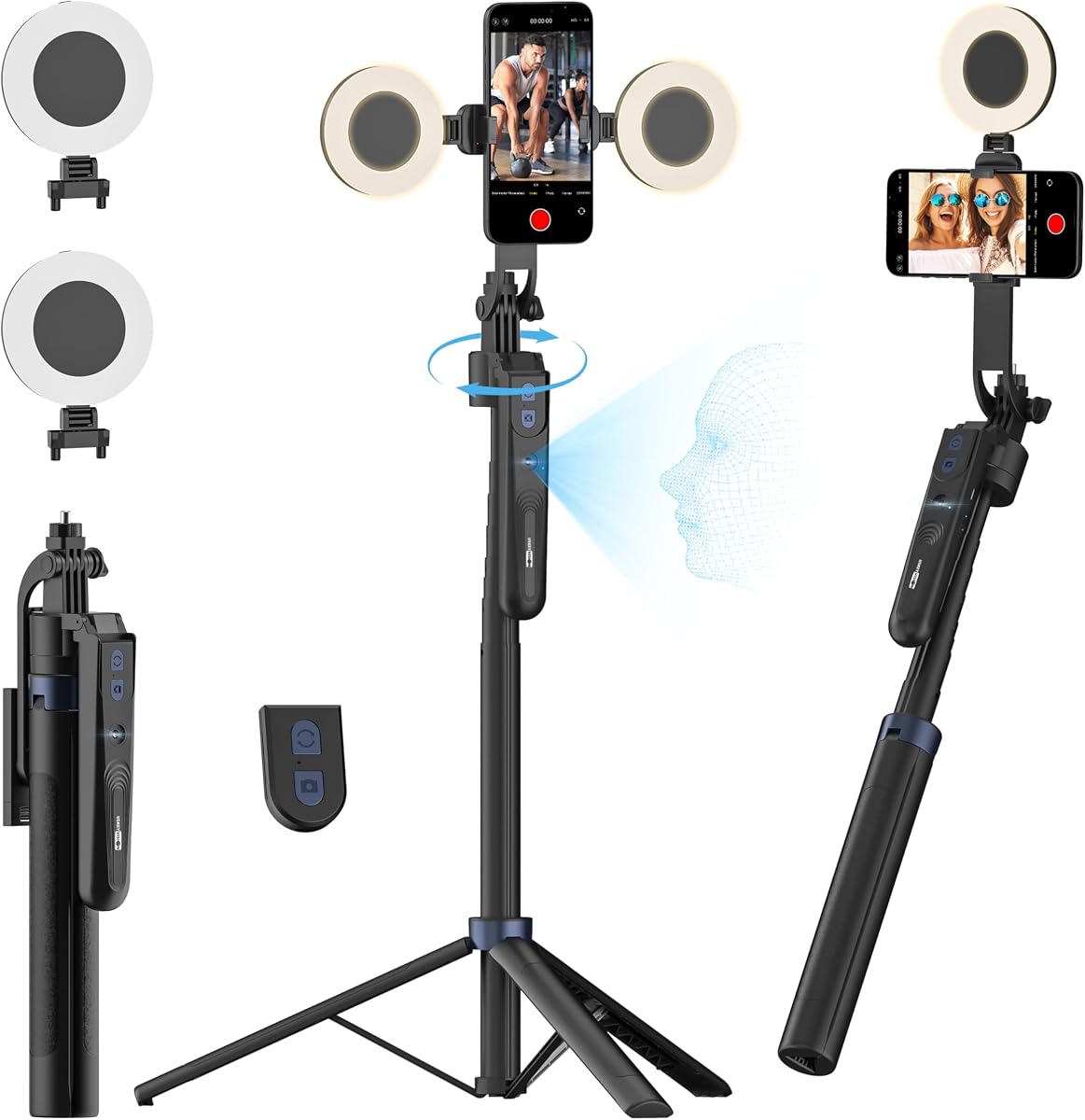
The Acer Gadget Auto Face Tracking Tripod is the highest-rated product in this roundup, carrying a 4.6 rating. It combines app-free face and body tracking, gesture operation, a detachable ring light, and a rotating gimbal with anti-shake stabilization. Its aluminum quadpod reaches 64.4 inches and folds to 13 inches, offering a balanced mix of floor-standing reach and portable length.
We may earn a commission when you buy through this link, at no additional cost to you.
An OK gesture starts tracking and an open palm pauses it, while the motorized head keeps the subject centered as the person moves. The stated working distance is 0.5 to 5 meters. Its detachable mini ring light provides warm, cool, and natural modes for low-light or mixed-color-temperature settings. The quarter-inch mount supports phones, cameras, GoPros, and additional ring lights, making it more than a one-purpose phone accessory.
The four-foot structure is intended to offer more stability than a conventional three-legged floor stand, and the 360-degree rotating gimbal is designed to reduce unwanted movement during recording. Its 64.4-inch maximum height is shorter than the 70.9-inch and 71-inch extensions offered by several competitors, though the quadpod base may compensate with a more reassuring footprint. The product also lists only one detachable ring light, so creative setups with two light sources may require another accessory.
This is a premium-style pick for creators who value smooth motorized movement, a stable base, broad accessory compatibility, and compact folding. It works particularly well for movement-based vlogs, live presentations, and self-recorded tutorials. Those wanting greater maximum height may prefer the Yeaki or yAyusi stands, while the Crienten is the simpler and more compact alternative.
The rotating gimbal is designed to adjust the frame while reducing unwanted shake. This is a meaningful distinction for creators who want tracking to support smooth-looking footage rather than merely reposition a fixed phone.
A 13-inch folded length makes the stand more manageable for travel than its full height suggests. The four-foot base supports a stable platform, while the telescoping structure allows desktop, eye-level, and elevated compositions from one unit.
We may earn a commission when you buy through this link, at no additional cost to you.
This Four-in-One Tracking Tripod is a flexible kit for content creators who want to move between a selfie stick, desktop tripod, handheld stabilizer, and auto-tracking floor stand. It has a 4.3 rating and uses a built-in AI chip, rechargeable battery, motorized 360-degree rotation, and gesture-controlled face or body tracking. The telescoping pole reaches 70.9 inches and collapses to 11.8 inches.
We may earn a commission when you buy through this link, at no additional cost to you.
The included lights receive particular attention in the product information. Two detachable mini ring lights each offer warm, cool, and natural modes, with three brightness levels per color for nine combinations in total. At maximum brightness, the stated continuous runtime is 50 minutes. A detachable seven-button remote works from up to 33 feet, and the phone holder rotates for front and rear shooting.
The tracking head supports 270-degree vertical and 360-degree horizontal rotation, covering portrait, landscape, and panoramic positions. The phone holder adjusts from two to four inches and can be removed as a standalone holder for calls or viewing. The listing also mentions a 20-to-48-hour rechargeable battery runtime, but that range likely reflects different operating conditions rather than continuous use with maximum lighting.
This model is a good fit for creators who value a broad accessory bundle and several physical configurations. It is less suitable for buyers who require a wide clamp, since the stated two-to-four-inch width is narrower than some competitors. The Acer Gadget offers a similarly compact folding concept with a broader overall extension range, while the yAyusi model provides a comparable long-tripod package with a simpler 2.5-inch-light setup.
The ability to remove the holder and use the tracking head in different configurations adds genuine versatility. It can support a seated call, a desktop presentation, a handheld recording, or a tall solo shoot without requiring several separate accessories.
Nine color-and-brightness combinations give the lights more adjustment than basic fixed-color models. The seven-button remote also provides a straightforward way to operate recording functions from across a room, although it does not offer the explicitly listed scrolling controls of the complete vlogging kit.
We may earn a commission when you buy through this link, at no additional cost to you.
The Crienten Auto Face Tracking Tripod delivers the essential tracking functions in a relatively focused package. It has a 4.4 rating and combines a real-time AI computing system, 360-degree face or body tracking, gesture commands, a Bluetooth remote, and two detachable fill lights. The stand operates without a companion app, which simplifies setup and allows it to work across different video applications.
We may earn a commission when you buy through this link, at no additional cost to you.
Its gesture system is one of the clearest in the group. An OK gesture starts tracking, an open palm pauses it, and a thumbs-up cancels the gesture function. This gives the user more direct control than a two-command setup. The phone holder expands from two to four inches, and a standard quarter-inch interface supports attachment to a tripod or other compatible equipment. Both fill lights provide three color modes and three brightness adjustments within each mode.
Because the supplied information does not list a maximum extension height, this model is best evaluated as a compact or general-purpose stand rather than a tall floor-stand specialist. Its two-to-four-inch holder is also narrower than the four-to-seven-inch range advertised by some rivals. It may not fit a large phone with a broad case, and users should confirm their device dimensions before purchasing. The absence of an app is a meaningful privacy and convenience advantage for many buyers.
The Crienten is a strong budget-oriented recommendation for livestreamers, remote workers, teachers, and casual creators who need reliable motorized framing and lighting without installing software. It is less suited to people requiring high-angle floor shots. For those needs, the Yeaki, USKEYVISION, and long-pole models provide clearly stated extension lengths.
The no-app approach removes a common source of setup friction. Creators can move between supported video, meeting, and livestreaming applications without relying on a particular tracking program or granting application access.
The two fill lights can be positioned independently and adjusted for color and brightness. This is useful for reducing facial shadows or matching different indoor conditions, while the detachable design also makes it possible to use the tracker without illumination.
We may earn a commission when you buy through this link, at no additional cost to you.
The Multi-Function Tracking Tripod combines a long aluminum floor stand with AI face and body tracking, a seven-button remote, and two detachable square fill lights. It has a 4.4 rating and supports motorized 360-degree horizontal rotation plus 270-degree vertical movement. Its tracking range extends to five meters, and the telescoping pole reaches 70.9 inches before folding to 12.6 inches.
We may earn a commission when you buy through this link, at no additional cost to you.
The four-leg structure uses an umbrella-like frame, metal ribs, and a keel at the base to improve support. The detachable phone holder rotates for front and rear cameras and adjusts from four to seven inches, accommodating a broad selection of phones and cases. Two detachable lights provide cool and warm modes across six brightness levels, with up to two hours of runtime stated at maximum brightness.
The remote operates from up to 33 feet and can be detached from the stand. A quarter-inch interface adds compatibility with smartphones, cameras, and other mounting solutions. One inconsistency in the listing is height: the general description refers to a 70.9-inch pole, while the multi-function section also states a 63-inch maximum height. Buyers who need an exact extended measurement should check the current product details and collapsed configuration.
This model is a good option for creators who want a tall, stable, light-equipped stand without paying for a full accessory bundle. Its wide phone holder is among the more accommodating in the roundup. The USKEYVISION offers more lighting modes, while the Acer Gadget focuses more heavily on gimbal stabilization. This stand is the better fit for users who prioritize maximum reach and a broad phone clamp.
The four-to-seven-inch adjustment range is more accommodating than the narrower two-to-four-inch clamps on several competitors. That makes it easier to accommodate phones with protective cases while retaining a secure grip.
The reinforced four-leg base is designed to reduce movement when the pole is raised. Its multiple-point support and metal-rib structure make it more appropriate for floor-standing recordings than a lightweight desktop tracker.
We may earn a commission when you buy through this link, at no additional cost to you.
The Compact Smart Tracking Tripod is built for portability, tabletop recording, and creators who want more than a fixed phone holder without carrying a full-height tripod. It carries a 4.4 rating and features AI face or body tracking, 360-degree motorized rotation, 180-degree neck adjustment, a wireless remote, and app-free operation. Its body measures 8.6 by 3.7 by 3.7 inches and weighs 9.5 ounces.
We may earn a commission when you buy through this link, at no additional cost to you.
The rotating clip can be detached and used as a desktop phone stand for calls, messages, or viewing. A hidden pole extends from the neck to provide additional shooting height, while front and rear camera rotation offers different perspectives. Pressing the cycle button initiates continuous 360-degree rotation, which may be useful for presentations, live broadcasts, teaching, meetings, or cooking demonstrations.
Its internal 1200mAh battery recharges through a Type-C connection, with a red indicator shown during charging. The base detaches and exposes a standard quarter-inch connector, allowing the tracking mount to be placed on another tripod. That flexibility partly offsets the compact native height. However, the stand does not include a fill light, and the hidden extension provides less elevation than a 63-inch or 70-inch telescoping model.
This is the most travel-friendly recommendation for users who create at a desk, record from a counter, or need a lightweight tracker for occasional use. It is less appropriate for filming a standing subject or producing high-angle floor content. The USKEYVISION and Acer Gadget offer taller frames and built-in lighting, while the Crienten is another compact-oriented alternative with two detachable fill lights.
At 8.6 inches long and 9.5 ounces, the tracker is easy to place in a bag without requiring a dedicated carrying case. It is particularly practical for remote meetings, livestreaming from a desk, and recording cooking or craft demonstrations.
The concealed neck pole and detachable quarter-inch base provide two ways to change the shooting position. Users can raise the device quickly for short recordings or mount the head on a separate full-height tripod for more demanding work.
We may earn a commission when you buy through this link, at no additional cost to you.
The yAyusi tracking tripod offers a long-format alternative for creators who want face and body tracking without a dedicated app. It has a 4.3 rating and includes a telescoping stand, rechargeable remote, two detachable ring lights, a carrying bag, and a universal phone holder. The listed tracking system recognizes a face or body and follows movement across a range of up to five meters.
We may earn a commission when you buy through this link, at no additional cost to you.
Each ring light offers warm, cool, or natural color temperatures with three brightness levels. The remote supports wireless shooting from up to 10 meters, while the quarter-inch mount allows the phone holder, lights, or compact camera to be connected to the support. The phone clamp adjusts from two to four inches, making it suitable for many iPhone and Android models, including those used with modest cases.
The product title refers to 70.9 inches, but the feature description gives a 63.8-inch maximum and 13.4-inch collapsed length. This discrepancy makes the title less reliable as a measurement guide. The listed battery life of up to 20 to 48 hours is also a broad range that will vary with tracking, rotation, and other functions. Users who need exact dimensions or all-day runtime should consult the current manual and listing.
Despite those inconsistencies, the yAyusi remains a capable choice for vloggers and livestreamers because it combines long reach, app-free tracking, lights, and a remote in one package. It is less appealing for users with large phones or those who need a floor tracker with a clearly documented maximum height. The Acer Gadget and USKEYVISION provide clearer dimension guidance alongside comparable tracking functions.
The no-app tracking system is convenient for creators who move between livestreaming, meetings, and recorded video. Its motorized rotation keeps the subject framed while the five-meter tracking range accommodates moderate movement.
The inclusion of two lights, a remote, and a carrying bag means the basic accessories are already grouped with the stand. This reduces the need to assemble a separate kit for a mobile vlogging setup.
We may earn a commission when you buy through this link, at no additional cost to you.
The Complete Wireless Vlogging Kit is the most content-production-oriented option in the guide. It has a 4.3 rating and combines an aluminum auto-tracking tripod, two LED lights, a wireless clip-on microphone system, a scrolling remote, and two storage bags. The stand extends to 63 inches, rotates 360 degrees, and tilts through 270 degrees, giving creators a flexible platform for short-form and long-form video.
We may earn a commission when you buy through this link, at no additional cost to you.
The tracking system automatically centers the user's face, with an OK gesture starting tracking and an open palm stopping it. The remote goes beyond a shutter: it can scroll through short-form video, turn pages on an iPad, and send likes with a double press. That makes it particularly relevant to TikTok-style workflows in which controlling playback and engagement from a distance can otherwise interrupt a recording.
Audio is the kit's major differentiator. It includes two microphones and a receiver, with a listed 79-foot wireless range and up to 12 hours of battery life after a two-hour charge. The receiver supports Type-C for newer iPhones and Android devices and Lightning for earlier iPhone models. A broader compatibility statement should still be checked against the user's exact device and connector requirements.
This bundle is best suited to creators who need tracking, lighting, and improved sound in one purchase. It may be excessive for someone interested only in a phone stand, and the four-to-four-point-seven-inch holder specification is narrower than several competitors. Those who need a wider clamp can choose the Multi-Function Tracking Tripod, while the Yeaki offers a more flexible extended height and scrolling-capable remote.
Most tracking stands address framing but leave audio as a separate concern. The included wireless microphones give this bundle a more complete production package for interviews, narration, and vlogs, with a stated operating range suitable for ordinary room-sized recordings.
The scrolling and double-press functions distinguish this remote from standard shutter controls. They are designed to reduce repeated touchscreen interaction during short-form recording, particularly when the phone is positioned beyond arm's reach.
We may earn a commission when you buy through this link, at no additional cost to you.
The right tracking stand depends on how and where you record. Height, tracking behavior, lighting, controls, device fit, mounting options, and portability should be evaluated together rather than treating the motorized rotation as the only important feature.
Look for a model that explicitly supports the type of movement your content requires. All ten products in this guide describe face or body tracking, but their architecture differs. Some use a built-in camera and AI processing, while others also provide a gesture-controlled start and pause sequence. The listed operating distances are generally around five meters, which is suitable for indoor demonstrations and moderate movement, but a fast subject can still exceed the sensor's practical limits.
Choose a tracker with clear gesture commands and an app-free workflow if seamless setup is important. Creators who routinely move close to the camera or make abrupt gestures should understand that vision-based tracking depends on recognition, line of sight, distance, and movement speed.
Tall stands are valuable for full-body demonstrations, group recordings, overhead angles, and keeping the camera away from crowded surfaces. The options here range from a compact 8.6-inch desktop body to telescoping models advertised at approximately 63 to 71 inches. Because a few listings contain conflicting measurements, check the current specifications and collapsed dimensions rather than relying solely on the product title.
Height should be balanced against base design. Aluminum construction, a four-leg or quadpod structure, non-slip feet, and a wide footprint can improve stability, although a taller stand occupies more floor space and requires a level surface.
Integrated lighting can make a large difference in dim rooms, nighttime streaming, and indoor tutorials. Some stands include one detachable ring light, while others provide two ring or square lights. More color modes and brightness levels allow better matching between warm household bulbs, cool office lighting, and neutral daylight.
Consider runtime and placement as well as brightness. Maximum-brightness runtimes vary considerably, and two detachable lights provide more positioning flexibility than one fixed source. If your recording environment already has strong natural light, a tracker without lighting may be sufficient and less complicated to carry.
A remote is essential when the phone is outside arm's reach. Basic models provide shutter and photo controls, while others add scrolling, swiping, page turning, or double-tap actions. Those expanded functions are especially useful for short-form video, but buyers should consider whether they require a particular app or operating system.
Gesture control provides another way to begin and pause tracking without touching the phone. An OK gesture commonly starts tracking and an open palm pauses it, while some models add a thumbs-up cancellation command. A three-command system offers more precise control, but users should practice the gestures where the camera can clearly see the hand.
Check the holder's stated width against the dimensions of your phone and case. Clamps in this group range from two-to-four-inch models to four-to-seven-inch models, and some products explicitly exclude tablets or foldable phones. A narrow holder can be difficult to use with a large handset or bulky protective case.
A standard quarter-inch interface adds valuable flexibility. It can support action cameras, compact cameras, microphones, and additional lights, allowing the tracking head to be mounted on another tripod. This is especially helpful if you already own compatible accessories and want to avoid building an entirely new support system.
The best stands often convert between several roles. A floor tripod can become a selfie stick, desktop stand, handheld stabilizer, or a removable phone holder. Removable clamps are helpful for calls and viewing, while telescoping poles provide broader framing choices for standing content.
More configurations can also introduce more moving parts and setup decisions. Consider how often you will change the form factor. A single-purpose floor stand may be easier to deploy consistently, whereas a multi-function design is more attractive to users who move between recording, calls, and entertainment.
Rechargeable operation is standard across the category, but published runtimes vary by model and use. The quoted ranges may include favorable conditions rather than continuous tracking, while some battery figures apply only to the fill lights. Look for a USB-C charging arrangement and an indicator that makes it clear when charging is complete.
For a long session, consider how often the stand will rotate, track, and illuminate simultaneously. Carry a charging cable or power bank if uninterrupted operation is essential, and recharge the remote and removable lights separately when they are not docked with the main unit.
Travel users should compare both folded size and listed weight, not just maximum extension. The compact Smart Tracking Tripod is designed around portability, while long telescoping models include carrying bags and aluminum structures that are easier to keep upright but bulkier to transport.
Balance extended height against the spaces where you intend to shoot. A narrow desk, crowded room, or travel restriction may make a shorter model more practical even if it cannot create a high overhead angle. Confirm that the folded unit fits your bag before committing to a larger stand.
Begin by assembling the stand on a level surface, extending the legs or pole, and securing the phone in the holder. Turn on the tracker and allow it to identify the person or face before recording. Use the documented OK gesture to start tracking and the open-palm gesture to pause, keeping your hand clearly visible and within the stated working distance.
Next, select the appropriate framing and orientation. Use portrait mode for vertical social video, landscape mode for demonstrations or wide scenes, and manual angle adjustments for fixed compositions. When using a light, choose a color temperature that matches the room and a brightness level that avoids washing out facial detail. Start or stop recording with the remote after the phone and remote are connected.
For care, collapse the telescoping sections gently, remove the phone before transporting the unit, and detach removable lights or accessories when appropriate. Keep the tracking camera and sensor lens free from dust and fingerprints, and avoid exposing the electronics to moisture. Charge the main unit, remote, and detachable lights as directed, and inspect locks, hinges, feet, and mounting threads before each important recording.
All ten products listed here are described as operating without a companion app, using built-in tracking and gesture controls instead. This can make setup easier and limit the need to grant app permissions. You should still confirm that the stand's remote and scrolling functions are compatible with the recording application you plan to use.
Most of the listed models specify an optimal tracking distance of approximately five meters, while the Acer Gadget lists a working range of 0.5 to 5 meters. Actual performance can change with lighting, movement speed, framing, and the subject's distance. Moving too quickly or stepping outside the effective range may interrupt tracking.
The most common controls are an OK or pinched-finger gesture to start and an open palm to pause tracking. The Crienten adds a thumbs-up gesture to cancel the gesture function. Gesture recognition works best when the hand is visible, the movement is deliberate, and the subject remains within the stated tracking distance.
Most models are designed for both iPhone and Android phones, but the holder width and stated size range vary. Some accommodate roughly two-to-four-inch devices, while others accept approximately four-to-seven-inch phones. The USKEYVISION specifically excludes tablets and foldable phones, so users should check device and case dimensions before buying.
Several models include a standard quarter-inch interface that supports compact cameras, action cameras, GoPros, ring lights, or microphones. Compatibility depends on the exact model and the size or weight of the attached accessory. The Acer Gadget, Auto Face Tracking Tripod 360 Rotation, USKEYVISION, and several other picks list this broader camera support.
They are not essential in bright rooms, but they can improve facial visibility indoors, at night, or under inconsistent lighting. Models with two detachable lights offer more positioning control than those with one, while models without lights are often simpler and more compact. Consider light runtime, color modes, and brightness levels as well as the light's physical size.
No tracking system can prevent every instability, especially on uneven or slippery surfaces. A wide base, non-slip feet, aluminum construction, and a low center of gravity improve stability, but the phone, mounted accessories, and extended pole still affect balance. Place the stand on a level floor and avoid extending it in strong wind or crowded walkways.
Confirm the battery charge, phone fit, remote connection, lighting mode, and tracking distance before recording. Test the OK and open-palm gestures, verify that the subject remains visible, and make sure the phone is positioned to capture the intended composition. A brief test recording can reveal unwanted movement, missed commands, or lighting problems.
The Acer Gadget Auto Face Tracking Tripod stands out for its 4.6 rating, anti-shake gimbal, quadpod base, and compact fold. The Auto Face Tracking Tripod 360 Rotation is the most balanced general-purpose option, with a 70.9-inch extension, no-app operation, and a useful quarter-inch mount, while the Crienten provides an approachable package with three-command gesture control and two detachable lights.
Your priorities should determine the remaining choice. Select a long aluminum model with a four-leg base for full-body or elevated recordings, a dual-light system for indoor content, or the compact Smart Tracking Tripod for travel and desktop use. Complete Wireless Vlogging Kit is the most extensive bundle because it adds wireless microphones, while the USKEYVISION offers two lights, remote control, and a long floor-stand format.
Before making a final selection, verify the current dimensions, phone-holder range, battery guidance, connector support, and package contents on the live listing. These details can change and are not always consistent across product descriptions. Checking the latest information will help ensure that the chosen auto tracking phone stand fits your device, recording space, and preferred way of creating.