
Logitech G203
4.6Editor score
Accurate 8,000 DPI sensor
Six-button gaming layout
Customizable RGB lighting
Our Blue Gaming Mouse guide compares 10 models across wireless options, sensor precision, DPI, battery life, comfort, programmable controls, and RGB lighting.
A blue gaming mouse should combine responsive tracking, comfortable handling, dependable connectivity, and controls suited to your favorite genres. The best models also fit your desk setup and routine, whether you need a lightweight wireless option, vivid lighting, quiet clicks, or extensive button customization.
We compared these ten mice using the supplied specifications, focusing on connection modes, sensor performance, adjustable DPI, battery considerations, button layouts, weight, software, lighting, and intended hand size. The list covers wired, 2.4GHz, Bluetooth, and tri-mode designs rather than focusing on one connection method.
Each review highlights the strongest reasons to consider a particular mouse, along with meaningful trade-offs. Rankings reflect the information available for this guide, while exact availability, configurations, ratings, and prices can change. Always check the current listing to confirm that the color, accessories, and software match your needs.
4.6Editor score

4.4Editor score

4.6Editor score
This side-by-side overview compares the ten featured gaming mice by connection, sensor, control, power, and practical everyday features, helping you narrow the field according to your preferred setup.




The EPOMAKER NEX Lite is the most feature-dense option in this guide, earning a 4.4 rating and an Editor's Choice place for its combination of dual displays, broad connectivity, and an included charging dock. The mouse can operate through 2.4GHz wireless, Bluetooth 5.0, or a wired USB-C connection, giving it unusual flexibility for a compact gaming peripheral.
We may earn a commission when you buy through this link, at no additional cost to you.
Its PAW3311 optical sensor reaches 12,000 DPI and offers six selectable sensitivity levels, while five programmable buttons can be assigned through the online configuration utility. One of the most useful details is the ability to store personalized settings on the mouse. The paired OLED displays show information such as DPI, battery level, connection mode, and polling rate without requiring a separate screen or constantly opening a companion application.
The main compromises relate to fit and setup. At 65g, the NEX Lite is light, but its right-handed ergonomic shape is specifically designed for medium-to-large hands and claw or palm grips. The customization process depends on online software, with Chrome recommended for the best compatibility, so prospective buyers should consider that extra step before committing.
This is a strong fit for gamers and multitaskers who enjoy seeing performance data at a glance. It is especially compelling for anyone who wants wireless freedom, wired versatility, RGB lighting, and a tidy charging solution in one package. Buyers who need a symmetrical design or want a mouse with more than five programmable buttons may prefer another model.
The mouse and charging dock both use OLED screens, putting commonly checked information directly where you can see it. That reduces interruptions and makes changes such as connection mode or DPI selection easier to verify.
Switching among 2.4GHz, Bluetooth 5.0, and USB-C wired operation makes the NEX Lite adaptable to gaming PCs, laptops, and other compatible devices. On-board memory is particularly helpful when moving to a new system.
We may earn a commission when you buy through this link, at no additional cost to you.
The Logitech G203 is a straightforward gaming mouse with a 4.6 rating and a strong case as the budget-focused recommendation. Its 8,000 DPI optical sensor includes zero filtering and smoothing according to the supplied specifications, providing a clear response improvement over many standard computer mice without introducing unnecessary complexity.
We may earn a commission when you buy through this link, at no additional cost to you.
G HUB support allows players to customize RGB colors, synchronize lighting with other LIGHTSYNC-compatible equipment, and assign commands to the six-button layout. Sensitivity can be adjusted through the software, with up to five DPI settings available through the central cycle button. The primary buttons use durable metal springs for crisp feedback, while a 6.89-foot USB Type-A cable provides a dependable wired connection.
Its main limitation is obvious: there is no wireless mode. Players who move frequently between devices or prefer a completely cable-free desk will need to look elsewhere. The six-button layout is also less flexible than the seven-button UHURU or the heavily programmable GravaStar Mercury M1 Pro.
Despite those limits, the G203 covers the essentials with less fuss than most specialized gaming mice. It is a sensible recommendation for a desktop gaming setup, competitive players who want stable wired tracking, and buyers who value lighting and software without seeking extreme specifications. Its blue version also directly fits the color focus of this guide.
A wired connection removes receiver pairing, wireless interference, and battery management from the experience. That simplicity makes the G203 especially approachable for gaming on a stationary PC.
G HUB provides the expected controls for lighting, sensitivity, and assignments. Six buttons and five DPI presets cover common needs without turning the mouse into a complex command surface.
We may earn a commission when you buy through this link, at no additional cost to you.
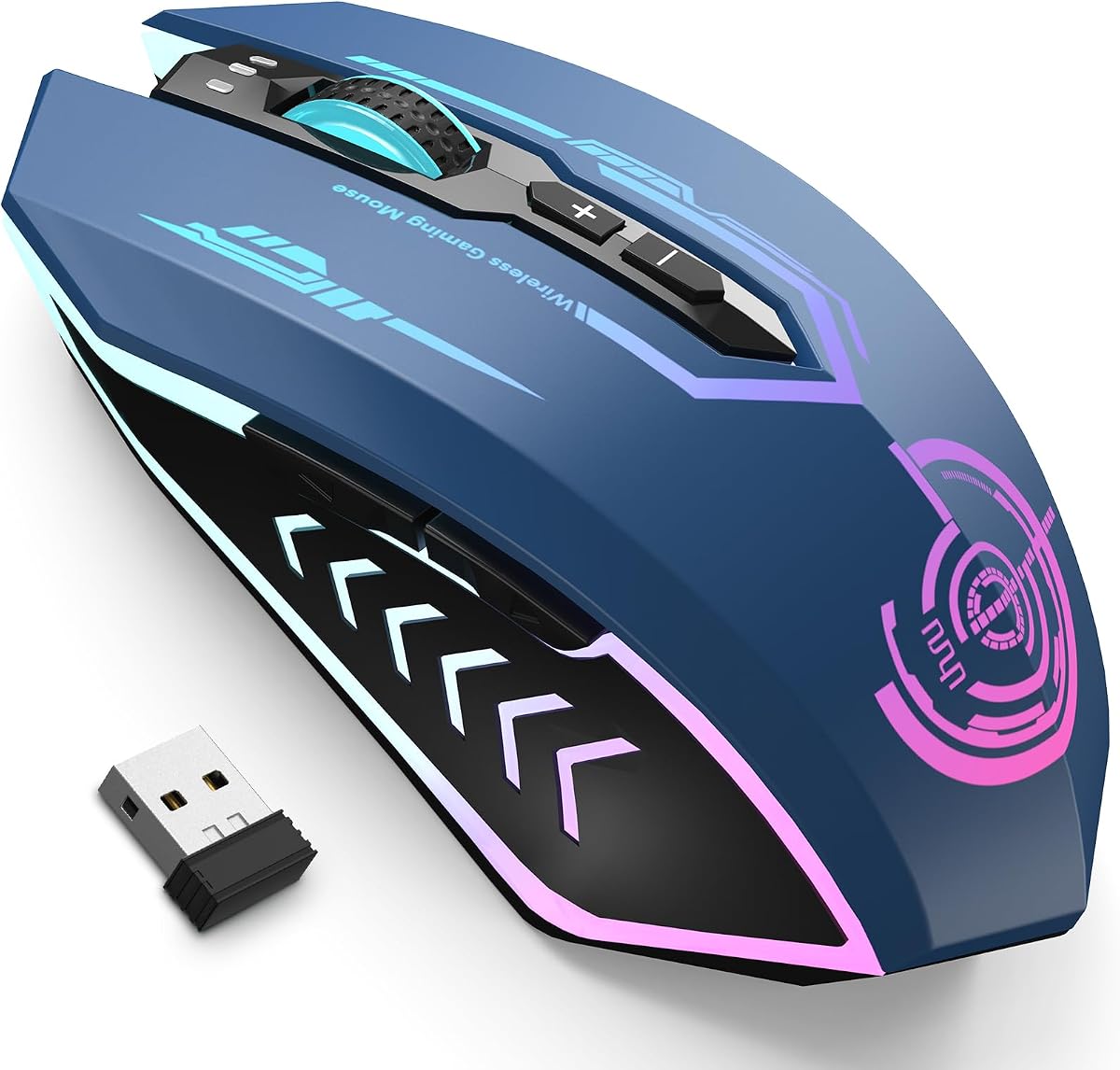
The UHURU Wireless Gaming Mouse carries a 4.4 rating and stands out for its seven programmable buttons, rechargeable design, and broad platform support. Its 2.4GHz receiver offers a stated connection range of up to 50 feet and is intended to provide near-instantaneous communication for common competitive games.
We may earn a commission when you buy through this link, at no additional cost to you.
Sensitivity can be changed directly beneath the scroll wheel across five levels ranging from 1,000 to 12,000 DPI. Seven buttons support macro editing after installing the supplied driver, making the mouse a practical fit for MMO-style games and other titles that benefit from extra actions. Lighting cycles automatically through seven colors and cannot be locked to a selected color.
There are a few limitations to consider. Its driver is compatible with Windows only, even though the basic mouse can operate with Mac OS and Linux. The automatic RGB cycle may not suit a carefully coordinated setup, and the claimed 60-hour battery life with lighting on differs from the stated 80 hours with lighting off.
The UHURU is a compelling option for a player who values programmable controls and wants wireless freedom without constantly replacing disposable batteries. It can also be used while charging when the nano receiver is installed. Buyers seeking manually fixed colors or fully cross-platform macro editing should look at alternatives with more flexible lighting or software.
The extra controls provide room for custom commands and macros in games with many abilities. They can also reduce reliance on keyboard combinations, although advanced assignments remain Windows-focused.
The battery lasts a stated 60 hours with RGB enabled and 80 hours with it disabled. Automatic sleep helps preserve charge, and continued operation while charging adds flexibility for long sessions.
We may earn a commission when you buy through this link, at no additional cost to you.
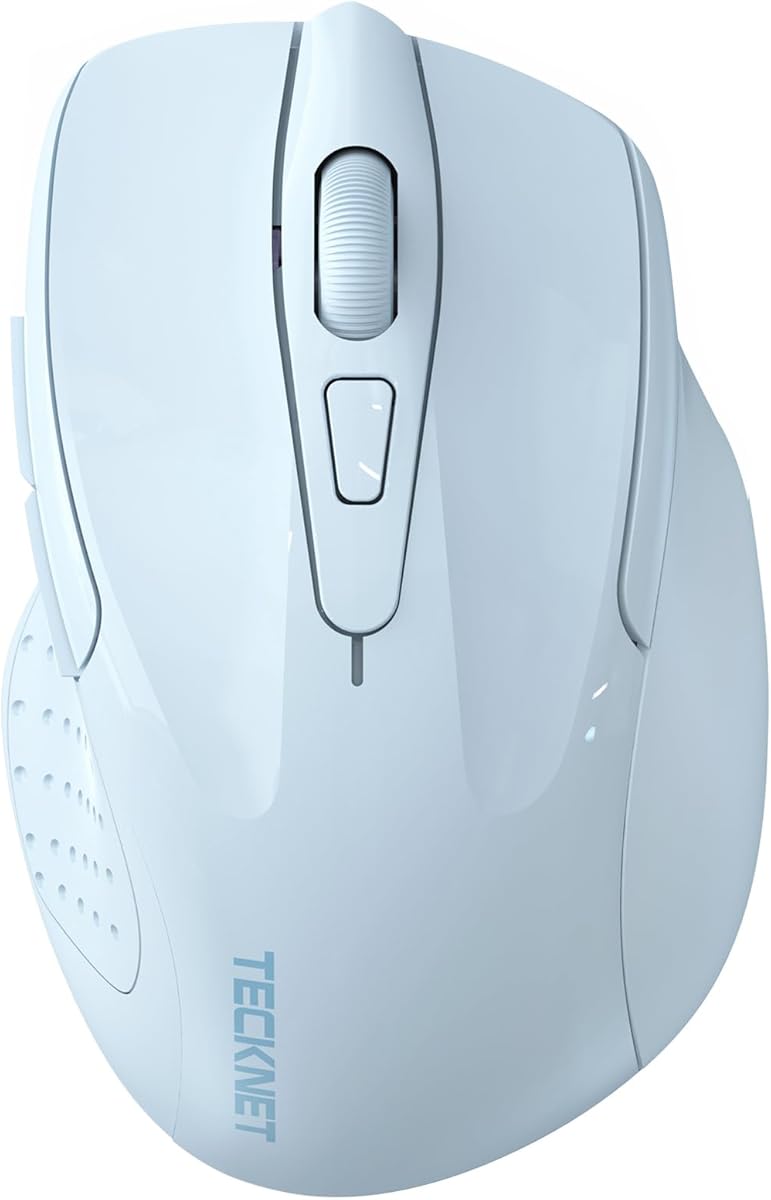
The TECKNET Wireless Mouse is a lightblue, dual-device option with a 4.5 rating that emphasizes quiet operation and practical productivity. It supports Bluetooth 5.0 or 3.0 and a USB-A 2.4GHz connection, allowing it to move between two devices with a button press.
We may earn a commission when you buy through this link, at no additional cost to you.
Six DPI levels range from 800 to 4,800, covering general browsing, document work, and more precise pointer control. The main clicks are designed to be quiet, which makes the mouse useful in offices, libraries, and shared spaces. Compatibility extends across Windows, macOS, Chrome OS, and Linux, although the side buttons do not work with macOS.
The design is compact and is described as ideal for small-to-medium hands, with some larger users potentially enjoying the smaller shape. Two AAA batteries are required but not included. The side buttons and scroll wheel are also not silent, so buyers expecting total silence should note that the quiet design is concentrated in the primary click area.
This mouse is a better fit for a hybrid work-and-play setup than for an enthusiast competitive configuration. Its dual-device switching, lightblue finish, adjustable sensitivity, and quiet clicks make it convenient for shared spaces. Competitive players who need very high DPI, extensive macros, or an explicitly gaming-focused sensor may prefer a more specialized option.
The primary buttons are designed for whisper-quiet operation during work or late-night use. The scroll wheel and side buttons are not silent, so quiet operation is beneficial rather than absolute.
Bluetooth and 2.4GHz connectivity allow fast movement between a laptop and another computer. That makes the mouse especially useful when one device is used for gaming and another for daily work.
We may earn a commission when you buy through this link, at no additional cost to you.
The INPHIC A9 offers a 4.4 rating and a versatile tri-mode design centered around the 12,800 DPI sensor. It supports dual-channel Bluetooth 5.0, 2.4GHz wireless, and USB-C wired operation, allowing it to serve laptops, desktops, tablets, and phones.
We may earn a commission when you buy through this link, at no additional cost to you.
Its asymmetric shell is sculpted for right-handed users with medium-to-large hands, using a thumb rest and matte anti-slip surface to support palm and claw grips. Six DPI settings run from 800 to 12,800, and the stated tracking performance remains smooth across desks, mouse pads, and fabric surfaces. A 500mAh rechargeable battery includes a three-level power indicator and supports Type-C fast charging.
The wired mode requires a separate USB-C data cable because one is not included. The two Bluetooth channels allow two Bluetooth devices to be connected alongside one 2.4GHz device, which is convenient but should be considered when organizing receivers and chargers. No mandatory driver is needed for ordinary operation, which simplifies setup across several operating systems.
The A9 is a strong general-purpose choice for gamers who also use mobile devices or regularly switch between systems. It offers a better sensor ceiling and broader connectivity than many similarly practical wireless mice, though it does not include the elaborate displays, receiver-based high polling, or extensive macro controls found in more specialized models.
Bluetooth, 2.4GHz, and USB-C modes cover both portable devices and gaming setups. Plug-and-play operation and broad platform support reduce setup friction when changing computers.
The sculpted thumb rest and anti-slip palm surface are intended to reduce strain during extended sessions. The shape suits medium-to-large hands better than compact designs.
We may earn a commission when you buy through this link, at no additional cost to you.
The SteelSeries Rival 3 Wireless Gen 2 has a 4.1 rating and brings a distinctive aqua colorway to a focused wireless gaming design. Its TrueMove Air 18K optical sensor supports up to 18,000 DPI, while SteelSeries describes its tracking as true one-to-one movement for accurate cursor positioning.
We may earn a commission when you buy through this link, at no additional cost to you.
Players can select 2.4GHz wireless for gaming or Bluetooth for everyday tasks. The 2.4GHz mode offers a stated 1.9-millisecond click latency, and the mouse is rated for up to 200 hours of 2.4GHz use or 450 hours over Bluetooth. Full PTFE feet are designed to support smooth gliding, while a built-in switch is claimed to withstand 60 million clicks.
Compared with feature-heavy alternatives, this model emphasizes core performance rather than elaborate displays, extensive macro software, or a large programmable button count. Its 4.1 rating is the lowest among the ten products here, so buyers should treat the stated advantages carefully and consider their own priorities before purchasing.
It is a strong option for players who want long battery life, low-latency wireless performance, durable switches, and a less conventional aqua finish. The absence of a wired mode and the relatively modest feature set make it less versatile than the GravaStar or EPOMAKER, but simpler for gamers focused on tracking and wireless freedom.
The 2.4GHz mode is designed around a 1.9-millisecond click latency for competitive play. Bluetooth remains available for general use when gaming-grade response is not the priority.
A stated 200-hour battery life reduces charging frequency in 2.4GHz mode. The 100% PTFE feet are intended to deliver low-friction movement across compatible surfaces.
We may earn a commission when you buy through this link, at no additional cost to you.
The GravaStar Mercury M1 Pro is the premium selection in this guide, combining a 4.6 rating with an 88g magnesium-alloy body and a 4K receiver. Its PAW3395 sensor reaches 26,000 DPI, the highest maximum in this comparison, and supports smooth, precise tracking for demanding aiming tasks.
We may earn a commission when you buy through this link, at no additional cost to you.
Tri-mode operation covers low-latency 2.4GHz wireless, Bluetooth, and wired play. The included 4K receiver is designed for ultra-low latency and stable communication, while the stated battery life reaches up to 200 hours. Intuitive software supports macro assignment, button remapping, performance adjustments, and custom GLOWSYNC RGB lighting profiles.
The primary trade-off is weight. At 88g, it is noticeably heavier than the 65g EPOMAKER NEX Lite, 3.4-ounce Logitech G305, and 39g ATK F1 V2. It also sits in a more specialized premium category, so buyers seeking a basic office mouse may find its advanced receiver, lighting, and construction unnecessary.
This model makes the most sense for competitive or enthusiast players who want high polling, a high-resolution sensor, broad connectivity, and extensive customization. The sculpted shape, tactile buttons, and long battery life support extended sessions, while the tri-mode design allows it to move between gaming and everyday devices without abandoning a single device.
The included 4K receiver supports a stated 4K polling rate and low-latency communication in 2.4GHz mode. Wired and Bluetooth options add flexibility when changing devices or priorities.
The magnesium-alloy frame gives the mouse a distinctive 88g build, while GLOWSYNC lighting and software-based remapping provide extensive visual and functional control. Programmable actions can support repeatable game commands and complex workflows.
We may earn a commission when you buy through this link, at no additional cost to you.
The YUNZII C2 is a compact blue wireless mouse with a 4.5 rating, aimed more at comfortable everyday gaming than competitive esports. Its soft, food-grade memory silicone shell is designed to reduce pressure and fatigue while providing a friendly, nontraditional appearance.
We may earn a commission when you buy through this link, at no additional cost to you.
The mouse operates through a 2.4GHz USB receiver and offers three DPI levels at 800, 1,200, and 1,600. Its stated 250Hz polling rate supports smooth general tracking, although that figure is modest compared with the gaming-focused models in this list. Primary buttons produce a maximum stated noise level of 45dB, making it useful in offices, libraries, cafes, or late-night sessions.
A single AA battery is included and can deliver up to six months of use according to the supplied information. Compatibility covers macOS, Windows, PCs, and laptops. The trade-offs are most noticeable in demanding games: the 1,600 DPI ceiling offers less sensitivity range, and the lower polling rate is not aimed at the most exacting competitive setups.
The C2 is a good recommendation for casual gamers, students, and travelers who value a soft grip, quiet clicks, attractive blue styling, and simple wireless operation. It is less appropriate for someone who routinely needs 10,000-plus DPI, high polling, extensive side controls, or a wired option for maximum responsiveness.
The memory silicone palm surface is intended to conform to the hand and reduce localized pressure. Its compact sculpted shape favors portability over large-hand ergonomic support.
Low-noise primary clicks make the mouse suitable for shared environments, while the included AA battery simplifies setup. The 2.4GHz receiver offers cable-free use across common computers and laptops.
We may earn a commission when you buy through this link, at no additional cost to you.
The Logitech G305 is a proven lightweight wireless gaming option with a 4.6 rating. Its next-generation optical HERO sensor delivers up to 12,000 DPI and 400 IPS precision, while LIGHTSPEED wireless technology provides a stated 1-millisecond report rate for competitive responsiveness.
We may earn a commission when you buy through this link, at no additional cost to you.
One AA battery can support up to 250 hours of continuous gameplay. Endurance mode in Logitech G HUB can extend that figure to as much as nine months, making it one of the strongest choices for players who dislike frequent charging or battery replacement. The compact design includes storage for the nano receiver, making it convenient to move between a gaming desktop and a gaming laptop.
Its weight of 3.4 ounces is a major advantage for quick movements and long sessions. The trade-offs are that it is not the featured blue model in this guide, it does not include the dual OLED displays or charging dock of the EPOMAKER, and it lacks the high-polling receiver and tri-mode connectivity of the GravaStar M1 Pro.
The G305 is best suited to competitive and portability-focused players who want low weight, dependable wireless response, and exceptional battery life. It remains an excellent general gaming mouse even when the blue color requested is unavailable, provided its black finish works with your setup and you can accept fewer advanced control features.
At only 3.4 ounces, the G305 is easy to move rapidly without the perceived heft of many wireless gaming mice. Its compact construction also supports convenient travel.
The stated 250-hour gaming battery life is supplemented by an Endurance mode that can extend operation to nine months. This makes the mouse particularly convenient for regular travel or casual use.
We may earn a commission when you buy through this link, at no additional cost to you.
The ATK Blazing Sky F1 V2 Ultimate is built around an ultralight, symmetrical design and carries a 4.6 rating. At 39±2g, it is the lightest featured model, which should appeal to players who favor rapid movement and prefer a low-profile shell over a deeply sculpted ergonomic shape.
We may earn a commission when you buy through this link, at no additional cost to you.
Its dimensions are listed at 118.2 by 62.4 by 38.8mm, placing it in the small-to-medium hand category. The frame uses a nano anti-fingerprint coating, and preinstalled double-layer anti-dent feet are included along with a spare set. Its pearl blue finish closely matches the color-oriented focus of this roundup.
The supplied product information is limited compared with the other entries, so specific claims about sensor resolution, polling rate, battery life, connection modes, and software should be verified on the current listing. The defined hand-size guidance is also important: larger users may find the symmetrical 39g body less accommodating than a fuller ergonomic shell.
This mouse is best for lightweight, competitive play and users who prefer symmetrical shapes. It may also suit buyers who enjoy the pearl blue finish and want replacement feet in the box. Before purchasing, verify the current sensor and wireless specifications, ensure the dimensions suit your hand, and confirm which connection features your preferred setup requires.
A weight of approximately 39g keeps rapid directional changes easy to perform. The symmetrical shell offers an alternative to the deeply contoured designs used by many right-handed gaming mice.
The anti-fingerprint coating helps resist visible marks on the pearl blue frame. Preinstalled feet and an included replacement set provide a practical maintenance advantage over mice that only include a single installed set.
We may earn a commission when you buy through this link, at no additional cost to you.
The best blue gaming mouse is not determined by color alone. Sensor range, wireless responsiveness, button count, hand fit, software, lighting, battery behavior, and intended use all influence whether a model will feel right in daily play.
Wired mice offer a simple, consistent connection without receiver pairing or battery charging, making the Logitech G203 a practical choice for a stationary gaming desk. Wireless models remove cable clutter and are easier to move between devices, but receiver quality and connection mode still matter. The SteelSeries Rival 3 Gen 2 prioritizes gaming-grade 2.4GHz performance, while the Logitech G305 emphasizes a low-latency LIGHTSPEED receiver and long battery life. Tri-mode designs such as the EPOMAKER NEX Lite, INPHIC A9, and GravaStar M1 Pro offer the broadest choice by supporting wireless and wired operation.
DPI indicates how far the cursor moves for a given physical mouse movement, but a high maximum alone does not guarantee comfortable control. Look for several adjustable levels that let you move between precise aiming and rapid cursor travel. The TECKNET and YUNZII C2 are more modest general-purpose options at 4,800 and 1,600 maximum DPI. The EPOMAKER NEX Lite and UHURU reach 12,000 DPI, the INPHIC A9 reaches 12,800, the SteelSeries reaches 18,000, and the GravaStar reaches 26,000. Sensor smoothness, consistency, and the availability of practical presets are just as important as the headline maximum.
Polling rate indicates how frequently the mouse reports movement and clicks to the computer. Higher figures can reduce input delay when the entire system is properly optimized. The GravaStar M1 Pro includes a 4K receiver and advertises a 4K polling rate, while the SteelSeries Rival 3 Gen 2 states a 1.9-millisecond click latency in 2.4GHz mode. The Logitech G305 offers a 1-millisecond report rate. More basic wireless options, such as the YUNZII C2 with its stated 250Hz polling rate, remain suitable for casual play but do not target the same latency tier as dedicated competitive models.
A standard six-button layout covers left click, right click, scroll wheel, DPI control, and two side actions, as seen on the Logitech G203. The UHURU adds a seventh button and supports macro editing for more demanding games, while the GravaStar provides extensive remapping and programmable actions. The EPOMAKER NEX Lite offers five programmable buttons and stores customized settings on-board. More buttons can be useful in MMO, strategy, and productivity applications, but they are not automatically better for competitive shooters, where accidental presses may be undesirable. Check the software requirements, operating system support, and whether customization is stored locally.
Mouse size and shape influence comfort more than many buyers expect. The EPOMAKER NEX Lite and INPHIC A9 use right-handed shapes suited to medium-to-large hands, while the TECKNET is compact and primarily positioned for small-to-medium hands. The ATK F1 V2 is symmetrical and also targeted at small-to-medium users. The Logitech G305 is especially light at 3.4 ounces, the ATK weighs approximately 39g, and the GravaStar uses an 88g magnesium-alloy body. Palm, claw, and fingertip users should compare their habitual grip with the stated design rather than relying only on shape appearance.
Battery design affects how often a mouse needs attention. The Logitech G305 can run for a stated 250 hours in normal use, with Endurance mode extending that to as much as nine months. The SteelSeries lists up to 200 hours over 2.4GHz and 450 hours over Bluetooth, while the GravaStar states up to 200 hours. The UHURU provides a rechargeable battery with 60 hours of RGB-on use and can operate while charging under specified receiver conditions. The EPOMAKER includes a charging dock, and the INPHIC uses a 500mAh rechargeable battery with a power indicator. The TECKNET uses replaceable AAA batteries, while the YUNZII C2 includes one AA battery.
Blue colorways can complement an existing setup, but lighting behavior matters as much as the finish. The Logitech G203 supports customizable LIGHTSYNC lighting, the EPOMAKER NEX Lite includes touch-controlled RGB effects, and the GravaStar offers configurable GLOWSYNC zones. The UHURU uses seven automatically changing LED colors that cannot be fixed to one selected color or fully programmed. The YUNZII C2 and ATK F1 V2 emphasize their blue or pearl blue appearances rather than listing extensive RGB features. Choose a mouse whose illumination matches whether you want coordinated static lighting, dynamic effects, or a clean design with minimal visual activity.
Configuration software can determine whether a mouse adapts easily to different tasks. Logitech G HUB supports lighting, sensitivity, and button assignments for the G203 and G305, while the EPOMAKER uses browser-based software and can save settings on the mouse. GravaStar software supports macros, remapping, performance settings, and lighting profiles. The UHURU supports macros through a Windows-only driver, so Mac and Linux users should verify that limitation. By contrast, the INPHIC A9 and YUNZII C2 emphasize plug-and-play operation with fewer advanced customization features. Consider whether onboard memory and cross-platform support matter more to you than an extensive options panel.
Begin by installing the required batteries or charging the mouse according to its instructions, then connect its receiver or pair it through the stated wireless mode. Place it on a clean, suitable tracking surface and confirm that the pointer moves naturally. If your model has a DPI button, test several settings before entering a game, since your preferred sensitivity may differ from the default.
Configure DPI, primary buttons, side controls, lighting, and polling or connection preferences through the included software. Take time to remap only the controls you understand, because unfamiliar assignments can cause accidental actions during play. When changing computers, save the profile to onboard memory when that feature is available and verify that the receiver or Bluetooth device is selected on the new system.
For care, clean the exterior with a soft, dry cloth and avoid pushing dust or debris into the sensor or switches. Keep wireless receivers unobstructed and replace loose batteries promptly. Check the feet for accumulated particles, use compatible surfaces, and follow the manufacturer's guidance for lubrication, firmware, and replacement parts rather than applying substances that could damage the coating or sensor.
The most important feature depends on how you play, but responsive tracking and a connection you trust are fundamental. Competitive users may prioritize polling rate and latency, while casual players may value comfort, lighting, and a comfortable grip. A blue finish is aesthetic and should be considered after the mouse fits your hand and supports your preferred games.
No. A higher maximum DPI provides more sensitivity range, but the best setting depends on monitor resolution, desk space, and personal preference. The models here offer multiple DPI levels, allowing you to find a balance between precise aiming and rapid movement rather than operating permanently at maximum sensitivity.
Wired mice provide a straightforward connection without receiver pairing or battery management. Wireless mice reduce cable clutter and can be easier to move between computers, while gaming-focused 2.4GHz systems can offer very low latency. Tri-mode mice give you the most flexibility but typically involve more settings and accessories.
No. Color does not affect sensor performance, connectivity, or build quality. The models in this guide cover wired and wireless gaming, adjustable DPI, programmable buttons, RGB lighting, quiet clicks, and premium polling features. You should choose the performance features you need first, then consider whether blue, aqua, pearl blue, or another finish suits your setup.
Compact mice generally feel most natural for small-to-medium hands because fingers do not need to stretch across a large shell. Fingertip users may also appreciate smaller bodies for rapid movement. The TECKNET and ATK F1 V2 are particularly relevant for smaller hands, while users with medium-to-large hands may favor the fuller EPOMAKER NEX Lite or INPHIC A9 shapes.
Not always. Standard shooters may need only sensitivity changes and a convenient DPI button, while MMOs and strategy games can benefit from extra assignments. Models such as the UHURU and GravaStar offer deeper customization, but buyers should verify driver compatibility, especially when using Mac or Linux rather than Windows.
It depends on the model, lighting, and use. The Logitech G305 is designed for extremely long battery life, while the EPOMAKER NEX Lite uses a charging dock and the INPHIC A9 includes a rechargeable battery. Turning off unnecessary RGB can improve runtime on some models, and automatic sleep features help conserve power during inactivity.
The required space depends on your sensitivity and preferred grip rather than the blue color or model name. Low-DPI users benefit from more desk area, while high-sensitivity settings need less movement. The INPHIC A9 is described as tracking smoothly on desks, mouse pads, and fabric surfaces, but a consistent clean surface is still important.
The EPOMAKER NEX Lite is the strongest all-around feature pick because it combines tri-mode connectivity, two OLED displays, a charging dock, programmable buttons, and a light 65g body. The Logitech G203 stands out as the budget wired choice, while the GravaStar Mercury M1 Pro leads the premium group with its 26,000 DPI sensor, 4K receiver, tri-mode design, and extensive customization.
Prioritize the features that directly affect your play: low-latency wireless for competition, a reliable wired connection for simplicity, quiet operation for shared spaces, or extra buttons for complex games. Hand size and grip are equally important, and a blue or aqua finish should complement rather than replace functional priorities. Check receiver contents, battery requirements, software compatibility, and included accessories before ordering.
Ratings, color availability, configurations, and prices can change over time, so review the current listing before making a final purchase. Compare the mouse with your computer setup, display size, favorite games, and preferred grip, and choose the model that offers the right balance of control, comfort, connectivity, and everyday convenience.