
Alex Tech 10ft Split Wire Loom
4.7Editor score
Split self-closing construction
Half-inch flexible diameter
Ten-foot cable coverage
Flame-retardant operating range
Cable sleeves for desktop PCs turn exposed wires, power leads, and peripheral cords into a cleaner, safer route behind a workstation. The right sleeve should fit the cable bundle, provide convenient access, and blend into the surrounding area without making installation unnecessarily complicated.
We compared the ten featured sleeves by examining their dimensions, closure methods, capacity, material, installation requirements, and suitability for common desktop arrangements. The list covers zippered organizers, split braided looms, reusable neoprene sleeves, self-closing tubes, and comprehensive management kits.
Each pick highlights a distinct reason to consider it, from flexible routing and pet protection to customizable coverage and dedicated desktop accessories. Product ratings and availability can change over time, so confirm the current listing details and deal availability before making a purchase.
4.7Editor score

4.8Editor score

4.5Editor score
As an Amazon Associate we earn from qualifying purchases.
The comparison below highlights the main differences among split looms, zippered sleeves, neoprene organizers, and cable management kits, including coverage, diameter, closure style, and practical desktop features.
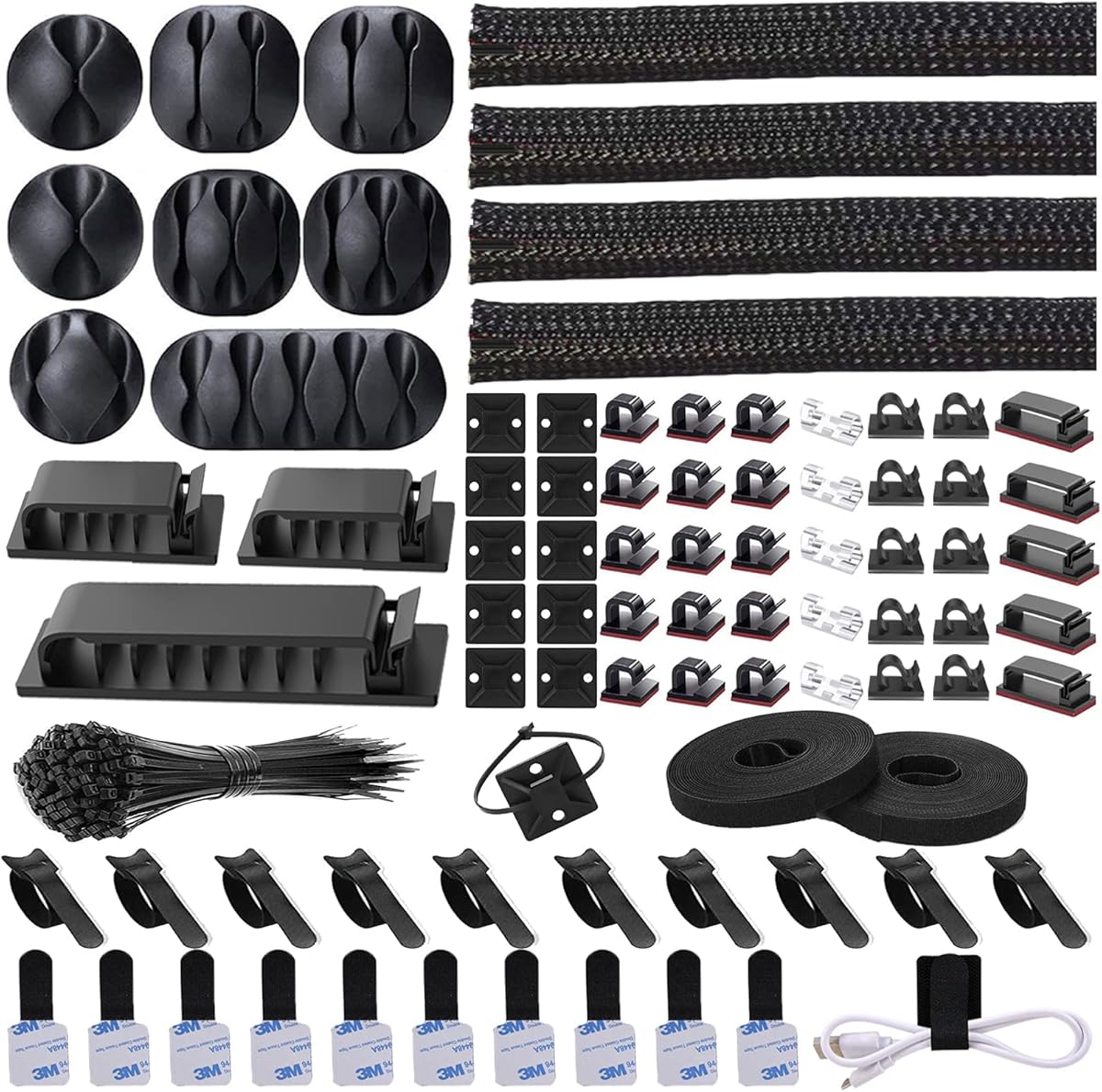


The N NOROCME 192 PCS Cable Management Kit is the most comprehensive option in this guide, earning a 4.6 rating while combining four split sleeves with ties, clips, holders, mounts, and fastening straps. Rather than solving only the problem of hiding a cable bundle, it gives a desktop owner several ways to route, secure, and dress the cables around a computer area.
We may earn a commission when you buy through this link, at no additional cost to you.
Its centerpiece consists of four 20-inch sleeves measuring 0.4 inches wide. Those narrow sleeves suit USB leads, monitor cables, power cords, and other relatively slim desktop wires. The split construction opens for loading and then closes around the bundle, so installation does not require unplugging equipment. The other included pieces expand the scope considerably: reusable wire ties organize smaller groups, adhesive clips route cords along desks or walls, and cable tie mounts provide additional anchoring options.
The main compromise is that the kit can feel more extensive than a single-purpose sleeve purchaser requires. Some components are better suited to loose cable control than to enclosing a full desktop wiring spine, and the 0.4-inch sleeve width is not intended for thick power bundles. Even so, the assortment offers better flexibility when a workstation has monitor leads, charging cables, peripheral wires, and a main power run that each need a different treatment.
This is a strong recommendation for someone who wants a complete desktop cleanup system rather than a single length of decorative cover. Choose it when the workstation has several cable types or when you also want clips and ties for securing lines to the desk, wall, or cabinet. For a tighter bundle, however, one of the larger-diameter sleeves may be a better fit.
The included clips, holders, rolls, mounts, and reusable ties make this package more versatile than a conventional sleeve-only purchase. That breadth is particularly useful when a PC setup includes a visible monitor run, several charging leads, and power cables that need to follow different surfaces.
The split sleeve opens for insertion and closes around the wires, allowing the kit to be installed without unplugging desktop connections. This makes it easier to tidy a working setup without stopping the computer.
We may earn a commission when you buy through this link, at no additional cost to you.
The JOTO 4 Pack Cable Management Sleeve has a 4.6 rating and offers a straightforward way to conceal multiple cords behind a monitor, desk, or entertainment unit. Each of the four black sleeves measures 19 to 20 inches long and expands to approximately 1.2 inches in diameter when closed, making it considerably roomier than a narrow single-wire loom.
We may earn a commission when you buy through this link, at no additional cost to you.
Its form-fitting neoprene construction is flexible enough to accommodate an estimated eight to ten cables per sleeve. A desktop tower may send display, power, USB, and audio cables through a common path, and this sleeve can keep that mixed bundle together while still allowing the individual leads to bend. The zipper provides direct access, so adding or removing a cable does not require dismantling a fixed route.
Neoprene also gives the sleeve enough elasticity for repeated handling and flexible positioning around a desk leg or monitor stand. Two sleeves can be connected when more length is required, although the finished route will still be shorter than a dedicated 10-foot loom. The full zipper can need extra working space to open, which may matter in a tightly packed workstation.
This option works well for users who want a neater appearance and frequent access to their cables. It is particularly attractive for monitor-heavy setups, office desks, and entertainment furniture where several moderately sized cables travel together. Choose a split or cuttable loom instead if maximum length, fine control of individual exit points, or a very narrow bundle is the priority.
The 1.2-inch closed diameter provides meaningful capacity for display, USB, audio, and power leads. That makes the sleeve better suited to grouping several types of wire than a half-inch loom designed primarily for a single lead.
The zipper lets the user open the sleeve, add or replace a cable, and close it again. That flexibility is valuable on active desks where peripherals, charging leads, and display connections may change regularly.
We may earn a commission when you buy through this link, at no additional cost to you.
The Wrap-It Storage Zipper Cable Sleeve is a 4.6-rated option for users who want to contain a substantial collection of cords in a single visual line. The four-pack includes 24-inch black sleeves measuring four inches wide, offering more room than conventional narrow split tubing and enough space for desktop power, display, charging, and speaker cables.
We may earn a commission when you buy through this link, at no additional cost to you.
Installation follows a simple sequence: wrap the sleeve around the bundle, pull the zipper closed, and route the resulting sleeve behind the desk or media furniture. The design does not require cutting or unplugging, and the zipper can be reopened whenever a cable needs to be added, removed, or exchanged. This makes it practical for a workstation that is adjusted often rather than treated as a permanent installation.
Width is the sleeve's main trade-off. A four-inch bundle has a larger visual footprint and may be less suitable beneath a narrow monitor shelf, but it also handles larger power connectors and mixed cable groups that would not fit comfortably in a compact loom. The fixed 24-inch length is convenient for segmented routes and multiple areas, although it cannot cover an unusually long run.
This is a strong pick for a desk with a large power bundle, a multi-monitor arrangement, or several entertainment devices feeding into one location. It is less compelling when the goal is a very narrow, nearly invisible cable trail. For wide and frequently accessed bundles, though, the zipper closure provides an effective combination of coverage and convenience.
The four-inch width gives power cords and several display or peripheral leads more room than a standard half-inch loom. It is a better choice when the main objective is consolidating a large, mixed group of cables.
Four 24-inch sections can be positioned around a desk, computer tower, media stand, or separate cable path. This modular approach makes it easier to manage several short zones without creating one oversized cover.
We may earn a commission when you buy through this link, at no additional cost to you.
The CableGeeker Cable Management Sleeve combines a lengthy 10-foot run with a roomy 1.5-inch diameter, making it the most premium-style and customizable organizer in the lineup. Its 4.5 rating reflects a flexible design that can be shortened with scissors, pierced for branch exits, and finished with a dependable hook-and-loop closure.
We may earn a commission when you buy through this link, at no additional cost to you.
The reversible black and white construction adds an unusual degree of visual flexibility. The darker surface can be presented in a high-traffic area, while the white face creates a cleaner look in a brighter workspace. The sleeve can be wrapped around a broad bundle, and custom holes allow individual wires to leave the main route at the exact point where a monitor, desk, or accessory requires them.
The included 12 reusable cable ties, eyelets, and hooks add support for oversized or heavy cords. The trade-off is access: once the hook-and-loop sleeve is closed, it is not as convenient to reopen as a zippered design, and the custom branch holes remain fixed after cutting. Users who frequently add and remove equipment should account for that reduced flexibility.
This pick best suits a permanent or semi-permanent desktop installation where one long route, tidy branching, and coordinated appearance matter more than instant zipper access. It is particularly useful behind a large desk or entertainment center with several full-length cable paths. For active setups, a zippered sleeve may be easier to adjust.
The ten-foot sleeve can be cut to the needed length and opened wherever a cable must branch toward a monitor or device. This makes it possible to follow a long, continuous route rather than relying on many separate covers.
Reversing the sleeve changes the visible surface from black to white. That simple option helps it coordinate with dark desks, light office furniture, or a mixed entertainment area.
We may earn a commission when you buy through this link, at no additional cost to you.
The AGPTEK White Cable Management Sleeve is built for users who need more than a cosmetic cover. Its two five-foot sections form a self-closing around desktop wiring, while the listed temperature range of approximately -50 to 150 degrees Celsius and UL94 V-2 flame-protection class make it a credible choice where heat management matters.
We may earn a commission when you buy through this link, at no additional cost to you.
The sleeves can be cut with scissors to accommodate the desktop route, and their 1.2-inch diameter allows several differently sized cables to be grouped together. The split design opens for loading and then closes around the wires. This installation method is quick and works particularly well for computer lines, automation wiring, and speaker or automotive leads that need a defined path.
The product also offers physical protection from pets and children. Its non-toxic construction is described as safe for household use, while the sleeve can discourage dogs, cats, rabbits, and other animals from chewing exposed cords. The white finish also looks less industrial on a light desk, although it may show dirt more readily than a darker option.
A specific safety point is that the product information recommends treating the cut edge with fire after cutting to prevent spreading. This makes careful fabrication important, and the sleeve is better suited to fixed routes than quick, repeated alterations. It is a strong recommendation for a light-colored workstation with mixed wiring, elevated heat exposure, or a need to shield cords from curious pets.
The listed operating and melt temperatures indicate that this sleeve is intended for more demanding environments than a basic fabric cover. That makes it useful for organized computer, appliance, automation, and speaker wiring.
Covering exposed wires gives pets and small children less direct access to the cable surface. The sleeve adds a physical barrier while the self-closing design keeps the bundle gathered into a neat route.
We may earn a commission when you buy through this link, at no additional cost to you.
The StangH Office Cable Management Sleeve kit contains two 39-inch white zippered sections, giving it the ability to cover substantial desktop cable paths while retaining a softer office-oriented appearance. It carries a 4.6 rating and is designed for PCs, televisions, offices, theaters, and home entertainment systems.
We may earn a commission when you buy through this link, at no additional cost to you.
The zipper is the central feature. It makes installation straightforward, permits the user to remove the sleeve for cleaning, and allows the cover to be reused when the furniture or equipment changes. The two sections can also be joined to create a longer route, which is useful when power, display, and peripheral cables travel from a tower toward a wall or monitor stand.
Its 3.5-inch width gives the sleeve useful capacity for a group of desktop leads. The tradeoff is that it is a fabric-style cover rather than narrow split tubing, so it occupies more visual space and does not provide the same highly specific branch control as a customizable long loom. It is better suited to creating a broad, tidy horizontal run.
This sleeve makes the most sense for an office or home-office user who values reuse, simple access, and a clean white finish. It can also help reduce exposed cable near walking areas, lowering the chance that someone will catch a cord. Users wanting a narrow, pet-resistant loom with custom exit points should choose a split tubular design instead.
At 39 inches per section, the two sleeves can cover more of a desktop route than many short organizer bundles. Connecting them creates a longer continuous line for cables running behind furniture or along a wall.
The white fabric and zipper construction fit a professional workspace better than an exposed industrial-style loom. The removable cover can also be cleaned and returned to the same cable route when needed.
We may earn a commission when you buy through this link, at no additional cost to you.
The Alex Tech 10ft Wire Loom is a 4.7-rated budget pick that combines generous length with a compact half-inch profile. Its split construction opens for loading and closes around the wires, making it especially convenient for covering long USB, power, audio, video, or speaker routes behind a desktop.
We may earn a commission when you buy through this link, at no additional cost to you.
Ten feet provides enough material for a cable run that extends well beyond the immediate area behind a monitor. The sleeve can follow the back of a desk, run along a floor edge, or protect a longer network of leads. Because it installs over existing wires, the user does not have to disconnect a working desktop to place it around the bundle.
The listed operating range of approximately -103 to 257 degrees Fahrenheit and a melt temperature of 446 degrees Fahrenheit support its use in varied conditions. The maker also identifies the wire sleeve as UL Recognized. Its physical barrier can protect cords from cat chewing and everyday abrasion, although the half-inch diameter is better suited to one or a few thin leads than to a thick collection of power cords.
This is a compelling choice for budget-conscious users who want a long, narrow, practical loom without the expense of a complete management kit. Its limitations are the fixed bundle capacity and lack of designated branch holes. For long individual cable runs or slim groups, however, it delivers a simple and effective solution at a modest purchase.
The ten-foot section can be wrapped around a long run of existing wires because the split sleeve opens for loading. That avoids unplugging monitors, computers, and peripherals merely to improve the cable route.
The half-inch diameter works well for USB, audio, video, speaker, and individual power leads. It is less appropriate for combining several thick desktop power connectors within the same sleeve.
We may earn a commission when you buy through this link, at no additional cost to you.
The 1 Inch 8ft Cable Management Loom stands out with a 4.8 rating, the highest listed rating in this comparison, and a balanced design for desktop cable management. Its one-inch diameter is large enough to accommodate several differently sized leads, while the eight-foot length offers enough reach for a substantial route behind a desk.
We may earn a commission when you buy through this link, at no additional cost to you.
The sleeve uses a split, self-wrapping structure. The user opens the flexible PET tube, places the wires inside, and allows the cover to close around them. This is fast, requires no zipper, and makes it easy to insert or separate individual cables. The sleeve can also be cut with scissors, allowing users to create a shorter length when a full eight feet would create excess material.
Its listed temperature range of approximately -58 to 302 degrees Fahrenheit, melt temperature of 464 degrees Fahrenheit, and UL94 V-2 flame-protection class make it suitable for demanding cable environments. The material is described as odorless, non-toxic, and resistant to fading, while the tube also helps protect cords from children, pets, dust, and physical damage.
This is the strongest all-around choice for someone who wants a narrow-looking but flexible sleeve that can hold more than one cable. It fits computer, speaker, television, automotive, and appliance wiring without being as bulky as a wide fabric organizer. The lack of a zipper means it is less convenient for constant cable changes, but for a stable desktop route, the self-wrapping design is fast, tidy, and durable.
The one-inch diameter gives the loom more room than a narrow half-inch tube while preserving a relatively compact profile. It can group a mixture of desktop wires without requiring a large fabric sleeve.
Opening the split construction makes it simple to place the cables inside and let the sleeve close around them. The cuttable format also lets the user reduce the eight-foot length to suit the available route.
We may earn a commission when you buy through this link, at no additional cost to you.
The StarTech 40-inch Neoprene Cable Management Sleeve is a purpose-built desktop accessory with a 4.2 rating, 11 evenly spaced cable exit holes, and connector buckles that allow additional sleeves to be daisy-chained. It is designed for office, home-office, and desktop workstation applications where a more structured routing solution is desired.
We may earn a commission when you buy through this link, at no additional cost to you.
Its 1.2-inch diameter is large enough for a grouped desktop cable run, while the 39.4-inch length approximates a one-meter section. Soft neoprene rubber provides flexibility around bends, while the stated thickness is 0.12 inches. The zipper closure allows the sleeve to be opened for access, and the built-in holes provide controlled points for cords to leave the main bundle.
Its most notable limitation is that the exit holes are fixed rather than user-created. A desktop whose branches are at irregular positions may therefore need to align its routing with the available holes or use another solution. The 4.2 rating is also the lowest among the listed products, so buyers should focus on the specific connector-buckle and exit-hole features rather than expecting a broad consensus of exceptional performance.
This is a compelling option for a standardized workstation, especially one with multiple monitors, classroom equipment, or a long desk that may eventually need extension. The buckle system makes it possible to add another sleeve, and the two-year warranty adds reassurance. For irregular branch locations, a cuttable custom sleeve may be more adaptable.
Eleven evenly spaced holes allow display, power, and peripheral cords to leave the covered route at consistent intervals. This structured approach helps maintain a cleaner appearance than allowing every cable to branch at one crowded point.
Built-in connector buckles at both ends allow another sleeve to be attached. The system can therefore cover a short section during initial setup and expand later if the desk arrangement changes.
We may earn a commission when you buy through this link, at no additional cost to you.
The Cable Management Sleeve with a split design provides 25 feet of coverage in a three-quarter-inch diameter, making it the longest dedicated sleeve in the list. Its 4.6 rating and braided construction combine practical cable protection with a tidy way to manage desktop wiring over substantial distances.
We may earn a commission when you buy through this link, at no additional cost to you.
The split opening allows the sleeve to wrap around an existing cable bundle and curl tightly, reducing the chance that wires will slip out. It also allows additional cables to be inserted later, which is useful when a desktop gains a new monitor, storage device, charging station, or network connection. Its length gives the installer freedom to follow a long perimeter or create multiple routes from the same section.
The flexible polyethylene is described as abrasion resistant and capable of withstanding heat up to 302 degrees Fahrenheit. It can also help protect cords from pet chewing. The three-quarter-inch diameter remains more compact than a wide fabric bundle, although it is not designed to contain several large power adapters at once.
This is an excellent choice for a workstation with an unusually long cable path or a plan to add equipment over time. The main practical issue is avoiding unused excess material, since a 25-foot sleeve may extend beyond a compact desk. Even so, the ability to add and remove cables makes it a flexible long-term organizer for a busy setup.
The 25-foot length can cover a long perimeter behind furniture or serve several separated routes. It reduces the need to join short sleeves and gives the user room to adapt the layout later.
The split opening permits new wires to be added without replacing the entire organizer. That makes the sleeve useful for evolving desks where displays, storage, charging cables, and peripherals may change over time.
We may earn a commission when you buy through this link, at no additional cost to you.
The most useful sleeve depends on the size of the cable bundle, the length and shape of the route, how often cables change, and the degree of heat, pet, or abrasion protection required.
Start by gathering the cables that need to travel together and estimating the bundle's widest point. A half-inch loom may fit a single USB or power lead, while a three-quarter-inch or one-inch sleeve can accommodate several slim wires. If the bundle includes full-size desktop power connectors, consider a 1.2-inch neoprene sleeve or a wider zippered cover rather than forcing the connectors into split tubing.
Measure the complete path from the computer or monitor to the wall, floor, desk leg, or entertainment unit. Include bends, vertical drops, and sections that pass behind furniture. A ten-foot sleeve may work for a compact desk, while a 25-foot section offers more freedom for a long perimeter or a multi-zone workstation.
Zippered sleeves offer the easiest access when cables are added, removed, or replaced frequently. Split self-closing looms install quickly over existing leads and work well when the route is stable. Hook-and-loop closures balance flexibility with a strong closure, while cuttable sleeving permits custom branch holes but is less convenient to reopen. Match the closure to how often the equipment will be changed.
Neoprene offers flexible, durable routing and is particularly useful around corners. Braided polyethylene provides a tidy decorative surface, while PET looms emphasize lightweight flexibility, heat resistance, and simple self-wrapping installation. If the sleeve sits near warmer equipment, review the listed operating range and avoid assuming that every plastic cover has identical heat performance.
A cable should not have to run through the entire sleeve if it needs to connect partway along the route. Fixed exit holes provide convenient standardized branches, while cuttable sleeves let the installer create openings in more precise locations. Zippered and wide sleeves can also allow a cable to leave through an end, but they may not provide dedicated side exits.
A sleeve can create a physical barrier between exposed wiring and curious animals or small children. Split looms, braided sleeves, and zippered covers can all provide this protection, though material thickness and coverage vary. Keep in mind that a sleeve is primarily a deterrent and organizer rather than a substitute for safe cable placement away from hazardous areas.
Black sleeves tend to blend into dark desks, entertainment units, and shadowed areas, while white sleeves create a brighter visible finish. Reversible sleeves offer both options in one product. Also consider whether the sleeve should disappear behind a monitor or become part of a clean visible line across the front of a desk.
A dedicated sleeve is convenient when the problem is one long cable run. A management kit is more useful when a desk has several independent cable groups, needs clips for desk or wall surfaces, or requires reusable ties for smaller cords. Comparing the individual pieces of a kit against the full assortment can help prevent buying redundant accessories.
Begin by unplugging the affected cables when practical, especially if the route requires cutting, drilling, or relocating a connector. Otherwise, a split or zippered sleeve can usually be installed over existing wires. Lay the sleeve beside the cable bundle, open the closure, and arrange the wires so they enter the sleeve without sharp bends or excessive tension.
Wrap the sleeve around the bundle and secure it according to its design. Pull a zipper fully closed, allow a self-wrapping tube to overlap neatly, or fasten the hook-and-loop strip. If the cable must branch, use the provided holes or create a carefully sized opening in a cuttable sleeve. Avoid cutting across a cable, and follow the product instructions for treating or finishing exposed material.
Inspect the route periodically for heat, pinching, fraying, or accumulated dust. Zippered and fabric sleeves can be removed for cleaning and then reinstalled, while split looms can be opened and reseated. Replace a sleeve that no longer closes securely, and route the finished bundle away from walking areas, sharp edges, and places where pets or children may pull at it.
The best size depends on the cables being grouped. A half-inch sleeve works well for one or two slim leads, while a three-quarter-inch or one-inch diameter can hold several medium-sized wires. For thick desktop power cords and large connectors, consider a 1.2-inch neoprene sleeve or a wider zippered organizer. Measure the gathered bundle before buying.
Yes, split self-closing looms and zippered sleeves are generally designed to wrap around existing cables. Open the sleeve, arrange the leads inside, and close it around the bundle. You should unplug equipment before cutting, relocating connectors, or placing a sleeve where the cable is energized and exposed to heat.
They can be suitable when the sleeve has enough diameter for the connector and the power cord is not exposed to excessive heat. Narrow half-inch looms are generally better for thin USB, audio, video, or speaker cables. A larger sleeve may be needed for a full desktop power plug and should not be tightly compressed around the connector.
A zippered sleeve opens along its length, making it easy to add or remove cables and clean the interior. A self-closing split tube wraps around the bundle and overlaps, which provides quick installation with a less traditional appearance. Zippered designs are usually better for active setups, while self-closing tubes suit stable cable routes.
Only cut a product that is specifically described as cuttable. For example, the CableGeeker sleeve can be shortened and branched with scissors, while the AGPTEK sleeve can also be cut and should have the cut edge treated with fire to prevent spreading. Follow the included instructions and avoid creating an opening that weakens the sleeve.
They add a physical barrier that can discourage chewing and keep cords gathered out of reach. Effectiveness varies with material thickness, placement, and whether the child or animal can pull the sleeve away. For best results, place the covered route behind furniture or along a wall rather than across an accessible floor.
A wider sleeve with a zipper or self-closing closure is useful for combining several display, power, and USB leads. The StarTech model is designed around evenly spaced exit holes for standardized branching, while the CableGeeker option allows custom openings. The best choice depends on whether the monitor positions follow regular intervals or require precise exits.
Choose the smallest diameter that safely holds the bundle, and route the sleeve behind a monitor stand, desk edge, or furniture panel. Reversible black and white sleeves can be oriented to match the background. Neoprene and PET loom designs also tend to present a more uniform appearance than broad fabric organizers.
The Alex Tech 10ft Wire Loom is a strong budget choice for long, narrow runs, while the 1 Inch 8ft Cable Management Loom provides the highest listed rating and flexible capacity for mixed desktop leads. For a premium-style setup, the CableGeeker 10ft sleeve adds reversible finishes, custom branching, and a long adjustable route.
Prioritize diameter, length, and access in that order. A sleeve that is too narrow can look crowded or fail to close cleanly, while one that is unnecessarily long can leave excess material in the workstation. Zippered options are best for changing equipment, stable routes can use self-closing looms, and pet or heat concerns should influence the material choice.
Before purchasing, confirm the current product dimensions, included accessories, and availability on the listing. Ratings, designs, and prices can change over time, so checking the latest listing helps ensure that the selected sleeve still fits the intended cable bundle and desktop arrangement.