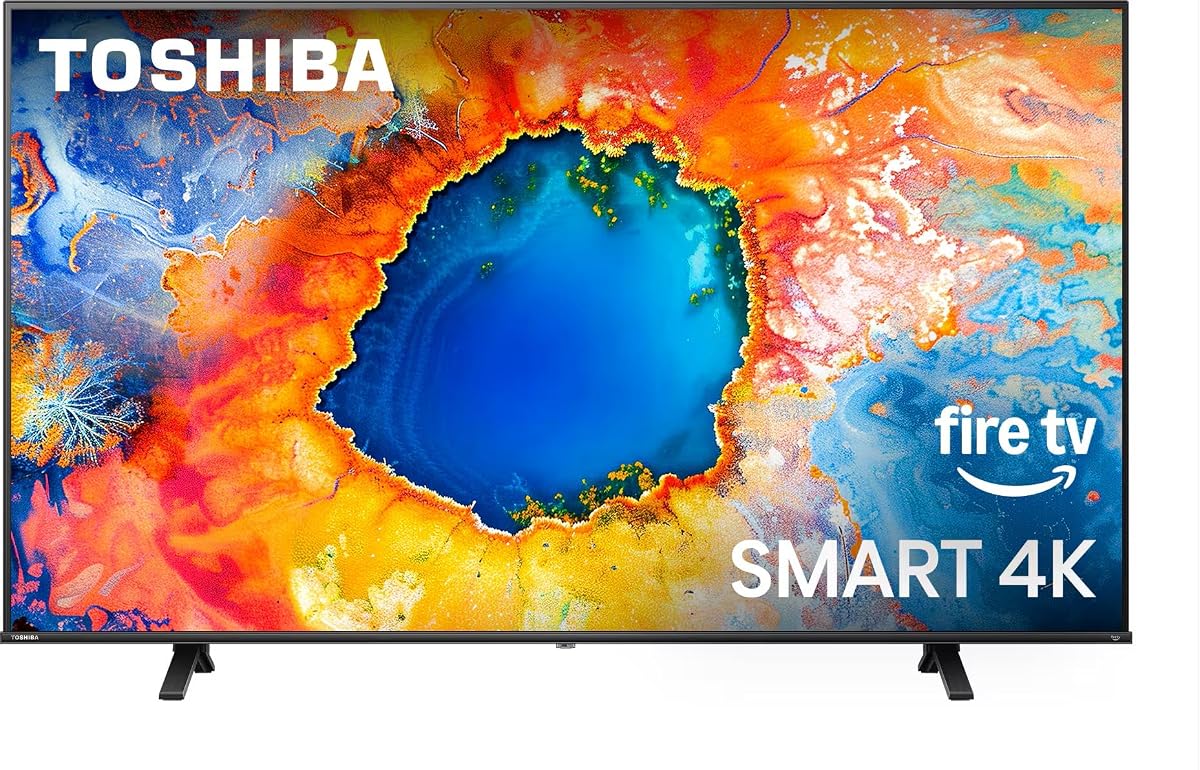
TOSHIBA 43-Inch C350 4K UHD Fire TV
4.3Editor score
AI 4K upscaling
Dolby Vision and Atmos
Gaming-focused motion features
A cheap AI enabled TV should do more than provide a convenient streaming interface. It should improve picture processing, simplify everyday navigation, support modern voice assistants, and offer enough connectivity for gaming, audio equipment, and other accessories. The best affordable models combine these useful capabilities without requiring shoppers to understand every technical specification.
This guide compares ten smart televisions across resolution, screen technology, artificial intelligence features, smart-home integration, gaming functions, audio, and connection options. It includes compact sets for bedrooms and kitchens, mid-sized models for living rooms, and larger screens for shoppers who want a more cinematic presentation. Ratings and product details reflect the supplied listing information.
Each pick highlights a different balance of features to help match a television with a particular room, viewing habits, and connected devices. AI upscaling, ambient-light adjustment, personalized picture settings, and intelligent motion processing are not identical across the list, so the labels should be evaluated by function rather than used as interchangeable marketing terms. Prices and availability change, so verify current listings before purchasing.
4.3Editor score

4.2Editor score

4.4Editor score
As an Amazon Associate we earn from qualifying purchases.
This side-by-side comparison highlights the major screen sizes, resolutions, AI processing features, smart platforms, and connectivity choices across all ten televisions, making it easier to identify the model that fits a specific room and entertainment setup.


The Samsung 65-Inch Class Crystal UHD U8000H Series Samsung Vision AI Smart TV is the most complete all-around option in this guide. It carries a 4.2 rating and combines a large 65-inch 4K display with dedicated picture processing, 4K upscaling, Color Booster, Motion Xcelerator, and built-in Alexa. The result is a television that makes ordinary streaming, live sports, movies, and games feel more refined without requiring buyers to assemble a separate streaming device.
We may earn a commission when you buy through this link, at no additional cost to you.
Its Crystal Processor is central to the package because it is designed to enhance color, sharpen detail, and upscale lower-resolution content toward 4K clarity. Motion Xcelerator estimates frame transitions in real time, which should be particularly useful for sports and fast-moving games, while the listing highlights performance up to 4K 60Hz. Color Booster adds another layer of visual processing, although the exact effect varies with the source material and the surrounding room.
The entertainment selection is another major strength. Samsung TV Plus is described as including more than 750 subscription-free channels, while the broader streaming offering reaches more than 2,700 free options. That breadth gives the set an advantage for viewers who do not want to maintain several paid subscriptions. Its main practical limitation is size: a 65-inch television is ideal for a generous viewing area but may feel imposing in a compact room or on a small media console.
This Samsung is recommended for a main living room where a large image, broad free-content selection, and strong general-purpose processing are priorities. It is less suited to buyers whose main requirements are a small footprint, a large collection of legacy ports, or the deepest collection of dedicated gaming settings. Even with those qualifications, its combination of display scale, 4K processing, motion enhancement, free channels, and integrated voice control makes it the strongest overall choice here.
The Crystal Processor handles detail refinement and 4K upscaling, while Color Booster is intended to add intensity to visible colors. These tools are most useful when a viewer regularly mixes HD streams, broadcast television, movies, and games rather than relying on one source type.
The extensive Samsung TV Plus lineup makes this model appealing for casual viewers. Live news, sports, entertainment, and other no-cost programming can be useful when paid streaming subscriptions are not available for every family member.
We may earn a commission when you buy through this link, at no additional cost to you.
The Roku 40-Inch Select Series Smart TV 2026 is an approachable choice for bedrooms, kitchens, offices, and other secondary viewing spaces. Its 4.5 rating is the highest among the ten products listed, and the set prioritizes fast access to streaming apps, a clean interface, clear sound, and helpful voice control. It is less ambitious on raw picture specifications than the 4K models, but its everyday convenience makes it a strong budget-oriented alternative.
We may earn a commission when you buy through this link, at no additional cost to you.
Roku Smart Picture cleans up incoming signals, optimizes them, and selects an appropriate picture mode, providing a simplified form of automated picture adjustment. That is useful for viewers who do not want to navigate extensive calibration menus. Fast Wi-Fi support, quickly launching apps, automatic updates, personalized home-screen picks, and unified search make the platform especially approachable for people who want less complexity than a conventional television menu.
The built-in sound is designed around clear speech and louder output, which can be beneficial for news, talk programs, and everyday streaming. Bluetooth Headphone Mode lets late-night viewers listen without disturbing others, while the option to keep audio playing with the display off adds flexibility. AirPlay, Roku Voice, Siri, Alexa, and Google Assistant support broaden the device's compatibility with existing phones, speakers, and smart-home routines.
Choose this Roku if you want a 40-inch Full HD television that is easy to set up and operate in a shared room. It is not the strongest option for a home theater, a large living-room viewing distance, or buyers who regard QLED color and 4K detail as non-negotiable. For its intended role as a convenient compact smart TV, however, it combines a highly rated platform with features that simplify both setup and daily use.
The uncluttered remote, quick app launches, personalized recommendations, and consolidated search help new users find content without learning a complicated interface. Automatic updates also allow the platform to evolve without a conventional television update process.
Clear speech-focused speakers make the set practical for daily viewing, while Bluetooth headphone mode is a welcome feature in a bedroom. Turning off the picture while continuing audio playback is another useful option for music or talk content.
We may earn a commission when you buy through this link, at no additional cost to you.
The TOSHIBA 43-Inch Class C350 Series LED 4K UHD Smart Fire TV offers one of the strongest combinations of 4K detail, AI upscaling, cinematic formats, and gaming support in this roundup. Its 4.3 rating reflects a well-rounded set, while the REGZA Engine ZR and AI 4K Upscaler work together to analyze source material and make lower-resolution programming look closer to 4K quality.
We may earn a commission when you buy through this link, at no additional cost to you.
Dolby Vision HDR and Dolby Atmos support gives the television meaningful appeal for movies and premium series. The AI upscaler does more than simply duplicate neighboring pixels; according to the product information, it detects colors and evaluates the texture of nearby pixels to determine a more appropriate result. That technical approach can be especially useful for Full HD streams, although native 4K content remains the ideal source for displaying the panel's full resolution.
Gaming is another differentiator. Game Mode supports ALLM, VRR, and eARC, giving the set useful features for compatible consoles and PC gaming. Ultimate Motion reduces blur in fast scenes, while Sports Mode is tuned to reveal action in live games. These capabilities make the C350 feel more specialized than many straightforward Fire TV sets, even though the listing does not claim advanced local dimming or the extensive game dashboard offered by the LG.
This Toshiba is best for a budget-conscious buyer who wants genuine 4K, AI-assisted upscaling, Dolby formats, and motion features in a mid-sized living room or bedroom. Fire TV provides quick access to major streaming apps and live television, although shoppers who dislike the platform should confirm their preferred services are supported. Given the combination of specification and practical features, it is the strongest budget-focused choice in the guide.
The AI 4K Upscaler is most useful for Full HD programs, older files, and streamed content that has been compressed. Native 4K sources can demonstrate the full value of the panel, while upscaling helps maintain perceived clarity when the source falls below that standard.
ALLM, VRR, and eARC support make the C350 a practical option for a mixed entertainment and gaming room. The additional Motion tools are useful during sports and fast action, although they are not a replacement for a dedicated gaming display.
We may earn a commission when you buy through this link, at no additional cost to you.
The INSIGNIA 43-Inch Class F50 Series LED 4K UHD Smart Fire TV is a strong general-purpose option for buyers who prioritize streaming access and physical connectivity. It has a 4.3 rating, 4K Ultra HD resolution, HDR10, and a broad selection of inputs. Unlike some of the more explicitly AI-focused sets in the guide, its appeal comes from practical Fire TV features and flexibility rather than a long list of named processing functions.
We may earn a commission when you buy through this link, at no additional cost to you.
The 2160p panel supports HDR10 and can upscale existing content toward Ultra HD quality, giving movies and shows improved detail compared with Full HD. DTS Virtual-X sound is designed to create a more dimensional presentation using the television's own speakers. For people who already own a soundbar or receiver, HDMI eARC can transmit the original full-resolution audio signal and reduce the need for additional cabling.
Connection options are notably comprehensive. The set includes three HDMI ports, composite jacks, digital optical output, USB, headphone and coaxial connections, Ethernet, and Wi-Fi. That makes it easy to link a game console, Blu-ray player, antenna or cable box, speakers, and network equipment. Fire TV also provides a single home screen for apps, live channels, and free ad-supported entertainment, while Alexa and smart-home functions add another route for everyday control.
The F50 is recommended for a family room, rental, first apartment, or secondary space where streaming convenience and connection options matter more than specialized AI tuning. It does not advertise the same level of gaming tools, brightness sensing, or processor-led personalization as the Hisense or LG. For shoppers who want a straightforward 4K Fire TV with broad app access, eARC, and flexible inputs, it remains an easy recommendation.
Three HDMI inputs, optical audio, Ethernet, USB, and legacy connections provide more flexibility than many compact sets. The range makes it easier to connect a console, disc player, sound system, and live television source without constantly changing cables.
Major paid services and free ad-supported channels sit behind a familiar Fire TV home screen. Alexa can assist with searching, while compatible smart-home devices can turn the television into a hub for camera feeds, lighting, thermostats, and other controls.
We may earn a commission when you buy through this link, at no additional cost to you.
The Roku 50-Inch Select Series Smart TV 2026 combines a 50-inch 4K QLED panel with the streamlined Roku platform. Its 4.4 rating and HDR10 support make it a persuasive middle ground for a living room, particularly for shoppers who want richer color and larger screen size without moving into the most advanced premium television category.
We may earn a commission when you buy through this link, at no additional cost to you.
QLED technology and HDR10 are intended to produce bright, accurate colors, while Roku Smart Picture cleans up incoming signals, optimizes them, and selects the appropriate picture mode. This automatic approach offers a convenient starting point for users who would rather avoid detailed calibration. The sharp 4K resolution also provides a noticeable upgrade over Full HD sets when viewed from a normal living-room distance.
The platform is a major strength. Fast Wi-Fi support, rapidly launching apps, automatic updates, personalized picks, unified search, and a simple remote make the television easy to operate. Voice search works across thousands of apps, while shortcuts provide quick access to favored services. A lost remote finder adds a small but meaningful convenience, and Bluetooth Headphone Mode supports quieter viewing after bedtime.
This model suits buyers who prioritize picture color, streaming simplicity, and a generous 50-inch screen. Its disclosed specification does not include the extensive gaming features of the LG, the AI light sensor of the Hisense, or the dedicated gaming mode details of the Toshiba. Even so, it delivers a balanced package for everyday entertainment, sports, movies, and casual gaming, with QLED color giving it a meaningful advantage over conventional LED sets.
The 50-inch panel provides enough physical scale to make 4K detail and QLED color noticeable without reaching the footprint of a 75-inch television. It is a flexible choice for a main living room, larger bedroom, or compact open-plan area.
Personalized home-screen picks, quick app access, voice search, and app shortcuts minimize the time spent navigating. These refinements are particularly valuable for households that switch among live channels and several different streaming services.
We may earn a commission when you buy through this link, at no additional cost to you.
The Hisense 55-Inch E6 Cinema Series Hi-QLED 4K UHD Smart Fire TV is packed with AI and display features for shoppers seeking a large, feature-rich television. It has a 4.0 rating, which is the lowest listed here, but the underlying specification is broad: Hi-QLED color, an AI light sensor, AI 4K upscaling, AI Smooth Motion, Dolby Vision, Dolby Atmos, and multiple HDR formats.
We may earn a commission when you buy through this link, at no additional cost to you.
The AI light sensor is one of the most useful practical additions. It detects ambient light and automatically adjusts screen brightness throughout the day, which can improve comfort and reduce unnecessary energy use. The television does not require the viewer to search through picture menus every time lighting conditions change, making it convenient for rooms used for both daytime viewing and evening entertainment.
Picture processing is supported by an AI 4K upscaler that uses machine-learning models to enhance lower-resolution content toward near-4K clarity. AI Smooth Motion combines MEMC, noise reduction, and a responsive panel to make fast action more distinct. On the content side, Dolby Vision, HDR 10+ Adaptive, HDR 10, HLG, and Dolby Atmos cover a wide range of films, broadcasts, and games.
The Hisense is best for a larger viewing area where automatic brightness, advanced motion handling, and cinematic formats can make a meaningful difference. Game Mode Plus, Filmmaker Mode, and Wi-Fi 6 add further appeal for modern households. Some buyers may want local dimming details, more ports, or a deeper gaming dashboard, but the supplied specification already makes this one of the most functionally complete sets in the guide.
Automatic brightness adjustment is the standout everyday benefit. By responding to ambient light, the set can keep the picture more appropriate during both daylight viewing and darker evening sessions without repeated manual changes.
Dolby Vision and Dolby Atmos provide a premium presentation pathway, while Filmmaker Mode preserves original creative settings. The broad HDR support is valuable for viewers who want the television to adapt to different streaming and broadcast formats.
We may earn a commission when you buy through this link, at no additional cost to you.
The LG 43UA7700P 43 inch Class UA77 Series LED AI 4K Smart webOS TV is the premium pick in this guide because it combines a well-regarded 4.4 rating with a deep set of processor, personalization, gaming, and smart-home functions. Its Alpha 7 AI Processor Gen8 is used for brightness, sound, detail refinement, 4K upscaling, and Dynamic Tone Mapping.
We may earn a commission when you buy through this link, at no additional cost to you.
The Personalized Picture and Sound Wizard is a meaningful distinction. Rather than treating AI as a single upscaling tool, this television can analyze favorite images and sound clips to create tailored picture and audio settings. Filmmaker Mode, HDR10 Pro, and the broad webOS content library add flexibility for both casual viewing and more intentional movie watching.
Gaming is another major strength. FreeSync, VRR, GeForce NOW, and Xbox Cloud Gaming support are joined by LG Game Optimizer, Game Dashboard, and four HDMI 2.0 ports. That combination is particularly useful for a household that owns current-generation consoles, uses cloud gaming, or connects multiple entertainment devices. AirPlay 2 and Google Cast make phone, tablet, and computer mirroring straightforward.
Choose the LG when personalization, gaming capability, and a polished smart platform matter more than obtaining the largest possible screen at an affordable level. A 43-inch display suits bedrooms, offices, and medium viewing distances, but it may appear small in a large open-plan room. For a premium AI television that does not rely on one headline feature, it is the most sophisticated and flexible recommendation here.
The picture and sound wizard extends AI beyond generic upscaling. By learning from selected images and clips, it can create a more personal baseline for the way movies, shows, and other content appear and sound.
Four HDMI 2.0 inputs, VRR, FreeSync, cloud gaming, and the Game Optimizer provide a more complete gaming foundation. The Game Dashboard and Game Optimizer also make it easier to adjust performance-related settings without repeatedly entering deeper menus.
We may earn a commission when you buy through this link, at no additional cost to you.
The INSIGNIA 75-Inch Class F50 Series LED 4K UHD Smart Fire TV delivers the largest screen in this roundup. Its 4.2 rating and 4K resolution make it an interesting choice for buyers who want a dramatic image at a comparatively affordable configuration, provided the room can accommodate a 75-inch footprint.
We may earn a commission when you buy through this link, at no additional cost to you.
Direct LED backlighting is intended to produce a more uniformly bright picture with improved color accuracy and contrast. HDR10 adds dynamic range information for brighter highlights, deeper dark areas, and a wider color presentation. The 4K resolution also reduces the need for aggressive upscaling when viewing compatible native content, although the supplied information does not claim the AI processing found in the Samsung, Toshiba, Hisense, or LG.
Fire TV provides access to major streaming applications, live television, and free ad-supported programming. The Alexa Voice Remote can launch content, search apps, switch inputs, and even control a connected cable source. For external equipment, three HDMI ports, composite jacks, optical output, USB, headphone and coaxial connections, Ethernet, and Wi-Fi offer practical flexibility.
This is a compelling option for a large living room, basement entertainment area, or open-plan home theater where scale matters more than sophisticated AI personalization. Its wall-mount compatibility uses a 400 by 300 VESA pattern, and HDMI eARC allows compatible audio equipment to receive a high-quality signal. Buyers must carefully measure the room, furniture, and viewing distance before ordering because the screen itself is only one part of the installation.
A 75-inch display can create a theater-like presence in a generous room. The large canvas makes 4K detail more visible and gives sports, movies, and console games greater visual impact, provided seating is arranged at an appropriate distance.
Direct LED backlighting supports a more uniform image across the large panel. HDMI ARC and eARC make it easier to connect a soundbar or receiver, while the extensive input selection accommodates consoles, disc players, and live TV sources.
We may earn a commission when you buy through this link, at no additional cost to you.
The INSIGNIA 32-Inch Class FE Series LED Full HD Smart Fire TV is the most compact option in the guide. It carries a 4.4 rating and focuses on the essentials: 1080p clarity, a familiar Fire TV experience, Alexa control, wireless sharing, and a broad selection of connections. It is a sensible fit for a bedroom, dorm, kitchen, or compact office.
We may earn a commission when you buy through this link, at no additional cost to you.
The LED-backlit LCD panel provides Full HD resolution and a wide range of colors and contrast. While that is below the 4K standard found in most larger models here, a 32-inch screen can look sharp in a small room when the viewer sits at a normal distance. The limitation becomes more relevant if the television will be viewed across a large space or used for close inspection of fine picture detail.
Fire TV supports live and free television, streaming apps, games, and music. Alexa can search for content, control entertainment, and switch inputs, while Apple AirPlay allows compatible devices to share video, photos, and music. DTS TruSurround is designed to create a surround-like presentation through the built-in speakers, providing more spatial audio than a basic mono setup.
This television is recommended when room size and practical features matter more than 4K resolution or specialized AI processing. Three HDMI ports, composite jacks, optical output, USB, headphone and coaxial connections, Ethernet, and Wi-Fi make it more flexible than the small size might suggest. It is a straightforward compact smart television for users who want convenience without paying for a larger, more advanced panel.
Fire TV, Alexa, and AirPlay bring familiar streaming and control tools to a space that may not support a large television. The result is convenient access to entertainment without needing a separate media device in every room.
Three HDMI inputs and multiple legacy and audio connections allow a console, streaming device, disc player, and sound system to be connected as needed. Ethernet support is also useful for a stable wired network connection.
We may earn a commission when you buy through this link, at no additional cost to you.
The Amazon Ember 40-Inch 2-Series with Fire TV is a polished mid-size smart television designed around speed, convenience, and an updated Fire TV interface. It has a 4.4 rating, a 40-inch Full HD display, a quad-core processor, and Wi-Fi 6 support, all of which reinforce its emphasis on quickly reaching and smoothly playing entertainment.
We may earn a commission when you buy through this link, at no additional cost to you.
The 2026 Fire TV experience introduces dedicated content categories, pinned favorite apps, personalized recommendations, and a cleaner modern design. Alexa+ adds natural-language searching across apps, smart-home management, and more conversational ways to locate information. These features are particularly useful for households that would prefer to state what they want rather than browse through long lists.
Omnisense is the distinctive hardware feature. Built-in sensors wake the display when someone enters the room, showing favorite artwork or providing an immediate path into content. The television can therefore function as an ambient display when not actively being watched, rather than remaining a completely black rectangle. Dolby Audio, two HDMI inputs, AirPlay, free games on the Appstore, and Amazon Luna cloud gaming round out the entertainment features.
The Ember is best for an Amazon-centered household that values the Fire TV ecosystem, quick recommendations, voice interaction, and gaming access. Its Full HD panel is less advanced than the 4K options, and two HDMI ports may be limiting for a heavily connected entertainment center. Even so, the fast processor, Wi-Fi 6, improved remote, ambient behavior, and Alexa+ features create a particularly user-friendly television for a bedroom, office, or medium-size living room.
Omnisense sensors allow the screen to wake when a person enters the room. Favorite artwork and immediate content access make the set feel more integrated into daily life and reduce the friction of starting a viewing session.
Instead of requiring rigid commands, Alexa+ is designed to process natural requests across apps and connected services. Personalized recommendations and pinned favorites further reduce time spent searching through Fire TV menus.
We may earn a commission when you buy through this link, at no additional cost to you.
Choosing an affordable AI television means balancing resolution, processing features, platform convenience, screen size, audio, and connections. The most useful specification is the one that matches the intended room, source content, and connected devices rather than simply choosing the model with the longest feature list.
AI on a television may refer to machine-assisted 4K upscaling, automatic brightness adjustment, motion processing, noise reduction, personalized picture settings, voice search, or content recommendations. The Samsung uses its Crystal Processor and Color Booster, the Toshiba has an AI 4K Upscaler, the Hisense adds an AI light sensor and AI Smooth Motion, the LG provides a Personalized Picture and Sound Wizard, and the Amazon Ember uses Alexa+ recommendations and Omnisense detection. These functions are not directly equivalent, so buyers should identify which capability would create a visible improvement in their regular viewing.
Screen size affects immersion, furniture requirements, and perceived detail. The guide includes 32-inch, 40-inch, 43-inch, 50-inch, 55-inch, 65-inch, and 75-inch options. A 32-inch set is well suited to a compact bedroom or kitchen, while 40-inch and 43-inch models offer a useful middle ground. A 50-inch or 55-inch screen can fill a conventional living room, and the 65-inch and 75-inch sets demand a generous wall and suitable furniture. Measure the area, account for stand or mount requirements, and think about the distance from the primary seating position.
Native 4K provides 2160p detail, while Full HD models provide 1080p. AI upscaling can make lower-resolution content look sharper by analyzing source pixels, identifying textures and colors, and reconstructing a higher-quality image. This is especially useful for live television, older movies, and compressed streaming. It does not create additional detail that was never present, however, and results vary by source. Native 4K remains preferable for modern 4K movies, programs, and games, while a well-sized Full HD television can still be satisfying in a smaller space.
The list mixes standard LED-backlit LCD, direct LED backlighting, Crystal UHD, Hi-QLED, and QLED panels. LED-backed LCD models offer a familiar, practical approach, while QLED and Hi-QLED sets emphasize richer color and stronger contrast. HDR10 is widely supported, while the Hisense and Toshiba add Dolby Vision and the Hisense includes Dolby Atmos. Filmmaker Mode on the Hisense and LG can preserve the original creative presentation. No single technology is automatically best in every room, so content type, screen size, and viewing habits should guide the choice.
Roku, Fire TV, Samsung's platform, and LG webOS each take a different approach to navigation. Roku is known here for quick app launches, personalized picks, a simple home screen, and consolidated search. Fire TV provides broad access to major apps, free channels, Alexa, smart-home functions, and, on the Amazon Ember, Alexa+ and Omnisense. Samsung combines its own interface with extensive free content and built-in Alexa. LG webOS adds deep app access, AirPlay 2, Google Cast, and AI personalization. Choose the ecosystem that feels easiest to navigate and already matches the streaming services used by your household.
The Toshiba supports ALLM, VRR, and eARC, the LG adds FreeSync, VRR, GeForce NOW, Xbox Cloud Gaming, Game Optimizer, Game Dashboard, and four HDMI 2.0 ports, and the Hisense includes Game Mode Plus. The Amazon Ember provides free Appstore games and Amazon Luna streaming. Casual players may be satisfied with any modern smart TV, but console enthusiasts and PC gamers should verify resolution, refresh rate, variable refresh rate, low-latency mode, and input availability. A soundbar or receiver can also improve the experience when the television's built-in speakers are not sufficient.
Built-in speaker quality matters for viewers who do not plan to add external audio. Roku emphasizes clear speech and louder sound, the Toshiba and Hisense support Dolby Atmos, the Insignia sets use DTS Virtual-X or DTS TruSurround, and the Amazon Ember includes Dolby Audio. For external equipment, count HDMI inputs and check ARC or eARC support. Optical audio, Ethernet, USB, composite video, headphone, and coaxial connections provide additional flexibility, particularly for live TV boxes, disc players, older devices, and wired networks.
A television that is easy to live with can be more valuable than one with a long specification sheet. Look for quick setup, fast applications, uncomplicated remote controls, personalized recommendations, and voice search. The Roku remote finder and app shortcuts, Amazon Ember's preset buttons and ambient sensors, Insignia's parental controls, and the Hisense's automatic brightness sensor are practical examples of convenience features. These functions can make a shared household television easier for children, guests, and older viewers to operate independently.
Start with the included remote, the television's power connection, and a network connection for streaming features. Most models offer guided setup, and the Roku, Fire TV, Samsung, and webOS platforms are designed to lead users through account sign-in, app selection, and basic preferences. Connect the signal source and only then configure advanced picture, sound, motion, and gaming options; changing several settings during setup can make it difficult to understand which control is responsible for a visual difference.
Use the smart platform's picture and sound recommendations as a starting point rather than a final calibration standard. AI upscaling, ambient brightness sensing, personalization, and Filmmaker Mode work best when they are tested with the content you actually watch. Compare standard movie viewing, live sports, and gaming separately, allowing the television to adapt and settle before changing another setting. For gaming, enable the supported low-latency or variable-refresh features only when the connected console or source is compatible.
For care, use a soft microfiber cloth to remove fingerprints and dust from the screen, and switch the television off before cleaning it. Avoid abrasive pads, liquid sprayed directly onto the panel, and aggressive chemical cleaners. Keep the vents unobstructed, give the television adequate ventilation, and avoid placing objects against its rear panel. When changing cables or connected devices, switch off the relevant equipment and check that the signal and audio format are supported by the television.
No. Some models use AI primarily for 4K upscaling, while others add automatic brightness adjustment, motion processing, personalized picture and sound settings, voice search, or recommendations. The strongest choice is the set whose specific AI tools match your content and room. A simple 4K television with accurate processing may be more satisfying than a larger set with AI functions you will never use.
It depends on the screen size and viewing distance, but a high-quality Full HD set can be perfectly suitable for a compact room. The 32-inch INSIGNIA FE and 40-inch Roku Select demonstrate that smart platforms, voice control, and streaming access do not require 4K. A 4K model becomes more compelling in a larger living room or when the television will be viewed at a greater distance.
Native 4K content is already rendered at 2160p, while upscaling analyzes lower-resolution material to make it look more detailed on a 4K panel. Upscaling can improve apparent sharpness, texture, and edge clarity, but it cannot reproduce information that was never captured. Native 4K remains the best choice for 4K movies, programs, and games.
Usually, no. Every television in the guide provides a built-in smart platform with access to major streaming applications, live television, or free content. The platform's speed, app selection, recommendations, and interface can still differ considerably, so buyers should confirm that their preferred services are supported and that the navigation system feels manageable.
The Hisense E6 Cinema Series includes an AI light sensor that detects ambient light and adjusts screen brightness automatically. Other models may use AI for upscaling, motion, personalization, or voice-driven functions instead. If automatic room adjustment is important, look for the ambient-light feature specifically rather than assuming every AI television includes it.
A 4K panel, HDR support, low-latency mode, VRR, and several modern HDMI inputs are the most useful foundations. The Toshiba and LG stand out for their gaming-oriented capabilities, while the Hisense adds Game Mode Plus and a larger cinematic-style screen. A compatible soundbar or receiver can further improve movie and gaming impact when built-in speakers are not sufficient.
A large screen needs adequate viewing distance, a suitable wall or furniture footprint, and safe cable routing. The 75-inch INSIGNIA in particular should be measured carefully before purchase, including the space required for its stand or wall mount. Choosing a size that fits the room and can be viewed comfortably is more important than simply selecting the largest available model.
No. Start with resolution, size, HDR or color performance, platform reliability, sound, inputs, and gaming needs. AI should be considered as an added layer after those fundamentals are in place. The best model is the one that provides a clear benefit in your room and supports the content and devices you already use.
The TOSHIBA 43-Inch C350 Series is the best budget pick, combining 4K resolution, AI upscaling, Dolby Vision and Atmos, and useful gaming features. The Samsung 65-Inch U8000H is the editor's choice for a large-screen, all-around television with strong processing and extensive free content, while the LG 43-Inch UA7700P earns the premium designation for personalized AI settings, gaming tools, and a polished webOS experience.
Other shoppers may find a better fit among the more focused alternatives. The Hisense E6 stands out for AI brightness sensing and cinematic processing, the 50-inch Roku Select balances QLED color with simple streaming, and the smaller Amazon Ember or Insignia models suit compact rooms. Always prioritize screen size, platform, connections, and viewing distance before treating AI as the deciding factor.
Current product listings, features, ratings, and prices can change, so confirm the latest specification and connectivity details before ordering. Check the intended installation space, compare the television with your streaming habits and connected devices, and review the current product page for final purchasing information.