This guide compares 10 cheap boom microphones for gaming, streaming, podcasting, and calls, highlighting setup, audio controls, compatibility, and included
As an Amazon Associate we earn from qualifying purchases. We may earn a commission when you buy through links on this page, at no additional cost to you.As an Amazon Associate we earn from qualifying purchases.Purchases through our links may earn us a commission, at no extra cost to you.
A cheap boom microphone can still provide the clear, close-up voice pickup needed for gaming, livestreaming, podcasting, video calls, and online collaboration. The most useful model is not simply the one with the longest feature list, but the one that balances sound quality, connection options, physical controls, positioning hardware, and compatibility with the devices in your setup.
We compared ten boom microphone options using the information supplied for each product, focusing on microphone type, pickup pattern, noise-reduction features, connection methods, mute and gain controls, monitoring support, included stands, and platform compatibility. The list covers USB condenser models, dynamic microphones with USB or XLR support, and a detachable 3.5 mm boom designed for headphones and game controllers.
Each review explains where the microphone stands out, what limitations or compatibility requirements should be considered, and which creators may benefit from it most. Rankings reflect the supplied ratings and practical feature combinations, while exact configurations, included accessories, and retailer availability can change over time.
Top 3 Picks for Best Cheap Boom Microphone
Best Budget
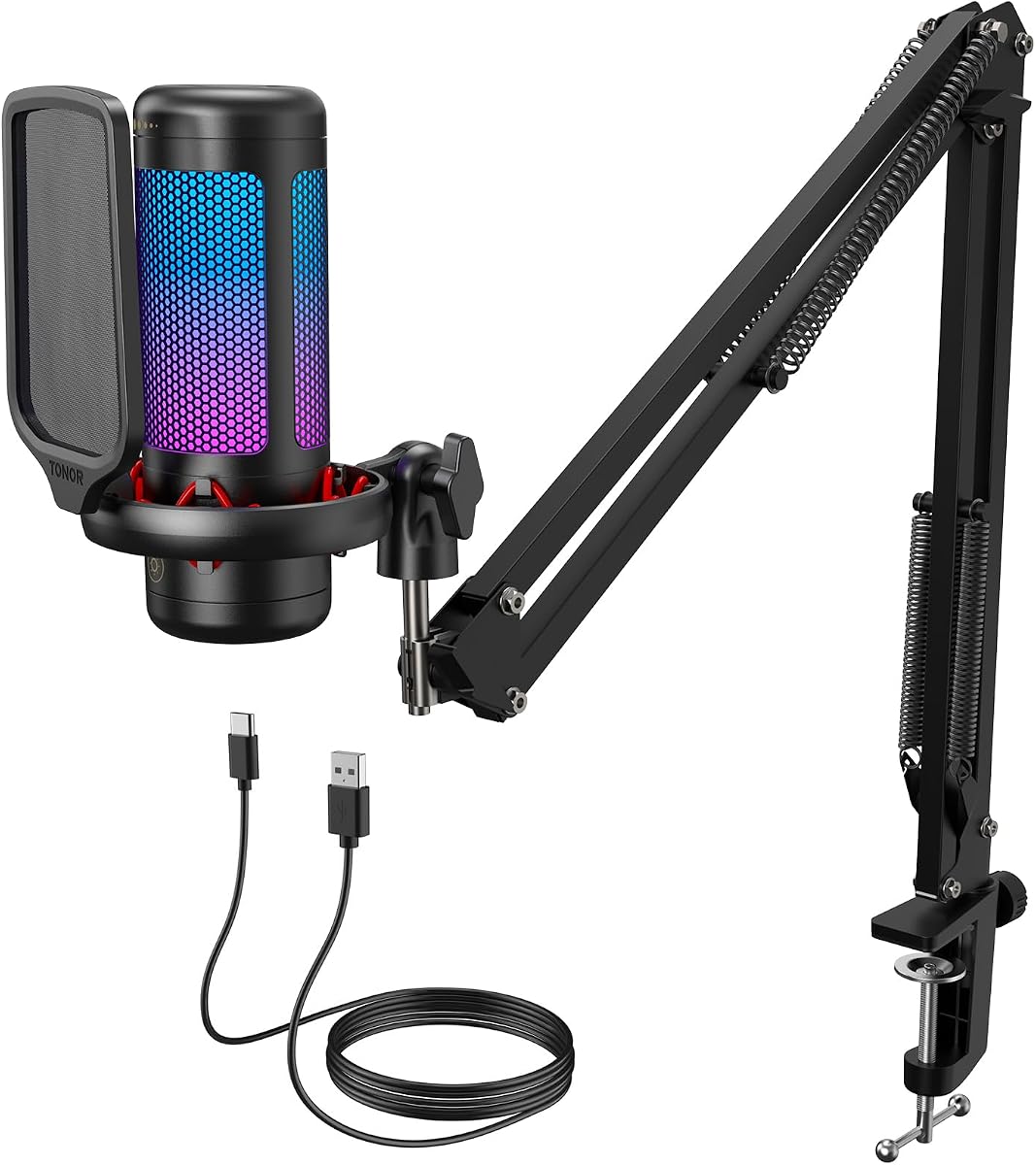
TONOR Gaming Microphone Set with Boom Arm, Vocal Condenser Microphone for Content Creators, USB Mic for PC with Stand, RGB, Tap Mute, Gain Control, Gaming Equipemnt, Twitch, Streaming, TC310+
Top 10 Best Cheap Boom Microphone in 2026 Compared
The table below compares the core connection methods, microphone design, monitoring features, and positioning hardware across all ten options, making it easier to identify the model that best fits a gaming, podcasting, or mobile recording setup.
The TONOR TC310+ combines a USB condenser microphone with a metal boom arm, desk clamp, RGB lighting, tap-to-mute control, and an adjustable gain ring. Its supplied 4.5 rating places it among the stronger choices in this guide. The important distinction is that this is not merely a compact desktop mic; it is a coordinated package aimed at streamers and content creators who want a microphone that can sit near the mouth without taking up much desk space.
Pros
Complete boom-arm package
Simple physical controls
Adjustable RGB brightness
Wide desktop clamp compatibility
Cons
Condenser sensitivity needs care
USB-only connection limits flexibility
We may earn a commission when you buy through this link, at no additional cost to you.
The hardware controls make the TC310+ approachable. A tap on the top of the microphone mutes it, while rotating the upper section adjusts gain. RGB users can select six static colors, a single-color gradient, a breathing effect, or a mixed-color gradient, and the brightness can be changed by long-pressing the lighting button. These features reduce the need to open software for routine changes, which is especially useful during a game or livestream.
The included arm has multiple adjustable joints and a clamp designed for desks no thicker than 2.36 inches. That gives the microphone a stable, close-positioning option, although installation requires enough clearance beneath the desktop. As a condenser microphone, it may capture more environmental sound than a dynamic model, so the gain control and correct positioning remain important. The product information also recommends a fully seated USB Type-C connection and a USB 2.0 or 3.0 port.
This is a strong choice for a streamer or gamer building a first recording setup without wanting to choose a stand separately. It is less suitable for someone who needs XLR operation or a 3.5 mm controller setup. Overall, the TC310+ is the most budget-conscious package here because it combines the microphone, arm, lighting, mute, and gain adjustments in one coherent desktop kit.
Fast, Physical Stream Controls
Tap-to-mute and top-mounted gain adjustment let you react quickly without navigating recording software. The illuminated controls also make the microphone's status easier to identify during a session.
Flexible Desk-Side Positioning
The multi-joint metal arm allows the mic to move closer to the speaker, improving consistency in voice levels. Its clamp supports desks up to 2.36 inches thick, giving it broader utility than a small fixed-base stand.
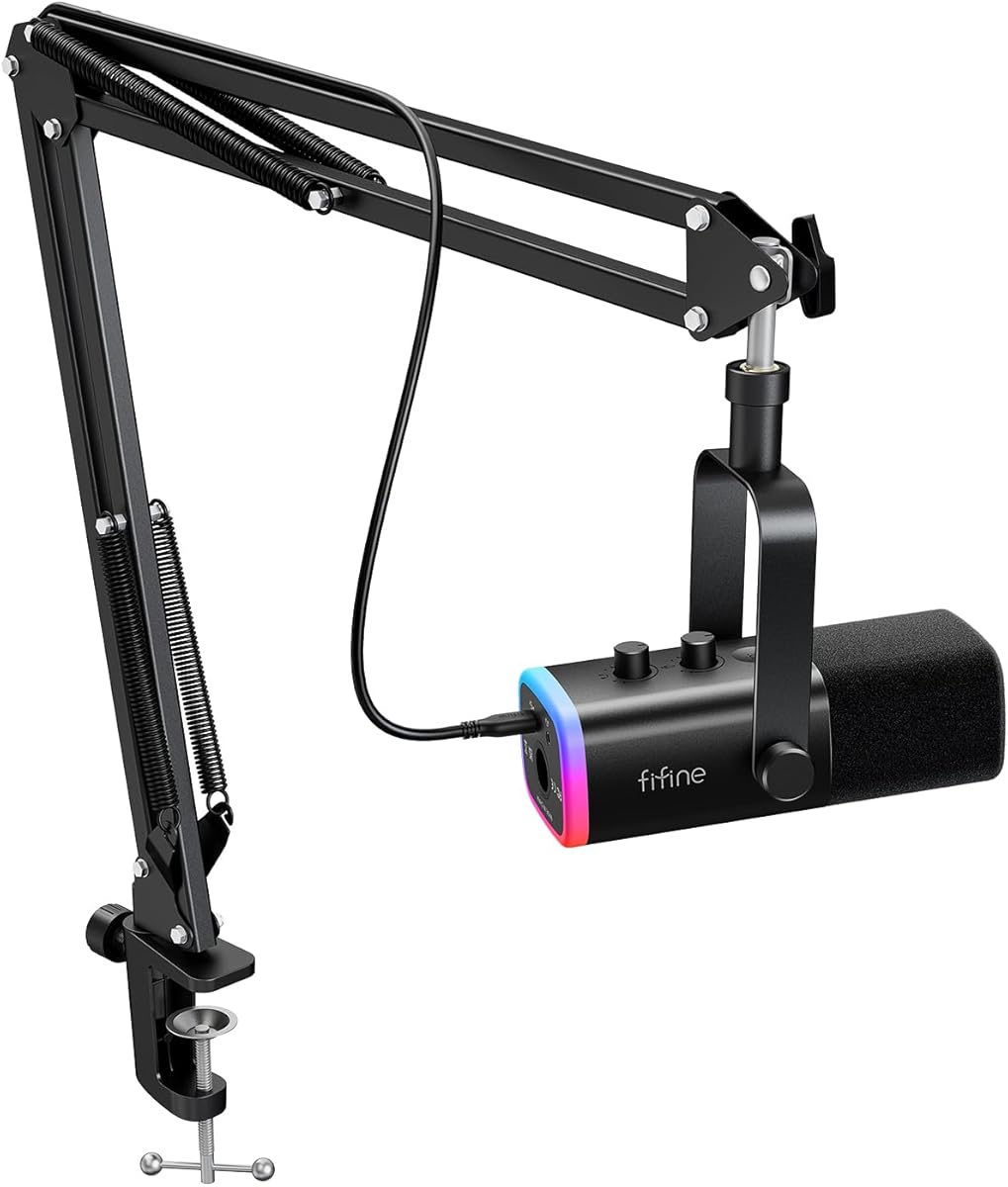
The FIFINE AM8T is a dynamic gaming microphone with both USB and XLR output, a cardioid pickup pattern, RGB lighting, and an included boom arm. Its 4.5 rating reflects a balanced design aimed at streamers, podcasters, voice-over artists, and musicians as well as players. The dual connection system is the central feature: a computer can use USB directly, while a mixer or sound card can take over through XLR.
Pros
Exceptional connection flexibility
Dynamic design rejects room noise
Physical monitoring controls
Sturdy adjustable boom arm
Cons
XLR cable not included
Desktop clamp size limitation
We may earn a commission when you buy through this link, at no additional cost to you.
The dynamic capsule offers a practical advantage for gaming spaces: it is less likely than a condenser to pick up every nearby keyboard, fan, or room noise. A cardioid polar pattern focuses pickup in front of the microphone, and the listed sensitivity is minus 50 dB. The microphone includes mute, gain, headphone volume, and monitoring controls, allowing creators to hear themselves without opening their streaming application.
The package includes the microphone, metal boom arm, C-clamp, and an 8.2-foot USB-to-USB-C cable. The arm uses metal construction and springs for stability, while an anti-scratch pad protects the desktop. It fits desks up to two inches thick. The XLR path adds useful upgrade potential, but an XLR cable is not included, and the USB-to-USB-C lead should be checked against the computer's available ports.
The AM8T is the strongest general recommendation for readers who want one microphone to cover gaming, streaming, podcasting, voice-over work, and instrument recording. It is particularly attractive for users who may eventually move from USB to an audio interface. Those who need the smallest possible setup may prefer a compact microphone, but the included hardware and broad application range make this a more complete solution.
A Future-Proof Connection Choice
USB provides immediate plug-and-play operation, while XLR opens a path to a mixer or sound card. That makes the AM8T useful for beginners and creators whose recording setup is likely to grow.
Monitoring Without Software Friction
A headphone jack, real-time monitoring, a mute button, a gain knob, and a separate headphone volume control make it easier to judge voice levels during play, streaming, or recording.
The MAONO A04 is a USB condenser microphone kit built around a 16-millimeter electret condenser capsule and a professional 192kHz and 24-bit sound chipset. It carries a 4.5 rating and is a natural fit for podcasting, voice-over, YouTube, video calls, and general desktop recording. The supplied accessories make it one of the most complete conventional podcast kits in the selection.
Pros
Detailed high-resolution capture
Comprehensive accessory package
Broad modern device compatibility
Two-to-six-inch sweet spot
Cons
Not compatible with Xbox
Cannot use Maono Link
We may earn a commission when you buy through this link, at no additional cost to you.
Signal capture is specified at a smooth, extended frequency response, with strong bass response and a best range of two to six inches. The package includes a metal shock mount, pop filter, foam windscreen, adjustable scissor arm, boom-arm base, and USB-A/USB-C to USB-B cable. These components work together to reduce plosives, stabilize the mic, and place the capsule close to the speaker.
Installation is straightforward because the microphone connects by USB and does not require extra drivers or an external sound card. It is compatible with most laptops, PCs, PS4, PS5, and mobile phones, as well as platforms such as Discord, Twitch, and Zoom. Two restrictions deserve attention: it is not compatible with Xbox, and the AU-A04 does not work with Maono Link. Users who need that app are directed toward the A04 Gen2.
The A04 is well suited to first-time podcasters and recording beginners who want a full accessory bundle rather than a basic microphone alone. It is less compelling for users who already own a boom arm, pop filter, and shock mount, but the included package otherwise covers the essential parts of a focused desktop recording setup.
High-Resolution USB Recording
The 192kHz and 24-bit chipset captures detailed speech and voice-over audio without requiring an external sound card. That makes it convenient for creators moving between podcast, streaming, and voice projects.
Everything Needed for Voice
A shock mount, foam windscreen, and pop filter help manage plosives and vibration. The scissor arm and base provide a closer, more consistent microphone position than a tiny fixed stand.
The InnoGear Gaming Mic is a USB condenser microphone with a boom arm, touch-sensitive mute, a large gain knob, zero-latency monitoring, and multiple RGB lighting modes. Its 4.4 rating makes it a compelling option for gamers and streamers who prioritize visual integration and simple controls. The included boom arm also distinguishes it from many simple stick microphones.
Pros
Touch-sensitive mute control
Large gain adjustment knob
Several attractive RGB modes
Wide device compatibility
Cons
Not compatible with Xbox
Condenser requires careful gain
We may earn a commission when you buy through this link, at no additional cost to you.
The mic is compatible with Windows PCs, Macs, PS4, and PS5, and the listed 6.56-foot USB cable provides a practical connection length. A cardioid condenser capsule is designed to emphasize the speaker while limiting pickup from the sides and rear. Noise cancellation is included, although condenser microphones still benefit from a careful gain setting and a relatively quiet placement position.
Four lighting treatments are available: solid color, multicolor gradient, single-color gradient breathing, and single-color gradient transitions. The touch-sensitive mute on top allows quick silencing, the base gain knob supports precise adjustment, and headphone monitoring helps users hear their own voice without delay. These physical features reduce interruptions during a livestream and make operation approachable for a new creator.
The main limitation is platform support: the product is explicitly not compatible with Xbox. Its USB-only design also makes it less flexible than a dual USB and XLR microphone. Even so, it is a strong fit for a PC, Mac, PlayStation, or mixed desktop setup where a coordinated RGB gaming aesthetic and included boom arm are priorities.
Hardware That Suits Streaming
Touch mute, a substantial gain knob, and live monitoring address the three controls most often needed during a broadcast. They are accessible without navigating complicated audio menus.
Gaming-Room Appearance
Multiple RGB patterns let the microphone match a gaming setup rather than looking like office equipment. The boom arm further reduces visual clutter by lifting it away from the desktop.
The V-MODA BoomPro is a detachable 3.5 mm boom microphone for communication, gaming, home working, and calls. Its 4.3 rating reflects a simple, portable design that can turn a compatible pair of headphones into a communication headset. Unlike the USB condensers in this guide, it does not require power, drivers, or computer configuration.
Pros
Works across many devices
Detachable boom stores easily
Simple inline controls
No USB power required
Cons
Compatibility varies by headphone
Less advanced than USB models
We may earn a commission when you buy through this link, at no additional cost to you.
The flexible boom positions the microphone near the mouth, while the clip-on controller provides a mute button and volume wheel. A reinforced but lightweight cable and 24-carat gold-plated connector support durability. The microphone works with smartphones, tablets, PCs, notebooks, and consoles including PlayStation 4, PlayStation Vita, and Xbox One through its 3.5 mm plug.
Its strongest attraction is portability and compatibility with existing V-MODA Crossfade headphones, along with many other 3.5 mm headphones. The manufacturer cautions that compatibility can vary by headphone model and version, so buyers should confirm the relevant connection arrangement. It is also a less technically advanced choice, with no XLR output, digital capture specification, boom-arm stand, or on-device gain control.
The BoomPro is best for a traveler, student, or casual gamer who already owns compatible headphones and values a compact microphone over studio-style features. It is less appropriate for someone creating polished podcasts who needs consistent digital capture, monitoring, and a fixed boom arm.
Portable Headset Upgrade
The detachable boom and inline controller turn compatible headphones into a communication setup. It can move easily between a phone, laptop, tablet, or console without carrying a separate desktop microphone.
Immediate Voice Control
A physical mute button and volume wheel are easy to operate during a call or game. Because the controls are on the cable, they remain accessible even when the microphone is positioned close to the face.
The FIFINE T669 combines a USB condenser microphone with an all-steel scissor arm, shock mount, double pop filter, and long USB cable. Its supplied 4.6 rating is the highest among the ten products. It is designed for home studios, podcasting, voice-over, dubbing, Discord, and online conferencing, giving it a clear focus on spoken-word production.
Pros
Highest supplied rating
All-metal support hardware
Double-layer pop filtration
Long adjustable reach
Cons
Not compatible with Xbox
Large arm needs clearance
We may earn a commission when you buy through this link, at no additional cost to you.
The cardioid condenser capsule captures sound from the front while reducing ambient pickup from other directions. A wide frequency response and high-SPL capability make it suitable for vocal and project recording. The included pop filter provides two layers of diffusion against the rush of air that causes plosives, while the shock mount helps isolate the microphone from desk movement.
Its steel scissor arm is a notable structural advantage. It rotates 180 degrees vertically, extends 135 degrees forward and backward, and offers a fixed 13-inch horizontal section with a stated 30-inch reach. The heavy-duty C-clamp and detachable desktop mount give the user more than one way to install it. The package also includes an 8.2-foot USB-B to USB-A/C cable and a user manual.
The T669 is a strong choice for someone creating podcasts or voice content who values a robust support system and a layered pop filter. Its large arm requires adequate desk space and careful positioning, while its USB-only connection does not offer an XLR upgrade path. Xbox users should also note the explicit incompatibility.
Stable, Adjustable Positioning
The all-steel arm offers broad movement and substantial reach. This allows the microphone to be brought close to the speaker while keeping the desk below it relatively clear.
Focused Voice Capture
A cardioid capsule, shock mount, and double pop filter form a practical vocal setup. Together they support direct speech capture while helping control plosives and vibration.
The Cable Boom Microphone is a 3.5 mm male-to-male adapter with a detachable flexible boom, rotary volume control, and mute switch. Its 4.2 rating makes it the least technically elaborate option in the list, but it serves a clear purpose: adding voice communication to headphones used with game controllers, PCs, laptops, phones, or tablets.
Pros
Works with many platforms
Easy detachable construction
Inline mute and volume
Dual adapter included
Cons
Depends on 3.5mm connections
No digital recording features
We may earn a commission when you buy through this link, at no additional cost to you.
The SteelFlex arm allows the microphone to be moved near the mouth, while the controls remain on the inline section. The stated input compatibility includes PlayStation 4, PlayStation 5, Xbox One, Xbox Series X/S controller, PCs, laptops, iPhones, and Android phones with suitable 3.5 mm audio output. Compatible headphones with 3.5 mm input ports can use the included output connection.
A dual 3.5 mm Y-adapter is included for devices that separate microphone and headphone inputs. This improves versatility, but users still need to confirm whether their device has a combined headset jack, separate ports, or a proprietary connection. The microphone cannot provide the digital capture specifications, gain control, or real-time monitoring offered by USB desktop models.
This is a practical choice for travel, shared computers, classroom gaming, and console use where a compact detachable microphone is more useful than a permanent desk setup. It is not the right match for a creator who wants higher-resolution podcast capture, direct USB recording, or a boom arm that holds a full-size microphone.
One Accessory, Many Devices
The 3.5 mm connection and included Y-adapter allow use with a wide range of compatible controllers, computers, phones, and tablets. That makes it easy to keep one compact communication accessory on hand.
Clear Inline Controls
The rotary volume control and mute switch provide quick, physical operation. The boom can also detach for storage, leaving the adapter ready for the next device.
The FIFINE K688CT is a USB and XLR dynamic podcast microphone with a cardioid pattern, 130 dB maximum SPL, an included metal boom arm, and extensive monitoring controls. Its 4.5 rating and broad feature set justify its place as the premium selection here. It is designed for podcasting, streaming, gaming, voice-over, and music recording, giving it more flexibility than a basic USB microphone.
Pros
Handles loud sources confidently
Premium dual-interface design
Rich monitoring control set
Effective voice isolation
Cons
XLR controls need external hardware
XLR cable not included
We may earn a commission when you buy through this link, at no additional cost to you.
A dynamic capsule supports natural, consistent voice reproduction and reduces unwanted room noise compared with a typical condenser. The cardioid pattern places emphasis on the source in front, and the product guidance recommends working between two and six inches for suitable input volume. The included windscreen and shock mount help reduce harsh explosive sounds and low-frequency vibration.
USB mode provides direct plug-and-play operation with tap-to-mute, gain, headphone monitoring, and monitoring volume. XLR mode can connect to a mixer or sound card, but the microphone's own function buttons do not operate in that mode; levels and controls must instead be handled through the external equipment. The included metal arm provides stable support, and the C-clamp fits desktops under two inches thick.
The K688CT is ideal for a creator who wants a dynamic microphone but does not want to give up simple USB operation. It is also a better long-term choice for someone who may later add an audio interface. Buyers should budget for an XLR cable if they intend to use that connection, and they should avoid forcing the arm knob during adjustment.
Dynamic Voice Control
The cardioid dynamic design focuses on the speaker and limits ambient pickup. This makes it particularly useful in untreated rooms where a condenser could capture more unwanted environmental sound.
Monitoring and USB Controls
Tap-to-mute, a gain knob, a headphone jack, and a monitoring volume control make USB operation practical. The visual and physical feedback allows quick changes during a live session.
The TONOR Dynamic Gaming Microphone uses a dynamic capsule, triple AI noise cancellation, USB and XLR outputs, RGB lighting, and real-time headphone monitoring. Its 4.5 rating makes it an attractive choice for streamers and voice-chat users who want cleaner speech in an active environment. The microphone is designed for both direct computer use and a later sound-card upgrade.
Pros
Strong background-noise reduction
Useful future XLR upgrade
Real-time monitoring controls
Customizable gaming appearance
Cons
XLR cable not included
Not compatible with Xbox
We may earn a commission when you buy through this link, at no additional cost to you.
Its noise-reduction system targets distractions such as keyboard clatter, which is one of the most common problems in game streaming. The dynamic capsule and AI processing work together to keep the voice prominent. A USB connection can be made directly to a computer, PS4, or PS5, while XLR mode provides a path to an external sound card for more advanced routing and control.
The microphone includes microphone and headphone volume controls, plus a headphone jack for zero-delay monitoring. RGB lighting adds visual customization for a gaming station. The important limitation is that XLR cables are not included, and the product is not compatible with Xbox. In XLR mode, the user will also need suitable external hardware to manage the signal.
This TONOR is a strong recommendation for someone who plays in a noisy room or regularly communicates with teammates. It offers a useful mix of noise control, monitoring, and connection flexibility, although the included information does not describe a full boom arm package, so buyers who need one should verify what is included with the current configuration.
Voice Clarity in Noisy Rooms
Triple AI noise cancellation is designed to reduce distractions such as keyboard and room noise. The dynamic capsule also favors direct voice pickup over ambient sound.
Upgrade Path and Monitoring
USB supports immediate computer use, while XLR allows a future move to a sound card. Headphone monitoring and separate volume controls help users judge their voice before an audience hears it.
The ZealSound K66K is a USB condenser podcast microphone with a cardioid pickup pattern, switchable noise reduction, zero-latency monitoring, an echo control, and a long metal boom arm. Its 4.4 rating reflects a feature-rich package for podcasting, streaming, meetings, voice-over, and mobile device use. The inclusion of USB-C and Lightning adapters broadens its appeal beyond a standard desktop setup.
Pros
Works across mobile platforms
Switchable natural noise reduction
Real-time headphone monitoring
Generous included accessory kit
Cons
Top-address pickup needs alignment
Boom clamp limits desk thickness
We may earn a commission when you buy through this link, at no additional cost to you.
The microphone covers 80 Hz to 20 kHz with minus 45 dB sensitivity and is intended to capture close-range speech clearly. Holding the mute button switches noise reduction on or off, allowing creators to choose reduced background noise in busy rooms or a fuller original sound in quieter spaces. A foam windscreen also helps control breath and plosive sounds.
Three front-mounted knobs handle microphone input, headphone monitoring, and echo. A short press of the mute button pauses the microphone, with a blue LED showing active operation and red showing mute status. The 3.5 mm headphone connection supports real-time monitoring. Because the microphone is top-address, its upper pickup area should face the mouth at approximately six to twelve inches for more consistent levels.
The package includes the microphone, metal boom arm, desk clamp, foam windscreen, 70.87-inch USB cable, USB-C adapter, Lightning-compatible adapter, and manual. The arm extends up to 30.8 inches, rotates 360 degrees, and clamps to desks up to 1.8 inches thick. This is an excellent choice for creators who alternate between a computer, iPhone, iPad, or Android device and want a complete recording setup in one package.
Flexible Voice Processing
The dedicated noise-reduction switch lets users move between cleaner speech and a more natural original tone. The echo control adds another layer of control for livestreams and voice content.
Computer and Mobile Ready
Included USB-C and Lightning adapters expand compatibility with PCs, Macs, iPhones, iPads, Android devices, and PS4 or PS5 systems. No separate driver or app is required for basic operation.
We may earn a commission when you buy through this link, at no additional cost to you.
Buying Guide – How to Choose the Best Cheap Boom Microphone
The right inexpensive boom microphone depends on your room, connection options, preferred applications, and need for portability. Comparing capsule type, controls, monitoring, stand hardware, and platform support prevents an inexpensive purchase from becoming frustrating after setup.
Condenser or Dynamic
Condenser microphones generally target detailed, sensitive voice capture and are well suited to quiet podcast rooms, voice-over work, and close-mic streaming. They may also pick up room noise, keyboard sounds, and other environmental interruptions more readily. Dynamic microphones use a different capsule design that tends to favor the voice directly in front of the microphone while reducing surrounding noise. That makes them easier to manage in active gaming spaces, less controlled rooms, and situations involving louder sound sources.
USB, XLR, or 3.5mm
USB is the simplest route for a computer-based creator because it generally provides plug-and-play operation without an external sound card. XLR offers a more substantial upgrade path for users with a mixer or audio interface, although the required cable may not be included. A 3.5 mm connection is useful for phones, tablets, compatible laptops, and many gaming controllers, but it provides no dedicated digital capture controls and depends on the device's available ports. Check whether the device has a combined headset jack or separate audio inputs.
Pickup Pattern
A cardioid pickup pattern is the most common choice in this guide because it emphasizes sound directly in front of the microphone and reduces pickup from the sides and rear. This helps when a gaming chair, monitor, lamp, or other equipment sits behind the speaker. A microphone with a directional pattern still needs careful gain and placement, however. Speaking off-axis or moving away from the capsule can produce inconsistent volume, so the boom arm should keep the mic at a stable distance.
Noise Control
Noise control comes from several layers: the capsule design, cardioid directionality, included foam windscreen, shock mount, pop filter, digital noise reduction, and correct gain adjustment. A dynamic mic is a logical starting point in a noisy room, while a condenser can still work if the environment is controlled. Digital cancellation may help with steady distractions such as fan hum or keyboard clatter, but it should not replace sensible positioning. A mic placed too close can create plosives, while excessive gain can amplify unwanted sound and introduce hiss.
Monitoring and Controls
Real-time headphone monitoring lets a creator hear the microphone signal without waiting for a recording or stream monitor. It is especially valuable for checking speaking distance, gain, background noise, and possible reverb. Physical controls are convenient during live use: tap-to-mute prevents accidental transmission, a gain knob supports level changes, and a separate headphone volume control avoids altering the microphone signal. Some models provide only basic mute and volume controls, so identify the controls you genuinely need before choosing.
Boom Arm and Desk Fit
A boom arm is valuable because it lifts the microphone away from the desk, places it close to the mouth, and reduces desk vibration. The key dimensions are the arm's reach, joint movement, and maximum clamp thickness. Some models fit desks up to roughly two inches, while others accept slightly thicker surfaces. Measure the desk before buying, check the space beneath it for the clamp, and make sure the arm will not conflict with a monitor, lamp, or swinging desk. Larger steel arms tend to require more clearance than compact scissor stands.
Platform Compatibility
Compatibility extends beyond the physical connector. Xbox support is excluded for several USB condenser models, while PS4, PS5, Mac, Windows, and mobile support vary by product. A microphone may also require a particular USB-C or USB-A arrangement, and some older systems need adapters. For controller use, confirm whether the device has a 3.5 mm headset port or requires a Y-adapter. For mobile recording, verify that the included USB-C or Lightning adapter matches the phone and that the recording app recognizes an external microphone.
Included Accessories
The included boom arm, shock mount, pop filter, windscreen, clamp, and cable can determine how quickly a new setup is usable. A package with a double pop filter and shock mount is particularly useful for spoken-word recording, while a USB microphone with a long cable and desk stand may be enough for a simple call. Check whether a USB cable is included, especially when the microphone uses an unusual connector. Also note which accessories are missing, such as the XLR cable on dual-interface models.
How to Use and Care for Your Cheap Boom Microphone
Begin by installing the clamp on a sturdy section of the desk, checking the stated maximum desk thickness before tightening it. Assemble the boom arm, attach the microphone or shock mount, and position the capsule at the upper pickup area or directly in front of the mouth. A close, consistent distance generally produces a stronger and steadier voice signal. Secure every joint without forcing screws, and route the cable so it cannot tug on the arm or create a repeating thump against the desk.
Connect the microphone using the appropriate port, then set input and headphone levels in the computer or recording application. Begin with a conservative gain setting, speak at your normal volume, and increase the level only as needed. Use the tap mute or inline mute before checking a stream, playing music, or adjusting hardware. If monitoring is available, listen for plosives, echo, hiss, clipping, and room noise. Add a windscreen or pop filter where appropriate, and move the microphone slightly off-axis if harsh consonants are prominent.
Clean the microphone gently with a soft, dry cloth and disconnect it before maintenance. Do not use moisture, cleaning sprays, or aggressive pressure around the capsule, controls, and connectors. Keep the windscreen and pop filter away from liquids, remove accumulated dust from the stand, and check that the clamp remains tight. Store a detachable 3.5 mm boom in its case, and route longer USB or XLR cables without tight bends. Periodic testing helps reveal loose joints, connection faults, or changes in room noise before they affect a recording.
Frequently Asked Questions
Is a condenser boom microphone better than a dynamic boom microphone?
A condenser microphone is usually better for detailed speech in a quiet, controlled room, while a dynamic microphone is often easier to manage in a noisy gaming space. Condenser models can capture more of the surrounding environment, including fans, keyboards, and room reflections. Dynamic models tend to focus more strongly on the voice directly in front of the capsule. The best choice depends as much on your room and recording style as on the microphone type.
Do I need an XLR microphone if I am just starting to podcast?
Not necessarily. A USB microphone can be the simplest option for a new creator because it usually connects directly to a computer and does not require an external sound card. XLR becomes more attractive when you want an upgrade path, need hardware mixing, or plan to build a more flexible recording setup. If you choose a dual USB and XLR model, remember that the XLR cable may not be included.
Can I use a USB boom microphone with a game console?
It depends on the console and the microphone's listed compatibility. Several models in this guide support PS4 and PS5 through USB, but others explicitly exclude Xbox. A 3.5 mm controller microphone offers a different route and can work with systems whose controllers have a compatible headset connection. Confirm both the console generation and the microphone's current compatibility information before ordering.
How close should I position a boom microphone?
For condenser models, the supplied guidance commonly places the best range around two to six inches from the microphone. The ZealSound K66K recommends roughly six to twelve inches because of its top-address design. Dynamic models also benefit from a stable distance, with their guidance suggesting approximately two to six inches. Keep the position consistent, speak toward the intended pickup area, and avoid moving far away during a recording.
Does real-time monitoring cause echo or delay?
Real-time monitoring is intended to let you hear the microphone with minimal delay, but the result can vary with the connection and system settings. Some systems offer zero-latency monitoring, while others may introduce a small delay. If echo appears during a call, check the selected communication mode, remove duplicated audio-routing devices, and lower monitoring or echo levels. For recording, direct headphone monitoring is usually more predictable than monitoring through speakers.
Do I still need a pop filter with a USB microphone?
A pop filter remains useful because most USB microphone packages do not prevent every burst of plosive sound. The MAONO A04 and FIFINE T669 include pop-filter accessories, and the ZealSound K66K includes a foam windscreen. Even without a separate filter, positioning the microphone slightly to one side of your mouth can reduce harsh consonants. A filter is not a substitute for correct gain, though excessive gain can still produce unwanted noise.
Is a longer boom arm better for streaming?
A longer boom arm offers more positioning flexibility and can bring the microphone closer for a stronger, steadier voice signal. It may also interfere with monitors or other desk equipment and requires sufficient under-desk clearance. Measure your available space and compare the arm's stated reach, joint movement, and clamp limit. A shorter arm can work well when the desk is compact and the microphone is already near the front edge.
What accessories do I need for a complete recording setup?
Most users need a stable boom arm, a suitable connection cable, and a pop filter or windscreen. A shock mount helps isolate desk vibration, while real-time monitoring is valuable for podcasting and streaming. Depending on the microphone, you may also need an XLR cable, a 3.5 mm Y-adapter, a USB-C adapter, or a Lightning adapter. Check the package contents because several dual-interface microphones exclude the XLR cable.
Final Thoughts on Choosing the Best Cheap Boom Microphone
The TONOR TC310+ stands out as the best budget-oriented complete kit, combining a USB condenser microphone, metal boom arm, RGB lighting, tap mute, and gain adjustment. The FIFINE AM8T is the strongest all-around recommendation because it combines USB convenience with XLR flexibility, dynamic noise control, and real-time monitoring. For a more premium podcast and streaming setup, the FIFINE K688CT adds a robust dynamic capsule, a 130 dB maximum SPL, and a complete USB-to-XLR upgrade path.
Prioritize the connection method, room acoustics, and daily workflow before comparing small feature differences. A quiet podcast creator may get excellent results from a sensitive condenser with a shock mount and pop filter, while a gamer in a noisy room may benefit more from a cardioid dynamic microphone and digital noise reduction. Existing equipment also matters: do not pay for duplicate accessories, but confirm that any separate stand, cable, or adapter you need is actually included.
Finally, check the current product listing, compatibility notes, and included accessories before making a final purchase. Retailer configurations can differ, and manufacturer compatibility guidance can change as cables, adapters, and device systems evolve. Choosing a microphone that matches your actual computer, console, phone, recording application, and room will deliver a more satisfying result than chasing a feature that your setup cannot use.
Our LCD Graphic Displays guide compares 10 options for size, resolution, touch, connectivity, and expandability to help builders choose the right display.
Our LED Lights for Drums guide compares rechargeable stage lighting, light-up drumsticks, control options, and installation for indoor live performers and