
Dell Chromebook 11 3100
4.3Editor score
Compact touchscreen design
Chrome OS platform
USB-C connectivity
A cheap Chromebook can be an excellent choice for students, remote workers, families, and anyone who mainly uses web-based tools. The strongest options balance a useful display, dependable battery life, adequate memory, and enough processing power for browsing, video calls, documents, and streaming without exceeding a modest budget.
We compared ten Chromebooks across important categories, including processor capability, screen size and resolution, RAM, local storage, connectivity, portability, convertible designs, and included accessories. The list covers renewed models, conventional laptops, touchscreens, and 2-in-1 devices, giving readers several ways to approach the category.
Each recommendation shows which type of buyer the model is best equipped to serve and why its trade-offs are reasonable. Product ratings, specifications, and availability can change over time, and listings may be updated, so readers should confirm the current configuration and condition before making a purchase.
4.3Editor score

4.3Editor score

4.2Editor score
As an Amazon Associate we earn from qualifying purchases.
The table below compares every model by its most decision-relevant specifications, including processor, memory, storage, display, and connectivity. It is designed to make differences in size, capability, and intended use easy to identify before choosing.




The HP 14-inch Student Chromebook combines a four-core Intel Celeron N4120 with 4GB of LPDDR4x memory and 64GB of eMMC storage, making it a capable general-purpose option for inexpensive everyday computing. Its 4.4 rating reflects a favorable balance of features, portability, and practical Chromebook functionality, while the anti-glare 14-inch screen is especially useful for schoolwork and commuting.
We may earn a commission when you buy through this link, at no additional cost to you.
Its four processing cores and boost speed of up to 2.6GHz provide enough capability for Chrome browsing, Google Workspace documents, online classes, video calls, and ordinary Android apps. The port arrangement is also more useful than many basic Chromebooks because it includes two USB-A ports, one USB-C port, HDMI, and a headphone jack. That selection reduces the need for adapters when connecting a mouse, storage device, display, or wired audio equipment.
The main compromises are the 4GB of memory and 1366 x 768 display resolution. Four gigabytes is adequate for cloud-centered work, but heavy tab counts and demanding Android applications can expose its limits, while the HD panel is less detailed than a Full HD alternative. Even so, these constraints are understandable for a value-focused model, and they do not undermine its suitability for documents, browsing, streaming, and remote learning.
This is the strongest general recommendation for most budget-conscious buyers because it avoids the fragility of a highly compact or very minimally equipped system. It suits students, families, travelers, and office workers who want a conventional 14-inch form factor without paying for a premium Chromebook. Choose it when balanced practicality matters more than a high-resolution screen or maximum processing power.
The anti-glare 14-inch display provides enough room for lesson materials, research tabs, and video-call panels without making the laptop overly large. Chrome OS and Google Workspace integration suit assignments, Google Classroom, and online collaboration.
Two USB-A ports, USB-C, HDMI, and a headphone jack cover common accessories. The varied port selection is particularly useful for students and hybrid workers who may need to connect peripherals in different locations.
We may earn a commission when you buy through this link, at no additional cost to you.
The HP Chromebook 14a-na0226nr is a well-rounded 14-inch Chromebook built around the Intel Celeron N4120, 4GB of RAM, and 64GB of eMMC storage. It carries a 4.3 rating and stands out for portability, long advertised battery life, fast charging, and a broad set of features that are rarely included together in an inexpensive conventional laptop.
We may earn a commission when you buy through this link, at no additional cost to you.
The N4120 has four cores and four threads, while Intel UHD Graphics 600 provides support for smooth 4K streaming and casual gaming. A multi-touch touchpad supports four-finger gestures, and 802.11ac Wi-Fi with Bluetooth covers everyday wireless needs. Up to 14 hours of battery life makes this model attractive for students and commuters who spend long periods away from an outlet.
Its limitations are the familiar 4GB of memory and 1366 x 768 screen. HD resolution is fine for web browsing and standard productivity, but detailed photo work or side-by-side document editing may feel cramped on a larger, sharper display. The memory is also not generous enough for intensive multitasking, although the supplied description positions it as sufficient for everyday assignments and multiple applications.
This Chromebook is a compelling recommendation for buyers who rank battery life and practical convenience above screen resolution. The 45-minute fast-charge claim is helpful during school or workdays, and the one-year limited hardware warranty adds reassurance. It is especially well suited to students, frequent travelers, and home users who need a dependable device for browsing, writing, and streaming.
The advertised battery life of up to 14 hours provides useful flexibility for long classes, travel, and café work. HP Fast Charge can raise the battery from 0 to 50% in approximately 45 minutes, reducing downtime between activities.
Dual-band 802.11ac Wi-Fi, Bluetooth, a multi-touch touchpad, and an HD screen make routine interaction uncomplicated. Custom-tuned stereo speakers also add value for casual media viewing.
We may earn a commission when you buy through this link, at no additional cost to you.
The Dell Chromebook 11 3100 is a compact, renewed 2-in-1 with an 11.6-inch HD touchscreen, Intel Celeron N4020 processor, 4GB of RAM, and 32GB of flash storage. Its 4.3 rating shows that the core Chromebook experience remains popular, and the convertible format gives it flexibility beyond that of a conventional laptop.
We may earn a commission when you buy through this link, at no additional cost to you.
The 1366 x 768 touchscreen makes navigation intuitive and supports a compact footprint that can be easier to carry than a full-size model. USB-C connectivity and Bluetooth provide modern connection options, while the included 65-watt power adapter completes the package. Chrome OS is well suited to web-based applications, online learning, and lightweight productivity.
The 32GB storage capacity is the clearest limitation, particularly for users who want to keep large files offline. The dual-core N4020 and 4GB of RAM are also modest, although they remain appropriate for browser-based work, Google applications, video conferencing, and basic media use. As a renewed product, its physical condition may differ from a new unit and should be checked carefully.
Buyers should choose the Dell 3100 when portability, touch interaction, and 2-in-1 flexibility matter most. It is a particularly good fit for students taking notes, travelers seeking a smaller computer, and families looking for a straightforward secondary device. Those who routinely work with large offline files should favor a model with more storage.
The 2-in-1 form factor allows the touchscreen to serve different tasks, from conventional typing to touch navigation. Its smaller 11.6-inch canvas is easier to carry and can be more convenient in crowded classrooms or during travel.
A renewed listing can provide substantial value, but the buyer should review condition details, included accessories, and warranty coverage. The supplied power adapter and USB-C connectivity help keep the basic setup straightforward.
We may earn a commission when you buy through this link, at no additional cost to you.
The Lenovo Flagship Chromebook differentiates itself with a 14-inch 1920 x 1080 touchscreen, an eight-core MediaTek Kompanio 520 processor, Wi-Fi 6, and a slim 2.86-pound design. Its 4.2 rating reflects a capable package for students and professionals, especially when visual clarity and modern connectivity are priorities.
We may earn a commission when you buy through this link, at no additional cost to you.
The Full HD IPS display offers substantially more detail and wider viewing angles than a basic 1366 x 768 panel. Touch navigation, an integrated 720p webcam with privacy shutter, and a dual-array microphone make the system well prepared for online classes and video meetings. Wi-Fi 6 and Bluetooth 5.1 also provide a useful foundation for busy wireless environments.
Memory remains the principal constraint. With 4GB of RAM, the laptop should perform best with a focused set of browser tabs and cloud applications rather than a large number of demanding programs. Storage is limited to 64GB eMMC, so users who download media or keep large documents locally will need suitable cloud storage or removable storage. The eight-core processor offsets some of these limitations for ordinary workloads.
This Lenovo is a strong pick for anyone who wants a premium-looking Chromebook experience without stepping into a premium price bracket. It is particularly appropriate for students who need a sharp display, hybrid workers who value the privacy shutter, and users who want thin-and-light portability. The Full HD screen is the feature that most clearly separates it from basic models.
The 1920 x 1080 IPS panel provides finer detail for reading, writing, and editing. Wide viewing angles make the screen more versatile for shared viewing, while the LED backlight supports comfortable use in varied indoor lighting.
Wi-Fi 6 can improve efficiency on compatible networks, while Bluetooth 5.1 supports accessories. The webcam's physical privacy shutter adds a simple way to prevent the camera from viewing the room when it is not needed.
We may earn a commission when you buy through this link, at no additional cost to you.
The Acer Chromebook 15.6-inch offers a large anti-glare screen, an Intel Celeron N4020, 4GB of LPDDR4 memory, and 64GB of eMMC storage. With a 4.4 rating, it is a strong budget recommendation for buyers who want more visual workspace than a compact Chromebook can provide.
We may earn a commission when you buy through this link, at no additional cost to you.
Its 15.6-inch display makes side-by-side research, spreadsheets, lesson plans, and streaming more comfortable. The anti-glare coating is useful in bright rooms, and a 720p front-facing camera with built-in microphone supports remote classes and meetings. Two USB-C and two USB-A ports provide solid peripheral flexibility, while the included five-in-one bundle adds a mouse, mouse pad, HDMI cable, USB cable, and wireless earbuds.
The N4020 is a dual-core processor, so it is less compelling for heavy multitasking or demanding applications than a four-core or eight-core alternative. The 4GB of memory and 64GB of storage remain modest. However, Chromebook workloads are usually web focused, and the large display may deliver more practical value during long study sessions than a faster internal processor would.
This Acer is a good match for students working with documents, families streaming media, and office users who prefer a large screen and full-size layout. It is also attractive when bundled accessories would otherwise need to be purchased separately. Those needing intensive Android app performance should consider a stronger processor, while typical users will appreciate the expansive workspace.
The large panel reduces the need to zoom frequently and is better suited to research, spreadsheets, and presentations. Its anti-glare surface also helps maintain visibility under bright indoor conditions.
The five-piece accessory bundle covers several common needs, including input, display connection, and audio. It can make setup easier for a new Chromebook owner, particularly one preparing a student workspace.
We may earn a commission when you buy through this link, at no additional cost to you.
The ASUS 15-inch FHD Chromebook pairs a Full HD IPS display with 4GB of DDR4 memory and 128GB of storage, offering a particularly balanced storage-and-screen combination. Its 4.3 rating makes it a compelling renewed option for buyers who want more room for local files than most entry-level Chromebooks provide.
We may earn a commission when you buy through this link, at no additional cost to you.
The 1920 x 1080-class Full HD presentation is the model defining feature, making text, videos, and web pages look more detailed than on standard HD alternatives. Storage expands the practical value further because 128GB leaves more room for applications, downloaded media, and offline files. Intel UHD graphics, a webcam, HDMI, USB-A, USB-C, and a headset jack cover everyday needs.
The listed Intel processor reaches up to 2.80GHz, but the exact processor model is not specified, so buyers should not assume features beyond the stated capacity. Memory is still limited to 4GB, and renewed condition can vary. Buyers should review photos, description details, and any return or warranty terms carefully, especially when assessing cosmetic wear or device functionality.
The ASUS is a strong choice for a student or home user who wants a large, sharp display and more storage without moving to a premium Chromebook. It is also suitable for a family computer used mainly for browsing, educational applications, video calls, and media. The renewed format is the main condition-related trade-off, but the core configuration is well aligned with value-focused everyday use.
The IPS Full HD panel provides a clear image and wide viewing angles for a budget-oriented Chromebook. It is a meaningful upgrade for users who spend much of the day reading or editing text-based content.
With 128GB of storage, the ASUS offers twice the capacity of many 64GB alternatives. That makes it easier to retain documents, media, and applications without relying entirely on cloud storage.
We may earn a commission when you buy through this link, at no additional cost to you.
The HP Chromebook 14a-na0020nr delivers a polished 14-inch design, backlit keyboard, multi-touch touchpad, and up to 13.5 hours of mixed-use battery life. Its 4.5 rating is the highest among the listed models, and the ceramic-white finish gives it a distinctive appearance for a budget Chromebook.
We may earn a commission when you buy through this link, at no additional cost to you.
The Intel Celeron N4000 is a dual-core processor with a 1.1GHz base frequency and up to 2.6GHz burst speed. It is appropriate for browsing, Google Workspace, online learning, video calls, and streaming. Four-finger touchpad gestures improve navigation, while stereo speakers tuned by B&O make entertainment more engaging. Fast Charge can reach 50% in approximately 45 minutes.
The 32GB eMMC storage is the most restrictive specification, followed by the modest dual-core processor and 4GB of memory. Users who rely on cloud storage will find that limitation manageable, but those who keep substantial media or files locally may need external storage. The 1366 x 768 display also lacks the detail of Full HD alternatives.
This HP is ideal for buyers who care about design, keyboard comfort, audio, and battery life more than maximum internal specifications. It works especially well as a personal, travel, or secondary family computer. Among similarly inexpensive models, its high rating, backlit keyboard, and strong feature set justify considering it before a bare-bones alternative.
The backlit keyboard makes the device easier to use in dim rooms, while the multi-touch touchpad supports four-finger navigation. Together they create a more comfortable interface for regular writing and browsing.
At 3.24 pounds, the laptop is light enough for routine travel, and its long advertised battery life supports use away from an outlet. B&O-tuned stereo speakers add a clear benefit for streaming and casual media.
We may earn a commission when you buy through this link, at no additional cost to you.
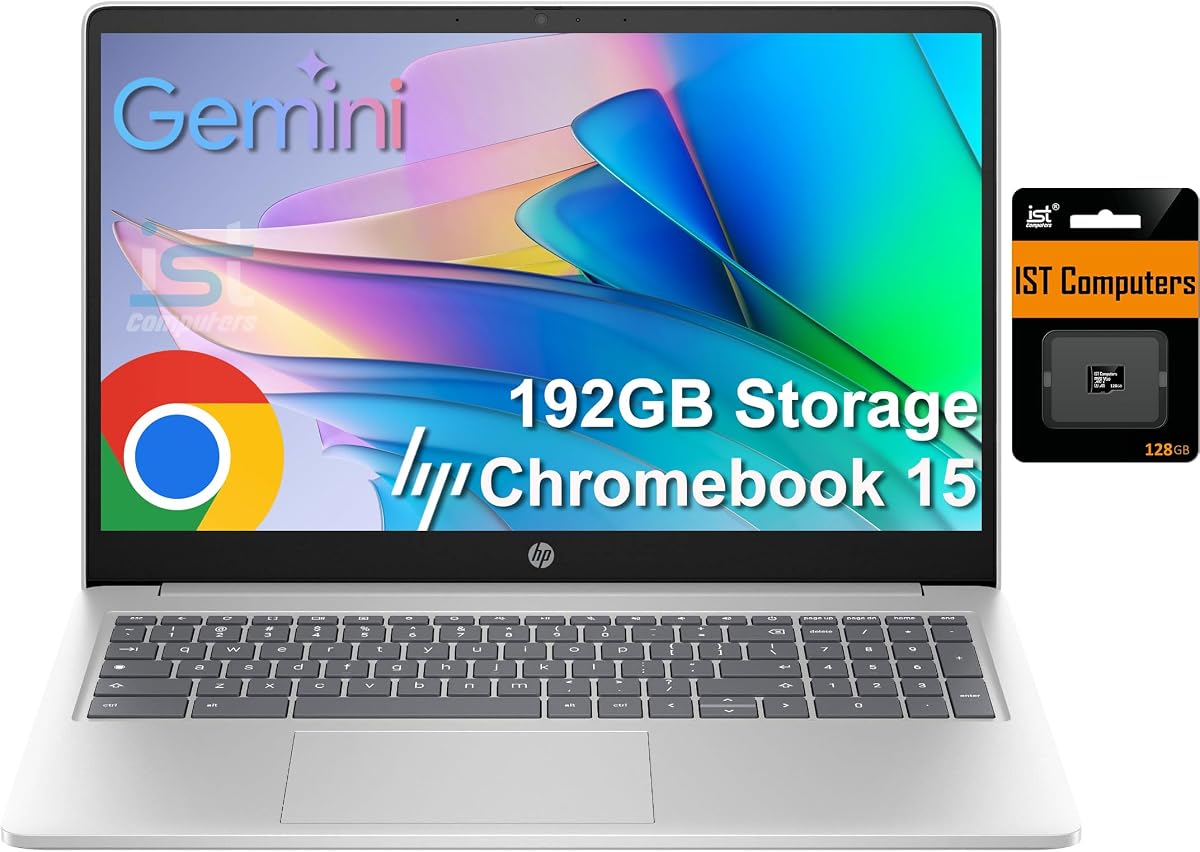
The HP Chromebook 15.6-inch stands apart with 8GB of DDR5 memory, a four-core Intel N200 processor, and 192GB of combined storage. Its 4.4 rating reflects a configuration that is better suited to multitasking than most affordable Chromebooks, particularly those equipped with 4GB of memory.
We may earn a commission when you buy through this link, at no additional cost to you.
The additional RAM can help when numerous browser tabs, video calls, and applications remain open together. Storage consists of 64GB of eMMC and an included 128GB SD card, which provides room for local media and files. A 15.6-inch anti-glare display, numeric keyboard, and webcam with privacy shutter make the model well oriented toward home offices and study desks.
The display remains 1366 x 768, so the large screen does not provide Full HD detail. Its 250-nit brightness and 45% NTSC color coverage are also less impressive than higher-end panels. Nevertheless, the Intel N200 has four cores, and the supplied specification notes that one external monitor can be connected through the USB-C port at up to 4K resolution without a docking station.
This is a compelling choice for users who want budget Chromebook hardware without settling for the category's lowest memory and storage. It suits students with many applications, home-office users, and anyone who values a numeric keypad. Buyers should be comfortable with a larger chassis and basic screen resolution, but the performance-oriented internals make this a versatile all-rounder.
Eight gigabytes of DDR5 RAM is a meaningful advantage over the 4GB found in most models here. It gives the system more room to retain open tabs, applications, and video-call processes without becoming the first limitation.
The eMMC and SD-card combination provides 192GB of total storage, and USB-C DisplayPort 1.4 supports a single external monitor at up to 4K. These features make the laptop more adaptable for a fixed desk setup.
We may earn a commission when you buy through this link, at no additional cost to you.
The Acer 15-inch FHD Chromebook combines an IPS display, 4GB of DDR5 memory, 64GB of storage, and Wi-Fi 6 in a renewed configuration. Its 4.1 rating is slightly lower than most alternatives, but the model still offers a large screen, modern wireless standards, and a distinctive Dale Purple finish.
We may earn a commission when you buy through this link, at no additional cost to you.
The broad port selection includes two USB-C ports, two USB-A ports, and a 3.5mm headphone and microphone combination jack. That makes it easy to connect storage, accessories, displays, and audio without relying on a single port type. Wi-Fi 6 and Bluetooth support provide up-to-date wireless options, while the integrated HD webcam supports calls and remote participation.
The listing refers to an Intel Celeron processor reaching up to 2.78GHz without providing a specific model number. That uncertainty makes detailed performance comparison difficult, so buyers should review the final component details before buying. Although DDR5 is efficient, 4GB is still a modest memory allocation, and 64GB of storage will fill more quickly if many files are kept offline.
The Acer is a sensible option for buyers who prioritize the appearance of a large IPS screen and want Wi-Fi 6 without moving to a premium Chromebook. Its renewed status and comparatively lower rating encourage careful review of the listing and condition. For general home use, school portals, browsing, and video conferencing, the included features should meet most needs.
Two USB-C and two USB-A ports offer a generous mix of modern and legacy connections. A dedicated combination audio jack and integrated webcam further reduce the need for immediate extra purchases.
Dale Purple gives the device a distinctive look among conventional silver and gray models. Because the exact processor is not listed, confirming the precise configuration and condition is especially important for renewed purchases.
We may earn a commission when you buy through this link, at no additional cost to you.
The Lenovo 100E Chromebook 2nd Gen is the most stripped-down and accessible model in this guide. It combines a MediaTek MT8173C processor, 4GB of DDR4 memory, 16GB of eMMC TLC storage, and an 11.6-inch HD display, earning a 4 rating that reflects its basic role as a lightweight web machine.
We may earn a commission when you buy through this link, at no additional cost to you.
Its compact screen and Chrome OS make it practical for browsing, Google applications, online learning, and lightweight productivity. The use of TLC solid-state storage is a positive foundation for a compact device because it avoids the moving parts and responsiveness limitations associated with older portable hard drives. The black finish also gives it a simple, durable-looking school-computer style.
Storage is extremely limited at 16GB, leaving little room for downloaded files, applications, media, and operating data. The processor platform is also older than those in most newer alternatives, while 4GB of memory offers little spare capacity. This model should therefore be treated as a secondary computer for cloud-based work rather than a main system for local creative projects.
The Lenovo 100E is most suitable for a student who needs a separate device for web research, school portals, and typing assignments, or for a household that needs an inexpensive additional browser. Its low acquisition cost helps offset the constraints, but only when the buyer is comfortable working primarily online. Users needing offline capacity should choose a model with more storage.
Chrome OS provides a straightforward environment for Google Classroom, web-based coursework, email, and documents. The small display and simple hardware make this an uncomplicated option for basic school or household tasks.
With only 16GB of TLC storage, the user should rely heavily on cloud storage and keep downloaded files minimal. Frequent offline media use or large document collections would quickly overwhelm the available capacity.
We may earn a commission when you buy through this link, at no additional cost to you.
Choosing a cheap Chromebook is easiest when you begin with the work you expect it to perform. Screen size, memory, storage, processor capability, connectivity, and condition all influence the experience, but no single specification matters more than the intended workload.
Screen size determines the balance between workspace and portability. The Dell Chromebook 11 3100 and Lenovo 100E use compact 11.6-inch panels that are easy to carry and convenient in tight spaces. The 14-inch models from HP and Lenovo offer a more comfortable balance for writing and browsing, while the 15.6-inch Acer and HP choices suit desks, classrooms, and users who prefer more visible workspace. Resolution matters as well: 1366 x 768 is common in this category, while the Lenovo Flagship and ASUS models offer Full HD panels for sharper text and more detailed video.
Chromebooks rely heavily on web-based applications, so processors with four or more cores provide a more comfortable foundation. The Intel Celeron N4120 in two HP models has four cores and four threads, while the MediaTek Kompanio 520 in the Lenovo Flagship has eight cores. The N4020-based Dell and Acer models are dual-core choices that should be reserved for lighter workloads. Some listings identify only a processor family and maximum clock speed, so buyers should check the exact processor before comparing performance in detail.
Memory determines how comfortably a Chromebook can keep multiple applications and browser tabs active. Most affordable models listed here provide 4GB, which is workable for Google Workspace and typical Chrome use but offers limited headroom. The HP Chromebook 15.6-inch stands apart with 8GB of DDR5 memory, making it the better choice for heavier multitasking, frequent video calls, and users who keep several applications open throughout the day. For ordinary use, 4GB can still provide a satisfactory experience, particularly when applications are cloud based.
Local storage determines how many files, applications, downloads, and media can be retained without relying entirely on cloud services. Models with 64GB eMMC are common and provide a reasonable balance for web-focused users. The ASUS 15-inch FHD has 128GB, while the HP Chromebook 15.6-inch combines 64GB of eMMC with a 128GB SD card for 192GB total. At the opposite end, the Lenovo 100E has only 16GB. Capacity is less important for users who work entirely in the cloud, but it becomes critical for offline coursework, local media, or heavy download use.
A touchscreen can make navigation, drawing, and presenting more intuitive, while a 2-in-1 design can be folded into different positions for watching content or typing. The Dell Chromebook 11 3100 offers the clearest convertible design in this group, combining an 11.6-inch touchscreen with a compact body. The Lenovo Flagship includes a 14-inch Full HD touchscreen but is presented primarily as a conventional slim laptop. A touchscreen is useful for casual use and education, but it is not essential for every Chromebook workflow, so buyers should avoid paying for a feature they will not use.
Port selection can determine how often a Chromebook owner needs an adapter. Most models provide a healthy mixture of USB-A, USB-C, HDMI, and an audio jack. The HP Chromebook 15.6-inch is particularly flexible, with multiple high-speed USB ports, a microSD reader, and support for a 4K external display through USB-C. Wi-Fi 6 appears on the Lenovo Flagship and Acer 15-inch FHD, while other models use Wi-Fi 5 or 802.11ac. Bluetooth support is broadly available and useful for wireless mice, headphones, and other peripherals.
Battery life can determine whether a device is genuinely portable for school, travel, or remote work. HP advertises up to 14 hours for the 14a-na0226nr and up to 13 hours and 30 minutes for the 14a-na0020nr, with both supporting a rapid charge to approximately 50% in 45 minutes. The Lenovo Flagship weighs 2.86 pounds, the HP 14a-na0020nr weighs 3.24 pounds, and the Acer 15.6-inch model weighs 3.59 pounds. Larger screens generally improve desk comfort but can reduce the ease of carrying the device between locations.
Renewed listings can make an inexpensive Chromebook considerably more attainable, but they require careful evaluation. The Dell Chromebook 11 3100, ASUS 15-inch FHD, Acer 15-inch FHD, and Lenovo 100E are all identified as renewed. Review the condition description, available photographs, included power adapter, warranty terms, and return policy before ordering. A renewed device can still provide excellent value when it has been properly inspected and its reduced specifications fit the intended task.
Begin by signing in to your Google account, completing the Chrome OS setup prompts, and checking for operating-system updates. Install only the applications you need, and use Google Play, web applications, and cloud storage to keep local storage pressure low. For a school-managed Chromebook, follow the district's enrollment instructions before adding personal accounts or changing settings.
Create separate Google profiles for different household members if the computer is shared. Set a screen lock, enable automatic locking, and review the privacy controls for the camera, microphone, location, and microphone permissions. Chromebook accounts are designed for online work, so use a strong password, enable available recovery options, and avoid leaving sensitive accounts open in a shared environment.
Keep the device on a stable surface and clean the screen with a soft, lint-free cloth. Avoid placing heavy objects on the keyboard, charging with damaged cables, or allowing ports to collect dust. For long-term storage, shut the Chromebook down fully and keep it in a dry environment. Review available storage periodically, remove unused downloads, and restart the system when browser performance begins to slow.
A usable budget Chromebook should have at least a dual-core processor, 4GB of RAM, and 32GB to 64GB of local storage. A 1080p webcam, USB-C connection, and reliable Wi-Fi are also helpful for modern work and learning. If you regularly keep many tabs open or run heavier Android applications, prioritize 8GB of RAM and faster quad-core or eight-core processing.
Renewed Chromebooks can be a strong option when the device has been inspected, graded accurately, and covered by a meaningful return policy or warranty. They are especially attractive for basic browsing, school portals, and Google Workspace. Check the cosmetic condition, battery expectations, included charger, storage capacity, and exact processor before purchasing.
For Google Docs, web browsing, online classes, and standard communication apps, 4GB is generally sufficient. It becomes restrictive when dozens of tabs, video meetings, and demanding Android applications are open simultaneously. The HP Chromebook 15.6-inch is the strongest multitasking option in this group because it includes 8GB of DDR5 memory.
A touchscreen is useful for touch navigation, presentations, casual drawing, and 2-in-1 use. It is less essential for standard typing, document editing, and streaming. If you want the flexibility, the Dell Chromebook 11 3100 is a compact convertible, while the Lenovo Flagship offers a larger Full HD touchscreen.
A Full HD display provides noticeably sharper text, more detailed images, and a more comfortable view of split-screen work. The Lenovo Flagship and ASUS 15-inch FHD are the featured models with this advantage. If the laptop will mainly be used at a desk for reading and writing, the clearer screen may be worth considering over a faster processor with the same amount of memory.
A user focused on cloud-based applications can work comfortably with 64GB, provided downloads and offline media are limited. The 128GB ASUS and 192GB HP configurations offer more freedom for files and applications. The 16GB Lenovo 100E is best treated as a lightweight secondary browser because its capacity leaves little room for anything beyond essential online use.
Yes, Chrome OS supports Google Classroom, Google Meet, Zoom, and other common learning platforms. Look for a webcam, microphone, reliable Wi-Fi, and a comfortable screen size. The 14-inch and 15-inch models are often easier to use for classes because they provide more visible workspace, while the Lenovo Flagship also includes a webcam privacy shutter.
An 11.6-inch model is easiest to carry and fits well in a compact backpack, while a 14-inch display offers a more balanced writing and viewing experience. A 15.6-inch screen is preferable for students who work at a desk and need more visible space. The best choice depends on whether portability or workspace will be the greater daily priority.
The HP 14-inch Student Chromebook is the most balanced general recommendation, combining a quad-core processor, useful ports, 64GB of storage, and a portable anti-glare display. The HP 14a-na0226nr is an attractive alternative for buyers who prioritize battery life and fast charging, while the Lenovo Flagship stands out with its Full HD touchscreen, eight-core processor, and Wi-Fi 6.
When comparing the remaining options, focus first on the workload rather than on every specification. Choose the Dell 3100 for a compact 2-in-1, the larger Acer models for screen space, the ASUS for Full HD detail and storage, and the HP 15.6-inch for 8GB of memory. The Lenovo 100E is most appropriate as a minimal secondary browser for cloud-focused tasks.
Before ordering, verify the exact processor, memory, storage, display resolution, connectivity, included accessories, and condition of the particular listing. Product configurations and available listings can change, and current prices should always be checked. The most economical Chromebook is the one that comfortably supports your daily needs without requiring upgrades or compromises that disrupt your work.