
15.6-inch 12GB RAM 128GB SSD FHD IPS Laptop
5.0Editor score
Pentium Gold 6500Y processor
12GB RAM for daily multitasking
Expandable 128GB SSD storage
Useful USB-C and HDMI selection
A laptop used for recording music must balance processing power, memory, storage, display quality, and practical connectivity without pushing the budget beyond reach. Even an entry-level machine can handle lightweight music-production software, virtual instruments, browser-based tools, and basic audio editing when configured thoughtfully and paired with a separate microphone and interface.
We compared ten affordable laptops using their published processor, memory, storage, screen, port, wireless, and everyday-use specifications. The list considers Windows and Chromebook options at several performance levels, emphasizing which models are realistic for beginner recording, editing, arranging, mastering, and mobile music work rather than treating every inexpensive laptop as a professional workstation.
Each pick reveals how its specifications change the recording experience, with the strongest overall choices noted first. Ratings reflect the supplied customer feedback, while configurations and promotions can change over time, so readers should confirm the current processor, memory, storage, operating system, ports, and included software before making a purchase.
5.0Editor score
4.3Editor score

5.0Editor score
As an Amazon Associate we earn from qualifying purchases.
The table below compares the ten laptops by processor, memory, storage, screen size, and general suitability for affordable music recording. It is designed to help beginners identify the right balance of capability, expandability, and portability before adding essential recording hardware.



This 15.6-inch laptop ranks first because it combines a 12GB memory configuration with a Full HD IPS panel, creating a sensible foundation for inexpensive home recording. Its supplied rating is 5, and the listed Pentium Gold 6500Y processor should handle lightweight digital audio workstations, basic virtual instruments, web-based recording tools, and ordinary editing sessions when the project is not excessively demanding.
We may earn a commission when you buy through this link, at no additional cost to you.
Memory is one of the most useful features here. Twelve gigabytes is unusually generous for an entry-level configuration and gives the operating system, recording software, plug-ins, browser tabs, and sample libraries more room to operate than a machine limited to 4GB or 8GB. The 128GB SSD supports quick startup and file access, while the M.2 slot allows expansion up to 1TB as sessions and sample libraries grow.
The 1920 by 1080 IPS display is large enough to arrange a recording interface, mixer, and sample browser, and wide viewing angles make it practical for editing over extended sessions. Connectivity includes USB-C, HDMI, USB 3.2, USB 2.0, WiFi 5, Bluetooth 5.0, and a TF card slot. These omissions are meaningful: the integrated processor and small storage are better for sparse projects than for a large sample library or complex mastering chain.
This is the strongest general budget pick for students, beginner producers, podcasters, and anyone learning to record on a laptop that also needs to handle schoolwork or everyday productivity. A separate USB audio interface, microphone or instrument cable, headphones, and a storage upgrade would create a more dependable mobile studio, but the laptop itself offers one of the most balanced specifications in this guide.
The 12GB RAM allocation is the standout for light music production. It allows a DAW, editing utilities, a browser-based instrument, and communication applications to coexist with less pressure than the 4GB and 6GB alternatives lower in the list.
The built-in M.2 storage slot can accept a larger drive up to 1TB, making it sensible to preserve original recordings on an external drive while keeping active projects and frequently used samples on the internal SSD.
We may earn a commission when you buy through this link, at no additional cost to you.
The HP Chromebook 14 has a 4.4 rating and is the clearest option here for cloud-based recording, educational music tools, and portable capture rather than intensive local production. Chrome OS supports web applications and Android music tools, while the included webcam and dual array digital microphones could handle basic voice or idea capture with an appropriate workflow.
We may earn a commission when you buy through this link, at no additional cost to you.
Its Intel Celeron N4000, 4GB RAM, and 32GB eMMC form a modest but efficient platform for online lessons, browser-based sequencers, remote collaboration, and playback. The machine weighs 3.24 pounds and is rated for up to 13 hours and 30 minutes of wireless streaming, making it especially useful for a student moving between classes or a creator working away from an outlet.
The main limitation is ecosystem rather than processor speed. Serious DAWs, certain plug-ins, native virtual instruments, and professional audio drivers generally expect Windows or macOS, while 32GB of local storage leaves little room for downloaded sessions and samples. The 1366 by 768 anti-glare display is also less detailed than the Full HD alternatives, although it remains adequate for learning and compact workspaces.
Choose this Chromebook if your recordings are primarily cloud-based, you want the lightest listed option, or you need a simple device for music lessons and communication. For Reaper, GarageBand, Ableton Live, Logic Pro, or large local projects, a Windows laptop with more memory and storage would be a more flexible investment.
Chrome-based music applications make the Chromebook attractive for cloud workflows, lessons, collaborative sessions, and quick access to a project stored online. Its portability and advertised battery endurance reinforce that advantage.
The Wide Vision HD camera and integrated dual array microphones provide a convenient starting point for remote collaboration, voice notes, and instructional sessions, although dedicated studio audio hardware would improve recording fidelity.
We may earn a commission when you buy through this link, at no additional cost to you.
This 15.6-inch model earns a 4.2 rating and stands out for a large, anti-glare Full HD IPS display, abundant ports, and 12GB of RAM. The Pentium Gold 6500Y can reach 3.4GHz, which is enough for lightweight recording, arranging, editing, and communication when a modest project size is maintained.
We may earn a commission when you buy through this link, at no additional cost to you.
The anti-glare coating can make the screen more comfortable in a bright room or near a window, while the 1920 by 1080 resolution provides more workspace than a compact HD panel. Two USB 3.2 ports, one USB 2.0 port, a full-function USB-C port, a charging-only USB-C port, HDMI, an audio jack, and a TF card slot cover common peripheral needs.
Its 3.5-pound weight and 0.8-inch thickness make it easier to transport than a conventional workstation. The trade-offs are the 128GB drive and modest integrated graphics. Dense arrangements, intensive mastering chains, and large sample libraries could expose the limits of this processor, so memory and storage discipline remain important.
This laptop makes sense for a learner or home producer who values a large display, flexible connectivity, and 12GB RAM while remaining on a limited budget. It is also a capable school and work computer that can handle a compact recording setup. The first model in the list has a similar central configuration and may appeal to buyers who prefer a longer-warranty-oriented listing.
A Full HD anti-glare IPS panel is useful for producers who work near windows or under bright household lighting. It balances screen area, clarity, and reduced surface reflection better than the smaller HD display in the Chromebook.
The broad port selection allows an external display, audio interface, storage drive, mouse, and headphones to be connected with fewer adapters. A USB-C audio interface is particularly relevant for new producers building a first recording setup.
We may earn a commission when you buy through this link, at no additional cost to you.
This BLUEING model has a 4.3 rating and offers a compact 14-inch FHD IPS panel with a listed 100% sRGB color gamut. Those screen characteristics are valuable for visual work, and its Pentium Gold 6500Y processor, 8GB RAM, and 128GB M.2 SSD provide a workable starting platform for inexpensive recording and editing.
We may earn a commission when you buy through this link, at no additional cost to you.
The 38Wh battery and portable dimensions make it appealing for mobile practice or recording away from a permanent desk. A full-function USB-C port, two USB 3.2 ports, USB 2.0, HDMI, a TF card slot, headphone connection, and a separate Type-C charging connection offer useful options for an external interface, drive, display, and other equipment.
Eight gigabytes of memory is the chief limitation. A DAW plus a modest collection of native plug-ins will fit, but large virtual instruments, sample libraries, and several browser or collaboration applications can quickly consume available capacity. The 128GB SSD also requires careful file management, and the listing describes expansion through a TF card while the internal M.2 drive provides a faster place for active projects.
Buy this version if a compact, color-conscious laptop is more important than maximum memory. It should suit students and first-time producers working on simple arrangements, voice notes, podcasts, or a small number of audio tracks. Users with demanding sessions should step up to the 12GB or 16GB options rather than expecting the processor to compensate for constrained memory.
The stated 100% sRGB coverage is a useful specification for editing visuals and judging content on a calibrated display, although audio work should still be judged primarily through properly configured monitoring and reference headphones.
The 38Wh battery and broad selection of I/O options support a mobile setup, particularly when the laptop is used for practice, remote lessons, and lightweight editing away from a home studio.
We may earn a commission when you buy through this link, at no additional cost to you.
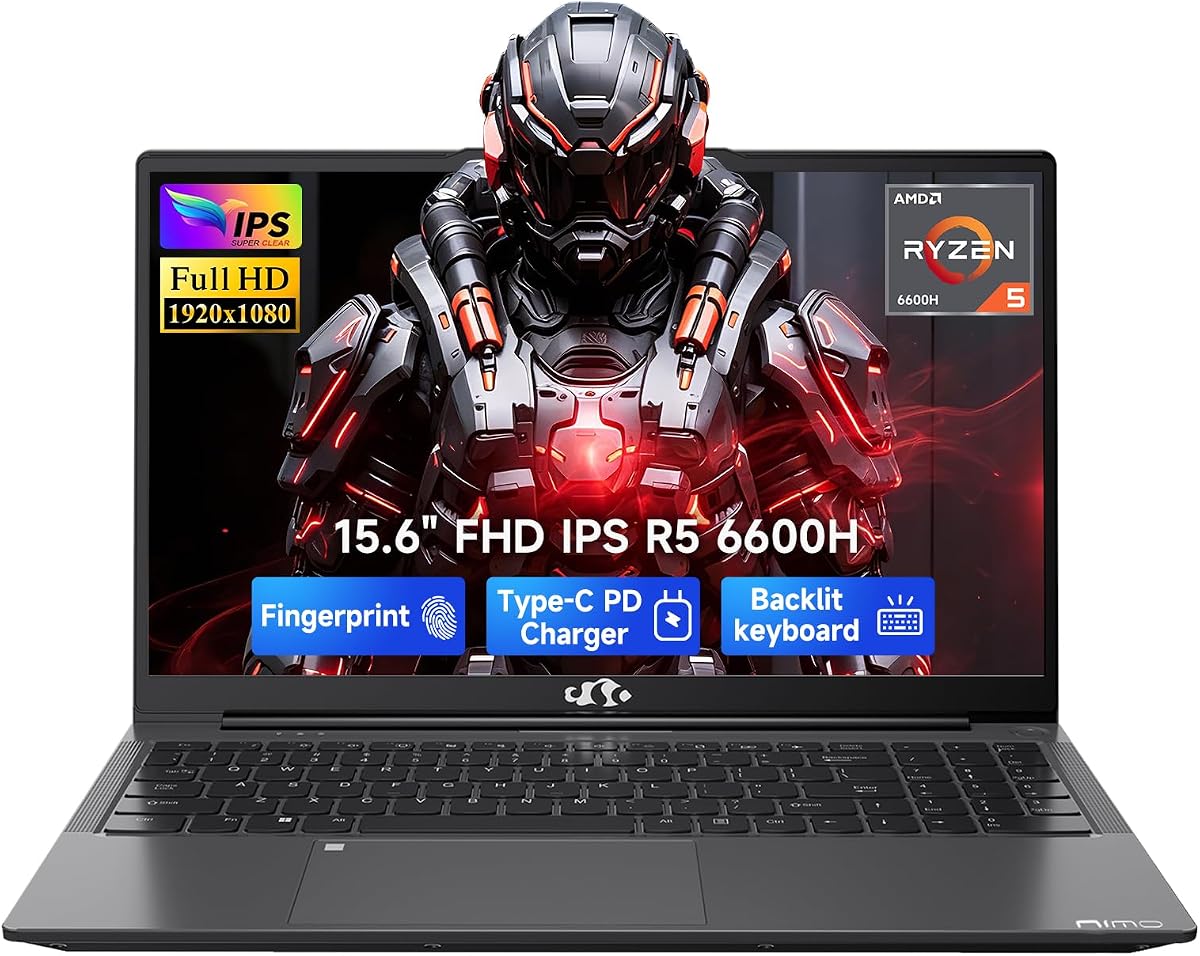
The NIMO 15.6 AI Creator Laptop is the clear performance pick and carries a 4.3 rating. Its Ryzen 5 6600H offers six cores and 12 threads with boost speeds up to 4.5GHz, giving it substantially more processing headroom than the Pentium and Celeron-based alternatives for software loading, effects, encoding, and multitrack editing.
We may earn a commission when you buy through this link, at no additional cost to you.
The combination of 16GB DDR5 memory and a 512GB PCIe SSD is especially valuable to a producer. Sixteen gigabytes allows a DAW, virtual instruments, plug-ins, and supporting applications to operate more comfortably, while 512GB provides room for sessions, stems, and a beginning sample collection. Dual SO-DIMM slots and an M.2 2280 design also permit future memory and storage upgrades.
Radeon 660M integrated graphics can handle everyday visual work, media playback, light photo editing, and casual games, although they are not intended for demanding 3D production. A 53.58Wh battery, 100W USB-C power adapter, backlit keyboard, fingerprint reader, and full set of USB, HDMI, card, and audio connections make this a polished daily machine. The two-year warranty and stated return window add reassurance.
This is the best choice for a beginner who wants room to grow, a student combining music production with coursework, or a creator moving beyond very simple projects. It is the most expensive option in this guide, but it also has the strongest processor and memory combination. Buyers should still use a proper audio interface, because laptop speakers and internal microphones cannot deliver dependable professional recording quality.
Six CPU cores and 12 threads provide a meaningful advantage when a DAW, virtual instruments, and effects are active at once. This extra headroom is especially valuable for sample playback, tempo-based processing, and video-synced editing.
The 16GB DDR5 and 512GB PCIe SSD establish a much more comfortable production baseline than the 4GB, 6GB, and 8GB alternatives. Upgrade support also makes the system more adaptable as a creator's project library develops.
We may earn a commission when you buy through this link, at no additional cost to you.
This BLUEING 2026 laptop combines 12GB RAM with a 256GB M.2 SSD, a combination that gives it one of the better balanced specifications among the lower-cost models. Its 4.2 rating reflects a practical option for students and home producers who need more room than a tiny eMMC drive can offer.
We may earn a commission when you buy through this link, at no additional cost to you.
The 14-inch 1920 by 1080 IPS display has a listed 100% sRGB color gamut and a wide 16:9 format. That gives enough space for a DAW, a modest mixer, and basic editing tools. The processor reaches 3.4GHz and includes 4MB of smart cache, which is adequate for learning arrangement, editing, and effects processing without approaching the speed of the NIMO Ryzen system.
Storage expandability is another strength. The 256GB drive gives immediate room for software and project files, while the listing notes that it can be upgraded to a 4TB NVMe drive. A TF card can add up to 512GB, and the full USB-C, dual USB 3.2, USB 2.0, HDMI, headphone, and charging connections make external peripherals straightforward to attach.
This model is well suited to a creator who wants 12GB memory and 256GB storage but prefers a compact 14-inch machine. It is also useful for schoolwork, remote meetings, and general productivity. The limits are the same as other Pentium Gold models: demanding tracks and large sample libraries can become difficult, so a more powerful system is preferable for advanced work.
A 256GB SSD offers double the nominal capacity of several comparable listings, reducing the need to move active sessions immediately to external storage. This is useful for preserving rough mixes, stems, and recordings while the project is in progress.
The selection of full-size USB ports and USB-C reduces adapter clutter when connecting an audio interface, controller, external drive, headphones, and display. A compact 14-inch footprint also preserves desk space for speakers and a small MIDI keyboard.
We may earn a commission when you buy through this link, at no additional cost to you.
This 15.6-inch laptop has a 4.2 rating and offers a particularly balanced budget configuration of 12GB RAM, a 256GB SSD, and a Full HD IPS display. That combination is more accommodating for music creation than the 4GB and 6GB models because it leaves more room for a DAW, supporting utilities, and imported media.
We may earn a commission when you buy through this link, at no additional cost to you.
The Pentium 6500Y is suitable for ordinary daily workloads, streaming, office tasks, and lightweight music projects. A 170-degree hinge is useful for positioning the screen in different working arrangements, while the built-in webcam cover adds privacy during online lessons or collaborative sessions. The listing also highlights quiet operation, which can be valuable in shared rooms.
The main compromises are performance headroom and endurance. The processor is not designed for large orchestral sample libraries, high track counts, or demanding mastering processors, and the stated battery life of up to six hours is less generous than the Chromebook's advertised figure. Storage is nevertheless a meaningful improvement over the first model, allowing projects and audio files to remain on the internal drive.
The laptop suits a student who wants a single machine for coursework, communication, entertainment, and introductory recording. Its 3.5-pound weight supports portability, and the combination of HDMI, USB ports, dual Type-C connections, WiFi 5, and Bluetooth 5.0 provides a good accessory foundation. For heavier production, move up to the NIMO rather than expecting this configuration to scale indefinitely.
Pairing 12GB of memory with a 256GB SSD gives a more useful editing baseline than either low memory or low storage alone. It allows beginners to keep software, several recordings, and the project file together without immediately filling the drive.
Quiet operation and a physical webcam cover make the machine less disruptive in a bedroom studio, classroom, or shared office. The wide hinge also gives the user some flexibility when using an external display.
We may earn a commission when you buy through this link, at no additional cost to you.
The BLUEING 15.6-inch model has a 4 rating and prioritizes a large, sharp workspace with 8GB of memory and a 256GB M.2 SSD. Its Full HD IPS screen is listed at 100% sRGB, and the 16:9 format should make arranging tracks and navigating software more comfortable than on a smaller or lower-resolution panel.
We may earn a commission when you buy through this link, at no additional cost to you.
The Pentium Gold 6500Y boosts to 3.4GHz and has 4MB of smart cache. That is sufficient for lighter DAW sessions, educational software, basic effects, and everyday productivity. The 256GB SATA PCIe 3.0 SSD provides a practical amount of active storage, while the internal drive can also be upgraded to 4TB according to the listing.
Its weakness is 8GB RAM. While adequate for a single lightweight production application, memory can become a bottleneck when a producer opens a browser, a DAW, virtual instruments, and multiple plug-ins simultaneously. A 12GB version with the same general display size may be a wiser choice for a computer intended specifically for music creation.
This model is a practical choice for users who want a large screen, useful connectivity, and 256GB storage on a limited budget. The full-size keyboard and spacious touchpad also help with general productivity. It can handle introductory recording well, but buyers should keep sessions focused, store sample libraries externally, and close unnecessary applications when editing.
The 15.6-inch Full HD panel gives a DAW, mixer, and file browser more usable area than the HP Chromebook's smaller HD display. This helps when a beginner is learning to arrange clips, label tracks, and compare takes.
The included 256GB SSD is useful for active sessions, while the claimed upgrade path to 4TB gives owners a way to expand as recordings accumulate. The TF card option provides an additional route for transferring or archiving media.
We may earn a commission when you buy through this link, at no additional cost to you.
The Amzboy 15.6-inch laptop has the second-highest supplied rating at 4.8 and is the least conventional choice here. Its Intel N4020, 4GB RAM, and 128GB eMMC are modest, but Windows 11 is preinstalled, giving beginners immediate access to a wide range of desktop music applications.
We may earn a commission when you buy through this link, at no additional cost to you.
The fanless solid-state design promises silent operation, which is pleasant during practice, online lessons, and basic recording. Its 1920 by 1080 anti-glare display offers a large, clear workspace, while the 3.3-pound body keeps the machine portable. A compact 45W Type-C PD adapter simplifies charging when only one USB-C travel cable is needed.
The 4GB memory and 128GB eMMC are serious constraints for audio production. Heavy DAWs, sample libraries, and multiple effects will strain this configuration, and eMMC is generally slower than an SSD. External TF storage can add up to 1TB, but it will not improve internal memory or processing speed.
This laptop is best for a student on a very limited budget who needs Windows, a full HD screen, and a simple machine for coursework, basic voice recording, and introductory DAW lessons. It earns its high rating, but ratings alone do not overcome the hardware limits. Anyone handling more demanding recordings should choose at least 12GB RAM and a conventional SSD.
A preinstalled Windows 11 system removes much of the configuration involved with a new notebook. That convenience is useful for beginners who want to install a familiar DAW and begin learning rather than troubleshoot a different operating environment.
The fanless construction can be advantageous in quiet environments, while the 3.3-pound weight and Type-C charging setup make the system easy to carry between a classroom, shared workspace, and home.
We may earn a commission when you buy through this link, at no additional cost to you.
The 15.6-inch 5205U laptop has a 5 rating and combines a Comet Lake 5205U processor, 6GB of RAM, a 128GB SSD, and Windows 11. Its integrated UHD Graphics support the listed work of web research, office productivity, online learning, and HD playback, making it a plausible lightweight computer for learning the fundamentals of audio production.
We may earn a commission when you buy through this link, at no additional cost to you.
Its 1920 by 1080 display provides a generous editing area, and the machine weighs 1.63kg with a thickness of 17mm. The stated 38Wh battery is intended to cover long lectures, meetings, and commutes. A Kensington lock slot is a useful addition for libraries, cafes, and shared work areas where the laptop may be left unattended.
The connector selection includes three USB 3.0 ports, Type-C, HDMI, a TF reader, and a 3.5mm audio jack, so basic peripherals can be connected without a large adapter collection. Memory is the main production limitation at 6GB, while 128GB of internal storage leaves little room for plug-ins and samples. TF expansion up to 512GB can archive files, but memory cannot be added based on the supplied information.
This is a solid low-cost choice for a student who needs a portable Windows notebook for coursework and light music work. Its high rating suggests strong customer satisfaction, although audio creators should remain realistic about its capacity. It works best for simple projects, and a 12GB or 16GB laptop is a better investment for a growing production setup.
At 17mm thick and 1.63kg, this model is designed for easy transport. A student can use it for lessons and practice sessions without carrying a large desktop replacement into a shared space.
The integrated Kensington lock slot is a meaningful benefit in public areas, while the range of USB, HDMI, card, and audio connections supports common music-production accessories and an external monitor.
We may earn a commission when you buy through this link, at no additional cost to you.
Choosing a cheap laptop for recording music means deciding which production tasks matter most, because processor speed, memory, storage, software compatibility, and portability involve trade-offs. A low-cost device can support learning, podcasts, voice-over, and small music projects, but it cannot replace a workstation for heavy mixing or mastering.
The processor determines how quickly a DAW, virtual instruments, effects, and exports respond. The Ryzen 5 6600H in the NIMO offers the strongest performance in this group, with six cores and 12 threads, while the Pentium Gold 6500Y models are more appropriate for modest projects. The Intel N4020, Celeron N4000, and Comet Lake 5205U occupy the lower end of the list and favor light workloads over intensive multitrack production.
RAM is especially important because a DAW, audio editor, plug-in host, browser, and virtual instruments can all demand memory at once. The 16GB NIMO is the safest choice for a growing setup, while 12GB models provide a sensible entry-level balance. The 8GB and 6GB configurations can handle simple sessions, and 4GB is best reserved for light educational or voice-recording use rather than large projects.
Recording projects, exported mixes, stems, installers, and sample libraries consume storage quickly. A 128GB SSD is enough for a small collection of lightweight projects, while 256GB gives beginners more breathing room and 512GB is preferable for active use. External SSDs and TF cards help with archives, but working directly from slower removable media can interrupt editing and increase the risk of workflow problems.
A good recording laptop needs reliable connections for a microphone or instrument interface, headphones, MIDI controllers, external drives, and monitors. USB-C is useful for modern compact interfaces, while full-size USB-A ports remain convenient for controllers and legacy peripherals. None of these laptops should be judged by their built-in speakers or microphones when professional-quality recording is the goal.
Music software benefits from enough screen area to show tracks, waveforms, mixer controls, and plug-in windows at the same time. A 15.6-inch Full HD panel offers the most workspace among the laptops listed, while the 14-inch models balance editing room with portability. The HP Chromebook's 1366 by 768 HD display is the least detailed, and its Chrome OS also imposes more software restrictions.
Windows laptops support the broadest range of desktop DAWs, plug-ins, MIDI utilities, and educational recording programs in this list. Chrome OS is excellent for browser-based tools and cloud services but cannot run conventional Windows music applications. macOS remains a popular music-production environment, yet none of the supplied products is a Mac, so this guide focuses on Windows and Chromebook options.
Recording can happen anywhere, so weight, thickness, charger size, and battery endurance may matter as much as raw speed. The HP Chromebook is the lightest listed system at 3.24 pounds and advertises up to 13 hours and 30 minutes of wireless streaming, while the NIMO provides a larger battery and a USB-C charging arrangement. Frequent mobile users should plan for real-world battery loss while running a DAW and audio interface.
Expandability can extend a budget laptop's usefulness. Several models provide M.2 storage upgrades, and the NIMO additionally lists dual SO-DIMM slots and support for higher memory and storage capacities. Warranty length, return terms, and local support may also influence confidence in an unfamiliar brand. The NIMO includes a two-year manufacturer warranty and a 90-day return window, while several BLUEING options include one-year protection and 30-day support.
Before opening a recording project, connect the audio interface to the laptop, install its driver, select the correct input and output devices, and confirm that the DAW is receiving a signal. Set the buffer size carefully: a smaller buffer can reduce monitoring delay but demands more processing power, so begin with a moderate setting and lower it only if the computer remains responsive.
Organize recordings by project, keep active files on the internal SSD, and back them up to reliable external storage. Save versions after meaningful changes, avoid renaming files while an application has them open, and retain separate copies of irreplaceable takes. Close unused browser tabs and applications before intensive editing so memory remains available for plug-ins and virtual instruments.
Protect the laptop by keeping vents clear, avoiding unstable surfaces that block airflow, and cleaning the screen with a soft dry cloth. For transport, shut the machine down fully, remove cables carefully, and use a padded bag. Periodic software updates, storage checks, and backup verification help maintain a stable recording environment, while a surge protector or suitable power supply adds protection where electrical conditions are uncertain.
Yes, a cheap laptop can record basic vocals, instruments, podcasts, and simple music projects. Its usefulness depends on the processor, memory, software, and project complexity. A model with 12GB or 16GB of RAM will generally handle a DAW more comfortably than a 4GB machine. You will also need a suitable microphone or instrument, an audio interface, and headphones rather than relying on the built-in laptop hardware.
There is no single specification that works for every creator, but processing power and memory usually matter most for a local DAW workflow. A capable processor handles plug-ins and virtual instruments, while enough RAM prevents the system from stuttering or struggling with multiple applications. Storage and port selection are also important, particularly when large samples or external studio equipment are involved.
Eight gigabytes can support learning and relatively simple recording sessions, especially with a lightweight DAW and few effects. It becomes restrictive when a producer uses large sample libraries, several virtual instruments, a browser, or multiple audio applications. A 12GB configuration is a better minimum for a new music laptop when the budget permits.
A Chromebook is best for browser-based recording, cloud collaboration, instructional tools, and projects stored online. Its local storage and memory are limited, and conventional Windows DAWs and plug-ins cannot be installed normally. The HP Chromebook 14 in this guide is therefore most appropriate for lightweight and cloud-centered work rather than an extensive local production setup.
Most basic audio recording and editing does not require a dedicated graphics card. Integrated graphics are sufficient for DAWs, effects, MIDI, and ordinary media playback. A stronger GPU becomes more relevant for demanding video editing, 3D work, game development, or visually intensive production. The Ryzen 5 6600H model in this guide has integrated Radeon 660M graphics that suit its creator-oriented general-purpose role.
Most models include USB-A or USB-C connections that can accommodate a compatible USB microphone, although the appropriate adapter or cable may be needed. A USB audio interface usually provides more flexible input options, lower-latency monitoring, and better control than a basic built-in microphone. Confirm the laptop's supported audio accessories and the interface's operating-system requirements before purchasing.
That depends on the included capacity and the type of recording. A 256GB or 512GB SSD is generally more comfortable for a new production setup, while 128GB can work if active projects are kept lean and old files are archived. Moving from eMMC to an SSD can improve responsiveness, but the supplied data does not indicate internal replacement support for every model, so verify the exact configuration first.
At minimum, most beginners need a compatible microphone or instrument connection, an audio interface, closed-back headphones for tracking, and cables for the chosen equipment. A MIDI controller can add value for keyboard input, while powered speakers are better suited to mixing than the laptop's built-in audio. The computer handles software and storage, but it does not replace quality capture and monitoring hardware.
The NIMO 15.6 AI Creator Laptop leads for overall music-creation capability because its Ryzen 5 6600H, 16GB DDR5 memory, 512GB SSD, and expandable construction offer the most growth room. The first 15.6-inch 12GB laptop is the more compelling general budget option, while the 15.6-inch 5205U model combines a 5 rating, Windows 11, a Full HD screen, and a thin portable design.
For most beginners, prioritize at least 12GB of RAM, a solid-state drive with adequate capacity, and a processor that can sustain the chosen DAW. A 14- or 15.6-inch Full HD display improves editing, and USB connectivity makes studio accessories easier to add. Avoid choosing solely by display size or customer rating when the processor and memory cannot support the intended workload.
Before purchasing, confirm the current configuration, operating system, included charger, warranty, return terms, and exact port layout because listings can change. Compare current prices across retailers, factor in the cost of an audio interface and headphones, and preserve enough budget for proper capture and monitoring equipment rather than relying on the laptop's built-in audio.