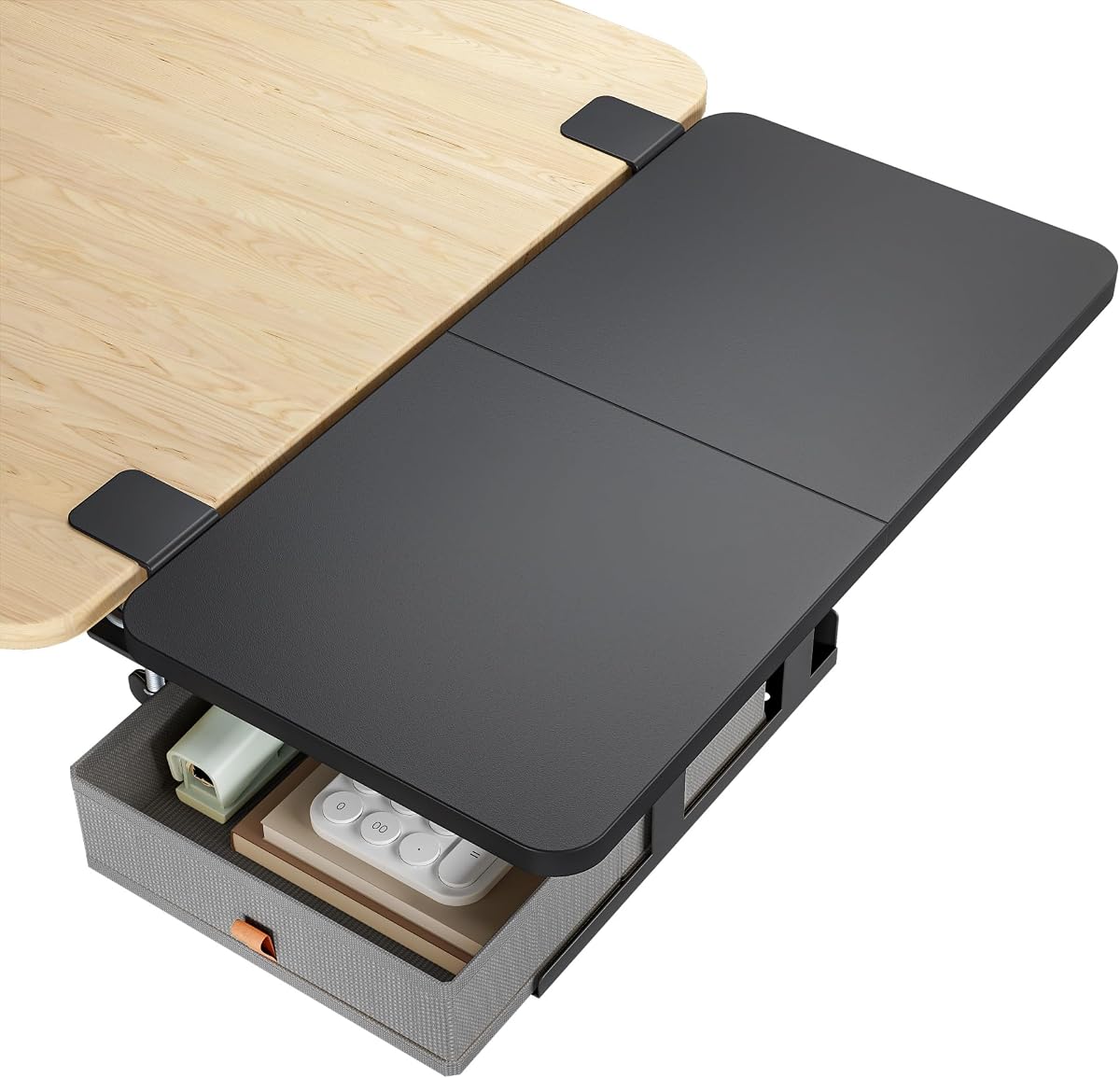
PEGZONE Desk Extender Tray with Storage Drawer
4.7Editor score
Supports up to 55 pounds
Integrated storage drawer
Front or side mounting
A clamp on desk extender tray adds usable surface without requiring a larger desk, permanent drilling, or a complicated riser setup. The best models combine a secure clamp, useful dimensions, smooth arm support, and enough strength to hold keyboards, mice, monitors, printers, and everyday accessories.
We compared these ten trays using the supplied specifications, including dimensions, weight capacity, mounting methods, folding mechanisms, desk-thickness compatibility, storage features, and intended uses. The list covers compact arm rests, broad keyboard platforms, monitor shelves, and multipurpose extenders for different workstation layouts.
Each pick highlights a particular balance of capacity, versatility, and convenience. Ratings reflect the supplied customer feedback, while practical details show how each tray may fit your desk. Product availability and pricing can change, so confirm the current specifications and listing before making a final purchase.
4.7Editor score

5.0Editor score

4.3Editor score
As an Amazon Associate we earn from qualifying purchases.
The comparison below organizes all ten options by their most important characteristics, including usable surface, stated load capacity, mounting style, and special features.


The BONTEC Ergonomic Desk Extender Tray is a compact solution for people who want their mouse hand and forearm to sit closer to desk height. Its supplied rating is 4.5 out of 5, and the defining feature is a 9.5-by-9.1-inch platform designed to extend the working edge without creating a large overhead shelf.
We may earn a commission when you buy through this link, at no additional cost to you.
The platform can hold a mouse, notebook, small keyboard, or other daily accessories, while its stated 33-pound capacity provides useful strength for a compact unit. A knob-operated clamp allows installation without drilling, and the 90-degree folding mechanism lets the tray sit out of the way when it is not needed. The textured, waterproof surface should be easier to wipe clean than exposed fabric.
This is not a full-width keyboard tray, so buyers who need room for a full-size keyboard and mouse should look farther down the list. Some assembly is also implied by the inclusion of an installation manual and adjustable hardware. Even so, the BONTEC balances a small footprint with polished materials and strong ergonomic positioning.
Choose this tray if you work primarily with a mouse, use a compact keyboard, or need a dedicated forearm rest at the front edge of a compact desk. It is especially attractive to users who want a non-damaging installation and the ability to fold the tray away between work sessions.
The low-profile shelf brings the mouse area closer to the main desktop, which can reduce the need to reach upward or outward. Its compact footprint targets forearm support rather than broad equipment storage.
The folding design and non-hole clamp make this practical for rented spaces, shared offices, and desks where permanent modifications are undesirable. The textured finish also suits frequent daily use.
We may earn a commission when you buy through this link, at no additional cost to you.
The VIVO Black Clamp-on Desk Extender provides one of the broadest work surfaces in this guide, with an actual platform measuring approximately 23.7 by 11.7 inches. Its supplied rating is 4.2 out of 5, and its broad dimensions make it suitable for a full-size keyboard and mouse, a printer, speakers, or other equipment that would overwhelm a small arm-rest shelf.
We may earn a commission when you buy through this link, at no additional cost to you.
Reinforced K-shaped brackets support up to 44 pounds, giving the platform a practical foundation for everyday office equipment. The C-clamp fits desktops from 0.5 to 3.5 inches thick and is tightened by hand. When the workspace is no longer needed, the tray folds through 90 degrees so it occupies less visual and physical space.
Compatibility deserves attention. The supplied information says the extender is not compatible with lipped or beveled desk edges. It may also project more than a compact wrist shelf, which can matter in a narrow room or when the desk is tucked tightly against a wall. Buyers should inspect the underside of their desktop before ordering.
This VIVO model is a strong choice for users who want a substantial secondary surface and the option to use it for more than arm support. It is especially useful for keyboard-focused setups, equipment organization, and shared offices where a broad, foldable platform can serve several functions.
The wide platform can serve as a keyboard tray, printer stand, or equipment shelf. That flexibility makes it more adaptable than trays designed solely for a mouse or compact writing surface.
A hand-tightened clamp and included hardware simplify installation. Confirm the desk profile and thickness first, particularly if the underside contains raised molding or beveled edging.
We may earn a commission when you buy through this link, at no additional cost to you.
The PEGZONE Desk Extender Tray with Storage Drawer combines a generous 24-by-12-inch surface with a concealed place to keep small accessories. Its supplied rating of 4.7 out of 5 reflects a particularly strong showing among the products compared, while the stated 55-pound capacity is the highest listed here.
We may earn a commission when you buy through this link, at no additional cost to you.
The drawer is designed for pens, cables, and other small office supplies that would otherwise contribute to desktop clutter. Rounded edges help reduce sharp contact points, and the tray's construction is intended for keyboards, mice, laptops, printers, arm support, and equipment stands. Mounting from the front or side gives users some freedom when arranging a narrow or corner-oriented workstation.
Assembly is a genuine consideration because the tray consists of two connected panels. The clamp fits desks from 0.6 to 2.4 inches thick and at least 22 inches wide, but it is not compatible with raised, beveled, or irregular edges. Those limits are reasonable, although they mean the desk must have a clean, square profile for a secure fit.
This is the pick for buyers who value organization nearly as much as expanded workspace. The storage drawer distinguishes it from ordinary keyboard trays, while the strong capacity and broad dimensions make it appropriate for a full daily office setup. Buyers willing to complete the straightforward panel assembly gain a notably versatile surface.
The under-surface drawer gives frequently used items a defined home without adding another container to the desktop. It is especially useful for keeping cables, adapters, pens, and small accessories organized beneath the working area.
A stated capacity of 55 pounds provides comfortable margin for heavier office equipment. Front and side mounting options make the broad platform easier to adapt to different desk arrangements.
We may earn a commission when you buy through this link, at no additional cost to you.
The Adjustable Ergonomic Clamp-On Desk Extender Tray stands out for its wood-grain laminate surface, integrated cup holder, and under-desk retraction design. Its supplied rating is 2.6 out of 5, which is lower than every other product in this comparison and warrants more caution when considering the listing.
We may earn a commission when you buy through this link, at no additional cost to you.
Its 20-by-7.8-inch surface is narrower than the broad keyboard trays but can accommodate a keyboard, mouse, phone, tablet, notebook, and drink. The cup holder keeps a beverage within reach while limiting its direct contact with electronics. Reinforced metal clamps support hole-free installation on many standard desk edges.
The main uncertainty is the absence of a stated weight capacity in the supplied product information. Buyers who plan to place a printer, monitor, or other heavy device on the shelf should not infer that it is designed for such loads. The listed clamp range of approximately 1 to 5 centimeters may also fit fewer desks than models specifying wider thickness limits.
This tray may appeal to users who value the distinctive cup holder, warmer visual finish, and compact retractable footprint more than maximum capacity or universal fit. For a lightweight office setup, it offers useful organization in a relatively small area. For heavier equipment, one of the products with an explicit and higher load rating is the safer specification-led choice.
The shallow shelf and dedicated cup holder create an organized landing area for common accessories. Its retractable approach keeps the extension close to the desk when it is not being used.
The supplied customer rating is notably lower than the rest of the field, and no maximum load is stated. Consider those limitations carefully before choosing it for demanding equipment.
We may earn a commission when you buy through this link, at no additional cost to you.
The Height-Adjustable Desk Shelf is designed to do more than extend a work surface. Its supplied rating is 4.4 out of 5, and the 15-by-9.5-inch platform is positioned at an adjustable 6.5-inch height, allowing it to function as a monitor riser as well as a shelf for laptops, small speakers, gaming equipment, and office accessories.
We may earn a commission when you buy through this link, at no additional cost to you.
Four clamping options provide unusual installation flexibility: top clamp, side clamp, bottom hang, and parallel placement. The C-clamp mounts without drilling and accommodates desktops from 0.4 to 2.1 inches thick. A stated capacity of 44 pounds gives the shelf enough capability for a monitor and several smaller accessories.
The primary drawback is size. At 15 by 9.5 inches, the platform is not intended to provide a full-size keyboard-and-mouse workspace like the 24-inch extenders. Height adjustment also adds complexity compared with a simple fold-flat design, although that complexity is valuable when screen positioning is the priority.
Choose this shelf when your main goal is to lift a monitor, improve screen placement, and consolidate desktop accessories. It is also well suited to mixed work and gaming environments where a sturdy elevated platform can support equipment without occupying the full width of the desk.
The adjustable height places a monitor closer to eye level, which can reduce the need to bend or tilt the neck. The extended edge can also provide a resting point for the forearms.
Top, side, hanging, and parallel configurations allow the shelf to work around different desk structures. Review the installation examples and measure the desktop before assembly.
We may earn a commission when you buy through this link, at no additional cost to you.
The Suptek Clamp-on Desk Extender provides a broad 23.6-by-9.5-inch surface for keyboards, printers, speakers, or general storage. Its supplied rating is 4.6 out of 5, placing it among the strongest-rated products here, while the stated 44-pound capacity suits a substantial office workload.
We may earn a commission when you buy through this link, at no additional cost to you.
Its most useful advantage is the broad stated desk compatibility range of 0.5 to 4.17 inches. The adjustable C-clamp mounts without damaging the desktop, and included hardware and instructions support straightforward assembly. Reinforced K-shaped brackets help maintain rigidity, while the 90-degree folding design lets the platform recede when it is not required.
Compatibility still has clear boundaries. The supplied information excludes lipped or beveled edges, curved or corner desks, and plastic desktops. Those exclusions may eliminate otherwise popular desk shapes, so measuring and visually inspecting the installation area is essential.
This Suptek is a good middle ground between compact arm rests and very broad workstation extensions. It offers enough width for a typical keyboard-and-mouse arrangement, a generous clamping range, and a clean folding mechanism. It is particularly suitable for standard rectangular office desks used by intensive computer workers.
The elongated platform can function as a writing surface, keyboard tray, printer stand, or accessory shelf. Its stated capacity provides useful confidence for equipment beyond a mouse and notebook.
The 0.5-to-4.17-inch thickness range fits many standard desks. The exclusions for beveled, curved, lipped, and plastic desks should be checked before installation.
We may earn a commission when you buy through this link, at no additional cost to you.
The Sisyphy Ergonomics Desk Extender Tray is a compact, value-focused arm rest with a supplied rating of 4.3 out of 5. Its 9.5-by-9.1-inch platform is designed to sit flush with the desktop, bringing the mouse hand, forearm, and smaller keyboard area into a more natural working position.
We may earn a commission when you buy through this link, at no additional cost to you.
The punch-free clamp installs without drilling, making the tray suitable for home offices, dorm rooms, and temporary workstations. It can mount on the front or side of a standard right-angle desk, and the stated maximum desk thickness of 4.5 centimeters is a useful compatibility benchmark. The fold-down structure allows it to tuck under the desktop when not needed.
Its smaller width is the main constraint. Although the supplied description refers to use with a keyboard, notebook, and mouse, it cannot offer the continuous work area of a 24-inch platform. The product is also optimized for standard right-angle desks, so unusual edges may not provide enough clamping surface.
This Sisyphy tray is best for buyers who mainly need mouse and forearm support without spending on a large shelf. The no-hole installation, front or side placement, and folding design deliver the core benefits of a clamp-on extender in a compact and economical package.
Extending the desktop horizontally reduces the need to hold the mouse arm away from the desk. The low-profile format is particularly useful during long typing or navigation sessions.
The no-drill clamp and stated quick setup make the tray practical for temporary workspaces. Folding it under the desk keeps the extension from occupying permanent surface area.
We may earn a commission when you buy through this link, at no additional cost to you.
The PEGZONE Desk Extender Tray with Laptop Holder shares the broad dimensions and high stated capacity of the drawer-equipped PEGZONE model, but organizes accessories differently. Its supplied rating is 4.3 out of 5, and its integrated laptop stand and headphone hook give it a strong appeal for users who want a more complete equipment-management surface.
We may earn a commission when you buy through this link, at no additional cost to you.
The assembled platform measures 24 by 12 inches and supports up to 55 pounds. That makes it suitable for laptops, keyboards, mice, printers, speakers, and office supplies. Rounded edges help soften contact areas, while the white finish may blend more readily with a light desk or contemporary office.
As with the related model, the tray consists of two connected panels and requires assembly. Its clamp fits desks from 0.6 to 2.4 inches thick and at least 22 inches wide, but not raised, beveled, or irregular edges. Those constraints should be checked before purchase, especially on desks with decorative trim.
Choose this version if a laptop stand and headphone hook matter more than a concealed drawer. It combines broad workstation capacity with convenient hanging and support features, making it a practical platform for a frequently changing collection of desk equipment.
The underside laptop support and headphone hook turn otherwise loose accessories into organized components. These details can reduce visual clutter around the main working area.
The 24-by-12-inch surface and 55-pound stated capacity accommodate more than a compact wrist rest. It remains versatile for keyboards, peripherals, and supported office equipment.
We may earn a commission when you buy through this link, at no additional cost to you.
The ETHU Foldable Desk Extender Tray is the widest platform in the guide at 25.6 by 11.4 inches. Its supplied rating is 4.3 out of 5, and the generous surface comfortably accommodates a full-size keyboard and mouse with additional room for a phone, notebook, or other frequently used accessories.
We may earn a commission when you buy through this link, at no additional cost to you.
Unlike fixed-position trays, this model allows the user to adjust the height and angle of the platform. That flexibility can help align the keyboard more closely with the body and create a comfortable typing posture. The clamp-on mounting method avoids drilling, while the supporting frame and mount are made of metal with a rust-resistant powder coating.
Its stated load capacity is 33 pounds. That is enough for keyboards, mice, and typical accessories, but it is lower than the 44- to 55-pound capacities offered by several other broad trays. Buyers should also account for the extra components and adjustment required by the height-and-angle mechanism.
This ETHU model is well suited to users who prioritize a large keyboard platform and personalized positioning. It works particularly well in a dedicated office where the tray can remain adjusted, and the white finish gives it a clean appearance that coordinates easily with light-colored equipment.
Height and angle adjustment make it easier to bring the keyboard into line with the user's shoulders and wrists. This is valuable for setups where the main desktop height is not ideal.
The broad platform fits a full-size keyboard and mouse with space left for a phone or small accessories. That makes the tray more useful than a mouse-only shelf.
We may earn a commission when you buy through this link, at no additional cost to you.
The 16 by 12 Inch Clamp-On Arm Rest Shelf has the highest supplied rating in this guide at 5.0 out of 5. It offers a balanced combination of compact dimensions, substantial stated load capacity, folding storage, and near-flush positioning that makes it an especially versatile desktop extension.
We may earn a commission when you buy through this link, at no additional cost to you.
The high-density particleboard surface is described as 1.6 centimeters thick, while upgraded brackets and a cold-rolled steel double-clamp design support up to 50 pounds. Its extended edge aligns closely with the desktop to provide arm and wrist support. The 90-degree folding structure allows the tray to tuck under the desk when it is not needed.
The product is assembled from two connected panels, so buyers should expect a short assembly step. Its listed 16-by-12-inch title dimensions differ from the supplied description of a larger working area when extended, so shoppers should examine all listing images and specifications to confirm the usable surface. It is also not quite large enough for every full-size keyboard setup.
This is the most well-rounded pick for users seeking a dependable balance of support, strength, and compact storage. It suits mouse-heavy work, writing, study, and general computer use, particularly when elbow pressure and reaching are concerns. The strong rating and clearly stated capacity make it a practical first choice for many desks.
The platform is intended to align closely with the main desktop, helping keep the forearms and wrists in a more natural position. This can make extended computer sessions more comfortable.
A 50-pound stated capacity and steel double-clamp construction provide a stable base. The 90-degree folding design allows the tray to disappear beneath the desk when not in use.
We may earn a commission when you buy through this link, at no additional cost to you.
The right clamp-on extender depends on your desk edge, equipment load, ergonomic needs, and available space. Measure first, then compare surface size, support structure, folding behavior, and included organization features.
Match the tray to a clean, straight desk edge. Measure both thickness and profile before ordering.
Choose a small arm-rest size for peripherals and a broad platform for a keyboard. Avoid paying for unused surface or extra projection.
Match the stated capacity to the heaviest planned item. For substantial equipment, favor a clearly rated and reinforced platform.
Look for a flush, stable surface that places input devices closer to the body. Adjustability is useful when a fixed position does not fit.
Folding saves space, but check knee clearance and nearby furniture. A compact design is easier to use every day.
Integrated storage adds convenience, but prioritize capacity and stability first. Choose features that match your actual accessories.
Look for an easy-clean top and rust-resistant hardware. Clean spills promptly and inspect the clamp periodically.
Read the instructions, assemble panels before mounting, and tighten the clamp gradually. Confirm a level fit without damaging the desk.
Start by identifying the straightest usable portion of the desk edge and measuring the desktop thickness. Assemble any connected panels on a flat surface, then position the tray where the keyboard, mouse, or equipment will sit directly in front of you. Attach the clamp gradually while checking that the desk edge remains flat and undamaged.
After installation, adjust the tray's height, angle, or folding position if the model supports it. Place frequently used items within easy reach and distribute heavier equipment across the supported surface. Keep drinks on a coaster or use the integrated cup holder, and maintain clear space beneath the desk for knees and chair movement.
For maintenance, wipe the surface with a soft damp cloth and dry it promptly. Avoid soaking laminate or particleboard, and use only a mild cleaner if the manufacturer permits it. Periodically check the clamp, bolts, brackets, and adjustment hardware for looseness, especially after moving the desk or changing its position.
A properly installed clamp generally avoids permanent holes and is less invasive than drilling. However, the clamp can dent a soft or finished surface if tightened excessively or installed against an uneven edge. Use the supplied hardware, tighten gradually, and inspect the desk thickness before installation.
A long platform is generally more appropriate, with products around 23 to 26 inches wide offering enough room for a keyboard and mouse. Compact 9.5-inch trays are better for a mouse, notebook, or forearm support. Always check the actual usable dimensions because a product's title dimensions may describe the platform rather than its fully extended working area.
Some models are designed for front or side mounting, including the Sisyphy and PEGZONE trays. Others are intended only for a particular orientation. Installation depends on the bracket geometry, desk clearance, and the amount of space left near the adjacent surface, so review the mounting instructions before ordering.
That depends on the stated load capacity, mounting stability, and whether the tray includes a suitable platform or stand. Products listed at 44 pounds or more are better candidates for a monitor, while 33-pound models are generally more appropriate for keyboards, mice, and lighter accessories. Follow the product's load and installation guidance.
All of the listed products use clamp-on or punch-free installation rather than requiring permanent drilling. Some still require basic assembly of connected panels or mounting hardware. The desk must also meet the stated thickness and edge-profile requirements for the clamp to secure properly.
It can improve comfort by moving the mouse, keyboard, or forearm support closer to the body and closer to desk height. The effect depends on proper positioning, chair height, monitor placement, and work habits. A tray is one part of an ergonomic setup rather than a substitute for an adjustable chair and correctly placed display.
Many models in this guide rotate through 90 degrees so they can be stored beneath the desk. Products with integrated drawers, monitor-height adjustments, or multiple mounting positions may have different movement mechanisms. Check the folding path for obstacles and leave sufficient clearance for comfortable legroom.
Measure desktop thickness, width, edge shape, and the clear space beneath the desk. Compare those measurements with the product's stated compatibility range and installation orientation. Clean, straight edges are easiest to clamp, while beveled, raised, curved, irregular, or plastic desktops may prevent a secure fit.
The 16 by 12 Inch Clamp-On Arm Rest Shelf is the strongest all-around option for its balanced footprint, 50-pound stated capacity, near-flush positioning, and space-saving fold. The PEGZONE model with a storage drawer leads the more organized premium alternative, while the Sisyphy tray delivers a focused, budget-friendly arm-rest solution.
Your priority should match the job: choose a compact surface for mouse and forearm support, a broad tray for a keyboard or equipment, and an adjustable or elevated model for screen positioning. Before buying, verify desk thickness, edge shape, clearance beneath the desktop, and the weight of the equipment you intend to place on the tray.
Ratings, configurations, and availability can change over time, so review the current listing before ordering. Comparing the latest measurements and features against your actual desk is the most reliable way to select a clamp-on desk extender that feels stable, supports your workflow, and preserves valuable workspace.