
OMTech Pro 130W
130W laser power
35 by 55 inch workspace
Built-in CW-5200 chiller
Our CO2 Laser Cutters guide compares 10 models for power, workspace, safety, software, cooling, and production versatility, helping makers choose confidently
CO2 laser cutters are among the most versatile tools for makers, educators, and small manufacturers because they can engrave and cut many nonmetallic materials with impressive speed and repeatability. A good machine balances usable power, a practical work area, dependable safety systems, manageable software, and effective smoke extraction.
We compared the ten featured machines using their stated specifications and available customer feedback, focusing on laser power, cutting capacity, workspace, autofocus, cooling, airflow, safety protections, and software compatibility. The list covers compact desktop units, larger commercial machines, and advanced production systems with automated positioning.
Each review explains the standout capabilities, practical trade-offs, and ideal user for the machine, while the comparison table makes the major differences easier to scan. Product configurations and prices can change, so verify the current listing and included accessories before ordering.

4.5Editor score

4.5Editor score
The following table compares all ten featured CO2 laser cutters by their stated power, workspace, automation, cooling, and key workflow features. Specifications can vary by configuration, so use the table as a starting point and confirm the exact package shown on the product listing.




The xTool P3 80W is an advanced enclosed CO2 laser cutter built for users who want strong cutting performance with fewer manual setup steps. Its listed 4.5 rating reflects a favorable customer response, while the combination of 80W output, a 36 by 18 inch workspace, and intelligent positioning makes it unusually compelling for desktop-scale production.
We may earn a commission when you buy through this link, at no additional cost to you.
Its headline feature is the Automated Creation System, which combines LiDAR ranging for autofocus, dual HD cameras, and an AutoLift Base. The cameras provide a 16-megapixel overview and close-range detail image, with stated alignment accuracy of 0.0079 inch. Smart Nesting reportedly reaches 98.7% material utilization, and variable batch fill supports spreadsheet-driven production workflows.
The P3 can cut stated thicknesses of 20mm wood and 25mm acrylic while reaching a maximum speed of 1200mm/s. The fully enclosed Class 1 design, lid interlocks, active detection, and suppression system, and scrap buildup alerts make it particularly relevant to shops that value controlled operation. Rotary, conveyor, infrared, and air-purification expansions add flexibility, although the listing notes that these accessories are sold separately unless bundled.
This is the most sophisticated selection in the guide for makers who value automation, large-format access, and efficient nesting. It may be more than a new hobbyist needs, but for a growing business handling repeated production, reducing setup time can be more valuable than choosing solely by wattage. The xTool P3 80W earns top pick status for its unusually complete and integrated workflow.
LiDAR autofocus, automatic bed positioning, and dual-camera alignment address several common causes of failed jobs. These features are especially useful when switching between different material thicknesses or running repeated batches that require accurate placement.
The stated Smart Nesting capability can place more parts within a sheet, reducing waste. Variable batch fill and spreadsheet import also make the system more attractive for makers producing personalized or repeated product runs.
We may earn a commission when you buy through this link, at no additional cost to you.
The OMTech K40+ 45W is a compact desktop CO2 laser cutter that delivers considerably more cutting capability than the small diode-style alternatives commonly used for engraving. Its 4.4 customer rating indicates generally positive experiences, and the stated ability to slice 10mm acrylic and 8mm wood makes it a practical entry point for hobbyists, educators, and small businesses.
We may earn a commission when you buy through this link, at no additional cost to you.
Its integrated 45-degree air assist automatically adjusts airflow according to laser power. That function helps clear smoke and debris, protects the optics, limits carbonization on wood, and reduces fire risk. Additional protections include door and water protection, an emergency stop, a flame-retardant acrylic panel, and a high-powered exhaust fan.
The 12 by 8 inch honeycomb bed handles flat and irregular materials, while a detachable base and optional rotary axis expand the range of supported objects. LightBurn and LaserGRBL compatibility gives users access to familiar preparation and control software. The trade-off is a relatively small work area, which means large sheets must be divided or fed through in sections.
The K40+ is best for users who want meaningful CO2 cutting power in a manageable desktop package. It is less suitable for high-volume sign production or oversized components, but its airflow system, safety provisions, and software flexibility make it a balanced recommendation for creators who are ready to move beyond engraving-only workflows.
Airflow that changes with laser power is more useful than a fixed setting because thick cuts generally create more smoke and debris. The K40+ system supports cleaner edges, helps protect the lens and mirrors, and reduces the chance that residue will settle onto the workpiece.
A 12 by 8 inch bed is small for sheet production but adequate for signs, labels, craft blanks, jewelry components, and prototypes. Users should account for the space needed for supports and fixturing, especially when engraving tall or cylindrical objects.
We may earn a commission when you buy through this link, at no additional cost to you.
The VEVOR 100W is a large-format CO2 laser engraver and cutter with a 24 by 35 inch work area. Its 5.0 rating is the highest numeric customer score among the machines here, although ratings alone do not establish suitability. The combination of 100W power, a spacious bed, and 19.7 inches-per-second operating speed gives it a strong foundation for professional cutting and engraving.
We may earn a commission when you buy through this link, at no additional cost to you.
The stated cutting capacity reaches 0.59 inch in one pass, while the product information identifies engraving compatibility with wood, acrylic, cardboard, glass, leather, stone, and more than 1,000 nonmetallic materials. A honeycomb bed supports stability, and front and back pass-through doors allow longer workpieces to extend beyond the enclosure.
The digital control panel works with LightBurn, CorelDRAW, and AutoCAD, and the system supports Windows, Linux, and macOS. Files can be transferred by USB disk, USB cable, or network cable. Safety features include a tinted viewing window, automatic shutdown when the lid opens, an emergency stop, and air assist for moving smoke, dust, and sparks.
This is a good fit for users who need a substantially larger bed than a desktop model without moving into the most advanced automated production category. It lacks listed autofocus and does not mention an included water chiller, so buyers may need to budget for separate accessories and manual height adjustment. Even so, the strong power and generous workspace make it a compelling mid-to-large-format choice.
The 840 square-inch working area is one of the most useful distinctions in this list. It can accommodate wide signs and multiple smaller components, while pass-through access reduces the need to reposition exceptionally long pieces.
Compatibility with major design and control programs makes the machine approachable for users arriving from different workflows. Cross-platform support also helps studios that create files on more than one operating system.
We may earn a commission when you buy through this link, at no additional cost to you.
The OMTech Maker 90W is a commercial-oriented CO2 laser cutter aimed at users who need meaningful throughput without moving to the largest professional systems. No customer rating is supplied, so its appeal should be judged primarily from the stated specifications: 90W power, speeds up to 23.6 inches per second, and a 20 by 28 inch work area.
We may earn a commission when you buy through this link, at no additional cost to you.
A bundled water chiller supports extended engraving sessions by managing laser heat. The Yongli H2 tube is listed for up to 8,000 hours of use, with a longer service life when operated at lower settings. Honeycomb and aluminum blade beds provide a versatile platform, while four-way pass-through doors allow larger or longer materials to feed through from more than one direction.
The safety design includes a widened flame-retardant viewing window and a cover interlock that disables the laser when the cover opens. Built-in air assist removes smoke and dust, helping protect the lens and reflective mirrors. These protections and the included chiller create a more production-ready package than a basic desktop configuration.
Choose the Maker 90W when your work requires fast cutting, steady long-session output, and a moderate-to-large work area without adopting a fully automated platform. Its lack of listed autofocus means setup may be more hands-on, and the absence of a customer rating makes real-world service impressions harder to assess. Even so, the supplied equipment and balanced performance make it a strong commercial midrange option.
The included chiller is an important benefit for sustained production because heat management can influence consistency. A dedicated cooling package also makes the machine more self-contained than configurations that require a separate chiller purchase.
Pass-through doors on four sides reduce awkward repositioning when the workpiece is longer or wider than the bed. This is especially useful for signage, long labels, packaging blanks, and other repeatable production dimensions.
We may earn a commission when you buy through this link, at no additional cost to you.
The OMTech Maker 60W combines a 4.7 rating with a polished bundle that includes LightBurn and a water chiller. Its 20 by 28 inch work area and 60W output position it as a capable small-production machine, particularly for users who want easier setup and a large bed without moving directly to 100W or 130W systems.
We may earn a commission when you buy through this link, at no additional cost to you.
Autofocus is one of its most important advantages. The workbed adjusts vertically and the preinstalled system finds the focal distance automatically, reducing the need for manual calibration when material thickness changes. Honeycomb and aluminum blade beds support different workpiece types, and four-way pass-through doors make it easier to handle larger sheets or elongated items.
The included LightBurn software reduces the initial configuration burden for users who want a structured design and laser-control environment. A built-in air assist removes smoke and dust, while the water chiller supports temperature management. The widened viewing window uses flame-retardant material, and the product is described as Laser Class 2.
This machine makes sense for a growing maker or compact commercial operation that values automation, software readiness, and a generous work area. The 60W tube provides less through-cutting reserve than higher-powered models, so demanding production jobs may require multiple passes or different equipment. Within its class, however, the integrated autofocus and support bundle make it an attractive and thoughtfully assembled choice.
Automatically finding the focal distance is particularly helpful when a workflow includes several material thicknesses. It reduces setup time and makes it easier to move between jobs without repeatedly relying on manual height adjustments.
Bundling LightBurn and a water chiller removes two common setup decisions for new buyers. The combination supports a more controlled workflow from vector preparation through extended operation, although users should still learn each machine's material settings.
We may earn a commission when you buy through this link, at no additional cost to you.
The OMTech K40+ 45W is the strongest desktop-oriented recommendation in this roundup. Its 4.5 rating shows a favorable customer response, and the machine combines useful 45W cutting power with automatic airflow, broad software compatibility, and a safety package that goes beyond many entry-level machines.
We may earn a commission when you buy through this link, at no additional cost to you.
Stated performance includes cuts through 10mm acrylic and 8mm wood, engraving speeds up to 300mm/s, and a reported 1.5 to 2 times cutting-speed improvement over the earlier version. The 45-degree air assist automatically varies airflow with power, clearing smoke and debris while helping reduce wood carbonization and protect the lens.
The 12 by 8 inch honeycomb bed accepts flat and irregular stock, and a detachable base creates room for taller work. An optional rotary axis supports cylindrical objects, though it is not stated as included. LightBurn and LaserGRBL support ensures that users can choose their preferred control environment, while door and water protection, emergency stop, and a flame-retardant panel improve operational safeguards.
The K40+ is ideal for home studios, classrooms, craft businesses, and makers who want to cut wood or acrylic rather than merely engrave surfaces. It will not replace a production machine when every job requires full sheets or long sign blanks, but its manageable format and strong feature set make it a very convincing desktop purchase. This listing earns the Best Budget designation for overall value.
A 45W tube is substantial enough for meaningful cut-through work while preserving a footprint suitable for many workshops. The result is a more useful machine class than a lightweight engraver that cannot handle thicker material.
Supporting both LightBurn and LaserGRBL gives new and experienced users room to choose their preferred interface. The detachable base and optional rotary attachment broaden the types of products that can be made without changing the core system.
We may earn a commission when you buy through this link, at no additional cost to you.
The OMTech Pronto 100W is built around speed, power, and a large 40 by 24 inch work area. No customer rating is provided, but the stated 100W tube, 1000mm/s engraving speed, and advanced autofocus offer a clear production focus. It is especially relevant to users who want to move from small craft pieces to batches of larger components.
We may earn a commission when you buy through this link, at no additional cost to you.
The 960 square-inch honeycomb and aluminum blade bed provides 40 percent more nominal area than a 20 by 28 inch configuration. Two-way pass-through doors allow oversized or elongated workpieces to extend through the machine. Advanced autofocus removes much of the guesswork from setup, supporting more consistent results when switching between materials or job types.
Cooling and extraction are emphasized. The laser tube is listed for up to 12,000 hours of use, while a 4.4 cubic-foot-per-minute air pump and 318 cubic-foot-per-minute fan support clean cuts and reduce material burn. Water protection, air assist, temperature alarms, cover protection, and an emergency stop form a broad safety set.
The Pronto 100W is a strong option for production-minded makers and small manufacturers with room for a larger machine. It may be excessive for occasional hobby cutting, and the two-way pass-through system is less flexible than four-way access. Even so, its 100W output, high speed, autofocus, and large bed form a convincing package for repetitive work.
The stated 1000mm/s speed can shorten cycle times for detailed engravings and shallow cuts. High throughput matters when the same design is produced in multiples, where a small time saving can accumulate across an entire order.
The combination of a dedicated air pump and high-volume fan is intended to clear debris and reduce burning around the cut. This helps preserve edge quality while limiting residue on the laser lens and reflective mirrors.
We may earn a commission when you buy through this link, at no additional cost to you.
The OMTech Pronto 130W is a large, high-output CO2 laser cutter with a 5.0 customer rating. It combines 130W laser power with a 51 by 35 inch work area, giving it a total nominal bed area of 1,785 square inches. That scale makes it one of the most capable machines here for oversized work and continuous production.
We may earn a commission when you buy through this link, at no additional cost to you.
The stated engraving depth reaches 0.4 inch, or 10mm, across materials including wood, glass, acrylic, and leather. Operating speed reaches 1000mm/s, or 39.8 inches per second. Preinstalled autofocus and electrically adjustable workbeds simplify material changes, while two-way pass-through doors accommodate workpieces longer than the bed.
The Yongli H2 laser tube is stated to deliver up to 12,000 hours of use and to last longer when operated at lower settings. Safety features include water protection, air assist, temperature alarms, cover protection, and an emergency stop. These details suggest a production-oriented machine, although no water chiller is explicitly identified as part of the standard bundle.
Choose the Pronto 130W when throughput, maximum material capacity, and speed outweigh the need for the xTool's more extensive automated creation tools. Its large footprint and high power make it a better fit for a dedicated workshop than a compact home studio. For organizations producing large panels or repeated industrial-style parts, it is a compelling high-output choice.
The 51 by 35 inch bed can hold substantially more material than the other desktop and mid-format models in the guide. That capacity reduces material handling and makes larger signs, panels, and multi-part layouts more practical.
At 130W, the tube provides substantial reserve for thicker wood, acrylic, leather, and other suitable nonmetallic materials. The stated 10mm engraving depth also indicates that it is intended for more than shallow surface marking.
We may earn a commission when you buy through this link, at no additional cost to you.
The OMTech K40+ 45W appears as a compact desktop option for makers who want a dedicated CO2 cutter without the footprint of a commercial cabinet. It shares the well-known K40+ product name with other listings, but this particular entry provides only limited details and no customer rating, so buyers should review the full package carefully before purchasing.
We may earn a commission when you buy through this link, at no additional cost to you.
The confirmed core specification is 45W laser output with a Class 2 designation. That output places the machine in a useful range for cutting wood and acrylic as well as engraving surfaces, but the supplied information does not specify the exact bed dimensions, speed, autofocus arrangement, air-assist design, or included accessories for this listing.
A compact format can be the main benefit for a home workshop, classroom, or apartment studio where floor space is limited. A focused machine may also be easier to learn than a large production cabinet. However, limited published details make it harder to compare cutting depth, maximum speed, bed construction, software support, and safety provisions with the better-documented K40+ entries.
This listing is best considered by buyers who recognize the K40+ platform and can confirm the current configuration on the listing page. It is potentially a practical value choice for small projects, but the more detailed K40+ options are easier to evaluate. Unless the seller confirms additional contents, do not assume that a water chiller, rotary axis, or particular software package is included.
A compact desktop laser is most useful for signs, labels, ornaments, prototypes, and other pieces that fit comfortably within a small bed. Confirm dimensions and clearance requirements before planning larger production layouts.
The listing supplies fewer specifications than the other K40+ entries. Buyers should verify the bed, airflow, cooling, control software, and accessories to ensure the package meets their needs.
We may earn a commission when you buy through this link, at no additional cost to you.
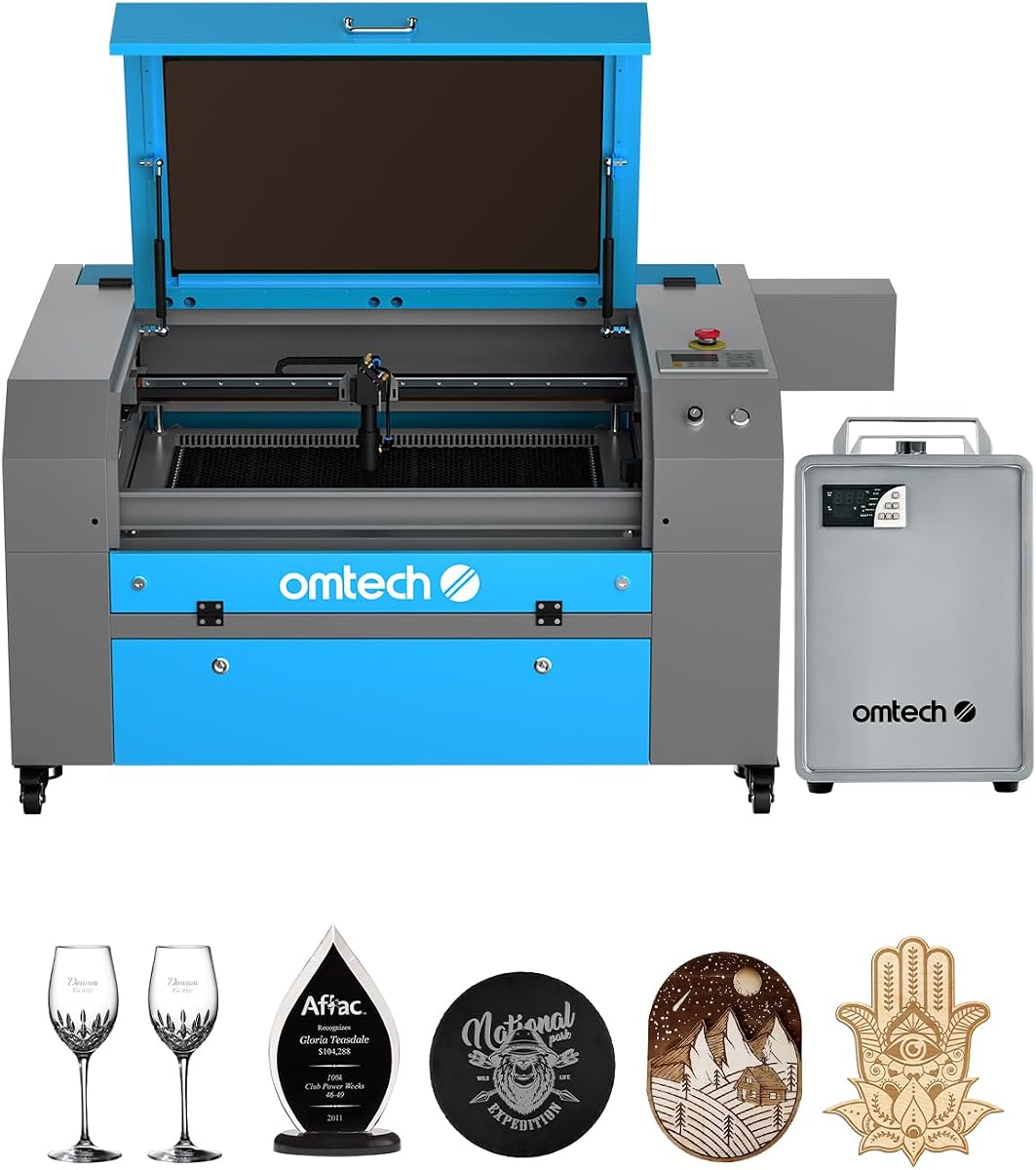
The OMTech Pro 130W is a premium, production-oriented CO2 laser cutter distinguished by 130W output, a 35 by 55 inch workspace, and a built-in CW-5200 chiller. No customer rating is supplied, but its specification package indicates a machine intended for professional and industrial use rather than casual desktop crafting.
We may earn a commission when you buy through this link, at no additional cost to you.
The chiller provides 5,186 BTU per hour of cooling capacity and is stated to maintain temperature within 0.5 degrees Fahrenheit. Integrating it into the main system simplifies thermal management and keeps the cooling equipment together with the cutter. Upgraded ball-bearing guide rails and X- and Y-axis servo motors support a stated speed of 1,200mm/s.
Control is handled through a Ruida 6445G touchscreen with WiFi connectivity. A widened tempered glass viewing window improves visibility, and tri-color status lights offer at-a-glance operating information. Four-way pass-through doors support large, long, or unusually shaped workpieces, while the total nominal bed area of 1,925 square inches provides substantial production capacity.
This is the best premium pick for a dedicated business that prioritizes speed, capacity, integrated cooling, and a connected control interface. Its large footprint, 130W power, and industrial orientation make it less relevant to a small hobby shop, but it should appeal to professional fabricators working with long batches. Confirm local ventilation, power, and space requirements before finalizing the purchase.
A built-in CW-5200 removes the need to source and position a separate chiller. Its stated temperature control and cooling capacity are valuable for sustained jobs, where heat buildup can affect equipment condition and consistency.
The Ruida 6445G touchscreen places important machine controls directly at the workstation, while WiFi can simplify remote operation and file handling. These features are especially useful when the cutter runs as part of a larger production workflow.
We may earn a commission when you buy through this link, at no additional cost to you.
Selecting a CO2 laser cutter means balancing power, material capacity, workflow automation, safety, cooling, and the kinds of products you intend to make. The following factors help separate a convenient hobby machine from a productive commercial system.
Laser power determines how quickly the machine can move through wood, acrylic, leather, and other nonmetallic materials. Higher power generally supports faster through-cutting, greater cutting depth, and more demanding production schedules, but it should be considered alongside bed size, focus accuracy, and airflow rather than used as the only selection criterion.
In this list, 45W models offer a meaningful step up for desktop cutting, while 90W to 130W machines are better suited to thicker stock and repetitive jobs. Choose enough power for your most demanding material without paying for capability you will never use.
The work area determines the largest sheet or object that can be positioned directly on the bed. A compact 12 by 8 inch bed is convenient for home use, while 20 by 28 inch and larger systems support signs, panels, and batch layouts. Pass-through doors add valuable flexibility because long workpieces can extend through the machine instead of being divided into smaller sections.
Compare both the bed dimensions and the door configuration. Four-way access offers the most freedom for unusual shapes, while two-way access is often sufficient for consistent production runs on a fixed sheet size.
Accurate focus is essential for clean cuts and consistent engraving depth. Autofocus systems use sensors to locate the correct working distance, reducing manual setup and helping preserve results when material thickness changes. Camera-based positioning can add even more value for jobs involving multiple components, templates, or precisely repeated placements.
Machines with autofocus are more convenient, but buyers should also consider whether bed height can be adjusted reliably and whether the system supports the material combinations they expect to use.
A CO2 laser needs active cooling to control heat, while air assist removes smoke, dust, sparks, and residue from the cutting path. Together, these systems help protect the lens and mirrors, reduce burning around wooden edges, support cleaner cuts, and maintain safer working conditions.
Look for a water chiller in the package or budget for a compatible unit. A strong exhaust system is also necessary because even a fully enclosed laser can release fumes from the processed material. Adequate room ventilation and filtration remain important.
The control software determines how designs are prepared, arranged, and sent to the laser. LightBurn and LaserGRBL are common in the category, while some machines also support CorelDRAW, AutoCAD, and operating systems such as Windows, macOS, and Linux. Spreadsheet import, nesting, batch filling, and variable text features are particularly useful for commercial workflows.
Check whether required software is included, whether it needs a separate activation, and whether your preferred file format is supported. A broad program list is less valuable if the machine cannot handle the exact vector or raster workflow used in your business.
A closed laser cabinet is easier to integrate into a shared workshop because it contains much of the beam and reduces exposure to moving components. Look for lid or cover interlocks, an emergency stop, temperature alarms, water protection, flame-retardant viewing materials, and automatic power interruption when an access door opens.
Safety features do not eliminate the need for responsible operation. Ventilation, material-specific settings, clean lenses, and safe handling of flammable or unknown substrates remain essential regardless of enclosure rating.
Advanced systems can save time with LiDAR focusing, dual cameras, smart nesting, batch filling, conveyor feeding, and rotary attachment support. These features are most valuable for repeated jobs, personalized products, and businesses seeking to reduce manual setup. For occasional projects, they may add expense without delivering an immediate return.
Prioritize automation only after confirming that the basic machine has enough power, bed space, and safety coverage for your normal work. A simpler system that handles most jobs reliably is often more valuable than a complex setup that is underused.
The machine itself is only one part of ownership. Chillers, air pumps, exhaust equipment, rotary axes, conveyor feeders, material, and replacement parts may be separate purchases. Manufacturer support, local service access, warranty terms, and availability of replacement components can materially affect downtime.
Review what is included in the exact package before comparing machines. Accessories sold separately should be added to the practical ownership calculation, especially for rotary, conveyor, infrared, or advanced production functions.
Begin with a clean, stable work surface and verify that the enclosure, door interlocks, emergency stop, air assist, cooling system, and exhaust path are functioning correctly. Read the manual, confirm the output and laser classification, and use the machine only in a well-ventilated area. Install or connect the appropriate filtration and exhaust equipment before processing materials that can produce smoke or fumes.
Prepare artwork as clean vectors whenever possible, test settings on an offcut from the same material, and verify focus before running a full job. Start with conservative settings, adjust power and speed in small steps, and use the same material settings as a reference for future work. Keep the lens and mirrors clean, remove debris after every session, and never operate the laser with an obstructed airflow path.
Maintain the chiller and associated fluid as directed, clean the honeycomb bed and slats, and inspect rails, belts, mirrors, lenses, cables, and fasteners on a regular schedule. Use the appropriate settings for each material and avoid leaving the machine unattended while it is active. Before storage or service, switch it off, disconnect power safely, and follow the manufacturer's cleaning and maintenance instructions.
CO2 laser cutters are primarily suited to nonmetallic materials such as wood, acrylic, leather, paper, cardboard, glass, stone, and certain plastics. The strongest machines in this guide can make signs, panels, labels, jewelry components, packaging, decorative objects, and engraved gifts. Material compatibility and safe settings should always be confirmed before cutting, particularly for plastics or anything that could contain hazardous chemicals.
A 45W CO2 laser is a meaningful desktop cutting class and can handle wood and acrylic beyond light engraving. The featured K40+ model is stated to cut 10mm acrylic and 8mm wood. It is well suited to prototypes, small products, and short production runs, but higher-power machines generally offer faster through-cutting and more margin on demanding jobs.
Active cooling is important for maintaining stable operation, particularly during long jobs. Some listings bundle a chiller, while others require one to be purchased separately. Check the exact package, confirm the recommended chiller specification, and never operate the system without the required cooling in place. Bundled cooling is convenient, but the machine still needs proper air extraction.
Engraving removes a shallow layer from the surface to create a mark, while cutting uses greater power and focused movement to pass through the material. A machine capable only of engraving may produce beautiful results but remain unsuitable for thick parts. The models in this guide are described as engravers and cutters, although performance varies with power, focus, material, and settings.
A larger workspace reduces the need to divide sheets and makes multi-part layouts easier, but it also increases the machine's physical footprint and may require more ventilation and floor space. A compact model can be more appropriate for a home studio with frequent small projects. Choose a bed that fits your typical products without paying for capacity that will rarely be used.
Common options include LightBurn and LaserGRBL, while some featured systems also list CorelDRAW and AutoCAD. Compatibility with Windows, macOS, and Linux varies by model, and file transfer may be supported through USB, network connections, or wireless control. Confirm the required software is included and understand any activation requirements before purchasing.
A suitable laser cutter should include an emergency stop, door or cover interlocks, temperature protection, water monitoring where applicable, and an enclosed or guarded beam path. The workspace also needs smoke extraction, filtration, and adequate ventilation. A flame-retardant viewing panel is helpful, but operators should still follow material-specific safety guidance and keep flammable materials away from the machine.
A 60W machine is a middle-ground option for users who want a larger bed and good output without the highest power demands. A 100W system is better for faster cutting, tougher jobs, and larger production batches. A 130W machine offers additional cutting reserve and speed but generally calls for more space, power, cooling, and ventilation. The best choice depends on material thickness, job size, and expected order volume.
The xTool P3 80W stands out for intelligent automation, dual cameras, LiDAR autofocus, nesting, and an enclosed Class 1 design, making it the most workflow-complete choice. The OMTech Pro 130W takes the premium position with its massive bed, 1,200mm/s stated speed, WiFi touchscreen, and built-in chiller, while the OMTech K40+ 45W delivers the most convincing desktop value.
Prioritize the constraints of your actual workflow. A smaller machine is often easier to learn and may suit frequent prototypes, while a larger bed and more power become increasingly valuable for thick materials, repeated orders, and oversized parts. Autofocus, effective airflow, adequate cooling, reliable safety systems, and software support can matter more than wattage alone.
Before ordering, confirm the current product configuration, included accessories, bed dimensions, software terms, service coverage, and ventilation requirements. CO2 laser cutters are substantial investments in equipment, learning, and consumables, so choosing a machine that matches both your present projects and realistic production goals is the most practical path to a satisfying result.

