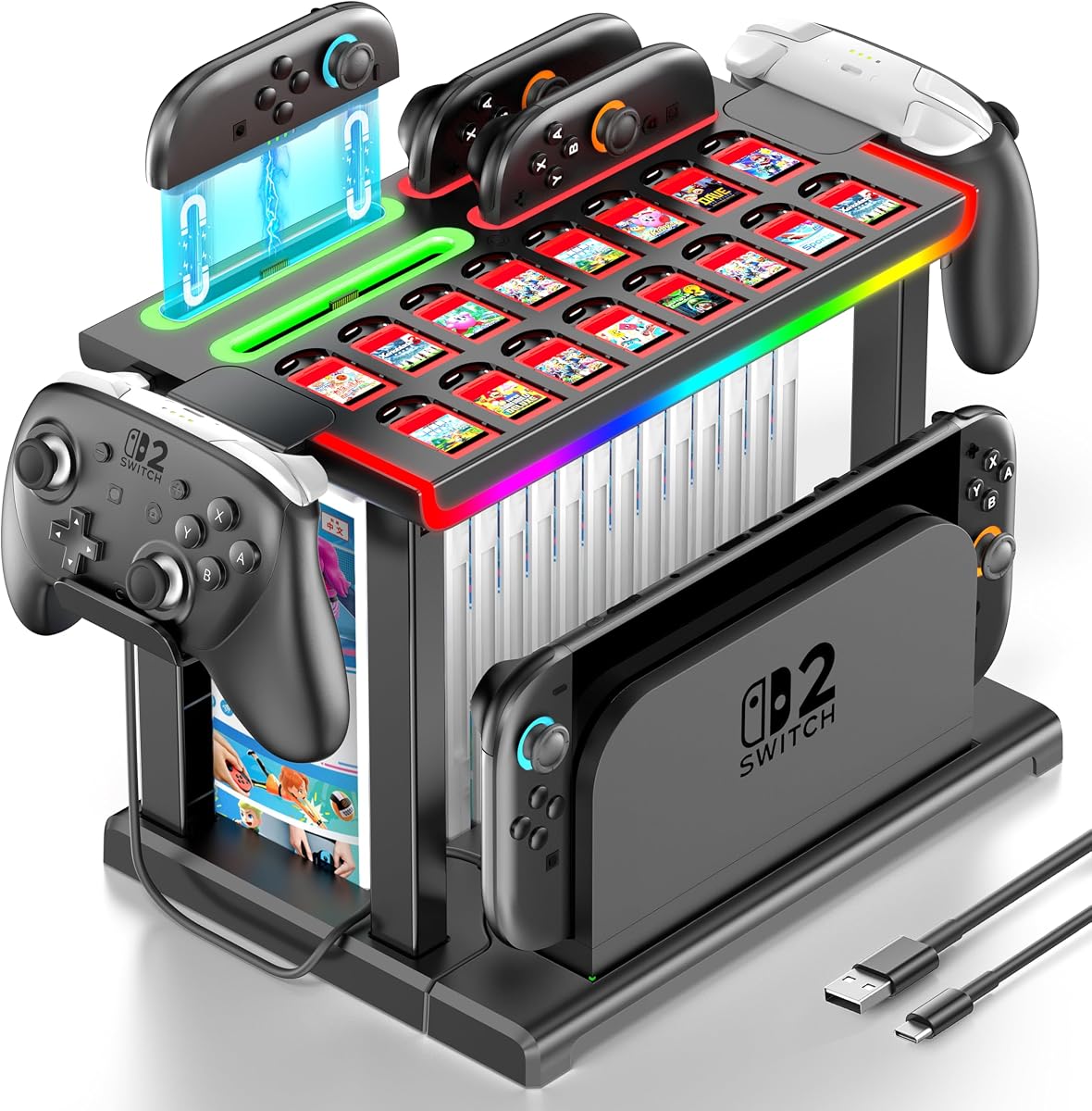
Switch 2 RGB Organizer Station
4.6Editor score
Charges four Joy-Con 2 controllers
Stores games, cases, and controllers
Nine static and dynamic light modes
Tool-free installation and nonslip base
Our Controller Charging Dock for Switch 2 guide compares 10 options for capacity, compatibility, charging speed, safety, lighting, storage, and setup quality.
A controller charging dock for Switch 2 can keep Joy-Con 2 controllers ready while reducing cable clutter around a television, desk, or gaming station. The best choice depends on controller type, charging capacity, power requirements, lighting preferences, and whether you also want a storage organizer for games and accessories.
We compared all ten available options by examining their stated compatibility, number of charging positions, power options, status indicators, safety features, physical design, and storage functions. The guide covers docks made specifically for Joy-Con 2 controllers, dual Pro Controller stands, multi-system chargers, and larger organizer stations.
Each review explains who benefits from a particular design and where its limitations matter. Ratings and product details reflect the supplied listings, while availability and prices can change. Always verify the exact controller model, included cables, and power requirements before ordering.
4.6Editor score

4.7Editor score

4.7Editor score
The comparison below highlights charging capacity, controller compatibility, organization, lighting, and notable design features. It includes dedicated Joy-Con 2 docks, Pro Controller stands, mixed-platform chargers, and multipurpose storage stations.


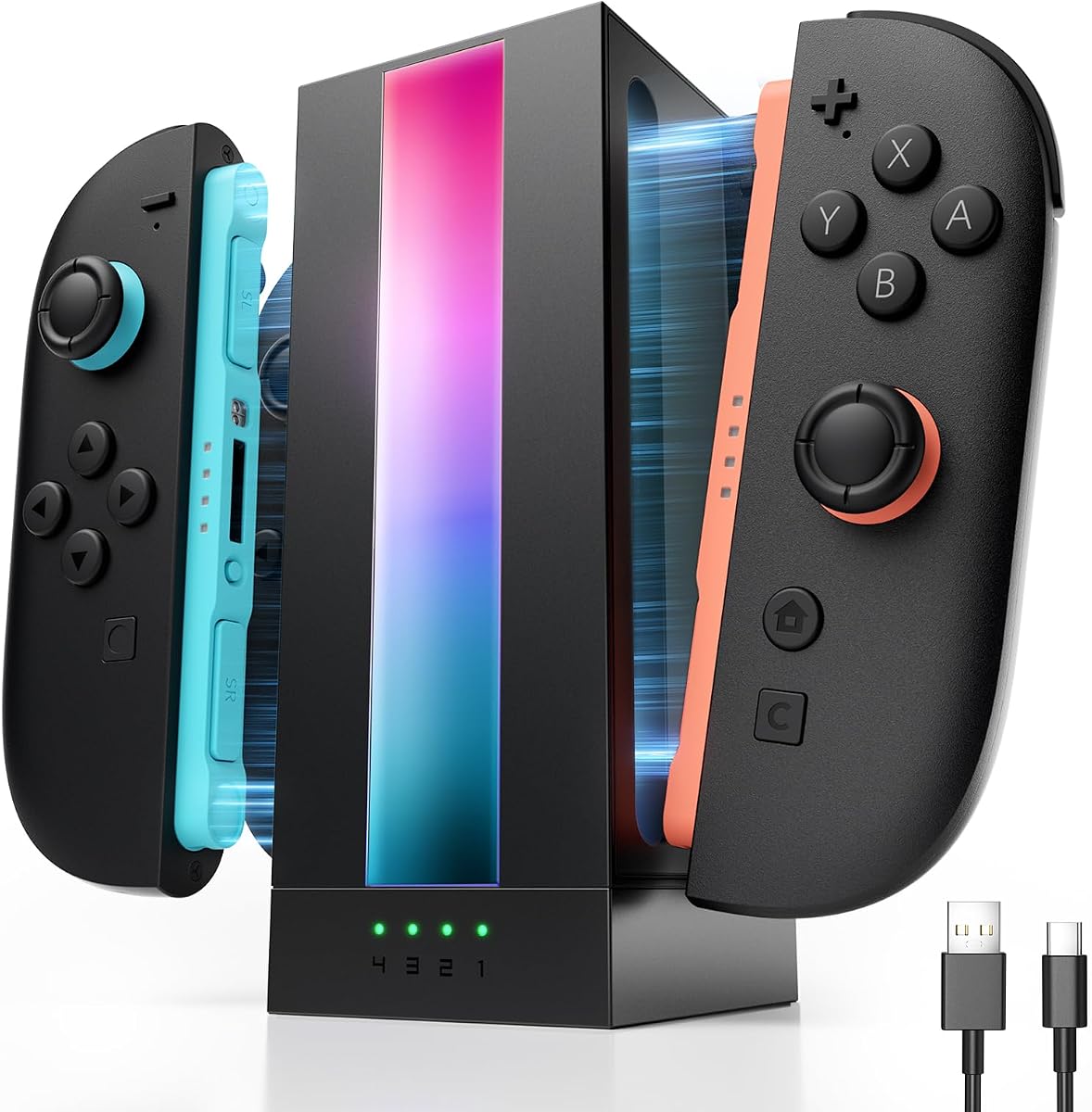
This dual controller charging station is built for households that use more than one kind of official controller. Its 4.0 rating reflects a practical, broad approach rather than a feature set centered entirely on Switch 2 Joy-Cons. It can charge two controllers at once and lists support for Switch Pro and Switch 2 Pro Controllers, PS5 Controllers, Xbox Series X|S Controllers, and Xbox Elite Series 2 Controllers.
We may earn a commission when you buy through this link, at no additional cost to you.
The removable USB-C adapters are a thoughtful detail because regular insertion and removal can place unnecessary strain on a controller's charging interface. Status lights use straightforward colors: red while charging and green when full. A built-in smart protection system is also listed, while a recommended five-volt, two-amp wall adapter helps provide faster and more consistent charging than a low-output USB port.
The primary limitation is compatibility. PowerA, Luna, and other third-party Pro Controllers are expressly excluded, which means the dock is less flexible than its broad system list may initially suggest. A suitable power adapter is not included either, and some users may prefer a dock with more than two positions or integrated storage for accessories.
This is a sensible choice for a mixed gaming setup that regularly uses official Nintendo, PlayStation, and Xbox controllers. It is less suitable if your household relies on third-party pads or needs dedicated storage for several games. For those requirements, check controller shape and connector type before purchasing rather than relying only on the broad compatibility description.
Instead of concentrating on one ecosystem, this station accommodates several official controller families in the same compact footprint. That makes it useful for shared televisions, multi-console bedrooms, and households where players regularly exchange between handheld and living-room gaming.
The included adapters let controllers rest in the dock without repeatedly connecting a cable to the port itself. For regular users, that may reduce wear while also making it easier to lift a controller from the stand and return it to a known charging position.
We may earn a commission when you buy through this link, at no additional cost to you.
The Switch 2 RGB Organizer Station combines charging with an extensive storage system, giving it a different role from a basic controller stand. It has a 4.6 rating and is designed to organize a complete Switch 2 setup while charging up to four Joy-Con 2 controllers at once. Charging indicators show red during charging and green when the controllers are full or in standby.
We may earn a commission when you buy through this link, at no additional cost to you.
Storage is the defining feature. The station can hold four Joy-Cons, 16 game cards, 16 game memory cards, 16 game cases, two Pro Controllers or headsets, and one Switch 2 TV Dock. The TV Dock itself is not included, so buyers who want that component still need another source for it. The broad assortment of shelves and slots also makes the station more useful than a simple charging puck.
Its nine lighting modes include seven single colors plus slow-breathing and fast-breathing effects. Installation is described as tool-free, and nonslip pads on the bottom help prevent sliding and protect the desktop. The trade-off is the larger footprint and more complex structure, which may be excessive for a player who only needs somewhere to recharge two controllers.
This organizer is especially attractive to owners with a sizable physical game library and a cluttered entertainment area. It suits anyone who values a central home for controllers, cases, memory cards, and the television dock. Those with a smaller collection may prefer one of the more compact four-slot Joy-Con docks.
The station is especially useful when cables, game cases, and loose controllers have begun to occupy valuable shelf or tabletop space. Its dedicated areas give each accessory type a consistent home while the charging slots keep four Joy-Con 2 controllers ready for multiplayer sessions.
A short press cycles through the color and breathing effects, while a press-and-hold action turns the lights off. That makes it easy to create a subdued appearance at night or a more colorful display during a gaming session.
We may earn a commission when you buy through this link, at no additional cost to you.
The FASTSNAIL Magnetic Charging Dock is purpose-built for the 2025 Nintendo Switch 2 and its Joy-Con 2 controllers. Its 4.7 rating makes it one of the strongest-rated options in this guide, while the magnetic design provides a noticeably more convenient way to position controllers. A full charge is estimated at about 2.5 to 3 hours when all four positions are used.
We may earn a commission when you buy through this link, at no additional cost to you.
Magnetic alignment removes the need to distinguish between the plus and minus Joy-Con sides. That convenience is valuable during quick multiplayer breaks because both controllers can settle into the correct position with less fiddling. The dock also functions as a storage stand, has orange charging and blue standby or full-charge indicators, and uses a touch control that can disable the charging lights for a calmer sleeping environment.
RGB customization includes seven static colors and two dynamic effects. A memory function restores the previously selected mode when the dock is powered on. Safety features listed for the product include overcharge, overcurrent, short-circuit, and overvoltage protection. The station can draw power from an AC adapter, the console dock, or a computer, although the console and controllers are not included.
This is the most direct choice for a player who wants a clean, dedicated Joy-Con 2 charging solution. It avoids wasting space on unrelated storage and offers magnetic placement, useful status lights, flexible power sources, and four charging positions. It is not the right option for owners who need to charge original Switch Joy-Cons or multiple controller ecosystems.
The magnetic contacts help guide each Joy-Con into the proper orientation, so players do not have to check the plus and minus labels before every insertion. This is particularly useful for a family that regularly separates controllers for local multiplayer.
The touch control can turn off the lighting and indicators when the dock is not in use. That feature is valuable beside a television or in a bedroom, where persistent flashing LEDs could be distracting.
We may earn a commission when you buy through this link, at no additional cost to you.
This Switch 2 Pro Controller Charging Station is a focused solution for players who use two full-size Pro Controllers. It has a 3.5 rating, the lowest in this comparison, and its feature set centers on a compact two-position stand, LED status indicators, and a stated five-volt, two-amp input. Unlike several general-purpose docks, its charging format is specifically presented for the Switch 2 Pro Controller.
We may earn a commission when you buy through this link, at no additional cost to you.
Both controllers can charge at the same time, which makes the stand practical for alternating players or for keeping a primary and secondary controller ready. Red indicates charging and green indicates a full charge. The compact design combines storage with charging, helping controllers remain accessible without taking up the space required by a large organizer.
The listed intelligent protection covers overcharging, overheating, overcurrent, and short circuits. The trade-off is that its two-controller format is less versatile than the four-Joy-Con stations, and it does not appear to offer the wider controller compatibility of the mixed-platform options. The relatively modest rating also makes it harder to recommend without stronger evidence of broad user satisfaction.
Choose this station if your routine centers on two Pro Controllers and you want a small, uncomplicated charging point. It is a less convincing fit for a multiplayer group or a collection that includes several detachable Joy-Cons. In those situations, a four-slot magnetic dock would provide more flexibility and stronger overall ratings.
The stand removes the need to charge two Pro Controllers with separate cables. For a two-person household that always uses the same official controller type, this focused approach can be easier to maintain than a large universal station.
Separate red and green states make it easy to see when charging has finished. The stated protection features add confidence for routine overnight charging, although users should still use a suitable, stable power source.
We may earn a commission when you buy through this link, at no additional cost to you.
The PowerA Controller Charging Base is tailored to Nintendo Switch controllers and offers particularly relevant support for PowerA wireless controllers. It carries a 4.6 rating and combines a visually distinctive charging stand with the ability to charge Joy-Con and wireless controllers simultaneously. LED lights communicate when the connected controllers are charged.
We may earn a commission when you buy through this link, at no additional cost to you.
Compatibility with Nintendo Switch Pro Controllers makes it useful for players who have moved beyond the original Joy-Con format. Supporting both detachable and full-size controllers is convenient for mixed use, and the PowerA compatibility broadens the appeal to owners of officially licensed third-party pads rather than treating them as an afterthought.
The supplied information does not explicitly state compatibility with the 2025 Switch 2 and its newer controllers, and it provides no precise charging time or detailed input specification. Those omissions matter for buyers seeking a confirmed all-in-one dock for a current mixed collection. A listing that names the exact controller generation is generally easier to trust than one focused on a broader platform.
This base is a sensible choice for an established Nintendo Switch setup that already includes supported PowerA wireless controllers. It is less suitable as the sole charging hub for a new Switch 2 collection because the product description does not name Joy-Con 2 compatibility. Verify the connector shape, charging standard, and controller model before ordering.
Fully compatible support for PowerA wireless Nintendo Switch Controllers distinguishes this base from products that expressly exclude third-party pads. It is a logical choice for players who prefer supported third-party hardware within the Switch ecosystem.
The ability to charge Joy-Con and wireless Pro-style controllers simultaneously reduces the need for separate stands. This is useful in homes where different players prefer different controller formats.
We may earn a commission when you buy through this link, at no additional cost to you.
The Six-in-One Charging Station is built for large collections rather than a single controller pair. Its 4.7 rating reflects a design that can charge four Joy-Cons and either two Nintendo Pro Controllers or two PS5 Controllers at the same time. Its rail-inspired shape provides dedicated resting places for different controller formats.
We may earn a commission when you buy through this link, at no additional cost to you.
Power can come from the game console, a USB charging hub, or a wall charger through the included USB-C port. A protected circuit is listed for overcharging, overvoltage, overcurrent, and short-circuit conditions, while status LEDs provide charging feedback. The package includes the dock, an 80-centimeter USB-C cable, and a stated one-year quality promise.
Its greatest strength is also the source of its main drawback. A six-position stand consumes more space and is unnecessary for a single-player or two-player setup. More importantly, the supplied description refers to Nintendo Switch Joy-Cons, Nintendo Pro Controllers, and PS5 Controllers rather than explicitly confirming the 2025 Joy-Con 2 format. It should therefore be considered a broad older-platform charger rather than a confirmed Switch 2 solution.
This station fits a shared gaming room with several original Switch and PS5 controllers. If your main goal is a controller charging dock for Switch 2, a model explicitly designed for Joy-Con 2 will offer clearer compatibility. Choose this option instead when high controller capacity and cross-platform support matter more than the newest hardware format.
Six dedicated positions can keep a sizable group of controllers together instead of spreading charging cables across the room. The separate controller formats make it convenient to support different preferences within one household.
The station can draw power from the console, a USB hub, or a wall charger. That flexibility gives users more ways to place the dock according to the layout of their gaming area.
We may earn a commission when you buy through this link, at no additional cost to you.
The HEATFUN Dual Charging Dock combines a small footprint with support for several official controller families. It is listed for Switch Pro and Switch 2 Pro Controllers, PS5 Controllers, Xbox Series X|S Controllers, and Xbox Elite Series 2 Controllers. Two controllers can charge at once, making it a practical option for households that regularly swap between handheld and living-room sessions.
We may earn a commission when you buy through this link, at no additional cost to you.
The dock uses a five-volt, two-amp input for the most stable performance, and the removable USB-C adapters help controllers sit in place without repeatedly using their ports. LEDs display charging status, while the low-standing body is designed to fit on a desk, television stand, or compact gaming station.
As with other universal two-port docks, compatibility has boundaries. PowerA, Luna, and some third-party controllers are not supported. The two-position design also limits its value for a large multiplayer group, and a compatible wall adapter is recommended for consistent charging rather than relying on a low-power port.
This dock works best for one or two players who own official controllers from several supported systems. It is a reasonable compact alternative to larger organizer stations, but players with four Joy-Con 2 controllers should look to a dedicated magnetic dock instead. Confirm that the controller model and its connector match before purchasing.
The compatibility list covers the controller types most commonly found in a modern mixed-console household. It remains important to check the exclusions, because third-party pads often use connector shapes or charging standards that differ from official products.
The compact, low-standby form can fit more readily in a crowded entertainment center than a large organizer. Controllers remain accessible while the stand keeps them off the surrounding surface.
We may earn a commission when you buy through this link, at no additional cost to you.
The SUPCASE Joy-Con Charging Dock is a polished, dedicated solution for Nintendo Switch 2 owners. It carries a 4.7 rating and uses four magnetic charging slots designed for the 2025 Joy-Con 2. Magnetic alignment helps controllers settle securely, while the listed dual-side charging support means the placement process is more forgiving than a fixed-direction dock.
We may earn a commission when you buy through this link, at no additional cost to you.
The design combines convenience with a strong visual presentation. It offers nine RGB lighting modes that can complement a gaming space, and individual LED indicators display whether each Joy-Con is charging or fully charged. Magnetic placement may also reduce repeated wear on the controllers' charging ports because users do not need to align a plug with a socket.
Its smart chip detects the charging state and stops supplying power once a controller is full, with overcharging and overheating listed among the protections. The principal limitation is its narrow compatibility. It is made for Switch 2 Joy-Con controllers, and the Joy-Cons themselves are not included, so owners of original Switch or OLED controllers will need another dock.
This is the premium pick for a dedicated Switch 2 setup that wants four magnetic charging positions, refined lighting, and clear per-controller feedback. It is less useful for mixed-controller homes because it does not attempt to serve Pro Controllers or other systems. Its focused construction makes it a strong fit when compatibility is already known and design matters.
The magnetic structure and dual-side charging support reduce the chance of placing a Joy-Con incorrectly. This is helpful for quick player swaps and gives the stand a more refined feel than a basic fixed-contact rail.
Separate indicators make it easy to identify an empty, charging, or completed slot. Automatic charging cutoff and listed overheating protection add practical safeguards for docks that remain connected around a television.
We may earn a commission when you buy through this link, at no additional cost to you.
The FASTSNAIL Ten-Slot Charging Dock is the broadest compatibility option in this guide, supporting Nintendo Switch 2, original Switch, and OLED models. It accepts Joy-Con 2, original Joy-Con, and Pro Controllers, with ten physical slots that can charge up to four Joy-Cons and two Pro Controllers at once. This makes it appealing to collectors who have accumulated controllers across several Nintendo releases.
We may earn a commission when you buy through this link, at no additional cost to you.
Blue indicators show standby or full charge, while orange indicates active charging. A full charge is stated at roughly three to three-and-a-half hours, and a touch control can disable charging and the LEDs for a sleep-friendly setup. Eleven lighting modes include marquee, breathing, gradient, fast-flash, and seven static colors, with a memory function for the selected effect.
The dock also includes two USB 2.0 ports for data transfer or additional charging, along with overcharge, short-circuit, overvoltage, and overcurrent protection. It is nevertheless a large and potentially power-hungry arrangement, and the manufacturer specifically recommends using the included Y-type cable with the official Switch 2 dock as the power source. Third-party controllers are not supported.
This is a strong choice for a large Nintendo collection where the convenience of charging everything in one place outweighs the footprint. For a single player with only two recent controllers, a smaller magnetic dock would be easier to manage. For families with older and newer Joy-Cons, however, this model removes the need for separate charging stands.
Support for both newer and older Joy-Con formats is unusual in a compact charging dock. It makes the station especially valuable for households that still use original Switch controllers while transitioning to Switch 2.
Eleven lighting effects provide more variety than most compact alternatives, while the memory function restores the previous choice. The two USB 2.0 ports add a useful extra function for compatible accessories or data devices.
We may earn a commission when you buy through this link, at no additional cost to you.
The JSAUX EnergyFlow Charging Dock is a direct four-port charging solution for the 2025 Switch 2 Joy-Con. Its 4.3 rating reflects a focused design that emphasizes efficient charging and easy status monitoring. Two pairs of Joy-Cons can charge simultaneously, and the listed time for a full four-controller charge is approximately two-and-a-half hours.
We may earn a commission when you buy through this link, at no additional cost to you.
Each port has an independent LED indicator. Flashing green denotes charging, while a solid green light indicates a full charge or standby. The dock also features a dynamic RGB light bar controlled by a one-touch button, making it easy to turn the effect off when the setup should look less conspicuous. A 1.5-meter USB-C cable is included, though a wall adapter is not.
Compatibility is strictly limited to Switch 2 Joy-Cons. The listing expressly says the dock does not support Joy-Cons from the 2017 Switch or OLED model, and the proper plus and minus alignment must match the symbols on the dock. Intelligent protection is listed for short circuits, overcurrent, overvoltage, overheating, and overcharging.
This dock is a good straightforward choice for owners with two or more pairs of current-generation Joy-Cons. It lacks the magnetic convenience and RGB customization of some premium alternatives, but it provides four independent charging positions, clear port-level feedback, and a relatively short stated charging time without adding a large storage tower.
The stated two-and-a-half-hour full-charge time is attractive for families that regularly play multiplayer games. Four Joy-Cons can remain together in one compact dock rather than splitting across separate charging leads.
A dedicated light for every port makes it easy to see which controller is still charging. This is more informative than a single shared status light, particularly when only one player is using a second controller occasionally.
We may earn a commission when you buy through this link, at no additional cost to you.
The right charging dock depends first on which controllers you own, followed by capacity, power requirements, physical layout, and preferred features. Reviewing those details before ordering helps prevent compatibility problems and ensures the station fits the way you actually play.
In short, verify the controller generation rather than assuming every Switch accessory works with every Switch controller.
Choose two slots for a typical duo and four or more for regular multiplayer and larger collections.
Use the recommended power supply, and confirm whether an adapter and the correct cable are included.
Choose magnets for easy alignment; choose rails for simplicity or mixed-controller versatility.
Prefer per-port indicators for busy multiplayer setups and a light-off mode for bedrooms.
Choose an organizer for a large physical collection and a compact dock for limited space.
Look for stated multi-level protection, secure contacts, and a base that will not slide.
Treat lighting as a preference, not a substitute for capacity, compatibility, or stable charging.
Before the first use, identify the correct charging orientation and compare each controller with the symbols or rails on the dock. Magnetic models can generally be approached from either side, while fixed-orientation models require the plus and minus Joy-Con marks to match. For Pro Controller stands, insert each controller evenly into its charging contacts. Keep thick controller cases removed if they prevent a full connection, and do not force a controller that does not sit naturally.
Connect the dock with the supplied cable to a suitable power source. If the listing recommends a five-volt, two-amp adapter, use that type of source for consistent charging. A wall adapter may not be included, and low-output computer or hub ports can lead to slower or intermittent operation. Once connected, allow the controller to settle into its slot, then check the status light to confirm that charging has begun.
Care for the dock by unplugging it before moving it between locations or changing its arrangement. Clean the contacts gently with a dry cloth and keep liquids away from the base and power connection. Do not use aggressive chemical cleaners, and do not attempt to alter the internal charging circuit. For magnetic models, occasionally confirm that each Joy-Con is seated correctly; for multi-light models, use the touch control when persistent illumination is not wanted.
A Joy-Con 2 charger has slots sized for the new detachable Switch 2 controllers, often with magnetic alignment or explicit plus and minus guides. A Pro Controller charger is designed for the larger full-size controller and generally has two wider upright positions. They are not interchangeable, so confirm your exact controller model before ordering.
Some broad multi-controller docks support both Joy-Con 2 and original Joy-Con formats, but many products are dedicated to one generation. The FASTSNAIL Ten-Slot model explicitly supports Switch 2, Switch, and OLED Joy-Cons, while the JSAUX and SUPCASE options are limited to Joy-Con 2. Check the listing for both formats before selecting a mixed-generation dock.
A two-controller dock is sufficient for most solo and two-player homes, while a four-controller dock is better for frequent local multiplayer or owners with two pairs. The largest ten-slot station is aimed at collectors who also use Pro Controllers. More slots are useful only if you regularly own or borrow enough controllers to keep them charged.
No, not consistently. Some products include a USB-C cable but no wall adapter, while others specify a five-volt, two-amp adapter for best results without including one. Check the package contents and follow the stated power recommendation. A low-power USB port may lead to slower or intermittent charging, particularly when several controllers are connected.
They can reduce repeated direct cable insertion because the controller settles onto a fixed adapter rather than having a plug pushed into its port every time. The benefit depends on using the dock as intended and inserting the controller fully. Magnetic alignment also helps prevent sideways placement that could stress the connector.
Many RGB models provide a button or touch control that turns the lighting off. Some of the larger Joy-Con 2 docks also allow charging and indicators to be disabled for a quieter setup, while retaining the selected light mode in memory. Check the product instructions because the exact control behavior varies between models.
Usually not. Joy-Con docks are shaped for the narrow detachable controllers, while a Pro Controller needs a wider connector and support. Products such as the Switch 2 Pro Charging Station and the multi-slot FASTSNAIL model are designed for full-size Pro Controllers as well as detachable Joy-Cons.
A large organizer is better when you have many physical games, cases, memory cards, and accessories that need a shared home. It also provides more charging positions. A simple stand is more appropriate for a smaller collection or limited shelf space because it takes up less room and is easier to reposition.
The FASTSNAIL Magnetic Charging Dock stands out for dedicated Joy-Con 2 support, magnetic placement, four charging positions, and nine lighting modes. The Switch 2 RGB Organizer Station is the strongest choice when organization matters as much as charging, while the SUPCASE dock offers a polished premium design with magnetic alignment and per-controller status feedback.
Prioritize exact controller compatibility first, followed by the number of controllers you regularly use and the power source available at your setup. Select magnetic charging for convenient alignment, a larger organizer for a substantial game collection, and a two-controller stand only when your collection genuinely fits that format. Verify included cables and adapters before completing an order.
Product listings, ratings, features, and prices can change over time, so review the current listing before purchasing. A good controller charging dock for Switch 2 should keep your preferred controllers charged, display their status clearly, and fit cleanly into the space where you play rather than adding another complicated accessory to your setup.