
Scale Master Pro
4.7Editor score
72 built-in measurement scales
Six custom scale slots
Area and volume calculations
Portable counter-equipped design
Compare the 10 best digital architectural scale rulers, including plan measures, smart rulers, scale kits, accuracy features, and drafting tools.
A digital architectural scale ruler can turn printed plans, drawings, and maps into fast takeoff measurements, but the best model depends on the scale range, unit support, portability, and connected workflow you need. The category includes compact rolling plan measures, Bluetooth-enabled smart rulers, and multi-piece kits designed for both detailed reading and professional drafting.
We compared all ten products using their stated scales, measurement capabilities, physical construction, included accessories, portability, and practical appeal for architects, estimators, engineers, students, and design professionals. The list also considers several traditional metal scale rulers, since they remain useful references for reading plans when a digital tool is not required.
Each review identifies the feature that makes the product most distinctive, along with relevant trade-offs and ideal users. Ratings reflect the supplied customer feedback, while specifications and capabilities come from the product information. Availability and current prices change frequently, so confirm the latest listing details before purchasing.
4.7Editor score

4.8Editor score

4.4Editor score
The comparison below covers digital plan takeoffs, Bluetooth-enabled measuring tools, multifunction kits, and physical drafting scales. Use the short specifications to identify the right combination of scale support, unit support, workflow features, accessories, and construction for your work.




The Calculated Industries Scale Master Pro 6025 is a compact rolling plan measure for professionals who need dependable takeoff functions without a computer connection. Its 4.7 rating reflects broad user satisfaction, while the combination of 72 built-in scales, area and volume calculations, and a manual counter makes it especially versatile for estimating and material planning.
We may earn a commission when you buy through this link, at no additional cost to you.
Scale coverage is a major strength. The tool includes 39 imperial and 33 metric scales, with decimal feet, feet-and-inches, decimal inches, yards, millimeters, meters, kilometers, square formats, and cubic formats. Six custom scale positions—three for imperial and three for metric—allow users to calibrate drawings that have been reduced, enlarged, scanned, or otherwise delivered at an unusual scale.
The main trade-off is that this is a focused standalone tool rather than a connected drafting system. It does not offer the stated Bluetooth app workflow, modular drafting accessories, or the larger number of custom-scale positions found on more advanced models. Its rolling measurements also carry the stated typical error of approximately 2% to 3%, depending on scale magnitude and start-and-stop accuracy.
This is a strong recommendation for estimators, contractors, architects, and students who want area, volume, length, and quantity takeoff functions in a portable 7.3-inch device. The included batteries, user guide, hard case, and one-year warranty make it particularly attractive as a complete standalone kit for office, jobsite, and field use.
The broad imperial and metric library covers common architectural and engineering work, while six custom positions make unusual plan sizes manageable. The key advantage is that users can define and store a scale rather than abandoning a drawing because its reduction does not match a factory setting.
Dedicated length, width, and height keys support area and volume calculations, and the counter helps estimate recurring items such as studs, piers, or outlets. Operation does not depend on a cable, computer, phone, or internet connection, which simplifies work in the field.
We may earn a commission when you buy through this link, at no additional cost to you.
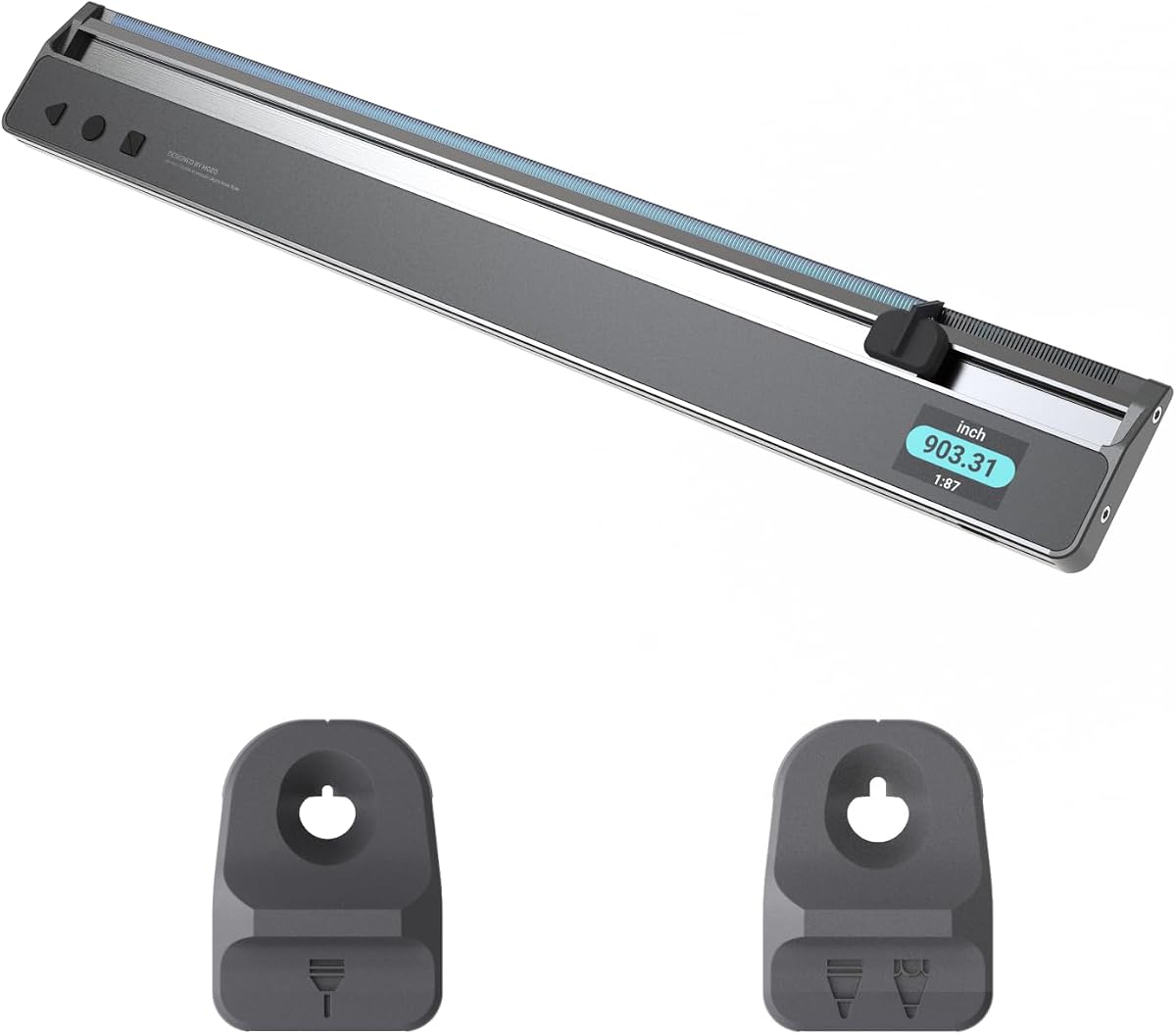
The HOZO NeoRuler is a 12-inch smart scale ruler for users who want to move beyond isolated length readings. Its 4.4 rating and stated accuracy of plus or minus 0.004 inch position it as a precise, connected option for architects, interior designers, civil engineers, real-estate professionals, and advanced drafting users.
We may earn a commission when you buy through this link, at no additional cost to you.
The NeoRuler includes 93 built-in scales spanning imperial and metric units, plus support for unlimited customized scales. That makes it useful when a plan uses a nonstandard ratio or when a user wants a library of frequently encountered scales. The aluminum-alloy and stainless-steel construction also gives the tool a more substantial feel than a simple plastic measuring accessory.
Its standout feature is the Bluetooth connection to the MEAZOR app. Users can transfer measurements, continue editing or drawing, export to DXF, PDF, or JPG, and save custom scale lists for later upload. A space-divider function can divide a distance into two to 12 equal sections, offering a quick alternative to repetitive manual calculations.
The trade-off is that the modular system is not entirely self-contained. Additional accessories are needed to transform the ruler into a scale caliper, and the connected workflow may take more setup than a standalone plan measure. Even so, it is the most compelling choice for users who want measurements to flow directly into a broader digital design workflow.
Bluetooth transfer and MEAZOR app compatibility help users move measurements beyond a simple display. DXF, PDF, and JPG export options support sharing and further editing, while saved scale lists help standardize repeated work across multiple drawings.
The stated plus or minus 0.004-inch accuracy suits detailed reading and drafting tasks. A 12-inch aluminum and stainless-steel body provides a balance of portability and durability, although the optional-module system adds complexity for users who only need basic measurements.
We may earn a commission when you buy through this link, at no additional cost to you.
The Calculated Industries 6135 Scale Master Pro XE is a high-output digital plan measure aimed at estimators and other professionals who work regularly with printed plans. Its 4.8 rating, 91 built-in scales, and ten custom-scale positions make it a compelling all-around choice for high-volume takeoff work.
We may earn a commission when you buy through this link, at no additional cost to you.
The scale library contains 50 US and 41 metric scales. Units include decimal feet, feet-and-inches, decimal inches, yards, millimeters, meters, and kilometers, with square and cubic formats for area and volume. Five custom positions for each measurement system let users handle reduced, enlarged, faxed, scanned, PDF, and otherwise out-of-scale drawings.
The device can roll across plans, drawings, and maps to capture linear distances, square areas, and cubic volumes. Manual and automatic counters help estimate recurring items such as studs or other components. An optional PC interface is available, but it is not necessary for core estimating work, allowing the tool to remain useful at a jobsite or in the field.
Compared with the more compact 6025, the XE provides more built-in and custom scales, both counting options, and an optional route into computer-based work. Its typical rolling error is stated at approximately 2% to 3%, so careful start and stop placement remains important. It is our Editor's Choice for users who want professional takeoff depth in a single portable instrument.
Ninety-one built-in scales and ten custom positions give the XE room to handle standard architectural and engineering work as well as unusual plan reductions. The additional custom positions are especially valuable for organizations that repeatedly receive drawings from multiple sources.
Manual and automatic counters support different takeoff habits, including estimating repeated plan elements. The optional PC interface can extend the workflow for users who want to transfer or manage information, but the core functions remain available without a computer.
We may earn a commission when you buy through this link, at no additional cost to you.
The NeoRuler NeoReading Kit is a 12-inch digital scale ruler bundle designed for users who spend significant time reading small details on plans. It carries a 5.0 rating and combines the NeoRuler with a NeoPointer and NeoMagnifier, making it a focused alternative to the more extensive drafting-oriented bundles in this list.
We may earn a commission when you buy through this link, at no additional cost to you.
The core ruler provides 93 built-in imperial and metric scales, unlimited customized scales, and Bluetooth connectivity to the MEAZOR app. Measurements can be transferred for editing and drawing, then exported to DXF, PDF, or JPG. Users can also create, save, and upload lists of custom scales for recurring project requirements.
The main advantage is the pair of reading accessories. The NeoMagnifier improves visibility of small text and intricate details, while the NeoPointer gives users another way to locate, trace, or inspect plan information. The aluminum-alloy and stainless-steel ruler body is 12 inches long and weighs 184 grams, which supports portability without feeling flimsy.
Users who need a full drafting setup may find the separate drafting bundles more complete. For reading-intensive work, however, this kit has a clear advantage: it includes the tools needed to interpret tight plan details rather than merely measure them. Its 5.0 rating also makes it an attractive choice for users who prioritize focused accessories and connected functionality.
The included NeoMagnifier addresses a common problem in digital and printed drawings: details that are accurate but difficult to see. Combined with the NeoPointer, it makes this bundle especially useful for examining annotations, dimensions, symbols, and crowded drawing areas.
The ruler retains 93 built-in scales and unlimited custom scale creation, so the reading bundle does not sacrifice measurement flexibility. MEAZOR app support adds transfer, editing, export, and reusable scale-list capabilities for a connected workflow.
We may earn a commission when you buy through this link, at no additional cost to you.
The 12-inch Triple-Sided Architectural Scale is a traditional aluminum drafting ruler for architects, engineers, draftspeople, and students who want a reliable physical scale reference. Its 4.8 rating and robust construction make it one of the strongest non-digital options in a list otherwise dominated by electronic measuring tools.
We may earn a commission when you buy through this link, at no additional cost to you.
Its three-sided configuration places multiple imperial scale markings on a single 12-inch body. The stated choices include 1-1/2 inch, 1 inch, 3/4 inch, 3/8 inch, 3/16 inch, 3/32 inch, 1/2 inch, 1/4 inch, 1/8 inch, and 3/16 inch, allowing one ruler to handle many common drawing ratios.
The body is made from anodized aluminum alloy, giving it a solid construction intended for regular use. Laser-etched numbers and graduations are designed for clarity and resistance to fading or wearing away. That makes the markings more dependable than printed labels that can become obscured during repeated handling.
This is not a digital plan measure and cannot perform takeoff calculations, track custom scales, or transfer readings to an app. It is best viewed as a precise, low-complexity companion to a computer or a digital ruler. For students learning to read architectural drawings or professionals who prefer a straightforward physical scale, it remains a practical and durable choice.
The three-sided design reduces the need to keep several separate triangular scales on hand. Users can select an appropriate edge for the drawing ratio, making it convenient to move between a floor plan, elevation, and detail sheet.
Laser etching gives the graduations a clean, permanent appearance, while anodized aluminum protects the body and its markings. The simple design also eliminates batteries, apps, and charging, which can be advantageous in studios and classrooms.
We may earn a commission when you buy through this link, at no additional cost to you.
The NeoRuler Complete Tool Bundle combines a smart scale ruler, NeoReading components, and NeoDrafting accessories in a single package. It is designed for architecture, engineering, design, and other detailed drawing work where both precise reading and controlled pen placement matter.
We may earn a commission when you buy through this link, at no additional cost to you.
The NeoMagnifier supports visibility of small text and intricate details, while the two penholders accommodate 0.8 mm and 1.2 mm pens. The stated purpose is precision drafting and detail reading across a broad range of technical applications. This makes the bundle more specialized than a basic digital ruler and more versatile than a reading-only kit.
The product's 3.6 rating is lower than those of the other digital tools in the comparison, and the supplied information provides fewer core ruler specifications than the standalone NeoRuler listings. As a result, buyers should examine the current package contents carefully to confirm that the base ruler and all desired modules are included.
For a user who wants a single coordinated drafting setup, the bundle is convenient. It reduces the need to source a magnifier, pointer, and compatible penholders separately. It may be less attractive for someone who only needs a simple digital measurement tool, but it offers a broader workstation for users who regularly work from detailed drawings.
The bundle integrates the tools required to inspect a plan and then work directly on it. That continuity can reduce workflow interruptions compared with assembling accessories from different manufacturers or incompatible standards.
Separate 0.8 mm and 1.2 mm holders support different line weights and drawing styles. The selection is useful for technical drafting, annotation, and design work, though users should verify the package configuration and ruler details before ordering.
We may earn a commission when you buy through this link, at no additional cost to you.
The 12-inch three-piece Architectural and Engineering Scale Ruler Set is a physical drafting collection for users who need both scaled drawing tools and a straightedge. Its 4.8 rating, distinct architectural and engineering rulers, and stainless steel straightedge make it a broad traditional alternative to a single-purpose scale.
We may earn a commission when you buy through this link, at no additional cost to you.
The architectural ruler supports building layouts and construction plans, while the engineering ruler is intended for civil engineering blueprints, technical measurements, and scaled work. A 12-inch stainless steel ruler adds a general-purpose straightedge for lines, dimensions, and other drafting tasks that do not require a scale ratio.
Both scaled tools are made from black or blue anodized aluminum with high-contrast, laser-etched graduations. The markings are described as resistant to fading, which supports long-term readability in offices, studios, schools, and other settings where a ruler may be handled frequently.
This set cannot calculate area, track quantities, set custom scales, or move measurements into software. Its value lies instead in comprehensive physical coverage. It is a good choice for architecture and engineering students, drafters, and anyone who wants dedicated architecture, engineering, and straightedge tools without maintaining a digital app or managing rechargeable batteries.
Keeping dedicated architectural and engineering scales makes ratio changes more intuitive than relying on a single generic ruler. The separate stainless steel piece handles ordinary straightedge work and rounds out the set for everyday drafting needs.
High-contrast laser-etched graduations on anodized aluminum are designed to remain clear under regular use. The three-piece format is less compact than one multifunction tool, but it gives users a clearer visual distinction between scale systems.
We may earn a commission when you buy through this link, at no additional cost to you.
The NeoRuler NeoDrafting Kit is a 12-inch digital scale ruler bundle aimed at users who want to measure and draw with the same coordinated system. It includes 0.8 mm and 1.2 mm penholders, allowing a user to select the instrument that best matches a particular drafting style or annotation task.
We may earn a commission when you buy through this link, at no additional cost to you.
The ruler provides 93 built-in scales across imperial and metric units, supports unlimited customized scales, and connects by Bluetooth to the MEAZOR app. Users can transfer measurements, continue editing or drawing, export to DXF, PDF, or JPG, and save reusable custom-scale lists for future work.
The main limitation is the absence of a supplied customer rating. That makes it harder to judge long-term user experience in the same way as the highly rated Scale Master Pro XE or reading bundle. It also offers fewer reading-oriented accessories than the complete NeoRuler tool bundle, concentrating instead on pen placement and drafting precision.
This kit is best for architects, engineers, interior designers, and other professionals who want a connected digital ruler with dedicated drafting accessories. It is especially relevant for users already comfortable with a companion app and interested in carrying measurements into editable design files.
The MEAZOR app extends the ruler beyond an isolated digital display. DXF, PDF, and JPG export gives users several routes for sharing or continuing to develop measured information, while saved scale lists support repeatable workflows.
The 0.8 mm and 1.2 mm holders give users more control over drafting line weight and hand feel. They are a meaningful addition for technical drawing, although users who mainly need a magnifier may prefer the NeoReading bundle instead.
We may earn a commission when you buy through this link, at no additional cost to you.
The NeoRuler Modular Collection Kit combines the 12-inch NeoRuler with reading and drafting accessories in a protected, organized package. Its 4.0 rating and emphasis on the NeoCollection case make it especially relevant to users who carry a complete measuring system between office, studio, and site locations.
We may earn a commission when you buy through this link, at no additional cost to you.
The case is designed to hold the ruler and three modules in one place. Magnetic attachment stores components securely, while the consolidated format makes each accessory easier to locate. The kit includes the NeoMagnifier and two penholder sizes, covering detailed reading and precise drafting in the same system.
Portability is one of the clearest benefits. Instead of keeping loose modules in drawers or separate pouches, users can organize the ruler and attachments around a single carrying solution. The case also helps protect the system during transport, although buyers should still verify its dimensions against their bag or workstation requirements.
This bundle is best for users who value organization, protection, and a coordinated toolkit. Its supplied information does not detail all of the ruler's scale specifications, so careful review of the current listing is advisable. Even so, for a mobile professional who wants a protected digital drafting system rather than a single loose tool, it is a convenient and well-structured option.
The magnetic system keeps as many as three modules organized with the ruler, reducing the chance of leaving a magnifier or penholder behind. This is particularly useful when moving frequently between drawing tables, client meetings, and field locations.
The dedicated NeoCollection case turns several accessories into a coherent portable kit. It is a practical alternative to protecting accessories separately and helps users maintain a more orderly drawing setup.
We may earn a commission when you buy through this link, at no additional cost to you.
The Scale Master Pro XE Two-Tool Bundle pairs the advanced 6135 plan measure with the more compact 6025. Its 5.0 rating makes it one of the most well-regarded products in the comparison, while the two-device arrangement offers a practical way to divide work between users or keep one tool available in a separate kit.
We may earn a commission when you buy through this link, at no additional cost to you.
The 6135 contributes 91 built-in scales and ten custom-scale positions, along with linear, area, and volume takeoffs. The 6025 adds 72 built-in scales and six custom positions, also supporting area and volume calculations. Together, the two products provide substantial coverage across imperial and metric systems and common out-of-scale plan formats.
Neither device requires a cable or computer for its core field functions. The 6135 does offer an optional PC interface, but users can operate both tools independently. The bundle's two plan measures can therefore support separate tasks, provide a backup, or let two people measure different drawings simultaneously.
The key trade-off is redundancy. Many users will not need both devices, and the pair does not provide a different measurement category or an entirely new workflow. It is best for teams, training environments, high-frequency estimators, or users who value redundancy and broad scale coverage more than minimizing the number of tools carried.
The XE offers the deeper scale library and counter options, while the Pro provides a smaller standalone alternative. Having both allows two people to work in parallel or lets an organization keep a second unit in a separate office, vehicle, or project kit.
Both tools can calculate area and volume, roll across printed plans, and operate without a computer connection. The bundle therefore extends capacity and redundancy without changing the fundamental rolling-measurement workflow used by both products.
We may earn a commission when you buy through this link, at no additional cost to you.
The right choice depends on how you measure, how often you work with printed plans, and whether you value standalone reliability, connected editing, precise point readings, or traditional drafting tools. Review scale support, unit formats, takeoff functions, portability, accessories, and display requirements before deciding.
Begin by considering the drawings you encounter most often. Architectural and engineering practices may use different ratios, while contractors and estimators also work with reduced, enlarged, scanned, faxed, and PDF plans. A large built-in library saves time when the plan uses a standard ratio, but custom-scale creation is equally important when a drawing arrives at an unexpected size. The 6025 offers six custom positions, the 6135 offers ten, and the NeoRuler supports unlimited customized scales.
Scale quantity alone does not tell the whole story. A useful ruler should present measurements in the unit system and format required for estimating, material orders, and drawing notation. The digital products in this comparison support combinations of decimal feet, feet-and-inches, decimal inches, yards, millimeters, meters, and kilometers, with square and cubic formats on the rolling plan measures. A traditional triangular ruler may serve imperial drafting well, but it will not replace digital unit conversion across both systems.
If your work includes material estimates, area or volume measurement is more useful than length alone. The Scale Master Pro and Pro XE can roll length and width to calculate area, set height for volume, and count recurring items such as studs, piers, or outlets. The XE offers both manual and automatic counters, while the 6025 provides a push-button counter. These features are particularly valuable for contractors, estimators, and site professionals who repeatedly need quantities from plans.
Standalone tools are dependable in field environments because they need no cable, computer, phone, or internet connection. The Scale Master Pro family is designed around that kind of portability. Connected tools offer another kind of flexibility: the NeoRuler can transfer measurements to the MEAZOR app, continue editing and drawing, export to DXF, PDF, or JPG, and save custom scale lists. That workflow is attractive for digital design practices, but it also introduces setup and device-coordination requirements.
Rolling plan measures and digital straight-edge rulers solve different problems. A rolling tool is efficient for tracing long or irregular printed paths, while its stated typical error of approximately 2% to 3% makes careful start-and-stop placement important. The NeoRuler emphasizes fine point readings with a stated accuracy of plus or minus 0.004 inch. For precision line work, verify which method matches the task rather than assuming one accuracy figure applies to every type of measurement.
A ruler that works in the office may still be awkward on a job site. Consider body length, weight, battery needs, and the space available for accessories. The 7.3-inch Scale Master Pro is compact, while the 12-inch NeoRuler offers a larger working length and an aluminum-and-stainless-steel frame. For multi-piece systems, the NeoCollection case demonstrates the value of magnetic module storage and consolidated protection, especially for users who move tools frequently.
A digital ruler becomes more useful when it supports the way you interpret and mark drawings. The NeoMagnifier improves visibility of small text and intricate details, the NeoPointer assists with locating or tracing plan information, and 0.8 mm and 1.2 mm penholders support different drafting needs. A traditional architectural and engineering ruler set offers a parallel benefit: permanent scale markings and a straightedge without battery management or application setup.
Not every architectural task requires electronics. Traditional rulers are fast to deploy, require no charging, and make it easy to develop a feel for drawing ratios. Digital tools shine when you need automated scale selection, custom calibration, unit conversion, area or volume calculations, count functions, or data transfer. Many professionals benefit from using both: a digital device for takeoff and a physical scale for quick reading and drafting.
Begin by identifying the drawing's stated scale and matching it to a built-in setting. If the drawing was resized, scanned, or printed at a different ratio, use the custom-scale function and calibrate against a known dimension. Verify the result by measuring a second known line before beginning a full takeoff. For rolling devices, start and stop at the same point on each line and keep the wheel aligned with the path.
Choose the output unit and calculation mode before measuring. Use length mode for individual runs, area mode when capturing width and length, and volume mode when a reliable height is available. The item counter can help estimate repeated elements, but counts should be checked against drawing symbols and notes. With a connected NeoRuler, transfer and save readings to the MEAZOR app, label them clearly, and export or back up the resulting file in the format required by your project team.
Store rolling wheels and measuring surfaces away from grit, adhesive residue, and excessive heat, and clean the body with a soft, lightly dampened cloth rather than abrasive chemicals. Protect the device from drops and impact, especially when modular accessories are attached. Check battery levels before extended field use, keep replacement batteries or the appropriate charging method available, and periodically recalibrate or verify the scale against a known measurement to catch physical or setup changes.
A rolling plan measure is moved along a printed line, path, area, or volume and converts the rolled distance into scaled measurements. A digital scale ruler is generally used like an electronic straightedge for point measurements and can also provide custom scales, spacing functions, and app transfer. Rolling tools are especially efficient for takeoffs, while digital rulers tend to be more useful for detailed reading and drafting.
It can handle many scaled measurement tasks, but it does not fully replace every function of a traditional triangular ruler. A digital tool adds calculation, unit conversion, custom calibration, and sometimes connectivity, while a physical triangular scale remains fast, battery-free, and familiar for quick visual ratio checks. Some professionals use both to combine convenience with drawing fluency.
Custom-scale calibration teaches a device the ratio of a particular printed drawing so it can convert rolling or point measurements into real-world dimensions. It is useful for plans that were reduced, enlarged, scanned, faxed, or printed inconsistently. A reliable process involves measuring a known dimension, entering the matching scale, and checking a second known line before recording results.
Accuracy depends on scale magnitude, wheel condition, path alignment, and how precisely the user starts and stops each roll. The Scale Master products state that most users typically experience approximately 2% to 3% rolling error under normal conditions. For critical work, use a known dimension to verify the setup and repeat important measurements.
Most of the digital products in this guide support both US and metric scales, including units such as millimeters, meters, kilometers, decimal feet, yards, and decimal inches. The rolling models also provide square and cubic formats. Traditional rulers vary: the three-sided architectural scale is imperial-focused, while the three-piece set includes architecture, engineering, and stainless steel straightedge tools for broader physical drafting needs.
No. Standalone models such as the Scale Master Pro and Scale Master Pro XE can perform core takeoffs in the field without a cable or computer. Bluetooth is useful when you want to transfer readings to an app, edit or draw from them, export files, and save custom scale lists. The best choice depends on whether mobile data transfer is valuable enough to justify a connected workflow.
The NeoRuler bundles are specifically oriented toward drafting and reading, with penholders, a magnifier, and in some cases a pointer. The NeoDrafting Kit emphasizes precise drawing and connected measurement editing, while the Complete Tool Bundle combines reading and drafting modules. Buyers should also verify the exact package contents because bundle configurations can differ.
Keep the measuring surface and rolling wheel clean, and avoid grit, adhesives, moisture, and abrasive cleaners. Store the tool in its case when possible, protect it from impact and extreme heat, and check the battery before field use. Periodic calibration against a known dimension is a good way to confirm that the scale setup and instrument remain consistent.
The Scale Master Pro stands out as a balanced standalone plan measure with 72 built-in scales, six custom positions, area and volume calculations, and a useful item counter. The Scale Master Pro XE is the stronger professional takeoff option, adding 91 built-in scales, ten custom positions, and dual counter workflows. For connected measuring and drawing, the HOZO NeoRuler combines broad scale support, customizable settings, and MEAZOR app transfer.
Your priorities should determine the category. Choose a rolling plan measure for field takeoffs, a NeoRuler bundle for app-connected measurement and drafting, or a physical scale set for permanent, battery-free ratio reading. Consider the drawings you actually receive, the units you must report, and the accessories that solve recurring problems rather than simply adding more equipment to your bag.
Ratings, package configurations, and availability can change over time, so check the current product listing before making a final decision. Compare the present scale library, included components, construction, and measurement functions against the workflow you need most, and also review current prices at the time of purchase.