
OTraki 4 Pack Artist Drawing Gloves
4.6Editor score
Four glove multipack
Left or right hand
Four size choices
Compare the best digital drawing gloves for digital art, including palm rejection, fit, comfort, materials, hand coverage, and multi-packs for artists.
A digital drawing glove helps artists create on graphics tablets, pen displays, and touchscreens with less unwanted contact from the palm. The right glove improves glide, reduces visible smudges, and supports comfort during long sessions without obstructing the fingers used to control a stylus.
The gloves in this guide were compared using the supplied product information, focusing on palm coverage, finger design, fit, material, flexibility, hand orientation, included accessories, and suitability for drawing. Products with sparse or unavailable details receive limited analysis rather than unsupported conclusions.
Each review identifies the product's strongest qualities and practical limitations, while the comparison table provides a concise overview. Rankings reflect the available specifications and customer ratings, and prices can change, so readers should confirm current listings and fit information before buying.
4.6Editor score

4.6Editor score
4.4Editor score
This side-by-side overview compares glove coverage, sizing, material, hand compatibility, and included components across all ten listings, while identifying where essential product information was unavailable.


The HUION Artist Drawing Glove is a one-size, two-finger glove designed for either the left or right hand. Its customer rating is 4.5, and its supplied specifications emphasize flexibility, reduced surface friction, and practical use with graphics tablets, pen displays, and related creative surfaces.
We may earn a commission when you buy through this link, at no additional cost to you.
The supplied 20-centimeter length and 8-centimeter width offer a useful sense of scale. Soft Lycra and nylon construction should allow the fabric to flex with the hand while maintaining a light barrier between the palm and drawing surface. The black finish is described as resistant to visible soiling, reducing maintenance concerns.
Its most important limitation is explicitly stated: the glove cannot completely prevent accidental touchscreen contact. Instead, it reduces friction and makes the hand glide more smoothly. It is also a single-glove package, which may be less appealing to artists who want a replacement or a spare for changing hands.
This is a sensible choice for sketchers, illustrators, and hobbyists who want a simple, flexible glove that works across several drawing tasks. It is particularly appropriate for users who understand that palm rejection depends partly on the device and prefer a lightweight fabric barrier over a thick, rigid cover.
The two-finger construction keeps the hand streamlined while the palm section provides a sliding barrier over the surface. The listing specifically positions the glove for sketching, inking, coloring, and digital drawing, making it useful across common illustration workflows.
Soft Lycra and nylon make this an uncomplicated accessory for artists who want flexibility without a bulky covering. The dirt-resistant black finish also makes it easier to maintain between creative sessions.
We may earn a commission when you buy through this link, at no additional cost to you.
This Artist Drawing Glove stands out with a three-layer palm-rejection design and a 4.6 customer rating. It is intended for iPads and drawing tablets, with a two-finger, ambidextrous layout designed to preserve mobility while creating a barrier between the palm and screen.
We may earn a commission when you buy through this link, at no additional cost to you.
The listing describes the inner construction as anti-slip and anti-smudge, with a smooth surface intended to reduce friction during strokes. Soft, stretchy, moisture-wicking fabric is another strength, particularly for extended sessions in which trapped heat and perspiration could otherwise make a glove uncomfortable.
This set is more complete than a single-glove option. It includes two gloves and a cleaning cloth, allowing the user to switch hands or keep a replacement available. Three sizes offer more precision than a universal fit, although artists with dimensions outside those ranges may need to check measurements carefully.
The glove is a strong recommendation for artists who value a layered approach to palm rejection and want useful accessories in the package. As with other two-finger gloves, it cannot guarantee that every device will ignore the covered palm, but its construction appears better targeted at that recurring drawing problem.
The three-layer design is the defining feature here. It is intended to reduce accidental contact while supporting a smoother glide, making the glove relevant for stylus users who frequently work across a large drawing area.
Two gloves and a cleaning cloth give this package better day-to-day utility. The included cloth also provides a convenient way to wipe away residue from the tablet or display without relying on an unrelated cloth.
We may earn a commission when you buy through this link, at no additional cost to you.
The XPPen Artist Drawing Glove is a two-finger accessory made for graphics tablets, with the supplied listing shown in size M. It carries a 4.5 rating and is designed for both right- and left-handed users, which adds flexibility for different working habits.
We may earn a commission when you buy through this link, at no additional cost to you.
The fabric is described as highly elastic, breathable, soft, and skin-friendly. Those characteristics make it a sensible option for extended sketching and illustration, where a restrictive glove could interfere with hand movement. Its two-finger shape leaves the drawing fingers exposed for stylus control.
The glove reduces smudging and supports an easier glide, but it does not claim to provide complete palm rejection. Buyers should therefore not expect the fabric alone to guarantee that a device will ignore every covered-palm contact. The included choice of S, M, and L sizes is helpful, although this particular listing identifies medium.
This glove is a balanced pick for digital artists who value airflow, stretch, and ambidextrous use more than extensive packaging. It also suits students and practicing illustrators who need a straightforward tablet accessory for inking, sketching, coloring, and general graphics work.
High elasticity and air permeability help the glove conform to the hand without feeling rigid. These features are especially relevant for artists who spend extended periods sketching, coloring, or navigating a pen display.
The ambidextrous construction allows the glove to move between hands without changing models. That flexibility is useful for artists who naturally alternate hands while sketching or who share a studio workspace.
We may earn a commission when you buy through this link, at no additional cost to you.
The OTraki four-pack combines a 4.6 rating with the convenience of including four gloves. Each glove can be worn on either hand, and the supplied dimensions cover XS through Large, giving users several options for finding a more appropriate fit.
We may earn a commission when you buy through this link, at no additional cost to you.
The glove is made from soft, elastic Lycra fiber with breathable and tensile-strength characteristics. It is designed to reduce friction, help the hand slide smoothly, and limit visible scratching or smudging on a graphics monitor, tablet, light box, or tracing pad.
The listing makes an important distinction: the glove acts as a buffer rather than a complete solution for palm detection. Devices with a built-in palm-detection feature may need that function disabled before drawing. This is a reasonable tradeoff for users who primarily want smoother movement and reduced contact marks.
This is an excellent practical choice for families, classrooms, shared studios, and artists who lose or soil gloves frequently. Four units provide useful redundancy, while the range of sizes and ambidextrous design makes the pack easier to use across different people.
Four gloves make it easy to keep a spare at a desk, rotate between hands, or share the pack. That convenience adds value without changing the core function of the glove as a friction-reducing hand barrier.
The listed sizes range from XS to Large, and the product can be worn on either hand. Buyers should compare the dimensions with their own hand because elasticity and manual measurement can introduce slight variations.
We may earn a commission when you buy through this link, at no additional cost to you.
The supplied data for ASIN B09XTG7YX1 contains no product title, customer rating, image, or descriptive specifications. That limited information prevents a reliable comparison of materials, sizing, palm coverage, and other features relevant to a digital drawing glove.
We may earn a commission when you buy through this link, at no additional cost to you.
The direct Amazon listing is the appropriate place to verify the current product identity and specifications. Buyers should look for a clear glove construction, two-finger or full-finger design, hand orientation, size information, and a stated purpose involving graphics tablets or pen displays.
It would be misleading to assign this listing a material, fit, or palm-rejection benefit without supporting data. The absence of those details is a meaningful limitation for a buying guide because even a visually similar glove can behave very differently on a particular device.
This entry should therefore be treated as a listing awaiting verification rather than a confident recommendation. Artists seeking an immediate choice are better served by a glove with documented coverage, dimensions, materials, and customer feedback.
Check the live listing for the included quantity, glove length, palm coverage, and compatibility claims. Those details are essential when selecting an accessory that must work smoothly with a specific drawing surface.
A digital glove may look simple, but fabric thickness and finger placement can materially affect stylus control. Without confirmed specifications, the listing cannot be compared responsibly with the documented alternatives.
We may earn a commission when you buy through this link, at no additional cost to you.
The XPPen Cat Print Drawing Glove combines the practical format of a two-finger artist glove with a distinctive black cat-print design. It has a 4.5 customer rating and is intended for right- or left-handed use, giving it the same broad working flexibility as many conventional gloves.
We may earn a commission when you buy through this link, at no additional cost to you.
Its high-elastic, breathable cloth is described as soft and skin-friendly. The construction is intended to reduce smudging and make the hand glide more easily, while the dark base color is described as resistant to visible dirt and less demanding to clean frequently.
Its main advantage is visual personality rather than a uniquely documented technical feature. The supplied information does not mention a multi-layer palm system, exact dimensions, or an included cleaning cloth. Artists who prioritize a distinctive appearance and comfortable stretch may find those omissions acceptable.
This glove is best suited to illustrators, students, and hobbyists who enjoy a playful accessory and need a flexible two-finger cover. It should be considered for everyday drawing tasks, provided the buyer confirms the fit and expected level of device palm detection on the product page.
The cat print gives the glove more visual character than a standard black model. That makes it a fitting choice for creative workspaces where personality is welcome and for gifting to a digital artist.
The glove retains the practical two-finger format associated with sketching and stylus work. Its stretchy, breathable material and ambidextrous orientation support general digital illustration use.
We may earn a commission when you buy through this link, at no additional cost to you.
The supplied product record for ASIN B0147WCE0A does not include a title, rating, image, or specifications. As a result, there is no reliable basis for describing this listing as a two-finger glove, a multipack, or a full-coverage model.
We may earn a commission when you buy through this link, at no additional cost to you.
Any buyer should inspect the active listing for a product photograph, dimensions, material description, and inclusion list. It is also worth checking whether the item is specifically designed for graphics tablets or is intended for another application, such as traditional painting or light-box work.
Fit deserves particular attention because drawing gloves differ in finger length, palm coverage, and elasticity. A glove that is too short may leave the heel of the hand in contact with the surface, while a restrictive one may interfere with natural stylus movements.
Because the available data does not establish meaningful advantages or drawbacks, this is better viewed as an item to verify than a top recommendation. The documented alternatives provide a much clearer basis for comparing everyday digital drawing performance.
Confirm that the listing corresponds to an artist glove and review the included quantity. This prevents confusion with unrelated accessories that may share a generic listing structure.
Compare the listed glove length and width with the user's hand before ordering. Coverage should extend across the area that normally touches the screen without covering the fingers needed for precise stylus control.
We may earn a commission when you buy through this link, at no additional cost to you.
ASIN B0BD86L67G has no supplied product name, rating, image, or feature description. These omissions make it impossible to assess its fit, palm coverage, material breathability, or suitability for a particular drawing setup from the provided record.
We may earn a commission when you buy through this link, at no additional cost to you.
The active product page should be used to confirm the item's purpose and included components. Important details include whether it covers two fingers or more, whether it is sold as a multipack, whether both hands are supported, and whether a cleaning cloth or other accessories are included.
Material is another crucial factor to verify. A thin, smooth glove may reduce friction effectively, while a thicker fabric could offer better isolation but restrict movement. The best option depends on the artist's hand, stylus technique, display size, and tolerance for heat or moisture.
Given the lack of factual support, this listing should not receive a confident recommendation. It may be suitable after direct verification, but users who want an immediate, well-documented selection can choose one of the gloves with confirmed materials, dimensions, and customer feedback.
A digital drawing glove should fit securely without bunching around the wrist or restricting the stylus fingers. Verify the measurements and read any available guidance about how the product is intended to be worn.
A listing that specifically mentions graphics tablets, pen displays, or touchscreens provides a stronger basis for purchase than a generic artist-glove description. Confirm the target surfaces before ordering.
We may earn a commission when you buy through this link, at no additional cost to you.
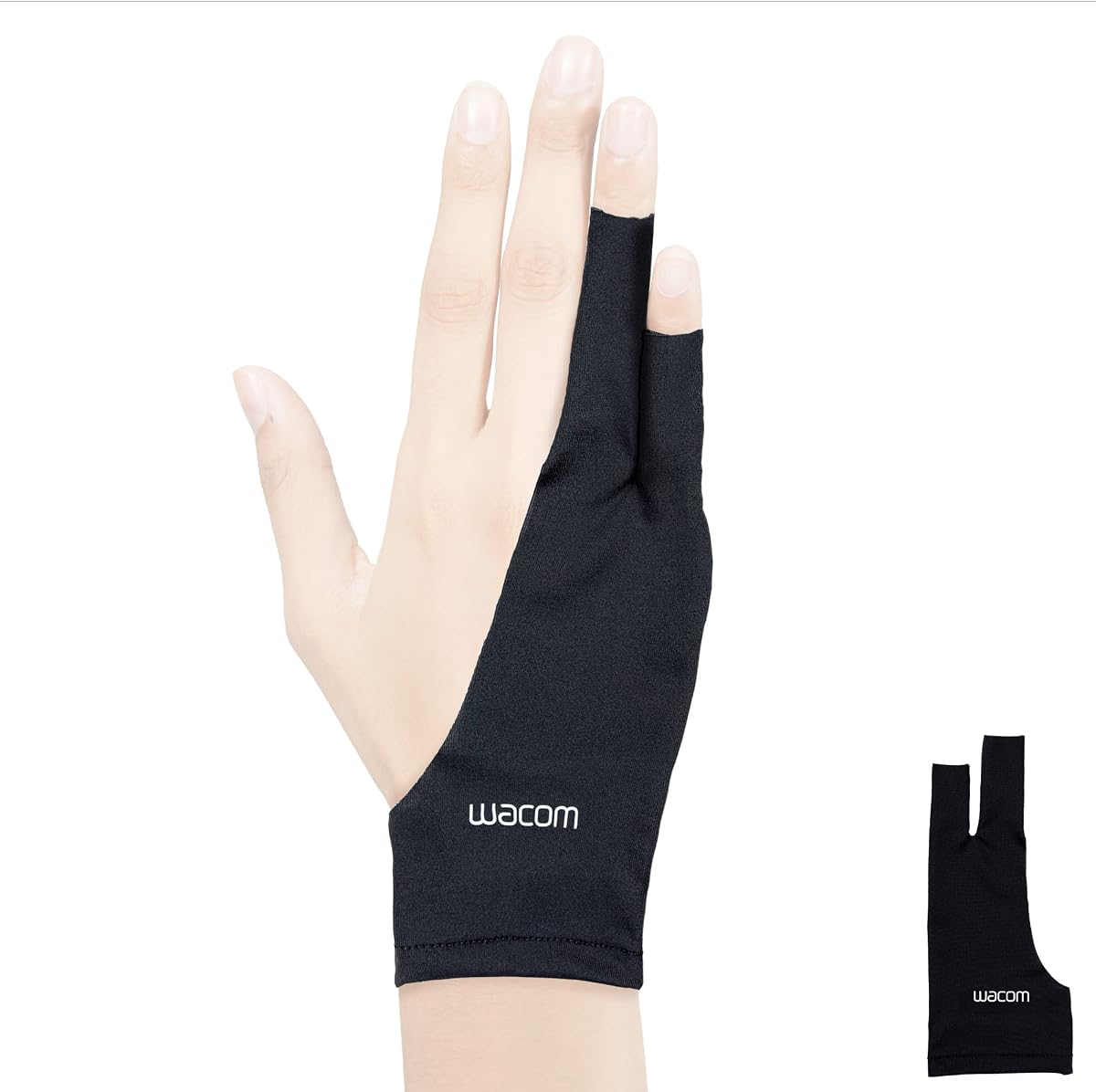
The Wacom Artist Drawing Glove takes a different approach by leaving the fingertips exposed, allowing users to interact with touchscreens and type on a keyboard without removing it. It carries a 4.4 rating and is constructed from recycled polyester and spandex for comfort and stretch.
We may earn a commission when you buy through this link, at no additional cost to you.
The glove is designed to reduce friction between the hand and a screen or tablet, helping prevent oils and sweat from creating distracting smudges. That benefit is especially useful when working on a graphics tablet or pen display where a clear view of the artwork matters.
Its exposed-finger design makes it less protective than a glove with fuller finger coverage, but it improves interaction with on-screen controls. The package includes one glove, so users who prefer to alternate hands may want to purchase another unit. The one-size format fits most users but may not suit every hand shape.
This is the premium pick for artists who frequently switch between drawing and direct touchscreen interaction. It is also a compelling option for users who want a branded, stretchable glove made partly from recycled materials without sacrificing access to the fingers used for navigation.
Exposed fingertips make it easy to select on-screen menus, zoom a canvas, or use a keyboard. That versatility allows the glove to remain on during more of the digital workflow rather than being removed for every interface task.
The blend of 90% recycled polyester and spandex is intended to provide stretch, durability, and comfort. Its 7.6-inch length and 3.3-inch width offer concrete measurements for assessing one-size fit.
We may earn a commission when you buy through this link, at no additional cost to you.
The OTraki four-pack of two-finger drawing gloves has a 4.6 rating and emphasizes coverage, comfort, and a broad range of compatible creative surfaces. Each glove is ambidextrous, allowing the same design to be worn on either the left or right hand.
We may earn a commission when you buy through this link, at no additional cost to you.
The listed main measurement is 3.23 by 8.07 inches, with XS, Small, Medium, and Large alternatives also available. Coverage extends over the palm and fingers, creating a barrier intended to protect artwork from sweat, grease, and unintentional smearing.
The high-elastic Lycra fiber is described as soft, breathable, moisture-wicking, and resistant to tearing. Those features make the gloves suitable for longer sessions, although users who perspire heavily may still prefer a thinner fabric or a model with more exposed fingertips.
This multipack is a strong choice for users who rotate gloves frequently, share equipment, or want a spare ready for different tasks. Its stated applications include sketching, inking, coloring, digital drawing, graphics monitors, tablets, light boxes, and tracing pads.
The design covers the palm and fingers to reduce unwanted residue reaching the drawing surface. That broader barrier can be helpful when resting the hand heavily or switching among sketching, coloring, and detailed illustration.
Four gloves allow users to rotate between units or between hands. Moisture-wicking fabric and strong tensile resistance are intended to preserve comfort and shape during extended creative work.
We may earn a commission when you buy through this link, at no additional cost to you.
The most useful digital drawing glove balances smooth movement, reliable coverage, low-friction fabric, and an accurate fit. The right choice depends on the device, drawing style, hand size, and how much direct touchscreen interaction you need.
Palm rejection describes a device's ability to ignore covered-palm contact while a stylus is active. A drawing glove can reduce the area of contact and make the hand slide more easily, but most two-finger models do not guarantee that the device will ignore every covered area. Some products explicitly use layered construction to target this problem, while others describe themselves only as friction-reducing barriers.
Choose a glove based on realistic expectations. Look for clear palm-rejection claims, confirm whether the product covers only two fingers or more of the hand, and check the manufacturer's device settings. If your tablet offers palm rejection, use it alongside the glove rather than assuming the fabric alone will handle every situation.
Two-finger gloves leave the index and middle fingers exposed for precise stylus control, which is the most common format in this category. Some gloves cover more fingers or extend farther across the palm, creating greater separation from the screen but potentially restricting movement. Full-finger styles can be useful for touch interaction, while exposed fingertips offer easier access to on-screen controls.
Compare the glove with the way you actually work. Artists who draw with one hand may prefer minimal coverage, while those who rest their palm heavily may benefit from broader protection. The exposed Wacom design, for example, prioritizes touchscreen and keyboard access rather than maximum isolation.
A well-fitted glove should remain secure without bunching, squeezing the fingers, or restricting wrist movement. Two-finger gloves must be long enough to cover the portion of the palm that normally contacts the surface but should not pull tightly when the hand is relaxed. One-size designs offer convenience, while multiple size options can provide a more precise result.
Compare listed dimensions with your hand and note whether measurements refer to length, width, or both. Elastic materials can accommodate some variation, but they cannot compensate for a glove that is fundamentally too short or too narrow. Review customer feedback about sizing whenever specific measurements are provided.
Stretch Lycra, nylon, polyester, and spandex are common because they combine flexibility with a relatively smooth surface. Breathability and moisture management become increasingly important during long drawing sessions. A thin fabric can reduce friction effectively, while a thicker layer may provide more separation from the screen but retain more heat.
Look for descriptions that address airflow, sweat handling, softness, and tensile strength. Black fabric may also be practical because it tends to conceal visible soil. Care should remain gentle, as excessive washing or harsh detergents can affect stretch and surface smoothness.
An ambidextrous glove can be worn on either hand, making it convenient for left-handed artists, users who switch hands, and households that share accessories. Some models use a symmetrical two-finger construction, while others may have subtle differences in finger length or shaping. The supplied product descriptions identify several gloves as suitable for both hands.
Ambidextrous is not automatically the same as universal size. A glove may fit either hand while still being too long for one user or too short for another. Check both the hand orientation and the measurements before deciding.
A drawing glove should let the hand move smoothly without dragging excessively across the display. Too much grip can create uneven lines when the palm shifts, while too little control may make it difficult to position the hand. Anti-slip and anti-smudge descriptions are common, but the glove should still allow controlled contact with the surface.
Consider the type of artwork as well. Fine line work may benefit from a smoother, thinner surface, while broad coloring and sketching can benefit from stable coverage. Users should also clean the display regularly, since a glove reduces smudges but does not remove every trace of residue.
Package contents can improve convenience. A two-glove set makes hand switching easy, a four-pack provides useful spares, and an included cleaning cloth helps maintain the screen. Some listings include one glove in a simple, lightweight package, which may be enough for a single user with one drawing hand.
Compare quantity against replacement needs rather than treating extra gloves as automatically better. Families, classrooms, and shared studios may gain more from multipacks, while a solo artist may prioritize a more tailored size or a special feature over extra units.
The best glove is one that complements the device's palm-detection system and the software workflow. Graphics tablets, pen displays, iPads, graphics monitors, light boxes, and tracing light pads have different pressure and contact-detection systems. A glove that works on one surface may not behave identically on another.
Look for compatibility information and any recommendations about changing palm-detection settings. Consider whether you need direct touchscreen access for menus, zoom controls, or keyboard shortcuts. For those tasks, exposed fingertips may be more useful than additional palm coverage.
Begin by cleaning the tablet or display with a suitable microfiber cloth, then put on the glove before placing your drawing hand near the surface. Adjust the glove so the covered fingers sit comfortably and the exposed stylus fingers retain a natural range of motion. If the device includes palm rejection, enable it or follow the manufacturer's recommended settings before beginning a detailed drawing.
Use light, controlled movements and avoid dragging the palm unnecessarily across the artwork. Let the glove reduce friction rather than expecting it to eliminate every accidental touch. When working on other surfaces, such as a light box or tracing pad, confirm that the material will not leave residue or transfer fibers.
Remove the glove gently after the session and inspect it for oil, dust, or discoloration. Follow any supplied care instructions, and use gentle cleaning rather than harsh chemicals or high heat, which may damage elastic fibers. A cleaning cloth can help keep the drawing surface clear, while storing gloves in a clean, dry place helps preserve their shape between uses.
Not always. A glove creates a barrier and reduces friction, but many two-finger gloves do not guarantee that the device will ignore every covered-palm contact. Products with layered palm-rejection construction may provide better separation, and the tablet's built-in palm-detection setting should also be configured according to its instructions.
It depends on your technique and the glove design. Many artists wear one glove on the drawing hand and leave the other free for shortcuts, a keyboard, or screen controls. Ambidextrous gloves make switching easier, while two-glove sets are convenient for users who prefer balanced coverage.
Two-finger gloves usually preserve more freedom in the index and middle fingers, which many artists use for stylus control. Full-finger or exposed-fingertip designs can provide broader screen protection or easier touchscreen interaction. The better choice depends on whether your priority is precision, direct touch access, or maximum separation from the display.
Compare the listed length and width with your hand and review the manufacturer's sizing chart. The glove should cover the palm area that rests on the screen without bunching around the wrist or compressing the fingers. Elastic material can accommodate minor differences, but it cannot correct for a fundamentally undersized glove.
Yes, a glove can reduce friction and visible smudges on an iPad used for illustration. Check that the fingers remain comfortable around the stylus and that the device's touch or palm-detection behavior remains reliable. A glove designed for graphics tablets may also work with an iPad, but the two devices can use different contact-detection methods.
Clean it when visible oil or dirt builds up, particularly if the glove begins transferring residue to the screen. Follow any product-specific care directions and avoid harsh detergents or high heat that could damage stretch fibers. Light maintenance is usually sufficient for many users because dark, dirt-resistant designs can remain serviceable between cleanings.
The glove itself does not automatically improve line quality. Its main contribution is smoother hand movement, less friction, and fewer distracting marks from the palm. Line quality also depends on the stylus, pressure settings, software, and the artist's technique.
A multipack is useful for sharing, rotating between hands, or keeping a clean replacement available. For a solo artist, a smaller set may be sufficient unless the extra units solve a recurring problem such as frequent soiling or loss. Compare fit and included accessories before deciding on quantity.
The Artist Drawing Glove with three-layer palm rejection is the strongest all-around choice for its layered construction, comfortable stretch fabric, two-glove package, and cleaning cloth. The OTraki four-pack offers excellent flexibility for shared studios and rotating users, while the Wacom glove is the premium option for artists who need exposed fingertips and quick touchscreen access.
Prioritize the features that affect your actual workflow. Palm coverage and layered construction matter when hand contact interferes with artwork, while exposed fingers or a two-finger format may better support precision and interface navigation. Fit, breathability, and reliable surface glide are equally important during long sessions.
Finally, confirm the current listing, measurements, included quantity, and device-specific guidance before purchasing. Product details and prices can change, and a glove that suits your hand and software setup is more valuable than one selected solely from appearance or a broad product description.