
Eyoyo 3.5-Inch Portable Digital Video Magnifier
4.6Editor score
Compact 3.5-inch display
2X to 25X magnification
Eight viewing color modes
AV output for larger screens
Capture and screen locking
A digital magnifier can make small print, labels, menus, maps, and everyday objects easier to see by displaying an enlarged live image on a screen. The best model depends on magnification range, screen size, focus, color controls, viewing comfort, portability, and how you plan to use it.
We compared ten digital magnifiers using the specifications and feature descriptions available for each product. The list covers compact readers, larger desktop-style aids, high-zoom models, dual-camera devices, and a premium magnifier with OCR and text-to-speech functionality.
Each review explains the standout features, practical trade-offs, and likely users for every model. Product ratings and features can change over time, and prices fluctuate, so check the current listing and customer feedback before making a final purchase.
4.6Editor score

4.3Editor score
4.0Editor score
As an Amazon Associate we earn from qualifying purchases.
The table below compares the ten magnifiers by display size, magnification range, principal viewing features, and portability, making it easier to identify the model that matches your reading habits and mobility needs.


The Eyoyo 3.5-Inch Portable Digital Video Magnifier is a compact reading aid with a 4.6 rating, making it a practical entry point for people who need temporary enlargement rather than a large, permanently stationed desktop system. Its 3.5-inch screen is easy to carry, while magnification from 2X to 25X gives users room to examine small print without an oversized device.
We may earn a commission when you buy through this link, at no additional cost to you.
Its most useful features go beyond basic zoom. Eight adjustable color modes include high-contrast combinations such as black on white and white on black, along with blue and yellow combinations that may make certain text easier to distinguish. The snapshot function can capture information for later viewing, while screen lock freezes the enlarged image so it remains steady while you read or write.
The main limitation is the small display. While portability is excellent, a larger screen generally feels more comfortable for prolonged reading because it presents more content at once. This model is also designed primarily for short-term visual assistance rather than OCR, spoken text, or extended book sessions. The included AV output solves part of that concern by allowing the image to appear on a television or other larger display.
This magnifier is best for travelers, shoppers, restaurant visitors, and anyone who wants an inexpensive screen-based aid for labels, forms, menus, and short passages. It also works well as a second device when a larger magnifier remains at home. For a user who values portability, familiar Eyoyo features, and straightforward controls, it is the strongest compact recommendation in this guide.
The foldable bracket supports flat use on a desk, while the compact body is designed to slide across books, maps, and newspapers. This makes the device flexible enough for both handheld checks and steadier tabletop reading.
Users can experiment with monochrome and colored combinations instead of relying only on standard full-color viewing. That flexibility is particularly helpful when glare, faded print, or reduced contrast makes ordinary text difficult to distinguish.
We may earn a commission when you buy through this link, at no additional cost to you.
This 5-inch electronic auto focus reading aid offers a broad 2X to 32X magnification range and 26 viewing modes. Its 3.9 rating places it below the highest-rated products in the group, but the extensive display customization and straightforward controls make it relevant for anyone who needs different visual conditions for labels, books, menus, and magazines.
We may earn a commission when you buy through this link, at no additional cost to you.
The simplified button arrangement is a meaningful strength. It is designed to be approachable for elderly users and children with amblyopia, while the device can memorize habits and preferred settings between sessions. Its 800 by 480 color LCD and image-processing system are intended to preserve details without deforming magnified fonts during longer reading sessions.
The integrated handle and foldable bracket create several positioning options. It can be held, placed on a page, or adjusted for left- or right-handed use, reducing the need to hunch over small print. AV connectivity also allows the display to connect to a television or computer, giving users a larger or more familiar viewing surface.
This model makes sense for users who value color choices and simple operation more than advanced text recognition. The lower rating may reflect mixed experiences, so buyers should read current customer feedback carefully. Within this category, it remains a versatile 5-inch option for routine low-vision assistance, particularly when a larger screen or computer display is available.
Twenty-six color modes provide more choices than a basic magnifier, allowing users to increase contrast or reduce visual interference. Memorized settings also reduce repeated adjustments when the same person uses the device regularly.
The restrained button layout focuses on essential operations rather than adding many secondary controls. That can make menus, prescriptions, and household instructions easier to handle for users with limited dexterity or visual confidence.
We may earn a commission when you buy through this link, at no additional cost to you.
The Portable Digital Video Magnifier for Visually Impaired combines a 5-inch HD LCD, adjustable magnification from 2X to 32X, and 26 color modes. Its 4.3 rating reflects a solid balance of useful features and customer satisfaction, making it a strong all-purpose choice for low vision, color blindness, amblyopia, and macular degeneration.
We may earn a commission when you buy through this link, at no additional cost to you.
The screen offers a more comfortable reading area than a compact 3.5-inch model while preserving portability. Users can switch between full color and numerous alternative viewing modes, and the device remembers preferred settings. The integrated foldable handle positions the screen at an angle, helping reduce the need to hunch over a page and allowing left- or right-handed operation.
At 800 by 480 resolution, the display is not as detailed as a high-end television or monitor, but the magnification and color controls remain the more important factors for many daily tasks. Text can also be shown on a television for a larger image. As with several similarly featured products in this category, there is no OCR or text-to-speech function for converting pages into spoken content.
This is our Editor's Choice because it avoids an extreme focus on one special feature while covering the core needs well: useful zoom, generous display customization, manageable controls, and a portable ergonomic design. It suits readers who want one device for books, labels, prescriptions, recipes, and travel. Anyone requiring narrated text should instead examine the Snow 12.
The 5-inch display gives users a wider view than a pocket-sized magnifier, while 2X to 32X magnification covers both modest enlargement and detailed inspection. This makes it suitable for varied print sizes encountered throughout the day.
The foldable bracket can rest at an angle over a page or document. That stable placement can reduce arm fatigue and make it easier to alternate between reading, writing, and viewing objects.
We may earn a commission when you buy through this link, at no additional cost to you.
The 5-inch Auto Focus Magnifier delivers 2X to 32X magnification, multiple color modes, and simplified controls for everyday reading. Its 3.9 rating means it does not lead the group in customer satisfaction, but the combination of automatic focusing and an accessible interface may appeal to users who want less adjustment during short tasks.
We may earn a commission when you buy through this link, at no additional cost to you.
Automatic focus is especially helpful when moving between labels, recipes, newspapers, and pages with different layouts. The 800 by 480 color LCD uses image processing to preserve color and detail, while the device remembers user habits before shutdown. It can also connect to a television or computer for a larger and more familiar image.
Its integrated handle and foldable bracket support different viewing angles and left- or right-handed use. The screen can rest above a page, reducing fatigue compared with holding it in one position. The main trade-off is that its display resolution is modest, and the rating suggests some buyers may have encountered issues not detailed in the available feature summary.
Choose this model when automatic focusing and simple controls matter more than advanced text-to-speech. It can serve as a general household reading aid for users with low vision, color blindness, amblyopia, or macular degeneration. Prospective buyers should confirm current customer feedback and after-sales support before ordering.
Rather than repeatedly adjusting the device for every new item, users can rely on automatic focusing. This is convenient for quick checks such as medication labels, price tags, and restaurant menus.
The magnifier can retain familiar operating habits between uses. For regular users, that reduces setup time and keeps the device more consistent with preferred viewing conditions.
We may earn a commission when you buy through this link, at no additional cost to you.
The VEVOR Portable Digital Magnifier stands out with a wide 2X to 48X magnification range, a 13MP near-and-far dual-lens system, and both AV and HDMI outputs. Its 3.4 rating is the lowest among these ten products, so buyers should investigate current reviews, but its dual-camera design and broad connectivity are unusually useful for a portable model.
We may earn a commission when you buy through this link, at no additional cost to you.
One lens is intended for close work such as books, newspapers, and documents, while the other provides views of distant signs or boards. The device also includes adjustable LED lighting, five brightness levels, 26 color modes, and horizontal and vertical curtain functions. Those controls can help isolate a line of text or reduce distracting areas around the magnified image.
The foldable stand supports tabletop use, and the built-in 2500mAh rechargeable battery supports extended reading and viewing. AV and HDMI outputs provide flexible options for connecting to a television, making the relatively compact unit more versatile than a basic handheld reader. Photo storage is available through TF cards up to 32GB, although a card is not included.
This magnifier is best for users who want to inspect both nearby documents and farther objects without changing devices. The 3.4 rating is the key caution, so it is better viewed as a feature-rich option requiring informed comparison rather than an automatic recommendation. Its lens system and output choices are compelling for travel, work, and household viewing.
The dual-lens system separates document viewing from distant subjects. That versatility can be useful in restaurants, stores, classrooms, workplaces, and outdoor settings where both kinds of visual information may appear.
AV and HDMI outputs offer two ways to enlarge the image on a television. This is especially useful when the handheld screen feels too small for prolonged reading or when another person needs to view the same content.
We may earn a commission when you buy through this link, at no additional cost to you.
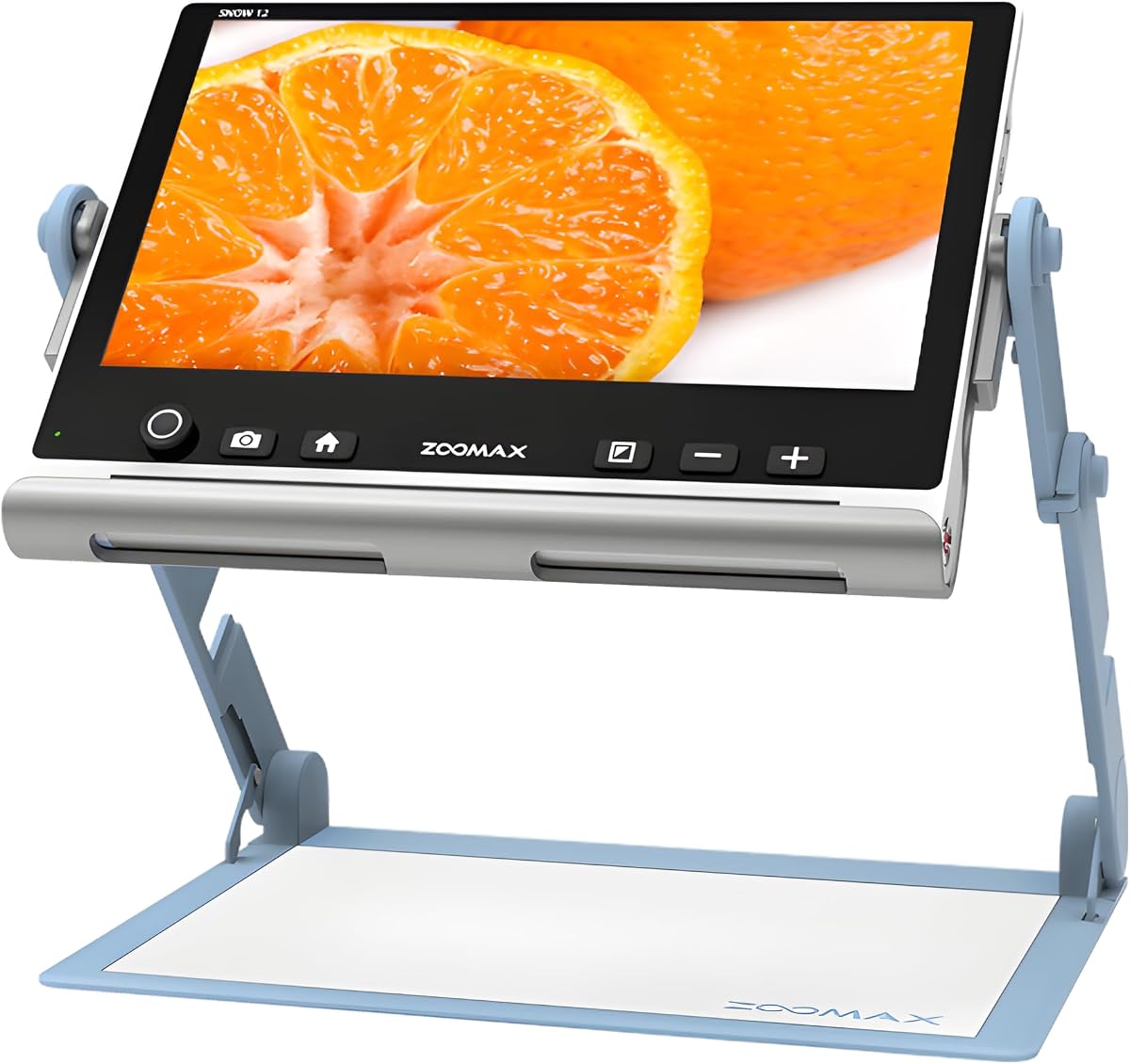
The Snow 12-Inch Foldable Portable Video Magnifier by Zoomax is the most functionally advanced model here because it combines a large HD display with OCR and text-to-speech. Its 4.0 rating is respectable for a specialized accessibility device, and the 12-inch screen offers a notably more spacious viewing experience than the 3.5- and 5-inch alternatives.
We may earn a commission when you buy through this link, at no additional cost to you.
Optical character recognition can recognize printed text and convert it into spoken words in more than 20 languages. That feature moves beyond simple enlargement and may help users understand labels, forms, instructions, and documents with less reliance on visual detail alone. The camera also supports general reading, writing, and viewing tasks, while the foldable stand offers stability and multiple angles.
Its maximum 19X magnification is lower than the stated ranges of several 5-inch models. Users who need to inspect extremely fine print may therefore favor a higher-zoom device or connect this unit to a larger display for additional visual detail. The large screen also makes the product less pocket-friendly, although its folding design helps with storage and portability.
This premium magnifier is a strong choice for users who specifically value narration and OCR rather than just visual enlargement. It is also appealing for multilingual households and anyone who wants a large surface for sustained reading. It earns the Best Premium designation because of its distinct text-to-speech functionality, not simply because of its physical size.
OCR can transform visible printed text into spoken output, making the device useful for users who may not be able to comfortably distinguish every character. This creates a different kind of access from simply making an image larger.
The 12-inch HD display provides more room for reading lines, forms, and pictures. Combined with a foldable stand, it can function as a more stationary desktop aid while remaining easier to put away than a rigid desktop monitor.
We may earn a commission when you buy through this link, at no additional cost to you.
The Eyoyo 5-Inch Portable Digital Video Magnifier combines 4X to 32X zoom with a 5-inch LCD, 17 color modes, and a 4500mAh battery. Its 4.0 rating and broad feature set make it a practical middle-ground option for reading, writing, and viewing images without the complexity of OCR devices.
We may earn a commission when you buy through this link, at no additional cost to you.
The device automatically remembers preferred settings, which is useful for repeat use. It can also capture photographs and play them back through compatible TF cards up to 32GB. A card is not included. For users who want to preserve a label, note, or diagram, this adds a useful record-keeping option beyond live viewing.
Its foldable, lightweight handle is comfortable to hold, while the larger battery is listed as supporting more than four hours of continuous operation. AV output provides an option to display the image on a television or other large screen. Compared with the 5-inch models offering 26 modes, this one has fewer color choices, but 17 combinations still provide meaningful contrast flexibility.
This magnifier is a solid choice for people who want a portable reader with reliable battery life and fewer advanced demands. It works well for everyday home tasks and travel, provided TV output is available when a larger view is needed. It is less suitable for users who require OCR, text narration, or the highest available magnification.
The 4500mAh battery is listed as providing more than four hours of continuous use. That makes the magnifier more practical for extended reading sessions away from a power outlet.
Photo capture and playback can preserve information that would otherwise disappear when the live image moves. This is helpful for reviewing labels, diagrams, instructions, and other visual details.
We may earn a commission when you buy through this link, at no additional cost to you.
This 5-inch portable reading aid offers 2X to 32X magnification, 26 color modes, and switching between near and far cameras. Its 4.0 rating reflects a balanced feature set, while the prominent buttons and remembered settings make it approachable for users who do not want complicated menus.
We may earn a commission when you buy through this link, at no additional cost to you.
Near and far camera switching expands the device beyond a basic desktop reader. Users can work with close text while retaining a way to view farther objects, though the same lens is not always ideal for both tasks. Twenty-six color modes allow fine-tuning for low contrast, color blindness, and general visual comfort.
The integrated foldable handle and bracket can rest at an angle over printed material, and the handle can be installed according to left- or right-hand preference. The 800 by 480 LCD uses image processing intended to preserve color and reduce distortion during magnification. AV output can provide a larger television image for extended reading or group viewing.
This model is appropriate for users who want detailed display customization and flexible cameras in a portable package. It does not offer OCR or spoken text, and the screen resolution is modest, so viewing on a larger television can improve the overall experience. It is most compelling for document-heavy daily use where color modes and near/far switching are priorities.
Switchable cameras make it possible to handle documents and inspect more distant objects. The feature broadens everyday use without requiring a separate electronic aid for each category.
Large, prominent buttons support straightforward operation, while remembered settings minimize repeated changes. Together, these details favor users who value predictability during frequent tasks.
We may earn a commission when you buy through this link, at no additional cost to you.
The Eschenbach SmartLux is a lightweight, handheld digital magnifier with fixed magnification choices of 5X, 7X, 9X, and 12X. Its 4.4 rating is the second highest among the products compared, which makes it a reassuring choice for shoppers who prefer a focused device with fewer controls and a 5-inch HD display.
We may earn a commission when you buy through this link, at no additional cost to you.
The straightforward feature set includes five viewing modes and image capture. Rather than advertising an extremely broad zoom range, it concentrates on several practical magnification levels. That can be advantageous for users who want repeatable results instead of continuously adjusting the device around a very wide range.
Its maximum 12X magnification is lower than the stated limits of most 5-inch competitors. Users with very small print may find that ceiling limiting, particularly when compared with 32X, 48X, or 25X alternatives. The compact list of five viewing modes also provides less contrast customization than models offering 17, 26, or 8 color choices.
Despite those limitations, the SmartLux may be attractive for straightforward reading, labels, and household objects. Its handheld design, strong rating, and image capture function give it a concise role as a dependable portable aid. Buyers should consider whether the 5X to 12X range adequately matches the smallest text they expect to view.
Discrete 5X, 7X, 9X, and 12X choices let users quickly select an appropriate level. The narrower range may be easier to master than a long zoom menu with many incremental settings.
The handheld body is designed for convenient movement between reading materials and objects. It is best suited to shorter tasks where portability matters more than advanced output connections or text narration.
We may earn a commission when you buy through this link, at no additional cost to you.
The 5-Inch 48X Digital Magnifier reaches from 3X to 48X magnification and carries a 4.0 rating. It is a strong option when fine detail matters more than continuous book reading, with simplified controls, a color LCD, image capture, and a battery listed as lasting more than four hours.
We may earn a commission when you buy through this link, at no additional cost to you.
The broad zoom range can help with tiny labels, serial information, medicine packaging, and other fine print. A 5-inch color LCD with 800 by 480 resolution provides the viewing surface, while AV output allows users to connect the device to a television for a larger image. That combination can make high magnification easier to use without relying on the small built-in screen alone.
The foldable handle is lightweight and portable, which supports dining out, shopping, travel, and pharmacy visits. A memory function retains user habits and settings, while photo capture and playback can preserve important information for later review. TF cards up to 32GB are supported, but no card is included.
The listed guidance explicitly says the magnifier is not recommended for long books or novels, which is an important limitation to consider. High zoom is most useful for brief inspections rather than sustained reading. It is best for users who need occasional detailed views and can connect to a larger screen for more comfortable results.
The 48X ceiling provides substantial enlargement for very small characters and marks. It is particularly relevant for labels, expiration dates, ingredient lists, and other details that occupy little space.
The folding handle and four-hour-plus external battery support use away from home. These characteristics suit quick inspections in stores, restaurants, pharmacies, and while traveling rather than prolonged stationary reading.
We may earn a commission when you buy through this link, at no additional cost to you.
The right digital magnifier depends less on the largest advertised zoom number than on how you will read, the size of the smallest text, your comfort with controls, and whether you need portability, narration, or a larger screen.
Choose a range that covers your actual tasks without creating unnecessary complexity. A 32X model may suit a mix of books, prescriptions, and labels, while a fixed 5X-12X range can be easier for short daily checks.
For frequent book reading, favor a 5-inch or larger display. For short checks and travel, a compact screen may be the more comfortable overall choice.
Prefer models with several contrast combinations and adjustable lighting. The most useful mode is the one that makes your specific text clear without creating harsh color distractions.
Choose OCR and speech when reading difficult text aloud is a core requirement. If spoken output is unnecessary, a simpler visual magnifier may be more direct and less demanding to operate.
Choose a handheld model for mobility and a larger stand-based model for sustained reading. Check that the controls remain reachable in the position you intend to use.
For frequent fine-detail inspection, pair a high zoom with a large external screen. For moving use, prioritize reliable automatic focus and a stable camera view.
For extended use away from an outlet, prioritize a stated multi-hour runtime. Treat photo storage as a bonus unless you know you need it, and remember that a compatible TF card may be a separate purchase.
Begin by charging the device fully and learning the basic controls for power, focus, magnification, brightness, and viewing mode. Place the printed material on a stable, flat surface with good lighting, then hold the magnifier above it or use the foldable bracket to maintain an even distance. Move the device slowly across the page so the image remains sharp, and begin with a moderate zoom before increasing magnification for smaller details.
Experiment with full color and the available high-contrast modes on familiar materials. If glare causes a reflection, change the angle of the device or the light source rather than increasing brightness unnecessarily. For writing, rest the stand or handle near the page and keep the magnifier in a fixed position. Use image capture for details that need to be reviewed later, and connect a television or computer when a larger display would make reading easier.
Clean the lens and screen with a soft, dry microfiber cloth, avoiding harsh chemicals and excessive moisture. Keep the charging port free of debris, and follow the manufacturer's guidance for storage and battery care. Do not leave the device in extreme heat or damp conditions, and do not point the powerful lens toward the sun. Periodically test the focus, controls, ports, and display so that problems are identified before an important task.
A model offering adjustable magnification through roughly 32X gives users room to move between normal print and smaller type. More magnification is not always more comfortable, however, because the screen may display only a small area at extreme levels. A 5-inch display, stable stand, good focus, and adjustable contrast are often more important for reading comfort than reaching the highest zoom level.
A 3.5-inch model is usually best for short tasks, travel, shopping, and checking labels rather than sustained reading. It is easier to carry and can be less intimidating in public. If you intend to read chapters, forms, or detailed documents for extended periods, a 5-inch or larger display will generally present more information at once and create a more comfortable viewing area.
An optical magnifier enlarges text with lenses and does not require power, while a digital magnifier uses a camera and screen to create an adjustable electronic image. Digital models can add color controls, brightness adjustment, image capture, external display output, OCR, and text-to-speech. They also introduce charging, focus, and interface considerations that optical readers do not have.
They can make printed material easier to see by enlarging it, increasing contrast, adjusting brightness, and reducing glare. The degree of benefit varies according to the nature and progression of each person's vision. Several products in this guide specifically identify macular degeneration as a use case, but users should consult an eye-care professional for advice about their individual condition.
Yes, if the model includes compatible output. Several devices support AV output, while the VEVOR offers both AV and HDMI. Connecting to a television or computer creates a much larger image, which can be useful for extended reading and high magnification. Check the included cable requirements and television input compatibility before relying on this function.
They can be very helpful when print is faded, the background is distracting, or certain colors are difficult to distinguish. Black-on-white and white-on-black modes increase contrast, while blue and yellow combinations may reduce glare or make text stand out. The best mode depends on the user's vision and the material being viewed, so multiple choices are generally more useful than a single fixed setting.
OCR is useful if you want printed text converted into recognized digital text, and text-to-speech is especially helpful when hearing the content is easier than visually deciphering it. The Snow 12 is the only model here with both features. If you mainly need larger, clearer images, a simpler magnifier with color and brightness controls may be sufficient and easier to use.
Choose a handheld design if you will use the device in stores, restaurants, while traveling, or around the home. A stand-based design is usually better for books, forms, writing, and sustained reading because it keeps the image stable. Models with a foldable bracket and handle offer a useful compromise, allowing the device to function in either position.
The Eyoyo 3.5-Inch Digital Magnifier is the best compact and budget-conscious option, offering useful zoom, eight color modes, image capture, and TV output in a small body. The Portable 5-Inch Digital Magnifier is the strongest all-around choice for its larger screen, 2X-32X range, 26 modes, and ergonomic handle, while the Snow 12 earns the premium recommendation for OCR, text-to-speech, multilingual support, and a spacious display.
Prioritize the features that match your daily life. Consider screen size and comfort before chasing the largest zoom number, then evaluate focus, color modes, brightness, stand stability, battery life, and external connectivity. If spoken reading is essential, narrow the search to an OCR-capable model; otherwise, a dependable 5-inch magnifier with adjustable contrast is often the most versatile choice.
Ratings, feature descriptions, availability, and prices can change, so review the current listing and recent customer feedback before ordering. Checking current details is especially important for accessories, included cables, TF-card support, battery claims, and television connections. The right digital magnifier should make the tasks you actually perform easier without introducing unnecessary complexity.