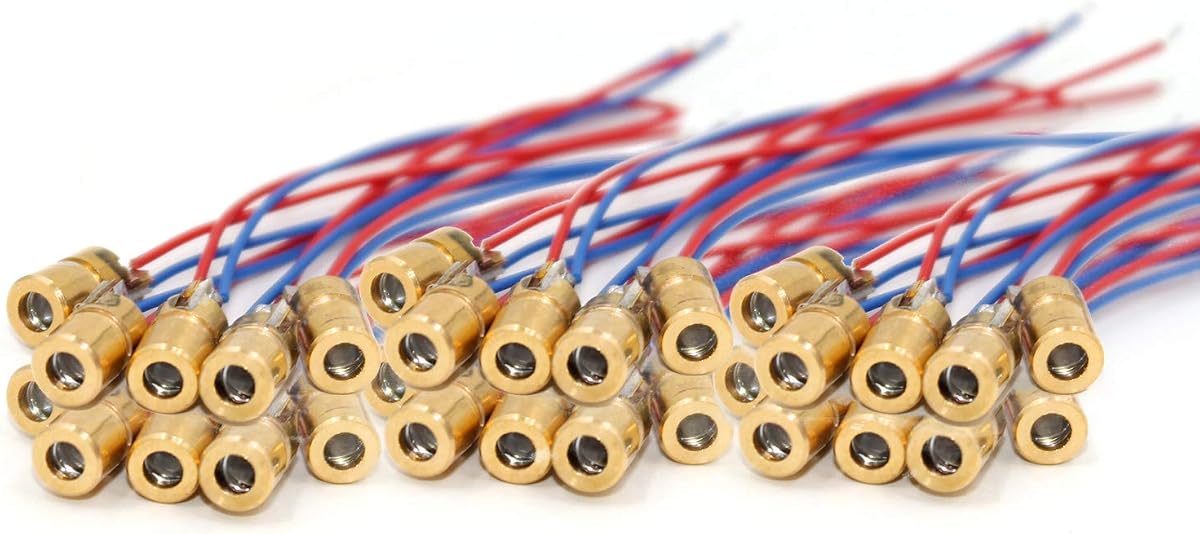
30Pcs Mini 650nm 5mW 5V Laser Diode
4.6Editor score
Thirty miniature diode units
Low-voltage 5V operation
Arduino and Raspberry Pi compatible
Discover the best diode laser module options by comparing output, wavelength, focus, installation, cooling, and ideal DIY projects in this expert buying guide.
Diode laser modules are compact light sources used for engraving, cutting, alignment, leveling, and experimental electronics projects. A strong choice depends on wavelength, optical output, beam shape, focus adjustment, electrical requirements, thermal management, and compatibility with the machine or controller driving it.
The products in this guide range from low-power red, green, and violet modules to blue engraving systems with built-in focus and air assistance. We compared the supplied specifications, construction details, intended applications, installation considerations, and practical trade-offs to show what each module is designed to handle.
Each review highlights the most relevant strengths and limitations, helping builders distinguish between general-purpose diode assemblies and dedicated engraving modules. Ratings reflect the listed customer feedback, while technical performance depends on the host machine, materials, optics, and settings. Product availability and pricing change over time.
4.6Editor score

4.6Editor score

4.4Editor score
This side-by-side overview compares wavelength, output, beam type, electrical needs, and principal applications across ten modules, from compact 5mW red diodes to high-output blue engraving assemblies.
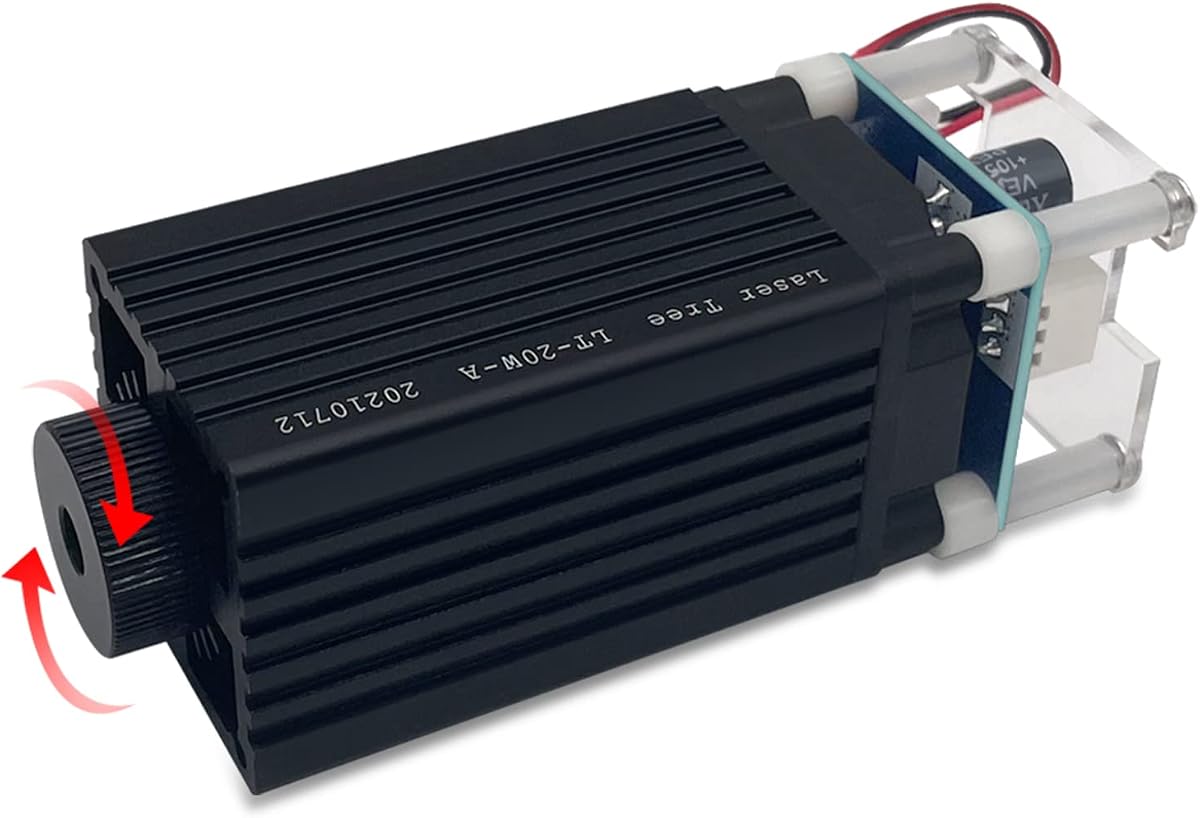


The LASER TREE 4W Laser Engraver Module combines a 450nm blue-violet source with 4W of stated optical output and an adjustable focus range of 20–50mm. Its 4.3 rating reflects a practical balance of capability and value, particularly for builders upgrading an engraving machine or creating a compact cutting setup.
We may earn a commission when you buy through this link, at no additional cost to you.
The focal adjustment is one of the module's most useful features because it allows the beam to be adapted to different working distances. The listed specifications state that it can cut through one to two millimeters of plywood in a single pass, making it more versatile than the low-power alignment diodes elsewhere in this guide. PWM modulation and a pluggable three-pin connection also support integration with common engraving systems.
The module is not universally plug-and-play, however. It calls for a 12V input capable of approximately 1.6A, with the stated acceptable range extending from 1.4A to 1.8A. Materials also matter: blue, purple, white, and transparent surfaces are unsuitable, as is aluminum without an oxide layer. These limitations are reasonable for a blue engraving source but worth checking before building.
This is a sensible option for makers who want meaningful engraving and shallow cutting power without moving to the larger 5.5W or 10W systems. It suits DIY engravers, CNC users, and 3D-printer-based projects that can accommodate the specified power and control requirements. For projects centered on pointer alignment, indicators, or low-voltage electronics, a small red or green diode would be a more efficient choice.
The 20–50mm focus range helps a single module work across different material thicknesses and production positions. Set the focus carefully before engraving, as an inconsistent focal plane can reduce beam definition and repeatability.
PWM modulation and the XH2.54 three-pin connection make the module approachable for compatible engraving machines and CNC projects. Verify voltage, current, connector arrangement, and control signals before installation.
We may earn a commission when you buy through this link, at no additional cost to you.
This HiLetgo set includes ten 650nm red diode heads, each rated at 5mW and designed to operate from 5V. The 4.3 rating and multipack format make it especially useful for electronics experimentation, prototyping, and makers who want several identical sources rather than one high-power engraving assembly.
We may earn a commission when you buy through this link, at no additional cost to you.
The 6mm diameter supports compact, conventional project layouts, and the supplied leads make it easier to incorporate the diodes into homemade instruments. Listed applications include level instruments, ground instruments, remote-light controls, and long-distance laser communication. A broad stated working range of minus 10°C to 40°C also suits normal indoor and outdoor project environments.
Because these are 5mW sources, they should not be confused with engraving modules. They are better suited to alignment, sighting, indication, and light-control experiments than to material removal. The buyer must also provide suitable current control and a safe circuit design, since the bare diode heads are not complete regulated laser assemblies.
This pack is a good fit for students, educators, and tinkerers building several small electronics projects. It offers a practical way to compare diodes, prototype multiple instruments, or retain spare components. For a single red dot module, one of the smaller packs may be sufficient; for engraving or cutting, choose a blue module with a documented optical output and mounting system.
A ten-piece set gives makers a ready supply of consistent components for classroom exercises, instrument mockups, and multiple installations. Spare diodes can reduce the inconvenience of a failed unit in a compact circuit.
The visible 650nm beam is well suited to sighting and alignment tasks where a clear reference point is needed. Such uses should follow appropriate laser-safety practices and avoid directing the beam toward eyes or reflective surfaces.
We may earn a commission when you buy through this link, at no additional cost to you.
This two-pack provides 650nm red line laser modules rated at 5mW, making it a focused option for experiments that benefit from a projected line rather than a point. Its 4.1 rating indicates a straightforward product with a narrower set of documented details than some more specialized alternatives in the list.
We may earn a commission when you buy through this link, at no additional cost to you.
Line modules can help define a reference edge, illustrate a projected plane, or add a visible guide to a homemade optical setup. The red wavelength is familiar and easy to see in many environments, while two modules provide enough units for a simple paired arrangement or a spare for a second project.
The limited specifications mean buyers should confirm the electrical requirements, dimensions, and optical details before committing to a circuit. These are 5mW modules rather than engraving systems, and their line output is primarily valuable for visualization, alignment, or instructional projects. They are not appropriate for cutting wood or metal.
This product makes the most sense for experimenters who specifically want a red line source and do not need a complete high-power laser module. It is also a convenient alternative to buying many single units. For conventional point alignment, the two-pack dot module may be more intuitive; for engraving, consider one of the blue laser modules with documented cutting specifications.
A line-shaped output can provide an immediate visual reference for alignment, demonstrations, or a projected boundary. Mount the module securely so that its orientation remains stable during use.
Two matching modules simplify a paired arrangement and provide a spare without requiring a separate purchase. Confirm pinout and power requirements before integrating them.
We may earn a commission when you buy through this link, at no additional cost to you.
The GM532-50 two-pack uses 532nm green diode modules with a nominal 50mW output and a focused dot pattern. The listed 4.2 rating makes it a compelling choice for visibility-sensitive projects, particularly where a green beam is easier to perceive than a red source in some surroundings.
We may earn a commission when you buy through this link, at no additional cost to you.
The description states that 532nm appears brighter than 520nm, while the two-module pack provides matched units for parallel builds or spare parts. Solder wires are included for integration into custom laser products, and the compact modules suit experiments involving indicators, alignment, or demonstration apparatus.
A notable operating detail is the stated warm-up period of approximately two to ten seconds when the temperature is below 15°C. Green diode modules can also require more careful circuit design and current control than a simple indicator LED, so builders should understand the drive requirements before installation. The product is not presented as an engraving module.
This pair is best for green-beam experiments, custom indicators, and projects where visibility is the priority. It may be particularly useful for classroom demonstrations or alignment fixtures where the concentrated dot is helpful. For a single lower-output green source, the one-piece 5mW module may be simpler; for a high-output red diode project, the 30-piece red pack offers greater quantity.
The 532nm beam provides a vivid reference point that can be useful in workshop alignment and demonstrations. Use an appropriate stable mount and a controlled driver to keep operation consistent.
The stated two-to-ten-second warm-up below 15°C matters for projects that need immediate stable output. Account for that delay in testing or in applications where continuous visibility is critical.
We may earn a commission when you buy through this link, at no additional cost to you.
The LASER TREE 10W module is the most powerful optical source in this roundup, combining a listed 10W output with 80W machine power, built-in FAC, and an air-assist system. Its 4.4 rating reflects a capable package for experienced builders seeking advanced engraving and cutting performance from a compact module.
We may earn a commission when you buy through this link, at no additional cost to you.
The module is documented as engraving mirror stainless steel without black paint, reaching a stated 300mm/s on 304 stainless steel with a 45mm focus length. It is also listed as cutting eight-millimeter plywood in one pass at 1.5mm/s. A six-millimeter bent air nozzle, removable blue-light filter cover, fan protection, and air-tube holder support cleaner and more practical operation.
Its headline performance comes with substantial requirements. The stated Class 4 classification and high optical output make enclosure, filtering, ventilation, and safe operating procedures essential. The package includes a driver adapter, input cable, eye-protection cover, spare protective window, wrench, and focus plates, but the host machine still needs to provide appropriate power and safe enclosure design.
This module is the strongest choice here for a serious DIY cutting and engraving build where maximum throughput and material capability matter. It suits makers with a compatible 12V machine, sound safety practices, and experience tuning focus, air pressure, speed, and power. Buyers with modest projects will get more than they need from the 4W alternative.
The built-in FAC is intended to concentrate the beam at focus, improving the energy density available for engraving and penetration. The listed performance depends on the correct 45mm focus and suitable machine settings.
Air assist helps clear debris and improve material-edge definition during cutting. The integrated fan and protective components support consistent operation, although an enclosure and adequate machine cooling remain necessary.
We may earn a commission when you buy through this link, at no additional cost to you.
This 30-piece set of mini 650nm red diode modules has a 4.6 rating, the highest listed score in the guide. Each diode produces a 5mW dot beam from a 5V supply, making the pack a practical choice for classrooms, prototyping benches, and makers who need numerous inexpensive optical indicators.
We may earn a commission when you buy through this link, at no additional cost to you.
The copper-and-plastic construction, 6mm diameter, and nine-centimeter total length support compact installations. Each unit has a stated operating current below 20mA and a working temperature range of minus 10°C to 40°C. Compatibility with Arduino, Raspberry Pi, and other microcontrollers broadens the range of possible projects.
These are general-purpose low-power diodes, not focused engraving modules. They can be used in homemade pointers, water-level meters, ground meters, remote controls, and long-range light-control experiments, but their output is not intended for serious material cutting. A microcontroller's output pin should not be treated as a complete regulated power supply without appropriate driver design.
For high-volume prototyping, this pack is difficult to match because it provides spares and multiple identical units at once. It is ideal for educational sets, parallel optical experiments, and maintenance inventories. Buyers seeking visible alignment should still observe safe beam direction and reflection precautions, while engraving projects should move to a blue module.
The stated compatibility with Arduino, Raspberry Pi, and similar platforms makes these diodes accessible for first-time electronics builds. Use a suitable current-limiting driver and confirm the electrical requirements of each controller.
Thirty units support classroom groups, repeated prototypes, and several instruments at once. Having spare components on hand can simplify troubleshooting when one diode or connection fails.
We may earn a commission when you buy through this link, at no additional cost to you.
The 405nm violet diode module offers a 5mW industrial dot source that operates from a 3–5V DC supply. Its 3.8 rating is lower than the scores assigned to several red and green options, so buyers should pay close attention to their particular circuit and application requirements.
We may earn a commission when you buy through this link, at no additional cost to you.
Its most distinctive advantage is wavelength. A violet beam can be useful for specialized visual indicators, inspection setups, and experiments involving visible-light behavior. The front housing is adjustable, allowing the user to refine the spot at different distances when the beam is not initially a clean dot.
The product information is concise and does not describe a driver board, dimensions, or detailed mounting system. That makes it more appropriate for experienced builders who can work from raw diode-module conventions than for someone expecting a fully regulated assembly. Its 5mW output is appropriate for light tasks, not material removal.
This module suits a maker seeking a specific violet dot rather than a standard red or green diode. It may fit a custom indicator, alignment fixture, or educational optical experiment. For broad project support and clearer component information, the 30-piece 650nm red set is more versatile; for visible engraving, a blue high-output module is the appropriate category.
The front cap can be adjusted to maintain a dot-like spot at varying working distances. This is useful when the module is mounted in an adjustable fixture or used across multiple positions.
The 405nm output differentiates this module from more common red indicators and can make experimental results easier to distinguish. Choose it for its color and low-power dot function rather than for cutting work.
We may earn a commission when you buy through this link, at no additional cost to you.
The AENBUSLM module combines a listed 5.5W optical output, built-in FAC, air assist, and a 12,000rpm cooling fan. Its 4.6 rating places it alongside the highest-rated products, and its blend of cutting performance, cooling, and mounting flexibility makes it an excellent middle ground between lighter engravers and the 10W premium model.
We may earn a commission when you buy through this link, at no additional cost to you.
According to the supplied information, the module can engrave mirror stainless steel without black paint and reach a stated 800mm/s on 304 stainless steel with a 45mm focus length. It is also listed as cutting five-millimeter plywood in one pass at 60–100mm/s. The focused optic and integrated airflow are designed to support cleaner edges and more efficient material processing.
One candid limitation is stated directly: output can decrease by approximately 300–400mW at 100% power. The module also carries a Class 4 designation, so safe enclosure design, eye protection, filtering, and controlled access are essential. Multiple mounting holes and plug-and-play control wiring simplify installation, but users must still verify the machine's voltage, pin configuration, and cooling arrangement.
This is the most balanced recommendation for a serious DIY engraver that wants strong output without moving to the highest-power option. It is particularly appropriate for makers building around compatible 12V or 24V machines, CNC routers, and laser cutters. Those who need the maximum stated cutting depth may prefer the 10W module, while simple electronics projects need a much smaller diode.
Air assist helps remove debris and can produce cleaner cut edges, while the high-speed fan supports heat management. A secure mount and unobstructed airflow remain important when using the module at high output.
The listed stainless-steel and plywood results illustrate the module's serious engraving potential. Actual results vary with material finish, optics, focus, speed, power, and air pressure, so testing should begin conservatively.
We may earn a commission when you buy through this link, at no additional cost to you.
This two-pack contains 650nm red dot laser modules rated at 5mW and designed to operate from 3–5V. A 3.8 rating suggests buyers should consider the module carefully for their exact circuit, but the adjustable front and broad voltage range offer useful flexibility for DIY projects.
We may earn a commission when you buy through this link, at no additional cost to you.
Applications include laser test tools, concentric locating, medical-equipment locating, signal-equipment projects, and general DIY work. The front of the laser head can be adjusted to produce an ideal dot, which is useful when the working distance changes or when the module is installed in a custom holder.
As with other bare low-power diodes, the product does not remove the need for safe electrical design. Current regulation, heat management, and stable mounting should be handled by the builder. Its output is meant for indication and alignment, so it should not be expected to engrave or cut ordinary materials.
This product is most appropriate for a compact alignment or locating project that needs two matched red sources. It may appeal to instrument builders because the 3–5V range simplifies power arrangements. The 30-piece red set is better for large classroom inventories, while the violet module is the alternative for anyone specifically seeking a different visible wavelength.
The concentrated red dot is useful for checking alignment, concentric positioning, and testing optical assemblies. Adjust the front cap to obtain a clean spot at the intended working distance.
The stated 3–5V working range makes the module adaptable to common low-voltage circuits. The driver still needs to limit current correctly and maintain stable output.
We may earn a commission when you buy through this link, at no additional cost to you.
The single-piece 532nm green dot module offers a bright, visible source for custom laser products and alignment-style projects. Its 3.9 rating is toward the lower end of this roundup, so the module is best approached as a specialized component rather than a general-purpose engraving solution.
We may earn a commission when you buy through this link, at no additional cost to you.
The description emphasizes that 532nm is brighter than 520nm, which can improve visibility in demonstrations and instrument work. Solder wires simplify incorporation into a handmade circuit, while the focused dot provides a clear reference for positioning, signaling, or experimentation.
Cold conditions affect operation: below 15°C, the stated warm-up time is approximately two to ten seconds. This delay is important for tests that assume immediate stable output. The module also requires appropriate current control and careful attention to laser safety, particularly around reflective surfaces and during repeated alignment work.
This option is well suited to a single custom green-beam project rather than bulk prototyping. It is a reasonable alternative to the two-pack for buyers who need only one unit, while the green GM532-50 pair provides matching components for dual applications. For engraving, cutting, or high-volume electronics work, the blue and red multipacks provide more appropriate capabilities.
A vivid 532nm dot can be easier for some users to follow during demonstrations and positioning tasks. Its concentrated output should still be directed away from eyes and specular surfaces.
The one-piece format and solder wires make this module convenient for a focused custom build. Plan the current driver and include warm-up time when evaluating the finished circuit.
We may earn a commission when you buy through this link, at no additional cost to you.
A suitable diode laser module should match the intended job, the available electrical system, and the builder's safety setup. Output, wavelength, beam quality, thermal design, and mounting requirements are more important than a broad range of unrelated features.
Start by separating light tasks from material-processing tasks. A 5mW red, green, or violet diode is appropriate for pointing, alignment, indicators, and circuit experiments, while a 4W to 10W blue module is intended for engraving and some cutting. Choosing a high-output module for simple alignment adds cost, power requirements, and safety complexity without improving the basic task. Conversely, a low-power alignment diode should not be selected merely because its beam is bright enough to see.
Choose the application first, then match the module to it. Confirm whether the requirement is a point, line, engraving, or cutting beam and whether the host system already includes the required driver, controller, cooling, and enclosure.
Optical output and electrical input are different measurements. The LASER TREE 10W module is described as having 10W optical output and 80W machine power, while the AENBUSLM module lists 5.5W optical output and 40W machine power. Comparing only the larger electrical figure can make one module appear more powerful than it is. Low-power diode modules instead list outputs around 5mW, making them suitable for indications rather than engraving.
Treat the stated optical output as the main comparison point, but recognize that real cutting and engraving also depend on focus, beam quality, travel speed, material, and air assistance. Begin with conservative settings and increase intensity only when the machine and enclosure support it safely.
Wavelength affects visibility, beam behavior, and suitable applications. The 650nm red modules are popular for alignment and electronic indication, 532nm green sources are especially visible and are offered in both dot and line versions, and 405nm violet is useful for specialized indicators. The 450nm blue-violet modules in this guide are geared toward engraving because visible blue light interacts differently with many engraving surfaces.
Match wavelength to the task rather than assuming one color is universally better. Consider how visible the beam must be, what materials will be marked, and whether the receiving electronics or controller has any relevant wavelength restrictions.
Dot modules produce a concentrated point, line modules project a narrow line, and engraving modules need a stable focal point across the working area. The 4W module offers adjustable focus from 20–50mm, the AENBUSLM performance figures reference a 45mm focus length, and the low-power green and red dot modules can be focused through their front housings. These differences determine how precisely the source can be positioned.
Look for a focus system that is easy to lock and repeat. For engraving, consistent focus is essential because small changes in working distance can affect line width, contrast, penetration, and the ability to engrave reflective metals.
The module must operate from the voltage and current available in the host project. The 4W blue module specifies DC 12V and 1.6A, the 10W system is presented as a 12V configuration, and the AENBUSLM description states compatibility with 12V and 24V machines. Smaller diode heads commonly operate at 3V or 5V and may require current limiting or a dedicated driver.
Check connector type, pin order, control signals, and power capacity before installation. Never assume that a visually similar module will work with an existing driver board. A stable, correctly rated power supply is essential for repeatable output and component longevity.
Heat management becomes increasingly important as optical output rises. The AENBUSLM includes a 12,000rpm fan, while the 10W LASER TREE module includes fan protection and an air-tube holder. Air assist can direct airflow toward the work surface, helping remove debris and improve cut-edge clarity. Neither feature replaces adequate host-machine ventilation or a properly designed enclosure.
For high-output engraving, prioritize modules with integrated cooling and airflow hardware. Confirm that the intended machine can support the module's heat load and that the nozzle and air path are positioned correctly. Lower-output indicator modules need far less thermal planning.
A laser module must remain rigidly aligned because movement changes focus and workpiece marks. The higher-output LASER TREE and AENBUSLM products use multi-hole mounting patterns intended for compatibility with different laser engravers, CNC routers, and similar machines. The 4W unit is compact at 35 by 35 by 99.6mm, while the smaller diode heads are easier to fit into compact instruments.
Compare the module dimensions, mounting-hole pattern, adjustment range, and weight with the host machine. Also consider the depth needed for a protective window, airflow components, cables, and service access.
Laser safety is part of product selection, not an afterthought. The 4W module is labeled Class 1 in its listing, while the 5.5W and 10W engraving modules are identified as Class 4. The 4W listing also specifically advises appropriate safety glasses because direct and reflected light can injure the eyes. Safe operation requires an enclosure, controlled access, appropriate viewing protection, secure wiring, and awareness of hazardous reflected beams.
Choose protection appropriate to the wavelength, output, and installation. A visible beam does not mean it is harmless, and open-frame testing should be limited to controlled, low-risk procedures. If a complete safety enclosure is outside the project scope, select a much lower-output module for alignment or indication work.
Before installation, identify the module's wavelength, optical output, required voltage, current, connector arrangement, and control method. Compare those specifications with the driver board and host machine rather than relying on physical appearance alone. For low-power diode heads, design a current-limiting circuit and provide a stable connection; for engraving modules, confirm that the power supply, cooling, and safety enclosure are ready.
Mount the module rigidly, keep the beam path away from reflective surfaces, and use appropriate protective measures for the wavelength and power level. Establish the correct focus before marking a workpiece. High-output engraving should begin at conservative power and travel speed, with air assist and material-specific settings introduced gradually. A clean beam and correctly adjusted optics improve consistency and reduce avoidable stress on the assembly.
During use, monitor airflow, connectors, and optical components for heat or contamination. Clean protective windows according to the machine's guidance, avoid touching optical surfaces, and keep the lens and nozzle free of residue. When power is removed, allow the module and its cooling system to cool, check mounting hardware, and inspect wires for strain. If output becomes unstable, the spot distorts, or the module does not focus cleanly, stop and diagnose the driver, focus, optics, and cooling before continuing.
A 5mW diode module is a low-power visible source typically intended for alignment, pointing, indicators, and electronics experiments. A 4W engraving module concentrates substantially more optical energy for marking and some shallow cutting. The higher-output type also requires a stronger power supply, better cooling, more robust mounting, and stricter laser-safety controls.
The 4W module is listed as capable of cutting one to two millimeters of plywood in one pass, while the higher-output modules have larger stated cutting claims. Actual performance depends on focus, travel speed, power settings, air assist, machine rigidity, and the specific plywood. Start with test cuts because density, coatings, and grain can change results.
No. Compatibility depends on electrical supply, control signals, connector arrangement, mounting dimensions, and the software or firmware driving the machine. The high-output products are described for CNC routers, laser cutters, engravers, and some 3D printers, but installation still requires checking voltage, pins, cooling, and safety features.
A dot module projects a concentrated point that can be positioned as a reference, while a line module projects a narrow line useful for defining a plane, edge, or guide. The 650nm two-pack in this guide is a line product, whereas the red and green DOT modules create focused points. Choose the beam shape based on the geometry of the task.
The product information states that below 15°C, a 532nm green module may need approximately two to ten seconds of preheating. This allows the diode and its associated components to stabilize before use. Projects requiring an instantly consistent visible point should account for that delay.
The supplied product information does not indicate that the modules include a complete power supply or controller. The engraving modules list cables and adapters, while the low-power heads emphasize solder wires or leads. Buyers should confirm the required supply, current regulation, and control hardware before ordering or installing a module.
No. Wavelength affects how visible the beam is, but risk also depends on optical output, beam concentration, exposure, reflections, and the work environment. A dim-looking red diode can still cause eye injury, and a visible engraving beam can be dangerously intense. Use output-appropriate protective measures and never judge safety by visibility alone.
No. The 4W module's listing specifically excludes blue, purple, white, and transparent materials, along with aluminum that lacks an oxide layer. Higher-output modules are described as capable of engraving stainless steel and ceramics, but coatings, surface finish, and machine settings still affect the result. Test the exact material before running a full project.
The AENBUSLM 5.5W module is the most balanced choice for serious engraving, combining a 4.6 rating with FAC, air assist, cooling, and flexible mounting. The LASER TREE 10W module takes the lead for maximum listed output and deeper cutting claims, while the 30-piece red diode pack offers the strongest budget value for electronics and educational projects.
Prioritize the task before the headline specification. Low-power red, green, and violet diodes are best reserved for alignment, indication, and experimentation; engraving and cutting require a blue module with suitable optical output, focus controls, cooling, power, and enclosure. Check connectors, voltage, current, materials, and protective equipment before installation.
Customer ratings and product availability can change, and current pricing should be verified at the time of purchase. Use the linked listings to confirm the latest configuration and package contents, then compare those details with your machine and safety requirements before choosing.