
Microsoft Surface Dock
4.5Editor score
Four USB 3.0 ports
Dual Mini DisplayPort
Gigabit Ethernet connection
Magnetic Surface Connect
Our guide compares the 10 best docking stations for Surface Pro, covering displays, charging, networking, ports, compatibility, and setup for work.
A docking station can turn a Surface Pro into a practical desktop workstation, adding external displays, faster networking, wired peripherals, and a cleaner connection to charging equipment. The right model depends on your Surface generation, monitor arrangement, power requirements, and whether you value a compact official design or a wider selection of ports.
The products in this guide were compared using the supplied specifications, with particular attention to display outputs, USB configuration, wired Ethernet speed, included power adapters, supported Surface models, and connection method. The list includes Surface Connect docks, Thunderbolt 4 models, and several Surface-oriented docks that advertise three-display configurations and broad compatibility.
Each review explains who the dock is best suited for, where it stands out, and where buyers may need to verify compatibility before ordering. Ratings and product details can change, as can pricing and availability, so check the current listing and the support information for your exact Surface Pro model before making a final decision.
4.5Editor score

4.8Editor score

4.4Editor score
The comparison below places all ten docks by their most important characteristics: connection method, display support, wired networking, USB selection, and charging arrangement. These details make it easier to identify the model that matches your Surface Pro and desk setup.



The Microsoft Surface Thunderbolt 4 Docking Station is a premium desktop accessory with a 4.4 rating and a clear focus on high-speed connectivity. Its combination of Thunderbolt 4, 2.5G Ethernet, multiple USB ports, and support for up to two 4K monitors makes it particularly compelling for users who regularly move large files, maintain demanding workspaces, or connect their Surface Pro to more advanced network infrastructure.
We may earn a commission when you buy through this link, at no additional cost to you.
The dock provides three USB-C ports, three USB-A ports, a 3.5mm audio jack, 2.5G Ethernet, and a security lock slot. Microsoft states that a connected laptop can charge in approximately 2.5 hours, while the display arrangement supports two 4K monitors. Raised tactile indicators make the ports easier to locate, and the enclosure incorporates 20% recycled ocean-bound plastic according to the supplied product information.
The main trade-off is that this is a premium option, and users should not assume that every Surface Pro generation or every USB-C peripheral will work exactly as expected. Display support also depends on the Surface model, the selected display mode, and the capabilities of the connected system. Buyers seeking the simplest possible compatibility path may prefer a dock built specifically around Surface Connect.
This is the strongest recommendation for power users who want faster networking and a broad, modern port selection. It is particularly useful for creative professionals, developers, and heavy multitaskers. Those who only need a few USB-A connections and a basic display may not require everything this model offers, but for a premium desktop setup, it is a balanced and well-equipped choice.
Thunderbolt 4 provides the dock's headline advantage: a high-speed device link alongside USB, display, audio, and Ethernet connections. The inclusion of 2.5G Ethernet also gives it an advantage over docks limited to 100Mbps networking, particularly on modern wired office networks.
With support for up to two 4K monitors, the dock is well suited to a productivity-focused arrangement with separate application and reference screens. The audio jack and security lock slot further improve its usefulness as a permanent desk fixture.
We may earn a commission when you buy through this link, at no additional cost to you.
The original Microsoft Surface Dock is a straightforward and economical route to a desktop-style Surface Pro setup. It carries a 4.5 rating and is built around the magnetic Surface Connect cable, reducing the need to manage several separate cables. It may not offer the newest port selection, but the core essentials are all present in a compact format.
We may earn a commission when you buy through this link, at no additional cost to you.
Its two Mini DisplayPort outputs can be used with compatible monitors, while four USB 3.0 ports cover keyboards, mice, flash drives, external storage, and other peripherals. A Gigabit Ethernet port offers a stable wired alternative to Wi-Fi, and the audio-out connection handles external speakers or headphones. The listed compatibility includes several Surface Pro, Surface Laptop, and Surface Book generations.
Its main limitation is age. Mini DisplayPort may require suitable cables or adapters for newer monitor arrangements, and the dock has no listed USB-C ports. Display resolution support and the number of active displays can also vary by Surface model, so the exact system should be checked before purchase. A separate external power supply is included for the desktop setup.
This dock is best for a straightforward home or office workstation built around compatible existing monitors and conventional USB-A accessories. It is also a sensible choice for owners of a listed older Surface Pro who want a native-feeling connection without a large collection of adapters. It remains a practical pick when the priority is a useful port hub rather than cutting-edge media or networking specifications.
The magnetic Surface Connect design is the core convenience. Once the dock is connected to power and the cable is attached, a compatible Surface can use the external displays, Ethernet connection, audio output, and USB peripherals with minimal desk clutter.
Four full-size USB 3.0 ports are enough for many standard desk configurations, while Gigabit Ethernet is useful when reliable network performance matters. The absence of USB-C keeps the design simple but makes it less future-facing than newer alternatives.
We may earn a commission when you buy through this link, at no additional cost to you.
This 12-in-1 Surface docking station offers one of the broadest port selections in the guide and carries a 4.1 rating. Its two HDMI ports, VGA connection, USB-A and USB-C data ports, Ethernet, card readers, and audio connection are designed for users who want one hub to cover displays, storage, networking, and sound.
We may earn a commission when you buy through this link, at no additional cost to you.
The listed display configuration includes two HDMI outputs at up to 4K at 30Hz and one VGA output at up to 1080p at 60Hz. It can extend or mirror across three external displays, although the product information states that the Surface's own screen must be turned off when using all three external outputs. Two USB 3.0 and two USB-C data ports are listed at speeds up to 5Gbps.
The Ethernet port is limited to 10/100Mbps, which is a meaningful limitation compared with the gigabit options in this roundup. The card slots are a useful addition for photographers, with stated transfer speeds up to 104MB/s. Buyers should also verify display and USB behavior for their exact Surface Pro because broad model compatibility does not mean every output mode is available on every device.
This dock suits users who value a variety of legacy and modern connections, especially those working with a mix of VGA equipment, HDMI monitors, USB storage, and wired accessories. It is less compelling for a bandwidth-heavy network, but the large connector assortment and included power supply make it a flexible option for a mixed-device desk.
Dual HDMI and VGA give users several ways to configure a multi-screen workspace. The stated three-external-display arrangement is particularly useful for detailed work, though the requirement to turn off the Surface screen should be considered before building the setup around it.
The SD and TF slots, four 5Gbps data ports, 3.5mm audio jack, and wired Ethernet create a more complete hub than a simple display adapter. The tradeoff is 100Mbps Ethernet, which may not keep pace with gigabit office networks.
We may earn a commission when you buy through this link, at no additional cost to you.
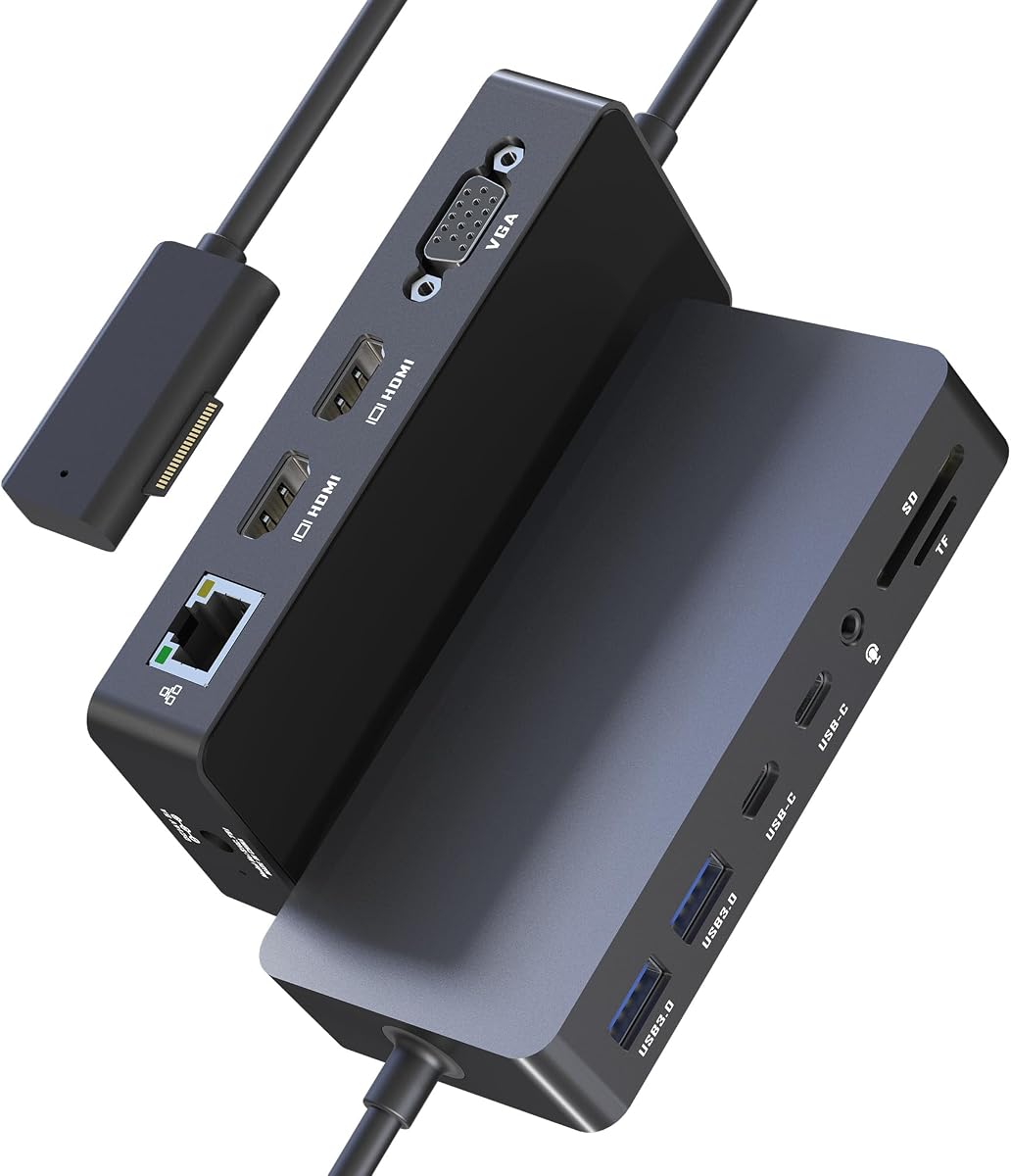
This 12-in-1 Surface dock stands out with a 4.8 rating, the highest listed score in the group, and a feature set tailored to flexible desktop work. It combines dual HDMI, VGA, USB-A, USB-C, Ethernet, audio, and card-reading connections with a 72W power adapter, making it a convenient all-in-one option for a Surface Pro desk.
We may earn a commission when you buy through this link, at no additional cost to you.
The product advertises dual 4K at 30Hz HDMI output and VGA at 1080p at 60Hz, with extend and mirror modes. It can support three external displays, but the listing notes that the Surface screen must be turned off in that configuration. Two USB 3.0 and two USB-C data ports are listed at up to 5Gbps, while SD and TF card slots support stated transfer speeds up to 104MB/s.
The 72W adapter is a meaningful improvement over the 45W arrangement referenced in the product information and should be more appropriate for a docked device running multiple peripherals. However, the RJ45 Ethernet port is only 10/100Mbps. The broad device list is helpful, but buyers should still verify that their exact Surface Pro model, operating system, and intended display configuration work together as expected.
This is the most versatile recommendation for a general-purpose Surface Pro workstation, particularly when the desk needs multiple display formats, card access, and several USB devices. Creators, hybrid workers, and office users will appreciate the included adapter and varied ports. Those requiring gigabit networking should instead favor a Surface Dock 2 or another model with a gigabit Ethernet port.
The combination of displays, fast USB data connections, card slots, wired networking, and audio reduces the number of separate accessories needed at a desk. It is particularly useful when a user moves between editing, presentation, and general office tasks.
A dedicated 72W adapter provides a stronger charging arrangement than a basic bus-powered hub. It also makes the dock easier to use as a stationary workstation, although the exact charging experience remains dependent on the Surface model and power requirements.
We may earn a commission when you buy through this link, at no additional cost to you.
The Triple-Display 12-in-1 Surface Pro Dock is built for buyers who want a broad desktop hub and a wide range of display options. It has a 4.2 rating and offers dual 4K HDMI, VGA, four 5Gbps data ports, card readers, wired Ethernet, audio, and a 72W DC power supply in one enclosure.
We may earn a commission when you buy through this link, at no additional cost to you.
The three-display arrangement combines two HDMI outputs at up to 4K at 30Hz with a VGA output at up to 1080p at 60Hz. The dock can extend or mirror content across those outputs. SD and TF card slots are listed at speeds up to 104MB/s and support capacities up to 2TB, while the RJ45 Ethernet connection operates at 100Mbps.
The included 72W adapter supports a more sustained docked workflow and is listed at 15V and 4.8A. Compatibility is advertised across numerous Surface Pro, Laptop, Go, Book, and Studio models. Even so, users should confirm the exact model because display output, charging, and dock support can differ among generations, particularly when three displays are involved.
This is a good fit for photographers, video editors, designers, and office users who want multiple display formats and direct card access. The card readers and 72W charging arrangement are especially useful for creative desks. If a gigabit network connection is more important than the three-display option, one of the Surface Dock 2 models would be a better fit.
Using two HDMI outputs alongside VGA provides flexibility when a workspace includes mixed monitor brands or an older projector. At 4K on HDMI and 1080p on VGA, the dock accommodates both modern and legacy visual equipment.
Integrated SD and TF slots reduce the need to carry a separate reader for common camera and mobile media. Their stated speed makes the hub more useful for moving substantial image and video files than a basic card reader.
We may earn a commission when you buy through this link, at no additional cost to you.
The Microsoft Surface Dock 2 is a polished native-style desktop dock with a 4.5 rating. It uses Surface Connect to combine charging, dual 4K display support, high-speed USB expansion, audio, and Gigabit Ethernet in a design intended to turn a compatible Surface into a desktop PC.
We may earn a commission when you buy through this link, at no additional cost to you.
Its display capability supports dual 4K at 60Hz. The port selection includes two front-facing USB-C ports, two rear-facing second-generation USB-C ports, two rear-facing USB-A ports, a 3.5mm input/output audio jack, Gigabit Ethernet, and a Kensington-compatible security lock slot. The 199W power supply and longer 80-centimeter Surface Connect cable support a flexible desk layout.
This dock is more specialized than a universal USB-C hub. Its abilities depend on Surface Connect compatibility, and the listed product information does not cover every modern Surface Pro generation. It also provides two USB-A ports rather than four, so users with many legacy peripherals may need an additional hub. Those constraints are acceptable for a buyer who prioritizes a cohesive Microsoft-designed desktop experience.
It is a strong recommendation for compatible Surface Pro owners who want two high-refresh 4K monitors, gigabit networking, and modern USB-C devices. It is particularly suitable for offices that value a recognizable, orderly hardware ecosystem. Users needing extensive legacy USB connectivity should compare its two USB-A ports against the 12-in-1 alternatives in this guide.
Surface Connect provides a convenient one-cable route to power, displays, network access, and peripherals. The design reduces port clutter and avoids requiring a separate USB-C dock to support the listed Surface models.
Dual 4K at 60Hz support is useful for high-refresh productivity, creative, and entertainment displays. Gigabit Ethernet and the four USB-C ports add useful speed and modern peripheral support to the docking arrangement.
We may earn a commission when you buy through this link, at no additional cost to you.
This Microsoft Surface Dock 2 listing combines a 4.8 rating with the established Surface Connect desktop experience. It is an attractive option for compatible Surface Pro owners who want dual high-resolution displays, modern USB expansion, Gigabit Ethernet, and a substantial included power supply.
We may earn a commission when you buy through this link, at no additional cost to you.
The dock supports dual 4K monitors at 60Hz through its listed Surface Connect capabilities. It includes two front USB-C ports, two rear second-generation USB-C ports, two rear USB-A ports, a 3.5mm audio jack, Gigabit Ethernet, and Kensington-compatible security lock support. The included 199W power supply and 80-centimeter Surface Connect cable make it ready for a fixed workstation.
Compatibility is listed for Surface Pro 4, 5, 6, and 7, Surface Book 2 and 3, Surface Go 2, 3, and 4, and Surface Studio. This is more limited than the broad compatibility claims of the 12-in-1 docks, so a buyer with a newer or differently named model should check the listing or manufacturer guidance first. The dock also has only two full-size USB-A ports.
This is a compelling choice for a compatible user who values a high customer rating, clean Surface integration, and strong display and network specifications. It works especially well in a modern office where peripherals are predominantly USB-C. Its dedicated Surface Connect design and narrower compatibility are the main reasons to choose it over a broader third-party hub.
The port collection covers displays, input devices, wired networking, audio, storage, and physical security. This breadth reduces the number of adapters required in an office where the Surface Pro is used as the primary computer.
Dual 4K at 60Hz and Gigabit Ethernet provide the core performance required by many professional desks. The 4.8 rating is encouraging, although buyer experiences can vary with device generation, monitor configuration, and peripherals.
We may earn a commission when you buy through this link, at no additional cost to you.
The Thunderbolt 4 Triple-Display Dock offers an ambitious 12-port configuration with a 4.3 rating. It is aimed at Surface Pro users who want two 4K HDMI outputs, legacy VGA, gigabit Ethernet, several high-speed data ports, card readers, audio, and dedicated charging in a single desktop accessory.
We may earn a commission when you buy through this link, at no additional cost to you.
The listed display configuration includes dual 4K at 60Hz HDMI and 1080p VGA, with MST support for extending or mirroring across three external monitors. Two USB 3.0 and two USB-C data ports are listed at 5Gbps. The RJ45 connection supports 1000Mbps Ethernet, while the included 100W DC power input is designed to charge the Surface and support connected devices.
The product listing describes a broad range of compatible Surface Pro, Laptop, Laptop Studio, Go, and Book models. However, it also calls the dock a Surface Dock 2 alternative, which suggests the connection method may differ from a native Surface Connect dock. Users must verify whether their Surface model supports the required USB-C connection, whether charging and display output can operate simultaneously, and whether all three displays work as intended.
This dock makes sense for a compatibility-conscious buyer who needs a broad collection of ports, gigabit networking, and a three-display option. It is particularly attractive for creative and professional users. The key caution is that its ambitious feature set should be matched carefully to the Surface generation, operating system, and display configuration being used.
Four data ports, gigabit Ethernet, and memory-card access provide a stronger networking and transfer foundation than the 100Mbps docks. The mix of USB-A and USB-C also supports both newer and older accessories.
Dual HDMI handles modern high-resolution displays, while VGA offers compatibility with older or specialized screens. Because this is an ambitious multi-display configuration, buyers should confirm the exact output behavior for their Surface before purchasing.
We may earn a commission when you buy through this link, at no additional cost to you.
This renewed Microsoft Surface Dock 2 offers a proven native dock design with a strong 4.7 rating. It is a practical option for compatible Surface Pro owners who want dual 4K display support, a 199W power adapter, Gigabit Ethernet, and a full set of USB connections without moving beyond the established Surface Dock 2 platform.
We may earn a commission when you buy through this link, at no additional cost to you.
The product information lists two USB-C ports, two USB-A ports, two additional video-capable USB-C ports, a 3.5mm audio input/output connection, and Gigabit Ethernet. It supports dual 4K at 60Hz through Surface Connect, 199W power delivery, and data transfer up to 10Gbps. The package includes the dock, an original 199W power supply, and a USB-C cable.
Because this is a renewed product, cosmetic and functional condition can vary. Buyers should review the seller's condition description and any return terms. Compatibility is also model-specific, with the title listing Surface Pro 4 through 7, Surface Book 2 and 3, Surface Go 2 through 4, and Surface Studio, while the detailed text gives a broader-looking device list. Confirming the exact model remains essential.
This is a good recommendation for someone who recognizes the Surface Dock 2 format and values its display, charging, and networking capabilities. It is especially attractive when purchasing a renewed unit can provide a more economical route to that hardware. Buyers who need guaranteed appearance or a brand-new product should choose a new listing instead.
The Surface Connect platform, dual 4K at 60Hz support, and Gigabit Ethernet create a capable desktop foundation. The 199W adapter is also well suited to a docked computer operating across a full workday.
Renewed status can provide good value but may involve visible wear or other condition differences. Checking the listing photographs, the seller's grading, warranty coverage, and return policy is more important than it would be for a new product.
We may earn a commission when you buy through this link, at no additional cost to you.
The 10-in-1 Surface Dock is a familiar-looking desktop expansion option with a 4.2 rating. It uses the magnetic Surface Connect cable and provides a balanced set of legacy-friendly ports, including dual Mini DisplayPort, four USB 3.0 connections, Gigabit Ethernet, 3.5mm audio, and a dedicated 90W power supply.
We may earn a commission when you buy through this link, at no additional cost to you.
One Mini DisplayPort output is listed at 4K at 60Hz. When both outputs are used simultaneously, the listed resolution arrangement changes to one 4K display at 30Hz and one 1080p display at 60Hz. Four USB 3.0 ports can support storage, charging, input devices, and other accessories, while the gigabit Ethernet port provides a stable wired connection.
The product lists compatibility across a wide set of Surface Pro, Surface Laptop, Surface Laptop Go, Surface Book, and Surface Go models, although compatibility should still be confirmed for the exact unit. The lack of listed USB-C ports makes this less appealing for newer compact accessories, and the reduced resolution when both Mini DisplayPort outputs are active is worth considering for detailed work.
This dock is best for a traditional desktop filled with USB-A peripherals and one or two Mini DisplayPort monitors. It is a straightforward choice for users who want magnetic Surface Connect, gigabit networking, and a bundled power supply without paying for a three-display feature set. It is less forward-looking than the USB-C-heavy alternatives, but it remains easy to understand and use.
Mini DisplayPort, four USB 3.0 ports, and Gigabit Ethernet cover many established office setups. Users migrating from older Surface dock arrangements may find the familiar connector mix easier to integrate.
The dock can drive two Mini DisplayPort monitors, but its stated resolutions differ from the single-display mode. Buyers who need two full 4K screens at 60Hz should choose a dock whose specifications explicitly support that arrangement.
We may earn a commission when you buy through this link, at no additional cost to you.
The right Surface Pro dock depends on connection method, display requirements, charging needs, peripheral mix, and network expectations. Comparing those factors before shopping is more reliable than choosing solely by the number of ports printed on the box.
Do not rely only on the words Surface Pro in the product title. Check the detailed compatibility list, review the dock's connection method, and look for the required power supply arrangement. This is especially important for newer devices, older devices, and any plan involving multiple external monitors.
Choose Surface Connect for a streamlined, native-style setup; choose Thunderbolt 4 or USB-C when high-speed peripheral performance and broader modern-device support are priorities.
Prioritize the actual output mode you need, not just the advertised display count. A reliable dual 4K setup may be more valuable than a larger but lower-resolution configuration.
Use the supplied power adapter rather than assuming a random USB-C charger will provide equivalent performance. For a full-time desk, favor a documented power arrangement that covers your Surface and peripherals.
Choose the port mix that matches your desk rather than paying for unused connectors. USB-C and USB-A together offer the most practical flexibility.
Match Ethernet speed to your network and transfer needs. For most modern offices, Gigabit Ethernet is the safer baseline than 100Mbps.
Card readers, audio, and lock support are useful secondary features, but they should not replace checking core compatibility and display performance.
Confirm the box contents before ordering, particularly for docks sold with different power supplies or connection cables. A clear warranty and complete package improve long-term convenience.
Begin by placing the dock in a stable position near the monitors and other desk equipment. Connect the display cables, Ethernet cable, keyboard, mouse, storage, and audio accessories before attaching the dock to the Surface Pro. For Surface Connect models, connect the power supply first and then attach the magnetic cable to the correct port. For USB-C or Thunderbolt-based models, use a compatible cable and verify that the Surface supports the required display, charging, and data functions.
After connecting the hardware, open the display settings on Windows and choose whether the screens should be extended or mirrored. Select the desired resolution and refresh rate for each display, then arrange the screens in the order that matches their physical positions. If a three-display arrangement is not active, check the dock's requirements, including whether the Surface's internal screen must be turned off. Configure Ethernet and audio only after the basic display setup is stable.
For care, keep the dock and power adapter away from moisture, excessive heat, and crowded cable routes. Handle the Surface Connect connector gently rather than pulling it sideways from the tablet. Refresh the system and dock firmware when updates are offered, and avoid changing docks or adapters while files are transferring. If performance changes, test the monitor connection, power supply, network cable, and individual peripherals separately before assuming the dock has failed.
It depends on the connection method and the specific dock. Some models use Surface Connect and list particular Surface Pro generations, while USB-C or Thunderbolt-style docks may advertise broader support. Always check the detailed compatibility list and confirm the connector on your exact Surface Pro. Display and charging functions can also vary even when the dock physically connects.
Surface Connect is the magnetic interface used by many Microsoft Surface docks, combining power, displays, networking, and peripheral connections through a proprietary system. Thunderbolt 4 offers a high-speed universal interface and broad peripheral support. The right choice depends on your Surface model, monitor needs, and the accessories you plan to use.
Several docks in this guide list three-display configurations using dual HDMI plus VGA or a similar combination. Some require the Surface's internal display to be turned off, and the supported resolution of each output may differ. Check the exact display mode, Surface generation, operating system, and adapter requirements before assuming all three screens will work.
It is best to use the supplied adapter because it is matched to the dock's stated charging capability. Different power supplies can provide different levels of charging and peripheral support. A dock listed with 72W, 90W, 199W, or Thunderbolt charging should be paired with its intended adapter for the most reliable setup.
Gigabit Ethernet is useful for large transfers, stable video calls, and busy offices where Wi-Fi performance is inconsistent. Docks with 100Mbps Ethernet can still provide a stable wired connection, but they are limited in peak throughput. For a permanent desk, Gigabit or faster is generally a safer long-term choice.
Count the accessories that need to remain connected. A typical desk may use one or two USB-A ports for a keyboard and mouse, while USB-C is increasingly important for external storage and compact devices. More ports are not automatically better if they are the wrong type, so prioritize the mix that matches your equipment.
The listed docking solutions are designed to provide both, but actual behavior depends on the Surface Pro generation, dock, power supply, and display configuration. Verify that your exact device appears in the compatibility information. For multi-monitor use, also check whether the dock requires the tablet's internal screen to be disabled.
A renewed dock can make sense if it provides the required Surface Connect features at a more attractive cost. Review the condition grade, photographs, included accessories, warranty, and return policy carefully. Renewed products may show cosmetic wear, and the seller's description should be considered alongside the hardware specifications.
The Microsoft Surface Dock is the practical budget selection for a straightforward compatible desktop, while the 12-in-1 Dock with the 72W adapter is the most versatile general-purpose recommendation in this guide. At the premium end, the Microsoft Surface Thunderbolt 4 Dock stands out for Thunderbolt 4 connectivity, 2.5G Ethernet, and support for two 4K monitors.
Prioritize the features your desk actually requires. Match the connection method to your exact Surface Pro, choose a display arrangement that supports the intended resolution and refresh rate, and consider gigabit networking if you transfer large files or depend on wired calls. Port quantity is useful, but reliable charging, appropriate data speeds, and exact device compatibility matter more.
Before ordering, review the current listing, included power supply, connection cable, warranty, and compatibility notes. Ratings, specifications, pricing, and availability can change, so use this guide as a structured comparison rather than a substitute for checking the latest product details and your own monitor arrangement.