
TP-Link TL-SG105
4.7Editor score
Five Gigabit Ethernet ports
No software or configuration required
Fanless metal desktop design
The best Eero Ethernet Switch options are compared by ports, speed, PoE, management, coverage, and compatibility in this practical 2026 guide.
An Ethernet switch expands the number of wired devices that can connect to a home or small-business network, while a PoE switch can also power compatible access points, cameras, and other equipment through the cable. Because networking needs vary, the best eero Ethernet switch may mean an eero-integrated gateway, a multi-gigabit managed switch, or a simple unmanaged expansion.
This guide compares ten relevant products for port count, supported speed, PoE capability, management features, installation requirements, and eero ecosystem fit. It includes the eero PoE Gateway, standalone NETGEAR and TP-Link switches, and several eero mesh routers with Ethernet connectivity so readers can distinguish dedicated switching hardware from wireless gateway options.
Each selection highlights a particular use case, from budget-friendly plug-and-play expansion to multi-gigabit backhaul and centrally powered Wi-Fi 7 access points. Ratings and specifications reflect the supplied product information, while availability, feature bundles, subscription details, and prices can change. Always verify current product details and regional compatibility before ordering.
4.7Editor score

4.4Editor score
4.3Editor score
The table below places dedicated Ethernet and PoE switches beside eero routers and access points, making it easier to compare the number of wired ports, connection speed, power delivery, and intended networking role.




The Amazon eero PoE Gateway is the most directly relevant product in this guide for anyone searching for an eero Ethernet switch. It combines an eero router with a 10-port switching platform, earning a 4.4 rating in the supplied data. Its standout feature is the mixture of two 10 GbE ports and eight 2.5 GbE PoE ports, allowing it to handle both a high-capacity network backbone and numerous powered network devices.
We may earn a commission when you buy through this link, at no additional cost to you.
Its primary strength is consolidation. Rather than requiring a separate router, a conventional PoE switch, and a careful arrangement of cables, this device places those roles in one enclosure. The two 10 GbE ports support wired speeds up to 9.4 Gbps for upload and download, while the included 140W power supply supplies a pooled 100W of PoE power. It can support devices using 802.3bt class 5 power, including up to eight eero PoE 6 access points or six eero PoE 7 access points.
There are trade-offs. The Gateway is more substantial than a basic plug-and-play switch, and some users may not need the routing and wireless ecosystem capabilities built around eero. Online security and additional network-management features are available through a separate subscription, while core setup is guided by the eero app. Its effective value also depends on whether the connected equipment can genuinely benefit from 2.5 GbE, 10 GbE, and PoE rather than ordinary Gigabit Ethernet.
This is a strong recommendation for a new eero-based deployment, especially one that includes several ceiling-mounted access points, wired cameras, or other PoE devices. It is particularly useful when a builder wants one centrally managed device rather than separate routing and switching hardware. For a simple network extension, a less advanced switch may be easier to justify, but for an integrated high-speed eero installation, this is the standout choice.
Combining a wired router, a 10 GbE-capable uplink, and an eight-port PoE switch reduces the number of separate boxes that must be powered, mounted, and connected. That makes the Gateway appealing to installers who want a clean central point for an eero mesh network.
The 100W pooled power budget provides meaningful capacity for eero access points and other compatible PoE equipment. Per-device requirements still matter, so check the power class and total draw of every planned endpoint before installation.
We may earn a commission when you buy through this link, at no additional cost to you.
The TP-Link TL-SG105 is a compact, uncomplicated way to add five wired connections to an existing network, and it holds a 4.7 rating in the supplied data. It is a conventional unmanaged Gigabit Ethernet switch rather than an eero-specific device, but it can solve the basic port-expansion problem faced by eero owners who need more places to connect computers, game consoles, televisions, or other wired endpoints.
We may earn a commission when you buy through this link, at no additional cost to you.
Its strongest benefit is the minimal setup process. All five RJ45 ports support 10/100/1000 Mbps, automatically negotiate the appropriate connection speed, and use Auto MDI/MDIX, which removes the need to select crossover settings. The switch does not require software installation or configuration, making it convenient for a home office, media area, or small business that primarily needs reliable port expansion.
The TL-SG105 also includes practical traffic-handling features despite its unmanaged status. IEEE 802.3X flow control supports reliable data transfer, while port-based 802.1p and DSCP QoS can prioritize voice or video traffic. IGMP snooping is listed as an advanced software feature. A fanless metal case keeps operation quiet, and its desktop or wall-mount design provides flexibility, although it does not offer the VLAN configuration found in managed alternatives.
Choose the TL-SG105 when the primary need is a dependable, uncomplicated way to add Gigabit Ethernet ports and the network already has a suitable router or gateway. It is not the right choice for powering cameras or access points, managing voice VLANs, or upgrading to multi-gigabit backhaul. Even so, for straightforward wired expansion, it delivers a focused feature set at an accessible tier.
The plug-and-play approach is ideal for extending a network without learning switch configuration. Connect the appropriate uplink and endpoint cables, and the TL-SG105 handles speed negotiation automatically.
Although it is unmanaged, the switch supports flow control and port-based QoS features. These can help maintain transmission quality in mixed traffic environments, although the settings are simpler than those of a fully managed switch.
We may earn a commission when you buy through this link, at no additional cost to you.
The NETGEAR GS308EP is an excellent dedicated PoE switch for structured networks that need more than basic port expansion. It has a 4.8 rating and combines eight Gigabit Ethernet ports with PoE+ support, a 62W total power budget, and an Easy Smart Managed interface. It is not an eero router, but it can serve as the wired infrastructure beneath eero access points or other compatible endpoints.
We may earn a commission when you buy through this link, at no additional cost to you.
The switch allows network administrators to configure VLANs, prioritize traffic through QoS, monitor ports, and manage network security. Per-port PoE controls add useful installation flexibility, while uninterrupted PoE helps maintain power delivery during supported operating conditions. All eight ports negotiate their speed automatically and work with existing Cat5e or Cat6 cabling, which simplifies expansion in homes and small offices that already have Ethernet infrastructure.
Its limitations center on scale and speed. A 62W budget cannot provide maximum PoE power to all eight ports simultaneously, so a network with several power-hungry devices may require a different power arrangement. The ports operate at Gigabit rather than 2.5 GbE speeds, which makes the GS308EP better suited to conventional access networks than to high-speed multi-gigabit backhaul. The included regional compatibility note also warrants attention when buying outside the United States or Canada.
The GS308EP is a strong choice for small offices, retail spaces, homes with wired cameras, and installers building an access-point network where centralized PoE and basic network segmentation matter. It is particularly useful when the eero Gateway is already handling larger 10 GbE and 2.5 GbE duties but a dedicated downstream switch is desired for a secondary group of devices.
Powering compatible devices through Ethernet reduces the need for local power adapters and nearby outlets. With eight PoE+ ports and per-port controls, the GS308EP supports organized deployment of access points, cameras, and other network equipment.
The Easy Smart Managed interface exposes VLANs, QoS, port monitoring, and security controls through an approachable software environment. This gives a small network more segmentation options than an unmanaged switch while remaining simpler to operate than a fully managed enterprise model.
We may earn a commission when you buy through this link, at no additional cost to you.
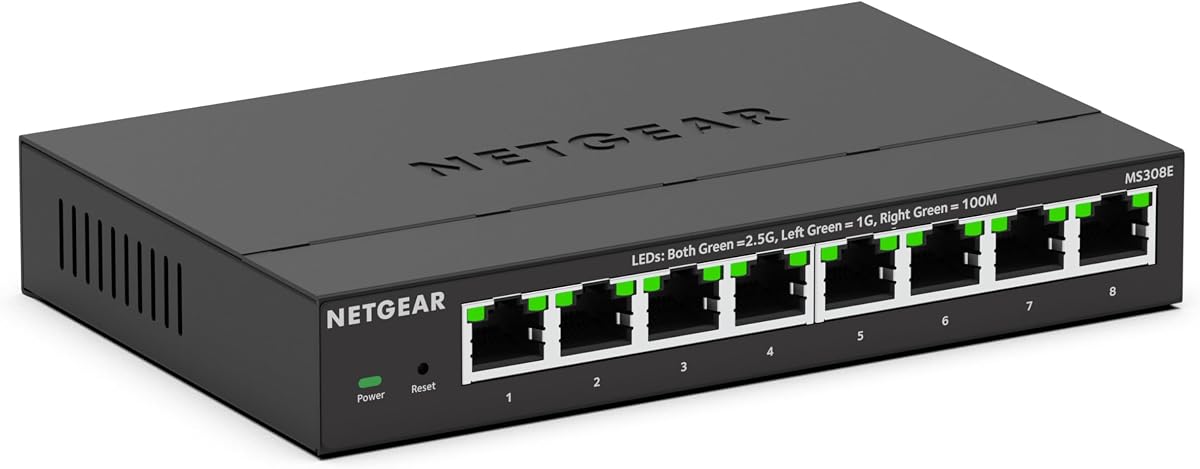
The NETGEAR MS308E is built for networks where ordinary Gigabit Ethernet is becoming the limiting factor. It has a 4.3 rating and provides eight auto-negotiating 2.5 GbE Multi-Gig Ethernet ports in a compact, fanless metal design. It can complement an eero system by supplying a high-capacity wired layer, although it is not itself an eero-branded device or a PoE switch.
We may earn a commission when you buy through this link, at no additional cost to you.
Every port can negotiate the optimal connection speed and works with existing Cat5e or Cat6 Ethernet cables, so a building does not necessarily need new higher-category wiring. That makes the switch a practical way to create a multi-gigabit LAN for compatible computers, NAS devices, media equipment, and other endpoints. For a home seeking a high-speed wired backbone around an eero gateway, the additional headroom can be useful.
The Easy Smart Managed interface adds VLAN configuration, QoS, port monitoring, and network-security controls. IEEE 802.3az Energy Efficient Ethernet helps reduce power consumption, while the fanless design keeps noise to a minimum. The main omissions are PoE and the faster 10 GbE tier found in the eero PoE Gateway and eero PoE 7. Anyone planning to power access points through the switch will need separate power or a PoE-capable alternative.
The MS308E is recommended for users who explicitly need multi-gigabit wired connections and modest management capability without moving to a more complex enterprise switch. It is not the most natural choice for a basic home or for installations where PoE is the central requirement. For those priorities, the TP-Link TL-SG105, NETGEAR GS308EP, or eero PoE Gateway may align more closely.
Eight 2.5 GbE ports provide a broad upgrade path for compatible devices. Because auto-negotiation is supported, a mixed network can connect devices at their available speeds instead of requiring separate speed-specific hardware.
The metal enclosure can sit on a desk or be mounted on a wall, while the fanless construction keeps it quiet. Energy Efficient Ethernet further reduces consumption where supported devices can take advantage of it.
We may earn a commission when you buy through this link, at no additional cost to you.
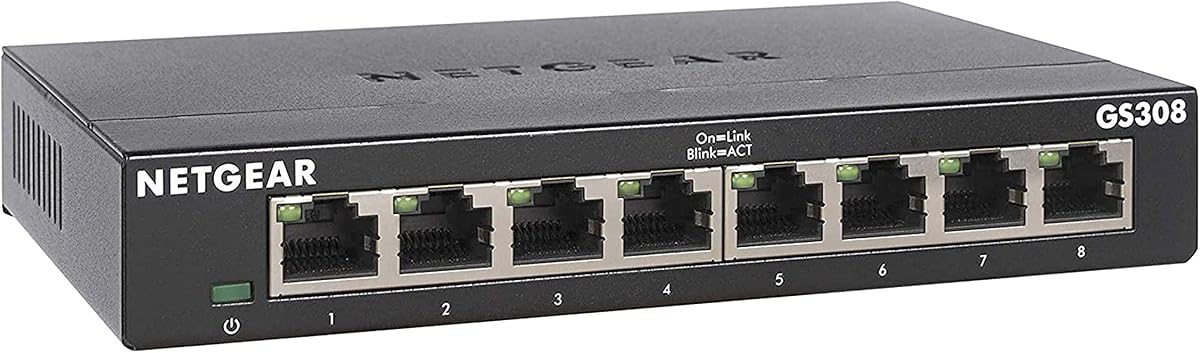
The NETGEAR GS308 is a straightforward eight-port Gigabit Ethernet switch for extending a wired network around an eero router or another capable gateway. Its 4.8 rating reflects a well-liked product, and its minimal design is easy to appreciate: plug it in, connect the cables, and begin using the available ports without installing software or creating a configuration profile.
We may earn a commission when you buy through this link, at no additional cost to you.
All eight ports support 1.0 Gbps Ethernet and automatically negotiate the optimal speed for the connected device. They also work with existing Cat5e or Cat6 cables, which makes the switch useful in renovations, offices, and media rooms that already have structured wiring. The compact metal housing supports either desktop placement or wall mounting, providing flexibility where a visible floor-standing box would be inconvenient.
The GS308 is deliberately limited in the management department. It does not offer the VLAN, QoS, port-monitoring, and security controls found in the Easy Smart Managed models, and it cannot provide PoE to access points or cameras. Those limitations are not defects for a simple LAN; they simply define the product as a reliable port expander rather than a network-control device.
Choose the GS308 when you need several additional wired connections and want the least complicated installation possible. It is an especially effective companion for an eero mesh system that provides wireless coverage while the GS308 handles gaming consoles, desktop computers, televisions, and other hardwired devices. Buyers who need PoE or segmentation should move up to the GS308EP or MS308E instead.
The GS308 removes configuration from the buying and setup process. It is a fitting choice for expanding an established network where each device only needs a basic Gigabit Ethernet connection.
A fanless design avoids mechanical noise, and IEEE 802.3az Energy Efficient Ethernet reduces consumption when the connected equipment supports the standard. The result is a compact switch suited to offices and living areas.
We may earn a commission when you buy through this link, at no additional cost to you.
The NETGEAR GS305E is a compact Easy Smart Managed switch that provides five Gigabit Ethernet ports and a 4.7 rating. It occupies a useful middle ground between a basic unmanaged switch and larger managed models. For an eero user, it can provide a small, organized wired segment for a home office, studio, or entertainment area while the eero system continues to handle wireless coverage.
We may earn a commission when you buy through this link, at no additional cost to you.
The five auto-negotiating ports work with Cat5e and Cat6 cables, while the software interface permits VLAN configuration, QoS prioritization, port monitoring, and network-security management. These controls are valuable when a home or small office needs to separate devices, prioritize latency-sensitive traffic, or identify connectivity problems without buying a more complex switch.
The trade-off is both port count and power capability. Five ports limits how many endpoints can be attached, and the GS305E does not include PoE. It is also made for use in the United States and Canada only. For a larger wired deployment, the eight-port MS308E offers more capacity and 2.5 GbE performance; for powered access points, the GS308EP is the more appropriate option.
The GS305E is recommended for users who want basic management but do not need a large port bank or multi-gigabit speed. It works particularly well as a small, quiet extension for wired workstations or entertainment devices connected to an eero network. Choose it when the modest five-port capacity matches the actual scale of the installation.
VLAN support can separate traffic logically without requiring a separate physical network for every device type. That makes the GS305E useful for home offices and small businesses that need cleaner organization.
Port monitoring provides visibility into connected equipment and link activity. Combined with QoS controls, it gives administrators a modest but useful troubleshooting and traffic-management toolkit.
We may earn a commission when you buy through this link, at no additional cost to you.
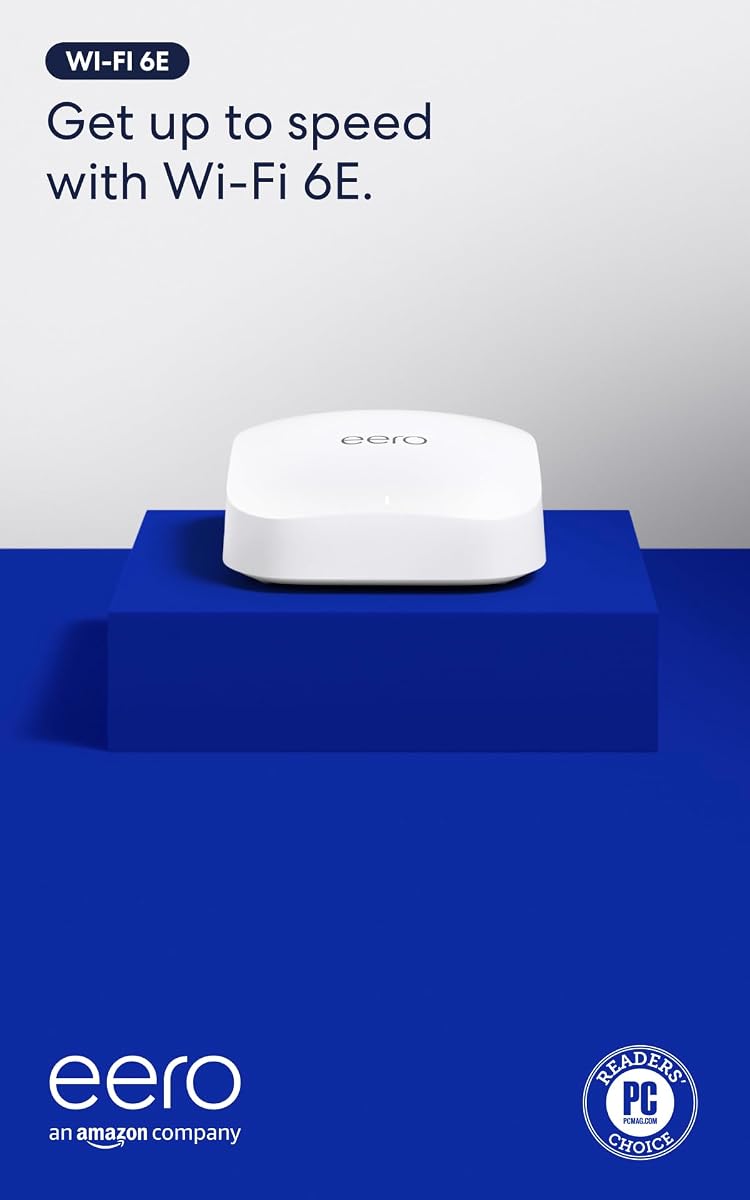
The Amazon eero Pro 6E is a mesh Wi-Fi router with one 2.5 Gb Ethernet port rather than a dedicated Ethernet switch. It earns a 4.3 rating and remains relevant to the keyword because it can act as an eero gateway, connect to another switch, or carry wired backhaul to compatible eero units. It is best understood as a network centerpiece, not as a substitute for a multi-port switch.
We may earn a commission when you buy through this link, at no additional cost to you.
Its main distinction is Wi-Fi 6E support, including access to the 6 GHz band for compatible devices and lower latency under suitable conditions. The system supports network speeds up to 2.3 Gbps, including wired speeds up to a gigabit and wireless speeds up to 1.6 Gbps, while its 2.5 Gb Ethernet port can accommodate a gigabit-plus internet plan. Coverage is stated at up to 2,000 square feet, and the unit supports more than 100 connected devices.
As a wired platform, it is limited by having only one Ethernet port. Users who need several physical connections will still require a switch, and the eero PoE Gateway is the more integrated option when access points and other PoE devices are central to the installation. The Pro 6E also supports TrueMesh traffic routing, app-based management, automatic updates, and backward compatibility with earlier eero devices, but online security and additional management features may require a separate subscription.
The eero Pro 6E is a sound gateway for an eero system that needs 2.5 Gb internet capability and Wi-Fi 6E coverage. It is best paired with a suitable switch when several wired endpoints must be connected. Buyers looking specifically for a multi-port eero Ethernet switch should prioritize the PoE Gateway, while those who need less wired port expansion may find this router sufficient for their layout.
The 2.5 Gb Ethernet port provides a useful match for faster internet services. It also offers more uplink headroom than a conventional Gigabit connection when the surrounding network supports it.
Access to the 6 GHz band can reduce congestion and support lower-latency connections for compatible clients. Backward compatibility allows existing eero devices to remain part of the expanded system.
We may earn a commission when you buy through this link, at no additional cost to you.
The Amazon eero 6 is a Wi-Fi 6 mesh router rated at 4.4 in the supplied data. It covers up to 1,500 square feet and supports more than 75 connected devices, making it a practical option for a moderately sized home. Although it has a Gigabit Ethernet port rather than a bank of switch ports, it can serve as the gateway for a broader eero installation or connect to a standalone Ethernet switch.
We may earn a commission when you buy through this link, at no additional cost to you.
TrueMesh technology is designed to route traffic intelligently and reduce drop-offs and dead spots. The eero app guides users through setup and supports remote network management, while automatic updates help keep the system current. The router also includes a built-in Zigbee smart home hub for compatible devices, allowing it to connect supported accessories to the network through Alexa without requiring a separate hub for each device.
Its wired limitations are significant for anyone shopping primarily for an Ethernet switch. There is only one Gigabit Ethernet port, so several wired devices require an additional switch. The single port also lacks the 2.5 GbE capability of the eero Pro 6E, eero 7, and eero PoE Gateway. Consequently, the eero 6 works best when wireless coverage is the priority and a separate switch handles wired expansion.
This model is recommended for value-conscious users building a conventional mesh network in a home that does not require multi-gigabit wired service. It is also useful as an additional eero node, thanks to cross-compatible hardware and easy expansion. For a dedicated eero Ethernet switch, consider the PoE Gateway; for simple port expansion, pair this router with the TP-Link TL-SG105 or NETGEAR GS308.
The stated coverage of up to 1,500 square feet gives the eero 6 a useful balance for many homes and small offices. Additional compatible eero units can extend the system when the property has more demanding coverage requirements.
Setup and management are handled through the eero app, which makes the system approachable for nontechnical users. Automatic updates also help maintain network security and add features over time.
We may earn a commission when you buy through this link, at no additional cost to you.
The Amazon eero PoE 7 is a mountable Wi-Fi 7 access point with a 4.1 rating. It delivers wireless speeds up to 3.9 Gbps and can operate as either an access point or gateway, giving installers more flexibility than a conventional client-only mesh unit. Its compact, low-profile design and PoE support are especially appropriate for ceiling or wall-mounted business and residential deployments.
We may earn a commission when you buy through this link, at no additional cost to you.
The device includes one 10 GbE port and one 10 GbE PoE+ port, providing wired throughput up to 9.4 Gbps. This makes it a strong endpoint for a high-speed eero backbone, especially when a wired backhaul is preferred to a wireless connection. The tri-band radio is intended to improve multi-gigabit backhaul for data-intensive workflows, video conferencing, and smart-home activity.
It is important to recognize that this is an access point rather than a conventional eight-port Ethernet switch. Its two physical connections are valuable for network integration but cannot replace a multi-port switch for numerous computers, cameras, or other wired devices. A PoE-capable upstream switch or the eero PoE Gateway is needed to provide the appropriate wired and power infrastructure.
The eero PoE 7 is recommended for users building a premium, high-capacity eero deployment with compatible Wi-Fi 7 clients and a multi-gigabit wired backbone. Its support for more than 200 devices and coverage up to 2,000 square feet per unit makes it capable in demanding environments. The main reason to choose it is high-speed wireless access with PoE, not conventional port expansion.
Two 10 GbE connections allow a fully wired path between access points and the network core. That can preserve high throughput and reduce the performance variability associated with wireless backhaul.
The compact low-profile enclosure supports cleaner ceiling or wall installations. Power over Ethernet can also reduce the need for separate power cables where compatible infrastructure is already in place.
We may earn a commission when you buy through this link, at no additional cost to you.
The Amazon eero 7 is a dual-band Wi-Fi 7 mesh router with a 4.4 rating. It stands out from conventional Gigabit routers through its two auto-sensing 2.5 GbE ports, which support internet plans up to 2.5 Gbps and offer more flexible wired connectivity. Coverage is stated at up to 2,000 square feet, and the system can support more than 120 connected devices.
We may earn a commission when you buy through this link, at no additional cost to you.
Its wireless performance is stated at up to 1.8 Gbps, and support for Wi-Fi 7 multi-link operation can improve reliability and efficiency on compatible networks. TrueMesh, TrueRoam, and TrueChannel software work together to keep clients on a preferred connection as conditions change. The router can serve as a gateway or be added to an existing eero network, and it remains backward compatible with previous eero generations.
Despite the two Ethernet ports, the eero 7 is not a general-purpose Ethernet switch. It lacks a bank of ports for numerous wired endpoints, and it does not provide PoE power to access points or cameras. A separate multi-port switch remains necessary for more extensive wired networks. The eero PoE Gateway is the more appropriate integrated option when the goal is specifically to combine routing, switching, and centralized power.
The eero 7 is a strong recommendation for a modern home or small office that wants a capable Wi-Fi 7 gateway and at least two multi-gigabit wired connections. It balances wireless speed, device capacity, and app-based convenience without requiring advanced switch configuration. For pure Ethernet expansion, compare it with the NETGEAR MS308E, while access-point deployments should consider the eero PoE 7.
The pair of 2.5 GbE connections can accommodate a high-speed internet service and another wired device or network segment. Auto-sensing allows connected equipment to negotiate an appropriate rate.
Existing eero devices can join the same system, making gradual expansion easier. This is particularly useful when upgrading one node while retaining earlier hardware elsewhere in the home.
We may earn a commission when you buy through this link, at no additional cost to you.
The right Ethernet switch depends on the number of wired endpoints, required throughput, PoE devices, management complexity, and how closely the hardware must integrate with an eero network. Start with the equipment that must connect rather than with a particular switch brand, then choose the least complicated model that satisfies every requirement.
An eero Ethernet switch can mean two different things in practice: a dedicated switch used alongside an eero router, or a single device that combines routing and switching. The Amazon eero PoE Gateway fits the second category, with two 10 GbE ports, eight 2.5 GbE PoE ports, and eero app management. It is attractive when several access points or other PoE endpoints will share one central installation. If the existing eero router already handles internet access and only a few ordinary devices need extra ports, a standalone switch is usually less complex.
Count every device that needs a wired connection, including the uplink back to the router, network storage, televisions, game consoles, cameras, and access points. A five-port model leaves little room for expansion unless one port remains dedicated to the uplink. Eight-port switches offer a more comfortable margin, but the number of usable endpoint connections is always one fewer than the total when a switch is connected upstream. Consider wall locations, cable reach, and whether a second switch might eventually be necessary.
Gigabit Ethernet remains suitable for many home and office workloads, but 2.5 GbE becomes relevant when a computer, NAS, server, or high-speed uplink can genuinely transfer data above one gigabit. The NETGEAR MS308E provides eight 2.5 GbE ports, while the eero PoE Gateway and eero PoE 7 add 10 GbE connections for high-capacity backhaul. Faster ports do not make slower devices faster, so choose the tier that matches the slowest essential link in the path as well as the fastest endpoint.
PoE is essential when access points, cameras, or other network equipment require both data and power through one cable. The NETGEAR GS308EP has eight PoE+ ports and a 62W total power budget, while the eero PoE Gateway offers eight 2.5 GbE PoE ports with 100W of pooled power from its included supply. The eero PoE 7 also includes a 10 GbE PoE+ connection. Compare the power class supported by each port with the requirements of every device, because a large port count does not guarantee enough power for all endpoints simultaneously.
Unmanaged switches are quick and dependable: the TP-Link TL-SG105 and NETGEAR GS308 automatically negotiate links and require no configuration. Easy Smart Managed models such as the NETGEAR GS308EP, MS308E, and GS305E add VLANs, QoS, port monitoring, and security controls through an approachable interface. These settings are useful in a home office, small business, or installation with cameras, guest networks, or voice traffic. If nobody will maintain the configuration, a simpler unmanaged model may be more appropriate.
A switch may live behind a television, inside a utility closet, on a wall, or beside a network rack. All five dedicated switches in this guide use fanless designs, which helps keep operation quiet. Several support desktop placement and wall mounting. Energy Efficient Ethernet can reduce consumption when the connected devices support it. Before ordering, check available space, whether the wall-mounting arrangement suits the cables, and whether the enclosure can be ventilated without obstructing it.
The eero products in this guide vary substantially in role. The eero PoE Gateway is a combined router and PoE switch, the eero PoE 7 is a mountable access point, and the eero 6, eero 6E, and eero 7 are mesh routers with Ethernet connectivity. Backward compatibility allows several eero generations to coexist, but the physical port functions are not identical. The three NETGEAR standalone models are marked for use in the United States and Canada only, so buyers elsewhere should confirm availability and local support before ordering.
Eero systems receive automatic updates and offer app-based management. Online security and additional network-management features are available through a separate subscription, according to the supplied information. Standalone managed NETGEAR switches use their own software interface for VLAN, QoS, monitoring, and security configuration. Compare not only the hardware but also the ongoing administration each ecosystem requires. A device that fits a small network today may need different management capabilities after several years of expansion.
Begin by documenting the intended network layout. Record the gateway or router, switch model, each cable connection, and the power or PoE requirement of every attached device. For an unmanaged switch, connect the upstream network cable and endpoint cables, allow speed negotiation to complete, and confirm that each device receives an address and can reach the local network. For an Easy Smart Managed NETGEAR switch, connect the appropriate uplink before applying VLAN or QoS settings, because incorrect initial configuration can affect access to the management interface.
Install the eero PoE Gateway through the eero app after the physical cabling and PoE infrastructure are in place. The app guides setup and remote management, while the included power supply provides the gateway and its powered ports with the necessary power. Check each PoE endpoint against the supported class and available pooled budget. For the eero PoE 7, use compatible PoE infrastructure or the appropriate power arrangement and mount the unit where its radio placement can support the intended coverage area.
Keep the hardware ventilated, dry, and accessible. Although the featured dedicated switches use fanless designs, stacking equipment or placing a switch in a confined cabinet can trap heat. Periodically inspect cables for damage, confirm that connectors remain secure, and review the switch for unusual lights or behavior. Use the eero app or NETGEAR management interface to check device connectivity, port status, and firmware updates. Never remove a cable or change PoE assignments while it is actively serving critical equipment without planning for the resulting interruption.
Yes. It combines a wired eero router with a switching platform that includes two 10 GbE ports and eight 2.5 GbE PoE ports. That makes it more integrated than a conventional standalone Ethernet switch. It is especially useful when the network needs both eero routing and centralized power for access points or other compatible PoE devices.
It depends on the number of wired devices and the need for PoE. A router with one or two Ethernet ports may be sufficient for a small network, but those ports are usually reserved for an uplink or a single client. A standalone switch becomes necessary when several computers, consoles, televisions, cameras, or access points need wired connections.
PoE delivers electrical power and network data through the same Ethernet cable, while PoE+ offers a higher power allowance than basic PoE. A device's power requirement must match the switch's port and overall budget. In a larger installation, adding too many high-power devices to one switch can exceed the available pooled or total power capacity.
Yes. Auto-negotiating multi-gigabit ports can connect to devices operating at their supported rate, so a mixed network can use the faster connection where it is available. The benefit becomes substantial when a fast computer, NAS, server, or uplink is involved. Without a matching high-speed device or service, the extra capability may remain unused.
An unmanaged switch is easiest for basic port expansion and requires no configuration. A managed or Easy Smart Managed switch is preferable when you need VLANs, QoS, port monitoring, or network-security controls. Choose based on whether those capabilities will actually be used, because the more configurable model also calls for more setup and ongoing administration.
The supplied product information states that the eero Pro 6E, eero 6, eero 7, and eero PoE 7 are backward compatible with earlier eero devices and services. A mixed system can therefore expand gradually rather than requiring every unit to be replaced at once. Physical roles still differ, so check whether a model is intended as a router, gateway, or access point.
Yes. A standard Ethernet switch can connect to an eero router or gateway and expand the number of wired devices on the LAN. The TP-Link TL-SG105 and the NETGEAR GS308 are simple examples, while the GS308EP, MS308E, and GS305E add PoE or management. The eero system manages the internet connection and wireless network, while the standalone switch handles wired connectivity.
Place it near the connected equipment while keeping an unobstructed path for cables to the gateway. Ventilation, easy access, and appropriate cable length all matter. Wall mounting may be useful in an office or media area, while a central rack or shelf may work better when many distributed PoE endpoints must be supported.
The Amazon eero PoE Gateway stands out as the most complete choice for a new eero installation that combines routing, high-speed switching, and centralized PoE. The NETGEAR GS308EP is a strong dedicated alternative for smaller managed PoE networks, while the NETGEAR MS308E suits buyers seeking eight 2.5 GbE ports. For uncomplicated wired expansion, the TP-Link TL-SG105 and NETGEAR GS308 provide focused, low-complexity solutions.
Prioritize the network that must exist after installation rather than the newest available specification. Count endpoints and uplinks, determine whether any access points or cameras need PoE, and check whether current devices can use 2.5 GbE or 10 GbE. Add VLANs, monitoring, and other managed features only when the network will benefit from them. For a primarily wireless eero system with a few extra wired connections, the eero 6, eero Pro 6E, or eero 7 may provide sufficient gateway functionality, but they are not replacements for a multi-port switch.
Finally, verify current product details, regional compatibility, included components, and any optional subscription before purchasing. Hardware specifications and marketplace availability can change, and current prices should always be checked at the time of ordering. With the correct port count, speed tier, power budget, and management approach, the selected switch can provide a dependable wired foundation for an eero network.


