
Shure MV88 USB-C
4.3Editor score
Four selectable polar patterns
Real-time background noise reduction
Automatic level adjustment
Our external smartphone microphone guide compares wireless lavaliers, shotgun mics, USB-C models, and creator kits for clear, reliable mobile audio.
An external smartphone microphone can transform phone recordings by reducing distracting room noise, capturing voices more clearly, and giving creators more control than the built-in device microphone. The right model depends on your phone connection, recording style, environment, and whether you need wired or wireless operation.
We compared ten external smartphone microphones across compatibility, sound capture, noise control, portability, accessories, battery life, and direct-to-phone convenience. The list includes wired shotgun microphones, dual wireless lavalier kits, USB-C models, and a handheld reporting microphone for interviews and mobile production.
Each review identifies the strongest use case and the compromises that matter in real-world recording. A universal pick is not automatically best for every setup, so pay close attention to connector type and recording environment. Prices and availability change frequently, so verify current details before purchasing.
4.3Editor score

4.6Editor score

4.3Editor score
This side-by-side overview compares connector support, microphone format, wireless capability, and headline recording features so you can quickly identify the model that fits your phone and workflow.


The Movo VXR10 is a universal wired shotgun microphone with a 4.3 rating and a broad device-support claim. It is designed for creators who want a recognizable directional microphone without committing to a wireless system. Its aluminum body, built-in shock mount, and included accessories make it particularly practical for vlogging, interviews, livestreaming, and mobile video.
We may earn a commission when you buy through this link, at no additional cost to you.
Its main strength is the combination of a directional capsule and useful included equipment. The microphone focuses on sound in front of it while reducing distractions from the sides, and the integrated shock mount helps control bumps and handling noise. The package includes a fuzzy windscreen, carrying case, camera cable, original and Rycote shock mounts, and a smartphone cable. That is a versatile kit for short video production.
The important limitation is connection compatibility. The VXR10 uses a 3.5mm microphone input and requires plug-in power, so Lightning and USB-C phones may need a compatible adapter. Certain cameras, including some Canon Rebel T6, T7, and VIXIA models, do not support external microphones. The correct TRS or TRRS cable and proper 1–5-foot placement also matter for good results.
This is the best overall choice for a creator who values directionality, included mounting hardware, and broad compatibility at a relatively accessible level. It is especially suitable for solo videographers who can keep the microphone near the subject and manage the required cable. Buyers using a modern phone should confirm that they have the right adapter and that their recording app accepts external microphone input.
Directional pickup is valuable when unwanted sounds surround the subject, such as traffic, pedestrians, or other people conversing. Positioning the VXR10 one to five feet from the speaker improves the balance between voice and background, although getting too close can introduce distortion.
The included windscreens, shock-mount options, cables, and carrying case reduce the need for immediate extras. This makes the microphone a practical starter package for mobile interviews, short films, online videos, and creators moving between a phone and a dedicated camera.
We may earn a commission when you buy through this link, at no additional cost to you.
The Movo X1-Mini earns a 4.4 rating and offers a more technical alternative to a basic wired microphone. It is intended for creators who move between smartphones, tablets, laptops, cameras, camcorders, and audio recorders. Its supercardioid pattern, 3.5mm connections, and USB-C digital cable make it one of the more versatile products in this guide.
We may earn a commission when you buy through this link, at no additional cost to you.
The microphone supports up to 24-bit resolution in digital mode and uses a battery-free aluminum design. A sturdy integrated shock mount is intended to reduce handling noise, while directional pickup helps isolate a subject from sound arriving from the sides. That combination is useful for presenter-led videos, tabletop demonstrations, interviews, and production work where a consistent microphone position is preferred.
The box is unusually complete for a wired microphone. It includes the X1-Mini, a Rycote shock mount, foam and furry windscreens, a 3.5mm TRS camera cable, a 3.5mm TRRS smartphone cable, a digital USB-C cable for computers and compatible smartphones, and a hard-sided carrying case. The trade-off is that the number of connection options can feel complicated to a new user.
This microphone is best for someone who values sound specifications, included accessories, and the ability to use one wired microphone across several kinds of equipment. It may also suit a creator who prefers a stable cabled connection to wireless. Before buying, confirm the exact input format supported by the phone or computer and use the correct included cable for that device.
The mix of TRS, TRRS, and USB-C cables gives the X1-Mini broader reach than a microphone designed around one connector. That is particularly useful for creators who alternate between phone video, camera narration, and computer-based recording without wanting to carry several microphones.
Digital mode supports up to 24-bit resolution, while the analog connections preserve compatibility with conventional camera and recorder inputs. Creators should still verify that their device accepts the relevant microphone signal and that their software recognizes an external input.
We may earn a commission when you buy through this link, at no additional cost to you.
The DJI Mic Mini is a single-transmitter wireless system rated 4.4, designed for solo mobile vlogs, livestreams, and interviews. Its most persuasive feature is scale: the lavalier transmitter weighs only 10 grams, making it discreet on camera and easy to wear for extended recording sessions.
We may earn a commission when you buy through this link, at no additional cost to you.
Sound-related specifications include 48kHz sampling, support up to 120 dB SPL, and a maximum transmission range of 400 meters. Two noise-cancellation levels provide options for quiet rooms and louder environments, while automatic limiting helps reduce the chance of clipping when a subject speaks loudly or moves close to the microphone.
The included USB-C mobile receiver offers a direct route to compatible smartphones, and the package also supports DJI ecosystem direct connections with several listed Osmo products. The charging case is rated for up to 48 hours of combined use. This makes the system especially appealing for travel creators who want extended endurance from a compact kit.
The main trade-off is its single-transmitter arrangement. A two-person interview would require an additional compatible system, whereas a dual-transmitter bundle is more immediately useful. It is best for solo creators who want discreet wireless audio, dependable automatic controls, and a long-lasting mobile package without carrying a larger microphone.
At ten grams, the transmitter is small enough to remain visually unobtrusive. That matters for vlogs, demonstrations, and travel videos where a large lavalier or handheld microphone could distract from the subject or interfere with clothing.
Automatic limiting, two noise-cancellation levels, and broad transmission range help simplify recording in places where the acoustic environment can change quickly. These controls are particularly useful for creators who cannot continuously monitor levels while moving.
We may earn a commission when you buy through this link, at no additional cost to you.
The Labstandard Wireless Lavalier is a dual-transmitter system with a 4.2 rating, aimed at interviews, podcasts, short videos, and livestreams. Unlike a single-transmitter package, it gives two people separate clip-on microphones, making it a straightforward starting point for conversations and collaborative content.
We may earn a commission when you buy through this link, at no additional cost to you.
Its 2.4GHz transmission system uses real-time automatic synchronization and a stated latency of 0.008 seconds. A built-in noise-reduction chip is designed to improve voice intelligibility in busy settings. The system also supports multi-channel real-time mixing, allowing recorded voice and background music to be synchronized during production.
Device support is one of its strongest selling points. The kit is designed for Type-C devices and includes a rechargeable Lightning adapter, allowing users to switch between Lightning and Type-C connections on compatible iPhones, iPads, and other Type-C equipment. The package includes the microphones and receiver, a user manual, and a USB-C charging cable.
The battery is listed at about six hours, which is shorter than many competing wireless kits. The manual is also important because the product description points users to it for functions and operating details. This is a practical choice for mobile creators who need two wireless microphones and broad connector support more than extended all-day endurance.
Two included transmitters reduce the need to buy a second microphone for a guest interview. The system is therefore particularly useful for podcasts, social interviews, and videos in which both participants should have consistent near-mouth pickup.
The stated 0.008-second latency and automatic synchronization are designed to keep dialogue aligned with the picture. Actual results also depend on the phone, recording app, placement, and environmental conditions, so creators should record a short test before a critical production.
We may earn a commission when you buy through this link, at no additional cost to you.
The RØDE Wireless Micro is a two-transmitter system with a 4.6 rating and a strong reputation for uncomplicated mobile recording. It is designed for iPhone 15 and later and Android devices with USB-C, making it a natural choice for creators working with modern phones who want to spend less time configuring their audio.
We may earn a commission when you buy through this link, at no additional cost to you.
The microphones arrive pre-paired and connect when docked to the receiver, removing the need for a dedicated app or a lengthy pairing process. Intelligent GainAssist automatically manages input levels, which is particularly helpful when two speakers have different voices or move closer to and farther from their microphones during a conversation.
The charging case provides up to 21 hours of combined use, and the complete package includes two microphones, a USB-C receiver, the case, and windshields. Its compact format fits naturally into a pocket or small production bag. The receiver provides a direct connection path to compatible phones without presenting the microphone as a wired accessory.
This version is USB-C only, so it is not appropriate for Lightning-equipped iPhones. Buyers should also confirm that their Android phone supports the intended audio connection. For two-person interviews, podcasts, livestreams, and mobile videos where fast setup and automatic leveling matter most, it is among the most compelling choices in this guide.
Docking the receiver automatically connects the microphones, removing a common source of setup friction. This is especially helpful for creators filming in changing locations who need to begin recording quickly without navigating a complex configuration process.
GainAssist is intended to keep levels consistent automatically. While no automatic system can replace thoughtful microphone placement, it reduces the need for frequent manual gain changes during interviews or livestreams with uneven speaking volume.
We may earn a commission when you buy through this link, at no additional cost to you.
The dual-transmitter DJI Mic Mini carries a 4.7 rating, the highest listed rating among these products. It combines two 10-gram lavalier transmitters with a mobile receiver, making it a strong fit for interviews, livestreams, and collaborative videos where a discreet two-person system is useful.
We may earn a commission when you buy through this link, at no additional cost to you.
The system supports up to 300 meters of transmission, 48kHz sampling, and 120 dB SPL. Basic and Strong noise-cancellation levels let creators choose a lighter or more aggressive processing setting, while automatic limiting helps prevent overload. Direct USB-C receiver pairing is listed for iPhone 15 through 17 series, Android phones, tablets, and PCs.
Unlike the single-transmitter Mini package, this version includes two DJI Mic Mini transmitters and one mobile receiver. Maximum operating time is listed at 11.5 hours, which is suitable for extended interviews and livestreams. The package is described as plug-and-play, reducing the configuration burden for mobile creators.
This system is best for creators who prioritize small wearable transmitters, a straightforward phone workflow, and selectable noise control. It is less suitable for a Lightning iPhone without an appropriate connection solution, and users should confirm app and device support before a critical shoot. For the stated mobile use cases, its rating and feature balance are excellent.
Both transmitters weigh only 10 grams, allowing two participants to wear them without the bulk associated with larger wireless systems. This is useful for conversational videos, street interviews, and presentations where the audio hardware should remain visually subtle.
Basic cancellation suits quieter indoor settings, while Strong mode is intended for more demanding environments. Creators should listen carefully after enabling Strong processing because aggressive noise reduction can also alter the natural character of a voice.
We may earn a commission when you buy through this link, at no additional cost to you.
The Shure MV88 USB-C is the most versatile premium option in the list, with a 4.3 rating and features aimed at more than standard voice recording. It connects directly to USB-C mobile devices and can capture spoken word, music, ambient sound, and live performance material with a level of control uncommon in compact smartphone accessories.
We may earn a commission when you buy through this link, at no additional cost to you.
Auto Level Mode adjusts gain in real time to keep the signal from becoming excessively loud or quiet. A real-time denoiser helps reduce background noise in cafés, streets, and other active locations. Four selectable polar patterns—stereo, mono cardioid, mono bi-directional, and raw mid-side—allow the microphone to handle everything from a single centered voice to spacious environmental recordings.
The microphone requires no separate receiver, and its direct USB-C arrangement makes it convenient for mobile creators. The supplied setup note recommends updating the firmware to version 1.3.0.3 for iPhone setup, with additional guidance for devices running iOS 26.4. A current software and firmware check is therefore important before use.
This is the best premium pick for creators who want to expand beyond simple vlogging audio. It can serve as a mobile interview microphone, a compact stereo recorder, or a tool for capturing musical and ambient sound. Its main limitation is the USB-C-only connection, which excludes Lightning-equipped iPhones without a suitable adapter. Buyers should also confirm the intended recording app supports the microphone.
Stereo captures a wider field, cardioid focuses on one direction, bi-directional picks up sound from the front and rear, and raw mid-side supports flexible stereo workflows. This makes the MV88 useful when a project changes from an interview to a music or environmental recording.
Automatic gain and real-time denoising reduce common problems encountered on phones. The controls are particularly helpful for creators who record in unpredictable locations and cannot devote attention to continuous sound engineering.
We may earn a commission when you buy through this link, at no additional cost to you.
The DJI Mic 3 is a single-transmitter wireless microphone with a 4.6 rating and a strong focus on dependable recording. Its standout feature is dual-file 32-bit float internal recording, which creates a backup of the captured audio and adds protection against clipping or an unusable take.
We may earn a commission when you buy through this link, at no additional cost to you.
Adaptive gain control is designed to keep audio balanced whether a subject whispers or speaks loudly. The microphone offers three voice tones and two noise-cancellation levels, allowing the character of the recording to be adjusted for a studio, park, or city street. Dual-band anti-interference is intended to support stable transmission in crowded spaces and busy offices.
The receiver can be expanded through DJI's broader system, with a listed capability to pair with four transmitters and synchronize to additional receivers for group work. The package itself includes one DJI Mic 3 transmitter, one mobile receiver, a magnetic transmitter charging cable, and other accessories. It is described as a direct-to-phone setup for solo vloggers and creators.
This microphone is best for someone who values backup capture and adaptable voice processing more than having two transmitters in the box. It is especially compelling for interviews, street recordings, and important mobile shoots where losing a take would be costly. The single-transmitter format remains its clearest limitation for two-person conversations.
The internal 32-bit float backup recording can preserve additional recovery information when a level rises unexpectedly. It adds a safety net for important recordings without replacing sensible gain settings, proper placement, or monitoring.
Adaptive gain, selectable voice tones, and two cancellation levels provide several ways to shape speech. The options make the microphone adaptable across interviews, narrated video, and livestreams, although creators should test each setting in advance.
We may earn a commission when you buy through this link, at no additional cost to you.
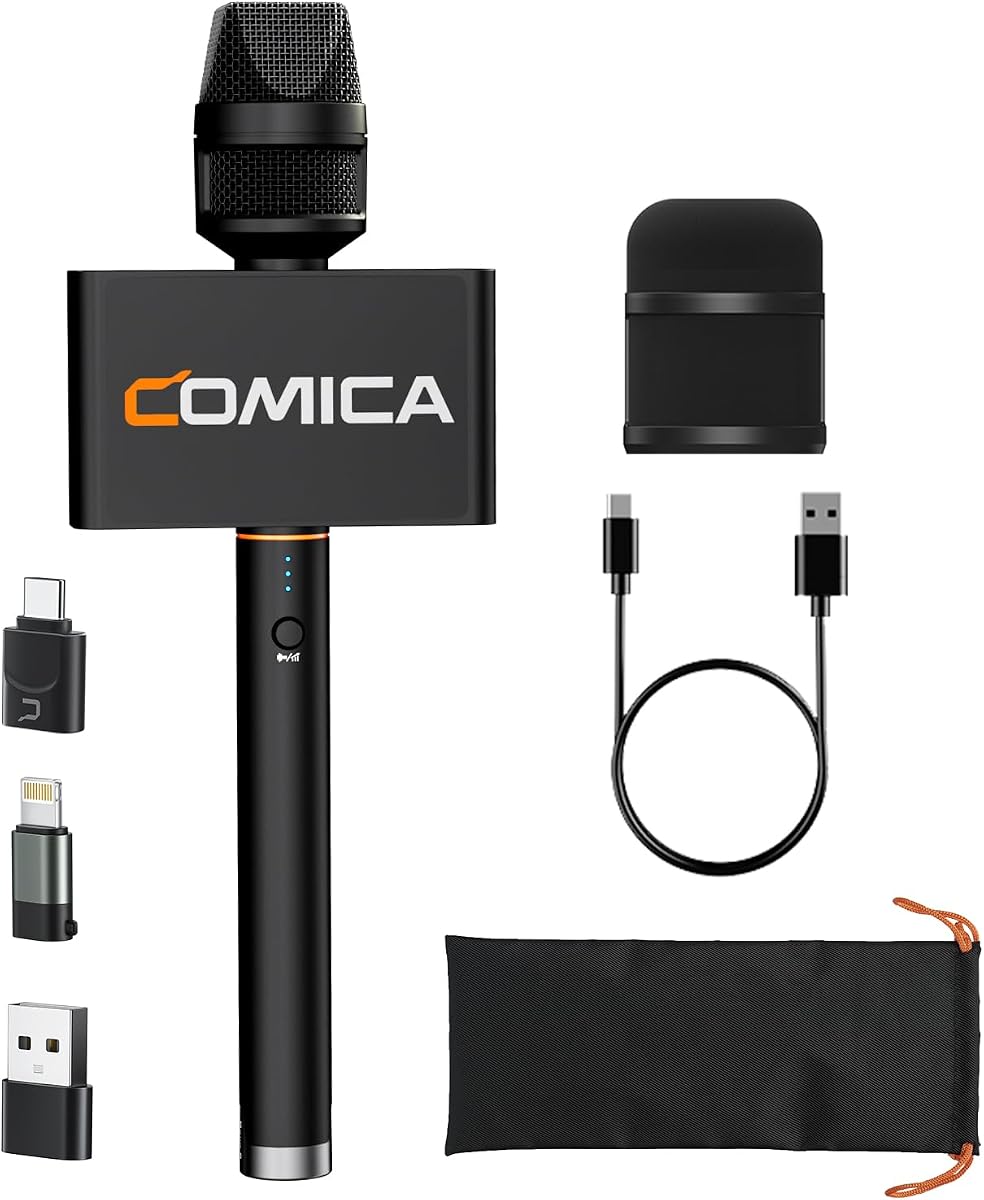
The COMICA Revo S is a wireless handheld microphone with a 4.6 rating, built for interviews, podcasts, vlogs, and direct-to-phone reporting. Unlike a lavalier system, it gives the speaker a familiar handheld microphone while transmitting the signal to a compatible phone or computer.
We may earn a commission when you buy through this link, at no additional cost to you.
Its 14mm condenser capsule uses a cardioid polar pattern to capture detail with a defined front focus. Recording is specified at 48kHz and 24-bit, while a one-key CalMix denoise function filters background noise. The built-in 350mAh lithium battery is listed for up to 15 hours, and three gain levels let users adjust sensitivity as needed.
The USB-C receiver supports compatibility with listed iPhone 15 and 16 models, Android smartphones, iPads, laptops, and computers. Lightning-port devices require a USB-C-to-Lightning adapter that supports OTG. The wireless digital output eliminates the need for a cable between the handheld microphone and the phone during use.
This is the best choice for a creator who wants the visual and handling advantages of a handheld microphone, particularly for street interviews, stand-up narration, and podcast-style segments. Its obvious trade-off is visibility: the microphone is larger and more noticeable than a clip-on transmitter. The single-speaker design also requires another microphone for a genuine two-person conversation.
The handheld form gives an on-camera presenter something natural to hold while retaining wireless mobility. Direct digital output removes cable clutter and keeps the phone available for video, notes, or other production tasks.
One-key denoising and three gain levels make it possible to adapt quickly when moving between locations. The controls simplify field operation, although a quick headphone or phone playback check remains important before a formal interview.
We may earn a commission when you buy through this link, at no additional cost to you.
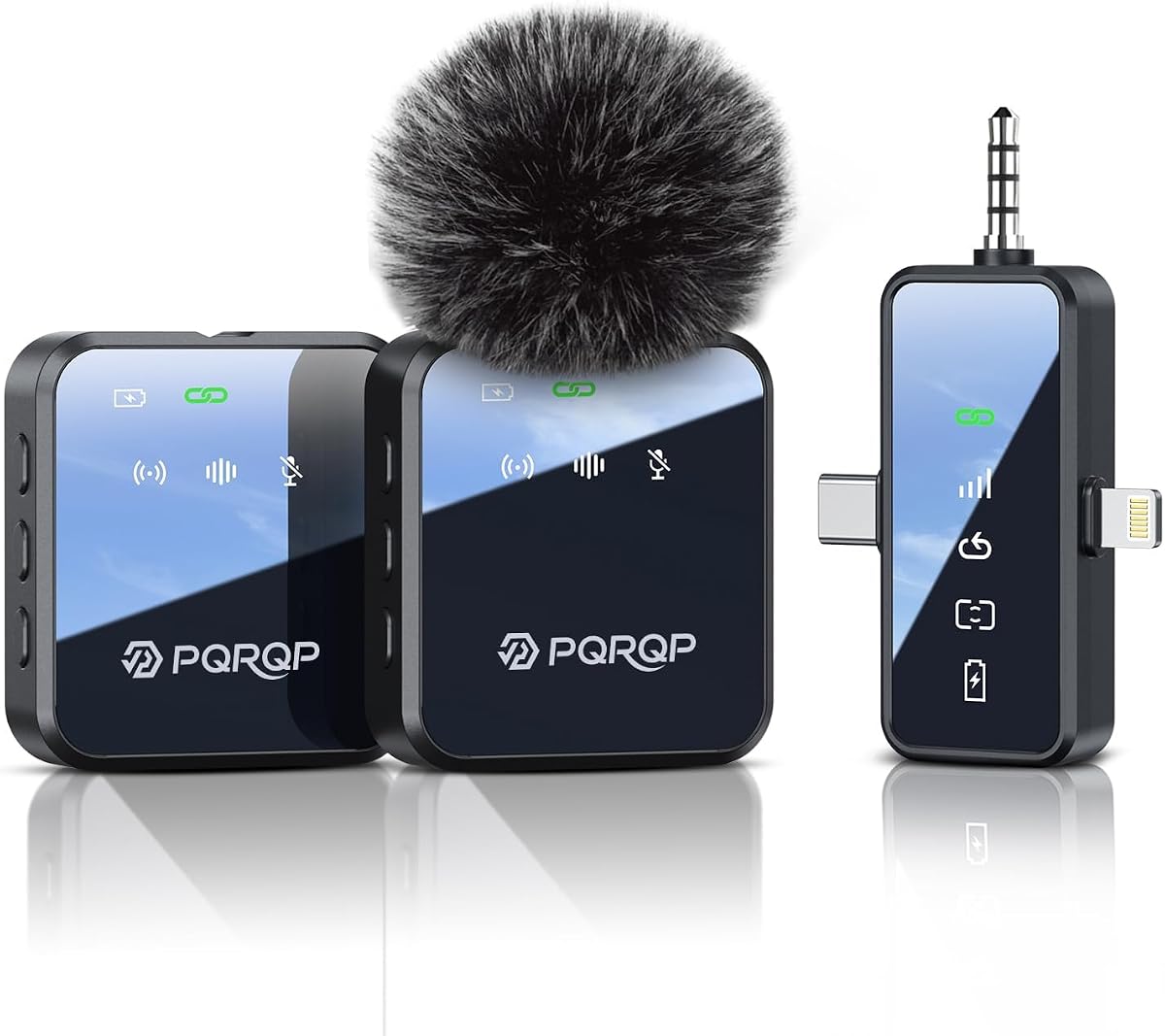
The PQRQP 3-in-1 Wireless Mini Microphone is a dual-transmitter system with a 4.6 rating and a broad feature list. It is positioned for YouTube, TikTok, podcasts, interviews, live streaming, karaoke, and general mobile content creation, with a receiver designed to work across phones, tablets, laptops, and cameras.
We may earn a commission when you buy through this link, at no additional cost to you.
The system specifies 48kHz and 24-bit high-fidelity capture, advanced noise cancellation, and a windproof cotton cover. Its 2.4GHz transmission has a stated range of 328 feet and low latency, while the two transmitters collectively offer up to 20 hours of runtime according to the product information. That endurance makes the kit suitable for long shoots and all-day events.
A one-touch mute control allows the user to stop recording without disconnecting the system, which is useful during private conversations or interruptions. A built-in reverb function adds an effect for singing and narration. These controls broaden the microphone's appeal beyond straightforward speech capture, although traditionalists may prefer a completely unprocessed vocal sound.
This product is most attractive to content creators who want a large bundle of functions in a compact dual-microphone setup. The broad compatibility and long claimed operating time are strong points, but wireless range and battery figures vary with conditions and usage. Test the complete connection and monitor for clipping before relying on it for a major production.
The 3-in-1 receiver concept makes the kit useful for creators who alternate between a phone, tablet, laptop, and camera. Each destination may still require a different cable or input mode, so the included connection method should be checked before recording.
Instant mute is useful when the microphone is still transmitting but should not capture audio. The built-in reverb is aimed at singing and narration, giving the kit a more creative orientation than a conventional interview-only wireless system.
We may earn a commission when you buy through this link, at no additional cost to you.
The best external smartphone microphone is the one that matches your connector, recording format, environment, and movement. Compare compatibility and sound capture before considering convenience features, and always verify the phone and app requirements.
Start with the port on the phone and the microphone's output format. USB-C is central to many current models, while Lightning-equipped iPhones require a microphone with native Lightning support or a compatible adapter. A 3.5mm microphone may also need a Type-C or Lightning adapter, and an adapter must support external microphones rather than charging or data alone. Check the exact phone generation as well as the connector label because USB-C, Lightning, and 3.5mm are not interchangeable.
Choose a microphone whose native connection matches your device whenever possible. It reduces signal-conversion risk, simplifies setup, and avoids carrying an extra adapter on important shoots.
Wired microphones are straightforward, dependable, and often inexpensive, but the cable can restrict framing or become awkward for handheld interviews. Wireless systems remove that restriction and make interviews more natural, although they introduce battery management, pairing, and potential radio-interference considerations. A single wireless lavalier is ideal for solo creators, while a dual system is more appropriate for a guest or cohost.
Choose wired for a stationary setup or budget-conscious project, and choose wireless when mobility is central to the recording. Match the number of transmitters to the number of people who need independent audio.
Shotgun microphones use directional pickup and work well for video in which the subject stays in a predictable position. Lavalier microphones sit close to the mouth and provide consistent speech capture for interviews, podcasts, and vlogging. Handheld microphones suit presenter-led reporting and give the subject a familiar visual prop. Stereo, cardioid, bi-directional, and other patterns offer different balances between subject isolation and environmental sound.
Pick the form that matches the source. Directionality cannot correct poor placement, so keep the microphone reasonably close and review a test recording before production.
Noisy cafés, streets, vehicles, and live events can obscure speech, so built-in noise reduction and automatic gain are valuable. Some systems offer multiple processing levels, while others use one-touch or fully automatic behavior. Processing can improve intelligibility, but excessive noise reduction may produce an unnatural or gated sound. Automatic gain likewise reduces level changes without eliminating the need for proper placement.
Look for adjustable or selectable processing, then test it in the actual recording environment. A short sample recorded with natural speech is more useful than a feature checklist.
Battery life should reflect how long you expect to record. A short social video and a full interview day place very different demands on a wireless microphone. Some systems list transmitter runtime, while others emphasize combined time from a charging case. Rechargeable, removable, or replaceable power options can be important for creators who work away from mains power. Always confirm whether the stated duration applies to one microphone, two microphones, or the case.
Choose enough endurance for the longest realistic session, then carry a charging cable or power bank when the margin is close. Record a full battery check before important work.
A microphone that cannot be positioned correctly may deliver disappointing results. Useful accessories include shock mounts, phone or camera adapters, foam and furry windscreens, carrying cases, and the correct cables. Outdoor recordings particularly benefit from a furry windscreen, while handheld and mounted video may require shock isolation. Some kits include several mounting options, which is convenient for creators moving between phones and cameras.
Check whether the necessary adapter and mount are included before ordering extra accessories. The complete package should support the recording style you already use.
Wireless range figures generally represent maximum conditions, not the distance you can expect through walls or around crowds. Busy streets, offices, and live events may contain more interference than an open environment. A range of a few hundred feet is more than adequate for most smartphone video, interviews, and livestreams where the subject stays close to the phone. The practical figure to consider is reliable performance at the distance you will actually work.
For interviews, prioritize a stable signal at normal conversational distance. For larger productions, test the system in the venue and keep a backup recording method when the recording is irreplaceable.
The hardware must work with the operating system and recording app on the phone. Some wireless receivers may appear as standard input devices, while others require compatible software, updates, or particular permission settings. Firmware can improve stability or add support for newer devices, as illustrated by the Shure MV88 setup note. Check the manufacturer's current instructions rather than assuming every USB-C microphone is recognized immediately.
Install required updates, grant microphone access, and record a short test before the real session. Confirm playback, monitoring behavior, and the selected input before moving to a formal recording.
Begin by fully charging the microphone system, installing any required firmware, and confirming that the phone recognizes the external input. Connect the correct cable or pair the receiver, then open the preferred recording app and select the external microphone. Set gain and processing at conservative starting values, play back a short test, and adjust the microphone position before recording the final take.
Place a lavalier near the speaker's collar without rubbing against fabric, aim a shotgun or handheld microphone toward the subject, and keep the device within a practical range of the sound source. Outdoors, use the included windscreen and choose clothing that reduces rustling. For interviews, avoid crossing arms, touching the microphone, or placing it where a pendant or necklace can knock against it.
After recording, disconnect the microphone before checking phone playback where the product instructions recommend doing so, since connected accessories can alter monitoring behavior. Store transmitters and receivers in their case, remove excess moisture, clean foam and furry windscreens according to the manufacturer's directions, and inspect cables for bending or damage. Avoid moisture, extreme heat, and loose storage of small clips, which can prevent the kit from being ready for the next session.
An external microphone can make a substantial difference when the subject is far enough from the phone for built-in noise and room reflections to become noticeable. It is particularly useful for interviews, vlogging, livestreaming, demonstrations, and outdoor recordings. For quiet, close-range phone footage, the built-in microphone may still be sufficient.
Yes, if you use a compatible USB-C-to-3.5mm adapter that supports external microphone input. Not every USB-C audio adapter supports microphones, so check its specifications carefully. A native USB-C microphone can be simpler because it removes the need for an additional adapter and potential connection troubleshooting.
A shotgun microphone is usually mounted away from the subject and uses directional pickup to emphasize sound from the front. A lavalier is worn close to the speaker's mouth and is often easier to hide in video. Shotgun mics suit controlled setups, while lavaliers are common for mobile interviews and conversational content.
Modern wireless systems can perform well in crowded settings, but radio interference depends on the environment and nearby equipment. Dual-band anti-interference features can improve reliability. Record a test in the actual venue, keep the receiver and transmitter within a reasonable distance, and keep a backup recording option for critical events.
The ideal distance depends on the microphone and the recording environment, but closer placement usually provides a stronger signal and less background noise. For the Movo VXR10, the recommended range is one to five feet, with too much distance potentially producing a muffled result. Avoid placing a microphone so close that breath or plosives create distortion.
Monitoring is strongly recommended for important work because automatic gain and noise reduction cannot replace correct placement. Listen through headphones when the phone and app support monitoring, and watch for clipping, weak levels, wind noise, or audio delay. Test the entire chain before recording so you know whether the app is using the external microphone.
A single microphone can capture two people if they remain close together and the environment is quiet, but separate wireless transmitters generally provide more consistent levels. A dual-transmitter system gives each speaker an individual microphone and is preferable for interviews, podcasts, and conversations with uneven voices.
Keep the receiver away from cables, power adapters, and densely packed electronics that may generate radio noise. Use the specified cable and avoid unverified adapters. If the phone makes a separate sound while connected, disconnect the microphone as some product instructions recommend, then check the recording app's input and monitoring settings.
The RØDE Wireless Micro stands out for the best two-person mobile workflow, combining pre-paired transmitters, automatic leveling, and direct USB-C connection. The Shure MV88 USB-C is the premium choice for creators who want multiple pickup patterns, automatic processing, and broader recording versatility. The Movo VXR10 provides the strongest value-oriented wired package for vloggers and interviews across phones and cameras.
Prioritize the connector first, then choose a microphone form that matches the recording situation. Use a lavalier for discreet speech, a shotgun for controlled directional video, and a handheld microphone for presenter-led reporting. Battery duration, noise control, accessories, and app support are particularly important for wireless systems because they determine how confidently the kit can be used in the field.
Current prices, product availability, firmware, and phone compatibility can change, so review the latest manufacturer information before purchasing. Check the connector, confirm that the recording app recognizes the microphone, and test the setup in the intended environment. Those simple steps prevent most avoidable recording problems and help ensure the chosen model fits the job.