
SUNLU Filament Dryer Box S1 Plus
4.3Editor score
Adjustable 35–55°C temperature range
Real-time LCD condition display
Continuous filament-feed opening
Broad multi-material compatibility
This filament dryer box guide compares capacity, temperature control, humidity protection, filament support, displays, and drying capacity.
A filament dryer box protects moisture-sensitive material from the humid air that can cause bubbles, stringing, clogging, and poor layer adhesion. The best models combine active heating with effective sealing, continuous filament access, useful monitoring, and enough capacity for the number of spools you regularly use.
This guide compares ten heated and passive storage options based on their published specifications. It covers spool capacity, supported filament types, temperature ranges, heating methods, timers, displays, sealing, and compatibility with 1.75mm and 2.85mm filament to help readers identify the right workflow.
The entries show why each dryer earns its place, from compact single-spool models to multi-chamber systems for advanced materials. Ratings and specifications reflect the supplied product information, while availability and prices can change, so readers should confirm current details before purchasing.
4.3Editor score

4.4Editor score

4.6Editor score
The comparison below organizes all ten products by capacity, heating range, controls, filament support, and moisture-protection features, making it easier to distinguish a basic dryer from a multi-spool or advanced-material system.



The SUNLU Filament Dryer Box S1 Plus combines an accessible single-spool format with an active fan, adjustable heat, and a two-inch LCD. Its supplied rating is 4.3, and its standout qualities are the balance of useful monitoring and broad material compatibility. It is a practical choice for a home printer that regularly uses PLA, PETG, ABS, TPU, nylon, or PA filament.
We may earn a commission when you buy through this link, at no additional cost to you.
Its 35–55°C temperature range is designed to cover many everyday drying needs without requiring complex programming. The display provides temperature, time, and humidity information, while separate buttons let users change drying duration and temperature. A maximum chamber size of 210 by 89 millimeters and support for 1.75mm, 2.85mm, and 3.00mm filament make it more versatile than a rigid single-format container.
The trade-off is that one spool at a time limits throughput for busy workshops. Its upper temperature also falls below the 70–85°C settings offered by several advanced models, so it may not be the first choice for the most demanding engineering polymers. Nevertheless, the fan-assisted design, adjustable controls, and broad compatibility make this a sensible entry for routine filament care.
This is the recommendation for readers who want more capability than a passive storage box without moving to a large dual-chamber appliance. Choose it when one frequently used spool needs dependable drying, environmental readings are useful, and the supported temperature range matches your filament. It also serves well as the primary dryer in a home workshop that owns multiple spools but dries them one at a time.
The two-inch LCD is more informative than a simple indicator light because it exposes temperature, drying time, and humidity together. That visibility helps users confirm that a session is operating as intended and makes recurring maintenance routines easier to manage.
A 35–55°C adjustment range, combined with fan-assisted airflow, provides a practical foundation for common 1.75mm and 2.85mm materials. Users can tailor the heat and duration to the filament and their surrounding humidity rather than relying on one fixed program.
We may earn a commission when you buy through this link, at no additional cost to you.
The Creality Space Pi X4 is a high-capacity dryer designed for workshops that need to manage several materials at once. It carries a supplied rating of 4.6 and stands out for four-spool storage, independent 200W heating chambers, temperatures up to 85°C, and a sealed enclosure intended to combine active drying with long-term moisture control.
We may earn a commission when you buy through this link, at no additional cost to you.
Each chamber can handle two standard 1kg spools or one large 2kg spool, allowing the full unit to support four 1kg spools or two 2kg spools. Separate temperature control is especially valuable when PLA or PETG and a higher-temperature material need different conditions. The 85°C ceiling broadens the range to ABS, PET, PC, ASA, PA, and PAHT, while the touch interface and real-time display simplify changes.
Its size and complexity are the main disadvantages. Users needing only occasional single-spool care may find two chambers and extensive controls excessive. The claimed moisture-removal rate and 24-hour protection depend on using the enclosure properly, so adequate space around filament paths and compatible spools remain important. Even so, the dryer-and-storage design reduces the need to move material between separate containers.
The X4 is best for advanced users, small production studios, or educators running multiple printers. It is especially attractive when different filament types need simultaneous, independent treatment. Readers who print mainly one common material at a time may find a simpler two-spool dryer more convenient, but this model delivers the broadest combination of capacity, temperature, and storage functionality in the list.
The two independent heating zones are the defining advantage. One chamber can handle a common material at a moderate setting while the other treats a polymer that benefits from greater heat, eliminating the compromises of a shared single-temperature enclosure.
Four-spool support and a silicone-sealed enclosure make the unit useful beyond an occasional drying session. It can protect material during pauses or overnight storage while filament paths allow printing to continue without repeatedly moving each spool.
We may earn a commission when you buy through this link, at no additional cost to you.
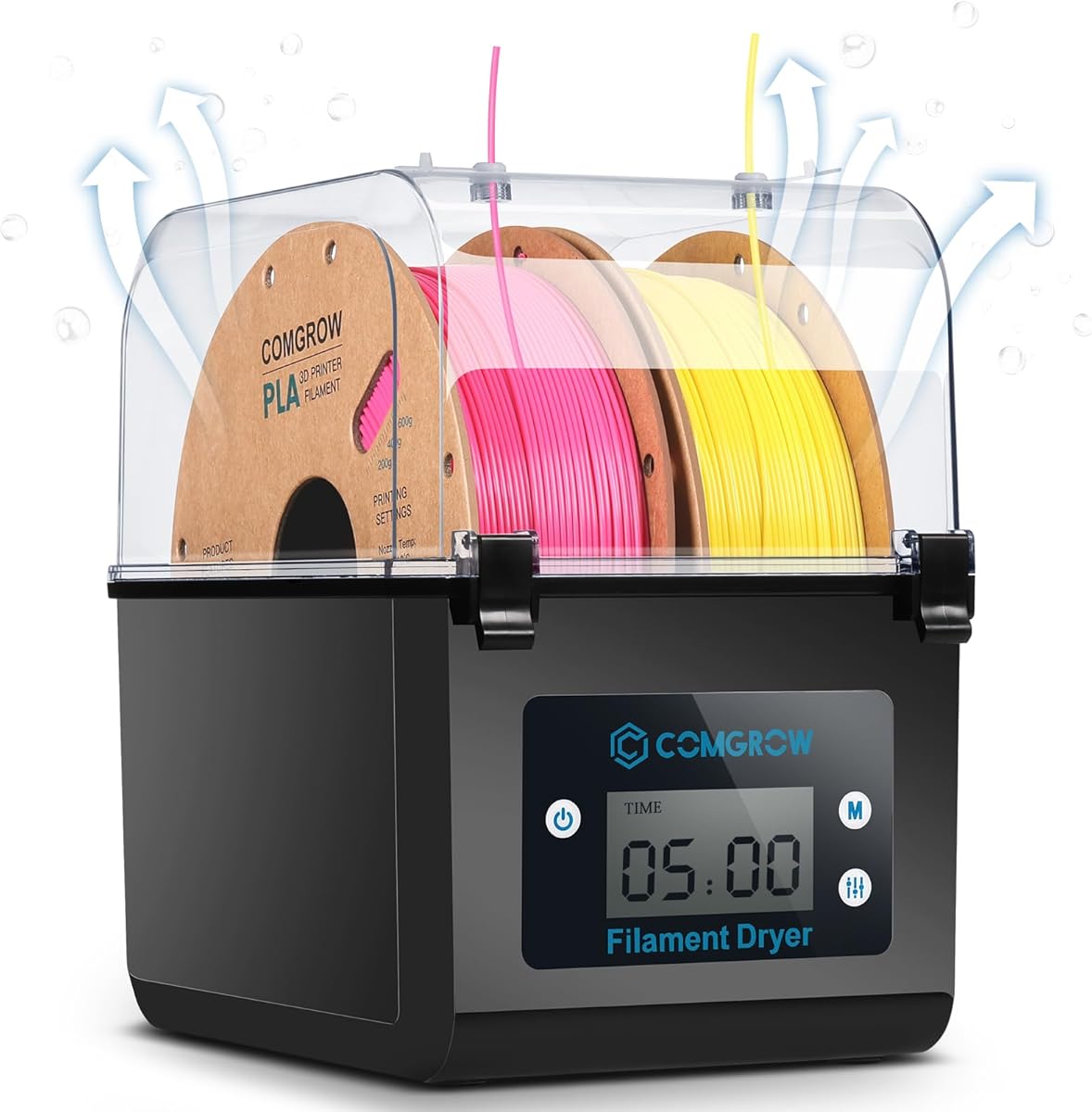
The Comgrow SH01 is a two-spool heated dryer with a 4.4 supplied rating. Its inner dimensions allow it to hold two 1kg spools, and its 40–50°C adjustable range focuses on common PLA, ABS, and silk filament. The two-inch LCD, touch buttons, and real-time temperature and humidity monitoring make it approachable for regular home-shop use.
We may earn a commission when you buy through this link, at no additional cost to you.
A notable design feature is the sealed outlet arrangement. Silicone cable sheathing and a Teflon tube create a smoother filament path, while a plug can close the opening when the dryer is not in use. During a drying session, the opening should remain available so moisture can escape. The housing also uses a snap-button upper cover intended to improve its overall seal.
The limited 40–50°C range means this is not a universal choice for every polymer. Users must also set temperature and duration after startup, and the working state must appear on the screen because the control board shuts down after three minutes if it does not. Filament must be installed counterclockwise so the lower pulley feeds properly, and error codes require a check of the internal cable connections.
Choose the SH01 if you regularly alternate between two 1kg spools of common material and want visible environmental data without moving to a large multi-chamber system. It is less suitable for advanced high-temperature polymers or operators who need completely hands-off startup, but its sealing, monitoring, and two-spool capacity make it a capable mid-format dryer.
Holding two 1kg spools is useful for anyone who alternates colors or material types. Both can be treated in one session, reducing the repetition of separate drying cycles while keeping the enclosure compact enough for a modest printer table.
The silicone-sheathed outlet and Teflon tube create a guided filament path, while the removable plug helps protect stored material when the box is idle. Users should follow the specified counterclockwise loading direction and confirm that the display shows an active work mode.
We may earn a commission when you buy through this link, at no additional cost to you.
The Polymaker Polydryer is a passive moisture-control solution rather than a heated dryer. It has a supplied rating of 4.4 and is designed for one spool up to 1kg. Its principal appeal is a sealed enclosure with desiccant support, a built-in hygrometer, and a filament path that permits printing while the spool remains inside.
We may earn a commission when you buy through this link, at no additional cost to you.
The visible humidity reading gives users a simple way to judge whether the container is maintaining a suitable environment. The box supports common materials including PLA, PETG, ABS, ASA, TPU, PVB, and PA/Nylon across 1.75mm, 2.85mm, and 3.00mm diameters. Because filament can feed through without breaking the seal, the box can remain part of the storage routine during pauses, overnight periods, and normal use.
The key limitation is the lack of active heating. This product cannot actively remove substantial moisture from a badly damp spool or recreate the temperature control of a heated model. It also does not include filament or the desiccant itself, as the supplied information specifies that the package contains the storage box only. Users will need to maintain the desiccant and monitor the hygrometer.
This is the right choice for people who mainly need dependable passive storage rather than a scheduled drying cycle. It suits clean, moderately humid workspaces and users who want a tidy way to protect filament between prints. For wet filament recovery, high-temperature polymers, or multiple simultaneous spools, a heated multi-spool dryer offers a more capable solution.
The built-in hygrometer turns an otherwise sealed box into a more transparent storage tool. Users can check the visible reading and maintain the desiccant rather than assuming the interior remains suitable for an extended period.
Supporting filament feed while the spool remains enclosed is valuable for homes where open spools collect dust and moisture. The system also reduces the need to transfer material back and forth between a printer, storage container, and dryer.
We may earn a commission when you buy through this link, at no additional cost to you.
The SUNLU Filament Dryer S2 uses a rotating spindle to expose filament more evenly during a drying cycle. It has a supplied rating of 4.3 and stands out for a 35–70°C adjustable range, a timer programmable from zero to 99 hours, a large touch screen, and a chamber that accommodates 1.75mm, 2.85mm, and 3.00mm filament.
We may earn a commission when you buy through this link, at no additional cost to you.
The larger 265 by 274 by 118mm chamber and rotating built-in spindle distinguish it from simple heated boxes. The spindle turns the spool so different sections receive heat more evenly, while the touch screen makes material, time, and temperature changes accessible. A translucent lid allows users to inspect the filament without opening the chamber and disrupting the drying environment.
As with other single-spool devices, throughput is limited. A long programmable timer is useful for reviving neglected material, but it cannot compensate for the absence of a separate chamber for a second material. The rotating assembly also introduces more moving parts than a static enclosure, and users still need to select settings appropriate for the specific filament and manufacturer guidance.
The S2 is well suited to a dedicated printer whose primary material must be dried thoroughly, especially when a 70°C ceiling is important. It is a strong choice for advanced home use because it combines broad temperature control, long sessions, and rotating exposure in one appliance. Buyers with several spools in constant rotation may prefer a two- or four-spool alternative.
The built-in spindle continuously spins the spool, helping expose more of its surface to the heated chamber. This design is especially relevant when restoring filament that has been stored open for an extended period.
The timer can run from zero to 99 hours, while the translucent lid allows visual checks without opening the box. Together, they make the dryer convenient for both scheduled maintenance and longer recovery periods.
We may earn a commission when you buy through this link, at no additional cost to you.
The Comgrow SH02 improves on the two-spool concept with a 150W PTC heater, 360-degree fan circulation, and a 40–70°C adjustment range. Its supplied rating is 4.4. The unit can reach 50°C within seven minutes and 70°C within 25 minutes, making it attractive for users who value a quick start and consistent circulation.
We may earn a commission when you buy through this link, at no additional cost to you.
Nine one-key programs cover PLA, TPU, PETG, ABS, ASA, PVA, PC, PA, and PP. Each program uses a predefined temperature and duration, simplifying routine drying while allowing manual adjustment up to 98 hours. Two filament holes accommodate PTFE tubes, and their revised placement is designed to work with a wider range of printer and extruder layouts. The touch screen provides centralized control.
The trade-off is shared environmental treatment. Users cannot assign separate temperatures to the two spools, so materials requiring substantially different conditions should not be dried together. A maximum of 70°C is useful for many materials but still below the hottest dual-chamber systems. Safety protections include automatic heating cutoff above 130°C, resumption below 90°C, and an alarm if the fan stops.
Choose the SH02 for a two-printer or two-material setup that relies on common filaments and benefits from rapid heating. Its one-key programs reduce the chance of choosing unsuitable settings, and the sealing rings protect the chamber, upper and lower covers, outlet, and base. It is a stronger fit than a basic box for frequent users who want faster recovery and broader material support.
The 150W PTC system is designed to reach useful drying temperatures quickly, while the built-in fan moves hot air through the chamber. This combination is attractive for material that needs prompt conditioning before a scheduled print.
One-key programs simplify the most common material choices and provide a maximum drying time of 98 hours. Fan monitoring and automatic high-temperature cutoff add practical safeguards around the heating system.
We may earn a commission when you buy through this link, at no additional cost to you.
The Creality Space Pi is a single-spool active dryer built around 360-degree fan circulation and a 110W PTC heater. Its supplied rating is 4.4. The 3.7-inch touch screen, twelve one-key filament settings, 45–70°C manual range, and zero-to-48-hour timer make it particularly approachable for users who want guided setup.
We may earn a commission when you buy through this link, at no additional cost to you.
The hot-air approach is intended to reduce uneven drying associated with localized heating pads. One-key programs cover common materials as well as composites including PLA-CF, PA-CF, and ASA, and the display can switch between Celsius and Fahrenheit. A parameter power-off memory function restores the previous material and temperature selection after an interruption, which is helpful for users with recurring drying schedules.
Single-spool capacity means users must schedule different materials separately. The 70°C maximum is suitable for many filaments but does not reach the 85°C offered by the highest-temperature Creality systems. The supplied information also does not describe the exact number of external filament holes or a built-in humidity reading, so buyers seeking those features should examine the Plus model instead.
This model is a strong fit for a home user who primarily dries PLA, PETG, TPU, ABS, or supported composite filaments. The large display and preset programs reduce setup friction, while the circulating fan and power-off memory support consistent operation. For advanced polymers or multiple spools, a dual-spool or dual-chamber model offers more flexibility.
Twelve one-key programs reduce the need to memorize drying recipes. The supported list extends from everyday materials to PLA-CF, PA-CF, and ASA, while manual adjustment gives experienced users additional control.
The 3.7-inch touch display presents operating information clearly, supports Celsius and Fahrenheit, and pairs with a 48-hour timer. Power-off memory is particularly useful for recurring workflows where the same material and temperature are used repeatedly.
We may earn a commission when you buy through this link, at no additional cost to you.
The Creality Space Pi Plus combines dual-spool capacity with the circulating hot-air design used by the standard Space Pi. Its supplied rating is 4.4. A 45–70°C adjustable range, real-time humidity monitoring, twelve material presets, a 3.7-inch touch screen, and power-off memory make it a balanced option for users who want more than a single-spool dryer.
We may earn a commission when you buy through this link, at no additional cost to you.
The 110W PTC heater and built-in fan circulate hot air through the chamber, while the humidist display provides additional context beyond temperature alone. Presets cover everyday polymers and composites such as PLA-CF, PA-CF, and ASA. The timer runs from zero to 48 hours, and the unit restores the prior material and temperature selections after a power loss.
Because the two spools share a chamber, they should require similar drying conditions. The 70°C ceiling also leaves some high-temperature applications to the X4 range. Its feature set is more advanced than a basic dryer but less ambitious than independent dual chambers, making it a deliberate middle ground rather than a specialist for every material.
The Plus is the recommendation for users who regularly alternate between two spools and want visible humidity data in a guided interface. It handles the needs of a serious home or educational printer without requiring the footprint of a four-spool system. Buyers who need separate temperatures for dissimilar advanced materials should move to one of the independent-chamber Creality models.
Real-time humidity monitoring complements the temperature display and active heating. This gives users a clearer view of the chamber environment, especially when determining whether a spool needs another drying session.
Two spool positions make the Plus more useful for alternating colors and materials than a single-spool model. The trade-off is a shared temperature, so users should select paired spools with compatible drying requirements.
We may earn a commission when you buy through this link, at no additional cost to you.
The Creality Space Pi X4L is a four-spool dryer built around two independently controlled 200W heating chambers. It has a supplied rating of 4.5 and is intended for high-volume users who need to dry several materials while maintaining moisture protection. The chambers reach up to 75°C and can handle different filament types at different temperatures.
We may earn a commission when you buy through this link, at no additional cost to you.
Capacity is one of the X4L's strongest attributes. It accommodates four standard 1kg spools or two large 2kg spools in 1.75mm and 2.85mm formats. Independent zones make it practical to pair everyday PLA or PETG with higher-temperature ABS, PET, PC, ASA, PA, or PAHT. An illuminated window allows users to monitor spools without opening the silicone-sealed enclosure.
Its disadvantages are size, cost, and operational complexity relative to compact dryers. A separate chamber still cannot offer more than the X4L's 75°C maximum, so users with heat-sensitive trays or the need for 85°C operation should examine the DB-05. The manufacturer also advises confirming that other plastic trays are heat resistant.
The X4L is well suited to small studios, classrooms, or serious hobbyists operating several printers. Its four-spool capacity reduces repetitive handling, while independent heat makes mixed-material workflows more flexible. Choose it when high throughput and dedicated storage matter more than a compact footprint or the absolute highest temperature setting.
The two-chamber arrangement gives users a practical way to treat dissimilar materials simultaneously. Each 200W zone has its own temperature control, while the overall capacity accommodates four 1kg spools or two 2kg spools.
The silicone-sealed enclosure and illuminated viewing window support continued protection during pauses or storage. This makes the X4L useful as both an active dryer and a higher-capacity organizer for frequently used filament.
We may earn a commission when you buy through this link, at no additional cost to you.
The Creality Space Pi X4 DB-05 is the most capable premium dryer in this guide, with a supplied rating of 4.6. It combines four-spool support, dual 200W PTC heaters, independent temperature control, and a maximum temperature of 85°C. That combination makes it especially relevant to advanced-material users who need more heat and greater throughput than compact appliances provide.
We may earn a commission when you buy through this link, at no additional cost to you.
Eight filament holes and PTFE tubing allow material to be routed from multiple spools, supporting simultaneous drying and printing on as many as four printers. The two insulated chambers can operate at different temperatures, allowing two filament types to be treated at once. The 85°C ceiling supports demanding materials including PA, PAHT, and PC, along with PLA, PETG, ABS, TPU, ASA, PET, and other compatible filament.
There is a meaningful operational warning: other brands' plastic trays may not be heat resistant. The supplied guidance recommends using Creality RFID filament with suitable plastic trays. Buyers should also consider the large footprint and the fact that two independent chambers create more controls than a basic single-spool box. Single-chamber mode helps reduce energy use when the second zone is unnecessary, and the manufacturer states that it can save up to 40% energy in that mode.
The DB-05 is the top recommendation for a workshop that prints with advanced polymers, operates several machines, or wants a single appliance to dry and store multiple materials. It is less necessary for someone who uses one common spool occasionally, but for intensive workflows its independent high-temperature chambers and generous routing options provide the strongest overall versatility.
Separate 200W PTC heaters can bring each chamber to different temperatures, up to 85°C. This avoids forcing a heat-sensitive polymer and a high-temperature engineering material to share one compromise setting.
Eight filament holes and PTFE tubing make it possible to dry four spools and send them to separate printers. The system can also operate in single-chamber mode when users want to reduce energy consumption.
We may earn a commission when you buy through this link, at no additional cost to you.
The right filament dryer depends on how many spools you use, which materials you print, how humid your workspace is, and whether you need active heat, passive storage, or the ability to print while filament remains enclosed.
Capacity should reflect both the number of spools you own and the number you realistically dry at once. A single-spool model is appropriate for a dedicated printer, while two-spool boxes suit users who alternate colors or materials. Four-spool dual-chamber systems are better for workshops, classrooms, and small production environments where keeping multiple materials in different thermal conditions matters. Also check the stated internal dimensions, because two nominal spools will not necessarily fit if the chamber includes a central divider, rotating spindle, or elevated heating assembly.
The maximum temperature tells you whether a dryer can support demanding materials, but a safe operating range matters more than one headline number. Common PLA, PETG, ABS, and TPU can often be managed in moderate-temperature boxes, while PA, PC, ASA, PET, and similar materials may benefit from a 70–85°C chamber. Consult the filament manufacturer’s recommended drying temperature and duration before selecting a program. Using excessive heat can deform a spool or damage a tray, while insufficient heat may not restore the material effectively.
Heater wattage alone does not reveal how evenly a chamber dries. PTC systems combined with a circulating fan are designed to distribute warm air throughout the enclosure, while rotating spindles can expose different sections of a spool more evenly. Consider whether the design treats the entire spool uniformly and whether the airflow can reach filament near the center of a tightly wound reel. For advanced or previously damp material, even heat distribution can be more important than a short warm-up time.
A dryer must remove moisture without allowing humid room air to return immediately. Look for silicone seals around the lids and filament outlets, covered feed ports, and a chamber that can remain closed while filament exits. Passive boxes should also have desiccant support and a way to monitor internal humidity. Active systems can provide both drying and storage, but sealing remains important during pauses, overnight periods, and times when the appliance is not heating.
The interface determines how easily you can select safe settings. A dedicated display showing temperature, time, and humidity is more useful than a basic power switch, especially when different materials require different programs. One-key presets are convenient for routine use, but manual temperature and timer adjustment provides essential flexibility. Touch screens are easy to operate, while simpler button controls may be more durable and less distracting in a working printer area. Power-off memory can also save time when the same material is dried repeatedly.
Verify the supported filament diameter, spool dimensions, and number and position of feed ports. Standard 1.75mm and 2.85mm filament is common, but some models also support 3.00mm material. Your printer's extruder position and the direction of its filament path can determine which dryer placement is convenient. PTFE tubes and smooth outlet liners should guide the filament without excessive drag, while a spool should rotate freely enough to avoid tangles. Multiple external ports are particularly important when one dryer serves more than one printer.
Independent chambers are valuable when two materials need different temperatures, while single-chamber operation can be more economical when only one group is being dried. A high-temperature appliance may be unnecessary if your printer uses only common polymers, and a passive storage box may be enough in a cool, dry room. Consider the materials you actually use today and the ones you might add. Also verify that spool trays are heat resistant; some manufacturers explicitly warn against exposing certain plastic trays to elevated temperatures.
Before placing filament in the dryer, confirm that the chamber is clean, dry, and free of damage. Read the filament manufacturer's recommended temperature and duration, then select a matching preset or enter the settings manually. Load the spool in the specified direction, guide the filament through the correct outlet or PTFE tube, and secure the tube in your printer's extruder without creating sharp bends. Leave the feed port open while actively drying so moisture can escape.
Start the selected program and confirm that the display shows the active working state. If the appliance has a fan, listen or observe that it is operating, and check the chamber or outlet for obvious airflow. Avoid opening the lid repeatedly because each interruption can introduce humidity. After a cycle, allow hot components to cool before removing a spool, collect or replace the desiccant in a passive box, and close unused ports with their protective plugs.
For ongoing care, wipe the interior with a dry cloth, inspect seals and cable sockets, and keep dust away from vents and moving parts. Follow any model-specific instructions for loading direction, outlet plugs, error codes, and acceptable spool trays. Clean desiccant when it becomes saturated, replace damaged tubing or seals, and never use a filament dryer as a general-purpose oven or heat chamber for non-filament items.
A heated dryer may not be necessary for occasional use in a consistently dry environment, especially with well-sealed filament packaging. It becomes more useful as humidity rises, spools remain open for long periods, or prints show moisture-related symptoms. A passive box with desiccant and a hygrometer can provide baseline protection, while active heat is more useful for restoring damp filament.
Always follow the recommendations supplied with the filament, because formulations and storage histories vary. In general, PLA needs gentler heat than ABS, while PETG usually falls between them. The dryers in this guide offer different ranges, from limited 40–50°C models to units reaching 70–85°C, so choose one that can accommodate your most demanding material without applying excessive heat to softer plastics.
Only when they require compatible temperature and time settings. A shared two-spool chamber can dry two spools under the same conditions, but independent dual-chamber models are better for pairs such as PLA and a high-temperature engineering polymer. Separating incompatible materials prevents one spool from receiving heat that could deform it or leaves another insufficiently dried.
A passive storage box relies on sealing and desiccant to limit moisture exposure, whereas an active dryer uses heat, airflow, and sometimes rotation to remove moisture. Passive protection is convenient and uses no electricity for heating, but it cannot recreate a badly damp spool. Active models are more versatile for routine maintenance and material recovery.
For models with a coverable outlet, closing the unused opening is generally the correct storage practice because it helps keep the enclosure protected. During an active drying session, the supplied Comgrow guidance specifically states that the sealing hole should remain open to allow moisture to drain. Follow the manual for the particular model, and do not improvise airtight sealing around an active outlet without checking its instructions.
Repeated popping or bubbling, persistent stringing, uneven surfaces, and poor layer adhesion are common warning signs, although some can also result from temperature, retraction, or machine settings. A dryer with a humidity display or hygrometer can help assess storage conditions more directly. After a drying cycle, test a short print and compare it with previous results before treating the filament as unusable.
No. The spool itself is not the only concern; its plastic hub and cardboard or plastic tray must tolerate the selected temperature. The Creality DB-05 specifically advises checking that other brands' plastic trays are heat resistant and recommends using compatible Creality RFID filament with suitable plastic trays. Users should follow manufacturer guidance for every spool placed in a heated chamber.
Many models are designed with filament feed holes, tubes, and seals that support direct printing while the spool remains inside. This is useful because the chamber can continue protecting the material during a pause or overnight session. Confirm that the feed path, tube diameter, and extruder position are compatible, and follow the loading direction specified by the manufacturer.
For the most balanced affordable choice, the SUNLU S1 Plus offers active fan-assisted drying, a useful LCD, and broad compatibility in a compact single-spool format. The Creality Space Pi Plus is the stronger all-around choice for users who want two spools, hot-air circulation, material presets, and real-time humidity visibility. At the premium end, the Creality Space Pi X4 DB-05 delivers four-spool capacity, independent 85°C chambers, and the flexibility to route filament toward multiple printers.
Prioritize the features your actual workflow needs. A passive Polydryer is sufficient for protected storage, while a single-spool heated box suits a dedicated everyday material. Two-spool systems improve convenience, and four-spool dual chambers become compelling for advanced polymers, mixed-temperature workflows, and busy workshops. Always confirm filament diameter, tray heat resistance, temperature guidance, and outlet compatibility before buying.
Ratings, specifications, availability, and prices can change over time, so consult the current product listing before ordering. The included links provide access to the latest product details and customer information. By matching capacity, thermal range, airflow, sealing, and controls to your materials and printer setup, you can choose a filament dryer box that protects material and supports more consistent printing.