
SSYA Digital Calendar Alarm Clock
4.6Editor score
Seven-inch clear display
Twelve programmable alarm modes
Automatic nighttime dimming
The best gadgets for elderly parents should make daily life safer, easier to navigate, and less stressful for both seniors and their families. Useful options range from simple call buttons and caregiver pagers to large-display dementia clocks and monitoring cameras with two-way video calls.
We compared the products in this guide by examining their core purpose, ease of use, alert options, range, display clarity, installation requirements, accessibility features, and suitability for different levels of care. The list covers wireless home alerts, orientation aids, and remote communication tools.
Each pick highlights a different practical advantage, from a budget caregiver pager to a feature-rich monitoring camera and smartphone-independent video calling. Product details and availability can change, and prices fluctuate, so readers should confirm the current specifications and cost before purchasing.
4.6Editor score

4.8Editor score

4.4Editor score
As an Amazon Associate we earn from qualifying purchases.
The comparison below highlights each gadget's primary function, connectivity, alerting method, accessibility, and installation needs to help families identify the right balance of features for an elderly parent's home and routine.
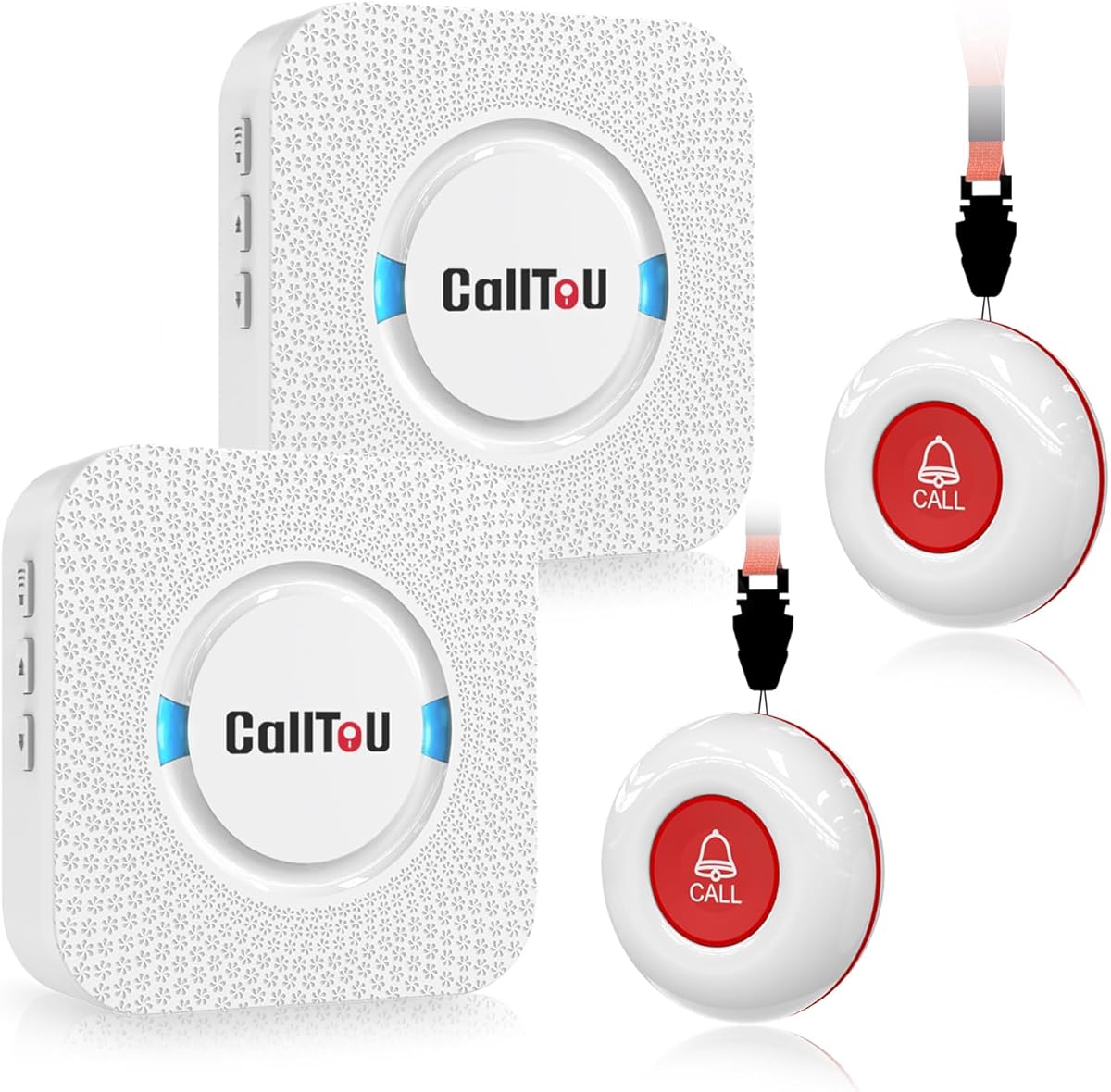


The CallToU Caregiver Pager combines two wireless call buttons with one portable receiver, making it a balanced choice for a home where a parent may need assistance from the bedroom, bathroom, or living area. Its 4.6 rating reflects a generally favorable response, particularly for families seeking a simple way to request help without installing a complex monitored service.
We may earn a commission when you buy through this link, at no additional cost to you.
One of its strongest features is the receiver's portability. While it must be plugged into an outlet, it can move from room to room with the caregiver, providing a greater degree of flexibility than a fixed wall unit. The stated open-area range exceeds 500 feet, which should cover many homes, bedrooms, and adjacent living spaces, although walls and household construction can reduce effective distance.
The system also accommodates different alert preferences. Users can select from 55 ringing tones and adjust the volume across five levels, including settings from silent to 110 decibels. The call buttons may be worn as pendants, secured with brackets, or attached with the supplied double-sided sticker, allowing the parent to keep one close and place the other in a high-risk location.
Its weather resistance adds practical value, particularly in a bathroom or other potentially damp area. The main limitation is that it is a local caregiver alert rather than a remotely connected medical monitoring service; the receiver must remain within range. Even so, it offers a clear, approachable way for an elderly parent to summon nearby help while giving adult children the freedom to focus on other tasks.
This is the strongest all-around choice for households seeking dependable room-to-room assistance without smartphone-dependent features. It suits families that live nearby, want two call locations, and prefer a receiver that can move with the caregiver rather than depend exclusively on phone or internet notifications.
The portable receiver is especially helpful when the person providing care moves between the kitchen, bedroom, and living area. Because it draws power from an outlet, the user should position it where the alert can be heard before carrying it elsewhere.
Two included buttons can be placed beside a bed and in a bathroom, or worn as neck pendants. This versatility supports a simple routine without requiring an elderly parent to operate a phone or remember complicated applications.
We may earn a commission when you buy through this link, at no additional cost to you.
The FullHouse Caregiver Pager is designed around a wearable emergency wristband, giving an elderly or disabled person a direct way to request assistance without shouting. Its 4.5 rating reflects a solid overall reception, and the combination of a long stated range, visual alert mode, and multiple mounting choices makes it practical for a range of caregiving arrangements.
We may earn a commission when you buy through this link, at no additional cost to you.
The wristband is one of the product's most useful details. It keeps the call button close without requiring the user to search for a wall-mounted device. The button can also be carried in a pocket, attached to a wheelchair, positioned at a bedside, secured in a washroom, or worn like a life-alarm necklace, allowing the family to adapt the setup as needs change.
Signal reach is advertised at up to 1,000 feet in open air and around 500 feet when walls are present. The receiver offers 52 melodies and five volume levels extending to 110 decibels. For light sleepers or shared spaces, the silent mode relies on an LED flash, allowing the caregiver to notice a call without creating noise.
The important limitation is that the button is splash proof rather than fully waterproof. It should be removed before bathing or showering, even if it is installed in a washroom. The system also has no monthly fee, but it remains a local alert system rather than a professional emergency response service, and some optional emergency services would require separate protection.
Families should consider this model when a wearable button is a priority and the caregiver can keep the receiver within effective range. It is a particularly good fit for a senior who may not remember where a fixed call button is installed but can comfortably wear a wristband throughout the day.
Keeping the button on the wrist reduces the need to reach for equipment after a fall. The same button can be moved to a bedside, bathroom wall, wheelchair, or pocket when continuous wearing is not appropriate.
Silent LED mode is useful late at night because the caregiver receives a visual cue without a ringing tone. Caregivers can also choose among 52 melodies and multiple volume levels for daytime use.
We may earn a commission when you buy through this link, at no additional cost to you.
The SSYA Digital Calendar Alarm Clock is one of the most approachable orientation aids in the guide. Its 4.6 rating and seven-inch 1024-by-600 LCD are especially relevant for parents with dementia, memory loss, or impaired vision. Instead of leaving people to decode standard clock abbreviations, it clearly labels morning, afternoon, evening, night, predawn, and other periods.
We may earn a commission when you buy through this link, at no additional cost to you.
The display shows the time, date, and day of the week in a form that can be understood at a glance. Automatic dimming lowers the display at 7:00 p.m. and restores brightness at 7:00 a.m., while five manual brightness levels help users find a comfortable setting. The clock can sit on a table or hang on a wall, allowing it to be placed where a parent naturally spends time.
Its alarm system supports 12 modes, including single alarms, daily alarms, weekday-only schedules, weekend-only schedules, and labeled events such as meals, medication, and appointments. The included setup language is important because reminders are only useful if the parent recognizes why the alarm is sounding. Eight languages and multiple time formats add further adaptability.
The primary drawback is dependence on an included AC adapter. Although the clock resets to the correct date and time after a power interruption, it does not function continuously as a battery-operated device. It also focuses on visual orientation and alarms rather than providing emergency calling, so families may still need a separate caregiver alert system.
This is the best budget-oriented clock in the list for someone who struggles to remember the date, day, or approximate time. It is simple enough for daily use, readable from across a room, and versatile enough to support both orientation and routine reminders.
Plain-language labels remove much of the ambiguity associated with a conventional digital clock. A parent can see both the numerical time and the broader part of the day, which can be reassuring during periods of confusion.
Programmable alarms can support medicine, meals, appointments, and other recurring activities. Labels make it easier to connect each sound with its purpose rather than treating every alert as an undifferentiated alarm.
We may earn a commission when you buy through this link, at no additional cost to you.
The WiFi Caregiver Pager Life Alert System offers the strongest blend of accessibility and remote connectivity among the caregiver alerts reviewed. Its 4.8 rating is the highest in this guide, and its combination of a waterproof call button, wearable watch button, loud receiver alarm, and app notifications makes it suitable for families who cannot remain beside a parent continuously.
We may earn a commission when you buy through this link, at no additional cost to you.
A press of either button triggers the receiver and can send an instant app notification to a family member's phone. Shared notifications allow siblings and other relatives to receive alerts as well. The system has no monthly fee for its listed core functionality, although direct SMS and phone-call alerts require a subscription, so families should distinguish the free app alerts from optional expanded service.
The stated control range reaches 656 feet, or 200 meters, and is designed to work through corners, walls, and doors. The receiver sounds a loud alert with customizable ringtones and four volume levels. For placement, the wearable button can be worn as a bracelet or lanyard, while included mounting options include screws, adhesive patches, and hanging slots for bedside or bathroom use.
Its most significant constraint is the requirement for 2.4GHz Wi-Fi. A household with only a 5GHz network may need compatible equipment or a different network configuration. The system also depends on app permissions, network availability, and correctly configured shared contacts, so a family should test notifications before relying on it during an actual emergency.
This is the top connected option for an elderly parent whose adult children live farther away or divide caregiving duties. It is best suited to households comfortable with basic app setup and a stable 2.4GHz network, while still offering a local receiver when internet service is unavailable.
App notifications let relatives respond even when they are not physically present. Shared access is useful when siblings, professional caregivers, or other trusted family members need a common alert channel.
The watch-style button can remain on the parent, while the waterproof unit can be placed near a bed, shower, or living area. Screw, adhesive, and lanyard mounting provide several ways to establish a convenient call point.
We may earn a commission when you buy through this link, at no additional cost to you.
The Digital Voice Announcement Clock combines a large, bold date display with spoken time announcements, offering an alternative for elderly people with weak vision. Its 4.7 rating places it among the strongest products in the guide, and its design is particularly relevant for seniors affected by dementia, Alzheimer's disease, or memory loss.
We may earn a commission when you buy through this link, at no additional cost to you.
Using the OK button on the key or remote control triggers an automatic spoken time announcement. The feature supports nine languages, while the screen displays the week, month, and date without complicated abbreviations. Together, spoken and visual information can make the clock easier to use for someone who struggles to read small text or interpret a conventional display.
Multiple alarms can handle medication, schedules, and daily routines. Automatic dimming reduces the screen at 7:00 p.m. and brightens it at 7:00 a.m., creating a less disruptive nighttime environment. The interface is designed to be intuitive, and the remote or top-button controls reduce the need to manipulate small controls directly.
Some users may not want an audible announcement, and the spoken feature will be of limited value to a senior with hearing loss. The clock also has to be configured correctly, so family members should test language, alarm timing, and brightness after setup rather than assuming every function is active by default.
This model is a good choice when visual orientation alone is not enough. Families can place it within easy reach so the parent can ask for a time announcement, use the screen for date awareness, and rely on programmed alarms for essential daily structure.
The large screen supports users who can read but need prominent information, while the voice announcement offers an accessible alternative. Pressing a clearly identified control is often easier than deciphering a small time display.
Automatic dimming reduces nighttime brightness without requiring the parent to locate a menu. A softer display can support better rest while preserving an easy-to-read time and date during the day.
We may earn a commission when you buy through this link, at no additional cost to you.
The Wireless Caregiver Pager stands out for its expandability and very long stated transmission range. It includes one call button and one receiver, but the system can grow to support as many as 30 call buttons and multiple receivers. Its 4.7 rating makes it a strong choice for larger homes, shared caregiving spaces, or a parent who moves frequently between rooms.
We may earn a commission when you buy through this link, at no additional cost to you.
The manufacturer states a transmission distance of up to 1,500 feet. Actual performance depends on walls, floors, appliances, and other obstructions, so a test in the intended home is advisable. The call button is rated IP55 for water and dust resistance and is specified for temperatures from -4 to 140 degrees Fahrenheit, supporting use in varied areas.
Audio customization is another strength. The receiver contains 58 ringtones and five adjustable volume levels, ranging from zero to 120 decibels. This allows a household to move from a gentle cue during quiet hours to a prominent alarm when a parent needs immediate assistance. The included button can be positioned wherever it is easiest for the user to reach.
The catch is that the base package provides only one button, and larger configurations require additional components. The alert remains local rather than delivering calls to relatives across town. It is therefore most appropriate when several caregivers share a home, care unit, or nearby workspace and need to hear every call.
For families seeking a scalable system, this pager offers more flexibility than a basic two-button kit. Its generous range, expandable design, and broad alert controls make it a practical choice for a multi-room or multi-caregiver environment.
A single-button start makes the initial setup manageable, while support for up to 30 buttons allows the family to add bedside, bathroom, and living-area call points. Multiple receivers can also keep alerts audible in separate spaces.
The 1,500-foot specification is useful for large properties, but walls and building materials affect the signal. Positioning the receiver near the parent or conducting a trial before mounting buttons in distant rooms is a sensible precaution.
We may earn a commission when you buy through this link, at no additional cost to you.
The DAYTECH WiFi Call Button System is a connected caregiver kit with two buttons, one wrist-worn option, and a receiver. Its 4.3 rating is the lowest among the reviewed products, but that does not eliminate its value for families that need alerts both at home and through a mobile application.
We may earn a commission when you buy through this link, at no additional cost to you.
Pressing a button or wearing the wrist device triggers a loud receiver alarm and a mobile app notification. Shared alerts can be sent to several family members, helping distribute responsibility among siblings, relatives, and professional caregivers. The app allows users to choose from 20 button sounds and adjust the volume across five levels, helping distinguish different call locations or routines.
The package is generous for a connected system because it includes multiple ways to request help. A receiver provides a local alert even when the phone is in another room, while app notifications extend awareness beyond the house. Optional phone and text message notifications are available as an upgrade for situations when the user's phone may be offline.
The trade-off is that core remote reliability depends on internet access, app configuration, and shared permissions. The optional messaging tier introduces an added service consideration, and the receiver must remain connected to an outlet. As with any network product, a simple test call should confirm that every intended caregiver receives the alert.
This is a solid choice for households that want local and remote notifications across a larger family network. It is best for users willing to manage an app and willing to consider optional messaging support when uninterrupted communication outside the home is important.
Shared app notifications are valuable when relatives take turns checking in. The receiver still provides an immediate in-home signal, while the app extends that signal to a wider support network.
Twenty sound options and five volume levels make it possible to create a recognizable audio pattern. Distinct sounds can help caregivers understand which button produced an alert after installing devices around the home.
We may earn a commission when you buy through this link, at no additional cost to you.
The SYMYNELEC Elderly Monitoring Camera is the most advanced communication device in the guide, combining a small family-facing screen, one-touch video calls, fall and distress sound alerts, and a mechanical privacy mode. Its 4.4 rating reflects a balanced feature set, while the absence of a required monthly subscription makes it a notable option for ongoing family communication.
We may earn a commission when you buy through this link, at no additional cost to you.
A parent can see a family member on the 2.8-inch screen without using a smartphone or learning a complicated app. The one-touch button simultaneously rings bound family phones, which vibrate and appear like ordinary incoming calls. The first person to answer connects the conversation, reducing the chance that an urgent call is left unnoticed.
The camera provides 1080P pan-tilt-zoom recording with automatic tracking intended to keep a parent in view. It also offers alerts for detected loud crashes, falls, or cries for help. These sound-based detections are supportive rather than a diagnosis, but they can notify family members when a parent cannot reach a phone or call button.
Privacy is the central consideration with any monitoring camera. This model addresses that concern with a mechanical mode that rotates the lens away and cuts the live feed, as well as customizable auto-on and auto-off timers. It also supports local continuous recording through a memory card up to 128GB, although the card is not included. The camera uses constant Type-C power and stable 2.4GHz Wi-Fi.
This is the best premium pick for families seeking frequent video contact and a broader monitoring layer. It is most appropriate when the parent understands the camera, family members agree on how it will be used, and the household follows a clear privacy routine rather than relying on monitoring casually.
The dedicated screen removes the need for an elderly parent to navigate a smartphone during a call. A single button press can connect the parent with a family member and provide a stronger sense of presence than a standard voice call.
The mechanical privacy mode physically turns the lens away instead of relying only on software masking. Scheduled timers add another layer of control, especially for private activities and regular periods when the camera should be off.
We may earn a commission when you buy through this link, at no additional cost to you.
The Large Display Calendar Clock offers extensive orientation and reminder features in a seven-inch HD LCD. Its 4.4 rating reflects a versatile product designed for seniors, people with dementia, and anyone who appreciates a clear, customizable display. It goes beyond showing the hour by presenting time periods, dates, days, reminders, and visual themes.
We may earn a commission when you buy through this link, at no additional cost to you.
Users can program up to 20 normal alarms and 20 custom reminders. The alarms can repeat daily, only on weekdays, only on weekends, or on selected dates, while custom reminders can be tied to particular dates and times. This makes the clock suitable for medicine, water intake, meals, birthdays, and scheduled appointments, especially when each reminder receives a clear icon or word label.
Display controls are unusually flexible. Ten brightness levels range from low to full, and a one-touch top button turns the display off for a completely dark sleeping area. Twelve themes and multiple color choices can improve recognition, while 18 ringtones, nine volume levels, and selectable snooze intervals allow families to tune the audio experience.
The device supports six languages, different time formats, 12- and 24-hour modes, and a manual daylight saving adjustment. Two AA batteries are not included and only preserve settings during a power cut; the included power adapter supplies operating power. An SD or USB flash drive can also display family photos, turning the clock into an electronic frame.
This is the most feature-rich clock in the list, but complexity is the corresponding trade-off. A family member should configure it and then simplify the visible settings for the parent. For households wanting one screen to handle orientation, routines, and familiar photos, it offers exceptional versatility.
With room for forty standard and custom alerts, the clock can organize a detailed daily schedule. Clear labels and icons help make each prompt understandable rather than simply repeating an unidentified sound.
Brightness, theme, language, time format, and photo options allow the clock to fit the room and the user. The one-touch sleep display is especially convenient when a bright screen would be disruptive overnight.
We may earn a commission when you buy through this link, at no additional cost to you.
The SYNLETT Caregiver Pager offers a clear, uncomplicated way for an elderly parent to request help. It includes two wireless call buttons and one portable receiver, earning a 4.6 rating for its easy operation, flexible placement, and dependable local alerting function.
We may earn a commission when you buy through this link, at no additional cost to you.
The receiver can be clipped to a caregiver's belt or placed on a flat surface, allowing the person providing care to move through the home while remaining able to hear a call. A call button may be worn around the neck as a pendant, fixed to a wall with its bracket, or mounted on a bedhead or bathroom wall. That versatility helps families place assistance within easy reach.
The receiver offers two principal alert styles. A ding-dong chime resembles a conventional doorbell and may be less startling, while a continuous alarm siren is easier to notice in a noisy home. The stated signal range is 500 feet in an open area, which should cover many apartments and houses, though walls can reduce performance.
The system is local rather than remotely connected, so it does not notify relatives who are away from the receiver. It also depends on battery life for the call buttons and portable receiver, meaning regular testing is important. Despite these limitations, its operation is so simple that it can work even when a parent is uncomfortable with apps or smartphones.
This is a good choice for a nearby caregiver who wants an inexpensive two-button system with uncomplicated controls. Its strengths are portability, placement flexibility, and a fast response, making it a useful primary or backup alert device for a home care arrangement.
The belt clip keeps the receiver with a caregiver without requiring a smartphone or complicated dashboard. The parent can activate a call from the bed, bathroom, or another installed location with one press.
A pleasant chime works well in calm environments, while the alarm mode is more noticeable when household noise could mask a doorbell-like tone. Testing both settings helps the household choose an appropriate signal.
We may earn a commission when you buy through this link, at no additional cost to you.
The right gadget depends on the type of support required, the parent's comfort with technology, the layout of the home, and the availability of caregivers. Prioritizing a clear, dependable function is more important than adding features that no one will use.
Start by identifying the problem the device must solve. A caregiver pager or call button is appropriate when the parent needs to summon nearby help, while a dementia-oriented clock supports time awareness, medication routines, and reduced confusion. A video camera is more relevant when a family wants frequent visual contact and remote reassurance than simple one-button assistance. Choosing one clear purpose makes the setup easier for the parent and prevents a complicated device from being abandoned.
The best device for an elderly parent is one they can operate without memorizing complicated menus. Large call buttons, single-touch controls, plain-language displays, and wearable options can reduce errors. Voice announcements may assist someone with impaired vision, while a physical privacy button or display-off control can make a clock more comfortable at night. Family members should also consider the parent's hearing, vision, dexterity, and familiarity with smartphones when deciding which interactions are realistic.
Range claims are usually measured under open-air conditions, which can overstate performance through walls, floors, and dense furnishings. A caregiver pager needs to reach from the parent's room to wherever the receiver is carried. Connected systems need sufficient network coverage, and the SYMYNELEC camera and specified WiFi pager require a 2.4GHz network. For any wireless product, performing test calls from the intended locations is more informative than relying solely on the maximum stated distance.
Local receivers are straightforward and can ring without internet access, but they only notify people within earshot. App alerts extend awareness to relatives in other locations, though they depend on a phone, application permissions, and network access. Optional SMS or telephone features may involve a subscription, so buyers should review the complete service terms. Families should also consider whether a flashing LED, audible chime, vibration, or spoken announcement is most likely to be noticed and understood.
The bathroom and bedside are among the most useful locations for caregiver call buttons. Waterproof or water-resistant construction adds confidence in damp areas, but it is important to distinguish full waterproofing from splash resistance. The FullHouse button, for example, is splash proof but should be removed before bathing or immersion. Caregivers should confirm mounting methods, button reach, wristband comfort, and whether power outlets are available for receivers and displays.
Large screens should be evaluated by actual character size, contrast, viewing distance, and nighttime brightness rather than screen size alone. Voice announcements can help users with weak vision, while adjustable volume and silent LED modes serve light sleepers or shared spaces. For dementia-related clocks, clearly written time periods, dates, event labels, and simple alarm programming are especially valuable. A family member should perform the setup so the parent's final interface contains only useful, clearly labeled options.
Cameras and connected monitoring devices deserve a deliberate privacy discussion involving the parent whenever possible. The elderly parent's home is a private space, and surveillance should not be introduced solely for family convenience. Physical privacy shutters, scheduled camera-off periods, encrypted streaming, and clear rules about recording and family access can reduce concerns. In every case, adults should explain what the device records, who can view it, and how alerts are handled.
A safety gadget needs ongoing attention to remain useful. Test call buttons regularly, confirm that receiver batteries are charged, check app permissions, and verify that family members still receive alerts. Wall-mounted devices should be checked for secure placement, while wrist buttons and pendants should remain comfortable. Connected products also depend on stable Wi-Fi and correct time settings, while outlet-powered clocks should have their settings verified after a power interruption.
Begin by involving the parent in the setup whenever possible. Explain the purpose of each button, demonstrate the action required to call for help, and ask which placement feels most comfortable. A caregiver pager button can be worn on a wrist or lanyard, mounted beside a bed, or positioned in a bathroom. Keep the receiver plugged in and carry it consistently rather than leaving it in a room where the alert cannot be heard.
Test the entire setup before treating it as an emergency solution. Press every call button while the caregiver is in different parts of the home, check app notifications on each family member's phone, and confirm the receiver produces a recognizable sound. For a camera, verify the viewing angle, two-way audio, call connection, privacy mode, recording schedule, and shared-app permissions. For a clock, confirm the date, time, time period, language, reminders, and brightness schedule.
Continue with regular maintenance. Replace or charge batteries as directed, clean buttons and receivers, and keep the parent's call devices accessible. Test alerts on a schedule and after any router, phone, or app change. A simple household log can record the last test date and the person responsible for checking each device, reducing the chance that a familiar alert is missed because a family member assumed someone else had verified it.
A large caregiver call button is often the easiest option because it requires only one press and does not depend on a smartphone. A wristband or pendant can be even more convenient for someone who may not remember where a wall button is installed. Choose a device with a distinct sound and test whether the parent can comfortably reach and press the button.
They can be useful for independent seniors who need a simple way to request help but do not require continuous professional monitoring. A local pager supports a caregiver in the same home, while an app-enabled system can notify relatives elsewhere. Families should still maintain a conventional emergency plan and understand that consumer paging products are not the same as professionally monitored medical alert services.
Local wireless caregiver pagers generally do not require internet access, although they depend on their own radio signal and receiver power. App notification and monitoring camera products need a compatible network and electrical power. The SYMYNELEC camera and the listed WiFi caregiver pager specifically call for 2.4GHz Wi-Fi, so families should verify their router settings before installation.
The SSYA clock and Large Display Calendar Clock both use large screens and plain-language time periods, which can reduce confusion. The SSYA model is comparatively simple, while the larger feature set of the other clock may be better for families that want numerous reminders, themes, and photo displays. The best choice depends more on the user's ability to understand the display than on any single feature.
A camera can support communication and situational awareness, but it should be introduced with the parent's knowledge and agreement. Clear expectations about recording, viewing, and response are important, especially when the camera operates in a bedroom or private space. Mechanical privacy modes, scheduled off times, and a dedicated call screen can improve comfort, but families should not confuse remote observation with hands-on care.
Place it where the parent spends time and can reach it without searching, such as beside the bed, near a favorite chair, or on a bathroom wall. Wearable options provide more constant access. Check that the button is not obstructed, that the signal reaches the receiver, and that its water-resistance level is appropriate for the location.
No. These products are designed primarily to notify family members or nearby caregivers and may not include dispatch, professional monitoring, or subscription-based telephone response. Anyone with a history of serious falls, medical emergencies, or prolonged inability to respond should discuss appropriate monitored protection with a healthcare professional or reputable emergency-alert provider.
Test them regularly, especially after moving a button, changing rooms, updating the Wi-Fi network, or granting a new family member app access. A weekly or monthly test can reveal weak batteries and failed notifications, but the schedule should reflect the urgency of the user's needs. Record each test so responsibility for routine checks is clear.
The CallToU caregiver pager is the strongest overall option for straightforward household assistance, while the SSYA digital calendar clock offers an accessible and economical orientation aid. The SYMYNELEC camera stands out for families that want one-touch video communication, and the WiFi caregiver pager system provides the strongest connected alert experience for relatives who are not always at home.
The most important priority is fit rather than feature count. Consider the parent's vision, hearing, dexterity, memory, comfort with technology, and willingness to use the device. Then evaluate placement, range, power, connectivity, privacy, and recurring service requirements. A simple tool that the parent understands and uses confidently is generally more valuable than a sophisticated gadget that is confusing or left unattended.
Before purchasing, compare the current specifications, included accessories, compatibility requirements, and warranty details, and read recent customer feedback for practical insight. Product configurations and prices can change, so check the current listing and total ownership terms before making a final decision.