
PlayStation DualSense Wireless Controller – Cosmic Red
4.6Editor score
Adaptive trigger resistance
Detailed haptic feedback
Bluetooth and wired connectivity
Broad device compatibility
Our gaming controller for Arc Raiders guide compares ten leading PC, console, and hybrid controllers for latency, aim, remapping, comfort, and compatibility.
A controller for ARC Raiders should translate deliberate aiming, rapid movement, and frequent trigger inputs without introducing distracting delay. The most useful features include stable sticks, responsive buttons, practical remapping, reliable wireless connectivity, and compatibility with the way you play on PC or a compatible console.
We compared ten controllers across input precision, connection methods, polling performance, trigger options, battery life, customization, grip design, and platform support. The list covers premium esports models, familiar console controllers, versatile wireless options, and a more affordable multi-platform controller for PC and mobile play.
Each review explains the strongest reasons to consider a particular model, along with the compromises that may matter to a particular setup. Rankings reflect the supplied product specifications and customer ratings rather than personal playtesting, and prices and availability can change over time.
4.6Editor score

4.1Editor score
3.9Editor score
The comparison below highlights the most important differences in connectivity, polling, stick technology, trigger behavior, customization, and platform support. It is designed to make it easier to identify the controller that matches your PC, preferred control scheme, and competitive priorities.




The Razer Wolverine V3 Pro combines an 8000Hz polling rate, magnetic TMR thumbsticks, and a distinctly competitive control layout. Its 4.1 rating may place it below several simpler controllers, but the specification set is aimed at players who want unusually fast input registration and extensive control over aiming and trigger behavior.
We may earn a commission when you buy through this link, at no additional cost to you.
The defining attraction is the true 8000Hz polling rate available in both wired and wireless modes. That can appeal to competitive PC players who continually adjust their grip, make micro-corrections, or use long-range weapons and other aiming-intensive mechanics. TMR sticks are designed to reduce drift, while Pro HyperTriggers allow mouse-click-style activation or full analog travel.
The four rear mouse-click buttons and two claw-grip bumpers offer more ways to bind frequently used actions than a standard console layout. Four onboard profiles, keyboard-key mapping, adjustable stick sensitivity, tactile PBT face buttons, and a floating eight-way D-pad make it possible to build a setup around a particular play style rather than accepting the defaults.
Its principal limitation is platform focus. It is designed for Windows 11 PCs with USB-A wireless support and does not work with Xbox consoles, PlayStation systems, macOS, or mobile devices. For a PC-only player seeking maximum polling and esports features, that narrow focus is a feature rather than a drawback.
This is the strongest all-around recommendation here for competitive PC play, especially when input speed matters more than console compatibility. Players who value familiar layouts, extensive battery life, or the ability to move between several device families may be better served by one of the multi-platform alternatives.
The 8000Hz polling rate is the headline feature for competitive PC users. In practical terms, it allows the controller to check for input changes far more frequently than conventional wireless controllers, which can be attractive when small aim corrections and reaction timing matter.
Remappable rear buttons, additional bumpers, configurable triggers, and onboard profiles extend the controls beyond a conventional gamepad. These options make the Wolverine V3 Pro especially suitable for players who want to keep important actions close at hand.
We may earn a commission when you buy through this link, at no additional cost to you.
The AceGamer Aurora II is a value-focused wireless controller designed for PC, Android, Switch, iOS, Switch 2, and Steam Deck. Its 4.2 rating reflects a broadly positive reception, while the mix of 2.4GHz and Bluetooth connectivity gives it more flexibility than a console-specific pad.
We may earn a commission when you buy through this link, at no additional cost to you.
The upgraded receiver and encryption dongle are intended to improve connection stability and resistance to interference. Hall Effect joysticks reduce the concern associated with conventional potentiometer sticks, and two programmable back buttons provide room for trigger combinations or other shortcuts. A 1000mAh battery is also a meaningful feature for a wireless portable controller.
Its trade-offs are mostly visible in the specifications. It does not offer the very high polling rates, interchangeable trigger controls, extensive onboard profiles, or premium physical materials found on higher-end gaming controllers. The title mentions rotary motors and RGB lighting, but the supplied feature list does not provide further detail about either feature, so those points should be verified in the product listing.
The Aurora II is not compatible with Xbox systems, but it covers a broad collection of other platforms. This makes it especially useful for someone who alternates between a Windows PC, a handheld PC, Switch, and mobile devices without wanting to maintain several different controllers.
For budget-conscious players who prioritize broad compatibility, wireless play, and programmable rear controls, this is a practical recommendation. It is less compelling for highly competitive PC players who need maximum polling, adjustable trigger stops, or a highly established desktop customization suite.
A 2.4GHz receiver offers a dedicated low-latency connection on compatible systems, while Bluetooth allows the controller to move between PCs, handheld devices, Switch systems, and phones. Pairing requires a short button sequence, so check your device's input settings before starting a session.
Two programmable rear buttons and switch access add flexibility that a basic controller may not offer. They are not equivalent to a full remapping suite, but they can provide quicker access to secondary actions for users who are comfortable creating their own bindings.
We may earn a commission when you buy through this link, at no additional cost to you.
The PlayStation DualSense earns one of the strongest ratings in this group at 4.6, making it an appealing budget choice for ARC Raiders players who do not need an esports-focused controller. Its familiar layout, adaptive triggers, and haptic feedback suit a wide range of action and shooter experiences.
We may earn a commission when you buy through this link, at no additional cost to you.
Adaptive triggers vary resistance as the player pulls, creating more nuanced control than a fixed mechanical trigger. Haptic feedback communicates in-game actions physically, which can make impacts, movement cues, and environmental effects more noticeable. The built-in microphone, dedicated mute control, and 3.5mm headset jack also cover common communication needs.
Compared with the high-end options, the DualSense lacks high polling rates, swappable trigger stops, extra rear buttons, and extensive onboard profile controls. That makes it less attractive to a player who spends significant time tuning competitive settings, but those omissions are reasonable for a more straightforward general-purpose controller.
It connects to Windows PCs and Mac computers by USB Type-C or Bluetooth, as well as Android and iOS devices, and remains designed for PS5. This cross-device support means it can continue serving as a household controller after your PC gaming sessions are finished.
The DualSense is the best value-oriented recommendation for most players. Choose it when tactile feedback, broad device compatibility, and a familiar ecosystem matter more than esports-specific hardware. Competitive specialists should first confirm that the game and their preferred setup do not require additional rear controls.
The trigger resistance changes with the amount of pressure applied, providing a more expressive alternative to a fixed stop. This is useful for gradual actions such as aiming, charging, or navigating controlled movement.
Haptic feedback and the built-in microphone are supported features of the controller's broader platform experience. USB-C and Bluetooth connectivity make it easy to move between a PS5, PC, Mac, or supported mobile device.
We may earn a commission when you buy through this link, at no additional cost to you.
The Xbox Elite Wireless Controller Series 2 is built for players who want to tune nearly every part of the control experience. Its 4.3 rating, interchangeable components, adjustable thumbstick tension, and three-step hair trigger locks make it a strong fit for Xbox and Windows PC users who value comfort and control.
We may earn a commission when you buy through this link, at no additional cost to you.
The included set contains six thumbsticks, four paddles, two D-pads, a carrying case, and a charging dock. Adjustable stick resistance lets the user tune the feel of each stick, while interchangeable trigger locks can reduce pull distance for faster shooting. Up to three custom profiles can be stored and changed directly from the controller.
Its main limitation is that the supplied specifications do not advertise a high PC polling rate. It therefore does not match the Razer Wolverine V3 Pro or several 1000Hz alternatives on raw input frequency. The abundance of interchangeable parts also makes the package larger and more involved than a straightforward wireless controller.
Connectivity covers Xbox Series X|S, Xbox One, Windows PC, Bluetooth devices, and cloud gaming through Xbox Wireless, Bluetooth, or the included USB-C cable. The Xbox Accessories app supports button mapping, dead-zone adjustment, keyboard remapping in supported games, and profile management.
This controller is a strong recommendation for an Xbox-centered setup or a player willing to experiment with different stick shapes, paddles, and trigger stops. It is a particularly good match for long sessions because the components, grips, and charging dock support comfort and endurance, although competitive PC users focused only on polling speed may prefer a newer alternative.
Adjustable tension and multiple topper shapes allow you to find a stick response that feels consistent with your grip. Because the components are interchangeable, you can change the setup without replacing the entire controller.
Three-step hair trigger locks reduce trigger pull distance and can help with rapid inputs. The exact feel is personal, so it is worth testing each setting and retaining the configuration that provides the best control.
We may earn a commission when you buy through this link, at no additional cost to you.
The 8Bitdo Ultimate 2 combines a 4.5 rating with a broad feature set aimed at PC, Apple, Steam, and Android users. Its 1000Hz polling rate, TMR joysticks, programmable rear controls, and selectable trigger modes make it a compelling mid-tier choice for competitive PC gaming.
We may earn a commission when you buy through this link, at no additional cost to you.
TMR sticks are designed to provide greater sensitivity, precision, and durability. The 2.4GHz connection is advertised as stable and low-latency, while 1000Hz polling is available in both 2.4GHz and wired modes. A trigger switch lets the user move between linear Hall Effect behavior and non-linear tactile stops.
Two rear paddles and extra R4 and L4 bumpers expand the available bindings, while customizable six-axis motion, turbo, and rumble provide additional ways to adapt the controller. These features require configuration through 8BitDo Ultimate Software V2, which may appeal to technical users but can feel like more work than a plug-and-play standard pad.
A multifunction charging dock and USB-C adapter are included, making it convenient to keep the controller organized and charged. As with other wireless options, using every lighting, motion, and vibration feature can affect battery consumption, so players should disable functions they do not need.
The Ultimate 2 is an excellent all-round option for a PC-focused player who wants competitive polling and deep control without moving to the most expensive esports range. It is particularly attractive if you also use Apple or Android devices and want one controller to cover several platforms.
The 1000Hz polling rate applies in both 2.4GHz and wired connections, providing a meaningful response advantage over conventional Bluetooth controllers. A wired connection can also simplify setup when dependable low-latency input is the priority.
The physical trigger mode switch makes it possible to alternate between linear Hall Effect travel and non-linear tactile stops. Trying both styles can reveal whether you favor gradual pressure control or a defined endpoint.
We may earn a commission when you buy through this link, at no additional cost to you.
The GameSir G7 Pro Wired combines strong hardware specifications with broad compatibility across Xbox consoles, PC, and Android. Its 4.3 rating is supported by a 1000Hz PC polling rate, Mag-Res TMR sticks, Hall Effect analog triggers, and four extra programmable controls.
We may earn a commission when you buy through this link, at no additional cost to you.
The physical mode switch supports wired Xbox play, 2.4GHz and wired PC connections, and Bluetooth for Android. On PC, 1000Hz polling is available through wired and 2.4GHz modes. TMR thumbsticks combine the durability associated with Hall Effect designs with traditional potentiometer performance, while the analog triggers provide linear input and selectable micro-switch stops.
The GameSir Nexus app expands the controller with gyro settings, stick curves, and button-to-mouse mapping. PC-only gyro aiming can be assigned to sticks, buttons, or mouse input, while L5 and R5 bumpers plus lockable R4 and L4 rear buttons provide additional binding locations.
Its wired focus is not a universal weakness, but players who prefer an entirely wireless desk may find the included cables less convenient. Gyro and advanced mapping also require setup, and the PC-only limitation on that feature should be understood before buying.
The G7 Pro Wired is a strong pick for an Xbox and PC setup that wants modern sensors, many remappable inputs, and flexible trigger options. It is especially compelling for PC players who appreciate 1000Hz polling but also play on current and previous-generation Xbox consoles.
A physical mode switch makes it easy to move among Xbox, PC, and Android connection methods. The controller supports wired play where latency matters and wireless modes where convenient roaming matters.
The Nexus app provides stick-curve editing, gyro configuration, and button-to-mouse mapping. Four additional controls give those remaps practical places to go, making the controller suitable for custom layouts.
We may earn a commission when you buy through this link, at no additional cost to you.
The GameSir G7 Pro Wireless is an officially licensed controller for Xbox Series X|S and Xbox One that also targets Windows PC players. Its 4.4 rating, TMR thumbsticks, 1000Hz PC polling, dual-mode triggers, and extensive customization make it one of the strongest specialist options in the roundup.
We may earn a commission when you buy through this link, at no additional cost to you.
TMR sticks are positioned as a blend of traditional stick accuracy and Hall Effect durability, with virtually no stick drift. Hall Effect analog triggers can be switched to micro triggers, and the optical ABXY buttons plus mechanical D-pad are designed to provide crisp, durable input. Four remappable controls include R5 and L5 bumpers and lockable rear buttons.
The supplied information specifies that 1000Hz polling applies to PC through wired or 2.4GHz wireless connections. Xbox consoles are described as optimized for stable and smooth performance, not as sharing that PC polling rate. A 1200mAh battery and auto start-stop charging station support extended play, while the three-part magnetic faceplate and extra D-pads enable visual and functional changes.
The Zenless Zone Zero edition may not be the first design choice for every ARC Raiders player, but the hardware underneath it is the important factor. Users should compare the themed shell, extra D-pads, and official Xbox features against their preferred aesthetic and grip.
Choose the G7 Pro Wireless if you want modern stick and trigger hardware across Xbox and PC, along with extensive remapping and swappable components. It is a particularly good fit for players who want a premium-feeling controller without stepping into the dedicated Razer esports range.
Official licensing for current and previous-generation Xbox systems provides a straightforward way to use the controller in a console setup. One-press wake-up support is also listed for seamless console sessions.
A magnetic three-part faceplate, additional D-pads, remappable rear buttons, and Nexus app settings make it easy to alter the controller's appearance and behavior. Remapping can be tailored to different games without changing the hardware.
We may earn a commission when you buy through this link, at no additional cost to you.
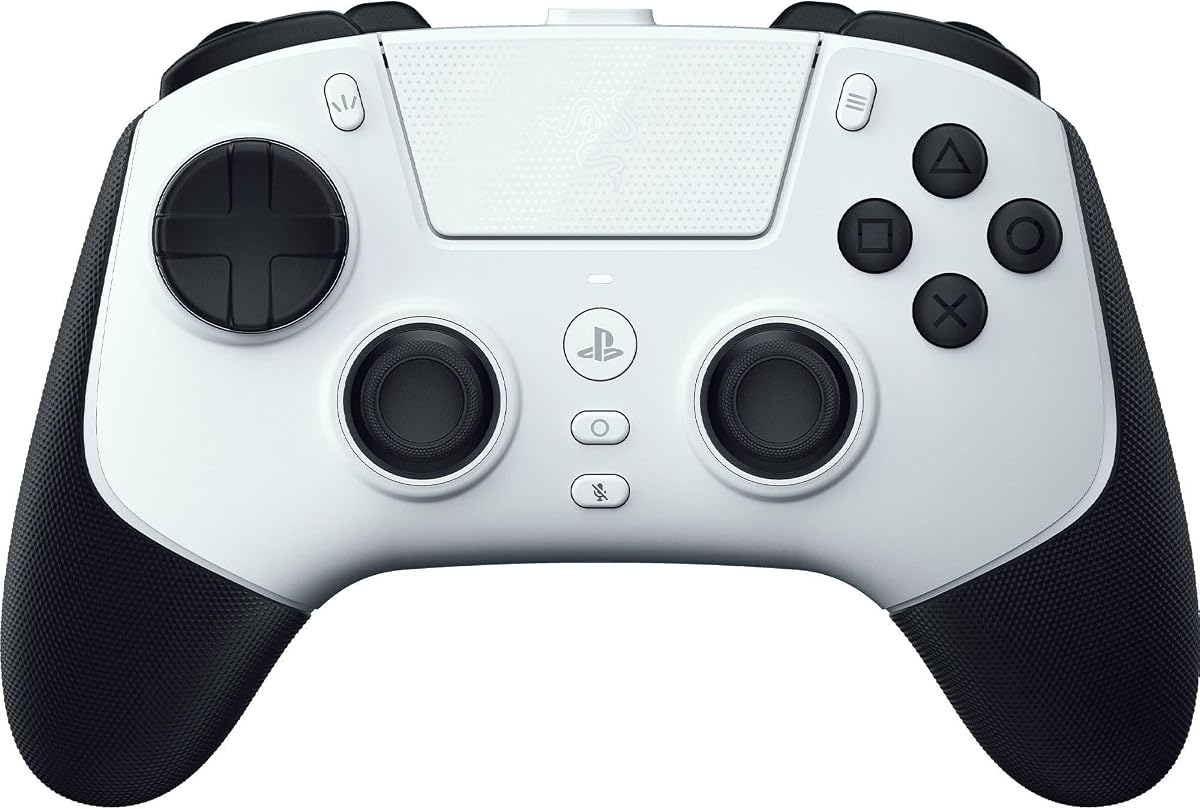
The Razer Raiju V3 Pro is a premium wireless esports controller for PlayStation 5 and PC. Its 3.9 rating is the lowest among the products in this guide, but the hardware is specifically built around tournament-oriented features such as removable mouse-click rear buttons, claw-grip bumpers, and high polling.
We may earn a commission when you buy through this link, at no additional cost to you.
The controller supports 2000Hz wired polling on PC and low-latency 2.4GHz wireless play through Razer HyperSpeed. Symmetrical magnetic TMR thumbsticks are designed for consistent tracking and micro-adjustments, while Pro HyperTriggers can switch between fast mouse-click actuation and full analog travel.
Six remappable controls include four removable mouse-click back buttons and two claw-grip bumpers. Mecha-Tactile PBT action buttons, an eight-way floating D-pad, adjustable stick sensitivity, trigger calibration, and four onboard profiles complete a feature set designed for players who adjust their setup frequently.
The lack of Xbox support narrows its audience, and its 3.9 rating gives prospective buyers less customer feedback reassurance than the higher-rated alternatives. It also does not match the Wolverine V3 Pro's stated 8000Hz polling rate, although the practical difference will depend on your PC, connection method, and the game.
The Raiju V3 Pro is best for a PS5 or Windows PC player who wants premium esports controls, wireless freedom, and a broad remapping toolkit. Its carrying case, cable, replaceable stick caps, and back-button removal toolkit also make it practical for travel or organized competitive setups.
Four removable mouse-click back buttons can be assigned to actions that would otherwise require moving a thumb away from the stick. Their removal capability lets players switch to a cleaner layout when it is more appropriate.
The 2000Hz wired polling rate targets competitive PC play where rapid input registration can matter. HyperSpeed wireless provides another low-latency option for PS5 and PC use, although its exact PC performance is separate from the stated wired rate.
We may earn a commission when you buy through this link, at no additional cost to you.
The ASUS ROG Raikiri II is a refined hybrid controller for Windows PC and Xbox Series X|S. Its 3.9 rating is modest compared with the field, while its 1000Hz PC polling, four rear buttons, dual-mode triggers, and anti-drift TMR sticks place it firmly in the modern performance-controller category.
We may earn a commission when you buy through this link, at no additional cost to you.
Connection flexibility includes low-latency 2.4GHz, Bluetooth, and wired USB-C for PC and ROG Xbox Ally use. The controller is also certified for Xbox through USB-C and 2.4GHz RF. On PC, 1000Hz polling is available in both wired and wireless modes through ROG SpeedNova Wireless technology.
The dual-mode triggers allow a change between short-travel micro-switch triggers and full-travel TMR sensor triggers. Micro-switch D-pad, ABXY, rear buttons, and bumpers should provide crisp tactile feedback, while an anti-slip grip supports stability during longer sessions.
The stated battery life is at least 30 hours with RGB lighting, audio, and vibration disabled, so enabling those features may reduce endurance. The product also does not include Xbox Wireless certification, which means console use depends on the supported 2.4GHz or USB-C routes.
The Raikiri II is a worthwhile choice for PC and Xbox players who value high polling, rear controls, and a premium accessory package. The included protective case supports charging while closed, and the stand plus detachable joystick caps round out a polished setup.
A 1000Hz polling rate is available over wired and 2.4GHz PC connections, reducing the gap between input and in-game response. The ROG SpeedNova system is intended to maintain low latency over the wireless connection.
An anti-slip surface and dual trigger modes make it easier to tune the controller for a long play session. Removable stick caps allow small changes in feel and appearance without replacing the entire unit.
We may earn a commission when you buy through this link, at no additional cost to you.
The Xbox Storm Breaker Special Edition delivers a strong 4.6 rating and a familiar Xbox layout across consoles, PCs, TVs, mobile devices, gaming handhelds, and supported cloud destinations. It is a straightforward all-purpose option for ARC Raiders players who want wireless convenience without advanced esports hardware.
We may earn a commission when you buy through this link, at no additional cost to you.
Textured triggers and rubberized grips provide a secure hold, while the stated battery life reaches up to 40 hours. Xbox Wireless, Bluetooth, and USB-C connectivity cover both console and PC use, and a 3.5mm headset jack supports wired audio. A dedicated Share button provides quick access to screenshots, recordings, and other captured content.
Compared with the premium gaming controllers, it does not offer a 1000Hz or greater PC polling rate, swappable stick modules, trigger stops, or additional rear paddles. It also has fewer physical configuration choices than the Xbox Elite Series 2 or the Razer models.
That simplicity is an advantage for many users. The Xbox Accessories app supports button mapping and personalized profiles, providing the essential customization layer without requiring a complex accessory kit. The Storm Breaker's special gray, black, and white design also distinguishes it from a standard Xbox controller.
Choose the Storm Breaker if you want a well-rated, familiar controller with strong battery life and easy cross-device use. It is particularly suitable for general play and mixed gaming setups, while competitive PC players who obsess over polling and trigger response should look to a higher-specification option.
The stated battery life of up to 40 hours reduces the need for frequent charging. Actual runtime can vary with usage, but the figure makes this controller appealing for extended sessions and regular travel between devices.
Xbox Wireless, Bluetooth, and USB-C make the controller suitable for console, PC, mobile, handheld, and cloud gaming setups. The Share button and headset connection cover common everyday functions without a learning curve.
We may earn a commission when you buy through this link, at no additional cost to you.
The most important buying factors are platform compatibility, stick reliability, trigger response, wireless latency, and the amount of customization you need. Prioritizing these features helps prevent an attractive controller from becoming frustrating once the game is running.
Begin with the devices you actually use. The Razer Wolverine V3 Pro is designed exclusively for Windows 11 PCs, while the Razer Raiju V3 Pro supports PS5 and PC. The Xbox Elite Series 2, GameSir G7 Pro models, and ROG Raikiri II provide different combinations of Xbox and PC support, and the AceGamer Aurora II broadens its reach to Switch, Apple, Android, Steam Deck, and other compatible systems. Always confirm the specific platform, connection type, and required game support before buying. A controller that looks universal may use a different protocol or button-mapping profile on each device.
Polling rate indicates how frequently a controller checks for new input. The range here extends from conventional Bluetooth behavior to 1000Hz, 2000Hz, and the Razer Wolverine V3 Pro's 8000Hz. Higher rates can make fast aim adjustments and rapid trigger presses register more quickly, but the full benefit depends on the computer, connection mode, game, and frame rate. A high polling rate cannot compensate for unstable wireless reception, and some rates are limited to PC or wired connections.
A thumbstick that develops unwanted movement can ruin otherwise precise aiming. TMR and Hall Effect systems are designed to reduce the likelihood of drift compared with conventional potentiometer sticks. The Aurora II uses Hall Effect sensors, while several higher-spec models use TMR technology. Stability matters because a small resting offset can require constant correction, particularly when aiming at distant targets or navigating with a slow analog movement.
Triggers can use a fixed mechanical stop, a tactile endpoint, adjustable resistance, or a switchable system that combines several styles. The DualSense offers adaptive resistance, while the GameSir G7 Pro models and ROG Raikiri II support switchable micro-switch and sensor-based travel. Razer Pro HyperTriggers can move between mouse-click-style activation and full analog pulls. A good trigger should support the type of pressure and speed you need without making accidental shots more likely.
Remapping lets you place secondary actions on rear buttons, bumpers, or other accessible controls. The Wolverine V3 Pro and Raiju V3 Pro each support four onboard profiles, while the Xbox Elite Series 2 supports three. The GameSir Nexus app, Xbox Accessories app, and Razer software add different levels of stick-curve, trigger, gyro, and keyboard-mapping control. A more advanced setup is useful only if you are comfortable maintaining it, so consider how much configuration you realistically want to maintain.
Wireless freedom should not come at the expense of consistent input. Dedicated 2.4GHz receivers are generally designed for stable low-latency communication, while Bluetooth is convenient for switching among devices but may not offer the same connection characteristics. The Aurora II includes a 1000mAh battery, the ROG Raikiri II claims at least 30 hours with lighting, audio, and vibration disabled, and the Xbox Storm Breaker and Elite Series 2 advertise up to 40 hours. Actual battery life depends on the features you use.
Controller shape matters more than any individual specification once you begin playing. Rubberized surfaces, textured triggers, anti-slip grips, and lightweight designs can improve comfort and control over longer sessions. The Wolverine V3 Pro is presented as Razer's lightest wireless esports controller, while the Xbox Elite Series 2 emphasizes wrap-around grips. The best choice is usually the one whose shape, button placement, and weight feel natural in your hands.
Accessories can add convenience but also create clutter. Some controllers include charging docks, cases, spare sticks, paddles, cables, or replacement D-pads, while others provide only the essential hardware. The Xbox Elite Series 2 has the most extensive interchangeable kit, and several Razer and GameSir options include protective cases or charging stations. Decide whether you will use these extras before placing extra importance on them in your selection.
Before your first session, read the controller's connection instructions and confirm the correct mode for your device. 2.4GHz controllers generally require their receiver to be inserted into the computer, while Bluetooth controllers need to be selected from the device's input menu. The AceGamer Aurora II specifically uses a button sequence for pairing, so taking a moment to complete that process correctly can prevent an otherwise puzzling connection problem.
Once connected, open the game and test movement, aiming, firing, and secondary actions before beginning a serious match. If the controller includes a configuration app, assign rear buttons, adjust stick curves, set trigger modes, and create separate profiles for different games. Save a baseline profile before making large changes, because a profile that feels precise in a menu may behave differently during fast movement and recoil.
For care, keep the controller away from moisture, dust, and extreme heat, and clean the grip and buttons with a soft dry cloth. Avoid leaving a rechargeable controller on an active charging dock for extended periods unless the manufacturer permits it. Periodically check for loose stick rings, worn stick caps, and debris around the D-pad, and use the supplied case when traveling to reduce impact and surface wear.
A controller is often more approachable for action and shooter play because its movement and aiming inputs are designed around a gamepad layout. Keyboard and mouse can offer more precise cursor movement and access to numerous bindings, while a controller is usually easier to pick up and use from a couch. The better choice depends on your preferred aiming method and how you configure the game.
An 8000Hz controller is primarily aimed at competitive PC players who value very rapid input registration. It may be useful in demanding aiming scenarios, but it is not automatically necessary for every player. A stable connection, responsive sticks, and a layout you understand can matter more than the headline polling figure for many sessions.
Yes, several of the listed Xbox controllers support Windows PC through Xbox Wireless, Bluetooth, or USB-C, depending on the model. Connect the controller before launching the game, let the PC recognize it, and confirm that ARC Raiders is using the correct input device. Keyboard and mouse bindings may also need adjustment when switching from a console profile.
Wired controllers offer a straightforward connection and can suit competitive desktop setups, while wireless controllers provide more flexibility around the room. If you notice interference or variable latency with a wireless connection, try a wired mode or reposition the receiver. A quality 2.4GHz connection and a strong PC radio environment can also provide a responsive wireless experience.
Both approaches are designed to improve stick reliability compared with traditional potentiometer designs. TMR combines magnetic sensing with a different physical implementation, while Hall Effect relies on magnetic field detection. The important practical factors are stable recentering, consistent input, and a stick shape that suits your grip rather than the sensor label alone.
Rear buttons can make secondary actions easier to reach without removing a thumb from the main movement stick. Depending on your bindings, they may be used for crouching, aiming, equipment selection, or communication. They are not automatically more accurate than face buttons, and you should only remap actions after confirming how your controls are configured in the game.
Several models support multiple device families, but compatibility depends on the exact model and its listed connection modes. The PlayStation DualSense supports PS5, PC, Mac, Android, and iOS, while the AceGamer Aurora II supports Windows, Switch, iOS, and Android. Pairing a controller to a new device may require resetting its connection mode before it appears in the device menu.
Update the configuration whenever you install a new game, change your mouse or keyboard bindings, or alter the controller layout. A useful routine is to test a saved profile, make one adjustment at a time, and then record what feels best. For competitive play, a separate profile per game can prevent settings intended for one title from interfering with another.
The PlayStation DualSense stands out as the best budget-oriented recommendation because of its 4.6 rating, adaptive triggers, haptic feedback, and cross-device support. The Razer Wolverine V3 Pro is the Editor's Choice for competitive PC play because of its 8000Hz polling, TMR sticks, trigger switching, and extensive remapping, while the Razer Raiju V3 Pro offers a premium PS5 and PC combination with a tournament-style layout.
Your priorities should guide the decision. Choose stable anti-drift sticks and a comfortable shape before focusing on secondary features. Add high polling for competitive PC use, rear buttons for custom bindings, and a charging dock or case only when they will improve your routine. Platform support must match your actual PC and console setup.
Finally, check current prices, availability, and the latest compatibility information before purchasing. Controller technology and bundle contents can change, so the product listing should remain your final source for current specifications, supported modes, included accessories, and warranty details.