
Garmin Dash Cam Mini 3
4.0Editor score
1080p HD recording
Ultra-compact windshield design
140-degree field of view
Built-in polarizer lens
Voice-controlled operation
Garmin Dash CAM guide comparing ten models for video quality, field of view, parking features, connectivity, displays, night performance, and value.
A dash camera can provide valuable video evidence when traffic becomes chaotic, a parking lot feels uncertain, or an unexpected incident occurs. The best model balances clear recording, a useful field of view, dependable parking features, simple installation, and an app experience that does not complicate everyday use.
This guide compares ten Garmin and competing dash cams based on their stated resolutions, lenses, displays, storage support, parking functions, wireless connectivity, driver alerts, voice control, and multi-camera capabilities. It also identifies models suited to different priorities, from discreet front-camera recording to three-channel coverage and always-connected remote viewing.
The selections show why dash cams are not created equally: compact Garmin models emphasize low-profile installation, while premium versions add larger screens, higher-resolution recording, and more elaborate parking support. Product specifications and availability can change, so readers should confirm the current features, compatibility, and price before purchasing.
4.0Editor score

3.8Editor score

3.5Editor score
The table below compares every camera in the guide across its most important characteristics, including recording resolution, perspective, connectivity, parking functionality, and physical design. Although several alternatives to Garmin appear, the comparison makes it easier to determine which feature set best fits a particular vehicle and driving routine.
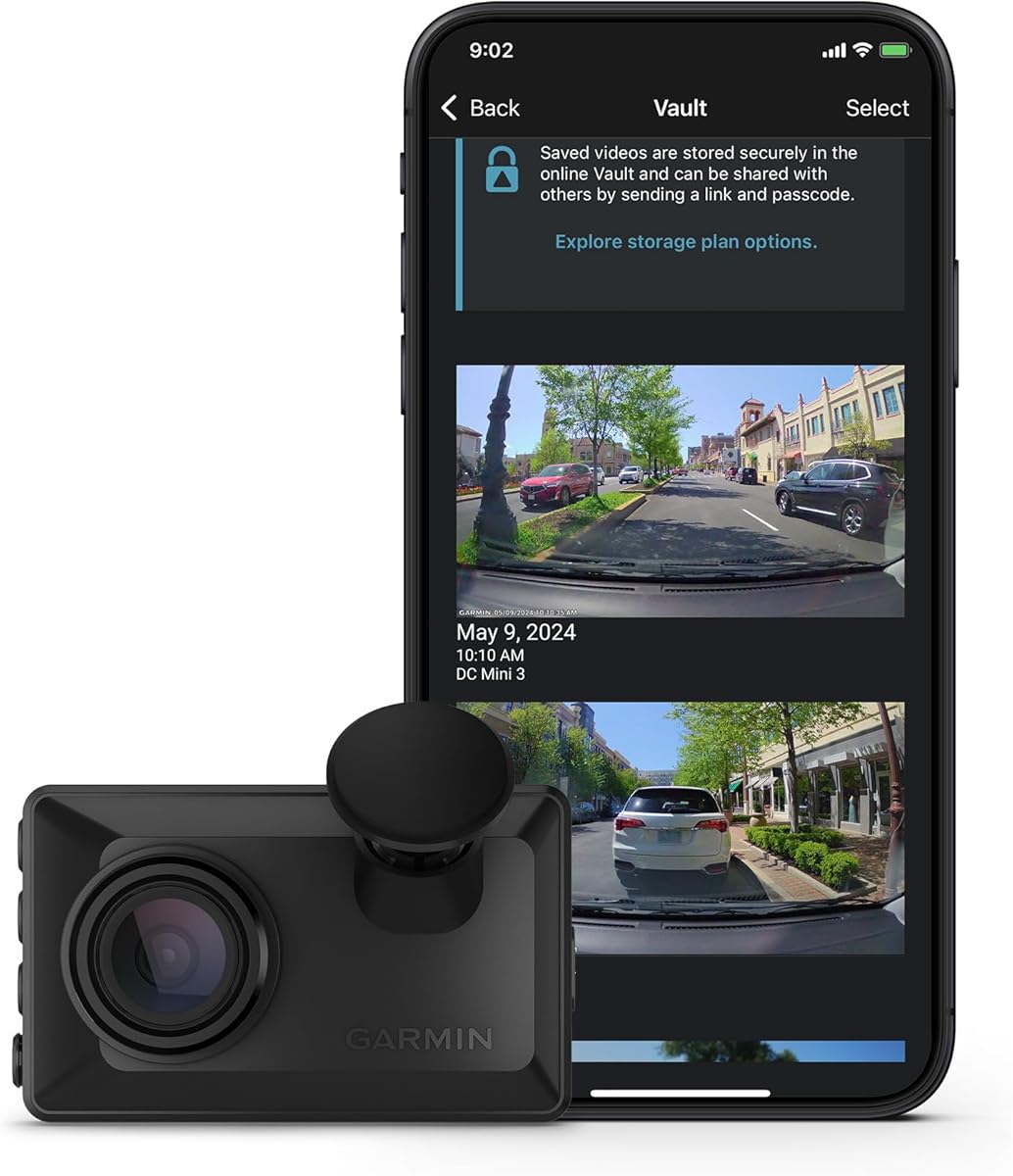




The Garmin Dash Cam Mini 3 is an attractive all-around recommendation for drivers who want recognizable Garmin features in a particularly small package. Its stated 4.0 rating reflects a generally favorable buyer response, and the camera combines 1080p HD recording, a wide 140-degree field of view, a built-in Garmin Clarity polarizer, incident detection, voice control, and support for the Garmin Drive app. The key-sized format also helps it blend into the windshield better than a large, conspicuous dashboard camera.
We may earn a commission when you buy through this link, at no additional cost to you.
Its strongest feature is the combination of video specification and installation footprint. The 140-degree lens is broad enough to capture meaningful context around the vehicle, while the polarizer is intended to reduce glare and improve the clarity of important details. Voice commands can save video and control audio recording without requiring the driver to handle the camera. The Mini 3 can also participate in a synchronized multi-camera setup through the Garmin Drive app, allowing up to four separately sold dash cams to provide additional viewpoints.
The Mini 3 does not have the touchscreen or physical playback screen found on the X310, X110, and X210. Its 1080p resolution is also below several alternatives in this comparison. More importantly, the most sophisticated features described for the camera, including remote live viewing, parking notifications, and automatic storage of important clips in the online Vault, require a paid Vault subscription, an active Wi-Fi network, and appropriate power and app conditions. Buyers interested only in local recording may find those requirements less relevant.
Even with those limitations, the Mini 3 is easy to recommend to someone who values discretion, a broad view, voice operation, and the Garmin ecosystem without needing a large display. It is particularly suitable for commuters, couples sharing one vehicle, and drivers who dislike a camera that dominates the windshield. Among Garmin’s straightforward front-camera choices, it offers the most attractive combination of compactness and everyday functionality.
The Mini 3’s key-sized body is one of its most persuasive features for commuters. A smaller camera can be easier to live with because it takes up less windshield space and is less likely to distract the driver or obstruct a view.
The built-in Garmin Clarity polarizer and 140-degree field of view work together to improve the chances of capturing useful context in bright daylight, low light, and glare-heavy driving conditions.
We may earn a commission when you buy through this link, at no additional cost to you.
The Garmin Dash Cam X310 is the most complete premium-style Garmin in this guide, combining 4K ultra HD recording with a 2.4-inch touchscreen, a 140-degree field of view, and Garmin’s established app, Vault, voice-control, and driver-alert ecosystem. Its 3.8 rating is lower than the ratings of several less expensive cameras, but its specifications show why it appeals to drivers who prioritize image detail, immediate playback, and advanced connected functions.
We may earn a commission when you buy through this link, at no additional cost to you.
The X310 records in 4K ultra HD, giving it a clear specification advantage over the Mini 3 and X110. Its built-in Garmin Clarity polarizer is designed to reduce windshield glare, while the wide lens captures details in both bright and low-light environments. The touchscreen makes it possible to adjust settings and review footage without connecting a phone, and the included driver alerts cover functions such as forward collision, lane departure, and speed camera warnings, subject to regional availability and the usual limitations of warning systems.
Connected functionality is the X310’s major attraction, although it also creates its largest ownership caveat. Vault storage, remote live view, parking notifications, and access away from the vehicle require a paid subscription, an active Wi-Fi connection, compatible power arrangements, and the Garmin Drive app. The camera’s 3.8 rating is also lower than those of many competing models. Buyers should not treat the advertised premium functions as automatic inclusions and should review the current subscription terms before installation.
Despite those trade-offs, the X310 is the best choice in the guide for someone who wants top-tier Garmin recording resolution, an integrated display, glare control, voice commands, safety alerts, and flexible multi-camera use. It is a sensible upgrade for drivers who regularly travel, want rapid access to clips, or already use other Garmin devices and the Garmin Drive app.
The X310 combines 4K ultra HD capture with a responsive 2.4-inch touchscreen, reducing the need to retrieve a memory card or open the app whenever a driver wants to inspect a recent event.
Parking guard, remote live view, Vault uploads, voice commands, and driver alerts make the X310 more versatile than a basic local-recording camera, particularly for drivers who want their footage accessible away from the vehicle.
We may earn a commission when you buy through this link, at no additional cost to you.
The Garmin Dash Cam X110 combines a 4.3 rating with a compact 2.4-inch LCD, 1440p HD recording, and a 140-degree field of view. That balance makes it one of the most appealing models for drivers who want an on-camera display without moving to a much larger premium body. It also includes a built-in polarizer, voice control, GPS-stamped incident clips, driver alerts, and compatibility with Garmin’s multi-camera app workflow.
We may earn a commission when you buy through this link, at no additional cost to you.
Video quality is a major strength. The supplied product information describes crisp 1440p HD capture in bright and low light, while the wide viewing angle gives the camera a more expansive view than a narrow forward-facing unit. The Clarity polarizer should also help when sunlight reflects off the windshield. For routine evidence gathering, those characteristics are arguably more meaningful than moving from 1440p to 4K, particularly when the driver is primarily interested in readable road details.
The X110 sits between the no-screen Mini 3 and the more elaborate X310. It offers immediate playback through a 2.4-inch LCD, but the supplied information does not describe that display as a touchscreen. It also does not match the X310’s 4K resolution. Remote live view, parking notifications, and Vault storage still depend on a paid subscription and compatible Wi-Fi, power, app, and phone conditions, so buyers should consider those recurring service requirements alongside the hardware.
The X110 is a strong recommendation for drivers seeking a compact Garmin with a screen, strong customer rating, wide view, and helpful safety alerts without moving to the top premium tier. It is especially suitable for people who want quick visual confirmation that the camera is working and easy access to recent footage without routinely handling their phone.
The X110 fills the space between a screenless Mini 3 and a 4K X310. Its 1440p recording, 140-degree lens, integrated LCD, and 4.3 rating create a particularly balanced package for everyday evidence and incident review.
Forward collision, lane departure, and speed camera warnings add useful awareness, although availability depends on location and no driver-alert system replaces careful observation or sound driving judgment.
We may earn a commission when you buy through this link, at no additional cost to you.
The Garmin Dash Cam 67W stands apart from the newer X-series models with an extra-wide 180-degree field of view, 1440p HD recording, and Garmin Clarity HDR optics. Its 4.2 rating is strong, and the included memory card makes the package more immediately ready to use. Although it is a front-camera model, the broad perspective can capture a larger portion of the road, adjacent lanes, and nearby intersections.
We may earn a commission when you buy through this link, at no additional cost to you.
Its 180-degree lens is the defining feature. That is a major advantage for drivers who want context around the vehicle without attaching a second camera, such as when documenting a wide intersection or monitoring parked surroundings. The Clarity HDR optics are intended to preserve detail in both bright and dark conditions, while voice control allows a driver to save video, start or stop audio, and take still pictures through spoken commands.
The 67W also supports automatic video uploads to the secure online Vault, parking guard notifications, and remote live viewing through the Garmin Drive app. Those features depend on suitable Wi-Fi, power, phone, and app conditions, while the camera’s broad lens may also introduce more edge distortion than a narrower model. Its 4.2 rating suggests that buyers are generally satisfied, but prospective owners should compare the platform with the newer Mini 3 and X-series offerings.
This model is best for drivers who prioritize peripheral visibility and want a wide-angle Garmin without the complexity of a multi-camera kit. It is a good choice when one camera must document as much of the surroundings as possible, especially in dense traffic, parking areas, or visually complex intersections.
The 180-degree field of view records a dramatically wider area than the 140-degree lenses used by several newer Garmin cameras. That can help place an incident in context, even though very wide perspectives can stretch objects near the frame edges.
Automatic Vault uploads reduce the need to transfer important clips manually, while voice commands let drivers preserve footage without handling the camera while attention should remain on the road.
We may earn a commission when you buy through this link, at no additional cost to you.
The AProX 3-Channel Dash Cam earns the highest customer rating in this comparison at 4.8 while taking a different approach from the Garmin products. It combines a 4K front camera, a 4K rear camera, and a 1080p cabin camera, providing coverage ahead, behind, and inside the vehicle. That makes it a strong alternative for rideshare drivers, families, and anyone who wants several perspectives without assembling a multi-camera ecosystem.
We may earn a commission when you buy through this link, at no additional cost to you.
Its resolution configuration is the headline feature. Both exterior cameras record at 4K, while the cabin camera records at 1080p, with viewing angles of 170 degrees at the front, 150 degrees at the rear, and 150 degrees inside. The supplied information also describes HD night vision, wide dynamic range, four infrared lights for the cabin camera, and a laminated 3.18-inch display. A free 128GB card is included, and cards up to 512GB are supported.
Connectivity is another advantage. Dual-band Wi-Fi 6 supports transfer speeds stated at up to 20MB/s, while the TERUNSOUL app supports viewing, downloading, sharing, settings management, and over-the-air firmware updates. Integrated GPS records speed and location, while a G-sensor locks incident footage during loop recording. Time-lapse parking monitoring is available, although a hardwire kit is required. The physical complexity and extra cameras may also make installation less discreet than a single compact unit.
The AProX is recommended for buyers who place more value on comprehensive multi-angle recording and night coverage than on a specific Garmin ecosystem. Its 4.8 rating is the strongest among the ten products, and the included storage makes the package especially complete. Drivers seeking only a discreet Garmin front camera should choose one of the Mini, X, or Live models instead.
Recording the road ahead, the area behind, and the passenger compartment provides a more complete account than a single forward camera. That perspective can be useful for documenting interactions inside the vehicle as well as exterior traffic events.
Dual-band Wi-Fi 6, a free 128GB memory card, and support for cards up to 512GB make the system practical for continuous loop recording while reducing the friction of moving large video files to a phone.
We may earn a commission when you buy through this link, at no additional cost to you.
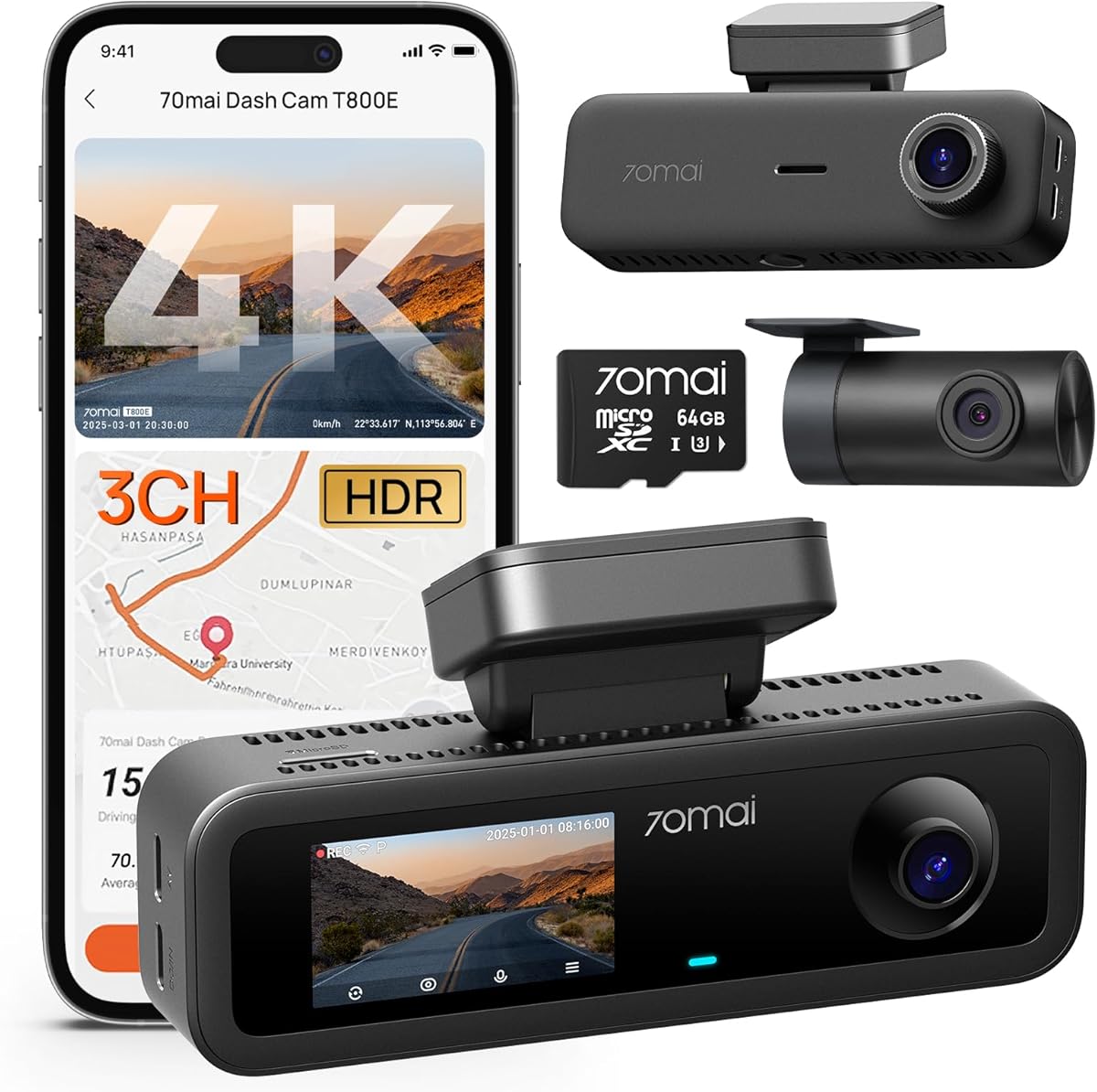
The 70mai T800E is a well-rounded three-channel alternative that records 4K footage through the front camera and 1080p footage through rear and interior cameras. Its 4.5 rating reflects strong buyer approval, and the inclusion of a rear camera, cabin camera, GPS, Wi-Fi 6, voice control, night-vision functions, and a 64GB memory card creates a generous feature set.
We may earn a commission when you buy through this link, at no additional cost to you.
The T800E’s standout specialty is the cabin camera. Its switchable infrared mode can provide clearer interior recordings in complete darkness, while HDR imaging and three-dimensional noise reduction support visibility during nighttime driving. The front camera uses an F1.55 aperture and ultra-wide lenses, while the system as a whole is aimed at drivers who want road, rear, and interior evidence. It is particularly relevant to rideshare and taxi drivers, although cabin recording raises privacy considerations that owners should understand before enabling it.
The 70mai app provides file transfers stated at up to 10MB/s, and built-in GPS supports five modes for location, speed, and route tracking. Voice control can take photos, begin recording, or lock important footage. Loop recording and G-sensor emergency lock help preserve incidents, and cards up to 512GB are supported. Parking monitoring requires a compatible hardwire kit, and the product does not support 4G connectivity.
Another positive feature is the super capacitor, which is specified to maintain stable performance from 14°F to 140°F and avoids the use of a conventional lithium battery for that purpose. The T800E is a strong fit for users wanting three perspectives, strong night recording, and an included card. It is less suitable for anyone who specifically requires a Garmin camera or cellular remote access.
Switchable infrared gives cabin-camera users a useful option for dark conditions. It can improve the visibility of the passenger compartment, although it should be used with awareness of passenger privacy and applicable recording rules.
The super capacitor is designed for stable operation across a wide temperature range, while GPS and Wi-Fi 6 support convenient file handling, location data, and route tracking through the phone app.
We may earn a commission when you buy through this link, at no additional cost to you.
The galphi 4K Dash Cam combines a 4.3 rating with a 4K resolution, 160-degree field of view, 5GHz Wi-Fi, and a screen-free compact body. It is especially compelling for drivers who want modern recording specifications without a bulky display taking up windshield space. A 32GB memory card is preinstalled, making the camera ready for use without a separate storage purchase.
We may earn a commission when you buy through this link, at no additional cost to you.
Its 4K UHD camera provides a substantial resolution advantage over 1080p and 1440p alternatives, while the 160-degree lens offers broad forward coverage. The F1.6 aperture, wide dynamic range, and super night vision mode are intended to balance exposure and retain detail in darkness, rain, or snow. The lack of a screen may be a positive feature for drivers who want minimal visual distraction, although it also means physical playback is not available on the camera itself.
The 5GHz connection is another meaningful strength. The supplied information states download speeds of up to 8MB/s, which should reduce waiting when transferring 4K video to a compatible phone through the free app. Loop recording overwrites the oldest files as needed, and the G-sensor locks clips after a detected collision. Parking mode records low-frame-rate time-lapse footage, but it requires a Type-C hardwire kit that is not included.
The galphi camera is best for value-conscious drivers who want 4K detail, a compact design, and fast wireless transfers. It lacks rear and cabin cameras, so buyers seeking comprehensive coverage should consider the AProX, T800E, or A800SE. It is also not part of the Garmin Drive ecosystem, so its strongest appeal is hardware value rather than compatibility with existing Garmin devices.
The compact, screenless construction keeps the camera from becoming a prominent dashboard object while still providing 4K recording and a broad 160-degree view of the road ahead.
A dedicated 5GHz connection and transfer speeds stated at up to 8MB/s help reduce the inconvenience of moving high-resolution clips from the camera to a phone.
We may earn a commission when you buy through this link, at no additional cost to you.
The 70mai A800SE delivers 4K front recording, 1080p rear recording, a 3-inch IPS display, Wi-Fi 6, GPS, night-vision features, and ADAS alerts. Its 4.4 rating makes it one of the stronger-rated products in the guide, while the included 128GB card and support for cards up to 512GB give it considerable recording capacity.
We may earn a commission when you buy through this link, at no additional cost to you.
Its flexible rear camera can be adjusted to capture either the road behind or the passenger compartment. That versatility makes the two-camera package useful for documenting rear traffic, parking incidents, and cabin activity. The 4K front camera is well suited to capturing license plates, road signs, and other fine details, while the F1.55 aperture, seven-layer glass lens, and dual HDR are designed to improve nighttime, tunnel, rain, and glare performance.
The A800SE also includes parking mode, time-lapse capture, loop recording, and a G-sensor emergency lock. Wi-Fi 6 transfers are stated to be up to five times faster than traditional Wi-Fi dash cams, and OTA updates help keep the firmware current. ADAS provides lane-departure and forward-collision alerts, but such warnings are supplementary and should never override safe driving practices. Unlike the T800E, this package does not include a dedicated third cabin channel.
This model is a strong recommendation for drivers who want detailed front coverage and a useful rear view without moving to a three-camera system. It is especially convenient for everyday use because the 128GB card is included and the 3-inch screen allows immediate review. Drivers who need a dedicated infrared cabin camera should compare it with the T800E.
The adjustable rear camera can serve two different purposes, giving owners a choice between a traditional rear-facing view and an inward-facing cabin perspective. Installation angle determines which one it captures.
A 4K front sensor, 1080p rear sensor, 128GB included card, and support for larger cards create a useful combination for drivers who retain many continuous recordings and want fewer manual storage interruptions.
We may earn a commission when you buy through this link, at no additional cost to you.
The Garmin Dash Cam Live is the only camera in this guide built around an always-on LTE connection. Its 3.5 rating is the lowest in the comparison, but its defining advantage is clear: drivers can access a live view and share saved video from the Garmin Drive app without needing to be near the vehicle. That makes it the most specialized option for continuous vehicle awareness.
We may earn a commission when you buy through this link, at no additional cost to you.
The camera records 1440p HD video through a 140-degree lens with Garmin Clarity HDR optics. Its connected features include location tracking, theft alerts, parking guard incident notifications, automatic uploads to the secure online Vault, voice controls, and synchronized viewing of up to four dash cams. A microSD memory card is included, so the basic recording setup is ready for use out of the box.
The central compromise is the need for an active LTE subscription. Remote live viewing and always-on connectivity depend on that service, and some vehicles also require Garmin’s separately sold constant power cable for full parking functionality. The camera’s low rating may reflect the complexity, expense, or connectivity demands of the feature set, although the available information does not establish which of these factors buyers considered most important.
The Garmin Dash Cam Live is best for drivers who specifically want to check on a parked or stored vehicle over a cellular connection. It offers more remote functionality than the Wi-Fi-based Garmin alternatives, but buyers should compare ongoing service requirements with the simplicity of a conventional dash cam. For routine driving evidence alone, a Mini 3 or X-series model may be more economical and easier to manage.
The always-on LTE connection is the camera’s defining advantage. Instead of requiring proximity to a local Wi-Fi network, it allows supported remote viewing and sharing through the Garmin Drive app while the vehicle is away.
Location tracking, theft alerts, and parking guard notifications extend the camera beyond its role as a driving recorder. Constant power may still be necessary to support these functions reliably when the vehicle is parked.
We may earn a commission when you buy through this link, at no additional cost to you.
The Garmin Dash Cam X210 is a compact premium camera with 4K ultra HD recording, a 2.4-inch touchscreen, a 140-degree field of view, and a built-in Garmin Clarity polarizer. Its 3.8 rating matches the X310, and the feature list is also extensive, including Vault access, voice commands, parking notifications, remote live view, GPS-stamped incident footage, and driver alerts.
We may earn a commission when you buy through this link, at no additional cost to you.
The touchscreen is one of its most visible advantages. Drivers can adjust settings and review clips directly on the camera, which is useful when a phone is unavailable, the battery is low, or a clip needs to be checked immediately after an event. The 4K capture specification and polarizer support crisp, glare-resistant footage, while GPS location, date, and time information add useful context to saved incident recordings.
Its 140-degree field of view is not as broad as the 67W’s 180-degree lens, and the camera records only the forward view. The most advanced remote functions require a paid Vault subscription, active Wi-Fi, compatible power, and the Garmin Drive app. The X210 also overlaps considerably with the X310, so the choice between those models may come down to current availability, specific feature differences, and the buyer’s preferred ecosystem configuration.
The X210 is a solid choice for someone who wants a compact Garmin with a touchscreen and 4K recording without moving to the more expensive Live model. It suits drivers who regularly inspect footage, appreciate direct physical controls, and want Garmin’s connected services. If remote cellular access is the priority, the Dash Cam Live is the more specialized alternative.
A touchscreen is especially useful for immediate playback and menu changes. It offers a more direct way to confirm camera placement, review an incident, and adjust settings without extracting a memory card.
Voice control, GPS-stamped incident clips, Vault uploads, parking alerts, and synchronized views create a broad feature set. The cost is that remote functionality depends on subscription and network conditions rather than being entirely self-contained.
We may earn a commission when you buy through this link, at no additional cost to you.
Choosing a dash cam involves balancing image detail, physical visibility, recording coverage, storage, parking support, connectivity, and operating conditions. The most valuable camera is the one whose strengths match how and where you drive, rather than simply the model with the longest specification list.
In short, prioritize useful detail and a field of view that matches the vehicle rather than choosing resolution alone.
In short, choose a screen that is easy to operate without becoming a distraction or blocking the road.
In short, add rear or cabin cameras only when their additional evidence and privacy implications genuinely suit your use.
In short, confirm the required power connection and installation method before expecting uninterrupted parking coverage.
In short, decide whether local Wi-Fi transfers are enough or whether cellular remote viewing justifies a service subscription.
In short, confirm whether a card is included, check its capacity, and use a card rated appropriately for the camera’s recording mode.
In short, prioritize polarizer or HDR features if you often drive after dark, but review real-world samples if possible.
In short, treat driver alerts as supplementary assistance and prioritize simple, low-distraction controls.
Install the camera in a legal location that does not obstruct the driver’s view, follow local rules concerning windshield mounting and recording, and confirm the camera date and time before relying on footage as evidence. Clean the windshield and camera lens thoroughly, attach the mount securely, and check the angle after a short drive. For models that support rear or cabin views, aim each camera to capture the intended area and verify the resulting footage in the companion app.
Format a compatible microSD card when the manufacturer recommends it, confirm the camera recognizes it, and test both loop recording and incident locking. Learn the app’s Wi-Fi connection process, file-transfer workflow, parking notifications, and Vault access before relying on them. Any hardwire installation should follow the vehicle manufacturer’s guidance and avoid interfering with airbags, controls, or other safety systems.
Review footage periodically, save important clips before loop recording replaces them, and keep the lens and mount free of dust, condensation, and residue. Do not clean the polarizer or lens with abrasive material. Check storage health, firmware updates, app compatibility, and power connections periodically, and remove the camera or disconnect parking power during unusually long periods without driving to avoid unnecessary drain.
4K can preserve more fine detail, especially when footage is enlarged to read a plate or examine distant road activity. It also creates larger files, requires more storage, and can make transfers over wireless connections slower. A well-tuned 1080p or 1440p camera may still provide useful evidence, so resolution should be considered alongside lens coverage, polarizer or HDR performance, and storage speed.
A wide lens captures more of the surrounding road and may document activity in adjacent lanes or parking areas. Garmin models in this guide use fields of view ranging from 140 to 180 degrees, with the 67W offering the broadest stated angle. Very wide views can stretch objects near the frame edges, so it is useful to compare sample footage and choose a balance between coverage and natural-looking detail.
Core local recording functions generally do not depend on the Vault subscription, but several advanced features do. Remote live view, automatic important-clip storage, parking notifications, and some other connected functions may require a paid subscription, an active Wi-Fi or LTE connection, compatible power, and the Garmin Drive app. Check the current service terms before buying if remote access is a major requirement.
Many parking surveillance features require a stable power connection so the camera can continue operating after the vehicle is turned off. Some models require a compatible hardwire kit, and some Garmin Live installations may require a separately sold constant power cable. The correct method depends on the model and vehicle, so follow the supplied instructions and avoid routing wires in ways that could interfere with safety systems.
A single front-facing camera normally records only the forward view, although a flexible rear camera can sometimes be rotated inward. Dedicated three-channel systems such as the AProX and 70mai T800E provide separate front, rear, and cabin cameras. If you need continuous interior coverage, confirm that a dedicated cabin channel and appropriate night-vision features are included.
Voice control generally reduces the need to reach toward the camera or phone while driving, which can minimize distraction. It is still important to give commands only when the road conditions permit and to keep manual interaction with screens for when the vehicle is safely stopped. The X310 and X210 combine voice commands with touchscreens for convenient configuration.
Most models use microSD cards and loop recording, so older files may eventually be overwritten. Save incident clips to the app, Vault, or another protected location before continuing to drive, and use the original product link to verify current memory-card and sharing requirements. A high-capacity card is useful, but a compatible card with an appropriate speed rating remains more important than capacity alone.
No. Some jurisdictions regulate or prohibit dash cameras, and privacy rules may apply differently to audio recording, driver monitoring, cabin cameras, and workplace vehicles. The supplied Garmin product descriptions specifically note that local restrictions may exist. Drivers should check applicable laws before recording and make sure any device placement does not obstruct safe vehicle operation.
The Garmin Dash Cam X310 stands out as the most feature-rich premium Garmin in the guide, with 4K recording, a 2.4-inch touchscreen, glare reduction, safety alerts, and Garmin’s connected ecosystem. The Mini 3 is the strongest compact and value-oriented option, while the Dash Cam Live is the specialized choice for drivers who prioritize always-on cellular access to a parked vehicle.
The right alternative may depend on coverage rather than brand. The AProX and T800E provide three recording channels, the A800SE balances 4K front footage with an adjustable rear camera, and the galphi model offers a discreet 4K design with fast 5GHz transfers. Prioritize the features that match your actual needs: front-only simplicity, cabin coverage, physical display controls, parking surveillance, or remote viewing.
Before buying, verify the current package contents, memory-card requirements, app compatibility, power needs, and subscription details for any connected features. Product prices, bundles, and service terms can change, so checking the current listing can prevent surprises and help ensure the chosen dash cam fits both the vehicle and the owner’s priorities.