
OREI 4K HDMI Audio Extractor
4.4Editor score
4K at 60Hz passthrough
ARC and optical extraction
CEC passthrough
HDR and Dolby Vision support
Our HDMI Audio Extractor guide compares ten models for ARC/eARC, 4K and 8K video, optical, RCA, 3.5mm audio, setup ease, and compatibility.
An HDMI audio extractor separates digital sound from an HDMI connection so it can reach speakers, amplifiers, soundbars, headphones, or other audio equipment through optical, RCA, or 3.5mm outputs. A capable unit can solve awkward home-theater connections, but the right model depends heavily on source type, video resolution, and audio format.
This guide compares ten extractors across ARC and eARC support, HDMI bandwidth, 4K and 8K compatibility, output options, surround formats, power requirements, and installation considerations. It includes conventional HDMI-to-audio devices for source components as well as ARC-focused models designed specifically to pull sound from a television.
The selections show that the most capable extractor is not automatically the most appropriate one. Entry-level devices may suit a game console or Blu-ray player, while premium models serve advanced displays, receivers, and high-bandwidth gaming setups. Product ratings and prices can change, so confirm current listing details before purchasing.
The products are arranged according to the supplied ranking, with the most versatile option at the top. The editorial badges identify the three products that stand out across the category, while the detailed reviews explain the compromises that matter when choosing between HDMI extraction, ARC conversion, 4K gaming, and surround-sound support.
4.4Editor score

4.2Editor score

4.2Editor score
The table below compares every extractor by its intended audio source, maximum video capability, major output types, and standout technical feature. It is designed to make incompatibility visible before you add a complicated adapter to an existing entertainment system.






The VPFET HDMI Audio Extractor is a straightforward HDMI-to-audio separation device with a 4.1 rating and support for optical, 3.5mm stereo, and HDMI passthrough. Its most useful qualities are its three operating modes, support for digital DTS 5.1 through optical output, and compatibility with common source components that lack a dedicated analog audio jack.
We may earn a commission when you buy through this link, at no additional cost to you.
This unit separates audio from an incoming HDMI signal while continuing to pass video toward a television or projector. It supports HDMI 1.4 bandwidth, HDCP 1.4, and 4K at 30Hz with RGB or YUV 4:4:4. The optical output is intended for DTS 5.1 and digital surround equipment, while the 3.5mm output is restricted to PCM 2.0. Selecting the right mode matters: stereo speakers require 2.0-channel mode, while the optical path is designed around 5.1-channel mode.
The main limitation is that this is not an ARC adapter. A television connected to its HDMI input is explicitly unsupported, and the product cannot pull return audio from a TV's ARC or eARC interface. Its 4K ceiling is also modest, and the supplied information notes that several popular streaming and gaming devices are limited to 1080p with this model. Some sources may require USB power from a 5-volt supply.
It is a sensible pick for a Blu-ray player, game console, disc player, or streaming box connected to older analog or optical equipment. It is less appropriate for a modern 4K television, 120Hz gaming, or a home theater that depends on HDMI return-channel audio. Users who need simple extraction and multiple output modes will appreciate its flexibility more than those requiring current-generation bandwidth.
Use 2.0-channel mode with headphones, powered speakers, or another stereo 3.5mm destination. Use 5.1-channel mode with the optical output, and try pass-through mode if a source produces neither expected video nor audio in the first two settings.
The device is most effective when a media player or console sends audio through HDMI to a display that has no convenient analog output. It avoids the need for an ARC-return setup, although source resolution limitations must still be considered.
We may earn a commission when you buy through this link, at no additional cost to you.
The OREI HDMI Audio Extractor ARC 4K@60Hz combines traditional source extraction with television return-audio support. It holds a 4.4 rating and stands out for 18-gigabit bandwidth, 4K at 50 or 60Hz with YUV 4:4:4, HDCP 2.2, HDMI 2.0b compliance, and simultaneous optical and analog L/R outputs.
We may earn a commission when you buy through this link, at no additional cost to you.
Its audio features provide useful flexibility. Dolby Digital and DTS 5.1 can be downmixed to two-channel PCM for the analog outputs, while multichannel audio can remain available through HDMI and optical connections. ARC support allows the device to work with an ARC-enabled television, making it a stronger option for a modern living-room system than a basic source-only converter. The package includes the extractor, a power adapter, and a user manual.
Video support is especially good for mainstream 4K systems. HDR, HDR10, HDR10+, Dolby Vision, and HLG are listed up to 10-bit color depth, with RGB and YCbCr color spaces supported. One important limitation is that the television or source remote will not control volume on the optical and L/R outputs. The product also stops at 4K rather than extending to 8K gaming bandwidth.
This is a strong general recommendation for someone who wants one device to handle both a source component and ARC television audio. It is particularly useful when analog stereo and optical surround outputs are both needed. It may not be the right choice for an 8K display, a 3.5mm headphone system, or an installation that demands television-remote volume control, but its broad format and HDR support make it an excellent middle ground.
Optical and analog L/R outputs can operate simultaneously, allowing a surround amplifier and stereo system to be connected at once. This is valuable when a room uses separate equipment for television viewing and casual listening.
Support for 4K at 60Hz, 10-bit HDR, Dolby Vision, and HDR10+ covers the visual requirements of many mainstream televisions and projectors. Matching the source, extractor, display, and cable to the same bandwidth standard helps prevent signal loss.
We may earn a commission when you buy through this link, at no additional cost to you.
The OREI 4K@60Hz HDMI Audio Converter Extractor is a source-oriented converter with a 4.2 rating. It combines 4K passthrough, optical and 3.5mm audio outputs, HDMI 2.0b bandwidth, and HDCP 2.2 in a metal housing, making it a durable option for common home and commercial installations.
We may earn a commission when you buy through this link, at no additional cost to you.
Format support is one of its main strengths. Listed audio options include LPCM 2, 5.1, and 7.1 channels, Dolby Digital, DTS 5.1, Dolby Digital+, Dolby TrueHD, DTS-HD Master Audio, Dolby Atmos, and DTS:X. Optical output carries the relevant digital streams, while the analog 3.5mm connection is intended for stereo sound. High-bitrate audio passthrough and CEC bypass are also included.
The specification sheet has notable exclusions. It does not support 1440p at 120Hz, 4K at 30Hz, 1080p at 120Hz, or 1080p 3D at 60Hz, and it has no ARC function. Consequently, it is best treated as a feature-rich converter between an HDMI source and display, not as a way to retrieve television audio from an ARC return path.
The product suits users connecting a Blu-ray player, PS5, Xbox, PC, Apple TV, Fire TV Stick, or Roku device to a receiver that needs optical or analog audio while preserving 4K video. The included dual-voltage supply and international adapter add convenience. It is a strong middle-range choice when source compatibility matters more than ARC, 8K, or high-refresh 4K.
The broad list of supported codecs makes this converter useful for current home-theater sources. Optical output preserves compatible digital formats, while the 3.5mm path provides a simple stereo option for headphones and active speakers.
The metal housing is appropriate for equipment that will remain connected in a living room, media cabinet, or commercial installation. It also reduces reliance on portable adapters for everyday source-to-audio separation.
We may earn a commission when you buy through this link, at no additional cost to you.
The eSynic Professional eARC and ARC Audio Extractor earns a 4.5 rating by concentrating on one specific job: converting television return audio into analog stereo. It supports eARC and ARC input, offers both RCA L/R and 3.5mm outputs, and handles PCM 2.0 at sampling rates up to 24-bit and 192kHz.
We may earn a commission when you buy through this link, at no additional cost to you.
Its strongest use is connecting a television to analog speakers, powered bookshelf speakers, or headphones when the television lacks a convenient 3.5mm jack or RCA output. Audio-status indicators provide a quick way to confirm whether the converter is receiving a signal. USB power supplies the unit, and no software or drivers are required.
This is not a general-purpose HDMI source extractor. It will not accept ordinary HDMI audio from a game console, Blu-ray player, or streaming box, and there is no optical output. It also supports PCM 2.0 rather than Dolby or DTS, so the television must be configured accordingly. These constraints make it less flexible than the multi-output devices higher in the ranking.
The product is an excellent targeted solution for a newer television that exposes eARC but lacks legacy analog audio. It is particularly attractive for late-night headphone listening through a 3.5mm connection. Buyers should confirm that their television actually supports eARC or ARC, identify the correctly marked port, and set its output format to PCM before installation.
The 3.5mm output lets television sound reach compatible headphones without routing it through television speakers. That makes the adapter useful in shared rooms or whenever the built-in speakers are inconvenient or disruptive.
Because the device handles PCM 2.0 rather than encoded surround formats, setup is centered on matching the television's output setting. The status indicators and straightforward power arrangement reduce troubleshooting after the initial configuration.
We may earn a commission when you buy through this link, at no additional cost to you.
The J-Tech Digital JTD18G-H5CH is a 4K 60Hz extractor with optical and 3.5mm outputs. Its 4.1 rating reflects a practical feature set that includes HDMI 2.0, HDCP 2.2, HDR10, CEC, and support for 1080p at 120Hz and 144Hz.
We may earn a commission when you buy through this link, at no additional cost to you.
Digital audio can pass through Dolby Digital and DTS formats, making the optical connection suitable for many AV receivers and powered soundbars. The 3.5mm output supplies stereo audio when the source is configured correctly. This combination allows a single source to feed a display while also feeding a legacy or digital audio system.
The important caveat concerns analog output. This unit does not decode Dolby Digital or DTS for its 3.5mm connection, so the source must be set to PCM audio when that output is used. The listing also excludes Apple TV third-generation model A2843, some Comcast Xfinity boxes, HDMI 1.2 sources, and monitors made before 2005.
It is a good fit for a modern game console, disc player, or media player feeding a 4K display and an optical receiver. It may frustrate users with older hardware or those who need the converter to decode surround audio into legacy stereo. The additional high-refresh 1080p modes also make it useful for displays that do not require 4K at 120Hz.
Optical output supports digital surround formats, while the analog path requires a PCM source. Understanding this distinction before installation prevents the common mistake of expecting DTS or Dolby Digital to become stereo automatically.
Support for 1080p at 120Hz and 144Hz broadens the unit's appeal for compatible gaming monitors. It offers more flexibility than extractors limited strictly to 60Hz output, even when the system does not use 4K gaming.
We may earn a commission when you buy through this link, at no additional cost to you.
The VPFET HDMI eARC Audio Extractor is designed to pull digital television audio from an ARC or eARC port and distribute it through optical and coaxial outputs. Its 4.1 rating, 24-bit and 192kHz support, and dual digital outputs make it useful for connecting modern televisions to older amplifiers and DACs.
We may earn a commission when you buy through this link, at no additional cost to you.
The package includes the converter, a Type-C power cable, a 19+1 HDMI ARC cable, an optical audio cable, and a user manual. Optical and coaxial outputs can serve speakers, amplifiers, DACs, and headphone amplifiers with digital inputs. A dedicated ARC/eARC status indicator provides a quick visual indication of the operating mode.
The product is deliberately restricted in scope. Only a television's ARC or eARC port is supported, and it does not accept ordinary HDMI audio from a console or disc player. CEC is also absent, so remote-control routing and basic HDMI control functions are outside its design. The included television setup notes recommend enabling eARC, turning off the TV speakers, and setting compatible output formats.
This is a good match for a modern television that offers eARC but lacks optical or coaxial outputs, particularly when a legacy digital amplifier or DAC needs access to the sound. It is not the appropriate device for a source-only home theater or for users who require analog RCA or 3.5mm connections. Its bundled cables simplify installation once the television-side settings are correct.
Optical and coaxial outputs make this converter valuable when an older amplifier or DAC has digital input but no HDMI. The two output choices also provide flexibility for matching different rear-panel connections.
The extractor reads return audio from a television's marked ARC or eARC connection. It cannot replace a conventional HDMI-to-audio converter for a game console, streaming box, or Blu-ray player.
We may earn a commission when you buy through this link, at no additional cost to you.
The OREI 8K@60Hz 48Gbps HDMI Audio Extractor is the most comprehensive conventional extractor in this group, combining source extraction, television ARC support, HDMI 2.1 bandwidth, and both optical and 3.5mm audio. Its 4.2 rating reflects a capable and technically broad package, although it requires careful cable matching.
We may earn a commission when you buy through this link, at no additional cost to you.
Video passthrough reaches 8K at 50 or 60Hz and 4K at 120Hz with YUV 4:4:4. It supports 48-gigabit FRL bandwidth, 18-gigabit TMDS bandwidth, HDMI 2.1 features such as ALLM, QMS, QFT, and SBTM, plus HLG, Dolby Vision, HDR, and HDR+. Audio compatibility includes LPCM 2, 5.1, and 7.1 channels, Dolby Digital, DTS 5.1, Dolby Digital+, Dolby TrueHD, DTS-HD Master Audio, Dolby Atmos, and DTS:X.
The extractor includes one HDMI input, one HDMI ARC output, one L/R audio output, and one optical S/PDIF output. ARC is supported, but eARC is not. A television remote cannot control the volume of the extracted outputs, and the supplied information specifically notes that an HDMI 2.1 cable is required. The included auto-switching power supply supports international use.
It is the strongest all-around recommendation for a high-end source connected to an 8K television, 4K 120Hz display, projector, or advanced receiver. It also covers ordinary ARC use when eARC is unnecessary. The main reasons to choose something else are a need for eARC, television-remote volume control, or a compact budget-oriented solution.
Eight 60Hz, four 120Hz, and 18-gigabit TMDS support cover the requirements of contemporary consoles and high-end displays. Every device in the chain, including the cable, must support the intended format for stable operation.
The combination of HDMI source input and ARC output lets the device serve as an extraction hub for a conventional media player while also handling television return audio. Optical, 3.5mm, and HDMI paths provide several ways to reach an audio system.
We may earn a commission when you buy through this link, at no additional cost to you.
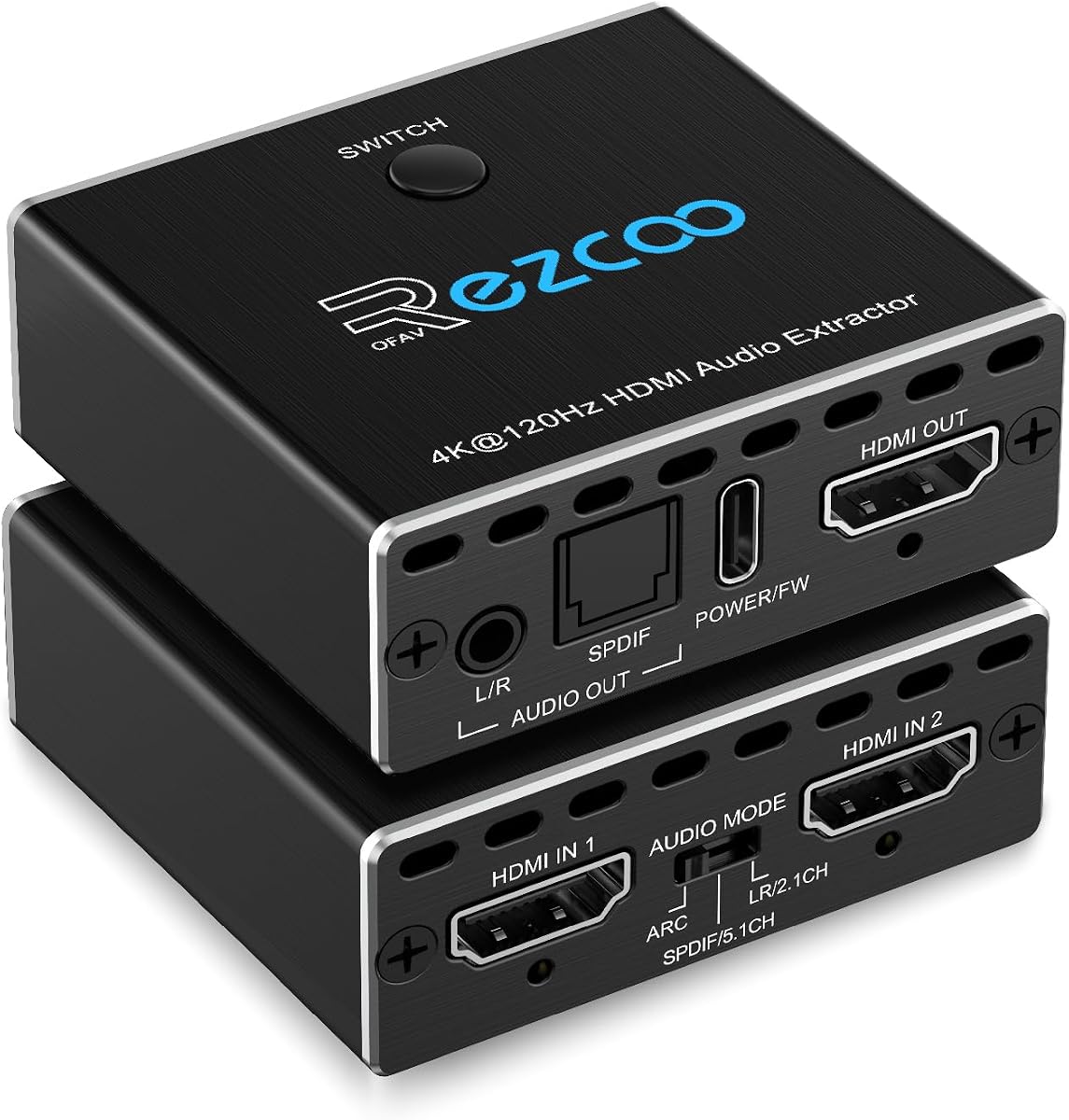
The HDMI 2.1 Audio Extractor Switch 2 in 1 Out has a 5.0 rating and combines source switching with audio extraction. It accepts two HDMI inputs, sends video to one display, and provides HDMI 7.1-channel, optical 5.1-channel, and 3.5mm stereo audio outputs for soundbars, amplifiers, and other systems.
We may earn a commission when you buy through this link, at no additional cost to you.
Its video specifications are unusually broad for a switch-based extractor. The listed modes include 8K at 60Hz, 4K at 120Hz, 1080p at 240Hz, 5120 by 1440 at 120Hz, 4K at 60Hz, 1440p at 60Hz, 3D, HDR, HDCP 2.2, and HDCP 2.3 bypass. Digital audio formats such as DTS:X, TrueHD, and DTS-HD Master Audio are supported through the HDMI output.
There are meaningful limits. The device switches two inputs into one output and does not support one input into two outputs or bidirectional operation. Full digital 7.1-channel audio is available only over HDMI, while optical output is limited to 5.1 channels and 3.5mm to stereo. A qualified HDMI 2.1 cable under 10 feet is recommended for the highest bandwidth modes.
This is a compelling solution for a gaming room with both a PS5 and an Xbox sharing one television, soundbar, and receiver. It removes the need to reconnect cables whenever the source changes. It is less appropriate for someone who needs to display the same source on multiple screens, split a single source to two displays, or route 7.1-channel audio through optical.
Two dedicated HDMI inputs make automatic source switching convenient for console-based systems. A single display and audio chain remain connected, reducing cable changes and simplifying day-to-day operation.
The broad resolution list supports demanding modern displays, including 4K at 120Hz and 8K at 60Hz. Cable quality and source-device support remain essential, since no extractor can create bandwidth that the connected equipment does not provide.
We may earn a commission when you buy through this link, at no additional cost to you.
The HDMI Audio Extractor 8K eARC ARC 4K@120Hz Optical SPDIF RCA Converter offers one of the broadest combinations of video and audio features. It carries a 4.2 rating and supports 8K at 60Hz, 4K at 120Hz, ARC, eARC, optical, RCA, and 3.5mm outputs across three operating modes.
We may earn a commission when you buy through this link, at no additional cost to you.
Pass-through mode mirrors the native audio signal, with optical output supporting multichannel formats. R/L mode downmixes PCM, Dolby Digital, Dolby TrueHD, and DTS-HD into 2.0 PCM and distributes it across the analog and optical outputs. SPDIF mode focuses on premium bitstream surround formats. The analog outputs require PCM input, because encoded formats can produce static hum or digital noise there.
The device supports both conventional HDMI-source extraction and television return audio. In eARC mode, an ARC-capable television connects to the marked HDMI output, while the DIP switch is set to TV mode and CEC is enabled on the television. A 5-volt Type-C connection provides power. One important warning is that a television should not be connected directly to the HDMI input in source mode because that arrangement will not work as intended.
This converter is ideal for an advanced mixed system that must connect a console or media player to a display while also giving a television access to optical, RCA, or 3.5mm audio. It offers more operating flexibility than most rivals, but those modes must be configured carefully. Users should verify source formats, use the appropriate output path, and avoid assuming analog outputs can decode surround streams.
Pass-through preserves native digital streams, R/L mode creates a universal stereo mix, and SPDIF mode is designed around multichannel digital audio. Choosing the correct mode prevents incompatible encoded signals from reaching analog equipment.
Support for 8K at 60Hz and 4K at 120Hz suits contemporary displays, while ARC and eARC expand compatibility with television audio. The source, display, television, and cables must all support the selected format for reliable results.
We may earn a commission when you buy through this link, at no additional cost to you.
The HDMI Audio Extractor Splitter is a compact source converter with a 4.2 rating and a straightforward feature set. It supports 4K at 30Hz, 1080p, 3D, HDMI video passthrough, and synchronized analog R/L audio output, making it a practical budget choice for uncomplicated setups.
We may earn a commission when you buy through this link, at no additional cost to you.
Its purpose is to provide analog audio from HDMI source devices that lack a dedicated audio jack. Listed compatible equipment includes Blu-ray and DVD players, cable or satellite boxes, Roku and Chromecast devices, PS3, PS4, PS4 Pro, PS5, Xbox, Fire TV, HD cameras, and DVRs. The lightweight body and plug-and-play arrangement make it easy to move between a television cabinet, game station, and computer desk.
Its limitations are significant for modern home theaters. There is no ARC or eARC support, and a television is explicitly not supported as the HDMI input source. The 4K ceiling is only 30Hz, there is no optical output, and analog audio is the only extracted path. Some devices with low-power HDMI ports, including certain Sony models, may require the included USB power cable or another suitable power source.
The package includes the extractor, USB power supply cable, an audio cable, a 4K HDMI cable, and a manual. It is a good choice for a console, disc player, or streaming box connected to simple powered speakers or an analog amplifier. It should not be selected for a television return-audio project, 4K gaming, 120Hz displays, or a surround system requiring optical or HDMI digital audio.
The extractor gives analog-equipped audio systems access to sound from many modern source devices. It is especially useful when the source has HDMI only and the amplifier lacks HDMI or optical input.
Its small, lightweight design reduces clutter, and the included power and connection cables cover the basic installation. Users should verify that the source device supplies enough power or connect the supplied USB cable if the unit does not start reliably.
We may earn a commission when you buy through this link, at no additional cost to you.
The right HDMI audio extractor depends on where the sound originates, which display and audio devices you own, and the video and surround formats your equipment supports. Start with the source and destination connections, then verify bandwidth, audio decoding, and control requirements before considering optional features.
Conventional HDMI audio extractors read audio from a game console, Blu-ray player, streaming device, or other HDMI source and send it to optical, RCA, or 3.5mm audio. ARC and eARC extractors perform a different job: they receive television return audio through the television's specially marked ARC or eARC port. A device that sounds ideal for a console may reject a television input, while a TV-only converter may not accept a game console at all. Identify the exact device that will send audio and the exact connector that will receive it before shopping.
Resolution is only one part of the video equation. An extractor advertising 4K should also be checked for supported refresh rates, chroma sampling, HDR formats, and required cable generation. The reviewed range includes 4K at 30Hz, 4K at 60Hz, 4K at 120Hz, and 8K at 60Hz. If you own an 8K television or a console capable of 4K at 120Hz, choose a model explicitly supporting that mode and use a suitable HDMI 2.1 cable. Otherwise, paying for extra bandwidth may offer little practical benefit.
Optical and HDMI digital outputs can carry encoded surround formats such as Dolby Digital, DTS, Dolby TrueHD, DTS-HD Master Audio, Dolby Atmos, and DTS:X when both devices support them. RCA and 3.5mm outputs are analog, and many extractors do not decode encoded surround audio into stereo. Some require the source to output PCM before analog sound will work correctly. Confirm whether you need native surround, two-channel downmixing, or PCM-only conversion, and select the output mode that matches the destination.
ARC can return compressed surround audio from a television to a receiver or soundbar. eARC uses a higher-bandwidth return path and can support lossless multichannel formats, although actual results depend on the television, source, and receiving equipment. Several extractors in this guide support standard ARC, while only a few are designed specifically for eARC input. If your television offers only a basic ARC port, paying for eARC is unnecessary. If lossless return audio is important, both ends of the connection must support it.
Optical output suits AV receivers, soundbars, DACs, and powered speakers with digital inputs. RCA L/R and 3.5mm connections serve analog amplifiers, powered bookshelf speakers, and headphones. Some devices offer all three, while others deliberately provide only one or two. Consider whether you need simultaneous outputs, whether a 3.5mm jack is enough for your headphones, and whether a soundbar requires optical rather than analog audio. More outputs add flexibility but do not necessarily improve the underlying signal.
HDMI extraction can become confusing when the television remote changes the volume on the television speakers but not on the extracted output. Several products explicitly state that television or source remotes do not control optical or RCA volume. CEC passthrough may allow basic source control over HDMI devices, but it is separate from output-volume control. Decide whether you are comfortable adjusting volume on the amplifier or soundbar, and consider models with indicators that make operating status easier to identify.
Some compact extractors draw enough power from the connected HDMI source that no external adapter is needed. Others require a USB connection, a Type-C cable, or a supplied AC adapter. Low-power source ports can cause intermittent operation, particularly with some gaming systems. ARC converters also require television settings to be changed so the TV speakers are disabled or appropriately configured. Reliable installation may involve enabling CEC, selecting PCM, choosing the correct output mode, and using the port marked for eARC or ARC.
A basic extractor normally has one HDMI input and one video output. A two-input switch can accept, for example, a PS5 and an Xbox while sending one selected source to a television. This is convenient in a gaming room, but it is not a general video splitter. Verify whether the product supports automatic switching, whether the switch is electronic or manual, and whether it can drive the intended display. One input to two outputs is a different feature and should not be assumed.
Begin by identifying whether your signal comes from an ordinary HDMI source or a television's ARC/eARC port. Disconnect the equipment before rearranging cables. Connect the source to the appropriate HDMI input, connect the display to the HDMI output, and connect the extractor to the amplifier, soundbar, speakers, DAC, or headphones using the intended optical, RCA, or 3.5mm path. Use the supplied power adapter, USB connection, or Type-C cable as required by the model.
Configure the source and television next. For conventional source extraction, choose the audio format required by the output device; many analog paths require PCM. For ARC or eARC, use the television's marked return-audio port, enable ARC or eARC in television settings, and use a compatible HDMI cable. On a dual-source switch, select the desired input and confirm that picture and sound stay synchronized.
Care for the extractor by keeping it ventilated, dry, and away from crowded cable bundles. Do not hot-plug equipment unless the manual explicitly permits it. When changing modes, power down first, allow the source and display to reestablish a connection, and then raise the volume on the external audio device. If no sound appears, verify the selected mode, output format, power connection, cable routing, and television audio settings before changing equipment.
A conventional HDMI audio extractor receives audio embedded in an HDMI source signal, such as the output from a game console or Blu-ray player. An ARC adapter instead receives television return audio through the television's designated ARC or eARC port. The two devices may look similar, but they generally do not accept the same source connection.
It cannot create Atmos support that the television, source content, and receiving equipment do not already provide. An extractor can pass or convert compatible formats, but a basic analog model may downmix surround audio to stereo. A digital-capable extractor and compatible receiver provide the best chance of retaining surround formats.
The most common cause is an incompatible source format, because many analog outputs require the source to output PCM. Another cause is selecting the wrong extractor mode, such as a surround setting while using a stereo destination. Check the source audio format, the extractor's mode switch, the cable connection, and the receiving system's input selection.
No. The required cable depends on the video mode you intend to use. A basic 4K at 30Hz installation may work with the included or standard HDMI cable, while 4K at 120Hz and 8K at 60Hz generally require suitable high-bandwidth HDMI 2.1 cables. The source, extractor, display, and cable must all support the intended format.
Not automatically. Several extractors explicitly state that a television or source remote will not control volume on the optical, RCA, or 3.5mm outputs. In many installations, volume must be adjusted on the amplifier, soundbar, or powered speakers. CEC can provide basic HDMI control, but it should not be confused with remote volume support.
No. More outputs only matter if the connected equipment can use them. Optical is ideal for many surround systems, RCA serves analog stereo amplifiers, and 3.5mm is convenient for headphones and compact speakers. A simpler device with the correct outputs and compatible formats may be a better fit than an advanced model with unused features.
The source may not be sending compatible audio, it may require external power, or its output format may need to be changed to PCM. Some devices enforce strict HDMI version, HDCP, or resolution requirements. Test the source with a direct HDMI connection, verify its audio setting, and ensure the extractor has a stable power supply.
A two-input, one-output HDMI audio switch can usually do this, with the extractor sending the selected console's picture to one display and its audio to the selected output. Check that the switch supports automatic selection, the intended display mode, and the console's resolution. It does not normally support one source displayed on two separate screens.
The OREI 8K HDMI Audio Extractor is the strongest all-around option because it combines 8K and 4K 120Hz bandwidth with HDMI source extraction, ARC, optical output, 3.5mm output, and broad surround-format support. The OREI 4K ARC Extractor is an excellent premium alternative for a mainstream 4K system that needs ARC, HDR, optical, and analog outputs without paying for 8K bandwidth.
For budget-conscious users, the compact HDMI Audio Extractor Splitter provides a simple way to recover analog audio from a console, disc player, or streaming device. Specialized choices should be matched to their exact role: the eSynic model is a focused PCM converter for television ARC or eARC, the VPFET eARC adapter targets digital optical and coaxial equipment, and the two-input HDMI switch is ideal for sharing one display between two gaming sources.
Before buying, verify the source type, television and audio-system ports, required resolution, refresh rate, audio format, remote-control behavior, and power method. Product ratings, listings, and prices can change, so check the current Amazon page and compatibility notes before ordering. The right extractor is the one that fits the entire signal path without asking unsupported devices or formats to do more than they can.