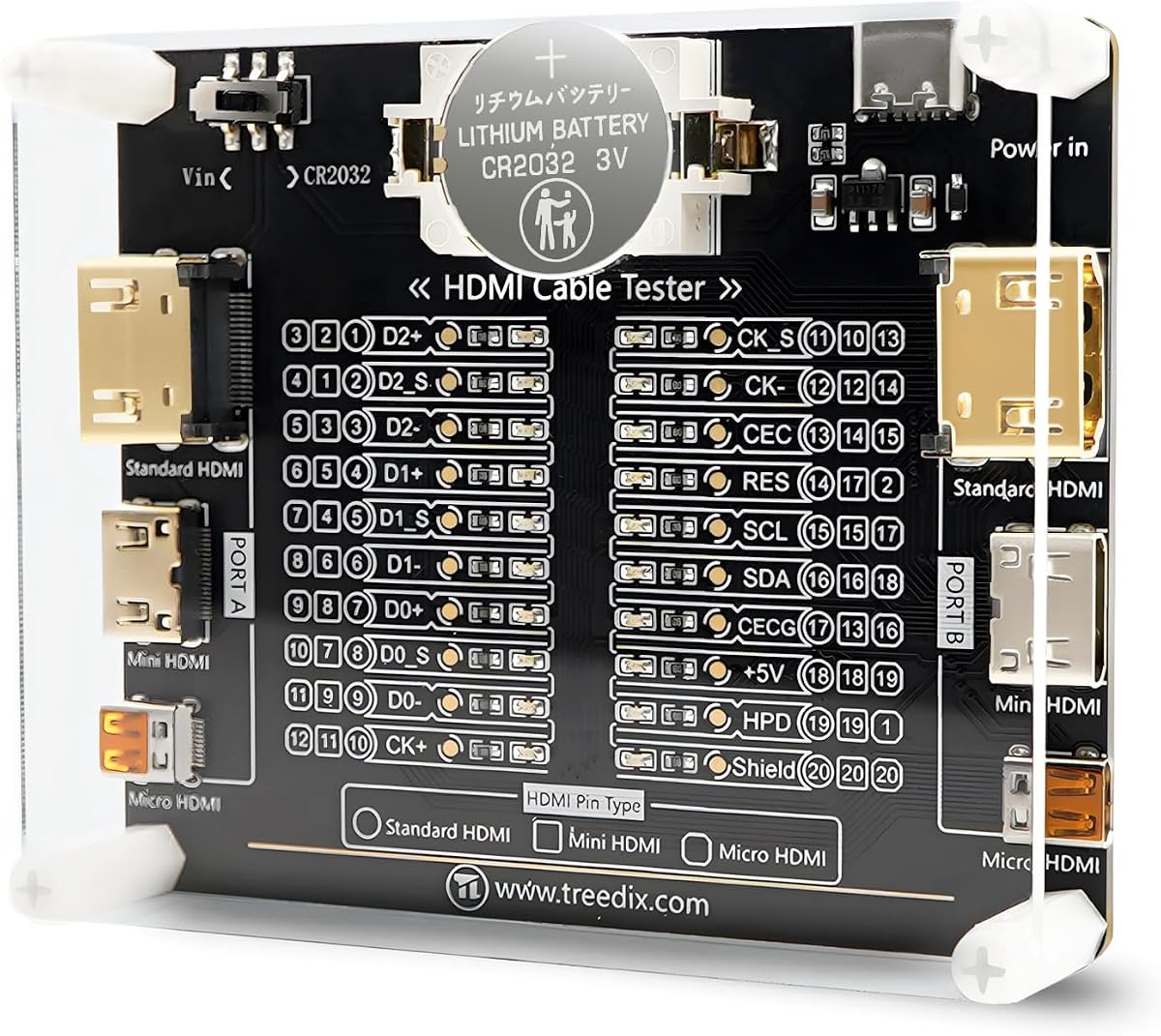
Treedix Cable Tester Board
4.6Editor score
Twenty individual pin indicators
Supports three HDMI formats
Battery or external power
Protective acrylic housing
Our HDMI Cable and Port Tester guide compares ten models for wire fault detection, signal testing, connector support, displays, portability, and ease of use.
An HDMI cable and port tester helps reveal broken conductors, crossed wires, short circuits, poor connections, and unexpected signal problems without requiring a display or advanced network diagnostic equipment. The right model depends on whether you need basic continuity checks, detailed pin status, active signal generation, or a visible audio and video test screen.
The ten products in this guide were compared using their stated testing capabilities, supported interfaces, display methods, power options, portability, and intended diagnostic applications. The list includes simple LED-only continuity testers, portable boards, professional multi-interface instruments, signal generators, and display analyzers for more advanced troubleshooting.
Each review explains what the tester is best suited to identify, along with relevant limitations and ideal users. Ratings reflect the supplied customer feedback, while current prices, availability, and retailer details can change, so readers should confirm the latest listing information before purchasing.
4.6Editor score

4.4Editor score

4.5Editor score
The comparison highlights the most important differences among the ten testers, including supported cable types, diagnostic depth, visual feedback, power requirements, and the kinds of technical work each device is designed to handle.


The HDMI Tester Portable High Definition Network Cable Tester Checker has a 4.4 customer rating and combines basic HDMI continuity testing with RJ45 network-cable diagnostics in a compact package. It supports HDMI 1.2V through 2.0V, standard Type A and Mini Type C connectors, and scans as many as 19 internal wires for opens, shorts, and incorrect ordering.
We may earn a commission when you buy through this link, at no additional cost to you.
Its strongest feature is flexibility for everyday troubleshooting. The remote unit stores alongside the main body, so the kit is easier to carry than a tester with a separate full-size remote. Power can come from one 1.5V AAA battery or a phone USB charger, reducing dependence on proprietary power supplies, while the network function uses rotating LEDs to show whether RJ45 conductors are connected correctly.
The limitations are important for installers with demanding expectations. LED indicators are less informative than a graphical pin map, and this unit is primarily a continuity and wiring-order tester rather than an active signal generator. It also cannot tell you whether a cable works at a particular 4K resolution or HDCP mode, and the stated battery and charger are not included.
This is a strong choice for home users, IT support staff, and installers who regularly encounter suspect HDMI or Ethernet leads and want a single inexpensive tool for both. It is less suitable for display engineers who need active video analysis, but for fast physical fault detection, it offers an unusually useful combination of functions and simple controls.
Adding RJ45 testing makes this device useful beyond an entertainment setup. A technician can move from a no-picture HDMI complaint to a network drop without carrying separate continuity tools, while the compact remote supports work across desks, racks, and wall cavities.
The nineteen-wire scan is practical for locating opens, shorts, and misordered conductors. It answers the question of whether the cable is electrically intact before the more difficult question of whether every high-bandwidth signal mode is supported.
We may earn a commission when you buy through this link, at no additional cost to you.
The Treedix Cable Tester Board for HDMI Continuity & Condition Check carries a 4.6 rating and specializes in showing the condition of individual HDMI conductors. Its 20 LED indicators correspond to the cable pins, making it easier to understand where a short or open occurs and how the line sequence compares with the expected configuration.
We may earn a commission when you buy through this link, at no additional cost to you.
The board supports HDMI versions 1.0 through 2.1 and accommodates standard Type A, Mini Type C, and Micro Type D interfaces. That unusual combination of connector formats makes it useful for a broader mix of legacy and mobile-device cables. It can also work with cables of any length, although results still depend on the quality of the cable and the test environment.
Power can be supplied by a battery or a 3–12V external source, and the stated reverse-connection protection for the Vin input adds practical safeguards. A separate acrylic housing is included to protect the exposed board during storage and transport. As a board-style instrument, though, it lacks the polished enclosure and intuitive display of a finished handheld tester.
This model is a compelling pick for repair technicians, electronics hobbyists, and anyone who wants pin-level information rather than a single pass or fail result. It is also appropriate for HDMI cable fabrication and troubleshooting. Those needing active resolution or HDCP testing should move up to a signal generator or display analyzer instead.
Twenty dedicated indicators make the board more informative than a tester with only a handful of status lights. A technician can associate a failed light with a specific pin and use that clue to investigate a damaged connector or internal conductor.
Support for Type A, Mini, and Micro HDMI expands the board beyond the most common full-size cable. It is particularly useful for mixed collections of modern displays, compact computers, cameras, and mobile accessories.
We may earn a commission when you buy through this link, at no additional cost to you.
The Jonard Tools HDMI-100 HDMI Cable Tester for HDMI and Mini HDMI Cables, Black has a 4.4 rating and is built around precise electrical fault diagnosis. It evaluates HDMI cables for shorts, open circuits, and incorrect wire pairings, with dedicated scan and full-display modes for viewing individual or collected test results.
We may earn a commission when you buy through this link, at no additional cost to you.
The detachable remote is central to its usefulness. It allows testing of installed or very long cables without forcing the main unit into an awkward position. Compatibility extends across HDMI 1.2V, 1.3V, 1.4V, and 2.0V, including Mini HDMI, while the stated testing reach extends to cables as long as 500 meters.
It is still a continuity-focused instrument, not a video pattern generator. You can determine whether internal wiring is correct, but the tester does not promise to negotiate every display mode or HDCP configuration. A 9V battery is required for operation, which is easy to overlook when planning field work, although it avoids dependence on a wall charger during mobile jobs.
The HDMI-100 is a strong choice for professional installers, AV service technicians, and anyone working with long cable runs behind walls, desks, or racks. Its combination of precise wire diagnostics, detachable remote access, and clear result modes makes it more specialized than a generic multi-cable toy without going into active signal analysis.
A removable remote is more than a storage convenience here. It lets the user reach the far end of a long or fixed installation while keeping the main display or control unit accessible for interpreting the result.
Scan mode can reveal connections one at a time, while full display mode presents the tested connections together. Switching between them makes it easier to isolate a single failed conductor or review the cable as a whole.
We may earn a commission when you buy through this link, at no additional cost to you.
The Monoprice HDMI Signal Generator and Display Analyzer has a 4.0 rating and represents a different approach from continuity-only instruments. It can operate as an HDMI signal generator or a display emulator and analyzer, allowing technicians to test signal behavior rather than merely checking whether conductors are present.
We may earn a commission when you buy through this link, at no additional cost to you.
A four-pin DIP switch controls video resolution and HDCP content, and the device supports 4K at 60Hz in 4:4:4 and 4:2:0, 4K at 30Hz in 4:4:4, and 1080p at 60Hz. HDCP can be turned off or configured for version 1.4 or 2.2, with four different test patterns available for HDCP versions.
The tradeoff is scope. It is designed around signal compatibility and display behavior, so it does not replace a continuity tester when the immediate goal is locating a short, open conductor, or crossed wire. Users also need to understand resolutions, chroma formats, and HDCP settings to interpret its configuration options properly.
Choose this model for display troubleshooting, installation verification, compatibility testing, or bench work where actual video signal generation matters. It is best suited to technically experienced users who need to reproduce specific output conditions, not someone who merely wants to check whether a short HDMI lead is electrically sound.
Supporting several 4K configurations, 1080p output, and multiple HDCP versions lets a technician reproduce common source-to-display conditions. That makes the generator useful for checking how a system behaves under a chosen mode.
Using the same product as a generator or display analyzer can streamline a test bench. One device can provide a controlled output or stand in for a display when narrowing down a source, cable, or display problem.
We may earn a commission when you buy through this link, at no additional cost to you.
The HDMI Cable Tester Portable High Definition Network Cable Tester Checker has a 3.9 rating and offers an approachable way to test both HDMI and RJ45 cables. It supports HDMI 1.1 through 2.0, scans as many as 19 wires, and identifies short circuits, open circuits, and incorrectly ordered conductors.
We may earn a commission when you buy through this link, at no additional cost to you.
Fast scan and full display modes let users choose between quicker status checking and a more complete visual assessment. The automatic shutdown after 10 minutes of inactivity is a thoughtful feature for a portable tool, helping preserve battery life when it is left on a workbench or temporarily set aside during a job.
The principal limitation is connector coverage. It supports full-size HDMI Type A rather than the Mini format offered by several competitors, so technicians working with a mixed inventory may need to keep another tester nearby. Its 3.9 rating also places it behind the stronger-reviewed models, although the listed features remain useful for routine physical diagnostics.
This is a sensible option for household users, office IT staff, and installers who want HDMI and network testing without navigating a complicated instrument. It is particularly useful for general-purpose kits where simplicity and automatic power management matter more than support for every connector format.
Fast scanning suits routine checks, while full display provides a broader visual summary. The separation can make the device convenient for both quick triage and a more deliberate cable inspection.
Automatic shutdown after inactivity removes a common source of frustration with portable electrical tools. It is especially helpful for users who may leave the tester connected while gathering tools or moving between jobs.
We may earn a commission when you buy through this link, at no additional cost to you.
The MFL. Detachable Professional Cable Tester, Multi-Interface Audio Line Checker, HDMI Type-C USB RCA BNC Testing Device with LED Indicators, Black has a 4.5 rating and is built for technicians who work with more than one kind of cable. Its ports cover XLR, HDMI, USB, RCA, BNC, TRS or jack connections, Type-C, and RJ11.
We may earn a commission when you buy through this link, at no additional cost to you.
A ten-way switch and LED indicators organize testing across audio, video, and network leads. The detachable design supports separate working modes and split testing, which is valuable when the cable ends are in different rooms, racks, or equipment cabinets. The metal housing, clearly labeled ports, and protected controls also give it a more workshop-oriented feel.
Its breadth is both strength and complication. A user working only with HDMI may find a dedicated HDMI tester simpler, and the range of modes may take time to learn. The device is also more substantial than a pocket continuity checker, making it better suited to a tool bag or service kit than minimal everyday carry.
For mobile AV technicians, installers, and repair professionals who routinely encounter several connector types, this tester can reduce the number of dedicated tools required. It is a particularly good fit for users who need HDMI diagnostics alongside XLR, RCA, USB, BNC, or analog audio checks.
Supporting XLR, RCA, BNC, TRS, USB, Type-C, RJ11, and HDMI lets a technician diagnose several common connectivity failures with one device. That breadth can simplify preparation for mixed AV and data installations.
The two-piece configuration is useful when the ends of a cable are not near each other. It supports a practical workflow for installed systems, backstage equipment, control rooms, and service racks.
We may earn a commission when you buy through this link, at no additional cost to you.
The UT681 HDMI Cable Tester, Portable Mini HDMI to HDMI, High Definition USB Cable Tester, for Check Disorder Short Open and Cross Connection has a 4.8 rating, the highest listed score in this group. It provides rapid analysis of nineteen HDMI wires and identifies short circuits, disconnections, mis-sequencing, and other physical faults.
We may earn a commission when you buy through this link, at no additional cost to you.
Compatibility includes standard Type A and Mini Type C interfaces across HDMI 1.2V, 1.3V, 1.4V, and 2.0V. Its two operating modes are a scanning mode based on on-off detection and a full display mode that illuminates all 20 LED groups to present overall status, while the indicator zones help highlight abnormal points.
Field-oriented details add to its appeal. A separate transceiver permits one-person operation, the listed body weight is about 175 grams, and the stated temperature tolerance spans -10°C to 50°C. A low-battery warning appears below 7.2V, and the device powers off automatically after 10 minutes without work.
This tester is an excellent choice for field technicians who want more granular fault feedback than a simple yes-or-no continuity tool. It does not cover RJ45, active video signals, or HDCP negotiation, but for locating physical HDMI wiring faults in a compact and portable form, its high rating and detailed indicators are compelling.
By showing abnormal points within LED zones, the tester gives users more clues than a single pass or fail result. Those clues can help distinguish a localized conductor issue from a connector or termination problem.
The separate transceiver, low-battery warning, automatic shutdown, broad temperature tolerance, and manageable weight reflect deliberate consideration of mobile repair work. The result is a tool designed to travel and remain usable across changing work environments.
We may earn a commission when you buy through this link, at no additional cost to you.
The Parts Express HDMI Cable Signal Tester has a 4.3 rating and focuses on the status of individual video-signal components. It connects through DVI-F and HDMI-F connectors and can help diagnose the cause of color shift, sparkle, or a missing picture without relying on a connected television.
We may earn a commission when you buy through this link, at no additional cost to you.
Its practical advantage is the ability to place the tester at either the source or display end. That flexibility can help determine whether a fault belongs to the cable, the source output, or the display input. The simple component status readout is more approachable than a dense pin-by-pin interface for basic troubleshooting.
The tool does not cover modern connector families as comprehensively as several competitors. It uses female DVI-F and HDMI-F connections rather than Type A, Mini, or Micro HDMI, and its diagnostics focus on signal components rather than providing a broad wire-by-wire fault map. It also may not offer the advanced resolution and HDCP controls found in a signal generator.
Parts Express is most useful for technicians or advanced home users who know the source and display architecture and want a lightweight way to inspect video-component status. It is less appealing for broad cable repair work where varied HDMI connector support and precise conductor mapping are priorities.
The tester is designed around symptoms users can see, including color shift, sparkle, and missing imagery. Displaying component status offers a more targeted diagnostic step than simply observing that a screen remains black.
Placement at either the source or display end helps narrow the location of a fault. Moving the tester between positions can reveal whether the issue follows the source, display, or connection path.
We may earn a commission when you buy through this link, at no additional cost to you.
The HDMI Cable Tester & RJ45 Network Cable Tester Tool Portable High Definition Multimedia Interface RJ45/cat5 cat5e cat6 cat6a UTP Ethernet LAN Wire Continuity Checker holds a perfect 5.0 listed rating. It combines HDMI and RJ45 testing in a portable two-unit format designed for quick cable screening.
We may earn a commission when you buy through this link, at no additional cost to you.
The HDMI side supports versions 1.2V through 2.1V and scans up to 19 wires for shorts, opens, and incorrect ordering through a standard Type A connector. The network side is intended for RJ45 cables associated with Cat5, Cat5e, Cat6, and Cat6a UTP Ethernet or LAN wiring, using rotating lights to confirm proper conductor connections.
A 9V battery or phone USB charger provides operating power, and the remote stores on the side of the main unit for convenient transport. The design remains limited to full-size HDMI and basic physical continuity. It does not evaluate 4K timing, HDCP, audio compatibility, or actual network throughput, so its excellent rating should not be interpreted as support for advanced signal analysis.
This model is a strong pick for network administrators, office technicians, and homeowners who maintain both entertainment and Ethernet connections. The broad listed category support and two-power-source convenience make it more versatile than an HDMI-only LED checker for everyday IT work.
A single tool that checks both HDMI and RJ45 cables simplifies common maintenance kits. It is useful for offices and homes where display leads and network cables fail for similar physical reasons and need quick preliminary diagnosis.
Rotating LEDs indicate correct RJ45 connections, while the HDMI scan identifies the location of common conductor faults. Although simple, these indicators are effective for separating a damaged lead from a deeper equipment problem.
We may earn a commission when you buy through this link, at no additional cost to you.
The STEREN Handheld, Portable, HDMI Tester with HD LCD Display and Audio has a 4.5 rating and provides visible full-color audio and video output. It is intended for technicians checking set-top box installations without needing a television, while also offering a 19-pin continuity check.
We may earn a commission when you buy through this link, at no additional cost to you.
Three HDMI ports provide enough flexibility for continuity work and connecting a source device to the tester. The display automatically scales resolutions, and the built-in screen can also be used to inspect a channel lineup, making this more than a basic wire checker. Its patented handheld format and internal 2300mAh battery are designed for mobile service work.
Durability is a major selling point. The screen is described as resistant to dust, water, shattering, and scratches, while a hybrid silicone-rubber and plastic housing adds shock protection. The unit is larger and heavier than simple LED testers, and its visible display focuses on 1080p rather than offering the 4K mode controls seen in dedicated signal generators.
STEREN is best for installers who need to confirm that a source produces a picture and sound, particularly when a customer television is unavailable or inconvenient. It is also valuable for continuity checks. Users focused on modern 4K standards or advanced HDCP troubleshooting should consider the Monoprice signal generator instead.
The full-color LCD provides immediate visual confirmation that audio and video are present. This is useful during first-time setup, source replacement, and service calls where bringing a display would be awkward.
A ruggedized housing, protected screen, handheld format, and rechargeable battery make the tester suitable for field use. The stated three-to-four-hour battery runtime gives technicians a practical window for common installation and diagnostic tasks.
We may earn a commission when you buy through this link, at no additional cost to you.
The right tester depends on the fault you need to diagnose, the connectors you use, and the level of detail required. A simple continuity checker may solve a broken-wire problem, while active signal tools are better for resolution, HDCP, and display compatibility issues.
A continuity tester checks whether the internal conductors of a cable are connected correctly. It can identify opens, shorts, crossed connections, and wire-order errors, but it generally cannot confirm that a cable carries a particular 4K resolution or successfully negotiates HDCP. A signal generator or display analyzer produces controlled video signals and can help investigate those higher-level compatibility problems. Start with the physical fault if the picture is absent, flickering, or intermittent after movement, and consider active signal testing if the cable passes continuity but the image remains wrong.
Most full-size HDMI cables use Type A, but Mini Type C and Micro Type D appear in cameras, compact computers, tablets, and portable displays. The most broadly useful tester supports all three, while several options in this guide cover only Type A. Check the actual connectors found in your equipment rather than relying on the broad term HDMI. Remember that testing a Type A cable does not mean the tester can physically accept a Mini or Micro plug without an appropriate adapter.
Simple pass and fail lights are adequate for deciding whether a cable should be replaced, but individual pin indicators can save time when repairing a custom cable. Look for a mode that identifies which conductor is shorted, open, or incorrectly sequenced. A full-display mode can be particularly helpful when reviewing all connections together, while scanning mode supports faster initial triage. The UT681 and Treedix board are examples that emphasize more granular LED information.
For a cable running through a wall, ceiling, or equipment rack, a detachable remote is valuable because the two ends may be far apart. The Jonard HDMI-100 can support very long runs, while the UT681 and MFL. devices also use separate transceivers for split-position testing. For short bench leads, a compact board or two-piece pocket tester may be easier to store. Consider where you will work, whether both ends will remain accessible, and whether the stated length range matches your installation.
LEDs communicate continuity, but a full-color display can confirm that audio and video are present. The STEREN tester is designed for that form of visible confirmation. If you need to reproduce a defined output mode, look for resolution and chroma controls instead: the Monoprice generator supports multiple 4K and 1080p output formats, along with HDCP off, HDCP 1.4, and HDCP 2.2. Active features make a device more versatile, but they also increase complexity and cost compared with a basic wire checker.
Portable testers use batteries, USB power, or both. AAA cells are convenient and widely available, while a 9V battery or rechargeable pack may be easier to monitor in a service kit. USB charging can reduce battery waste but requires access to a suitable power source. Also consider physical size, storage for the remote, automatic shutdown, low-battery warnings, and whether the housing will survive repeated transport.
A dedicated HDMI tester may be enough for a display specialist, while a multi-interface tool can save space in a broader technician's bag. The MFL. model supports XLR, HDMI, USB, RCA, BNC, TRS, Type-C, and RJ11 connections. Several HDMI and RJ45 combinations also suit office IT work. More functions are useful when they match your daily workload, but they can add controls and modes that are unnecessary for occasional HDMI troubleshooting.
Consider how you intend to use the tool. A home user may need only to determine whether a suspect cable is broken. A cable fabricator may want pin sequencing and short detection, while an AV technician may need long-cable support, visible media, or controlled signal patterns. Reading the connector list, modes, power options, and stated faults before purchasing prevents the frustration of buying a capable continuity tool when the real problem requires active video testing.
Begin by identifying the connector type and intended test mode. For a conventional continuity tester, connect the main unit to one end of the cable and the remote unit to the other. Ensure both ends are seated fully, turn on the tester, and select the appropriate HDMI or network function. Active signal tools follow a different setup, so read the device instructions before connecting a source or display.
Interpret the indicators in stages. A successful continuity pattern indicates that the relevant conductors are connected correctly, while a missing or abnormal light can point to an open, short, or crossed connection. Pin-by-pin models can narrow the fault to a particular conductor. If continuity passes but the video problem remains, move to a visible display tester or signal generator to investigate resolution, HDCP, or source behavior.
After use, disconnect cables carefully rather than pulling them from the tester by the cable. Keep the device dry, remove the battery during long storage if the manufacturer recommends it, and protect any exposed board with its housing. Clean connectors with a dry, nonabrasive method, inspect the remote and power contacts, and keep current listing details and model instructions accessible so future firmware, supported mode, or accessory information is not missed.
A basic continuity tester usually cannot prove 4K support. It can reveal broken, shorted, or misordered conductors, while some signal generators can test specific 4K formats and HDCP modes. For complete assurance, use an active signal tool and confirm that the source, cable, and display all support the intended resolution and refresh rate.
A continuity tester evaluates the physical wiring inside a cable. A signal generator creates controlled HDMI output so a technician can test source compatibility, resolution, chroma format, and HDCP behavior. The two tools solve different problems and are often complementary in a professional troubleshooting kit.
No. Many models support only full-size Type A connectors, while some add Mini Type C or Micro Type D. Check the exact connector list and the cable's physical plug shape before purchasing, especially if you work with cameras, compact computers, tablets, or portable displays.
A detachable remote makes testing easier when the cable ends are far apart or fixed in place. It lets the user reach the remote end while keeping the main unit accessible for reading results. This is particularly useful for installed cables running through walls, ceilings, racks, or large audiovisual rooms.
Only models with RJ45 support can check Ethernet wiring continuity and conductor order. They can identify common opens, shorts, and miswiring, but they do not necessarily test network throughput, packet loss, PoE, or application performance. A dedicated network analyzer is required for those deeper measurements.
An HDMI connection contains 19 signal and return conductors. A 19-wire or 19-pin check examines those individual paths for continuity, shorting, or incorrect order. It provides a much more detailed result than simply confirming that a cable produces a picture, although it still does not validate every advanced video capability.
Choose an LED tester for quick physical wire diagnosis, especially when repairing cables or troubleshooting intermittent connections. Choose an LCD model when you also need to verify that audio and video are present without connecting a television. LCD and signal-generating devices are generally more useful for installation verification and source testing.
Continuity testers do not, because they analyze the cable directly. The STEREN model also provides a built-in display for checking source audio and video without a television. Active generators and analyzers may still require a source, display, or emulator depending on the test being performed.
The Jonard Tools HDMI-100 stands out for professional continuity work, detailed wire-pair diagnostics, scan and display modes, and its detachable remote for long or installed cables. The Treedix board is the strongest budget-focused alternative when detailed pin indicators and support for Type A, Mini, and Micro HDMI are priorities, while the MFL. Professional Cable Tester is the most versatile premium option for technicians who also service audio, USB, network, and other connector types.
For routine home and office repairs, the HDMI and RJ45 combinations are more useful than a single-purpose device because they can screen both display and Ethernet wiring. The UT681 is worth considering for detailed field diagnostics, the STEREN for visible audio and video confirmation, and the Monoprice when controlled 4K, 1080p, and HDCP signal testing is more important than pinpointing a broken conductor.
Before buying, match the tester to the connector types, cable lengths, and fault categories you encounter most often. Then confirm the current listing, included accessories, power requirements, and supported modes, since prices and product details can change. A tool that fits the actual work environment will be more valuable than one with a long feature list you never need.