Treedix HDMI Continuity Test Board
4.6Editor score
Checks shorts and open circuits
Supports HDMI 1.0–2.1
Twenty individual pin indicators
This HDMI signal tester guide compares cable checkers, signal generators, analyzers, and display testers for diagnosing cables, signals, and HDCP issues.
An HDMI signal tester can reveal whether a troublesome connection comes from a damaged cable, unsupported signal mode, HDCP mismatch, or another issue in a display setup. The right device ranges from a simple continuity checker to a portable signal generator with a color display or a professional analyzer.
We compared the listed products by their intended testing function, supported HDMI standards, connector coverage, resolution capabilities, diagnostic detail, portability, and user-friendly design. The guide includes inexpensive cable checkers, multifunction tools, display testers, and advanced generators for both 4K and 8K workflows.
Each pick below highlights the product's most useful capabilities and the situations in which it makes the most sense. Ratings and specifications reflect the supplied product information, while prices and availability can change, so compare the current listing and required features before purchasing.
4.6Editor score

4.0Editor score

The comparison below separates basic continuity checkers from full signal generators, display analyzers, and multifunction diagnostic tools. It highlights the formats, signal standards, output capabilities, and connectivity options that distinguish each product.


The Monoprice HDMI Signal Generator and Display Analyzer combines two useful roles in one device: it can generate a controlled HDMI signal or emulate a display. Its 4.0 rating reflects a broadly capable solution for installers and technically inclined users who need more than a simple cable continuity check. The ability to work in both directions makes it particularly useful when isolating where a problem occurs in a source-to-display chain.
We may earn a commission when you buy through this link, at no additional cost to you.
The DIP switch provides direct control over video resolution and HDCP content, reducing the need for menus or companion equipment. Supported outputs include 4K at 60Hz in 4:4:4 and 4:2:0, 4K at 30Hz in 4:4:4, and 1080p at 60Hz. HDCP can be disabled or configured for version 1.4 or 2.2, while four test patterns are available for different HDCP versions. That combination helps a technician reproduce protected-content behavior and compare how a display responds to different conditions.
Its main limitation is the focus on video. The listed specifications do not mention audio signal generation or detailed audio analysis, making it less appropriate for a bench that must comprehensively validate every part of an HDMI installation. It also tops out at 4K rather than the 8K and 40Gbps capabilities offered by the J-Tech device in this guide. Buyers who need 8K formats, extensive resolution menus, or sophisticated EDID and CEC controls should look further down the list.
Even so, the Monoprice is a strong general recommendation for troubleshooting modern 4K setups, testing HDCP behavior, and confirming whether a source, cable, or display is the limiting factor. It is best suited to users who value focused signal testing and straightforward physical controls over a full professional analyzer interface. For standard 4K residential or installation work, it offers the most balanced combination of generator and analyzer functions here.
The device can select multiple 4K timing formats, color configurations, and HDCP modes. This makes it practical for reproducing a protected-content problem and observing whether a display behaves differently when encryption is enabled or disabled.
Using the unit as either a source or a display emulator lets an installer narrow down a fault by changing one part of the signal path at a time. It is a more functional tool than a checker that only reports internal cable faults.
We may earn a commission when you buy through this link, at no additional cost to you.
The Parts Express HDMI Cable Signal Tester focuses on a narrow but common troubleshooting need: determining whether an HDMI cable or connection is responsible for color shift, sparkle, or a missing picture. Its 4.3 rating and straightforward description make it an approachable option for homeowners, installers, and electronics technicians who want a quick answer before replacing expensive components.
We may earn a commission when you buy through this link, at no additional cost to you.
The tester uses DVI-F and HDMI-F connectors, allowing an HDMI cable to be connected directly for examination. It displays the status of each HDMI signal component, which is more informative than a simple yes-or-no continuity light. The unit can be located at either the source or display end of a system, giving the user flexibility when the cable is already routed through furniture, walls, or other confined spaces.
This is not a full protocol analyzer or signal generator. It does not offer a list of selectable 4K or 8K modes, HDCP configuration, timing analysis, or the broad format coverage seen in professional equipment. Its value lies in speed and portability: a technician can carry it to a wall, cabinet, or display rather than moving the entire source setup.
Choose this tester when the main question is whether a particular cable has a bad conductor, intermittent connection, or another detectable fault. It is also useful as a first-stage diagnostic before moving on to more complex source, display, or HDCP testing. For a compact cable-focused tool with a 4.3 rating, it remains a practical addition to a basic service kit.
Because it checks individual HDMI signal components, the tester can help narrow a visual problem to the cable before a user changes displays, sources, or settings. That makes it an efficient first diagnostic step.
The ability to place the tester at either end of a system is valuable when a cable is permanently routed. Users can test the connection where it is accessible without relocating the source or display.
We may earn a commission when you buy through this link, at no additional cost to you.
The HDMI Tester Portable High Definition Network Cable Tester Checker is a multifunction option for people who also need to inspect RJ45 network cables. Its 4.4 rating indicates a well-regarded balance of practical features, and the combination of HDMI and Ethernet testing can simplify a mixed toolkit without requiring a separate checker for every cable family.
We may earn a commission when you buy through this link, at no additional cost to you.
Its HDMI side scans up to 19 wires and identifies short circuits, open circuits, and incorrect wire order. It supports standard HDMI Type A and Mini HDMI Type C connectors and recognizes cable specifications from HDMI 1.2V through 2.0V. The network side uses rotating LED lights when the wires are properly connected and identifies the corresponding light that does not flash when a fault is present.
Power flexibility is another strength. The main unit can operate with one 1.5V AAA battery or draw power from a phone's USB charger supply. The remote unit stores along the side of the main body, making the package easier to carry, although the supplied information notes that a battery or charger for the RJ45 network-checking function is not included.
This tester is best for technicians who handle both video and network cabling, or for users who want a general-purpose continuity tool rather than a sophisticated signal analyzer. It cannot validate 4K timing, audio, EDID behavior, or HDCP negotiation, so it should be used for wiring faults first. A full installation workflow may then require a generator and analyzer.
The integrated RJ45 function is a practical advantage for IT installers, network administrators, and home technology enthusiasts. It reduces the number of small diagnostic devices needed for common cabling tasks.
Nineteen-wire scanning distinguishes shorts, opens, and incorrect ordering rather than merely showing that a test failed. This helps users decide whether a cable is repairable or should be replaced.
We may earn a commission when you buy through this link, at no additional cost to you.
The STEREN handheld HDMI tester is designed for installation and service work where a technician needs visible confirmation that a set-top box or other source is producing a usable picture. Its 4.5 rating reflects a practical package that combines a full-color LCD, audio and video indication, and cable testing in a rugged enclosure.
We may earn a commission when you buy through this link, at no additional cost to you.
A major advantage is that the tester can display the source's output without requiring a television. This is useful during a new installation because a set-top box can be checked before the primary display is connected or powered. The auto-scaling resolution feature helps present the image on the built-in screen, while the channel-lineup check provides additional value for installers confirming a provider setup.
The unit also supports a 19-pin continuity check and has two HDMI input/output ports for cable testing plus a separate HDMI port for the set-top box. Its tempered glass display is described as resistant to scratches, shattering, dirt, water, and shock, with a hybrid silicone-rubber and plastic housing designed for field use. The rechargeable 2300mAh battery provides approximately three to four hours of use.
The principal limitation is its 1080p-centered display role. It does not offer the extensive resolution testing, 8K bandwidth analysis, EDID controls, or pattern menus found in dedicated signal generators. It is best for verifying a source during setup or checking a displayed image without a TV, not for validating advanced 4K or 8K signal parameters.
The built-in display lets installers confirm that a source produces video and that a channel appears, even before the main television is available. This can streamline initial setup and reduce repeated movement of equipment.
The rugged housing, shatter-resistant screen, and approximately three-to-four-hour battery runtime suit technicians who carry diagnostic tools between job sites. Portability is a core benefit rather than an incidental feature.
We may earn a commission when you buy through this link, at no additional cost to you.
The JTECH-40GA is the most advanced HDMI signal tester in this guide, combining generation and analysis for HDMI 2.1 installations that extend to 8K. Its specification set includes 8K at 60Hz in 4:2:0 with 10-bit color, 40Gbps bandwidth, HDR, RGB and YCbCr formats, and 64 selectable resolution modes. It is built for users who need comprehensive signal validation rather than a basic pass-or-fail cable result.
We may earn a commission when you buy through this link, at no additional cost to you.
Thirty-three built-in test patterns support visual evaluation of color, geometry, and signal stability. The analyzer also tests HDCP 2.3 and 1.4 encryption, LPCM two-channel audio, and external S/PDIF input. Additional capabilities include EDID reading and writing, CEC control, timing and format analysis, InfoFrame analysis, and front-panel control. A 2910mAh rechargeable battery adds portability for field diagnostics.
The supplied data does not provide a customer rating for this model, so it should be evaluated primarily on its documented capabilities and compatibility requirements. Buyers must also consider the sophistication of the interface. Although the features are extensive, the breadth of resolution modes, formats, encryption standards, and analysis functions may exceed what a homeowner or basic cable installer needs.
This is the preferred choice for professional integrators, display engineers, repair facilities, and advanced enthusiasts working with 8K or high-bandwidth HDMI 2.1 equipment. It can help validate an entire signal path, reproduce different source conditions, inspect EDID data, and verify whether a cable or display behaves as intended. For those applications, the depth of the tool justifies the premium positioning.
The combination of 8K60 support, 40Gbps bandwidth, HDR, and 10-bit color makes the JTECH-40GA suitable for current high-end display ecosystems. Its 64 resolution modes and 33 patterns offer a broad range of controlled test conditions.
EDID read and write functions, CEC control, timing and format analysis, and InfoFrame inspection extend the tool beyond basic video generation. These features help professionals reproduce and isolate complex installation behaviors.
We may earn a commission when you buy through this link, at no additional cost to you.
The 2K/4K HDMI Signal Generator, Analyzer and Cable Tester is a broad professional diagnostic device centered on 2K and 4K workflows. Its 4.2 rating accompanies a useful combination of source generation, signal analysis, and cable compliance testing. The 18Gbps, 600MHz specification makes it appropriate for contemporary high-definition installations while remaining focused below 8K operation.
We may earn a commission when you buy through this link, at no additional cost to you.
It can analyze source video, audio, and timing information, providing a more complete picture than a dedicated continuity checker. Scaling from 4K to 1080p allows the generator to accommodate different displays and help test compatibility. HDCP compliance and EDID management are included, giving installers tools relevant to protected content and display handshake issues.
The cable testing function evaluates bandwidth and compliance, which is more rigorous than checking only for an open or short conductor. That makes the device helpful when a cable appears connected but cannot reliably carry the intended signal. It can help distinguish a marginal cable from a source, display, or configuration problem.
This is a strong recommendation for professional installation and service work involving 4K content. It offers a balanced set of generator, analyzer, and cable tools, but it does not advertise 8K, HDMI 2.3, 40Gbps operation, or the large pattern library of the JTECH-40GA. Buyers working strictly with 4K may find its documented focus more practical than a premium 8K platform.
Video, audio, and timing analysis allow the unit to evaluate whether the active signal is behaving correctly. This makes it useful when a connection appears physically intact but the picture or sound is unreliable.
The ability to scale 4K output to 1080p lets technicians test display compatibility across different panels. Cable bandwidth and compliance testing adds another layer of installation assurance.
We may earn a commission when you buy through this link, at no additional cost to you.
The HDMI Cable Tester Portable High Definition Network Cable Tester Checker is an affordable-style multifunction tool covering HDMI and RJ45 cables. Its 3.9 rating is lower than those of several alternatives, so buyers should focus on the documented two-mode workflow and supported connectors. It offers a useful combination of fast scanning and a full display view for basic cable maintenance.
We may earn a commission when you buy through this link, at no additional cost to you.
The HDMI function supports versions 1.1, 1.2, 1.3, 1.4, and 2.0, and scans up to 19 wires to identify short circuits, open circuits, and incorrect ordering. The stated compatibility includes standard HDMI Type A and RJ45 connectors. A fast scan mode supports quick checks, while full display mode provides a more comprehensive view of the results.
An automatic shutdown after 10 minutes of inactivity helps conserve battery power and reduces the chance of leaving the tester on inside a toolbox. These operational details make it a convenient choice for routine maintenance, especially for users who already handle network cabling alongside HDMI installations.
The tester does not support Mini HDMI in the supplied specifications, an important distinction from several competing products. It also does not generate, analyze, or display active video signals, making it unsuitable for validating HDCP, EDID, timing, or audio behavior. It is best viewed as a convenient wiring checker for standard HDMI and network leads rather than a full signal diagnostic platform.
Users can move from a rapid scan to a full display view depending on how much information they need. This flexibility suits both routine checks and troubleshooting a suspected pin-level fault.
Standard Type A HDMI and RJ45 support covers many common leads, but the lack of Mini HDMI makes users with compact camera or embedded cables confirm connector needs before buying.
We may earn a commission when you buy through this link, at no additional cost to you.
The Jonard Tools HDMI-100 is a cable-focused tester with a 4.4 rating and unusually broad length capability. It can evaluate HDMI and Mini HDMI C cables across 1.2V, 1.3V, 1.4V, and 2.0V specifications, with stated testing up to 500 meters. That makes it particularly relevant to installers working with long runs or permanently installed cabling.
We may earn a commission when you buy through this link, at no additional cost to you.
Its detachable remote is a meaningful design advantage. Instead of requiring both tester ends to remain together, the user can place the remote at the far end of a long or installed cable. Scan mode shows each connection as it is tested, while full display mode presents all tested connections together for an overall view.
The tester checks for shorts, open circuits, and incorrect wire pairings at the individual pair level. It does not generate an active display image or analyze resolution, HDCP, audio, timing, and EDID, so it should be used to verify the physical connection before moving to more advanced diagnostics.
A 9V battery is required for operation, which should be considered when stocking the tool in a field kit. Despite that limitation, the Jonard is an excellent choice for cable technicians who need Mini HDMI compatibility, long-cable testing, and the convenience of a removable remote.
Testing up to 500 meters distinguishes the HDMI-100 from compact checkers intended mainly for short leads. It is a better fit for structured cabling and installations where the remote must travel to the opposite end.
The detachable remote and choice between scan and full display modes make results easier to observe in awkward installations. Individual connection testing adds detail to a basic pass-or-fail assessment.
We may earn a commission when you buy through this link, at no additional cost to you.
The UT681 HDMI Cable Tester has the highest supplied customer rating in the group at 4.8, making it a notable choice for users who want detailed cable-fault information in a portable format. It supports standard Type A and Mini Type C connectors and recognizes HDMI cable specifications from 1.2V through 2.0V.
We may earn a commission when you buy through this link, at no additional cost to you.
Its 19-wire analysis scans the core conduction state and identifies short-circuit disconnection, mis-sequencing, and other faults. Separate LED indicator zones show where an abnormality appears, making it easier to understand which conductors are involved rather than merely seeing a failed test. This diagnostic detail is valuable when repairing or terminating a specific cable.
Two operating views support different working conditions. Boot-state scanning uses on-and-off detection, while full display mode synchronizes 20 LED groups to present overall connection status. A low-battery warning appears when voltage falls below 7.2V, and an automatic power-off after 10 minutes without work helps conserve power.
At approximately 175 grams, the UT681 is designed for portable field work and can be operated by one person. Its listed operating temperature range is -10°C to 50°C. It remains a cable tester rather than an active signal generator, and it does not support Micro Type D, so buyers should confirm connector requirements. Within standard HDMI and Mini HDMI testing, however, its rating and clear fault-location features make it an excellent recommendation.
The separated LED zones help users identify abnormal points within a 19-wire interface. This gives more actionable information than a general failure indication and supports troubleshooting and repair.
The lightweight body, broad temperature tolerance, detachable transceiver, and two display modes are well suited to field inspections. A user can complete testing without a second operator or a stationary bench.
We may earn a commission when you buy through this link, at no additional cost to you.
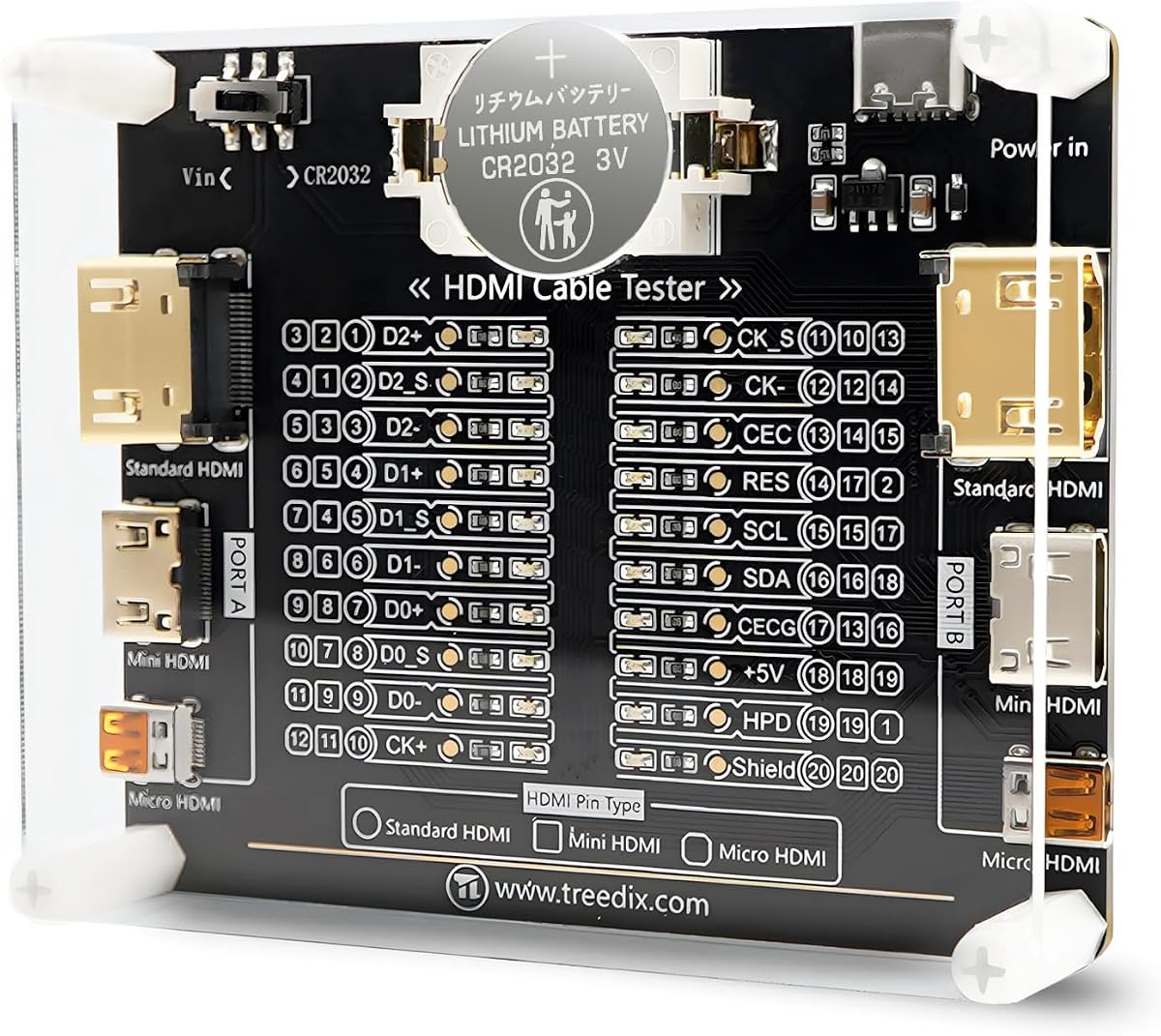
The Treedix Cable Tester Board is an open-style HDMI continuity and condition checker with a 4.6 rating. It provides a direct way to identify internal cable shorts and open circuits, while its 20 LED indicators map results to individual pins. The board design makes the tool visually direct and useful for detailed inspection.
We may earn a commission when you buy through this link, at no additional cost to you.
Its compatibility range is notable. The tester supports HDMI versions 1.0 through 2.1 and accommodates standard Type A, Mini Type C, and Micro Type D connectors. It also claims suitability for cables of any length. This broad interface coverage makes it attractive for repair work involving several cable formats, even though it does not actively generate or analyze a video signal.
Power can come from a battery or an external 3–12V source. The external Vin input includes reverse-connection protection, and the instructions note that the power switch should be set to Vin when using a Type C power supply. The included acrylic housing helps protect the open tester board from damage during transport or storage.
The Treedix is best for users focused on basic cable condition and pin-level continuity rather than active signal compatibility. Its open construction may appeal to repair-oriented users who want direct access to the tester board, although it may appear less finished than a fully enclosed consumer device. For inexpensive-style broad connector testing, it offers a capable and well-rated package.
Support for Type A, Mini Type C, and Micro Type D reduces the need to purchase separate testers for different physical connectors. HDMI 1.0 through 2.1 coverage broadens its relevance across cable standards.
Each of the 20 LEDs corresponds to a pin, making the board useful for checking continuity and understanding individual connections. The open layout and protective acrylic housing balance visibility with basic protection.
We may earn a commission when you buy through this link, at no additional cost to you.
The right HDMI signal tester depends on the faults you need to diagnose, the connectors in use, and whether you require cable continuity, active signal generation, display emulation, or detailed protocol analysis. These factors help separate simple checkers from professional diagnostic platforms.
A cable checker inspects conductors for shorts, open circuits, cross-connections, and incorrect ordering. A signal generator creates a known source output, while an analyzer examines timing, format, audio, HDCP, and other characteristics. A display analyzer or emulator can show whether a source produces a usable image. Advanced models often combine these roles, while compact tools usually concentrate on continuity testing.
Choose based on the problem, not on the broadest list of features. Start with a checker for damaged or intermittent cables; choose a generator and analyzer for active signal troubleshooting.
For an older 1080p installation, a basic display tester or continuity checker may be sufficient. Modern 4K systems benefit from a generator that explicitly supports the required resolution, refresh rate, color format, and bandwidth. The Monoprice and 2K/4K analyzer cover 4K workflows, while the JTECH-40GA supports 8K at 60Hz in 4:2:0 with 40Gbps bandwidth.
Verify every format rather than relying on an HDMI version label alone. Resolution, refresh rate, chroma subsampling, bit depth, and HDCP version must all be supported by the display and cable.
Standard HDMI Type A remains the most common interface, but Mini HDMI Type C and Micro HDMI Type D appear on cameras, compact computers, and other equipment. The Treedix board supports all three, the Jonard and UT681 support Type A and Type C, and the Parts Express tester uses DVI-F and HDMI-F. A mismatch can make an otherwise capable device unusable for the cable in question.
List the physical connectors in your equipment before buying. Also consider cable direction, fixed adapters, and whether the source or display uses a proprietary connector.
Basic LED indicators are often enough to identify a failed conductor. More informative tools report wire order, shorts, opens, and cross-connections, while advanced analyzers add resolution, timing, format, InfoFrame, EDID, and CEC information. Scan mode can show each connection as it is tested, whereas full display mode summarizes the entire cable. The right level of detail depends on whether you are replacing a lead or investigating an installation.
More detail is useful only if you can interpret it. Ensure the tester presents results clearly and includes the information needed for your specific troubleshooting process.
HDCP can prevent a source from displaying protected content when a display, converter, or cable does not authenticate correctly. The Monoprice allows HDCP to be turned off or configured for 1.4 and 2.2, the JTECH supports 2.3 and 1.4 verification, and the 2K/4K analyzer includes HDCP compliance and EDID management. These controls let users reproduce handshake and protected-content behaviors.
If you work with streaming boxes, AV receivers, splitters, or complex display chains, signal generation and HDCP control are more valuable than basic continuity testing. A cable checker cannot reveal an authentication problem.
Field technicians need tools that are easy to carry, protected from impact, and powered for several hours. The STEREN unit offers a rugged handheld housing, rechargeable battery, and approximately three-to-four-hour runtime. The JTECH-40GA also uses a rechargeable 2910mAh battery, while the Treedix board accepts battery or 3–12V external power. Some compact checkers use a 9V battery or an AAA cell, and some include automatic shutdown.
Select a power format that suits your work. Rechargeable tools are convenient for frequent service calls, while replaceable batteries can be more practical where charging infrastructure is limited.
A built-in LCD is valuable when a television is unavailable or a technician needs to see the source image directly. The STEREN tester provides a full-color display with audio and video assurance, while the Monoprice uses a DIP switch to configure output and HDCP settings. Advanced analyzers generally provide front-panel controls and detailed on-screen information. The Monoprice uses a DIP switch to configure output and HDCP settings. The JTECH-40GA provides front-panel control, timing, format, and InfoFrame analysis.
Consider readability, button layout, and how often you will operate the tool. A sophisticated menu is beneficial for specialists but may be unnecessary for a quick cable check.
Basic testers are ideal for occasional cable checks, while multifunction tools serve general IT and installation work. A signal generator and analyzer earns its place when reproducing source conditions, testing multiple displays, validating active signals, or managing EDID. A professional 8K platform serves a narrower but more demanding market involving high-end displays, AV professionals, and complex equipment racks.
Do not pay for complexity you will never use, but avoid a simple checker when the real problem requires active signal validation. Buy for the fault you need to solve.
Begin by defining what you need to learn. For a suspected cable fault, power on the tester, connect the appropriate main and remote units to both ends, and use the indicated scan or full-display mode. Read each pin or connection result carefully. If a short, open, or cross-connection is reported, inspect the connector, strain relief, and cable jacket, and retest before deciding whether replacement is necessary.
For a generator or analyzer, identify the source, display, cable, converter, or splitter involved in the failing chain. Connect the tester according to its role, select a resolution and color format supported by every device in the path, and begin with a conservative mode such as 1080p. Change one variable at a time, including HDCP, resolution, refresh rate, and scaling, so the effect of each setting remains clear.
Protect the device according to its design. Replace loose or obstructed batteries, keep contacts dry, and avoid connecting the tester to voltages outside its specified range. Store open-board models in their housing, use appropriate protection on handheld screens, and clean connectors gently. Recheck a questionable result with a known-good cable or source, and record the test configuration so troubleshooting can be reproduced.
An HDMI cable tester checks the physical conductors for faults such as shorts, open circuits, and incorrect wire order. An HDMI signal generator creates a controlled output that can be used to test a display, cable, extender, switch, or receiver. A full analyzer may also inspect the signal that passes through it. The right tool depends on whether you suspect a damaged lead or an active signal compatibility problem.
Only a tester that explicitly performs bandwidth or signal-generation testing can meaningfully validate high-resolution capability. Basic continuity checkers show whether conductors are connected but do not measure the full data rate. Look for the exact resolution, refresh rate, chroma format, bit depth, and bandwidth supported by the generator or analyzer, and also verify that the actual cable and display meet those requirements.
A cable can have intact conductors while still encountering a bandwidth, signal integrity, or configuration issue. HDCP authentication, EDID handling, unsupported color formats, refresh rates, and converter compatibility can also prevent a picture. Use a continuity tester to rule out physical damage, then use a signal generator or analyzer to test the formats and settings the display supports.
It depends on the cables you use. Standard Type A HDMI is sufficient for most home entertainment equipment, while cameras, compact computers, and some portable devices use Mini HDMI Type C or Micro HDMI Type D. The Treedix board supports all three common forms, whereas some alternatives cover only Type A and Type C. Check the physical connector before ordering.
HDCP controls determine whether protected content is encrypted and which authentication version the tester presents or verifies. This helps reproduce black-screen or restricted-content problems that are otherwise difficult to diagnose. The Monoprice can disable HDCP or select 1.4 and 2.2, while the JTECH-40GA verifies 2.3 and 1.4. Such tools are most useful to installers and technically experienced users.
Some multifunction checkers include RJ45 network cable testing in addition to HDMI continuity checks. The portable HDMI network tester and the HDMI network cable checker in this guide both support this approach. Their network functions use LED indications to identify wiring faults, but they remain cable checkers and do not provide full Ethernet protocol or performance analysis.
No. An advanced analyzer is valuable when you need controlled signal generation, high-resolution validation, EDID management, HDCP testing, or detailed timing information. For occasional checks of a few short cables, a compact continuity tester may be sufficient. The best choice is the least complicated tool that covers your connectors, formats, and troubleshooting tasks.
Disconnect the cable and inspect both connectors for dirt, bent pins, or visible damage. Test the cable again, then try a known-good cable and a different source or display to rule out the tester and other equipment. A reported short or open usually indicates that the cable needs repair or replacement, while a result that changes with movement points toward an intermittent connection.
The Monoprice HDMI Signal Generator and Display Analyzer is the most balanced overall recommendation for 4K troubleshooting, combining source generation, display emulation, several video formats, and HDCP controls. The Treedix test board is the leading budget-oriented choice for basic continuity work, offering broad connector support and clear pin-level indicators. For advanced 8K, 40Gbps, EDID, CEC, and protocol work, the JTECH-40GA offers the deepest feature set.
Prioritize the type of fault you need to diagnose before considering extra functions. A compact continuity checker is enough for many damaged-cable situations, a multifunction model is useful for mixed HDMI and network work, and an active generator or analyzer becomes important when the physical cable appears sound but the display remains unstable. Always match the tool's connector types, supported resolutions, color formats, and HDCP versions to the actual installation.
Current prices and availability can change, so check the current listing and all included accessories before ordering. Some testers require batteries or external power that may not be included, and compatibility details can differ between models. A careful match between the tester, the cable, and the display is the surest path to a useful diagnosis and a smoother installation.