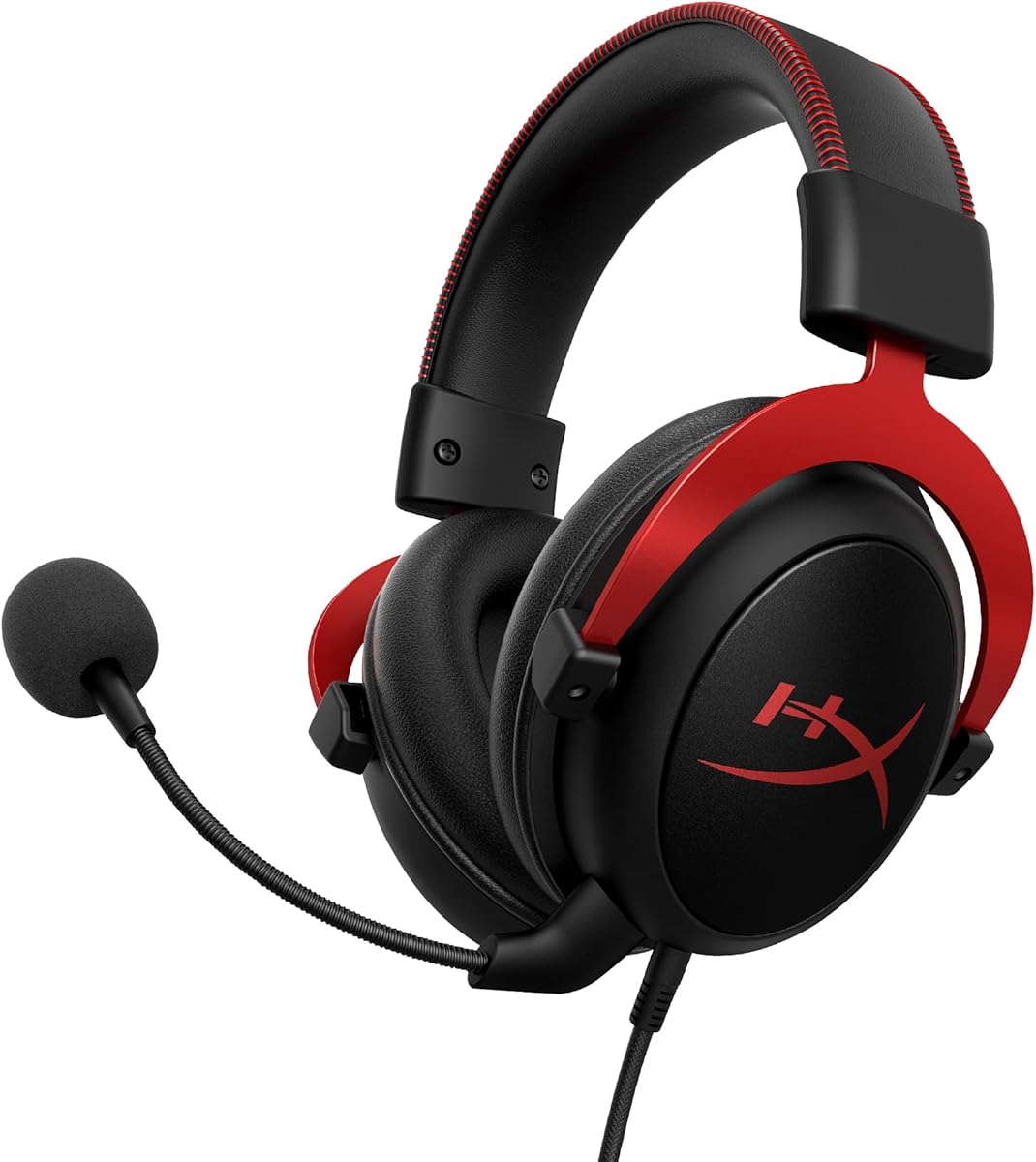
HyperX Cloud II Gaming Headset
4.5Editor score
Hardware-driven 7.1 surround
Detachable noise-cancelling microphone
Memory foam ear cushions
This guide compares the best headsets for Dota 2, covering sound positioning, microphones, comfort, wireless features, and platform compatibility.
A headset for Dota 2 should make every ability cue, team call, and directional sound easier to understand without distracting you during long matches. The best models combine accurate positional audio, a clear microphone, reliable comfort, and controls that work smoothly with your gaming setup.
We compared ten prominent gaming headsets using the supplied specifications, focusing on audio design, driver performance, spatial features, microphone construction, connection options, battery life, and cross-platform compatibility. The list includes wired, wireless, and multi-device models for different play styles and budgets.
Each review identifies the strongest reasons to consider that headset, along with important trade-offs. The top selections showcase the most balanced options for value, everyday competitive play, and premium versatility, although product availability and current prices can change over time.
4.5Editor score

4.2Editor score

4.2Editor score
This side-by-side comparison highlights the major differences in sound positioning, microphone design, connectivity, comfort, and platform support, making it easier to select a headset for Dota 2.




The HyperX Cloud II Gaming Headset earns the top position with a 4.5 rating and a balanced mix of useful gaming features, durable construction, and cross-platform support. Its hardware-driven 7.1 virtual surround is particularly relevant for Dota 2, where learning the direction of footsteps, spells, and neutral creeps can influence decisions before a fight begins.
We may earn a commission when you buy through this link, at no additional cost to you.
Large 53mm drivers provide the underlying sound, while the virtual surround layer is designed to place audio cues more precisely around the player. Memory foam ear cushions and a padded leatherette headband improve comfort during long sessions, and the closed ear cup design limits outside distraction. The detachable, noise-cancelling microphone is certified for TeamSpeak and Discord, giving squad communication a practical foundation.
The main compromises are its wired design and older approach to connectivity. Unlike several newer choices, it does not offer simultaneous wireless and Bluetooth connections, and the cable setup is less flexible for players who regularly switch among PC, console, and mobile devices. These limitations do not undermine its core appeal for a player who primarily uses one computer and values dependable positional audio.
The Cloud II is a strong recommendation for budget-conscious Dota 2 players who want more advanced spatial features than a basic stereo gaming headset. It is particularly well suited to competitive matchmaking and team play, where hearing a callout or locating an approaching enemy can matter. For most people, it offers the clearest balance of sound, comfort, microphone utility, and platform flexibility in this roundup.
The headset's hardware-driven 7.1 surround is intended to improve sound localization on PC and Mac. In Dota 2, that can help distinguish whether an incoming cue originates in front, behind, or beside the player, although familiarity with game audio remains important.
Memory foam cushions reduce pressure during extended matches, while the detachable microphone allows the user to separate gaming and communication functions. The boom mic is noise-cancelling and certified for popular voice-chat platforms.
We may earn a commission when you buy through this link, at no additional cost to you.
The SteelSeries Arctis Nova 5 Wireless is a versatile 4.2-rated headset that stands out for effortless device switching. Its 2.4GHz gaming connection and Bluetooth 5.3 can be toggled with a button, allowing a Dota 2 player to answer a call, listen to media, or move to mobile audio without reconnecting a cable.
We may earn a commission when you buy through this link, at no additional cost to you.
Neodymium magnetic drivers are designed to deliver clear highs, defined mids, and deep bass, while the companion app supplies more than 100 game audio presets. The fully retractable ClearCast 2.X microphone supports 32 kHz, 16-bit audio and disappears cleanly when not needed. On-ear controls provide power, mute, volume, and quick-switch functions without requiring software interaction mid-match.
Sound personalization is a double-edged feature. Presets can be convenient for players who do not want to manage a full equalizer, but they may also encourage assumptions that every game is mixed identically. Dota 2 does not necessarily benefit from the same treatment as an action title, and a player with good hearing may prefer neutral settings or a restrained bass boost. Battery life and wireless freedom also depend on volume, feature use, and operating conditions.
This is an excellent choice for players who regularly move between a gaming PC, phone, and other Bluetooth devices. It offers enough audio detail for Dota 2, dependable team communication, and a comfortable wireless format without moving into the most advanced multi-device category. For a flexible daily setup, the Nova 5 Wireless is one of the strongest recommendations here.
The one-button transition between 2.4GHz and Bluetooth is useful during breaks from Dota 2. Notification beeps can alert the player to incoming calls, while the compact USB-C dongle provides a straightforward PC connection.
The magnetic drivers offer a detailed sound profile, and the retractable ClearCast 2.X microphone provides a cleaner alternative to a fixed boom. Together, they support both directional awareness and practical team coordination.
We may earn a commission when you buy through this link, at no additional cost to you.
The Logitech G Astro A50 is the most connection-focused premium headset in the lineup, with a 4.2 rating and support for three simultaneous platforms. PlaySync switching allows a player to move among PC or Mac, PlayStation, Xbox, and Nintendo Switch systems through USB-C, making it well suited to a household that shares devices.
We may earn a commission when you buy through this link, at no additional cost to you.
Its 40mm Pro-G graphene drivers emphasize separation, location, and timing accuracy, all of which are useful qualities for interpreting Dota 2's layered soundscape. The 24-bit LIGHTSPEED connection is designed for uncompressed wireless audio, while the 48 kHz full-bandwidth boom microphone targets articulate communication. Bluetooth dual-device mixing can also bring Discord calls or music into the game sound.
The sophistication comes with practical considerations. The headset uses a magnetic charging dock, which keeps it ready but requires dedicated desk space. Its 24-hour stated playtime is shorter than the endurance offered by several battery-focused alternatives, and the broad feature set may feel excessive for a player who only uses one PC. The included 7-core DSP also stores advanced sound shaping on the headset when switching systems.
Despite those trade-offs, the A50 is ideal for someone who wants one high-end headset to serve PC and console gaming. The combination of simultaneous connections, precise Graphene drivers, high-quality voice capture, mixing, and advanced control software makes it a strong premium recommendation for a Dota 2 setup that spans multiple devices.
PlaySync can maintain connections to three platforms at once, reducing the need to repeatedly reconnect cables. On-ear controls make it simple to change the active system before or after a Dota 2 match.
G HUB and G App provide 10-band parametric EQ, microphone settings, noise gating, and stream output mixing. These controls let a player create a consistent profile for Dota 2 while retaining flexibility for other games and media.
We may earn a commission when you buy through this link, at no additional cost to you.
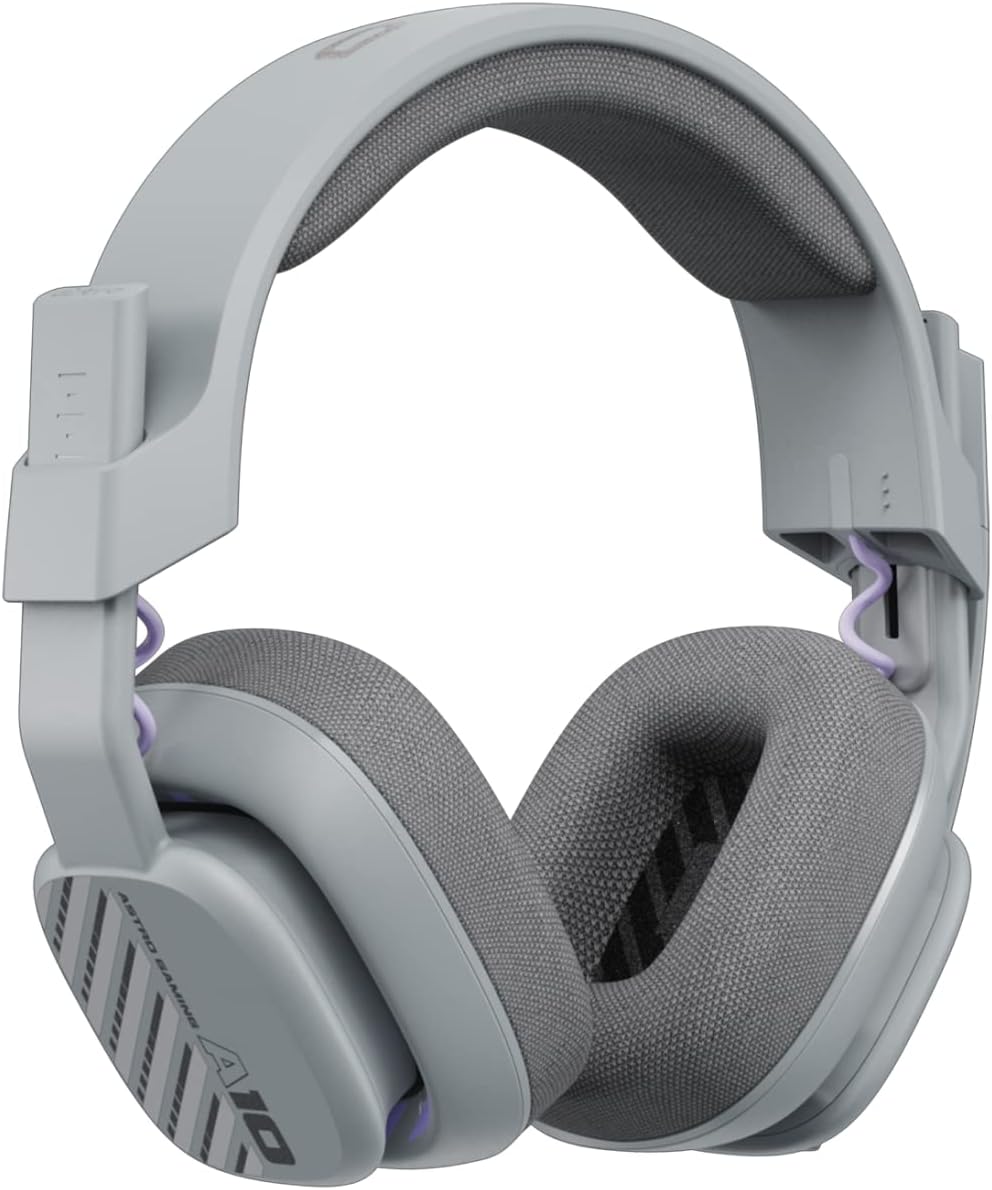
The Logitech G Astro A10 Gen 2 provides a straightforward route into gaming audio, with a 3.8 rating, a wired connection, and broad platform compatibility. It supports PC, Mac, current and previous generations of Xbox and PlayStation, Nintendo Switch, VR, and streaming applications.
We may earn a commission when you buy through this link, at no additional cost to you.
Custom-tuned 32mm dynamic drivers are designed to deliver game and teammate audio with clarity and precision. A 6.0 mm unidirectional microphone uses a familiar flip-to-mute mechanism, while the removable headphone cable includes inline volume control. That simplicity can be useful in Dota 2 because players can adjust sound without leaving the match or opening a companion application.
The main limitation is the absence of dedicated surround processing or advanced wireless features found elsewhere in the guide. Its supplied rating is also lower than those of the other products, and smaller drivers may not provide the same depth or separation as larger premium units. Even so, the A10 focuses on clarity, straightforward operation, and platform support rather than elaborate audio software.
This headset makes sense for budget-conscious players who want a reliable wired headset and may share devices across PC and console ecosystems. It is also attractive because the ear cushions and headband pad are replaceable, extending the useful life of the product. Dota 2 players seeking uncomplicated team communication and broad compatibility will find it easier to recommend than fans of simulated surround sound.
The removable cable's inline volume control gives quick access to audio adjustments without navigating menus. This is especially convenient during a Dota 2 session when the player wants to fine-tune communication or game sound immediately.
Replaceable ear cushions and headband padding reduce the need to replace an otherwise functional headset when comfort components wear out. That makes the A10 a practical choice for regular, long-session use.
We may earn a commission when you buy through this link, at no additional cost to you.
The Logitech G PRO X 2 Lightspeed combines pro-oriented design with detailed wireless audio, earning a 4.2 rating. Its 50mm Graphene drivers focus on low distortion and capturing a wider soundscape, which helps Dota 2 players distinguish subtle cues such as footsteps, actions, and spell effects.
We may earn a commission when you buy through this link, at no additional cost to you.
LIGHTSPEED provides a stated battery duration of up to 50 hours and a 2.4 GHz range of up to 30 meters. Bluetooth and a 3.5 mm auxiliary cable broaden the connection options, while the detachable cardioid boom microphone uses Blue VO!CE technology for focused voice pickup. DTS Headphone X 2.0 adds 7.1 surround processing for greater perceived positional and distance awareness.
Its feature density means some users may not need every function. Console compatibility includes limitations, including USB wireless stereo only for PlayStation 4 and docked wireless stereo for Nintendo Switch. Battery claims also depend on operating conditions, and the detachable microphone adds another component to manage. Most importantly, spatial processing is an interpretation layer rather than a guarantee that every sound will be easier to locate.
The PRO X 2 is a compelling choice for a player who values clean audio, wireless freedom, and a serviceable microphone. It is especially suited to PC-based Dota 2 sessions that also include voice chat and media use. For competitive players willing to learn the available controls, the combination of driver quality and spatial tools offers a refined experience.
The 50mm Graphene drivers are built to minimize distortion while reproducing a broad range of game sounds. That detail can make quieter cues easier to notice, although familiarity with Dota 2's audio mix remains essential.
LIGHTSPEED and Bluetooth cover wireless needs, while the included 3.5 mm cable offers a direct fallback. This makes the headset adaptable to a PC-only setup or a broader collection of gaming devices.
We may earn a commission when you buy through this link, at no additional cost to you.
The SteelSeries Arctis Nova 7P Wireless Gen 2 is a refined 4.3-rated option for Dota 2 players who want detailed sound, wireless endurance, and useful team communication. More than 200 game-specific presets can provide quick starting points, while 360-degree spatial audio support creates a broader soundstage for movement and ability cues.
We may earn a commission when you buy through this link, at no additional cost to you.
The custom-designed neodymium drivers target clear, high-fidelity audio with deeper detail than a simple stereo headset. Simultaneous 2.4 GHz and Bluetooth connections allow PC game audio and mobile audio to be mixed together. The ClearCast Gen 2 microphone can reduce background noise by as much as 25 dB, helping separate voice communication from nearby keyboard clicks, fans, and ambient room sound.
Battery life is stated at more than 50 hours, with optimized USB-C fast charging adding further convenience. On PC, Sonar AI can enhance the noise-rejection experience. As with other heavily software-supported headsets, the best results depend on configuration, and a game preset should not be treated as a substitute for personal audio preferences. The supplied specifications also do not list a standard wired gaming option, which may deter some PC users.
The Nova 7P is a strong all-around recommendation for a player who alternates between Dota 2, mobile communication, and other wireless devices. Its balanced emphasis on audio detail, noise-rejecting voice capture, comfort, and battery life makes it particularly appealing for long sessions and regular squad play.
More than 200 game-specific presets give users a broad starting library, while the GamingTrend-oriented control experience places game-specific adjustments within reach. Players can still refine the result based on personal hearing and preference.
ClearCast Gen 2 is designed to suppress keyboard, fan, and room noise. That processing is particularly helpful when Dota 2 teammates need concise callouts during chaotic fights.
We may earn a commission when you buy through this link, at no additional cost to you.
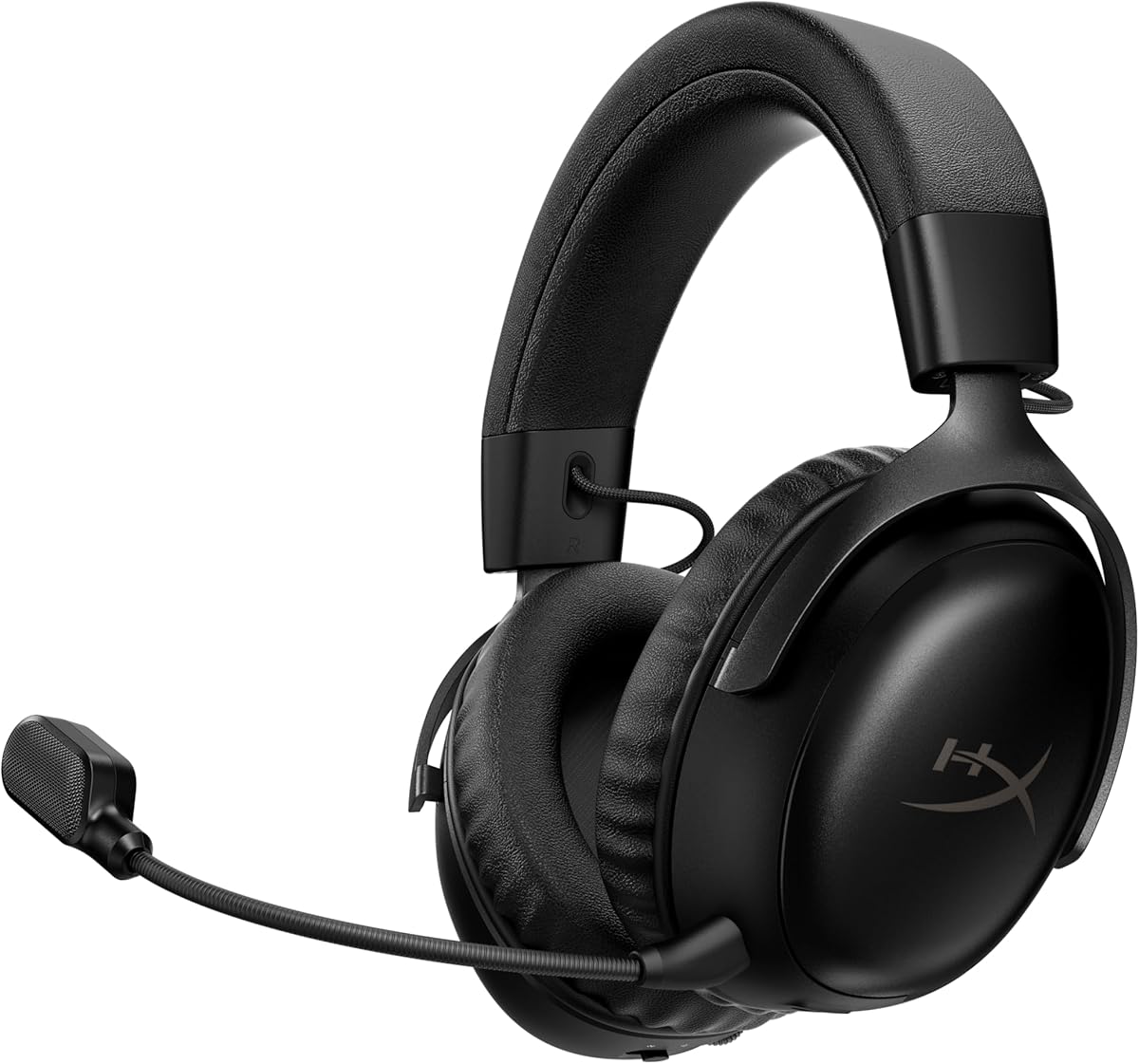
The HyperX Cloud III S is defined by extraordinary stated battery endurance and broad wireless compatibility. It can deliver up to 120 hours of gameplay over 2.4 GHz and up to 200 hours in Bluetooth mode, making it a strong fit for players who regularly game for long periods or dislike charging headsets often.
We may earn a commission when you buy through this link, at no additional cost to you.
Angled 53mm drivers were tuned by HyperX engineers to emphasize dynamic gaming sounds, and a lifetime activation of Spatial Audio on PC adds virtual 3D sound localization. The detachable 10mm boom microphone includes an LED mute indicator and a built-in mesh filter. For Dota 2, the combination of detailed drivers and optional spatial processing can help make team fights and approaching threats easier to distinguish.
The included connections cover PC, Mac, PlayStation, Nintendo Switch, mobile devices, and Bluetooth, with both USB-A and USB-C connectors represented. Instant Pair supports select OMEN gaming laptops without a dongle. Some features are less universal, however: the listed spatial activation is specifically for PC, and customizable magnetic earcup plates are sold separately. Battery figures may also vary with volume and feature use.
The Cloud III S is an excellent recommendation for a player who prioritizes endurance, modern connectivity, and a comfortable over-ear fit. It may be especially appealing for mobile-heavy schedules, since Bluetooth mode extends the interval between charges. For a dedicated Dota 2 setup, the PC spatial tools and detachable microphone complete a versatile package.
A stated 120-hour 2.4 GHz runtime means charging can become infrequent for regular players. The longer Bluetooth runtime adds further flexibility for travel, mobile use, and lighter communication sessions.
USB-A and USB-C connectors make it easier to connect the headset across PCs, Macs, consoles, phones, and tablets. The 2.4GHz and Bluetooth modes also provide a clear division between low-latency gaming and everyday media.
We may earn a commission when you buy through this link, at no additional cost to you.
The SteelSeries Arctis Nova Pro Omni is the specification-heavy flagship of this group, carrying a 4.4 rating and Hi-Res wireless certification. Its 96 kHz, 24-bit wireless audio is designed to preserve more detail with less compression over low-latency 2.4 GHz or Bluetooth connections.
We may earn a commission when you buy through this link, at no additional cost to you.
OmniPlay is the defining feature. The headset can connect to up to five devices, switch among PC, PlayStation, Xbox, Switch, and other supported sources, and mix as many as four audio feeds. That makes it an unusually complete solution for a Dota 2 player who uses a gaming PC alongside a console, phone, or streaming setup. The ClearCast Pro microphone adds AI Noise Rejection across platforms, while active noise cancellation reduces distracting background sound.
The enhanced Hi-Res Neodymium magnetic drivers extend the intended frequency range and take inspiration from the Arctis Nova Elite. As with other high-end wireless audio, actual benefits depend on source quality, connection stability, and listening preferences. The wide device support also demands more setup and may require cables that occupy additional desk space. It is unnecessary for a player who only games on one wired PC.
For a buyer seeking the most advanced all-in-one solution, the Nova Pro Omni delivers on connection flexibility, communication clarity, and high-resolution wireless sound. It is a particularly compelling Dota 2 choice for a multi-device battlestation, although simpler and more compact models may serve single-system players better.
Supporting up to five connected devices and four-source mixing gives the headset exceptional flexibility. A Dota 2 player can keep PC, console, and mobile audio available without relying on separate output hardware.
The 96 kHz, 24-bit certification targets less compression and greater detail, while active noise cancellation limits environmental intrusion. Together, they support a more controlled and immersive listening environment.
We may earn a commission when you buy through this link, at no additional cost to you.
The ASUS ROG Delta II Wireless combines broad connectivity with a notably light 318g design, making it an appealing choice for players who want a premium over-ear headset without excessive weight. Its 4.3 rating reflects a well-rounded combination of audio, battery life, and cross-platform support.
We may earn a commission when you buy through this link, at no additional cost to you.
The 50mm titanium-plated diaphragm drivers deliver high-resolution 24-bit, 96 kHz audio over 2.4 GHz, while the detachable 10mm boom microphone uses a super-wideband frequency range for voice detail. DualFlow allows a connection over 2.4 GHz and another over Bluetooth at the same time, so users can move between Dota 2, a console, and mobile calls more easily.
Compatibility covers PC, Mac, PlayStation, Xbox, Nintendo Switch, mobile devices, and handheld systems. A stated battery life of up to 110 hours applies to 2.4 GHz use with RGB off, and a short charge can add 11 hours of play. The D-shaped ear cushions and adjustable headband are designed for extended sessions, but their shape may not suit every wearer, and wireless high-resolution performance depends on transmitter conditions.
The Delta II is best for a player who wants detailed wireless sound, strong voice capture, and long battery life in a lightweight package. It is a particularly attractive choice for mobile and handheld gaming as well as PC, giving the headset relevance beyond a single Dota 2 setup.
At 318 grams, the headset reduces the bulk associated with many premium wireless models. Ergonomic D-shaped cushions and an adjustable headband are intended to preserve comfort during longer play sessions.
Bluetooth, 2.4 GHz, and 3.5 mm wired modes provide a useful connection hierarchy. The 2.4 GHz mode unlocks the listed 24-bit, 96 kHz audio capability for compatible PC and gaming use.
We may earn a commission when you buy through this link, at no additional cost to you.
The HyperX Cloud Stinger 2 is a lightweight PC-focused option with a 4.2 rating. It combines 50mm drivers with DTS Headphone:X Spatial Audio, giving Dota 2 players access to virtual positioning without moving into a large multi-device or premium broadcast-microphone system.
We may earn a commission when you buy through this link, at no additional cost to you.
The over-ear construction helps with isolation and comfort, while rotating earcups make it easier to rest the headset between matches. Its swivel-to-mute microphone offers a straightforward way to control communication, reducing the chance of accidentally transmitting background noise. The supplied feature list emphasizes essential gaming attributes rather than elaborate customization.
Its scope is narrower than that of most competitors here. The product is specifically identified as PC compatible, and the supplied information does not highlight wireless connectivity, console switching, advanced noise rejection, or a detachable microphone. Spatial processing can also require a balance between immersion and a natural stereo presentation, depending on the player's preferences. Its 50mm drivers are still designed to deliver a fuller sound than smaller basic gaming headsets.
The Cloud Stinger 2 is a sensible choice for a PC-only Dota 2 player seeking spatial audio, a light frame, and uncomplicated voice controls. It may not satisfy someone who switches frequently between platforms or needs advanced wireless features, but it covers the core requirements of directional game audio and team communication with a focused design.
DTS Headphone:X Spatial Audio expands the presentation beyond conventional stereo, helping players consider the direction of footsteps and spell effects. Its effectiveness improves as the player learns Dota 2's recurring sounds.
Rotating earcups and a swivel-to-mute microphone keep everyday handling simple. These features are useful during quick Dota 2 sessions where comfort and immediate communication control matter more than extensive configuration.
We may earn a commission when you buy through this link, at no additional cost to you.
The right Dota 2 headset should reveal useful audio cues, transmit team communication clearly, remain comfortable through extended sessions, and fit the way the player uses their computer. Sound quality, connectivity, microphone performance, and platform support deserve the most attention.
Prioritize a clear, controlled soundstage over exaggerated bass. A headset that makes every low-frequency effect louder may hide quieter cues, so balanced tuning is usually more useful for competitive play.
Choose a microphone that works with the player's communication setup and voice-chat platform. A secure boom, clear mute indication, and comfortable positioning can matter more than a long specification list.
Comfort is personal, so consider weight, ear-cup shape, headband padding, and heat buildup. A breathable or replaceable cushion can be valuable for players who game daily.
Check the included dongle, connector type, and device support before choosing wireless. A 3.5 mm connection can provide a useful fallback when the preferred platform or transmitter changes.
For daily competitive play, long stated battery life reduces interruptions. For occasional sessions, USB-C charging and a quick-charge function may matter more than the maximum runtime.
Choose the simplest platform coverage that meets actual needs. Multi-device support adds convenience but can also create setup complexity, extra cables, and more demanding charging requirements.
Look for adjustable options without expecting every preset to suit Dota 2. Start with a balanced profile, learn the game's audio cues, and make small changes based on personal comfort.
Consider both durability and repairability. A sturdy frame, detachable microphone, replaceable pads, and available connection cables can be more valuable than a short list of extra features.
Begin by installing the headset's companion software and updating it before configuring audio for Dota 2. Choose the correct Windows output device, confirm the microphone as the recording input, and test a neutral preset. Adjust the game and voice-chat volumes separately, then verify every direction with a known sound rather than relying only on music or videos.
For a wireless model, charge the headset before long sessions, keep the receiver unobstructed, and use 2.4 GHz for gaming when low-latency wireless is the priority. Reserve Bluetooth for calls and media if the headset supports both modes. For wired models, connect the appropriate plug fully and avoid hanging weight from the cable; use inline controls or a detachable boom where available.
Clean the ear cushions and microphone gently, and keep moisture away from the drivers and charging contacts. Store wireless headsets on a stand or in a protective pouch, coil cables without sharp bends, and replace worn cushions or pads when supported. Periodic cleaning and careful storage help preserve comfort, sound consistency, microphone performance, and the useful life of the headset.
It is helpful but not strictly required. Spatial processing can make footsteps, spells, and other directional cues easier to interpret, but the game's sound design and the player's familiarity remain decisive. A clear stereo headset can work well, while a surround or spatial model provides extra tools for learning the map and distinguishing more subtle cues.
A wired headset is simple, consistent, and easy to connect to a gaming PC. Wireless is preferable when cable-free play, mobile use, or quick device switching matters more. For competitive Dota 2, use a low-latency 2.4 GHz connection when the headset offers one, and verify compatibility with the selected USB transmitter before purchasing.
A clear unidirectional or cardioid boom microphone, dependable physical mute control, and noise rejection are the most useful elements. A detachable microphone is convenient for storage, while integrated processing can reduce keyboard clicks and room noise. The best choice is still one that produces natural speech at a comfortable volume without requiring constant adjustment.
Yes, even in single-player modes, a gaming headset can make ability effects, enemy movement, and environmental cues easier to understand. The priority shifts toward comfortable construction, accurate audio, and a microphone for party communication rather than advanced wireless switching. A simpler wired model may be entirely sufficient.
It depends on the model and the connection method. Several products in this guide explicitly support PC, PlayStation, Xbox, Nintendo Switch, and mobile devices, but wireless functionality can vary by platform. Check the full compatibility list and confirm whether console use requires a specific USB adapter, analog connection, or reduced feature set.
Moderate bass can add impact to attacks and abilities, but excessive low frequency may obscure footsteps, voice cues, and quieter effects. Start with a balanced preset, reduce bass if important details become difficult to hear, and use any equalizer controls cautiously. Clear midrange and controlled treble are generally more useful for competitive awareness.
Replacement depends on use, skin contact, and material condition. Some models, including the Logitech G Astro A10, have replaceable cushions and headband padding. Replace worn cushions when comfort declines, the seal becomes inconsistent, or the surface begins to crack, especially if regular use causes heat or moisture buildup.
It is advisable to install and update the relevant software before configuring the headset. This allows the user to select the correct device, test the microphone, choose a sound profile, and check for firmware updates. After that, the headset can usually retain its normal functions without requiring software to remain open during every match.
The HyperX Cloud II stands out as the most balanced overall choice, combining hardware-driven 7.1 surround, a detachable noise-cancelling microphone, memory foam comfort, and broad platform support. The SteelSeries Arctis Nova 5 Wireless is ideal for quick switching between gaming and mobile devices, while the Logitech G Astro A50 offers the most premium multi-system connection experience.
Players with different needs may prefer other selections. The Cloud III S prioritizes exceptional battery endurance, the Nova 7P balances detailed wireless audio with noise-rejecting communication, and the PRO X 2 emphasizes driver quality and spatial tools. The A10 and Cloud Stinger 2 remain practical wired choices for PC-focused players who want uncomplicated operation.
Before making a final decision, verify the connection method, platform compatibility, microphone features, and fit. Product listings and current prices can change, so check the latest availability and specifications at the time of purchase rather than relying only on an earlier roundup.