
MONTECH AIR 903 MAX
4.8Editor score
Four 140mm fans included
Dual 360mm radiator support
E-ATX and 400mm GPU clearance
Discover the best high airflow PC cases, comparing fan layouts, radiator support, motherboard compatibility, cable management, and build flexibility for 2026.
High airflow PC cases are built to move cool air toward demanding components and carry heat away before it accumulates. The strongest examples combine low-restriction intake panels, balanced intake and exhaust fans, useful radiator positions, and enough space for modern graphics cards. Good airflow is only one part of the equation, however, since installation, cable routing, noise, and expandability also shape the finished build.
This guide compares ten high airflow PC cases spanning compact ATX mid-towers, conventional mid-towers, E-ATX models, and a full-tower. The comparison considers included fans, front-to-rear cooling paths, radiator support, motherboard and graphics card clearance, cable management, dust-filtering surfaces, and practical features such as removable panels and adjustable mounting hardware. Ratings reflect the supplied customer feedback rather than personal testing.
Each review identifies the product’s strongest use case, important compromises, and who may benefit most from its particular layout. The list includes options for a strong first air-cooled build, compact systems, premium cooling hardware, large multi-component PCs, and builders who value modular or especially accessible construction. Product availability and prices can change, so readers should confirm current specifications and offers before purchasing.
4.8Editor score

4.7Editor score

4.8Editor score
The comparison below highlights airflow hardware, cooling capacity, and practical expansion support across all ten cases. The products are ordered by their overall rating, feature balance, and usefulness for a broad range of high-performance builds rather than by case size alone.





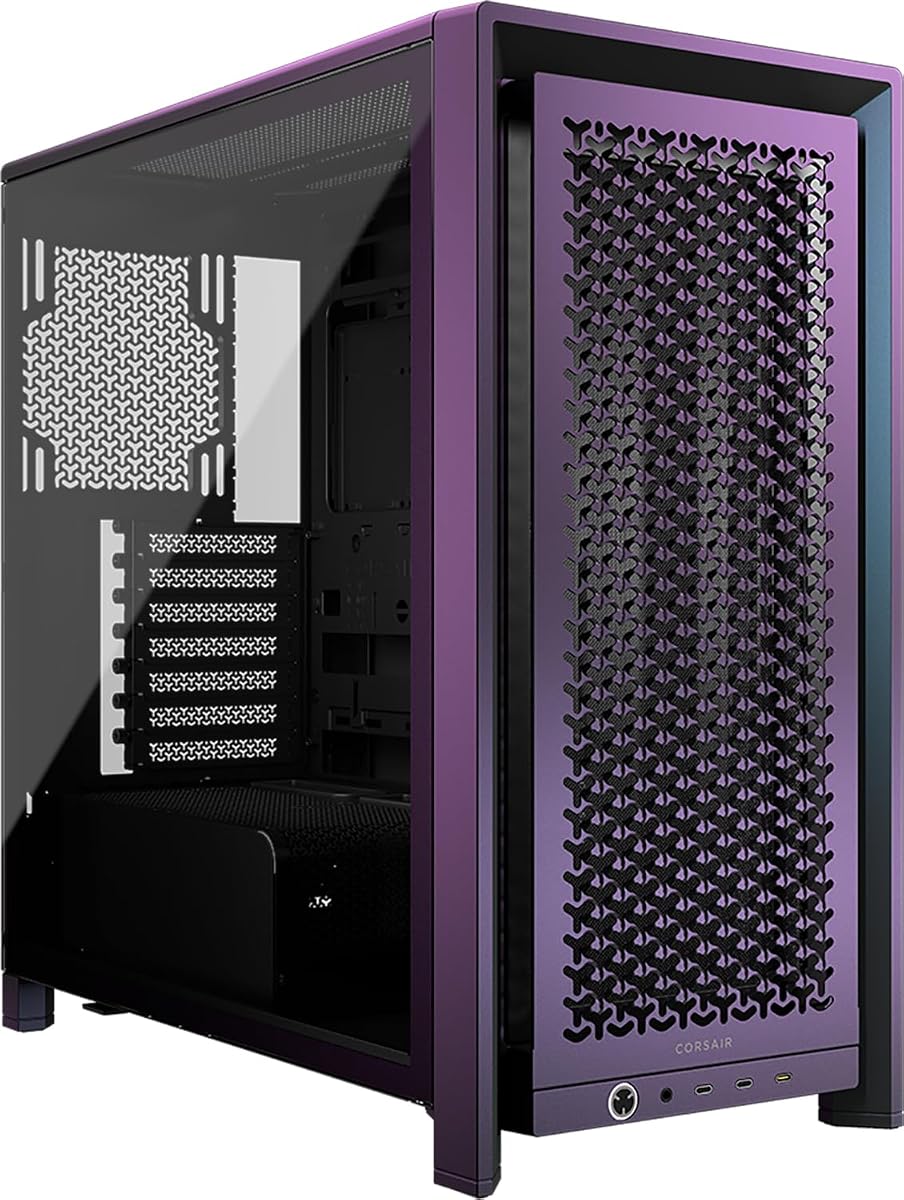
The CORSAIR 4000D RS ARGB combines a 4.7 customer rating with one of the most flexible airflow layouts in this guide. Its defining feature is the InfiniRail system, which lets builders reposition fans across the front and roof rather than accepting a fixed arrangement. Three CORSAIR RS ARGB PWM fans are included, providing immediate front intake and rear exhaust while leaving considerable room for additional cooling hardware.
We may earn a commission when you buy through this link, at no additional cost to you.
The steel front panel uses a three-dimensional Y-pattern perforation intended to reduce intake restriction while maintaining the case’s structural design. Inside, the removable internal side panel can remain in place as a cable cover or be taken away to create an additional side-mounted fan position. This makes the chassis adaptable to both air-cooled and liquid-cooled configurations without requiring a different enclosure.
The main compromise is that three pre-installed fans are not a particularly extensive cooling package for a system with a high-power processor and graphics card. The FRAME modular platform also introduces a more involved design philosophy than a conventional fixed-layout case. Some builders may prefer straightforward mounting points over the ability to change structural elements and internal positioning over time.
This is the most broadly convincing recommendation for builders who want a high airflow mid-tower that can evolve. It suits anyone starting with the included fans but expecting to add larger air coolers, more case fans, or radiators later. The combination of flexible mounting, clean cable management options, and compatibility with ASUS BTF, MSI Zero, and Gigabyte Stealth back-connect motherboards makes it especially practical for a modern build.
The InfiniRail system supports front-mounted fans up to 200mm and roof-mounted fans up to 140mm. That flexibility lets a builder begin with the supplied ARGB fans and later revise the cooling path as component temperatures, workloads, or noise priorities change.
The perforated Y-pattern steel panel offers a deliberately open route for incoming air. Rather than relying only on a decorative mesh facade, CORSAIR has combined structural metal with a three-dimensional pattern intended to reduce obstruction at the front of the chassis.
We may earn a commission when you buy through this link, at no additional cost to you.
The NZXT H5 Flow is a compact ATX mid-tower aimed at builders who want recognizable airflow performance without moving to a large full-tower. It carries a 4.7 rating and includes two 120mm quiet airflow fans, one at the front and another at the rear. Although the initial fan count is modest, the chassis provides a surprisingly capable foundation for additional cooling.
We may earn a commission when you buy through this link, at no additional cost to you.
Ultra-fine mesh covers the top, front, and side panels, allowing air to enter and leave through several available surfaces. A perforated power supply shroud on the side and bottom improves intake beneath the main chamber. The case also supports a 360mm front radiator and a 240mm top radiator, making liquid cooling possible even within its relatively compact dimensions.
Its limitations are straightforward. Two included fans may not satisfy a builder planning a quiet system or pairing the case with demanding components, and the product data does not list pre-installed ARGB lighting. The compact design may also constrain storage or cable space compared with the larger models in the guide, particularly if a full-length graphics card and multiple drives are installed.
The H5 Flow is a good match for a smaller workstation-style build, a gaming PC that does not require a huge enclosure, or a first builder who values a simple front-to-back cooling layout. Wide cable channels, hooks, and straps make the interior more approachable. For users willing to add fans or a radiator, it offers strong thermal flexibility in a relatively restrained chassis.
The H5 Flow avoids treating a smaller enclosure as permission for limited cooling. Its mesh panels, perforated shroud, 360mm front radiator position, and 240mm top position allow builders to create a more substantial thermal setup than the two supplied fans initially suggest.
Wide routing channels, hooks, and straps help keep wiring away from fans and out of sight. This is especially useful in a compact chassis, where a small number of poorly placed cables can interfere with airflow or make installation frustrating.
We may earn a commission when you buy through this link, at no additional cost to you.
The MONTECH AIR 903 MAX earns a 4.8 rating and stands out for delivering a generous high airflow foundation in a conventional mid-tower. Four 140mm fans are included: three HP140 ARGB PWM front fans and one 140mm PWM rear fan. That is an unusually useful starter package because the large front fans immediately establish a strong intake path while the rear fan handles exhaust.
We may earn a commission when you buy through this link, at no additional cost to you.
The ventilated mesh front panel is paired with a chassis measuring 478 by 230 by 493mm, providing enough room for substantial components without moving into full-tower territory. Both front and top positions accept radiators up to 360mm. E-ATX, ATX, Micro-ATX, and Mini-ITX motherboards are supported, as are graphics cards up to 400mm, reducing the chance that an upgrade will outgrow the enclosure.
The main limitation is its physical footprint. Its dimensions are larger than those of the NZXT H5 Flow, so builders working with a small desk or tightly controlled entertainment unit may need to measure carefully. The included front fans also have ARGB lighting whose brightness and effect must be managed through the system’s fan control, which may not suit users who prefer completely dark builds.
For most gaming and performance builds, however, the AIR 903 MAX offers an exceptional balance. Four large fans, dual 360mm radiator support, modern USB Type-C connectivity, and generous hardware compatibility make it easier to begin without planning a major fan purchase immediately. It is an especially appealing recommendation for builders seeking strong airflow hardware without moving to a premium chassis.
Three 140mm ARGB intake fans and a 140mm rear exhaust fan provide a balanced foundation. Because the supplied fans are already substantial, the system can begin with meaningful front-to-back airflow before additional case fans are considered.
Support for E-ATX motherboards, 400mm graphics cards, and 360mm radiators reduces the risk of future incompatibility. The chassis is therefore not limited to a temporary build intended for entry-level components.
We may earn a commission when you buy through this link, at no additional cost to you.
The LIAN LI LANCOOL 216 RGB is built around large airflow hardware, particularly its pair of pre-installed 160mm ARGB front fans. With a 4.7 rating, it appeals to builders who want a substantial intake area without moving to a full-tower. A 140mm rear fan is also included, giving the build an immediate front-to-rear cooling path.
We may earn a commission when you buy through this link, at no additional cost to you.
Fine mesh appears at the front and top as well as the side of the power supply shroud, spreading ventilation across several surfaces. The modular motherboard I/O can be moved higher or lower to create room for air- or water-cooling hardware. A removable top radiator bracket, fan-cable grooves, an innovative rear PCIe fan bracket, and sealing hardware for smaller top radiators improve installation flexibility.
Its depth and width are the main considerations. The stated dimensions are 480.9mm deep, 235mm wide, and 491.7mm tall, so it occupies more desk space than a compact mid-tower. The large 160mm fans may also obscure more of the internal view through the tempered glass, a visual compromise for some users who prioritize a clean presentation over maximum fan size.
This case is ideal for an enthusiast air-cooled build that wants big front fans, generous GPU space, and flexible motherboard positioning. It supports graphics cards up to 392mm, E-ATX motherboards, two 3.5-inch hard drives, and six 2.5-inch solid-state drives. For a builder who values airflow and expandability in a visually traditional mid-tower, the LANCOOL 216 RGB offers one of the strongest feature sets here.
The pair of 160mm ARGB fans moves a large volume of air across the front of the case. Fine mesh above and below the fans reduces the chance that the intake path becomes a significant obstacle to the cooling hardware.
Moving the motherboard I/O changes the available space around the CPU cooler and radiator. This allows the builder to adapt the chassis to different cooling solutions rather than accepting a single fixed internal arrangement.
We may earn a commission when you buy through this link, at no additional cost to you.
The Antec Flux Pro is the most expansive traditional airflow case in the guide, with a 4.7 rating and room for up to 12 fans. Six PWM fans are supplied: three Tranquil 140mm front fans, two P12R reverse fans on the power supply shroud, and one Tranquil 140mm rear fan. Reverse shroud fans can direct air toward the underside of the graphics card while also assisting the power supply area.
We may earn a commission when you buy through this link, at no additional cost to you.
Multi-directional venting and removable cooling brackets on the roof, front, and power supply shroud make it possible to configure several cooling paths. The case supports simultaneous 420mm and 360mm radiators, a rare degree of flexibility for builds using a large top cooler and a substantial front loop at the same time. An innovative iShift power supply mount offers a 90-degree orientation, while a CPU and GPU temperature display adds useful on-case information.
As a full tower, it requires considerably more room than the mid-towers in this list. Its material combination of metal, glass, and wood creates a more elaborate appearance, but that styling also adds visual bulk. The many mounting positions and brackets can also make the initial setup more involved than that of a simpler case.
The Flux Pro makes sense for a serious enthusiast system using a long graphics card, multiple storage devices, a powerful processor, and extensive cooling hardware. It is less suitable for a compact office build or a simple gaming PC, but for a showcase workstation it provides exceptional thermal headroom and thoughtful monitoring features.
A maximum capacity of 12 fans gives builders room to construct separate intake, exhaust, and component-directed paths. The included six-fan package already supports that approach and reduces the need to populate every mounting position immediately.
Simultaneous support for 420mm and 360mm radiators provides more cooling flexibility than most mid-towers. Removable brackets make it easier to install and reposition these substantial assemblies.
We may earn a commission when you buy through this link, at no additional cost to you.
The CORSAIR 3500X RS ARGB combines a wraparound glass design with a practical cooling layout. It carries a 4.6 rating, the lowest among the highly rated airflow cases in this guide, but its included three RS120-R ARGB fans and capacity for up to 10 120mm fans make it a credible option for visually oriented performance builds.
We may earn a commission when you buy through this link, at no additional cost to you.
Cooling positions are distributed across the side, roof, and power supply shroud, allowing the builder to create a more layered airflow arrangement. Motherboard support ranges from Mini-ITX through E-ATX, and the three supplied ARGB fans use a +5V header for motherboard control. The panoramic glass treatment is intended to showcase the components rather than hide them behind an opaque panel.
The most important limitation is that only three fans are included. That is enough for a basic front-to-back path, but a system using a high-power CPU and GPU may require more immediate cooling investment. Its 4.6 rating also suggests slightly less consistent customer satisfaction than several alternatives, so prospective buyers should examine recent feedback for their particular priorities.
This case is a good match for a builder who wants an attractive glass-sided system and values removable panels. The front and side glass can be taken off to improve access during installation or maintenance. It is particularly appealing for creators and gamers who want their internal lighting and component selection to remain visible while retaining flexible fan placement.
Side, roof, and shroud mounting points create multiple ways to improve airflow around the main components. The glass aesthetic does not prevent the case from accepting a substantial number of additional 120mm fans.
Removable front and side tempered-glass panels simplify component installation and later access. Builders can leave one panel off during initial work, then restore the panoramic view after cables and cooling hardware are arranged.
We may earn a commission when you buy through this link, at no additional cost to you.
The Lian Li V100-ATX is a strong all-rounder with a 4.8 rating, four pre-installed 120mm PWM ARGB fans, and a straightforward tool-less side-panel design. It offers a useful combination of modern features: a 26-LED ARGB strip, daisy-chain fan connectivity, and support for back-connect ATX and Micro-ATX motherboards.
We may earn a commission when you buy through this link, at no additional cost to you.
Its tool-less side panels make it easier to reach internal components during installation and servicing. The case supports ATX, Micro-ATX, Mini-ITX, and back-connect variants, while accommodating graphics cards up to 420mm and CPU coolers up to 178mm. A top radiator position supports up to 360mm, providing meaningful liquid-cooling capacity without requiring a full tower.
The included fans are specified at up to 1800 RPM with maximum airflow figures ranging from 61.47 to 60.4 CFM and noise levels of 26.5 to 30.8 dBA. Fans with the stated maximum speed may be more audible under sustained load, particularly if several are running at similar speeds. The integrated lighting and ARGB fans also require compatible motherboard control and careful cable planning.
The V100-ATX is well suited to builders who want easy physical access without giving up modern aesthetics or a strong included fan package. Its generous GPU clearance is especially useful for long modern graphics cards. It may not be the first choice for a builder planning a 420mm radiator, but for many conventional high-performance systems it offers an unusually balanced and approachable feature set.
Both side panels use a tool-less mounting mechanism, reducing the need for screws during routine access. This is valuable during first-time assembly and makes it easier to reach storage, wiring, and cooling components later.
Compatibility with back-connect ATX and Micro-ATX motherboards can eliminate many visible cables behind the tray. The clean result pairs well with the integrated ARGB strip and pre-installed lighting-equipped fans.
We may earn a commission when you buy through this link, at no additional cost to you.
The Cooler Master HAF II 500 is the premium airflow specialist in the guide, earning a 4.8 rating through its emphasis on very large fans. The oversized Mighty40 cooling system includes two 220 by 40mm front intake fans and a 180 by 40mm rear exhaust fan, creating a broad airflow path through the chassis.
We may earn a commission when you buy through this link, at no additional cost to you.
Low airflow resistance is a central design goal, supported by large front and rear ventilation openings. The MasterRail mounting system accepts multiple fan and radiator sizes at the front and roof, while split-level cable management creates room for the unusually deep rear exhaust fan. A dual-mode GPU holder can stabilize one graphics card or support two cards up to 3.6 slots thick each.
The trade-off is scale. This is not a compact or understated case, and the unusual 220mm and 180mm fan dimensions can narrow the range of replacement products available compared with a standard 120mm or 140mm layout. Its specialized cooling design is most effective for builders willing to plan the complete arrangement around the included large fans.
For a premium system with substantial heat output, the HAF II 500 is among the strongest choices here. The large front intake area can move substantial air with relatively low restriction, and the deep rear exhaust position addresses a common limitation of mid-towers. It is best suited to experienced builders who value maximum airflow hardware, specialized mounting, and multi-GPU flexibility over a smaller footprint or conventional fan sizes.
Two 220mm front fans create one of the broadest unobstructed intake arrangements in the guide. Their size supports high airflow while the large front openings reduce the chance that the enclosure becomes the limiting factor.
The dual-mode holder accommodates a single card with added stability or two cards with up to 3.6 slots of thickness each. This makes the case relevant to specialized multi-GPU workstations as well as conventional high-end systems.
We may earn a commission when you buy through this link, at no additional cost to you.
The NZXT H9 Flow distinguishes itself with a dual-chamber design that separates the power supply and drives from the main components. It carries a 4.7 rating, and that structural separation supports cleaner cable management while helping the primary chamber maintain a more direct cooling path.
We may earn a commission when you buy through this link, at no additional cost to you.
Perforated steel panels and angled front-right fans are designed to support efficient airflow, while the included package consists of three F140Q case fans at the front-right and one F120Q case fan at the rear. The total mounting capacity reaches ten fans, including positions across the top, front-right, and bottom. A panoramic wraparound tempered-glass panel keeps the separated chambers visible.
One technical detail deserves attention: the supplied F140Q and F120Q fans are case versions using three-pin DC control rather than four-pin PWM. Builders should confirm how the motherboard or fan controller handles these fans and whether PWM control or other speed behavior is important. Installing 420mm radiators at the top and front-right is possible, but doing so requires checking graphics card and hardware clearance carefully.
The H9 Flow is a good option for a high-end build where clean presentation, organized wiring, and strong radiator support matter. Compatibility with ASUS BTF and MSI Project Zero back-connect motherboards makes it well suited to a cable-free finish. It is particularly attractive to creators and performance builders who want a distinctive dual-chamber layout without assembling the cooling and cable system from scratch.
The power supply and drives are isolated from the main component chamber. This shortens some cable runs, reduces visual clutter, and leaves the primary cooling path focused around the motherboard, processor, memory, and graphics card.
Support for a 420mm radiator in both the top and front-right positions provides options for a large liquid-cooling system. The dual locations also allow builders to choose between roof and front intake according to component layout and tubing preferences.
We may earn a commission when you buy through this link, at no additional cost to you.
The CORSAIR Frame 4000D Vault Series is a limited-edition version of the modular 4000D platform, finished in the Galaxy colorway. It retains a 4.4 customer rating, the lowest in this comparison, but its airflow specifications and unusual collector positioning make it more than a simple cosmetic alternative to the standard 4000D RS.
We may earn a commission when you buy through this link, at no additional cost to you.
The FRAME system allows major elements such as the motherboard tray and front I/O panel to be changed or upgraded. InfiniRail fan mounting supports front fans up to 200mm and roof fans up to 140mm, while the perforated 3D Y-pattern front panel maintains a low-obstruction intake route. The case supports three 360mm radiator positions across the front, roof, and side, along with up to 12 120mm fans.
Its limited release of 1,337 individually numbered Galaxy units means availability will be restricted. The 4.4 rating also suggests that the combination of modular complexity, distinctive styling, and premium positioning has not been uniformly appealing to every customer. Buyers who need simple installation should not choose it solely for appearance, and those focused on cooling may find another case in the guide more direct.
This model is best suited to a collector or enthusiast who values a distinctive, individually numbered chassis and intends to personalize its modular elements. The side radiator position and large InfiniRail compatibility offer meaningful cooling flexibility. For most builders, however, the standard 4000D RS provides a more conventional path to the same architectural strengths, while this Vault edition offers rarity and visual identity.
The FRAME modular platform separates structural and I/O elements from the basic chassis. Builders can change components as their needs evolve, making the enclosure a platform for longer-term customization rather than a fixed arrangement.
Front, roof, and side mounting positions each accept a 360mm radiator. This is particularly useful for builders prepared to use substantial liquid cooling, provided they account for the space required by both the radiator and its tubing.
We may earn a commission when you buy through this link, at no additional cost to you.
A high airflow case should be judged by the complete path from intake through the component chamber to exhaust, along with hardware fit and installation convenience. The most important factors include fan size, radiator placement, motherboard support, graphics card clearance, cable routing, and the builder’s preferred workflow.
A useful cooling design coordinates front intake, rear or roof exhaust, and any dedicated component-cooling fans. Low-restriction front mesh or perforated steel is especially valuable because the front panel is often the narrowest part of the path. Look for a configuration that pulls air through the graphics card and CPU rather than circulating it in a closed loop inside the case. A balanced arrangement usually places larger intake fans at the front and directs warm air out through the rear, while roof or bottom positions provide additional flexibility for radiators and unconventional layouts.
Prioritize a clear intake-to-exhaust path, a ventilated front, and enough rear exhaust capacity. Fan quantity matters less than placement and case openness.
Larger fans can move substantial air through a given area and may produce less noise than several smaller alternatives at equivalent airflow, but they require compatible mounting positions and sufficient case depth. 120mm and 140mm options provide broad compatibility, while 160mm and 180mm fans can be ideal in purpose-built enclosures. Also count the included rear and power supply shroud fans. A case with four large fans may need fewer additions, whereas a product with only two included fans may benefit from a planned immediate upgrade.
Match the supplied fans to the case geometry and your cooling strategy. Check replacements and controller compatibility before committing to unusual sizes.
Radiator capacity determines how easily the system can move from air cooling to liquid cooling. A 240mm radiator may be sufficient for a modest processor, while demanding CPUs and GPUs benefit from 360mm or even 420mm options. Front and top positions support different priorities: front radiators cool incoming air directly, while roof radiators exhaust heat rising from the motherboard area. Cases supporting both can offer a more balanced path, although graphics card clearance must be checked after the cooler is installed.
Choose at least one large radiator position that suits your hardware. Verify maximum radiator size, and remember that a thick radiator may conflict with a long graphics card.
The case must support the exact motherboard form factor planned for the build. ATX is standard, E-ATX offers more expansion slots but requires a larger chassis, and Micro-ATX or Mini-ITX can reduce overall size. Back-connect motherboards are another important consideration because their connectors are mounted on the reverse side of the board. Cases with compatible routing space and dedicated openings can produce a cleaner interior, but a buyer should confirm the specific board and case are supported rather than assuming all back-connect standards fit.
Check the motherboard form factor and back-connection layout before buying. Support for future CPU coolers, storage, and expansion cards is also worth considering.
Modern graphics cards can be both long and thick, making nominal ATX support insufficient on its own. Look for a stated maximum card length and adequate side-panel clearance for a front radiator or intake fan. Some cases include adjustable GPU supports, which can help prevent sag while adding convenient mounting points for fans. Multi-GPU builders should also confirm the number of slots, riser compatibility, spacing, and power supply requirements. The HAF II 500 stands out here with support for two cards up to 3.6 slots thick each.
Compare the exact card model, not only the general GPU category. Measure radiator and fan thickness as well as card length before assembly.
Efficient cable management is part of thermal design because loose wires can block intake paths or interfere with fans. Wide routing channels, grommets, Velcro straps, clips, and space behind the motherboard tray all help. Tool-less side panels make initial installation and later maintenance easier, while removable radiator or fan brackets reduce the need to route cables around an already assembled cooling system. Builders should also consider whether the power supply shroud is perforated and whether cables need to pass beneath it.
Prioritize dedicated routing space and removable sections. A clean interior improves airflow and makes troubleshooting or component upgrades less disruptive.
Airflow cases pull a substantial amount of air through fine mesh, so dust accumulation is a realistic long-term concern. Removable filters are valuable because they can be cleaned without dismantling the system. Pay attention to the number and location of filters, whether they cover the front, top, and bottom, and whether the material can be rinsed or wiped. Tool-less panels also support routine cleaning. A case that is easy to access is likely to remain properly maintained, while filters hidden behind difficult panels may be cleaned less often.
Choose removable, accessible filters and plan routine cleaning. More open airflow works best when the intake surfaces are kept free of dust.
The most capable airflow case may be too large for the intended space. Compact ATX models can still support strong cooling, but very large fans and radiators often require greater depth. Aesthetically, a perforated steel front and functional cable routing may appeal to performance builders, while panoramic glass can better display coordinated components and ARGB lighting. Expansion plans matter too because additional drives, fans, and liquid-cooling hardware can consume space that seems ample during an initial build.
Measure the case and consider the whole system, not just the graphics card. Leave room for airflow, maintenance, and expected future upgrades.
Begin by comparing the case’s mounting positions with the dimensions of every component you plan to install. Confirm motherboard form factor, graphics card length, CPU cooler height, power supply dimensions, radiator thickness, and drive layout before moving hardware into the chassis. Assemble the major components outside the case when practical, especially a radiator-and-fan assembly, then transfer them into position after the motherboard and power connections are ready.
After installation, connect fans to the appropriate motherboard headers or a compatible fan controller. Verify that every fan spins in the intended direction, especially reverse-oriented shroud fans, and use software to create a gradual speed curve. Higher speeds can improve cooling but increase noise, while lower speeds provide a quieter baseline. Confirm that PWM-controlled hardware is connected to a four-pin PWM header and that any case-version three-pin DC fans are supported by the chosen controller.
Care for the case by cleaning removable dust filters regularly and checking that intake screens are not clogged. Keep cable bundles clear of fan blades and radiators, and periodically inspect the interior for dust. When changing components, use the removable panels and brackets provided by the manufacturer, and avoid forcing a side panel or radiator bracket against misaligned mounting holes.
No. A high airflow design can improve cooling when its intake and exhaust layout is configured correctly, but component choice, fan quality, radiator size, filter condition, and ambient temperature also matter. A well-ventilated case paired with suitable fans generally gives a builder more cooling headroom than a restrictive enclosure.
Not always. Large fans can move more air at lower speeds, but their motor design, blade shape, and operating speed determine the noise level. Compare airflow, pressure, maximum speed, and acoustic specifications rather than assuming a 220mm fan is automatically quieter than a 120mm model.
A rear or roof exhaust is generally important because it completes the path through the component chamber. Some cases direct additional air toward the graphics card through the power supply shroud, but that does not replace the need to move warm air out of the case.
It depends on the model. These cases support varying maximum graphics card lengths, often around 390 to 420mm for the larger mid-towers listed here. A front radiator and thick intake fans can also reduce usable clearance, so the card and cooling configuration should be checked together.
It depends on the model and the components. Cases such as the MONTECH AIR 903 MAX, Antec Flux Pro, and Lian Li V100-ATX include substantial fan packages, while the NZXT H5 Flow and CORSAIR 3500X RS ARGB include fewer. A demanding CPU and GPU may justify adding fans or using a larger radiator.
A perforated or fine-mesh front generally offers less restriction and a stronger direct intake path. A glass front may have a cleaner visual appearance but often requires additional fans or a less direct airflow route. The best choice depends on whether cooling priority or display aesthetics matters more.
Cleaning frequency depends on the environment, dust levels, and how much air the system draws in. Checking filters every few months is sensible for a typical desktop, with more frequent attention in dusty rooms or workstations that run continuously. Filters should be cleaned according to the manufacturer’s instructions.
Additional fans and fans running at higher speeds can increase overall power consumption, but the impact is usually modest compared with the processor and graphics card. Fan headers, motherboard power, and any fan controller should be connected correctly, and PWM speed curves can provide a quieter balance.
The CORSAIR 4000D RS ARGB is the strongest all-around recommendation because it combines flexible fan positioning, modular construction, strong front intake, and a modern feature set. The MONTECH AIR 903 MAX is the value standout, with four 140mm fans, dual 360mm radiator support, and generous component compatibility. The Cooler Master HAF II 500 leads the premium group with unusually large fans and a specialized low-resistance cooling layout.
Prioritize the complete cooling path rather than fan count alone. Confirm that the motherboard, graphics card, CPU cooler, storage, and radiator all fit together, and consider whether the case’s size suits the available space. Included fans are a useful starting point, but a well-planned airflow system also needs an unobstructed exhaust, clean cable routes, and regularly maintained filters.
Ratings and configurations can evolve as customer feedback and product revisions change, and current pricing and availability should always be confirmed before ordering. Comparing the live listing with the dimensions and features discussed in this guide will help ensure that the selected case remains the right fit for the intended components.