
Silverstone Retro-Inspired FLP01
4.7Editor score
Universal multi-size drive cage
USB Type-C front connectivity
Retro optical-bay styling
Our Htpc Media Cases guide compares 10 SilverStone HTPC cases for living-room fit, cooling, storage, expansion clearance, connectivity, and filter maintenance.
Htpc media cases are built for computers that live beside a television rather than under a desk. The best models combine a restrained, entertainment-center-friendly appearance with quiet cooling, useful front connectivity, straightforward cable management, and enough flexibility for media drives, gaming components, and other household technology.
The ten SilverStone cases in this guide were compared by examining their motherboard support, chassis dimensions, cooling approach, included fans, drive provisions, expansion-card clearance, front-panel connections, dust filters, and installation features. The list covers slim Micro-ATX models, more flexible ATX enclosures, and premium designs intended for larger media-center builds.
Each review explains where a particular chassis is most useful and where compromises may arise. Ratings, configurations, and retailer listings can change, so buyers should verify the exact model, supported components, included accessories, and current product details before purchasing or beginning an installation.
4.7Editor score

4.5Editor score

4.2Editor score
The comparison highlights motherboard format, cooling provisions, storage flexibility, expansion clearance, and media-friendly front connections so buyers can identify the chassis that best matches their hardware and entertainment cabinet.


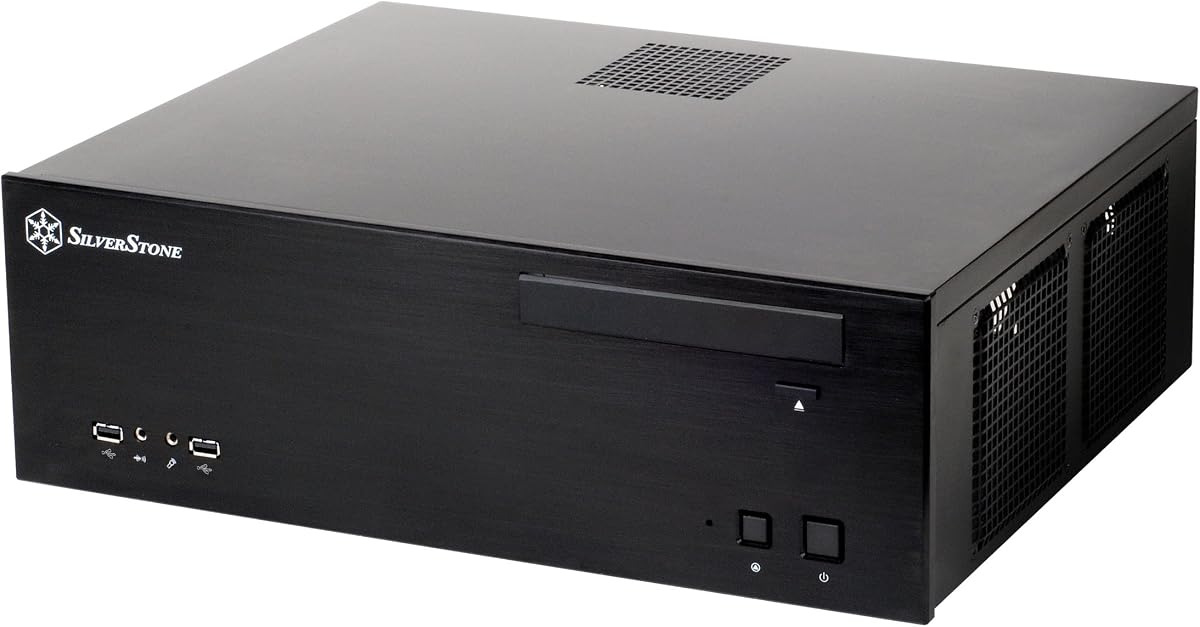

The SilverStone Grandia 11 stands out as the most versatile all-around HTPC enclosure in this collection, carrying a 4.5 rating while balancing living-room presentation with substantial PC flexibility. Its defining feature is 240mm radiator support, which is unusually useful in a chassis intended to sit near a television and potentially operate a quiet, powerful system.
We may earn a commission when you buy through this link, at no additional cost to you.
The enclosure supports SSI-CEB, ATX, and Micro-ATX motherboards, so it can serve a conventional entertainment build, a more compact system, or a workstation-class board without changing the visual language of the entertainment cabinet. A fully meshed front panel and positive-pressure design support airflow and dust prevention, while the shortened chassis aims to provide a large intake surface without creating a visually imposing tower.
There are trade-offs even for a highly capable case. Liquid-cooling support demands attention to radiator thickness, mounting locations, and the arrangement of cables and intake fans. Buyers who only need a basic media-center PC may find that the Grandia 11's flexibility is more than their build requires, but the additional capability can prevent a future upgrade from forcing a complete chassis change.
This is the strongest recommendation for someone who wants an HTPC case broad enough for a serious gaming or creator system. It is particularly convincing when quiet operation, clean presentation, motherboard flexibility, and potential radiator use all matter. A simpler build can still benefit, although the Milo models may be more appropriately sized for that task.
The 240mm radiator support is the Grandia 11's most important technical advantage for buyers considering quieter CPU cooling. The full-mesh intake and positive-pressure architecture complement that flexibility, although the final fan and radiator arrangement should be planned against the graphics card and storage layout.
Supporting SSI-CEB, ATX, and Micro-ATX boards gives the case unusual range for an entertainment-oriented enclosure. Builders can start with a small board and retain a future path to a full-size platform without sacrificing the understated stereo-shaped design.
We may earn a commission when you buy through this link, at no additional cost to you.
The SilverStone GD09 earns a 4.5 rating by offering a balanced mix of compatibility, practical maintenance, and a furniture-friendly faux-aluminum treatment. It supports SSI-CEB, ATX, and Micro-ATX motherboards, making it useful for more than a minimal streaming appliance or compact office PC.
We may earn a commission when you buy through this link, at no additional cost to you.
Its positive-pressure design is intended to promote cooling and quietness while limiting dust accumulation. Quick-access filters make routine care more convenient, and support for SilverStone RA02 rackmount ears adds an installation option that can be valuable in dedicated media furniture. The 358mm depth is explicitly designed to fit comfortably inside home-theater cabinets.
The main limitation is its footprint relative to smaller HTPC alternatives. Buyers should measure the cabinet before ordering and leave enough space for cable bends and airflow. The supplied information also does not identify a front USB Type-C port, so those who prioritize the newest external connection should verify the exact panel configuration before committing.
The GD09 is a strong choice for a conventional ATX-based media PC that needs serviceable cooling and broad board compatibility. It is especially appropriate for a living-room system that must look deliberate on a shelf, handle several storage devices, and remain straightforward to maintain.
The positive-pressure approach helps keep the media-center interior cleaner while supporting the quiet operating priorities of an HTPC. Quick-access filters make that benefit more useful because owners can inspect and clean the intake without dismantling the entire chassis.
Its 358mm depth and controlled exterior styling reflect the case's media-furniture focus. Support for RA02 rackmount ears adds another mounting option, although buyers should still check the cabinet's dimensions, openings, and available mounting points.
We may earn a commission when you buy through this link, at no additional cost to you.
The SilverStone ML03B is the sensible value-oriented selection in this roundup, earning a 4.2 rating and focusing on the essentials of a compact media-center computer. Its Micro-ATX focus keeps the enclosure more appropriate for living-room spaces than many full-size tower alternatives while still allowing room for a capable processor and graphics card.
We may earn a commission when you buy through this link, at no additional cost to you.
The case supports up to four 80mm fans, giving builders several cooling paths to consider. Drive cages use multi-purpose mounts to reduce the need for adapters, while the design is described as easy to install and straightforward for cable routing. Standard PS2 power supplies and low-profile expansion cards are also supported, which is useful for a compact or deliberately low-profile build.
The obvious constraint is motherboard format: a builder with a full ATX board should look elsewhere in this guide. The supplied feature list also does not mention a front USB Type-C connection, making the ML03B more appropriate for users whose peripherals rely on established USB-A connections or wireless accessories.
Choose the ML03B when the goal is a capable, compact HTPC without paying for features that will never be used. It is a particularly sensible match for a dedicated streaming box, living-room gaming PC, or compact home-office system that will benefit from low-profile expansion-card support and flexible drive mounting.
Four supported 80mm fan locations provide meaningful cooling latitude in a Micro-ATX chassis. Although the case is compact, the range of positions allows builders to balance intake, exhaust, storage cooling, and component clearance rather than relying on a single fan opening.
Multi-purpose drive cages are especially useful in a media center because these systems often combine a boot drive with additional media storage or backups. The mount system reduces adaptation requirements and can make the build cleaner and easier to service later.
We may earn a commission when you buy through this link, at no additional cost to you.
The SilverStone GD09B-C is a 4.3-rated variation of the GD09 that adds a front USB Type-C port, making it particularly relevant for modern phones, tablets, portable game systems, and other USB-C accessories. It retains the faux-aluminum design and broad motherboard support intended for a polished living-room installation.
We may earn a commission when you buy through this link, at no additional cost to you.
SSI-CEB, ATX, and Micro-ATX motherboards are supported. A positive-pressure design addresses cooling, quietness, and dust prevention, while quick-access filters simplify periodic cleaning. Compatibility with SilverStone RA02 rackmount ears is another installation-oriented feature for buyers using dedicated media furniture.
Its principal compromise is that the case's connectivity beyond USB Type-C is not fully listed in the supplied specifications. Buyers who need several USB-A ports, audio connections, or card-reader access should confirm the complete front-panel layout rather than assuming that one highlighted connector represents the entire I/O array.
This is the most fitting GD09 variant for a modern living-room setup in which a front USB-C connection has practical value. It suits users who need larger motherboards but want the visual simplicity of an HTPC enclosure, along with serviceable filters and straightforward media-cabinet integration.
The front USB Type-C port adds convenience for users who regularly connect compatible mobile devices, cameras, or storage accessories. Positioned on the face of the case, it is easier to reach than a connection hidden at the rear, particularly in a cabinet.
The GD09B-C retains the established GD09 combination of positive-pressure airflow, quick-access filters, broad board support, and optional rackmount ears. It is a connectivity-focused refinement rather than a completely different enclosure.
We may earn a commission when you buy through this link, at no additional cost to you.
With a 4.7 rating, the SilverStone FLP01 is the strongest-rated product in the guide and a compelling choice for buyers who want their media PC to look intentional rather than like a repurposed office tower. Its retro-inspired styling, including a floppy disk-style optical-drive bay cover, gives the enclosure a distinctive character suited to nostalgic or carefully coordinated entertainment spaces.
We may earn a commission when you buy through this link, at no additional cost to you.
The universal drive cage is the most functional standout. It accommodates 5.25-inch, 3.5-inch, and 2.5-inch drives, which gives a media center considerable flexibility for optical devices, hard drives, and compact solid-state storage. A front USB Type-C port supports convenient connections, while positive-pressure design and quick-access filters address cooling, quieter operation, and dust prevention.
The supplied information does not clearly state the supported motherboard format or provide a complete fan and expansion-card specification. Buyers should therefore verify board compatibility, graphics-card dimensions, and cooling requirements before choosing this case. Its distinctive appearance may also be a deliberate feature for some users but less suitable for a minimalist contemporary cabinet.
The FLP01 is best recommended for a media-center builder who values character, flexible storage, and a clear front USB-C connection. It is also the most distinctive option in the collection, making it a natural centerpiece for a visible entertainment setup rather than a hidden utility chassis.
Supporting 5.25-inch, 3.5-inch, and 2.5-inch drives makes the universal cage unusually practical for a media center. It can accommodate a mix of legacy and modern storage according to the user's needs without relying on a collection of separate adapters.
The retro-inspired enclosure offers visual appeal that most functional media cases do not. The floppy disk-style bay cover turns a familiar computer component into a deliberate design feature, helping the system blend with entertainment equipment instead of resembling conventional office hardware.
We may earn a commission when you buy through this link, at no additional cost to you.
The SilverStone GD08B is the storage-heavy and large-format option in this roundup, earning a 4.2 rating while supporting E-ATX, ATX, and Micro-ATX motherboards. It is designed for buyers who want the media-center appearance without giving up the component flexibility associated with a full-size computer chassis.
We may earn a commission when you buy through this link, at no additional cost to you.
Storage capacity is its defining advantage, with support for up to twelve drive bays. Expansion cards can measure up to 13.6 inches, and an adjustable LED indicator lets the front status light be tuned to the room. The aluminum front panel provides a premium appearance, while positive-pressure airflow and quick-access filters support cooling and maintenance.
Those capabilities make the GD08B less compact than dedicated slim media cases. The stated support for SSI-EEB boards with a 13-inch standard also requires a custom configuration of six 60mm fans, and buyers should not assume every large motherboard is supported without a custom arrangement. Cabinet dimensions and drive access need careful planning.
This case is ideal for a high-capacity media server or enthusiast living-room PC that needs many drives and a powerful graphics card. It is less appropriate for a minimalist streaming appliance, but for expansive storage and motherboard flexibility, it provides the strongest foundation in the guide.
Up to twelve drive bays make the GD08B compelling for large local media collections and backup-heavy systems. Buyers should consider the operating noise and heat generated by multiple drives, then balance that reality against the case's positive-pressure cooling and quick-access filters.
Expansion-card support up to 13.6 inches provides room for substantial graphics hardware compared with more compact HTPC cases. This is particularly useful for gaming-oriented living-room systems that need more graphics performance than a low-profile card can provide.
We may earn a commission when you buy through this link, at no additional cost to you.
The SilverStone ML04B-C is a compact media-center case with a 4.0 rating, offering Micro-ATX and Mini-ITX support in a smaller enclosure. It is a practical fit for a dedicated living-room computer where a full-size motherboard and long graphics card are unnecessary.
We may earn a commission when you buy through this link, at no additional cost to you.
Its front USB Type-C port provides modern device connectivity, while the aluminum front door and steel body create a mixed-material chassis. Up to four 80mm fans can be installed, and the drive cage uses multi-purpose mounts that reduce adapter requirements. Standard PS2 power supplies are supported, which helps builders use familiar ATX power hardware.
Its 4.0 rating is the lowest in the collection, so prospective buyers should be especially attentive to their exact hardware. The case is limited to smaller motherboard formats, and the supplied details do not explicitly state expansion-card clearance or low-profile-card support. Those omissions matter for anyone considering a more capable compact GPU.
Choose the ML04B-C for a deliberately compact media build that benefits from front USB-C and does not need full ATX flexibility. It is less compelling for a high-performance living-room gaming system, where a larger case with documented long-card clearance would provide more certainty.
Micro-ATX and Mini-ITX support allow the ML04B-C to serve space-conscious media systems without resorting to the most minimal proprietary cases. The front USB Type-C connection adds everyday convenience for compatible accessories and portable devices.
Four fan positions offer useful cooling flexibility, and the multi-purpose drive cage simplifies storage installation. Builders should still confirm the final fan positions, card dimensions, and drive arrangement against their selected components before assembly.
We may earn a commission when you buy through this link, at no additional cost to you.
The SilverStone GD09B is a 4.3-rated ATX-oriented option for users who want a traditional, capable motherboard in an entertainment-center case. It supports ATX and SSI-CEB boards and allows expansion cards up to 12.2 inches, covering a useful middle ground between compact HTPC designs and very large chassis.
We may earn a commission when you buy through this link, at no additional cost to you.
Its positive-pressure design is intended to improve cooling and quietness while discouraging dust accumulation. Quick-access filters make routine care easier, and the 358mm depth is designed to fit inside home-theater cabinets. The aluminum front treatment preserves the subdued, media-oriented appearance expected from this part of the lineup.
Compared with the GD09 variant, its supplied specification emphasizes ATX and SSI-CEB support rather than the broader set of formats listed for the newer model. It also does not highlight front USB Type-C. Buyers should compare the precise model revisions and connector arrangements, especially if peripherals depend on the latest port standards.
The GD09B is a solid recommendation for a conventional ATX media PC that prioritizes component compatibility, filter access, and cabinet-friendly depth. It suits users who want more motherboard and graphics-card flexibility than a Micro-ATX case while retaining a purpose-built media-center appearance.
Supporting ATX and SSI-CEB motherboards allows a familiar desktop platform to be used in a more living-room-oriented enclosure. Expansion cards up to 12.2 inches provide useful performance headroom for many gaming and creator configurations.
Quick-access filters allow routine cleaning without a complete teardown, a meaningful benefit in a case that may collect dust in the same environment as television equipment and other electronics. The positive-pressure layout further supports the goal of keeping the interior cleaner.
We may earn a commission when you buy through this link, at no additional cost to you.
The SilverStone GD04B is a 4.0-rated Micro-ATX HTPC case distinguished by the inclusion of three silent 120mm fans. For a builder creating a quiet media center, having three substantial cooling components from the outset can simplify the initial build and offer more useful airflow paths than a case supplied with fewer fans.
We may earn a commission when you buy through this link, at no additional cost to you.
The positive-pressure design supports cooling, quietness, and dust prevention. A thick 8.0mm aluminum front panel gives the enclosure a substantial appearance, while the 323mm depth is designed to fit within a home-theater cabinet. Cable routing is planned to make installation more manageable and keep the finished system tidy.
Two front USB 3.0 ports are provided, which remain useful for external drives and many current accessories, although no USB Type-C port is mentioned. The Micro-ATX limitation also makes this case less versatile than full ATX alternatives. Its three larger 120mm fans require adequate clearance and careful positioning around drives and the graphics card.
The GD04B is best for a Micro-ATX build that values a generous fan package and straightforward cooling setup. It is a good fit for a quiet living-room system, particularly when the buyer wants substantial airflow without sourcing every fan separately.
The included set of three silent 120mm fans is the most useful distinguishing feature. Their size can provide meaningful airflow in a compact chassis, while the positive-pressure design gives the builder a framework for arranging intake and exhaust paths.
The thick aluminum front panel creates a more substantial look than a purely utilitarian enclosure, and the 323mm depth supports placement in furniture. Planned cable routing helps keep connections manageable during installation and reduces clutter behind the system.
We may earn a commission when you buy through this link, at no additional cost to you.
The SilverStone GD06B is a 4.1-rated Micro-ATX media case built around convenient storage access. It includes two hot-swap drive bays and supports four 3.5-inch hard drives along with 2.5-inch hard drives or solid-state drives, making it especially interesting for users who regularly add or exchange media storage.
We may earn a commission when you buy through this link, at no additional cost to you.
Three 120mm golf-bladed fans are included to provide a strong cooling foundation, while positive-pressure design supports quiet operation and dust prevention. The 340mm depth is designed for a home-theater cabinet, and the cable-routing design supports tidier assembly. Two front USB 3.0 ports add useful everyday connectivity.
Its storage and graphics limitations deserve attention. Expansion cards are supported only up to 11 inches, which is shorter than the clearance offered by several other cases in the guide. No front USB Type-C connection is listed, and the Micro-ATX format again rules out full ATX boards.
The GD06B is a compelling recommendation for a media server or storage-oriented HTPC where swappable drives are more important than maximum graphics-card length. Buyers should match the case to a suitably compact graphics card and take advantage of its included fan and positive-pressure layout.
Two hot-swap drive bays make it easier to service or replace storage without repeatedly accessing the rear of the system. The additional capacity for four 3.5-inch drives and 2.5-inch storage expands its usefulness for local media libraries and secondary data.
The three included 120mm golf-bladed fans create a useful cooling foundation for a system expected to operate near a television. Positive-pressure design helps direct airflow through the enclosure and supports the quiet, clean-running priorities of a media-center build.
We may earn a commission when you buy through this link, at no additional cost to you.
A suitable HTPC case must fit the available cabinet, accept the intended motherboard and graphics card, manage heat quietly, and provide the storage and front connections required by the build. The most important starting point is the hardware already selected rather than the case's exterior styling.
Motherboard support establishes the range of components that can be installed. The Grandia 11, GD09, and GD09B-C support SSI-CEB, ATX, and Micro-ATX boards, while the GD08B extends to E-ATX. More compact cases such as the ML03B, ML04B-C, GD04B, and GD06B are limited to Micro-ATX or smaller formats. Match the case directly to the board rather than relying on broad category labels, and also account for the board's socket clearance, rear-panel layout, and the space required for its heatsinks.
An HTPC case may look small in isolation but still be too deep for a television cabinet. Listed depths range from 323mm in the GD04B to 358mm in the GD09 and GD09B, with the FLP01, GD08B, and GD06B also requiring careful dimensional checks. Measure the usable interior depth, account for doors and ventilation openings, leave room for plugs and cable bends, and confirm that airflow paths will not be blocked by the back of the cabinet.
Media centers benefit from cooling that moves plenty of air without creating unnecessary noise. Positive-pressure designs are common across this list, while the GD04B and GD06B include three 120mm fans, the Grandia 11 supports a 240mm radiator, and the Milo cases allow up to four 80mm fans. Consider processor heat, graphics-card output, drive temperatures, room placement, and the balance between intake and exhaust rather than focusing only on fan count.
Expansion-card dimensions can determine whether a planned gaming or creator PC fits inside an HTPC enclosure. The GD08B supports cards up to 13.6 inches, the GD09B up to 12.2 inches, and the GD06B up to 11 inches. The compact Milo models emphasize Micro-ATX systems and may suit low-profile cards, although their supplied details do not provide a universal long-card measurement. Compare the exact card length, slot count, cooler height, and required power cables before finalizing a purchase.
The GD08B supports up to twelve drive bays, the GD06B supports four 3.5-inch drives plus 2.5-inch storage and includes two hot-swap bays, and the FLP01 uses a universal cage for 5.25-inch, 3.5-inch, and 2.5-inch devices. Smaller cases may still suit a system using a compact boot drive and external storage. Choose based on current capacity needs, expected expansion, drive noise, cooling, and whether hot-swapping has genuine value for the intended use.
Front-panel connections determine how conveniently a user can attach removable media, controllers, cameras, and mobile devices. The FLP01, GD09B-C, and ML04B-C highlight USB Type-C, while the GD04B and GD06B provide two front USB 3.0 ports. Because the supplied information does not list every port on every model, buyers should verify the complete front panel, including USB-A, audio, and any legacy connections, against their peripherals and intended cable arrangement.
A case living in an entertainment center can encounter the same airborne dust as any other indoor computer, and accessible filters make upkeep less troublesome. Quick-access filters are explicitly included with the GD09, GD09B-C, FLP01, and GD08B, while the positive-pressure designs throughout the range help limit dust accumulation. Check whether filters can be removed without moving drives or disconnecting major components, and establish a cleaning routine suited to the amount of visible dust in the room.
Media furniture can reward cases that support alternative mounting methods. The GD09 and GD09B-C support SilverStone RA02 rackmount ears, providing a more specialized installation path than a simple desktop placement. Cable routing features in the GD04B, GD06B, and Milo models also improve build organization. For either approach, confirm that the correct accessories are included, cabinet rails or mounting points are available, and the installed configuration leaves access to power buttons, ports, and filters.
Begin by confirming the motherboard format, processor cooler, graphics-card dimensions, power-supply type, storage devices, and expansion cards against the case specifications. Install the motherboard and power supply before routing permanent cables, and use the chassis's cable-routing openings to keep data and power leads organized. Keep airflow openings clear and position drives away from areas where unrestricted cables could impede the fans.
After the system is running, listen for unusual fan noise, inspect airflow around the front intake, and confirm that the operating system and applications are responding normally. Leave adequate clearance around the enclosure, avoid placing it in a closed recess that traps heat, and do not block dust filters with decorations. For long unattended operation, periodically check temperatures and make sure cables have not been disconnected by accidental movement.
Clean removable filters according to the manufacturer's instructions, ideally while the system is shut down and disconnected from power. Use gentle cleaning methods that will not bend the filter mesh or damage finish, then allow the parts to dry completely before reinstalling them. Inside the chassis, avoid dislodging cables or loosening standoffs; if regular service is needed, record cable positions and work methodically so the clean internal layout is preserved.
Most home users can build a capable media PC around a Micro-ATX motherboard, especially when a compact enclosure is desired. ATX support is useful for greater expansion, storage, and processor options, while E-ATX and SSI-CEB support is mainly relevant to specialized or high-capacity systems. Match the case to the board you already plan to use, then check cooler and card clearance.
Yes, if the selected model has enough graphics-card clearance, cooling, and power-supply capability. The GD08B, GD09B, and GD06B offer documented expansion-card limits, while the Grandia 11 provides broad motherboard and radiator support. A gaming build also needs a suitably sized power supply and enough ventilation, so the case should be selected around the complete hardware plan.
A positive-pressure arrangement helps manage dust by favoring controlled intake and filtered exhaust rather than uncontrolled air exchange. This can be especially helpful in a media center where the computer operates near other electronics and where a tidy, low-maintenance interior is desirable. Its effectiveness still depends on properly fitted filters, unobstructed vents, and balanced fan placement.
The ML03B and ML04B-C explicitly support standard PS2 ATX power supplies. Other models do not list power-supply support in the supplied information, so their internal layout and accepted PSU type should be verified before buying. Length, connector position, and the location of the drive cage can also affect fit even when the power-supply standard itself is compatible.
Front USB Type-C is convenient for compatible phones, tablets, portable devices, cameras, and storage accessories. The FLP01, GD09B-C, and ML04B-C highlight it as a key feature. If your peripherals mainly use USB-A or wireless connections, it may be less important, and the complete front-panel inventory should be checked rather than focusing on one port.
Capacity varies dramatically across the lineup. The GD08B supports up to twelve drive bays, the FLP01 accepts several drive sizes through its universal cage, and the GD06B supports four 3.5-inch drives plus 2.5-inch storage with two hot-swap bays. Compact builds may rely on a small internal drive and external storage, so matching the case to the size and number of drives actually needed avoids unnecessary bulk.
The appropriate interval depends on the room, visible dust, fan performance, and how often the computer runs. Media centers should be checked periodically, especially if the enclosure sits in a closed cabinet or near a fireplace. Remove and clean filters carefully according to the manual, and never operate the system with filters missing or obstructed.
Chassis design can support quiet operation, but the final noise level depends on the processor and graphics coolers, fan curves, power supply, spinning drives, and vibration from hard drives. The GD04B and GD06B include 120mm fans, and the positive-pressure designs in much of the range are intended to promote efficient cooling. A careful build with quality components and properly configured fan speeds is essential.
The SilverStone Grandia 11 is the strongest all-around recommendation because it combines broad motherboard support, a full-mesh intake, positive-pressure airflow, and 240mm radiator capability. The FLP01 leads for buyers who want distinctive retro styling, a versatile universal drive cage, and front USB Type-C, while the ML03B delivers the most focused compact value option with Micro-ATX support and ample cooling positions.
Prioritize hardware compatibility before appearance. Confirm motherboard format, graphics-card length, CPU cooler dimensions, power-supply type, storage requirements, and cabinet depth. Then refine the choice around front connectivity, fan configuration, filters, rackmount support, and the visual character you want in the room. A slightly larger case with appropriate clearance is often easier to build and more comfortable to maintain than an undersized alternative.
Product configurations, ratings, included components, and retailer listings may change, so check the current model identifier and detailed specifications before purchasing. Confirm the exact SilverStone variant because similar GD09, ML04, and GD08 series names can refer to different front-panel or motherboard-support arrangements.