
COOLJOB Warm Knit Fingerless Gloves
4.6Editor score
Soft elastic knit construction
Silicone palm grip dots
Exposed fingers for typing
Machine washable design
Explore the best keyboard typing gloves for warmth, compression, wrist support, dexterity, grip, and everyday computing comfort.
Keyboard typing gloves can make long work sessions more comfortable by combining warmth, compression, grip, or wrist support with the finger mobility required for typing. The best choice depends on whether your priority is preventing cold fingers, easing repetitive-strain discomfort, improving touchscreen control, or keeping your wrists in a more natural position.
We compared ten gloves using the supplied product details, focusing on construction, intended use, finger access, fit, material, support level, care requirements, and customer rating. The list covers warm fingerless knit gloves, targeted arthritis compression gloves, touchscreen gaming sleeves, reversible computer gloves, and ergonomic wrist supports.
Each pick highlights the feature that makes it most useful for a particular type of keyboard user, along with practical trade-offs to consider. Product availability, sizing options, and prices can change, so readers should verify the current listing and fit guidance before making a purchase.
4.6Editor score
4.3Editor score
4.3Editor score
The comparison below organizes all ten options by their primary purpose, from lightweight touchscreen sleeves to supportive compression and ergonomic wrist braces.


SATINIOR Winter Fingerless Gloves combine a warm knitted construction with open fingertips, making them a straightforward option for cold offices, homes, and outdoor typing sessions. The listed customer rating is 4.4, placing them among the stronger-reviewed products in this comparison. Their main appeal is practical warmth without placing full fingertips inside bulky fabric.
We may earn a commission when you buy through this link, at no additional cost to you.
The blend of 80.3% acrylic, 17.9% polyester, and 1.8% spandex gives the gloves a soft, stretchy feel that should accommodate different hand shapes. Extended rib tops help limit cold air around the wrists, while the fingerless layout preserves movement for typing, scrolling, and operating a phone. Select pack quantities include multiple pairs, which can be convenient for sharing or keeping a spare at work.
These gloves do not provide the structured support offered by compression or ergonomic models. Their ribbed cuff may feel less snug than a close-fitting wrist brace, and the product information does not identify specialized palm grips. Users who need therapeutic pressure or precise wrist alignment should look elsewhere, but those simply seeking warmth will find the focus clear and appealing.
SATINIOR is best for keyboard users who type in chilly environments and want bare fingertips with lightweight warmth. It is less suited to managing a diagnosed wrist condition or supporting vigorous gaming controls. Checking the current pack options and choosing the expected glove length carefully will help ensure the most comfortable fit.
The open-finger design keeps the parts of your hands most active during typing exposed. This makes the gloves easier to use on a keyboard, laptop, or phone without forcing bulky fingertips through narrow openings.
Multi-pair configurations make it easier to keep a pair at home, in a work bag, or with family members. They are particularly practical for cold-weather use where switching between environments is common.
We may earn a commission when you buy through this link, at no additional cost to you.
Duerer Arthritis Gloves offer light compression in a low-profile, fingerless format suited to people who want hand support without a rigid brace. The product has a 4.3 rating and emphasizes daily tasks such as typing, cooking, and using a phone. Its balance of support and mobility makes it a credible all-purpose option for keyboard work.
We may earn a commission when you buy through this link, at no additional cost to you.
Constructed from 43% cotton, 43% polyester, and 14% spandex, the gloves are designed to hug the natural shape of the hand while allowing air circulation. Open fingers and an open thumb preserve dexterity, while minimal stitching is intended to reduce irritation during extended wear. The opening length is positioned to balance compression with mobility rather than restrict the fingers.
The trade-off is that this design provides gentler, more generalized support than a wrist-positioning glove or a model with silicone support zones. People expecting substantial targeted pressure may find the fit less forceful, and correct sizing remains important. The product information advises contacting customer service if uncertain about size.
Duerer gloves are a good fit for keyboard users who want breathable compression for everyday tasks and dislike the bulk of traditional braces. They suit office work, home computing, and light creative projects. Those with more serious symptoms should seek qualified medical guidance before treating a glove as a substitute for professional care.
The cotton-rich, stretchable material is intended to remain comfortable during long periods of wear. Its temperature-regulating approach also makes it more practical than a thick insulating glove for year-round indoor use.
Open fingertips and thumb support make typing, phone use, and household tasks easier. The close fit supplies pressure without the rigidity of a hinged wrist brace.
We may earn a commission when you buy through this link, at no additional cost to you.
Ptwola Gaming Gloves are ultra-thin finger sleeves designed primarily for touchscreen games on mobile phones and tablets. They offer less coverage than conventional typing gloves, which helps preserve the direct, sensitive control required for quick swipes and taps. Their 3.9 rating is lower than the other products here, but the design addresses a specialized need.
We may earn a commission when you buy through this link, at no additional cost to you.
The main construction uses carbon fiber material, while the fingertip sections use conductive silver fiber. According to the supplied details, this supports conductivity and touch response while keeping the sleeves soft, elastic, and thin. Breathability and rapid sweat absorption are central selling points for users who prefer not to touch a screen with damp hands.
These sleeves do not warm the hands, support the wrist, or provide compression for prolonged keyboard work. They may also be less useful on conventional physical keyboards, where finger coverage is not needed to register presses. The product information describes a length of approximately 21 centimeters and adjustability suited to most finger sizes.
Ptwola is best for mobile gamers and tablet users who value touch sensitivity, portability, and sweat management. It is not the strongest choice for winter typing, office ergonomics, or wrist relief. Users should verify that their device responds normally to conductive fingertip sleeves before committing to a full gaming session.
Conductive fingertips are designed to preserve the ability to swipe, tap, and navigate a screen while adding a thin barrier. The ultra-thin profile minimizes the risk of feeling as though you are interacting with the device through a glove.
Breathable fabric and rapid moisture absorption are particularly useful during intensive mobile gaming. The sleeves can also be carried in a pocket and deployed only when direct screen contact is preferred.
We may earn a commission when you buy through this link, at no additional cost to you.
COOLJOB Warm Knit Fingerless Gloves deliver a broad combination of warmth, dexterity, grip, and convenience. The listed 4.6 rating is the highest among the ten products in this guide. With exposed fingertips and silicone palm dots, they suit keyboard work while also supporting common tasks such as driving, cycling, writing, and handling a phone.
We may earn a commission when you buy through this link, at no additional cost to you.
Made entirely from elastic yarn fiber, the gloves stretch to fit different hand sizes and remain easy to put on and remove. The knitted construction softens the palms and wrists in cold weather, while 100% silicone grip dots increase friction around phones, steering wheels, and other objects. Two pairs are included, and size options are offered across S/M and L/XL.
They do not provide targeted compression, wrist positioning, or structured support for a diagnosed condition. The silicone grip may feel unnecessary for someone who only types and writes. Care also requires some attention because hot water and machine drying can cause the gloves to shrink, even though hand washing or machine washing is otherwise supported.
This is the strongest general-purpose budget pick in the list for users who want warmth and grip without paying for a more specialized support system. It is especially suitable for casual typing, note-taking, travel, and cold-weather device use. Check the size chart before ordering, particularly if you prefer a snug fit or have larger hands.
The silicone dots add friction to the palm without covering the fingertips. This gives users a secure hold on a phone or other item while retaining the dexterity needed to type.
Elastic yarn gives the knit enough stretch to accommodate different hand shapes. The product guidance also suggests choosing one size down when a tighter feeling is preferred.
We may earn a commission when you buy through this link, at no additional cost to you.
NatraCure Computer Gloves focus on wrist mechanics rather than finger warmth. The design is intended to hold the wrist at approximately the same 10-degree angle used by most keyboards, making it a specialized choice for people who feel discomfort during repetitive typing or mouse work. Its customer rating is 4.1.
We may earn a commission when you buy through this link, at no additional cost to you.
A soft molded gel pad beneath the wrist provides ergonomic support and a massaging sensation while the hand is working. Lightweight, four-way stretch fabric is intended to keep the hands cool and permit a broad range of motion. The gloves are reversible, allowing either glove to be turned inside out and fitted to either hand.
Compared with fingerless compression gloves, this design is more substantial and more explicitly focused on wrist alignment. That specificity is an advantage for users seeking a mechanical change in wrist posture, but it may feel less like a simple fabric glove. The product description focuses on medium/large sizing, so buyers should confirm the available size before ordering.
NatraCure is best for users who spend substantial time at a keyboard and want wrist support rather than simple compression. It may also work with a mouse, laptops, and desktop setups. People who primarily need warmth or touchscreen sensitivity should consider one of the lighter knit or finger-sleeve options instead.
The 10-degree positioning concept reflects the angle used by many conventional keyboards. This can help users who want their wrists supported without the bulk and restriction of a rigid splint.
Turning each glove inside out allows the pair to fit either hand. The gel pad and flexible fabric remain close to the skin without limiting the range of wrist movement.
We may earn a commission when you buy through this link, at no additional cost to you.
Doctor Developed Compression Gloves are marketed for a wide range of hand and joint concerns, including arthritis, carpal tunnel syndrome, Raynaud's phenomenon, tendonitis, and repetitive strain. The open-finger format keeps typing motions natural while surrounding the palm, knuckles, and wrist with compression. Their listed rating is 4.2.
We may earn a commission when you buy through this link, at no additional cost to you.
The strongest differentiator is the stated development by medical doctors with experience managing pain, stiffness, and swelling. A doctor-written handbook is included to explain the product, treatment options, exercises, and hand-care ideas. This educational component may be valuable for buyers who want more than a fabric accessory.
The supplied details do not specify the fiber composition, compression level, or precise construction, making it harder to judge texture and durability against the more technical listings. While the gloves cover several potential needs, users with severe or persistent symptoms still need professional diagnosis rather than relying on a general guide.
These gloves are best for people researching compression support alongside hand exercises and general self-care. They can serve everyday typing and household tasks without enclosing the fingertips. Buyers seeking a specific material, tactile preference, or measurable compression should review the current listing carefully before ordering.
The included handbook expands the product's role beyond simple hand covering. It provides information about managing conditions and exercises intended to support hand strength and function.
The open-finger construction and compression format suit several common sources of hand discomfort. It may appeal to users whose needs vary between typing, light work, and everyday movement.
We may earn a commission when you buy through this link, at no additional cost to you.
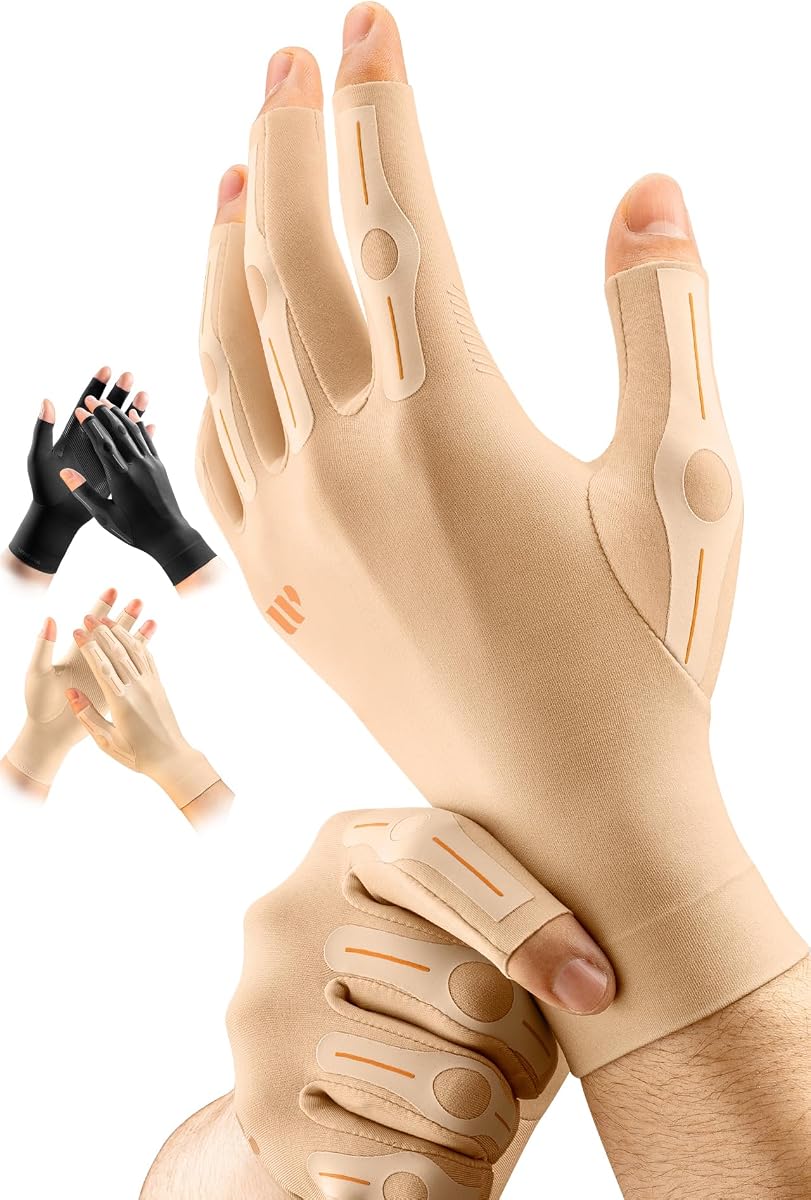
Targeted Compression Arthritis Gloves distinguish themselves with silicone support zones placed around key finger joints, knuckles, and thumb areas. Rather than relying only on uniform fabric pressure, the design combines 360-degree compression with more focused support. The listed rating is 4.3, and the glove's second-skin construction suits typing, crafting, gaming, and other repetitive work.
We may earn a commission when you buy through this link, at no additional cost to you.
The fabric contains 52% nylon, 44% high-elastane fiber, and 4% silicone. This combination provides substantial stretch, breathability, shape retention, and targeted cushioning. The manufacturer reports up to 95% elastic recovery after 3,000 stretch tests, while reinforced flatlock stitching is intended to improve durability without adding bulky seams.
Fit is the central trade-off. The wrist area provides noticeably snug compression and may feel tight during the first two or three wears. Buyers must measure palm circumference and select from XS through XL; the guidance notes that thicker wrists may benefit from gently stretching the opening before use.
This is the most technically detailed compression option in the list and the strongest choice for users who want more than uniform squeezing. It suits active hands that need support during typing, crafting, gaming, and travel. Correct sizing is essential to gain the intended support without making the wrist unnecessarily uncomfortable.
Extended silicone areas provide focused support over the knuckles, finger joints, and thumb. This design may be more useful than generic compression for users who notice discomfort in specific joint regions.
High-elastane fibers and reinforced stitching are designed to withstand repeated stretching. The result is a closer, more durable fit for extended typing, gaming, and repetitive hobbies.
We may earn a commission when you buy through this link, at no additional cost to you.
Copper Compression Arthritis Gloves combine copper-infused fibers, four-way stretch, and moisture control to support hands during typing, gaming, crafts, and other activities. With a 4.2 rating, they present a practical option for users who want compression without excessive heat buildup. The open-finger construction preserves fine motor control.
We may earn a commission when you buy through this link, at no additional cost to you.
The copper-infused material is paired with non-slip palm grips and a moisture-wicking structure designed to keep the hands dry and cool. These attributes make the glove relevant to longer working sessions, particularly for people who wear it through both work and recreational tasks. The construction also intends to retain compression and support over repeated use.
The supplied listing identifies the offered variant as size S, although the product description explains that XS through XL options exist. Buyers should verify which size is currently available. The glove also provides only limited wrist support, so it is not designed to correct wrist angle or replace a more structured ergonomic brace.
Copper Compression is best for users who value a close, flexible fit and moisture-wicking comfort during repetitive hand activity. It is especially relevant to typing, drawing, crochet, quilting, knitting, and gaming. Accurate measurement and attention to the listed size are essential before purchase.
Moisture-wicking fabric and an open design help limit the clammy feeling that can develop under compression gloves. This makes the gloves more practical for active or all-day use.
Four-way stretch and exposed fingertips support detailed movements. The gloves are suitable for crafting and drawing as well as conventional computer work.
We may earn a commission when you buy through this link, at no additional cost to you.
ComfyBrace Copper Arthritis Gloves emphasize continuous gentle compression in a light, ventilated format intended for work, exercise, driving, typing, cooking, sewing, and gaming. The 4.3 rating reflects a generally favorable customer response, while the product's low-profile construction differentiates it from bulkier braces.
We may earn a commission when you buy through this link, at no additional cost to you.
Copper-infused nylon and spandex fibers are designed to wick moisture, control odor, retain warmth, and provide consistent support. An open-finger layout, anti-slip grips, and minimal stitching preserve movement and reduce the sensation of confinement around the knuckles. The stretch is intended to hold its shape throughout daily use.
The support is intentionally gentle rather than aggressively stabilizing. There is no rigid wrist component or precise angle correction, so users with a need for positional support should consider a dedicated computer glove instead. Copper-infused fabric should also not be confused with a medical treatment or guaranteed therapeutic outcome.
ComfyBrace is best for people seeking comfortable everyday compression across varied tasks. It works well for general typing and common hobbies, particularly where breathability and low bulk matter. Review the sizing and current product details, and consult a healthcare professional for persistent pain, numbness, or worsening symptoms.
The copper nylon and spandex blend balances compression with moisture control. That balance makes the gloves suitable for activities that require steadier hand support without heavy insulation.
Exposed fingertips and minimal stitching allow normal dexterity. Anti-slip palm grips add control when holding a phone or working with other objects.
We may earn a commission when you buy through this link, at no additional cost to you.
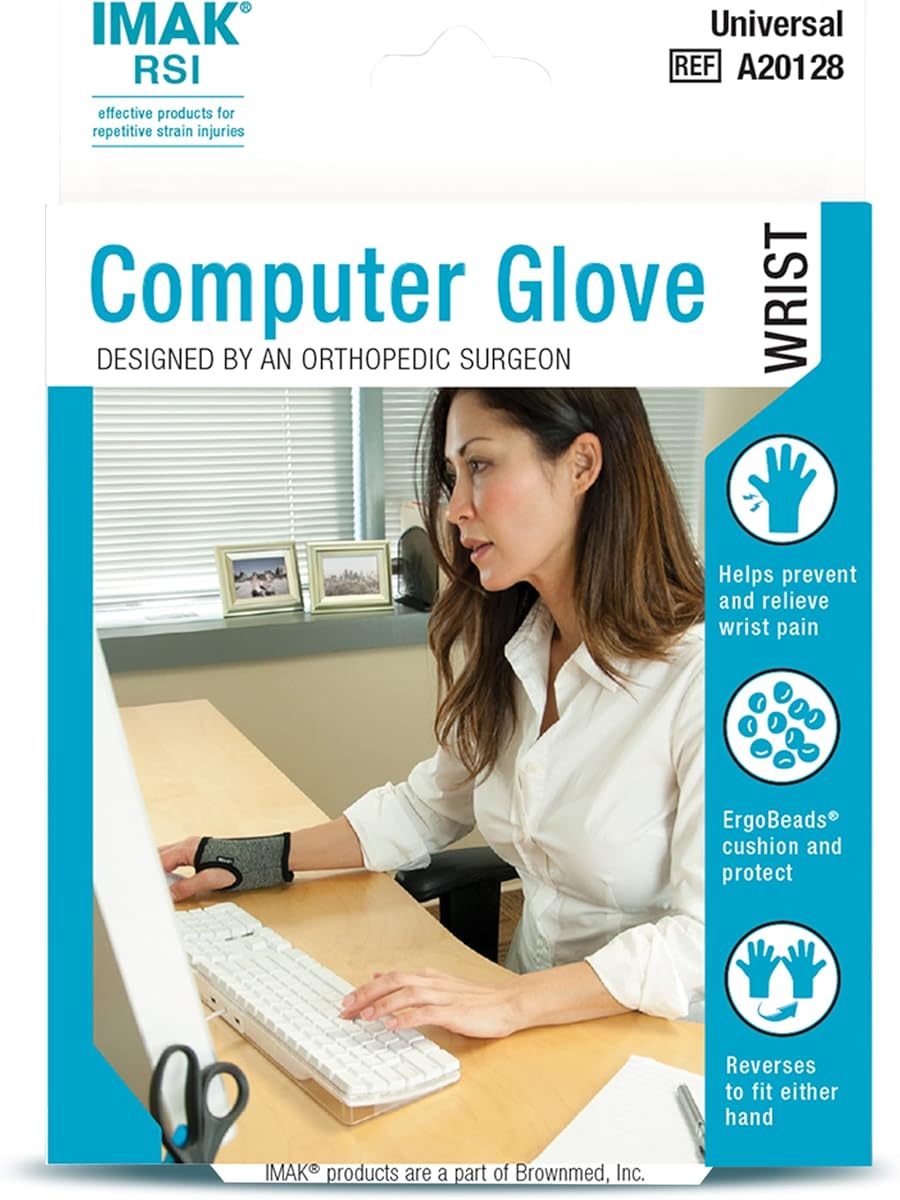
Brownmed IMAK RSI Computer Glove is the most explicitly ergonomic choice in this comparison, using built-in ErgoBeads to support the wrist and hand during keyboard, mouse, or controller use. Its 4.3 rating and specific computer-focused design make it a strong option for users who need more than basic compression.
We may earn a commission when you buy through this link, at no additional cost to you.
The massaging ErgoBeads double as a wrist rest, adding structure and stability where conventional fingerless gloves offer little. Breathable cotton fabric and gentle compression help manage comfort during extended work, while the ergonomic brace is intended to support proper wrist alignment. These features target repetitive strain discomfort associated with prolonged device use.
The added structure comes with a trade-off: the glove is bulkier than a simple knit fingerless option or ultra-thin touchscreen sleeve. It may not be the most natural choice for mobile gaming, where direct touch sensitivity and minimal coverage matter more than wrist positioning.
Brownmed IMAK is best for desk workers, programmers, writers, and other heavy keyboard users who value a dedicated wrist-support system. It also suits mouse and controller users seeking alignment support. People experiencing numbness, tingling, or persistent pain should obtain a professional diagnosis rather than relying solely on an accessory.
Unlike simple compression gloves, the ErgoBeads create a defined support surface beneath the wrist. This gives the hand a stable anchor during extended keyboard and mouse sessions.
Breathable cotton and gentle compression help balance structure with comfort. The glove is designed for sustained use while retaining enough flexibility for typing and device operation.
We may earn a commission when you buy through this link, at no additional cost to you.
The right keyboard typing glove depends on your work environment, the type of support you need, and how much warmth or structure you can comfortably tolerate.
Compression gloves surround the hand with even or targeted pressure and are best suited to users seeking support during repetitive finger and joint activity. Ergonomic wrist gloves add structure, beads, gel, or a fixed positioning angle for people who spend long periods at a keyboard or mouse. Warm fingerless knit gloves prioritize thermal comfort, while touchscreen sleeves prioritize conductive sensitivity. Choosing the primary function first prevents paying for or tolerating a design that addresses the wrong concern.
A useful typing glove must preserve the movement needed to reach every key. Open-finger and half-finger designs expose the fingertips and usually the thumb, making typing, scrolling, and phone use more natural. Check whether openings are sized for your fingers and whether the seams or support zones press on knuckles. Some highly targeted compression models add silicone around joints, which may feel supportive to one user and restrictive to another.
Compression and ergonomic gloves depend heavily on accurate sizing. Several listings ask buyers to measure palm circumference, while others provide general small, medium, or large guidance. Measure the area specified by the manufacturer rather than guessing from glove size. Pay particular attention to wrist circumference, especially for models that deliberately create a snug wrist fit. If you fall between sizes, review the listing's recommendation for sizing up or down.
Knitted gloves are useful in cold offices but may feel warm during long indoor typing sessions. Synthetic compression fabrics can stretch and wick moisture but may feel less insulating. Cotton-rich designs often feel soft and breathable. Consider your room temperature, whether your hands are usually cold, and how long you intend to wear the gloves. A pair that works during winter travel may be unnecessarily warm for year-round office use.
Silicone palm dots or grips can improve control when holding a phone, steering wheel, mouse, or other object. This added friction is useful for mobile work and travel, though it may feel unnecessary if you type at a fixed desk. For touchscreens, verify that the material is explicitly conductive and intended for finger sleeves. A basic open-finger glove does not automatically preserve capacitive screen response.
Look for stretch that returns to shape, reinforced seams, and stitching that will not irritate the skin. Flatlock seams can be useful in close-fitting active gloves, while minimal stitching may be preferable for sensitive hands. Nylon and elastane blends often emphasize resilience, whereas knitted yarn prioritizes softness and stretch. Care instructions also matter: some gloves tolerate machine washing, while others should be hand washed and kept away from heat.
A typing glove may provide comfort, warmth, compression, or supportive positioning, but product descriptions alone do not establish a medical diagnosis or treatment. Persistent pain, tingling, numbness, swelling, or weakness deserves attention from a qualified healthcare professional. If you use a glove for a diagnosed condition, follow medical guidance and treat the product as a support accessory rather than a replacement for care, exercises, or workplace ergonomic assessment.
Put on typing gloves before beginning a long computer session, especially when using a structured wrist model. Check that the fingers sit naturally, the thumb is not trapped, and the wrist is neither bent upward nor compressed into an uncomfortable angle. For compression gloves, begin with a moderate wearing period and allow the fabric to stretch naturally. Users of snug wrist designs may notice initial pressure, but sharp pain, tingling, color change, or numbness is a reason to remove them.
Keep the gloves clean according to the specific care instructions. The COOLJOB knit gloves can be hand washed or machine washed, but the manufacturer advises cold hand washing and no tumble drying because heat may cause shrinkage. Other gloves that explicitly permit normal laundry should be washed with clothing, while minimal-seam or technical fabrics benefit from gentle cycles and proper fastening. Always check the current listing before using bleach, fabric softener, or high heat.
Allow gloves to dry fully before wearing them again, especially after washing or exercise. Air circulation helps prevent trapped moisture and odors. Inspect seams, elastic sections, silicone zones, and fingertip conductors periodically. Replace a glove when the fit becomes loose, support zones flatten, or padding loses its shape. For touchscreen sleeves, test the device before beginning a long session to confirm that touch response remains consistent.
Fingerless gloves are often practical for keyboard use because they leave the fingertips exposed and reduce the effort required to make fine movements. They are especially useful in cool environments where warmth matters but full finger coverage would interfere with typing. Users seeking wrist alignment or substantial compression may still prefer gloves with more structure.
Compression and ergonomic gloves may provide comfort, warmth, or support during repetitive activity, but they do not diagnose or treat carpal tunnel syndrome. Persistent numbness, tingling, weakness, or pain should be evaluated by a qualified healthcare professional. A glove can be used alongside professional advice, not as a substitute for it.
Compression gloves are generally more appropriate when the main concern is broad hand or joint support during typing, crafts, or gaming. Wrist-support gloves are better when the main concern is holding the wrist in a particular angle during keyboard or mouse use. Some buyers prefer a middle ground with light compression and flexible support.
Measure the area requested by the manufacturer, usually palm circumference, and compare it with the size chart rather than relying on your normal glove size. Pay attention to wrist measurements if the product applies extra wrist compression. If you fall between two sizes, follow the listing's sizing guidance for a snugger or looser fit.
They work only when their fingertips contain a conductive material designed to interact with capacitive screens. The Ptwola sleeves in this guide use conductive silver fiber at the fingertips. Ordinary fabric or unsupported fingerless gloves may not register touches reliably, so compatibility should be verified before extended use.
That depends on the product's care instructions. Some models can be machine washed, while technical or lightly structured gloves may be safer to hand wash. Cold water, mild detergent, and avoiding the dryer are generally safest. Heat can shrink elastic knit fibers or damage padding and specialized support structures.
Warm gloves can work well in cold rooms, but an overly insulated pair may cause sweating during extended indoor use. Knitted fingerless styles provide a lighter option, while breathable compression fabrics are better suited to year-round wear. Consider the room temperature and how long the gloves will remain on.
Choose a glove with four-way stretch, minimal stitching, and correctly sized openings. For snug compression models, a short adjustment period may help the material adapt. If discomfort includes pain, tingling, numbness, or discoloration, remove the gloves and consult a healthcare professional.
The best overall value in this guide is the COOLJOB warm knit fingerless glove because it combines a strong customer rating, exposed fingertips, silicone grip, soft stretch, and simple care. The Targeted Compression Arthritis Gloves stand out for joint-specific support and shape retention, while the Brownmed IMAK RSI Computer Glove is the clearest choice for users who want a structured wrist rest with built-in ErgoBeads.
Prioritize the problem you need the glove to solve rather than treating every option as interchangeable. Choose warmth for cold conditions, conductive fingertips for mobile screens, compression for general hand support, or ergonomic positioning for long keyboard sessions. Accurate sizing is essential, especially for close-fitting compression models, and gloves should never be allowed to create pain, tingling, or numbness.
Before buying, verify the current listing, available sizes, material details, care instructions, and seller information because products and availability can change. Prices also fluctuate, so compare the current offer with the features that matter most rather than assuming the first inexpensive option is the best fit for your hands.
