
YUNZII QL108
4.5Editor score
Hot-swappable mechanical switches
Full-size 104-key layout
RGB shine-through keycaps
Metal frame construction
Our guide compares the best keyboards that sound like a typewriter, comparing switches, connectivity, layout, build, lighting, and style for every budget.
A convincing typewriter sound comes from more than vintage round keycaps. The switch profile, keycap shape, internal construction, and mounting all influence the rhythm, pitch, and volume of every keystroke. The best models combine that satisfying mechanical character with modern conveniences such as wireless connectivity, programmable keys, and adjustable lighting.
We compared all ten keyboards across the factors that determine both sound and usability: tactile feedback, switch flexibility, layout, connection methods, backlighting, construction, device compatibility, and extra features. The list includes compact wireless models, full-size wired boards, hot-swappable custom keyboards, and a keyboard-and-mouse bundle for buyers who want a coordinated setup.
Each review reveals where a model is most compelling and where compromises may matter. Some prioritize the boldest traditional clack, while others offer a softer pop, extensive programmability, a large device stand, or broad multi-device support. Ratings and specifications reflect the supplied product information, and current prices, availability, and feature details can change over time.
4.5Editor score

4.4Editor score

4.7Editor score
The comparison below covers switch behavior, layout, connection style, and notable features. It helps distinguish genuinely tactile typewriter models from quieter linear boards and highlights which options best suit writing, gaming, travel, and multi-device workspaces.



This compact wooden keyboard is one of the most straightforward interpretations of the classic typewriter experience. It has an 83-key layout, round punk-inspired keycaps, and clicky blue switches that produce a crisp, tactile response. Its 4.3 rating reflects a strong balance of visual character, modern connectivity, and a compact footprint that works well on smaller desks.
We may earn a commission when you buy through this link, at no additional cost to you.
Its defining strength is the combination of a traditional clack and practical flexibility. The blue switches supply the audible click and tactile bump associated with mechanical keyboards, while hot-swap sockets let users change switches and keycaps without tools. USB-C and Bluetooth connections support three devices, including a tablet, laptop, and phone. A stainless-steel lever and separate knobs provide convenient control over 14 white backlight modes, brightness, and volume.
The main compromise is the absence of a numeric keypad. That omission is precisely what allows the board to occupy less desk space, and it may be advantageous for writers who mainly use the alphabetic section. The supplied data does not confirm the same broad programmability offered by some premium boards, so buyers prioritizing macros should verify current software support. The fixed color of the illumination also makes it less versatile for RGB-focused setups.
This is a strong recommendation for someone who wants an unmistakable typewriter-inspired sound without sacrificing wireless convenience. It is especially attractive for writers, students, and creative professionals with limited desk space. Choose it when tactile feedback, hot-swappability, and multi-device use matter more than having a dedicated number pad.
The blue switches deliver the sharp, rhythmic feedback most closely associated with older mechanical typing. Round keycaps reinforce the vintage character, while the 83-key design preserves the familiar main typing area.
Bluetooth and USB-C connectivity make it easy to move between a laptop, tablet, and phone. Three-device support adds useful flexibility without turning the keyboard into a complex networking device.
We may earn a commission when you buy through this link, at no additional cost to you.
The YUNZII QL75 ranks as the most complete customization option in this group. It combines a 75-percent wooden case, round typewriter-style keycaps, and gradually ascending key rows with hot-swappable sockets, QMK and VIA support, and RGB lighting. Its 4.4 rating reflects a well-rounded board for enthusiasts who want the classic look without accepting a fixed configuration.
We may earn a commission when you buy through this link, at no additional cost to you.
Sound is especially adaptable because users can install tactile or linear switches according to preference. A tactile switch can create the pronounced click and feedback of an old typewriter, while a smoother linear option offers a quieter, more fluid experience. The premium PCB supports both 3-pin and 5-pin switches, and the hot-swap design makes experimentation much less cumbersome. The integrated stand is a thoughtful addition for holding a phone, tablet, or other device while working.
Its 75-percent layout omits a dedicated number pad, which may frustrate spreadsheet-heavy users. QMK and VIA support also introduces a learning curve for buyers who have never programmed a keyboard, even though the customization potential is substantial. Wired USB-C, Bluetooth, and 2.4GHz connections provide strong flexibility, while support for switching among five devices is particularly useful for multi-computer work.
This is the pick for keyboard enthusiasts who want to shape the sound, layout, and lighting around their own preferences. Writers can favor a crisp tactile switch, while programmers and gamers can choose a smoother feel and create shortcuts or macros. It is an excellent all-round choice for anyone seeking both visual drama and serious mechanical customization.
Hot-swappable 3-pin and 5-pin sockets make it straightforward to compare switch families. Tactile switches emphasize the typewriter-like click, while linear switches deliver a smoother bottom-out for shared offices.
QMK and VIA support can turn the QL75 into a purpose-built productivity tool. Shortcuts, layers, and lighting effects can be tailored for writing, editing, programming, or gaming.
We may earn a commission when you buy through this link, at no additional cost to you.
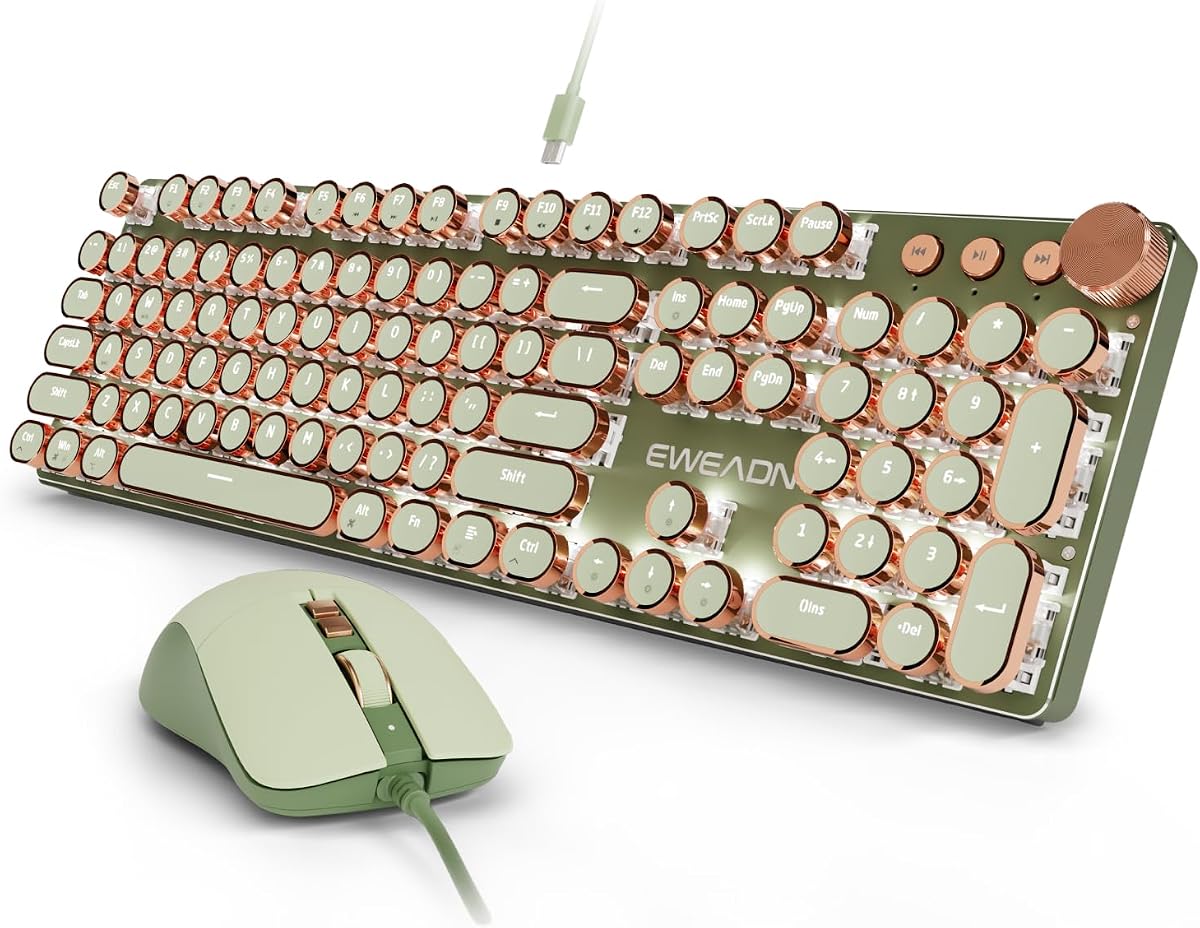
This green keyboard-and-mouse set delivers a typewriter-inspired look with a gentler acoustic profile than the loudest blue-switch models. Its pink linear switches provide smooth operation and a restrained pop instead of a sharp tactile click. The 4.4 rating makes it a compelling choice for shared workspaces, offices, and buyers who enjoy retro styling without the interruption of aggressive clacking.
We may earn a commission when you buy through this link, at no additional cost to you.
The bundle has practical advantages over assembling a keyboard and mouse separately. Both pieces share a coordinated appearance, and the keyboard includes a metal rotary knob for volume adjustment or muting. Dynamic lighting adds atmosphere without requiring extra software. The mouse has an independently attached cable, adjustable DPI from 1200 to 2400, and a contoured shape designed for longer use.
The trade-off is its wired approach. While that removes battery management and makes the connection dependable, it also limits portability and leaves cables on the desk. Compatibility is strongest for PC and office use, with Windows supported directly and USB-C laptops requiring a USB-A-to-USB-C adapter. The linear switches may also be less satisfying for buyers seeking the pronounced bump of a traditional typewriter mechanism.
Choose this set if visual impact, a complete coordinated package, and a softer mechanical sound are your priorities. It works particularly well for a fixed home office or gaming setup where the bold green finish and white backlight can become part of the room's décor. The included mouse adds convenience, although dedicated mouse users may eventually prefer a separate ergonomic model.
The pink linear switches moderate harsh clacking into a gentle pop. They preserve a satisfying mechanical cadence while remaining more considerate in an office or shared room.
Matching keyboard and mouse components simplify setup and create a more intentional appearance. The separate mouse cable also allows the mouse to be repositioned independently of the keyboard.
We may earn a commission when you buy through this link, at no additional cost to you.
The YUNZII QL108 gives buyers a particularly balanced version of the typewriter keyboard formula. It has a full-size 104-key layout, electroplated round keycaps, a metal frame, and RGB lighting, while its supplied pre-lubricated switches are described as creamy and clicky. Its 4.5 rating reflects a versatile package that works for writing, office tasks, programming, and gaming.
We may earn a commission when you buy through this link, at no additional cost to you.
One of its biggest advantages is the combination of a number pad and hot-swappable sockets. Users can customize the feel and sound without tools, while both 3-pin and 5-pin switches are supported. The metal shell provides a stable foundation, and the south-facing RGB lighting shines through the keycap legends. Online customization for Windows and Mac users can handle key remapping and macros, adding utility beyond the nostalgic appearance.
The board is wired through USB-C, which is simple and dependable but not as flexible as the tri-mode models in this list. RGB illumination is a natural choice for a fixed gaming setup, though a wireless model would be more convenient for a clutter-free desk or frequent travel. Buyers who need Bluetooth or 2.4GHz operation should not assume those features are included.
This is a strong pick for someone who wants a traditional round-keycap look, a complete number pad, and easy switch tuning without moving to a higher-end custom platform. It is particularly good for desktop users who value a full layout and consistent lighting. For a shared office, the wired design and customizable settings are also straightforward to manage.
The 104-key format preserves a dedicated number pad, useful for accounting, spreadsheets, and numeric shortcuts. Round keycaps and the metal shell supply the typewriter character without sacrificing modern utility.
Hot-swap sockets, broad switch support, and online remapping make experimentation accessible. Users can start with the supplied switches and then tune the sound to match their environment.
We may earn a commission when you buy through this link, at no additional cost to you.
This full-size white keyboard emphasizes appearance, lighting, and a smooth linear feel. It uses steampunk-inspired round keycaps with rose-gold rings, double-shot molded legends, and an aluminum alloy panel. Its 3.9 rating is the lowest in the group, but the product still offers a distinctive combination of retro appearance, modern lighting controls, and full-size mechanical performance.
We may earn a commission when you buy through this link, at no additional cost to you.
The custom white switches are described as smooth and linear, with moderate resistance and no tactile bump. That makes the typing action less explicitly typewriter-like than blue switches, though the round keycaps and deliberate mechanical motion preserve the visual and rhythmic theme. The keyboard includes 19 lighting effects, five brightness levels, adjustable speed, static presets, and dynamic modes controlled through Fn combinations.
Its 104-key layout includes full-key NKRO, making it useful for gaming and rapid typing. A detachable USB-A cable offers plug-and-play convenience, while a volume knob and three dedicated multimedia keys streamline daily control. The aluminum panel and adjustable tilt feet create a stable platform. The main limitation is its relatively modest 3.9 rating, which may warrant extra attention to recent user feedback before buying.
This keyboard is best for a buyer who loves the vintage look but prefers a smooth, bump-free mechanical action. It also suits gamers who need anti-ghosting and detailed lighting controls in a full-size board. Those seeking a sharp traditional click should favor a tactile blue-switch model, while those prioritizing programmability may find the QL108 or QL75 more capable.
Nineteen effects, multiple brightness levels, and adjustable speed provide more visual control than a simple single-color backlight. The system is operated through clearly assigned Fn shortcuts.
The linear switches and full-key NKRO prioritize fluid movement and reliable multi-key input. A number pad, detachable cable, and adjustable feet make this a practical fixed-desk keyboard.
We may earn a commission when you buy through this link, at no additional cost to you.
The pink wireless mechanical keyboard stands out for its crisp blue switches, refined retro appearance, and flexible connectivity. It earns a 4.7 rating, the highest among the ten products, and pairs a metal faceplate with concave round keycaps and white backlighting. The result is a polished typewriter-inspired option aimed at writers, creators, and professionals who value both sound and appearance.
We may earn a commission when you buy through this link, at no additional cost to you.
Blue switches provide the strongest classic typewriter sensation in this roundup, combining an audible click with a definite tactile bump. At the same time, Bluetooth, 2.4GHz wireless, and USB-C wired modes make the board useful across a modern multi-device workspace. It can switch among up to five devices, including Mac, PC, tablet, and smartphone systems. The built-in 5000mAh rechargeable battery supports extended wireless use.
Its visual design is intentionally specific: a pink body, white illumination, and vintage round keycaps create a striking centerpiece. The curved layout and concave caps are intended to support fingertip positioning during long sessions. Some buyers may want programmable RGB effects or macro software, neither of which is confirmed in the supplied information. The white-only lighting also offers less variety than the RGB-equipped models.
This is an excellent recommendation for someone who wants an authentic mechanical clack and a striking desktop centerpiece without giving up modern wireless convenience. It works especially well for a home office, writing setup, or creative desk where visual personality matters. Buyers should confirm their preferred operating system and device-switching workflow before committing.
Tactile blue switches create a crisp bump and audible sound with each press. This is the closest match in the list to the lively rhythm associated with traditional mechanical typewriters.
Five-device switching, three connection methods, and a large rechargeable battery make the keyboard adaptable across computers and mobile devices. USB-C charging also simplifies power management.
We may earn a commission when you buy through this link, at no additional cost to you.
This wireless keyboard-and-mouse bundle focuses on a comfortable, uncluttered office setup with a retro round-keycap appearance. It carries a 4.4 rating and adds several practical touches that are not always included with typewriter-style boards, including a magnetic wrist rest, a built-in phone holder, seven keyboard backlight colors, and eleven mouse lighting modes.
We may earn a commission when you buy through this link, at no additional cost to you.
The keyboard and mouse connect through one compact 2.4GHz USB receiver, providing a stable link up to 33 feet. Both components recharge through USB-C, while automatic sleep and physical power controls help conserve energy. The detachable wrist rest uses soft sponge padding and a skin-friendly surface, making it useful during extended typing sessions. The mouse also offers adjustable DPI with three forward and backward settings.
Sound specifications are not detailed, so buyers seeking a specific tactile click or linear feel should verify the switch information before purchase. Unlike several mechanical options in the guide, it is primarily presented as a complete wireless peripheral bundle rather than a customizable mechanical platform. There is also no indication of Bluetooth or multi-device switching; compatibility is based on the single 2.4GHz receiver.
Choose this bundle for a home office, classroom, or shared workspace where a coordinated wireless setup matters more than switch customization. Its wrist rest, phone holder, and broad operating system support are especially useful for daily productivity. It is also a convenient option for buyers who want both a retro-inspired keyboard and a matching mouse without sourcing each separately.
The magnetic wrist rest is padded and removable, allowing users to adjust the desk setup. Its simple attachment also makes the keyboard easier to clean or reposition.
One receiver serves both peripherals, reducing cable clutter around the desk. USB-C charging and automatic sleep add convenience without demanding frequent battery attention.
We may earn a commission when you buy through this link, at no additional cost to you.
This wired mechanical keyboard delivers a straightforward combination of blue-switch feedback, round typewriter keycaps, and adjustable RGB lighting. Its 4.3 rating places it among the stronger traditional options, and the design appears especially suitable for users who want an audible, tactile keyboard for general productivity or gaming.
We may earn a commission when you buy through this link, at no additional cost to you.
The blue switches are the central attraction, providing rhythmic clacking and crisp tactile feedback rather than a softer linear action. Round steampunk-inspired keycaps strengthen the old-fashioned appearance, while RGB modes, brightness, and speed settings allow the lighting to be tailored to different games and work environments. Full N-key rollover helps ensure that simultaneous inputs register reliably during rapid typing and gaming.
The aluminum alloy panel with a matte finish provides stability, while multimedia keys, a stepped key layout, and adjustable feet support everyday use. As a wired USB model, it avoids battery and pairing concerns but will not suit buyers seeking a clean, cable-free mobile setup. The supplied information also does not mention hot-swappable sockets, which limits future sound customization compared with the YUNZII models.
This is a good choice for gamers and typists who prioritize the sharp blue-switch sound and reliable anti-ghosting. It also makes sense for a permanent desk where a stable wired connection is preferred. Those interested in tinkering with switches or moving frequently between devices should instead examine the hot-swappable or tri-mode alternatives in this guide.
Blue switches offer both a tactile bump and audible click, creating clear confirmation for every press. N-key rollover supports accurate input when several keys are pressed together.
The metal panel anchors the keyboard on the desk, while adjustable RGB modes coordinate illumination with different games. Dedicated multimedia keys add straightforward control.
We may earn a commission when you buy through this link, at no additional cost to you.
The FINEDAY Keyboard 2.0 Plus goes further than most of its competitors in recreating the physical cues of a historical typewriter. It has a full-size 104-key layout, blue switches, an integrated stand, a left lever styled like an Enter key, and separate aluminum controls for brightness and volume. Its 4.2 rating reflects a distinctive design that rewards close attention to detail.
We may earn a commission when you buy through this link, at no additional cost to you.
The blue switches are designed to deliver a clickety-clackety feel, making this one of the clearest choices for traditional mechanical feedback. Its 9.22-degree cradling angle is intended to support a more natural typing position, while the integrated stand can hold a phone or other device. A 5000mAh built-in battery supports extended wireless use and reduces the frequency of recharging.
Connectivity is exceptionally flexible for the form factor. Bluetooth can cover three devices, 2.4GHz handles one more, and USB provides a fifth connection, allowing USB and Bluetooth to operate simultaneously. The unusual control arrangement is a potential drawback, however. The left lever, brightness wheel, and right volume wheel look authentic, but users accustomed to standard modern buttons may need time to adapt.
This keyboard is best for a writer or enthusiast who values narrative detail over minimalist design. It is also a compelling choice for anyone who wants the feel of an antique typewriter without giving up a number pad, wireless operation, or broad device support. Prospective buyers should confirm that the English keycap layout suits their typing habits and preferred computer system.
The lever-style Enter key and twin aluminum wheels reproduce familiar typewriter details. Their functions remain practical by controlling entry, lighting, and device volume.
Three Bluetooth devices, one 2.4GHz device, and one USB connection create a five-device workflow. The full 104-key layout remains useful for number-heavy tasks.
We may earn a commission when you buy through this link, at no additional cost to you.
The Redragon K710 combines a white typewriter-style design, blue mechanical switches, wireless flexibility, and detailed RGB control. Its 4.5 rating makes it one of the strongest all-around choices for buyers who want a traditional-looking mechanical keyboard that can also handle gaming and programmable workflows.
We may earn a commission when you buy through this link, at no additional cost to you.
The blue switches provide medium resistance, audible clicks, and tactile feedback. Round steampunk keycaps preserve the antique appearance without giving up modern mechanical performance. Tri-mode connectivity includes USB-C wired, Bluetooth 3.0 and 5.0, and 2.4GHz wireless modes, making it suitable for setups that alternate between a desktop and mobile devices. The metal panel adds stability, and 104-key anti-ghosting supports simultaneous inputs.
RGB customization is one of the K710's strongest features. It offers 16 presets, on-board brightness and speed adjustment, seven solid colors, and per-key customization through the supplied software. Users can also design custom effects, macros, and keybindings. That flexibility comes with a learning curve, and the software must be obtained from Redragon's official site using the K710W model listing.
This is a strong recommendation for gamers and power users who want a satisfying mechanical click, wireless convenience, and extensive lighting options in a full-size layout. It is less ideal for buyers who want tool-free switch experimentation because hot-swap support is not stated. Even so, the combination of build, sound, programmability, and connectivity makes the K710 a convincing all-rounder.
Tactile blue switches create a responsive and audible typing experience. Bluetooth and 2.4GHz modes free the keyboard from the fixed desktop setup.
Sixteen presets, solid colors, per-key effects, and custom macros provide extensive control. The dedicated Redragon software expands the board beyond basic lighting.
We may earn a commission when you buy through this link, at no additional cost to you.
The strongest typewriter-like experience depends on switch behavior, keycap geometry, construction, layout, and intended setting. Use the following factors to narrow the field before making a final decision.
Blue mechanical switches are the most traditional choice because they combine an audible click with a noticeable tactile bump. The result resembles a classic typewriter more closely than a smooth linear switch, although the sound can be loud in shared spaces. Linear switches provide a smoother, quieter action with less pronounced feedback, while tactile switches offer a middle ground with a noticeable bump and somewhat softer acoustic character.
In short, choose blue switches for maximum clack, linear switches for a quieter feel, and tactile switches for balanced feedback.
Typewriter-style keyboards range from compact 83-key designs to full 104-key boards with number pads. A compact or 75-percent layout can create more space for writing or improve portability, but it removes the dedicated number pad. Full-size models are better for spreadsheets, accounting, gaming shortcuts, and users who want all conventional keys. Think about the rest of your desk and mouse placement before choosing a narrow model.
Choose a compact layout for desk space and travel, or a full-size layout for maximum function and familiar key positioning.
Wireless keyboards reduce cable clutter and make it easier to move between a laptop, tablet, or phone. Tri-mode models support Bluetooth, 2.4GHz, and wired operation, while simpler wireless designs may use only a 2.4GHz receiver. Wired models usually provide the most straightforward connection and avoid charging, making them practical for permanent desks and gaming setups.
Choose tri-mode connectivity for flexible device switching, 2.4GHz for a simple wireless desk, or wired operation for dependable fixed setup.
Hot-swappable sockets allow users to change mechanical switches without soldering, making it easier to alter sound, weight, and feedback. Programmable boards add layers, shortcuts, macros, and remapped keys, which can streamline specialized workflows. QMK and VIA support is particularly useful for keyboard enthusiasts, while manufacturer software may provide lighting and macro controls. Verify compatibility with your preferred operating system before downloading anything.
Choose hot-swap sockets for easier acoustic tuning and programmable software for advanced shortcuts, remapping, and lighting control.
A metal panel or case generally creates a more stable foundation and may influence the overall acoustic character. Adjustable feet can improve comfort and typing angle, while a rubberized base or solid weight can reduce movement. The supplied information does not provide detailed sound testing results, so construction should be evaluated as a strong indicator of overall quality rather than a guarantee of one exact sound.
Prioritize rigid cases, adjustable feet, and a stable base for a more controlled desktop experience, especially during rapid typing.
Typewriter styling can be paired with restrained white illumination or vivid RGB effects. White backlighting supports the vintage appearance and can be easier on the eyes in a dim room, while RGB offers coordination with games and other peripherals. Round keycaps, case color, accent rings, and integrated stands also influence whether a keyboard blends into a professional workspace or becomes its centerpiece.
Choose white lighting for understated vintage style, or RGB for gaming setups and highly personalized desk arrangements.
Useful extras include a rotary volume knob, dedicated media controls, a removable wrist rest, a built-in phone or tablet stand, and automatic sleep. Battery capacity matters for wireless models, while USB-C charging simplifies power management. Carefully positioned stands can improve screen placement, but controls placed unusually for aesthetic reasons may require a short adjustment period. Daily convenience should complement, not outweigh, the typing experience.
Prioritize the extras you will use daily, such as a wrist rest, device stand, media knob, sleep timer, and easy charging.
Check the operating systems, connection types, and layout supported by the keyboard. Some models include Windows and Mac layouts, while others support Linux, Chrome OS, Android, or iOS. Wired boards may also require a USB-A-to-USB-C adapter. For international layouts or specialized punctuation, confirm that the legends and physical key arrangement meet your requirements before ordering.
Always verify operating system support, connector type, key legends, and language layout to avoid compatibility surprises.
Begin by placing the keyboard on a stable, flat surface and choosing a typing angle that feels natural. If it has adjustable feet, use the lowest comfortable setting at first and avoid resting the rear edge on an elevated surface. Connect the appropriate wired cable or pair the keyboard through its documented Bluetooth or 2.4GHz process. Confirm the active connection before opening a document, especially on models that can switch among several devices.
Learning the switch behavior can improve control. Blue and tactile switches have a deliberate bump, while linear switches move directly to the bottom. Slow down briefly while adjusting to the new feedback, and use the supplied software to set lighting, macros, or device shortcuts where applicable. For hot-swappable boards, power the keyboard down before removing keycaps or switches, and confirm that replacement switches match the supported three-pin or five-pin format.
Keep the keyboard dry and dust-free with a soft microfiber cloth. Avoid spilling liquids directly onto the switches, and unplug it before cleaning if moisture is present. Remove loose debris with a soft brush, clean keycap edges gently, and avoid abrasive cleaners. For wireless models, recharge periodically and use automatic sleep or power switches when the keyboard is not needed. Periodically check the connection, battery indicator, and key responsiveness.
Blue mechanical switches usually provide the most convincing typewriter-like experience because they combine an audible click with a tactile bump. Tactile switches deliver a softer bump and a less aggressive sound, while linear switches are smooth and relatively quiet. The keycap shape and internal case construction also affect the final character, so the switch is only one part of the sound.
They can be, especially models with full-key anti-ghosting, N-key rollover, and responsive blue switches. Round keycaps do not prevent normal gaming use, though buyers should check layout size and function-key compatibility. Programmable models may also support macros and remapping, while RGB versions can coordinate more closely with a gaming setup.
They make it easier to change the switches, and quieter switch choices can reduce noise. Linear switches are often smoother and quieter, while tactile and blue switches generally create more audible feedback. You can also change keycaps, add case foam, or adjust the keyboard angle, although those modifications are not included with every model.
A compact model can free meaningful desk space and is often easier to carry. Models with 83 or 75 percent of the usual keys omit or compress features such as the number pad. If you regularly enter large amounts of numerical data, a full-size model may be more practical despite taking up more room.
Several products in this guide support Bluetooth connections to mobile devices, while others use a 2.4GHz receiver. Compatibility depends on the operating system and the keyboard's stated device support. A model that supports USB-C wired use may also work with compatible tablets and phones, although adapters and app behavior can vary.
A typewriter-style keyboard uses round keycaps, vintage case styling, and sometimes a lever-shaped Enter key to evoke classic typewriters. Normal mechanical keyboards usually retain familiar rectangular sculpted keycaps and offer broader modern layouts. The sound difference often comes from the switch, keycap shape, case, and mounting rather than the appearance alone.
It depends on how much acoustic feedback you prefer. Blue switches deliver a crisp, louder clack, while linear or softer tactile options may be more considerate. Sound can travel through a shared desk, so choosing a quieter switch and avoiding excessive case amplification can help. A wired setup also eliminates pairing interruptions in busy environments.
Keep liquids away from the board, dust it with a soft brush, and wipe the keycaps with a lightly damp microfiber cloth. Unplug it before cleaning around the switches. Hot-swappable models should be powered down before changing keycaps or switches, and wireless models should be kept charged to avoid abrupt shutdowns during long sessions.
The YUNZII QL75 is the strongest all-round choice for buyers who want hot-swappable switches, extensive programmability, and tri-mode connectivity. The YUNZII QL108 offers the most accessible route to a full-size hot-swappable design, while the wireless pink model leads the group in customer rating and delivers a particularly satisfying blue-switch clack.
Your priorities should determine the winner. Choose a traditional blue-switch board for a pronounced click, a linear model for a softer office feel, a hot-swappable model for future tuning, or a tri-mode keyboard for switching among several devices. Consider the number pad, desk footprint, lighting, software, and operating system before focusing on appearance alone.
Current prices, availability, firmware, software compatibility, and product details can change, so check the latest listing and recent customer feedback before purchasing. The best typewriter-style keyboard is ultimately the one that delivers the sound and layout you enjoy while remaining comfortable and practical for your everyday work.