CLABEL 221B Thermal Label Printer
4.3Editor score
Flexible standard label support
Bluetooth mobile printing
Batch printing and templates
Waterproof label compatibility
A dependable label printer helps a bakery turn wrapped pastries, bakery boxes, ingredient containers, and outgoing orders into a polished presentation. The right model should produce readable text and scannable codes, accept the labels your operation actually uses, and make daily workflow changes without unnecessary friction.
We compared these printers by label width, print resolution, connection options, supported platforms, design features, portability, and suitability for food-related environments. The list covers compact label makers for jar labels and price tags as well as thermal shipping printers for orders, gift boxes, and wholesale deliveries.
Each review explains the strongest reasons to consider a model, along with the compromises that could affect a bakery. Ratings and specifications reflect the supplied product information, while availability, software behavior, and labeling needs should always be confirmed before purchasing.
4.3Editor score

4.4Editor score

4.3Editor score
As an Amazon Associate we earn from qualifying purchases.
The comparison highlights print resolution, maximum label width, connection choices, and the most relevant workflow feature for each model, helping bakery owners identify a printer that matches their labels, devices, and order volume.







The MUNBYN Bluetooth Thermal Label Printer receives a 4.4 rating and stands out as the most versatile option in this guide for a bakery handling both retail packaging and outgoing shipments. Its 203 dpi thermal output is appropriate for ingredient names, allergens, prices, barcodes, QR codes, addresses, and branded box labels, while support for label widths from 1.57 inches to 4.3 inches gives it room to cover many tasks.
We may earn a commission when you buy through this link, at no additional cost to you.
Bluetooth supports wireless work from iOS and Android through the MUNBYN Print app, while PC users can use the Munbyn Editor in Google Chrome. USB provides a fallback for Bluetooth-less desktops. The editing options are particularly valuable for a bakery because they include more than 3,500 elements, more than 2,000 templates, more than 80 fonts, file importing, OCR, and multi-language support. That flexibility makes it easier to develop consistent labels for croissants, cake boxes, storage bins, and customer orders.
The main caveat is label compatibility. MUNBYN recommends genuine MUNBYN thermal paper for the most consistent output, and the 130B may not work with UPS thermal paper. Specialty media options—including gradient, shell, aurora, glitter, rainbow, and Morandi labels—broaden creative options, but they also mean a bakery using a particular roll should verify dimensions and media support before committing.
This is the strongest overall choice for a bakery that needs one printer to cover packaging, inventory, and shipping. Choose it when flexible design tools, wireless mobile printing, and a wide range of label formats matter more than a dedicated shipping-only design. A first-time owner should install the appropriate app, check the installed media, and run a test label before setting up a full labeling station.
Its broad media support lets a bakery move between narrow jar labels, product tags, QR labels, and 4×6 shipping labels without changing equipment. That versatility reduces the need to maintain separate devices for packaging and order fulfillment.
The combination of a mobile app, a browser-based editor, and USB connectivity supports staff working from phones, tablets, laptops, and desktops. Importing existing artwork or using OCR also helps when labels must be created quickly from information already on hand.
We may earn a commission when you buy through this link, at no additional cost to you.
The NULLTONEX Thermal Shipping Label Printer has a 4.4 rating and is a practical choice for bakeries that send many customer or wholesale orders. It prints at 203 dpi and up to 150 mm per second, a stated rate of 72 labels per minute. That performance is particularly relevant when a morning pickup or delivery batch creates a concentrated rush of shipping work.
We may earn a commission when you buy through this link, at no additional cost to you.
Direct thermal technology removes the need for ink and toner, while the FlashLabel Pro app provides more than 1,800 templates, more than 300 fonts, and multiple editing tools. Its offline capability can keep locally stored templates and designs available when a stable internet connection is not. Bluetooth connects to phones, laptops, and PCs, while USB offers a more stable office connection.
Compatibility extends to Amazon, Shopify, Etsy, USPS, UPS, FedEx, and DHL, and the printer accepts standard 4×6 labels plus widths from 1.57 inches to 4.3 inches. The practical limitation is that output is black and white only. This is rarely a problem for functional shipping labels, but it means the printer cannot reproduce colored artwork on ordinary thermal stock.
Consider this model when fast fulfillment, offline templates, and shipping-platform support are priorities. It is less suited to a bakery seeking a colorful retail-label device, although monochrome allergy labels, storage labels, and product pricing can still look professional. Test the USB workflow at the counter and verify your carrier's label format before deploying it for daily orders.
A stated speed of 72 four-by-six labels per minute helps a bakery clear concentrated pickup or delivery batches. The printer's overheat protection is also relevant during extended printing sessions.
Local template and design storage lets staff continue preparing labels without waiting for cloud downloads. That can be valuable during busy service periods or when connectivity is inconsistent.
We may earn a commission when you buy through this link, at no additional cost to you.
The SUPVAN T50M Pro carries a 4.5 rating, the highest among the products in this roundup, and is well suited to small bakery containers, pantry shelves, and gift packaging. It prints labels from 3/4 inch to 2 inches wide, giving it more flexibility than a single-format label maker while remaining far more compact than a shipping printer.
We may earn a commission when you buy through this link, at no additional cost to you.
Its app supports images imported from a phone, tablet, or PC and provides more than 30 fonts, 50 frames, and 660 icons at no additional charge. Automatic label size recognition reduces setup time, and the lack of registration requirements makes onboarding temporary staff easier. The package includes three tapes, so a bakery can begin organizing jars, bottles, boxes, folders, and other small items immediately.
The main limitation is format. This model cannot handle 4×6 shipping labels, and its thermal process does not create full-color artwork. For a bakery, that means it is most valuable for ingredient containers, batch numbers, pantry labels, product names, QR codes, barcodes, and small business branding rather than large shipping labels.
This is an appealing choice for a bakery that wants a small, inexpensive-looking desktop or portable solution for premium packaging and organization. It is less appropriate as the sole printer for an order fulfillment operation. Confirm that your desired jar, container, and box labels fall within the supported width and shape range before purchasing.
Three included tapes reduce the friction of setting up a new labeling system. A bakery can use them to test container shapes, shelf organization, and packaging presentation before ordering a larger media supply.
Phone, tablet, or computer access to imported images makes it convenient to add bakery logos and ingredient details. Automatic size detection and a registration-free app keep everyday label creation approachable.
We may earn a commission when you buy through this link, at no additional cost to you.
The Phomemo 241BT receives a 4.4 rating and combines product labeling with a broad 1-to-4.6-inch label width range. That makes it a good middle ground for a bakery that needs small jar labels as well as large gift-box or shipping labels. Its 203 dpi printhead and direct thermal process are appropriate for text, barcodes, QR codes, forms, and product information.
We may earn a commission when you buy through this link, at no additional cost to you.
At up to 150 mm per second, the printer can produce as many as 72 four-by-six labels per minute. It supports eBay, Shopify, Amazon, Etsy, UPS, USPS, and FedEx, which covers many of the services used by small food businesses handling online orders. Mobile users print through the Labelife app, while PC and Mac workflows require the appropriate driver and a USB connection.
Phomemo states that its genuine thermal labels are engineered to resist fading and smudging, which is a useful quality to investigate for bakery storage, refrigerated displays, and frequently handled packages. However, the printer supports black-and-white printing only. Compatible thermal color paper is a separate purchase and should be considered carefully rather than assumed to be part of the package.
Choose the 241BT when one device must span gift-box labels, inventory tags, and fulfillment labels. Buyers should be comfortable installing the desktop driver and should test it with their shipping platforms before relying on it for high-volume work. Its broad format range and useful support options make it a strong all-around bakery choice.
Support from 1-inch to 4.6-inch widths allows a bakery to use one printer for small product identifiers and full-size shipping labels. The included sample labels provide an immediate way to verify fit and print quality.
The stated 72-label-per-minute performance suits batch printing during a busy pickup window. Platform compatibility also makes it easier to create labels directly from common ecommerce order systems.
We may earn a commission when you buy through this link, at no additional cost to you.
The KNAON Bluetooth Thermal Shipping Label Printer earns a 4.4 rating and emphasizes a quick path from mobile order to printed label. It supports iPhone and Android through the FlashLabel Pro app, Windows and macOS through the same app, and USB across macOS, Windows, ChromeOS, and Linux. A built-in USB drive contains drivers and tutorial videos to simplify setup.
We may earn a commission when you buy through this link, at no additional cost to you.
Its design library is extensive, with more than 3,000 templates, more than 5,000 icons, and more than 100 fonts. A bakery can use it for shipping labels, barcode labels, thank-you labels, mailing labels, name tags, and price tags. Paper widths from 1.5 to 4.2 inches accommodate both small packaging identifiers and standard 4×6 shipping labels.
KNAON lists Amazon, eBay, Shopify, USPS, UPS, Etsy, PayPal, Poshmark, and DHL among compatible platforms. The workflow often involves saving a logistics label as a PDF and importing it into FlashLabel Pro. This is not necessarily difficult, but it is a detail that new users should understand. Not every device connects directly through Bluetooth, so the app is an important part of the workflow.
This model fits bakeries that want fast output, a compact footprint, and mobile label creation without sacrificing 4×6 capability. Its stated speed of up to 180 mm/s is among the higher figures in the list. It is a particularly good fit for a small fulfillment counter where staff already use ecommerce platforms and can follow a short PDF import routine.
The 7.17 by 3.9 by 3.43-inch size is easy to store near a wrapping or packing station. That makes the printer more practical for operations that do not have room for a full-size office machine.
Drivers and tutorial videos stored on a built-in USB drive help staff move through initial setup. FlashLabel Pro then supplies a broad set of templates, icons, and fonts for common bakery labels.
We may earn a commission when you buy through this link, at no additional cost to you.
The JADENS Bluetooth Thermal Shipping Label Printer holds a 4.4 rating and is a practical option for bakeries that may use rolls, fanfold stock, or both. Its Japanese thermal printhead delivers 203 dpi output, and the supported label width range extends from 1.57 inches to 4.1 inches, covering common product labels and standard shipping formats.
We may earn a commission when you buy through this link, at no additional cost to you.
Windows 8 or later and Mac systems can print through Bluetooth, while Android and iOS users connect through the Jadens printer app. USB is available for Windows 7 and newer and Mac OS 10.9 or newer. The supplied information specifically notes that phones do not print through Bluetooth directly, making the app an essential part of mobile use.
The printer supports numerous fulfillment environments, including Endicia, Dazzle, ShipStation, ShippingEasy, Shippo, ShipWorks, Ordoro, eBay, Amazon, and Shopify. Driver files, instructions, and troubleshooting videos are available from a U-disk, and the product includes a one-year warranty with email, phone, and remote-control support.
A recurring operational detail is label calibration: users should long-press the feed button when changing labels. While this is a minor inconvenience, it matters when switching between packaging and shipping stock. JADENS is best for a bakery that values flexible media formats, straightforward support, and dependable platform coverage over wireless mobile convenience.
Supporting both formats lets a bakery use compact rolls for products and continuous fanfold labels for fulfillment without replacing the printer. It is especially useful while deciding which stock format fits the operation best.
The included U-disk holds drivers, setup instructions, and troubleshooting videos, reducing reliance on internet-only installation. A one-year warranty and multiple support channels add reassurance for a business-critical device.
We may earn a commission when you buy through this link, at no additional cost to you.
The PM240 Label Maker receives a 4.4 rating and is the most clearly portable option in this guide. At 207 grams, with a built-in 1500mAh rechargeable battery and up to 100 days of stated standby time, it suits bakeries that label jars, glass containers, classroom materials, or product displays away from a fixed counter.
We may earn a commission when you buy through this link, at no additional cost to you.
The package includes white rectangular labels measuring 40 by 30 millimeters, white rectangular labels measuring 50 by 80 millimeters, and pink round labels measuring 50 millimeters in diameter. The Labelnize app provides more than 2,500 icons, 3,800 templates, and 430 fonts, along with Excel import, batch printing, AI text-to-image, and OCR text recognition.
Bluetooth works with iOS and Android, while PC use requires the driver and software from the user guide plus a USB cable. Bluetooth and USB cannot operate simultaneously, and the device automatically powers off after 30 minutes of inactivity by default. That default can be adjusted in the app to 15, 30, or 60 minutes, which matters for long labeling sessions.
Choose the PM240 for portable shelf or container labeling rather than large shipping labels. It is also compelling for bakeries that teach staff, organize market displays, or want labels for events away from the main kitchen. Note that the power adapter is not included, and leave the green liner sticker attached as instructed to avoid printing errors.
The rechargeable design makes it easy to move from pantry to sales counter or market display without carrying a power cable. Its light weight also reduces strain during repeated labeling tasks.
RFID-equipped compatible TYPONOS labels allow the app to detect size automatically, which reduces manual configuration. That makes changing between the included rectangular and round formats more convenient.
We may earn a commission when you buy through this link, at no additional cost to you.
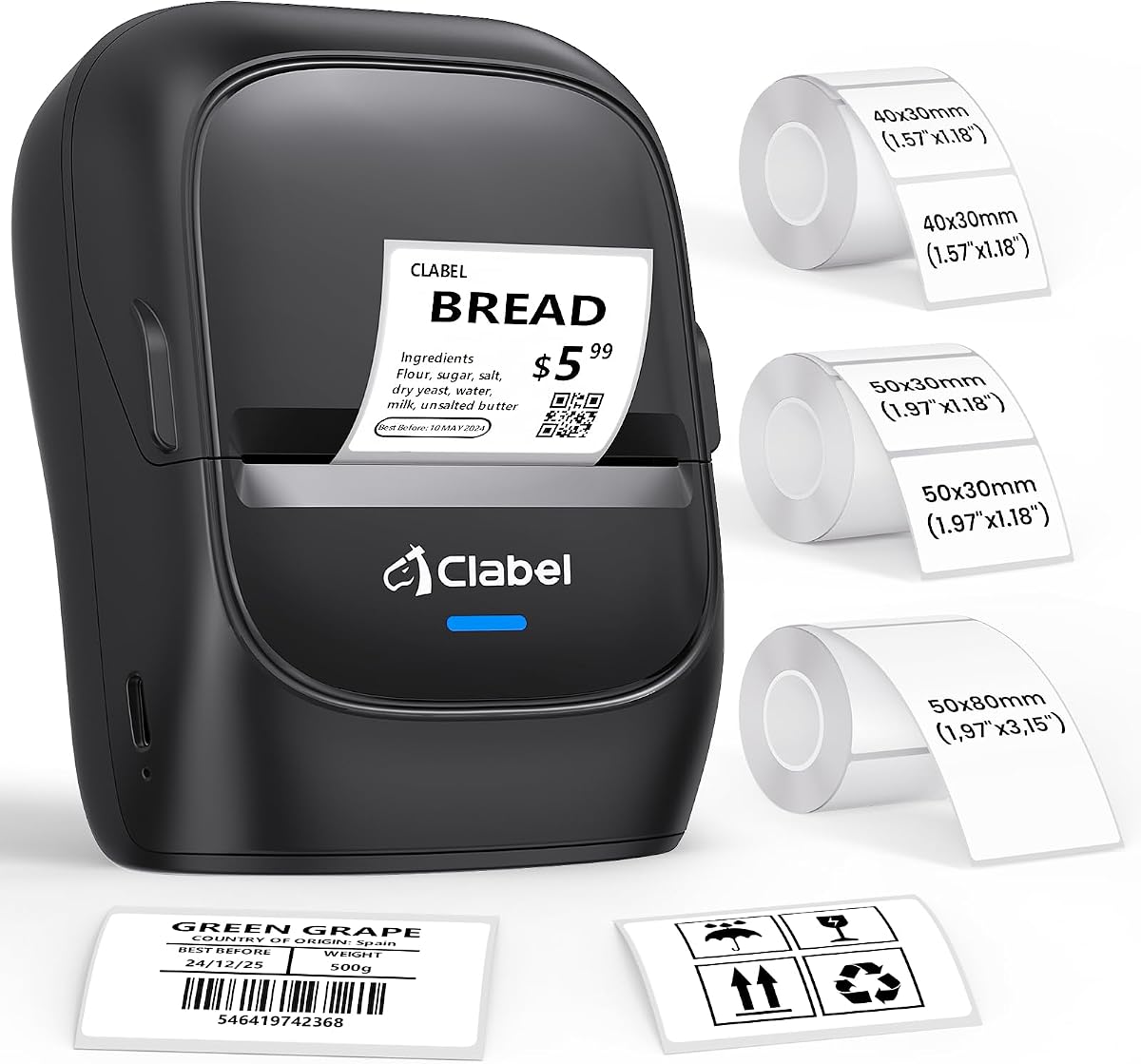
The CLABEL 221B receives a 4.3 rating and is a focused choice for bakeries that need clean product, jar, retail, and address labels without paying for a large shipping printer. Its 25-to-50-millimeter print range covers common 2-inch media, and the absence of RFID brand lock-in allows it to use standard thermal label rolls.
We may earn a commission when you buy through this link, at no additional cost to you.
The Clabel trade app provides hundreds of templates, icons, and fonts along with Excel batch printing and image-to-text. Bluetooth connection supports Android and iOS smartphones, while computers connect by USB. This is a straightforward combination for a small team that primarily edits on a phone but still needs occasional computer access.
The supplied rolls are marketed as waterproof, oil-proof, and resistant to friction and scratches, qualities that can be useful in a kitchen or on a busy retail shelf. The printer can produce barcodes, address labels, price tags, and jewelry labels, giving it broader value than a device designed only for one product category.
The CLABEL 221B is best for price tags, ingredient containers, bakery boxes, shelf labels, QR codes, and other labels within its two-inch width limit. It cannot produce 4×6 shipping labels, and iPad connectivity is not supported. Buyers should check those limits before purchase, but for a bakery focused on packaging and point-of-sale presentation, the flexibility is compelling.
The lack of RFID-based brand lock-in gives a bakery more freedom when sourcing compatible thermal media. This can simplify replenishment and make it easier to test several label styles before settling on a standard.
Excel import and batch printing help create groups of jar, shelf, or product labels efficiently. Image-to-text adds another option for turning visual information into printable label content.
We may earn a commission when you buy through this link, at no additional cost to you.
The Brother QL-820NWB has a 4.3 rating and is the premium pick for a bakery that wants professional-grade connectivity, resolution, and speed. Its 300 dpi monochrome printhead produces highly defined text and codes, while the stated performance reaches 110 standard address labels per minute. The readable monochrome LCD allows some operation without relying entirely on a connected computer.
We may earn a commission when you buy through this link, at no additional cost to you.
Its networking choices are notably comprehensive. Bluetooth, Ethernet, and 802.11b/g/n wireless connectivity make it possible to integrate the printer into different counter and packing-room layouts. A USB host interface also allows a peripheral such as a scanner to be connected, which can streamline workflows where items must be scanned and labeled in sequence.
Brother DK 2251 media can produce black-and-red labels, and maximum label length reaches three feet. That extends the machine beyond ordinary jar and shipping labels, opening possibilities for long packaging strips, signs, ingredient panels, or other bakery-specific information. It is not a full-color thermal printer, so its output remains limited to the supported monochrome or black-and-red formats.
This model is a strong fit for a growing bakery, shared production space, or fulfillment counter where dependable network access and high throughput justify a more substantial device. Buyers should confirm that their intended media is compatible with the printer and that its larger footprint suits the work area. For straightforward home packaging, a smaller model may be easier to manage.
Bluetooth, Ethernet, and Wi-Fi give the printer more placement options than a USB-only unit. Shared spaces or staff moving between devices can benefit from the ability to remain connected over the network.
The 300 dpi printhead creates crisp, detailed results, while the stated 110-label-per-minute speed supports substantial batches. Both qualities are useful for professional-looking packaging and readable operational labels.
We may earn a commission when you buy through this link, at no additional cost to you.
The Rollo USB Shipping Label Printer has a 4.6 rating, giving it the second-highest rating in the roundup, and it is a strong choice for a bakery with a dedicated packing station. It prints with a 203 dpi thermal head at up to 150 mm per second, stated as one 4×6 label per second, making it suited to concentrated shipping and wholesale order batches.
We may earn a commission when you buy through this link, at no additional cost to you.
Setup is centered around USB. After downloading the Rollo drivers, Windows and Mac users can connect a laptop or MacBook and begin producing shipping labels, warehouse labels, barcode labels, and stickers. The custom label maker also supports widths from 1.57 inches to 4.1 inches, allowing it to handle thank-you stickers, QR codes, business labels, and product identifiers.
Compatibility includes FedEx, UPS, USPS, Rollo Ship Manager, ShipStation, ShippingEasy, Shippo, ShipWorks, Amazon, Shopify, Etsy, and eBay. The included Rollo Ship application provides a streamlined workflow for connecting an ecommerce platform and creating shipments. This makes the printer particularly appealing to bakeries that fulfill many orders through online channels.
The tradeoff is that the printer does not offer built-in Bluetooth or Wi-Fi. A fixed computer, suitable USB cable, and driver installation are required, so it is less convenient for mobile-only workflows. If the bakery already has a dedicated packing computer and prioritizes reliable shipping output over wireless flexibility, the Rollo remains an efficient, well-regarded option.
A stated one-label-per-second rate supports large order batches and wholesale packing runs. Direct thermal technology also keeps the workflow simple by eliminating ink and toner replacement.
Support for major carriers, shipping services, and marketplaces covers common fulfillment routes. The companion shipping application and custom label features extend usefulness beyond standard address labels.
We may earn a commission when you buy through this link, at no additional cost to you.
The right choice depends on the labels your bakery uses, the devices already in your workflow, and whether printing is mainly for packaging, organization, or shipping. These factors help narrow the field before you compare software, speed, and media compatibility.
Begin by measuring the media you actually use, including the label width, roll diameter, spacing, and whether stock is supplied as a roll or fanfold. Compact label makers generally reach two inches and suit jars, containers, gift boxes, and price tags, while shipping-focused models often support roughly four inches of width for 4×6 labels. Check the maximum width before considering connection options or design features, because a printer cannot create a format it physically cannot feed.
Resolution affects the clarity of fine text, ingredient lists, small barcodes, and QR codes. A 203 dpi thermal printer is suitable for most functional bakery labeling, while the Brother QL-820NWB offers 300 dpi for especially detailed monochrome work. Resolution alone does not guarantee a perfect label, so print quality also depends on compatible media, correct sizing, and clean handling of the printhead.
Bluetooth is convenient for phones and tablets but depends on the app, operating system, and device model. USB tends to be more consistent for a fixed packing counter. The Brother model adds Ethernet and Wi-Fi, which can be valuable in a shared bakery or production environment. Do not assume every Bluetooth product prints directly from a phone; some require the label to be imported into a manufacturer app first.
A bakery accepting online and wholesale orders should confirm that the printer works with the exact marketplace, cart, and shipping service it uses. Amazon, Shopify, Etsy, USPS, UPS, FedEx, and DHL are mentioned across the available models, but compatibility can depend on the label format and export method. Some workflows require downloading a PDF and importing it into a printer app, while others offer more direct integration.
A useful editor should make it easy to add a bakery name, logo, product title, ingredients, allergens, price, date, barcode, or QR code. The listed apps range from a few hundred templates to collections of several thousand, with varying font, icon, OCR, image-import, and batch-printing tools. Look for automatic media detection, useful object libraries, and an interface that staff can learn without a long manual.
Fast output matters when many customer pickups, delivery labels, or wholesale boxes must be processed at once. Several thermal models state speeds between 150 and 180 mm per second, while the Brother model claims up to 110 standard address labels per minute. For low-volume bakery packaging, speed may matter less than size and portability; for a busy fulfillment counter, it becomes a central selection factor.
A bakery printer may encounter flour, sugar, moisture, oil, grease, and repeated contact with shelves or packaging. Some products include labels described as waterproof, oil-resistant, tear-resistant, or scratch-resistant. Media durability matters as much as the device housing, especially on jars, refrigerated displays, and gift boxes. Store rolls properly, use compatible thermal stock, and clean the printer according to the manufacturer's guidance.
Compact label makers are useful for markets, display tables, and staff moving around the shop, while larger shipping printers suit fixed packing stations. Check the included labels, tapes, cables, and power accessories. Some products provide starter media, one includes a built-in driver USB drive, and the PM240 lacks a power adapter. Confirm the power source and accessories before setting up the device.
Start by unboxing the printer, identifying its power source, and installing the correct app or driver before loading media. For phone printing, pair through the manufacturer's app and select the correct paper type and size. For computer printing, install the specified driver or extension, connect by USB or the supported network method, and print a test page before preparing a full production run.
Load the roll or fanfold labels in the direction shown by the printer, then set or allow the app to detect the media dimensions. Calibrate the label position when changing formats so content is not shifted. Create a master label design with the bakery name, product name, ingredients or allergens, date, barcode, or QR code as appropriate, and use templates for repeated jobs to limit spelling errors.
Keep the print path clean and handle thermal media by its edges. Store unused rolls in a dry place away from heat, direct sunlight, and friction, and use compatible stock for reliable results. Review the device guidance for cleaning, automatic shutoff, and supported media. Periodically test a label after a roll change, maintenance cycle, or software update, especially if the printer handles orders or food-safety information.
The right size depends on the labels you want to print. A compact two-inch label maker is sufficient for jars, containers, price tags, and gift boxes, while a printer supporting roughly 4.3 inches of width can also handle standard 4×6 shipping labels. Measure the actual stock before purchasing and check both maximum width and supported media format.
It depends on the box surface and label placement. Thermal printers work well with compatible adhesive labels applied to clean, smooth, room-temperature surfaces, but they do not print directly onto cardboard like an inkjet printer. Test a small area first because heat, moisture, oils, and rough surfaces can affect adhesion or print clarity.
Most of the thermal models in this guide produce monochrome output, and the Brother model supports black-and-red labels with compatible media. Color thermal paper may be available for some devices, but it is generally a separate purchase and should not be confused with full-color inkjet printing. Check the exact cartridge, label, or paper requirements before planning a colorful branding scheme.
Most listed models support mobile printing through a manufacturer app, but the process may require saving an order as a PDF and importing it rather than selecting the platform directly. Bluetooth compatibility also varies by phone and operating system. A short trial print with a real order is the safest way to confirm the complete workflow.
Thermal labels can work well on properly prepared containers when the adhesive and material are compatible with the storage environment. Some included label products are described as waterproof, oil-resistant, or scratch-resistant. You should still check refrigeration, moisture, and food-contact conditions, and always follow the relevant requirements for food packaging in your area.
Not every model requires proprietary media. MUNBYN and Phomemo specifically recommend their genuine thermal labels for optimal performance, while the CLABEL 221B is designed to avoid RFID-based brand lock-in. In all cases, using compatible media with the correct dimensions and spacing is important for barcodes, alignment, and reliable feeding.
Shipping printers are optimized for larger 4×6 labels, faster order batches, and compatibility with courier or marketplace workflows. Label makers are usually more compact and intended for narrow jar, container, shelf, product, and price labels. A growing bakery may eventually want both types, but one broader thermal printer can sometimes cover both categories.
First confirm that the media size in the app matches the loaded roll, then recalibrate or feed the printer after changing labels. Check that the roll is loaded in the correct direction and that the printhead is clean. If a barcode will not scan, test a new compatible label because damaged, wet, or poorly stored stock can create print defects.
The MUNBYN 4×6 Thermal Printer is the strongest all-around option because it combines flexible media support, mobile and browser-based design tools, and 4×6 capability. The CLABEL 221B stands out for focused bakery packaging and product labeling without proprietary RFID lock-in, while the Brother QL-820NWB offers the most professional connectivity and highest stated resolution.
For most small operations, start with the labels you need rather than the broadest possible specification. Match width and format first, then confirm that the app works with your phone or computer and that your ecommerce platform exports labels correctly. Consider speed and durability only after establishing a reliable basic workflow for names, ingredients, prices, QR codes, and addresses.
Before finalizing a purchase, verify current availability, included accessories, media requirements, software compatibility, and platform workflows because product configurations and software behavior can change. Running a real test label under your bakery's intended conditions is the most reliable final check before placing a printer into daily service.