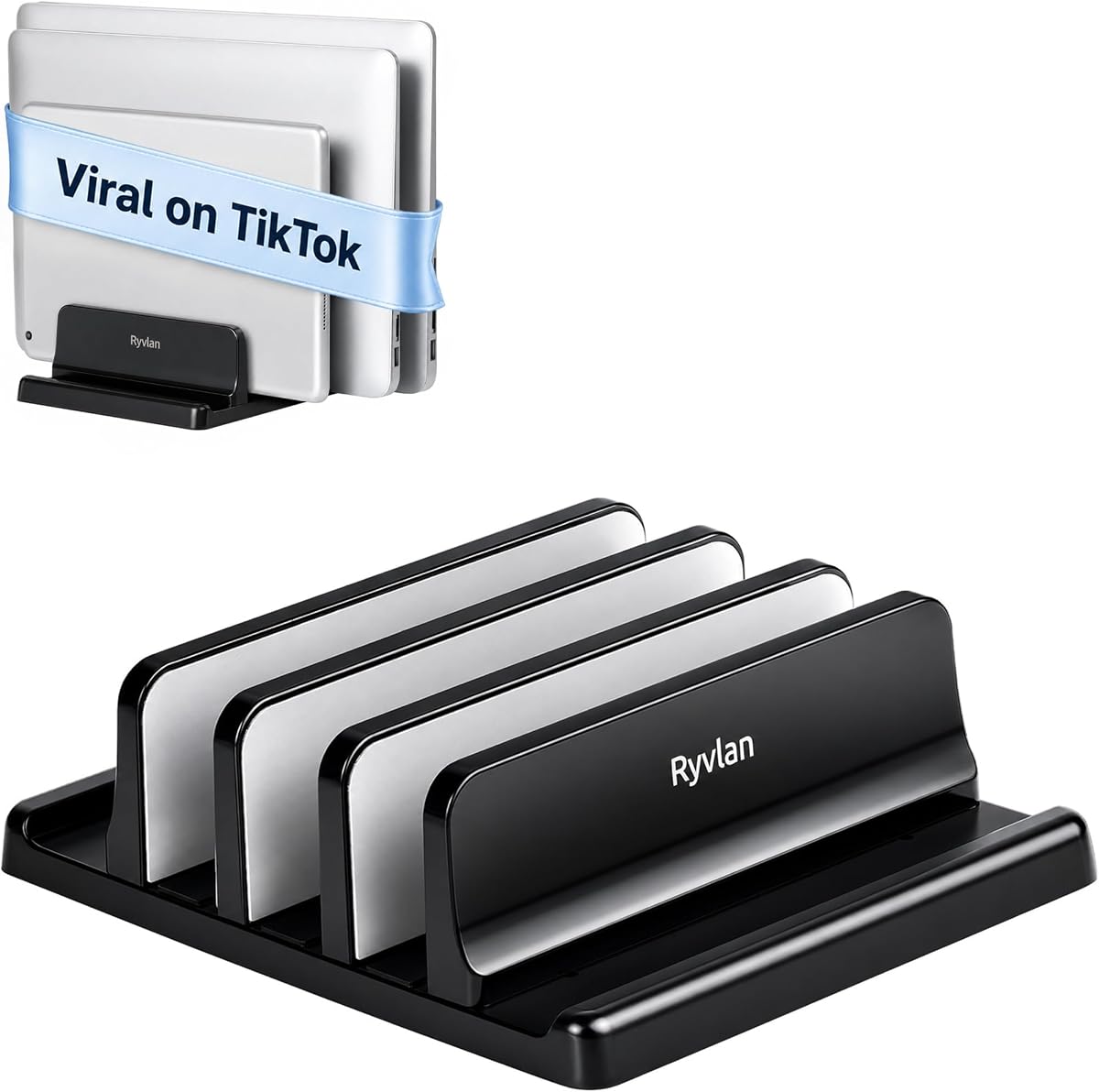
Ryvlan Vertical Laptop Stand
4.6Editor score
Holds three laptops and tablets
Six individually padded spaces
Adjustable slots fit varied devices
Compact desktop footprint
A laptop rack for multiple laptops can transform a crowded workstation into an organized, accessible setup. The best models combine vertical storage, stable support, flexible dividers, cable control, and enough capacity for the devices you actually use. They suit home offices, classrooms, repair benches, conference rooms, and shared technology spaces.
The products in this guide were compared using the specifications supplied for capacity, dimensions, materials, device compatibility, charging features, and stability. The list includes compact desktop stands, larger charging stations, adjustable aluminum organizers, bamboo accessories, and a floor-standing rack for demanding shared environments.
Each review explains the product's strongest use case, construction, compatibility, and practical trade-offs. Ratings reflect the supplied customer feedback rather than personal testing, while ratings and product availability can change. Current prices and offers should always be checked before making a purchase.
4.6Editor score
4.6Editor score

4.2Editor score
As an Amazon Associate we earn from qualifying purchases.
The comparison below covers ten multi-device racks, highlighting the trade-offs among desktop capacity, charging support, construction, compatibility, and physical footprint.


The Ryvlan Vertical Laptop Stand is a compact, budget-conscious organizer that combines three rear laptop spaces with two front spaces for tablets or phones. Its supplied rating is 4.6 out of 5, placing it among the strongest desktop options in this guide. The stand is particularly useful for users who want a visible, vertical home for several computers without committing to a large charging station.
We may earn a commission when you buy through this link, at no additional cost to you.
Every slot adjusts from 0.47 inches to 1.2 inches, allowing thin ultraportables and thicker gaming laptops to share the same rack. The supplied compatibility list includes MacBook Pro, MacBook Air, Microsoft Surface, Dell, HP, Lenovo, Samsung, Acer, XPS, and Chromebook models. An included wrench makes the adjustments straightforward, while the front positions accommodate an iPad, tablet, e-reader, or phone.
Impact-resistant ABS is combined with silicone padding across six walls and three bases. This construction is lighter than a full metal rack but still suited to regular desktop use. Its compact footprint of approximately 7.3 by 5.9 inches preserves desk space, although buyers wanting to store ten full-size laptops should choose a higher-density model. There are no integrated outlets or charging ports.
This is a strong recommendation for students, remote workers, and home-office users who need a few dedicated laptop slots. It combines broad size adjustment, scratch protection, and useful tablet storage in a relatively small footprint. It is less suitable for institutional charging or a very large device fleet, but within its niche it offers a balanced and economical solution.
Three independently adjustable laptop positions and two smaller front positions make this stand more versatile than a simple fixed cradle. The vertical arrangement also makes stored devices easy to identify and remove.
Silicone padding covers the contact surfaces, helping reduce scratches and slippage. The padded base also improves stability on smooth desktops.
We may earn a commission when you buy through this link, at no additional cost to you.
The Elestoria 10-Slot Vertical Laptop Stand is designed for users who need to organize a substantial collection of computers and tablets in one desktop footprint. Its supplied rating is 4.2 out of 5. Although it does not lead this guide in customer rating, it offers the greatest desktop capacity included here, with room for up to ten devices.
We may earn a commission when you buy through this link, at no additional cost to you.
Each divider can be adjusted from 0.24 inches to 5.83 inches, a broad range intended to accommodate different laptop thicknesses as well as slim tablets. The open-side layout leaves ports and charging cables accessible, while a heavy base and all-round silicone pads help resist tipping, scratching, and sliding. Devices up to 17.3 inches, including heavy gaming laptops, are supported.
The gray aluminum alloy body provides a more substantial appearance than molded-plastic organizers. Its footprint of 10.74 by 6.3 inches is large but remains relatively compact for a ten-slot system. The passive vertical arrangement promotes airflow compared with laying devices flat. Tool-free base-screw adjustment simplifies configuration, although the supplied information does not indicate an integrated power supply.
Choose this model for a high-density office, technology classroom, repair bench, or shared workspace where ten vertical positions are important. It is less appropriate when the priority is built-in charging or a very small footprint. Even with those limitations, its capacity, adjustability, and stable construction make it the premium desktop pick.
Ten independently separated positions make this a practical central storage point. The vertical layout keeps each computer visible and allows individual devices to be removed without disturbing the others.
The unusually broad adjustment range accommodates slim tablets, standard notebooks, and large gaming systems. This flexibility is valuable for mixed-device offices.
We may earn a commission when you buy through this link, at no additional cost to you.
The Elestoria 5-Slot Vertical Laptop Stand offers a middle ground between compact desktop organizers and high-density charging stations. It can cradle up to four laptops plus one tablet or mobile device. The supplied rating of 4.6 out of 5 reflects strong customer feedback, and its aluminum construction gives it a durable, professional appearance.
We may earn a commission when you buy through this link, at no additional cost to you.
Three sliding brackets adjust independently across a width range of 12 to 38 millimeters, or roughly 0.5 to 1.5 inches. This accommodates a mixture of slim MacBook-style notebooks and heavier gaming laptops up to 17.3 inches. Adjustment is performed through screws on the bottom, allowing the stand to support different thicknesses without complicated removable accessories.
A heavy base helps prevent tipping, while polished edges and soft silicone padding reduce the likelihood of scratches and slipping. The vertical presentation also supports passive cooling and makes the devices convenient to reach. As with the larger Elestoria model, it does not supply integrated charging, so cables must be managed separately.
This rack is well suited to creative professionals, developers, and home offices that routinely handle two to four primary laptops. It is especially attractive when a metal organizer and gaming-laptop support matter more than built-in power. For offices with ten devices, the ten-slot version is the better choice; for a more balanced setup, this model is the stronger recommendation.
Separate bracket adjustments allow thin notebooks and chunky gaming systems to sit securely in the same organizer. The result is a more cohesive workstation than several mismatched cradles.
The solid aluminum body and weighted base offer a steadier alternative to lightweight plastic stands. Soft padding protects contact surfaces during everyday use.
We may earn a commission when you buy through this link, at no additional cost to you.
The Unittype Bamboo Multi Device Organizer brings a warmer, furniture-like appearance to a category dominated by aluminum and black plastic. It offers six removable slots and has a supplied rating of 4.1 out of 5. The removable partitions allow the interior layout to adapt to phones, tablets, laptops, and other electronics.
We may earn a commission when you buy through this link, at no additional cost to you.
Its compact dimensions of 25.4 by 16.5 by 17.8 centimeters make it appropriate for small desks where visual bulk matters. Natural bamboo gives the organizer a distinctive finish that can blend with home-office furniture, and non-slip rubber feet improve stability while protecting the desktop from scratches. The open construction keeps stored equipment accessible.
The organizer is not limited to electronics. Its supplied information also identifies uses for magazines, folders, and letters, giving it broader organizational value. That flexibility can be helpful in a family office, reception area, or home workspace. It does not include charging electronics, and the supplied product data does not state a precise slot-width range, so buyers should verify their device dimensions before ordering.
This is a compelling pick when appearance, compactness, and general-purpose organization matter more than high-density laptop storage or integrated power. It can handle multiple mobile devices and a limited number of laptops, making it more suitable than the metal racks for a mixed device collection. For dedicated charging or a large workstation, a purpose-built station is the better match.
The natural bamboo finish gives the rack a more decorative character than technical metal stands. It works well on a home desk, study, or small reception counter.
Removing and repositioning the six partitions allows the organizer to accommodate different device combinations. The same structure can also manage documents and mail.
We may earn a commission when you buy through this link, at no additional cost to you.
The 10-Device Laptop & Tablet Charging Station is built for offices, classrooms, libraries, and reception spaces where devices must be stored and powered at the same time. It holds up to ten laptops, Chromebooks, tablets, iPads, e-readers, and mobile devices. Its supplied rating is 4.5 out of 5, reflecting a strong balance of storage and utility.
We may earn a commission when you buy through this link, at no additional cost to you.
Integrated power includes six AC outlets and four USB charging ports. This combination supports a varied device ecosystem without requiring a separate power strip for every category of equipment. A pre-installed surge-protected strip is rated for 110-volt, 10-amp operation. The supplied information does not state individual output wattages, so buyers with high-power requirements should verify those details.
The open vertical layout makes insertion, removal, and inspection fast, which is valuable when devices are collected frequently. Integrated cable routing helps control the cords typically associated with a rack full of computers. Compared with a storage-only organizer, this model adds essential charging but introduces a power cord that must reach a suitable outlet.
This is the best desktop choice for a shared technology environment that needs organized overnight charging. It should not be chosen purely for appearance or portability because the built-in power system adds weight and placement constraints. For users who already manage charging separately, a lighter storage stand may be more appropriate. For a classroom or office cart-like hub, however, the convenience is difficult to match.
Six AC outlets and four USB ports let a room charge a broad mix of laptops and mobile devices. The vertical rack keeps powered equipment organized while it rests.
Built-in routing channels help contain the visual clutter created by multiple charging leads. Open access still makes it easy to connect or disconnect individual devices.
We may earn a commission when you buy through this link, at no additional cost to you.
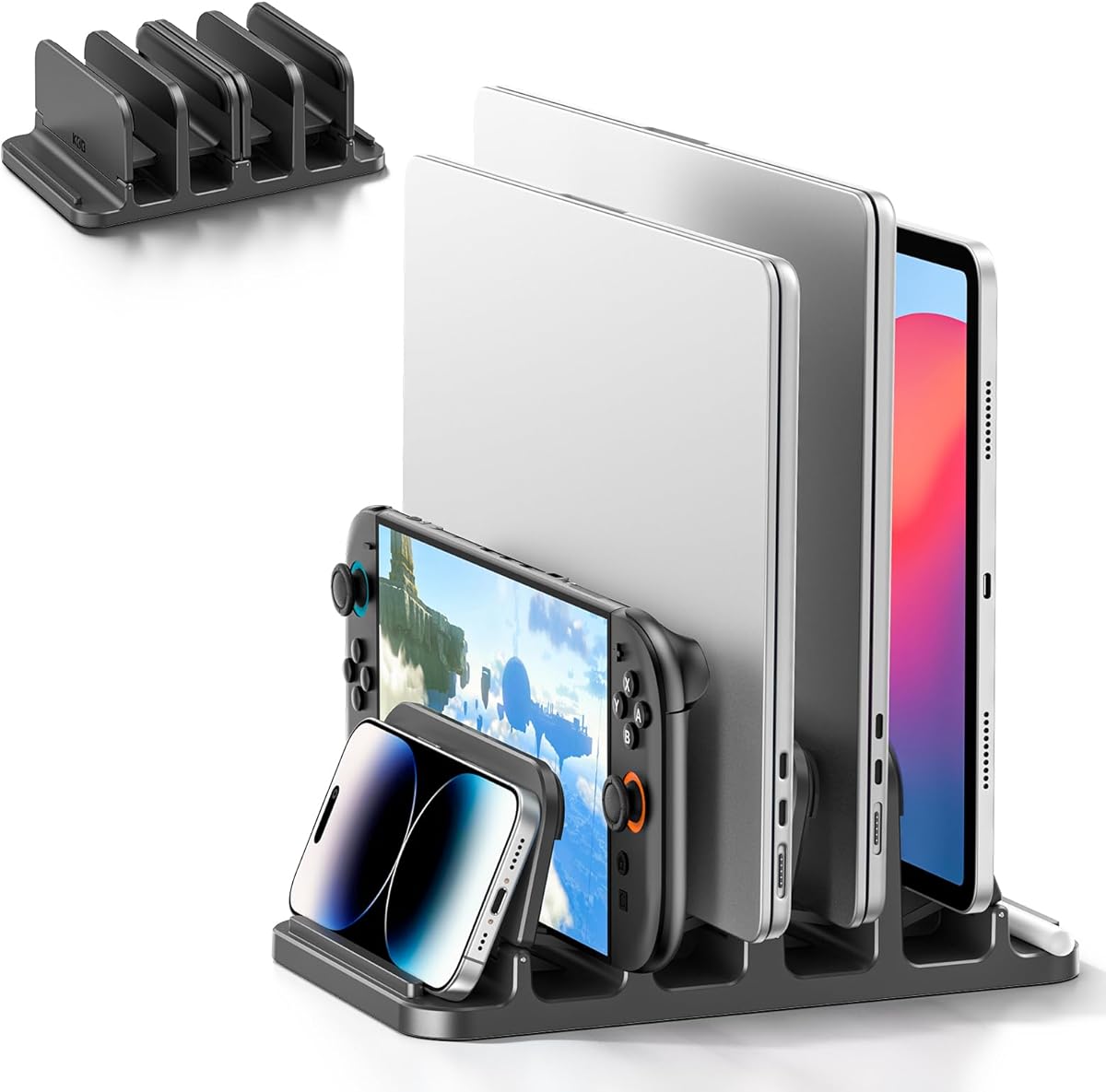
The KDD Vertical Laptop Stand is a six-in-one organizer whose most distinctive feature is its gravity-locking design. Devices settle into place without separate clamps or manual locking pieces. Its supplied customer rating is 4.6 out of 5, making it an especially strong choice for users who prioritize quick, convenient loading.
We may earn a commission when you buy through this link, at no additional cost to you.
The rack contains six storage spaces for laptops, tablets, phones, Kindles, books, and game consoles. Compatibility covers device thicknesses from zero to 1.1 inches, which includes many mainstream notebooks, tablets, and handheld systems. Names such as MacBook, Surface, HP, and Dell appear in the supplied compatibility information, along with phones and Nintendo Switch hardware.
Silicone anti-slip pads appear on both the base and the device slots. These contact points improve grip, reduce sliding, and help protect both the devices and the desktop. The vertical layout maximizes usable desk area, and the open design allows fast access to each stored item. This is a storage organizer rather than a powered charging station, so it does not replace a proper charging hub.
Choose the KDD stand for a busy home office, classroom, repair bench, or gaming desk where devices are inserted and removed frequently. Its automatic locking is convenient, and the broad device range is unusually useful. Buyers who need continuous charging should pair it with a suitable power hub or select one of the integrated charging stations in this guide.
The gravity mechanism draws devices into the slots and holds them upright. This removes the need to align a clamp or engage a separate locking part during every insertion.
Six spaces can hold computers alongside phones, tablets, books, and handheld consoles. That makes the stand more adaptable than a rack limited strictly to notebooks.
We may earn a commission when you buy through this link, at no additional cost to you.
The Five-Slot Aluminum Stand combines three adjustable center positions with two outer positions for devices such as phones, tablets, and iPads. It carries a supplied rating of 4.6 out of 5. The design is aimed at home and office users who want a tidy, space-efficient way to keep several frequently used devices within reach.
We may earn a commission when you buy through this link, at no additional cost to you.
The center dividers adjust with an included hex key, allowing each of the three main slots to match a different device thickness. The stand supports laptops ranging from small ultraportables to models with 17.3-inch screens, along with MacBook, Surface, HP, Dell, Samsung, Chromebook, tablet, and smartphone devices. The two side positions create useful separation for smaller accessories.
Brushed and CNC-machined anodized aluminum gives the stand a modern, substantial appearance. Non-slip silicone covers all five slots, helping prevent scratches, while a matching base pad helps the organizer stay in place. The vertical position promotes passive airflow and makes it easier to see each device. There are no built-in outlets, so it should not be described as a charging station.
This model is a strong recommendation for a streamlined professional desk that regularly holds three laptops and two smaller devices. It offers enough capacity for meaningful organization without the footprint of a ten-slot system. It is less suitable for a classroom that needs powered storage, but for a personal or executive workstation, its adjustment, material quality, and compact presentation are convincing.
Three larger laptop positions and two smaller side positions make efficient use of a limited desktop. Separate devices remain visible and are easier to remove.
The brushed finish resembles professional computer hardware, making the organizer visually appropriate for a modern workstation. Silicone padding adds protection beneath that polished appearance.
We may earn a commission when you buy through this link, at no additional cost to you.
The POCHAR 8-Device Universal AC Laptop Charging Station is a complete storage-and-charging solution for offices, schools, and businesses. It has a supplied rating of 4.6 out of 5. The rack can accommodate eight devices, including laptops, Chromebooks, iPads, tablets, Surface Pro systems, MacBooks, and Samsung Galaxy devices.
We may earn a commission when you buy through this link, at no additional cost to you.
Unlike many compact laptop stands, the wide-angle slots are intended to accept laptops up to 14 inches and devices as thick as 1.4 inches. The overall dimensions are 14.75 by 12.75 by 8.25 inches. This gives the rack a substantial presence, but the capacity and broad fit are appropriate for institutions that repeatedly collect and recharge portable equipment.
The integrated power strip includes surge protection intended to guard against voltage spikes. Open vertical storage keeps every device visible and easy to reach, while the all-in-one design avoids a separate power strip for basic AC charging. No assembly is required, so the station can be positioned and used after unpacking. USB charging is not specified in the supplied information.
This station works best for a classroom cart, staff charging area, or shared conference-room inventory. Buyers should confirm the 14-inch limit for larger gaming laptops, and all users should place it near a properly accessible outlet. For a smaller personal setup, one of the desktop organizers will be easier to manage. For recurring group charging, however, this ready-to-use design offers excellent practicality.
Eight positions allow schools and offices to standardize where laptops and tablets are stored. The open layout makes individual units quick to retrieve.
The integrated power strip and ready-made frame eliminate a complicated setup process. It can be positioned beside the appropriate outlet and put into service.
We may earn a commission when you buy through this link, at no additional cost to you.
The 10 Device Laptop Storage Rack is the only floor-standing option in this guide, and it has the highest supplied customer rating at 5.0 out of 5. Its two-tier frame provides ten device positions while remaining separate from the desktop. This makes it a practical choice for classrooms, offices, libraries, and temporary charging areas.
We may earn a commission when you buy through this link, at no additional cost to you.
Removable partitions allow the storage spaces to be adjusted for larger laptops and other equipment. The lower shelf adds storage for printers or other bulky items, making the rack more like a compact equipment station than a simple desktop cradle. An open construction allows direct access and unrestricted airflow around stored devices.
Steel construction and a high-temperature baked finish provide resistance to rust, wear, and deformation. Four universal casters include two brakes, allowing the rack to move when needed and lock securely once positioned. Handles add another practical touch for maneuvering. The supplied description refers to simultaneous charging, but detailed connector and output information is not provided, so buyers should verify those specifications for their specific devices.
This rack is ideal for an institution or office that stores many devices away from individual desks. It is less convenient for a home workstation because its floor placement and size are unnecessary for a few computers. The removable partitions, lower shelf, locking wheels, and open two-tier design nevertheless make it the most mobile and infrastructure-oriented solution in the roundup.
Four caster wheels and integrated handles make it easier to move a full collection of devices. Two brakes help keep the rack firmly in place while it is being accessed.
The lower shelf can hold printers, supplies, or other equipment. This expands the rack's role from temporary charging to broader workspace support.
We may earn a commission when you buy through this link, at no additional cost to you.
The MobileVision Bamboo Multi Device Organizer is a compact five-slot stand for smartphones, tablets, and laptops. Its supplied rating of 4.7 out of 5 is among the highest in the guide. It is designed for users who want a simple, attractive place to keep portable devices organized and within reach.
We may earn a commission when you buy through this link, at no additional cost to you.
Each of the five dedicated slots offers one inch of space. The organizer measures 10 inches long, 6.5 inches wide, and 7 inches tall, making it relatively easy to integrate into a modest home or office workspace. The supplied information specifically notes that devices with thick cases may not fit, so case thickness should be checked before ordering.
Sturdy bamboo forms the main structure, while four integrated rubber feet reduce sliding and protect the desktop from scratches. The vertical slots separate devices and keep them accessible without consuming a broad horizontal area. It can be used in conference rooms, classrooms, offices, and home workspaces, where a warm, understated organizer may be preferable to technical metal equipment.
Choose this model when appearance, compact dimensions, and straightforward storage matter most. It is well suited to a family charging area or shared office with several phones and tablets. For many full-size laptops, heavier gaming systems, or integrated power delivery, a specialized metal or charging rack is the better option. As a small bamboo organizer, it is practical and well rated.
Five one-inch spaces can organize a combination of phones, tablets, and laptops. The vertical layout preserves horizontal desk area.
Four rubber feet provide stability while helping avoid scratches on the supporting surface. The natural bamboo gives a home-friendly look without complicated assembly.
We may earn a commission when you buy through this link, at no additional cost to you.
The right rack depends on how many devices you store, whether they need power, the sizes and cases involved, and the space where the rack will live. Comparing these factors before buying prevents an attractive but unsuitable organizer from becoming another source of workspace clutter.
Begin by distinguishing laptop capacity from total device capacity. Some racks provide ten spaces but only four or five are suitable for full-size notebooks, while the remaining spaces are intended for tablets and phones. Measure the width and thickness of every device you expect to store, including cases and attached accessories. A five-position stand may be enough for a personal multi-computer setup, whereas classrooms and repair operations may need eight or ten dedicated positions.
Storage-only racks keep equipment tidy but leave every charger and power source to the user. Integrated charging stations include AC outlets, USB ports, surge protection, or some combination of those features. Check the number and type of connectors, supported device classes, and whether charging occurs through a conventional wall connection. High-power laptops, compact adapters, and USB-C equipment may require attention to output specifications that are not always listed in a product summary.
A fixed slot may fit one notebook but allow a thicker gaming laptop to rock, fall, or press against a divider. Adjustable dividers or partitions create a more controlled fit and are especially useful in mixed-device environments. Look for independently adjustable spaces, a clearly stated thickness range, and a base mechanism that can be reached without completely unloading the rack. Wider adjustment ranges offer more flexibility across changing device collections.
A multi-device rack must remain stable when a heavier laptop is inserted or removed. A weighted base, non-slip feet, and silicone contact pads help resist sliding and tipping. Metal frames generally provide a substantial feel, while impact-resistant ABS can be appropriate for a portable desktop organizer. Bamboo options add a decorative appearance but may not be ideal for dense collections of gaming laptops. Always consider the weight of the intended devices as well as the rack's stated maximum device size.
Screens, ports, vents, and cases determine whether a laptop can actually rest safely in a slot. Look for open-sided designs that leave charging ports and ventilation areas accessible. The stated maximum screen size is useful, but thickness is often more important for a snug fit. A rack advertised for a 17.3-inch computer should not be assumed to accept a thick model with a large power adapter unless the product information supports that combination.
Desktop stands are convenient for a personal workstation but usually hold fewer devices. Floor-standing racks can support more equipment and may include lower shelves, wheels, and larger frames, making them suitable for schools, offices, and temporary staging areas. Consider the available floor space, the route needed to move a locked rack, and whether keeping devices at desk level matters for daily workflows. Compact dimensions are valuable, but a very small organizer may reach capacity too quickly.
Charging multiple laptops can create as much cable clutter as the rack solves. Integrated routing channels, open access, and clearly positioned outlets help keep power cords manageable. A rack with enclosed channels may look cleaner but can make connections harder to reach, while a fully open design allows quick access but depends on the user's cable habits. Consider whether the rack includes strain relief and whether adapters need to remain connected overnight.
Aluminum suits a modern professional workstation and generally provides a sturdy, heat-conscious surface. Plastic can reduce weight and cost while offering enough strength for lighter collections. Bamboo creates a warmer, more decorative appearance for home offices and can double as a general file or mail organizer. Padded contact surfaces matter across all materials because they reduce scratches, slipping, and pressure against device edges. The best choice balances appearance, protection, and practical capacity.
Before loading the rack, confirm that each divider is adjusted to the thickness of its intended device. Place the rack on a level, hard surface, then use the supplied tool to tighten the base or divider screws. Do not force a laptop into a slot that is too narrow, and leave enough room around ventilation openings and charging ports. For a powered model, connect the integrated power strip to a suitable outlet before placing devices inside.
Insert the heaviest or largest laptops first, followed by thinner computers and smaller accessories. Keep chargers and cables routed through the intended channels, and avoid leaving excess cord loops in front of the base where they can interfere with the stand. If the rack has a gravity-locking or sliding mechanism, check that the device is fully seated and that the divider rests against it without excessive pressure.
Clean the rack with a soft, slightly damp cloth and dry it thoroughly before returning devices. Do not immerse a powered station or allow liquid to enter outlets, power components, or adjustment screws. Inspect silicone pads and divider movement periodically, and tighten any loosened hardware. Remove devices before moving a floor-standing rack, then use the handles and brakes to reposition it safely.
It depends on the model. Storage-only stands organize devices but do not supply power, while charging stations include AC outlets, USB ports, or a built-in power strip. Check the product features carefully and verify the supported connectors and electrical ratings before relying on a station to charge every device overnight.
Fit depends on screen size, thickness, case, and adapter shape. The products in this guide support different combinations, including compact notebooks, mainstream laptops, and some gaming systems up to 17.3 inches. Measure the widest part of each device and compare it with the stated slot range.
Several models are designed to support a laptop stored vertically while connected to an external monitor, keyboard, and mouse. Proper venting, a secure fit, and access to power and display connections remain important. Confirm that the stand supports the device and does not block any ports or airflow.
Capacity varies considerably. Some desktop organizers hold four laptops plus a tablet, while other desktop and floor-standing models hold ten devices. Distinguish total slots from full-size laptop slots because some spaces are intended only for phones, tablets, or accessories.
A weighted base improves stability but cannot prevent every tip, particularly if heavy devices are inserted unevenly or the surface is slippery. Distribute devices evenly, adjust the dividers correctly, and use non-slip pads. Floor-standing models should also have their brakes engaged when devices are being loaded.
Bamboo organizers emphasize attractive natural construction and general-purpose organization. Metal racks often provide greater rigidity, finer divider adjustment, and a denser professional appearance. In either case, stable feet and padded contact surfaces are valuable for reducing scratches and movement.
Vertical storage can improve passive airflow compared with laying a computer flat, but a stand cannot guarantee safe temperatures by itself. Leave vents unobstructed, avoid enclosing active devices, and follow each computer manufacturer's operating-temperature guidance. Powered charging also adds heat, so good spacing remains important.
Prioritize enough full-size slots, quick device access, suitable charging connectors, surge protection, cable routing, and a stable base. Open vertical designs are generally useful when students need to collect devices quickly. A wheeled floor model can be more practical for shared buildings than a small desktop stand.
The Ryvlan Vertical Stand is the best budget choice for a compact home desk that needs a few laptop positions and extra tablet storage. The KDD Gravity-Locking Stand stands out for effortless loading and a versatile six-space layout, while the Elestoria 10-Slot Stand offers the highest desktop capacity and a substantial adjustable aluminum construction.
Before buying, prioritize the number of full-size laptops you actually need to store, the thickness of their cases, whether integrated charging is required, and the available work surface. High-density users should also consider ventilation and cable routing, while smaller workspaces may gain more from a bamboo or plastic organizer than from a large powered station.
Ratings, configurations, availability, and prices can change, and the information in this guide reflects the supplied product data. Before making a final purchase, confirm the current dimensions, included accessories, electrical specifications, and latest offers on the product page. Those checks will help ensure that the chosen rack fits both the devices and the way you actually work.